Front brakes MAZDA MODEL CX-30 2021 User Guide
[x] Cancel search | Manufacturer: MAZDA, Model Year: 2021, Model line: MODEL CX-30, Model: MAZDA MODEL CX-30 2021Pages: 594, PDF Size: 83.37 MB
Page 275 of 594

Do not get out of the vehicle while
the stop hold control is operating:
Getting out of the vehicle while the
stop hold control is operating is
dangerous as the vehicle may move
unexpectedly and result in an accident.
Before getting out of the vehicle,
switch the MRCC with Stop & Go
function system off, shift the selector
lever to the P position, and apply the
parking brake.
CAUTION
If your vehicle is towed or you are
towing something , switch the MRCC
with Stop & Go function system off
to prevent an unexpected operation.
Turn the system
off when the vehicle
is running on a chassis roller.
NOTE
The MRCC with Stop & Go function
system does not detect the following
as physical objects.
Vehicles approaching in the
opposite direction
Pe d e s t r i a n sStationary objects (stopped
vehicles, obstructions)
If a vehicle ahead is traveling at an
extremely low speed, the system may
not detect it correctly.
If there is a structure on the road or
an object (such as a monorail) at a
low height off the ground in front of
the vehicle, the system may operate.
Therefore, do not use the MRCC
with Stop & Go function.
Do not use the MRCC with Stop &
Go function system under conditions
in which close proximity warnings
are frequently activated.
During headway control travel, the
system accelerates and decelerates
your vehicle in conjunction with the
speed of the vehicle ahead.
However, if it is necessary to
accelerate for a lane change or if the
vehicle ahead brakes suddenly
causing you to close in on the vehicle
rapidly, accelerate using the
accelerator pedal or decelerate using
the brake pedal depending on the
conditions.
While the MRCC with Stop & Go
function system is in use, it does not
cancel even if the selector lever is
operated and any intended engine
braking does not occur. If
deceleration is required, lower the
set speed or depress the brake
pedal.
While braking by the MRCC with
Stop & Go function control is
operating , you might hear an
operation sound, however, this does
not indicate a problem.
The brake lights turn on while
braking by the MRCC with Stop &
Go function control is operating,
however, they may not turn on while
the vehicle is on a down slope at the
set vehicle speed or traveling at a
constant speed and following a
vehicle ahead.
Stop the headway control function to
switch the system to the cruise
control function.
Refer to the Settings section in the
Mazda Connect Owner's Manual.
When Driving
i-ACTIVSENSE
4-129
CX-30_8JP5-EA-20K_Edition1_new 2020-7-22 15:50:09
Page 277 of 594

▼Close Proximity Warning
If your vehicle rapidly closes in on the
vehicle ahead because the vehicle
ahead applies the brakes suddenly
while you are traveling in headway
control, the warning sound activates
and the brake warning is indicated in
the display. Always verify the safety of
the surrounding area and depress the
brake pedal while keeping a safe
distance from the vehicle ahead.
Additionally, keep a safe distance from
the vehicles behind you.
1. “Depress Brake Pedal” message is
displayed
NOTE
In the following cases, the warnings
and brakes may not operate even if
your vehicle starts closing in on the
vehicle ahead.
You are driving your vehicle at the
same speed as the vehicle ahead.
Directly after the MRCC with Stop &
Go function system has been set.
Directly after the accelerator pedal is
released.
Another vehicle cuts into the driving
lane in front of you.
When Driving
i-ACTIVSENSE
4-131
CX-30_8JP5-EA-20K_Edition1_new 2020-7-22 15:50:09
Page 285 of 594
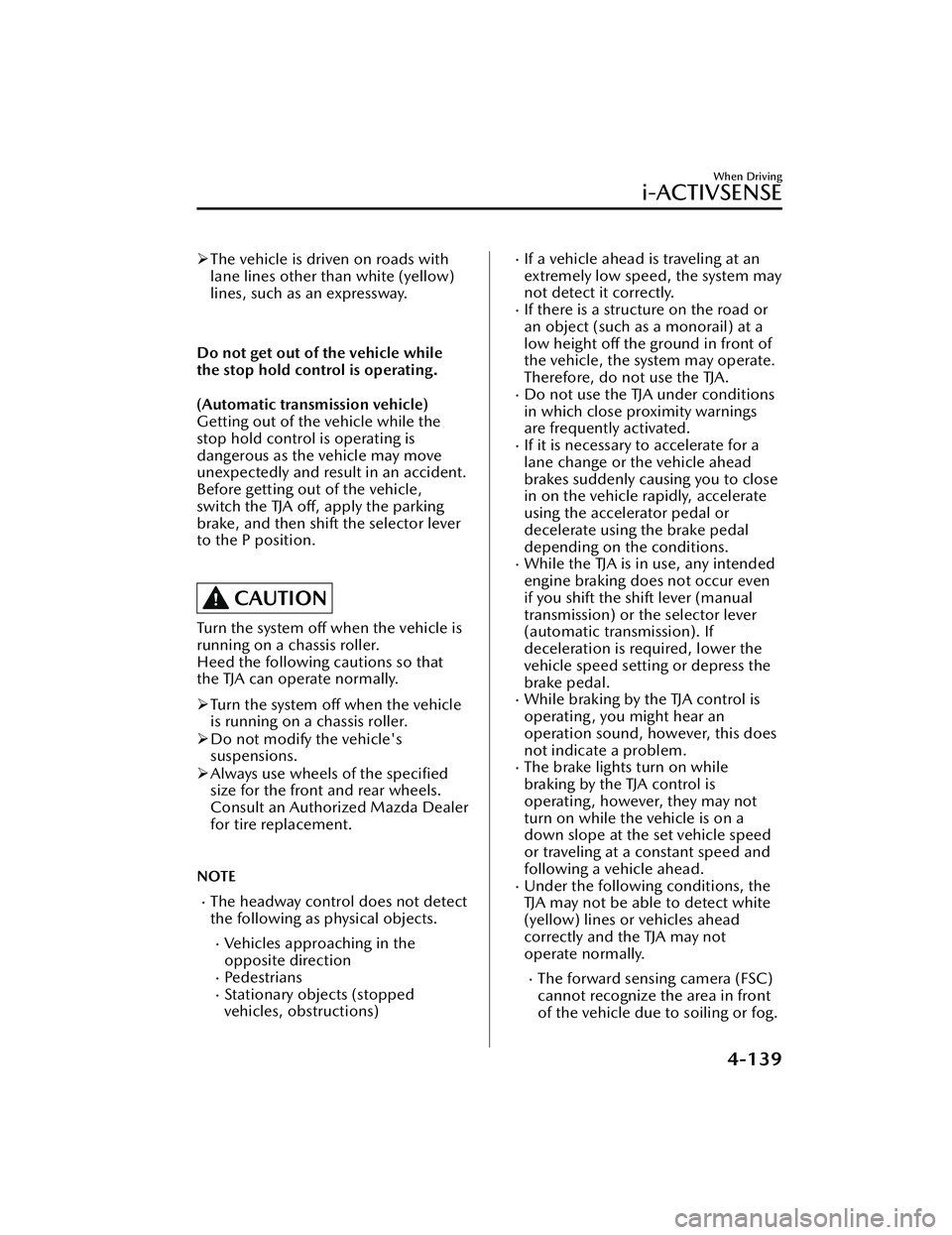
The vehicle is driven on roads with
lane lines other than white (yellow)
lines, such as an expressway.
Do not get out of the vehicle while
the stop hold control is operating.
(Automatic transmission vehicle)
Getting out of the vehicle while the
stop hold control is operating is
dangerous as the vehicle may move
unexpectedly and result in an accident.
Before getting out of the vehicle,
switch the TJA off, apply the parking
brake, and then shift the selector lever
to the P position.
CAUTION
Turn the system off when the vehicle is
running on a chassis roller.
Heed the following cautions so that
the TJA can operate normally.
Turn the system off when the vehicle
is running on a chassis roller.
Do not modify the vehicle's
suspensions.
Always use wheels of the specified
size for the front and rear wheels.
Consult an Authorized Mazda Dealer
for tire replacement.
NOTE
The headway control does not detect
the following as physical objects.
Vehicles approaching in the
opposite direction
Pe d e s t r i a n sStationary objects (stopped
vehicles, obstructions)
If a vehicle ahead is traveling at an
extremely low speed, the system may
not detect it correctly.
If there is a structure on the road or
an object (such as a monorail) at a
low height off the ground in front of
the vehicle, the system may operate.
Therefore, do not use the TJA.
Do not use the TJA under conditions
in which close proximity warnings
are frequently activated.
If it is necessary to accelerate for a
lane change or the vehicle ahead
brakes suddenly causing you to close
in on the vehicle rapidly, accelerate
using the accelerator pedal or
decelerate using the brake pedal
depending on the conditions.
While the TJA is in use, any intended
engine braking does not occur even
if you shift the shift lever (manual
transmission) or the selector lever
(automatic transmission). If
deceleration is required, lower the
vehicle speed setting or depress the
brake pedal.
While braking by the TJA control is
operating , you might hear an
operation sound, however, this does
not indicate a problem.
The brake lights turn on while
braking by the TJA control is
operating , however, they may not
turn on while the vehicle is on a
down slope at the set vehicle speed
or traveling at a constant speed and
following a vehicle ahead.
Under the following conditions, the
TJA may not be able to detect white
(yellow) lines or vehicles ahead
correctly and the TJA may not
operate normally.
The forward sensing camera (FSC)
cannot recognize the area in front
of the vehicle due to soiling or fog.
When Driving
i-ACTIVSENSE
4-139
CX-30_8JP5-EA-20K_Edition1_new 2020-7-22 15:50:09
Page 288 of 594

Inactive
Active (vehicle ahead)
Active (lane line)
If there is a problem with the TJA, a
message is displayed on the
multi-information display. Check the
details of the problem on the center
display and then have your vehicle
inspected by an Authorized Mazda
Dealer.
Refer to If a Warning Light Turns On or
Flashes on page 7-22.
▼Close Proximity Warning
If your vehicle rapidly closes in on the
vehicle ahead while you are traveling
under headway control, the warning
sound is activated and the brake
warning is indicated on the display.
Keep a safe distance between your
vehicle and a vehicle ahead.
1. “Depress Brake Pedal” message is
displayed
NOTE
In the following cases, the warnings
and brakes may not operate even if
your vehicle starts closing in on the
vehicle ahead.
You are driving your vehicle at the
same speed as the vehicle ahead.
Directly after the TJA operates.Directly after the accelerator pedal is
released.
Another vehicle cuts into the driving
lane in front of you.
When Driving
i-ACTIVSENSE
4-142
CX-30_8JP5-EA-20K_Edition1_new 2020-7-22 15:50:09
Page 301 of 594

Smart Brake Support(SBS)
*
▼Smart Brake Support (SBS)
The SBS alerts the driver of a possible
collision using the warning indications
in the display and a warning sound if
the front radar sensor and Forward
Sensing Camera (FSC) determine that
there is the possibility of a collision
with a vehicle ahead, pedestrian, or a
bicycle. Furthermore, if a collision is
unavoidable, the automatic brake
control is performed to reduce damage
in the event of a collision. In addition,
when the driver de
presses the brake
pedal, the brakes are applied firmly
and quickly to assist.
(Vehicles with Driver Monitoring
(DM))
When the SBS determines that the
driver is not paying attention to the
road using the driver monitoring
camera and it determines that there is
the possibility of a collision with an
obstruction, the SBS activates the
collision warning earlier than normal.
WARNING
Do not rely completely on the SBS:
The SBS is only designed to reduce
damage in the event of a collision.
The ability to detect obstructions is
limited depending on the obstructions,
weather conditions, or traffic
conditions. Over reliance on the
system leading to the accelerator pedal
or brake pedal being mistakenly
operated could result in an accident.
CAUTION
In the following cases, turn the system
off to prevent an unexpected
operation.
The vehicle is being towed or when
towing another vehicle.
The vehicle is on a chassis roller.
When driving on rough roads such as
in areas of dense grass or off-road.
See the next page on how to turn
off
the system.
Refer to Stopping the Smart Brake
Support (SBS) System Operation on
page 4-157.
Operation conditions
The SBS operates when all of the
following conditions are met.
The ignition is switched ON.The SBS is on.The i-ACTIVSENSE warning
indication/warning light is not
turned on.
(Object is vehicle ahead)
The vehicle speed is about 4 km/h
(2 mph) or higher.
(Object is a pedestrian or bicycle)
The vehicle speed is between about
10 to 80 km/h (6.2 to 50 mph).
The DSC does not operate.
NOTE
Under the following conditions, the
SBS may not operate.
If there is the possibility of hitting
only a part of a vehicle or
obstruction ahead.
You are driving your vehicle at the
same speed as the vehicle ahead.
When the driver deliberately
performs driving operations
(accelerator operation, steering
wheel operation).
When Driving
i-ACTIVSENSE
*Some models.4-155
CX-30_8JP5-EA-20K_Edition1_new 2020-7-22 15:50:09
Page 435 of 594
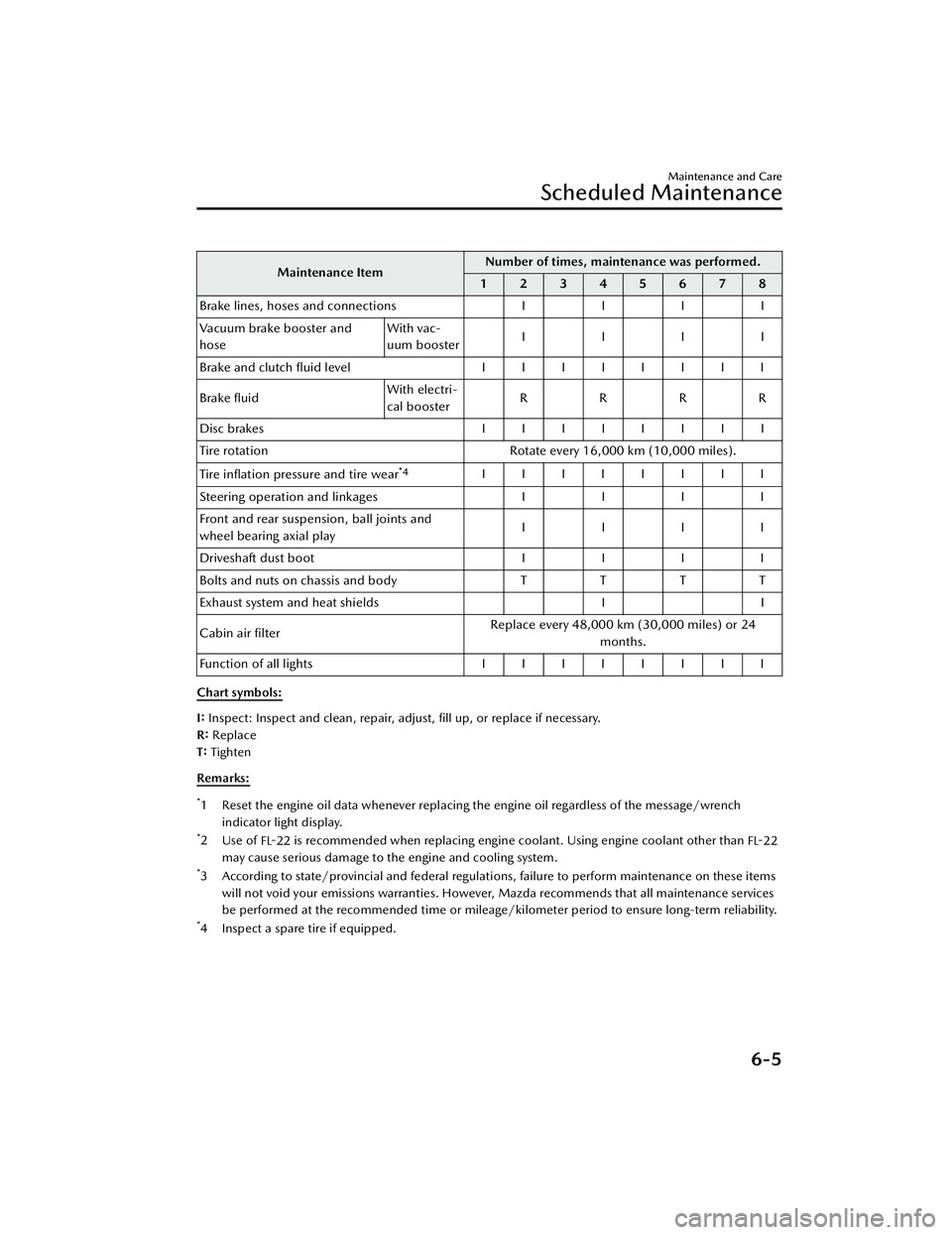
Maintenance ItemNumber of times, maintenance was performed.
12345678
B ra ke lin es, h ose s a nd c onnectio ns IIII
Vacuum brake booster and
hose With vac-
uum booster
IIII
Brake and clutch fluid level IIIIIIII
Brake fluid With electri-
cal booster
RRRR
Disc brakes IIIIIIII
Tire rotation Rotate every 16,000 km (10,000 miles).
Tire inflation pressure and tire wear
*4IIIIIIII
S te erin g o pera tio n a nd lin ka ge s IIII
Front and rear suspension, ball joints and
wheel bearing axial play IIII
D riv e sh aft d ust b oo t IIII
Bolts and nuts on chassis and body TTTT
Exhaust system and heat shields II
Cabin air filter Replace every 48,000 km (30,000 miles) or 24
months.
Function of all lights IIIIIIII
Chart symbols:
I: Inspect: Inspect and clean, repair, adjust, fill up, or replace if necessary.
R: Replace
T: Tighten
Remarks:
*1 Reset the engine oil data whenever replacing the engine oil regardless of the message/wrench indicator light display.
*2Use of FL-22 is recommended when replacing engine coolant. Using engine coolant other than
FL-22
may cause serious damage to the engine and cooling system.
*3 According to state/provincial and federal regulations, failure to perform maintenance on these items
will not void your emissions warranties. However, Mazda recommends that all maintenance services
be performed at the recommended time or mileage/kilometer period to ensure long-term reliability.
*4 Inspect a spare tire if equipped.
Maintenance and Care
Scheduled Maintenance
6-5
CX-30_8JP5-EA-20K_Edition1_new 2020-7-22 15:50:09
Page 437 of 594

Canada residents
Maintenance IntervalNumber of months or kilometers (miles), whichever comes first.
Months 6 1218243036424854606672
×1000 km 8 16 24 32 40 48 56 64 72 80 88 96 ×1000miles 5 1015202530354045505560
Engine oil & filter
*1*2Replace when the wrench indicator light is ON.
(Upper limit interval is 16,000 km (10,000 miles) or 12
months.)
Spark plugs SKYACTIV-G
2.5T
Replace every 64,000 km (40,000 miles).
Except SKY-
ACTIV-G
2.5T Replace every 120,000 km (75,000 miles).
Air filter Replace every 56,000 km (35,000 miles) or 36 months.
Drive belts
*3II
Engine coolant level IIIIIIIIIIII
Engine coolant
*4Replace at first 192,000 km (120,000 miles) or 120
months; after that, every 96,000 km (60,000 miles) or 60
months.
Fuel lines & hoses
*5III
Hoses and tubes for emission
*5I
Brake lines, hoses and connections III
Vacuum brake booster and
hose With vac-
uum booster
IIIIII
Brake fluid With electri-
cal booster
RRR
Disc brakes I C/L II/C
/L IC/LI I/C
/L
Tire rotation Rotate every 8,000 km (5,000 miles).
Tire inflation pressure and tire wear
*6IIIIIIIIIIII
Steering operation and linkages III
Front and rear suspension, ball joints and
wheel bearing axial play III
Body condition inspection for rust, corro-
sion and perforation IIIIII
Driveshaft dust boot III
Bolts and nuts on chassis and body TTT
Maintenance and Care
Scheduled Maintenance
6-7
CX-30_8JP5-EA-20K_Edition1_new 2020-7-22 15:50:09
Page 440 of 594
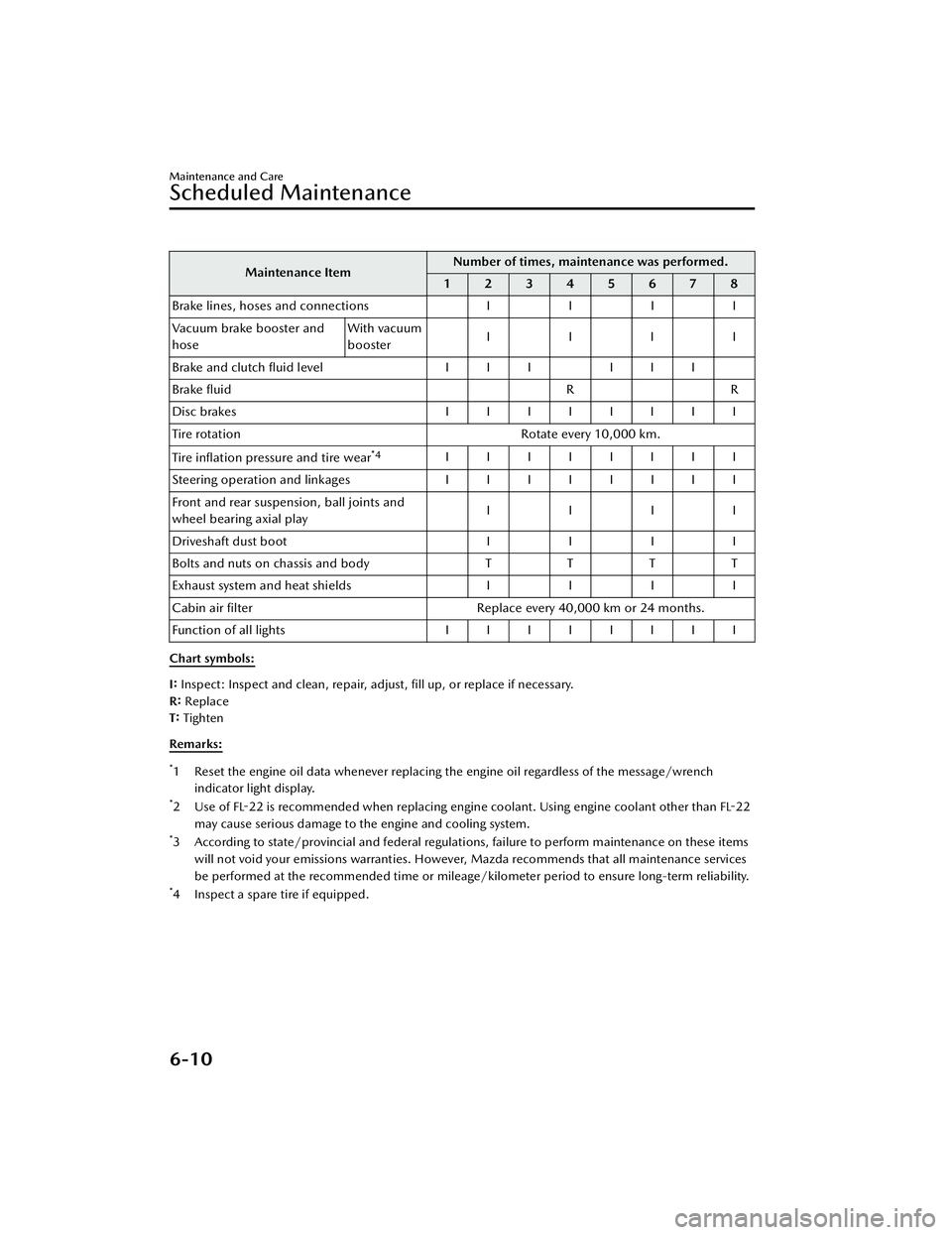
Maintenance ItemNumber of times, maintenance was performed.
12345678
Brake lines, hoses and connections II II
Vacuum brake booster and
hose With vacuum
booster
IIII
Brake and clutch fluid level III III
Brake fluid RR
Disc brakes IIIIIIII
Tire rotation Rotate every 10,000 km.
Tire inflation pressure and tire wear
*4IIIIIIII
Steering operation and linkages I I I I I I I I
Front and rear suspension, ball joints and
wheel bearing axial play IIII
Driveshaft dust boot II II
Bolts and nuts on chassis and body TTT T
Exhaust system and heat shields II II
Cabin air filter Replace every 40,000 km or 24 months.
Function of all lights IIIIIIII
Chart symbols:
I: Inspect: Inspect and clean, repair, adjust, fill up, or replace if necessary.
R: Replace
T: Tighten
Remarks:
*1 Reset the engine oil data whenever replacing the engine oil regardless of the message/wrench indicator light display.
*2 Use of FL-22 is recommended when replacing engine coolant. Using engine coolant other than FL-22
may cause serious damage to the engine and cooling system.
*3 According to state/provincial and federal regulati ons, failure to perform maintenance on these items
will not void your emissions warranties. However, Mazda recommends that all maintenance services
be performed at the recommended time or mileage/kilometer period to ensure long-term reliability.
*4 Inspect a spare tire if equipped.
Maintenance and Care
Scheduled Maintenance
6-10
CX-30_8JP5-EA-20K_Edition1_new 2020-7-22 15:50:09
Page 557 of 594
NOTE
Some spare tires require higher
inflation pressure.
8. Visually inspect the tires to make sure there are no nails or other
objects embedded that could poke
a hole in the tire and cause an air
leak.
9. Check the sidewalls to make sure there are no gouges, cuts, bulges,
cracks or other irregularities.
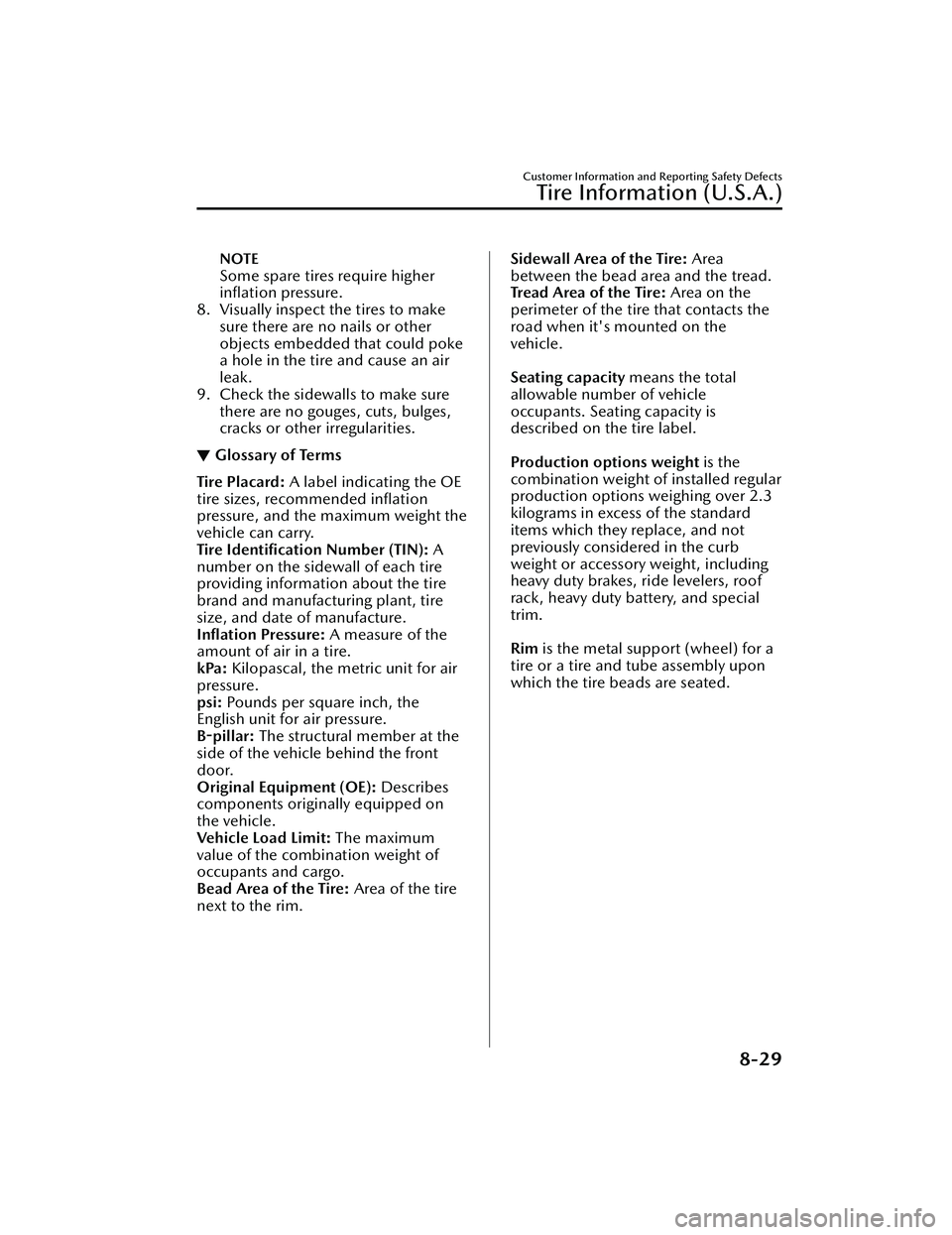
▼Glossary of Terms
Tire Placard:
A label indicating the OE
tire sizes, recommended inflation
pressure, and the maximum weight the
vehicle can carry.
Tire Identification Number (TIN): A
number on the sidewall of each tire
providing information about the tire
brand and manufacturing plant, tire
size, and date of manufacture.
Inflation Pressure: A measure of the
amount of air in a tire.
kPa: Kilopascal, the metric unit for air
pressure.
psi: Pounds per square inch, the
English unit for air pressure.
B-pillar: The structural member at the
side of the vehicle behind the front
door.
Original Equipment (OE): Describes
components originally equipped on
the vehicle.
Vehicle Load Limit: The maximum
value of the combination weight of
occupants and cargo.
Bead Area of the Tire: Area of the tire
next to the rim.
Sidewall Area of the Tire: Area
between the bead area and the tread.
Tread Area of the Tire: Area on the
perimeter of the tire that contacts the
road when it's mounted on the
vehicle.
Seating capacity means the total
allowable number of vehicle
occupants. Seating capacity is
described on the tire label.
Production options weight is the
combination weight of installed regular
production options weighing over 2.3
kilograms in excess of the standard
items which they replace, and not
previously considered in the curb
weight or accessory weight, including
heavy duty brakes, ride levelers, roof
rack, heavy duty battery, and special
trim.
Rim is the metal support (wheel) for a
tire or a tire and tube assembly upon
which the tire beads are seated.
Customer Information and Reporting Safety Defects
Tire Information (U.S.A.)
8-29
CX-30_8JP5-EA-20K_Edition1_new 2020-7-22 15:50:09
Page 584 of 594
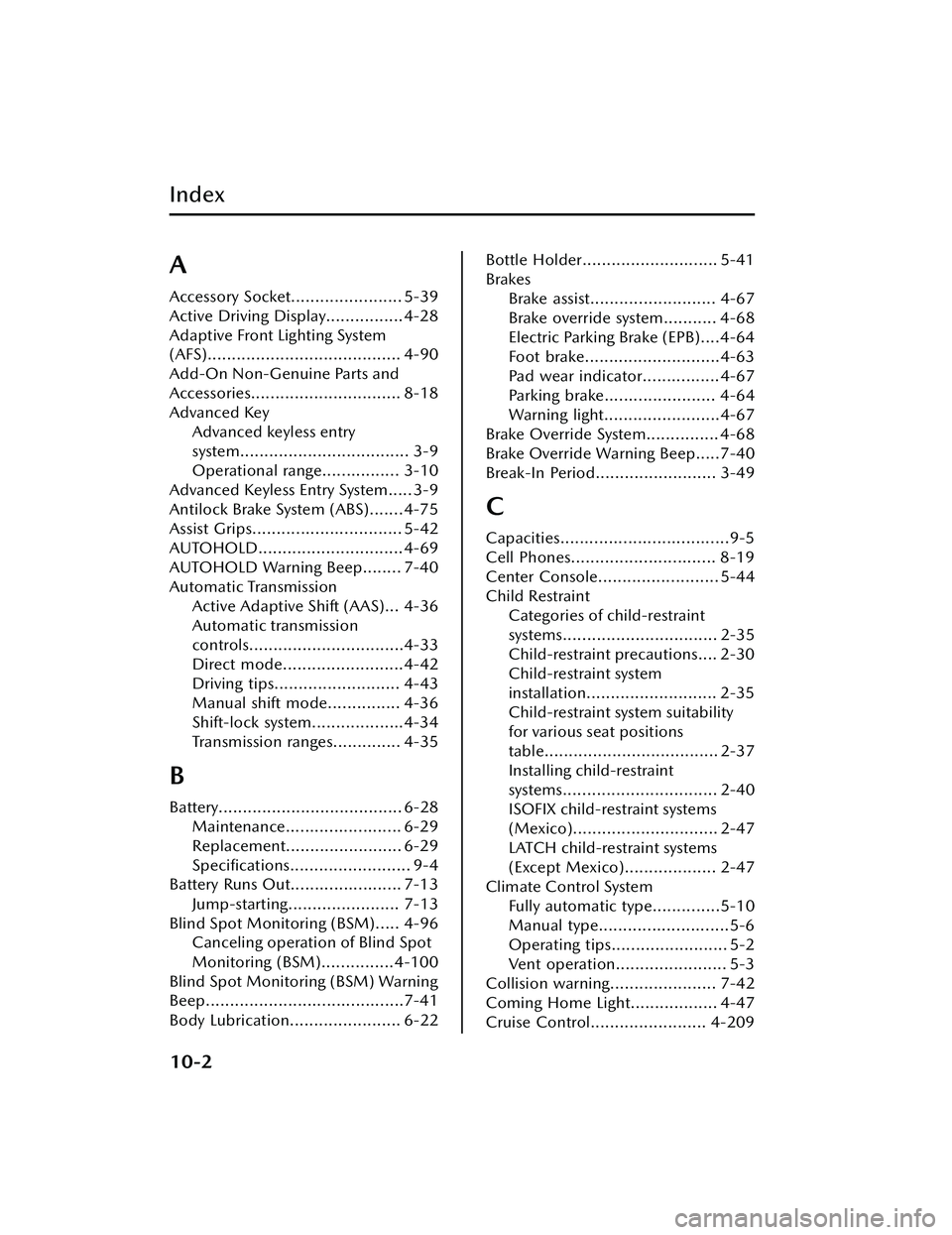
Index
A
Accessory Socket....................... 5-39
Active Driving Display................4-28
Adaptive Front Lighting System
(AFS)........................................ 4-90
Add-On Non-Genuine Parts and
Accessories............................... 8-18
Advanced KeyAdvanced keyless entry
system................................... 3-9
Operational range................ 3-10
Advanced Keyless Entry System..... 3-9
Antilock Brake System (ABS).......4-75
Assist Grips............................... 5-42
AUTOHOLD.............................. 4-69
AUTOHOLD Warning Beep........ 7-40
Automatic Transmission Active Adaptive Shift (AAS)... 4-36
Automatic transmission
controls................................4-33
Direct mode.........................4-42
Driving tips.......................... 4-43
Manual shift mode............... 4-36
Shift-lock system...................4-34
Transmission ranges.............. 4-35
B
Battery...................................... 6-28Maintenance........................ 6-29
Replacement........................ 6-29
Specifications......................... 9-4
Battery Runs Out....................... 7-13
Jump-starting....................... 7-13
Blind Spot Monitoring (BSM)..... 4-96 Canceling operation of Blind Spot
Monitoring (BSM)...............4-100
Blind Spot Monitoring (BSM) Warning
Beep.........................................7-41
Body Lubrication....................... 6-22
Bottle Holder............................ 5-41
Brakes Brake assist.......................... 4-67
Brake override system........... 4-68
Electric Parking Brake (EPB)....4-64
Foot brake............................4-63
Pad wear indicator................4-67
Parking brake....................... 4-64
Warning light........................4-67
Brake Override System............... 4-68
Brake Override Warning Beep.....7-40
Break-In Period......................... 3-49
C
Capacities...................................9-5
Cell Phones.............................. 8-19
Center Console......................... 5-44
Child Restraint Categories of child-restraint
systems................................ 2-35
Child-restraint precautions.... 2-30
Child-restraint system
installation........................... 2-35
Child-restraint system suitability
for various seat positions
table.................................... 2-37
Installing child-restraint
systems................................ 2-40
ISOFIX child-restraint systems
(Mexico).............................. 2-47
LATCH child-restraint systems
(Except Mexico)................... 2-47
Climate Control System Fully automatic type..............5-10
Manual type...........................5-6
Operating tips........................ 5-2
Vent operation....................... 5-3
Collision warning...................... 7-42
Coming Home Light.................. 4-47
Cruise Control........................ 4-209
10-2
CX-30_8JP5-EA-20K_Edition1_new 2020-7-22 15:50:09