gear MAZDA MODEL CX-30 2021 Owner's Manual
[x] Cancel search | Manufacturer: MAZDA, Model Year: 2021, Model line: MODEL CX-30, Model: MAZDA MODEL CX-30 2021Pages: 594, PDF Size: 83.37 MB
Page 213 of 594
NOTE
When canceling the parking brake
auto operation and parking the
vehicle, shift the shift lever to the 1st
gear or the R position for a manual
transmission, or shift the selector
lever to the P position for an
automatic transmission, and then
use wheel blocks.
The auto operation may not cancel if
the vehicle is parked on a steep
slope.
When the ignition is switched ON, the
parking brake auto operation is
restored.
▼ Warning Light
The warning light turns on when the
system has a malfunction.
Refer to Brake System Warning
Indication/Warning Light on page
7-22.
▼Brake Pad Wear Indicator
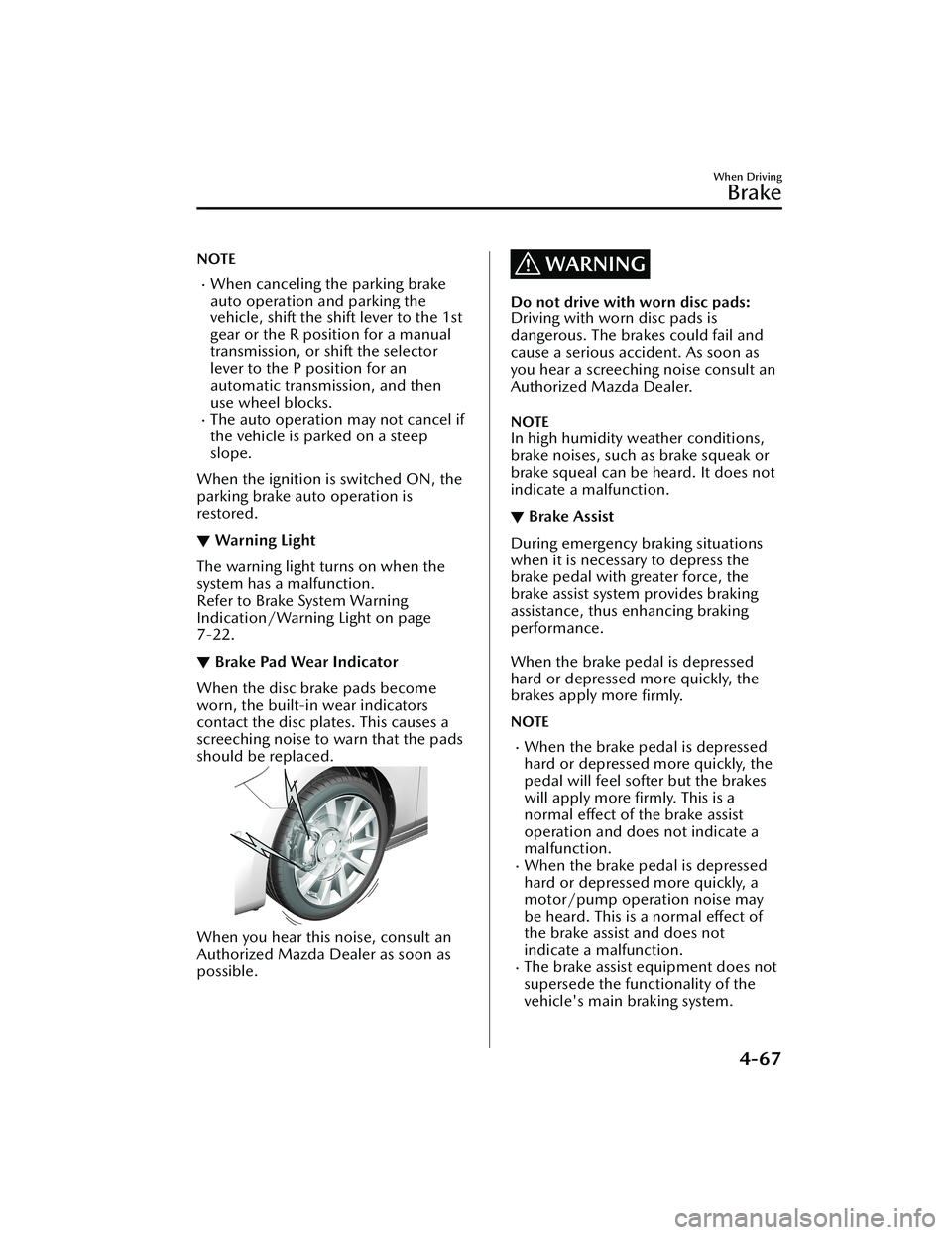
When the disc brake pads become
worn, the built-in wear indicators
contact the disc plates. This causes a
screeching noise to warn that the pads
should be replaced.
When you hear this noise, consult an
Authorized Mazda Dealer as soon as
possible.
WARNING
Do not drive with worn disc pads:
Driving with worn disc pads is
dangerous. The brakes could fail and
cause a serious accident. As soon as
you hear a screeching noise consult an
Authorized Mazda Dealer.
NOTE
In high humidity weather conditions,
brake noises, such as brake squeak or
brake squeal can be heard. It does not
indicate a malfunction.
▼Brake Assist
During emergency braking situations
when it is necessary to depress the
brake pedal with greater force, the
brake assist system provides braking
assistance, thus
enhancing braking
performance.
When the brake pedal is depressed
hard or depressed more quickly, the
brakes apply more firmly.
NOTE
When the brake pedal is depressed
hard or depressed more quickly, the
pedal will feel softer but the brakes
will apply more firmly. This is a
normal effect of the brake assist
operation and does not indicate a
malfunction.
When the brake pedal is depressed
hard or depressed more quickly, a
motor/pump operation noise may
be heard. This is a normal effect of
the brake assist and does not
indicate a malfunction.
The brake assist equipment does not
supersede the functionality of the
vehicle's main braking system.
When Driving
Brake
4-67
CX-30_8JP5-EA-20K_Edition1_new 2020-7-22 15:50:09
Page 219 of 594

There is a problem with the
AUTOHOLD function.Hill Launch Assist (HLA)
▼Hill Launch Assist (HLA)
The HLA functions to assist in
accelerating the vehicle from a stop on
slopes. When releasing the brake pedal
and depressing the accelerator pedal
to accelerate the vehicle from a stop
while on a slope, the function prevents
the vehicle from rolling. The HLA also
operates when reversing on a slope.
The braking force is maintained
automatically after releasing the brake
pedal on a steep slope.
For manual transmission vehicles, the
HLA operates when the vehicle is tilted
rearward with the shift lever in a
forward gear, and operates when the
vehicle is tilted forward with the shift
lever in the R position.
For automatic transmission vehicles,
the HLA operates when the vehicle is
tilted rearward with the selector lever
in a forward gear, and operates when
the vehicle is tilted forward with the
selector lever in the R position.
When Driving
Brake
4-73
CX-30_8JP5-EA-20K_Edition1_new
2020-7-22 15:50:09
Page 272 of 594
Changing the Set Vehicle Speed
(To accelerate/decelerate using the
RES switch)
When the RES switch is pressed up
(SET+), the vehicle accelerates and
when the RES switch is pressed down
(SET-), it decelerates.
Press and release immediately: 1
km/h (1 mph)
Press and hold: 10 km/h (5 mph)
(To increase speed using accelerator
pedal)
Depress the accelerator pedal and
press the RES switch up (SET+) or
down (SET-) at the desired speed. If
the switch is not operated, the system
returns to the set speed after you
release your foot from the accelerator
pedal.
NOTE
The warnings and brake control do
not operate while the accelerator
pedal is depressed.
Canceling the system
When the following operations are
performed, the MRCC system is
canceled, and the MRCC set indication
(green) switches to the MRCC standby
indication (white) at the same time.
The CANCEL switch is pressed.The brake pedal is depressed.The shift lever is in the reverse (R)
position.
Under the following conditions, the
MRCC cancel indication is displayed in
the multi-information display and a
single beep sound is heard.
The DSC has operated.
The Smart Brake Support (SBS) has
operated.
When traveling on a downslope for a
long period of time.
There is a problem with the system.The vehicle speed decreases to less
than 25 km (16 mph).
The shift lever is shifted to neutral
(N) for a certain period of time.
The clutch is depressed for a certain
period of time.
The engine stalls.The front radar sensor cannot detect
target objects (during rain, fog, snow
or other inclement weather
conditions, or when the radiator
grille is dirty).
The parking brake is applied.Any of the doors is opened.The driver's seat belt is unfastened.The operation frequency of the
braking by the MRCC control is high.
Resuming control
If the MRCC system is canceled, you
can resume control at the previously
set speed by pressing the RES switch
and after all of the operation
conditions have been met.
NOTE
If the set speed is not indicated in the
display, the control does not resume
even if the RES switch is pressed.
Tu r n i n g off the system
When the MRCC switch is pressed
while the MRCC is operating, the
MRCC turns off.
▼Shift-up/Shift-down Request
Display
The shift-up or shift-down request
display might be displayed while the
MRCC is operating. When this occurs,
shift gears because the gear position is
not appropriate.
When Driving
i-ACTIVSENSE
4-126
CX-30_8JP5-EA-20K_Edition1_new
2020-7-22 15:50:09
Page 273 of 594

Request Indication on display
Shift up Shift Up to a Higher Gear
Shift down Shift Down to a Lower Gear
NOTE
If the gears are not shifted up even
though the shift-up request
indication is displayed, load will be
applied to the engine and the MRCC
might be automatically canceled or
engine damage could occur.
If the gears are not shifted down
even though the shift-down request
indication is displayed, the MRCC
might be automatically canceled or
engine stalling could occur.
Mazda Radar Cruise
Control with Stop & Go function (MRCC with
Stop & Go function) (Automatic
Transmission)
*
▼ Mazda Radar Cruise Control with
Stop & Go function (MRCC with
Stop & Go function)
The MRCC with Stop & Go function
system is designed to maintain
headway control
*1 with a vehicle
ahead according to your vehicle's
speed using a front radar sensor to
detect the distance to the vehicle
ahead and a preset vehicle speed
without you having to use the
accelerator or brake pedals.
*1 Headway Control: Control of the distance between your vehicle and
the vehicle ahead detected by the
Mazda Radar Cruise Control
(MRCC) system.
Additionally, if your vehicle starts
closing in on the vehicle ahead such as
if the vehicle ahead brakes suddenly, a
warning sound and a warning
indication in the display are activated
simultaneously to alert you to maintain
a sufficient distance between the
vehicles.
If the vehicle ahead stops while you are
following behind it, your vehicle will
stop and be held stopped
automatically (stop hold control), and
headway control will resume when you
resume driving the vehicle such as by
pressing the RES switch.
Also refer to the fo llowing before using
the MRCC with Stop & Go function.
AUTOHOLD (page 4-69)
When Driving
i-ACTIVSENSE
*Some models.4-127
CX-30_8JP5-EA-20K_Edition1_new 2020-7-22 15:50:09
Page 295 of 594

If the steering wheel is held lightly, or depending on the road conditions, the system
determines that you have released the steering wheel (not holding the steering
wheel) even if you are holding it, and an al ert is indicated on the multi-information
display and the active driving display.
To r e s u m e o p e ra t i o n
If the TJA is temporarily canceled, it will resume operation at the previously set speed
by pressing the RES switch after all of the operation conditions have been met.
NOTE
If the set speed is not indicated on the display, the system does not operate even if
the RES switch is pressed.
After the operation, the steering assist op eration may not operate for a period of 5
seconds at the most until the lane lines are detected or a vehicle ahead is
recognized.
Tu r n i n g off
When the TJA switch is pressed while the TJA is operating, the TJA turns off.
▼Shift-up/Shift-down Request
Display (Manual Transmission)
The shift-up or shift-down request
display might be displayed while the
TJA is operating. When this occurs, shift
gears because the gear position is not
appropriate.
Request Indication on display
Shift up Shift Up to a Higher Gear
Shift down Shift Down to a Lower Gear
NOTE
If the gears are not shifted up even
though the shift-up request
indication is displayed, load will be
applied to the engine and the TJA
might be automatically canceled or
engine damage could occur.
If the gears are not shifted down
even though the shift-down request
indication is displayed, the TJA might
be automatically canceled or engine
stalling could occur.
When Driving
i-ACTIVSENSE
4-149
CX-30_8JP5-EA-20K_Edition1_new 2020-7-22 15:50:09
Page 321 of 594

Top view/Rear view, Top view/Rear wide view
The top view/rear view, top view/rear wide view displays when all of the following
conditions are met.
The ignition is switched ON.Shift lever/selector lever is in R position.
Display switching
The displayed screen can be changed ea ch time the 360°view monitor switch is
pressed.
1. Top view/Rear view
2. Top view/Rear wide view
NOTE
The top view/rear view and top view/rear wide view automatically display
whether or not the 360°View Monitor switch is turned on or off when shifting the
shift lever/selector lever to R position.
The top view/rear view and top view/rear wide view displays the previously
displayed screen.
The setting can be changed to display the top view/front view when shifting from
reverse to a forward gear without operating the 360°View Monitor switch to check
the front of the vehicle while parallel parking.
Refer to the Settings section in the Mazda Connect Owner's Manual.
When Driving
i-ACTIVSENSE
4-175
CX-30_8JP5-EA-20K_Edition1_new 2020-7-22 15:50:09
Page 358 of 594
▼To Resume Cruisi
ng Speed at More
Than 30 km/h (19 mph)
If the cruise control system is
temporarily canceled (such as by
applying the brake pedal) and the
system is still activated, the most
recent set speed will automatically
resume when the RES switch is
pressed.
If vehicle speed is below 30 km/h (19
mph), increase the vehicle speed up to
30 km/h (19 mph) or more and press
the RES switch.
▼ To Te m p o ra r i l y C a n c e l
To temporarily cancel the system, use
one of these methods:
Slightly depress the brake pedal.Press the CANCEL switch.(Manual transmission)
Depress the clutch pedal.
If the RES switch is pressed when the
vehicle speed is 30 km/h (19 mph) or
higher, the system reverts to the
previously set speed.
NOTE
If any of the following conditions
occur, the cruise control system is
temporarily canceled.
Even when the brake pedal is
slightly depressed.
The DSC is operating.There is a problem in the system.Any of the doors is opened.The driver's seat belt is unfastened.The parking brake is applied.(Automatic transmission)
The selector lever is in the P, N, or
R position.
(Manual transmission)
The shift lever is in the neutral
position.
When the cruise control system is
temporarily canceled by even one of
the applicable cancel conditions, the
speed cannot be re-set.
(Automatic transmission)
The cruise control cannot be
canceled while driving in manual
mode (selector lever shifted from D
to M position). Therefore, engine
braking will not be applied even if
the transmission is shifted down to a
lower gear. If deceleration is
required, lower the set speed or
depress the brake pedal.
▼ To D e a c t i v a t e
Press the cruise switch again.
When Driving
Cruise Control
4-212
CX-30_8JP5-EA-20K_Edition1_new
2020-7-22 15:50:09
Page 517 of 594
Display*1*2ContentAction to be taken
Mazda Radar Cruise
Control Canceled. Drive
Safely This message is indicated when the
Mazda Radar Cruise Control
(MRCC), Mazda Radar Cruise Con-
trol with Stop & Go function (MRCC
with Stop & Go function), and the
Traffic Jam Assist (TJA) have been can-
celed other than by the driver.
Have your vehicle inspected by an
Authorized Mazda Dealer.
Distance & Speed Alert
Operation Canceled
Drive Safely This message is indicated when the
Distance & Speed Alert (DSA) have
been canceled other than by the driv-
er.
Have your vehicle inspected by an
Authorized Mazda Dealer.
Cruise Control Opera-
tion Canceled. Drive
Safely This message is indicated when the
Cruise Control have been canceled
other than by the driver.
Have your vehicle inspected by an
Authorized Mazda Dealer.
Emergency Braking Acti-
vated. Depress Brake
Pedal to Hold Stop This message is indicated after the
Smart Brake Support (SBS) brakes op-
erate and when the Smart Brake Sup-
port (SBS) is canceled.
Depress the brake pedal.
Touch Key Fob to Push
Button Start Switch This message is indicated when the
key battery is weak (battery dead or
damaged key). Touch the key against push button
start to start the engine.
Refer to Engine Start Function When
Key Battery is Dead on page 4-8.
Depress Brake Pedal to
Start Vehicle This message is indicated when the
push button start is pressed without
depressing the brake pedal. When starting the engine, press the
push button start with the brake ped-
al depressed.
Depress Clutch Pedal to
Start Vehicle This message is indicated when the
push button start is pressed without
depressing the clutch pedal. When starting the engine, press the
push button start with the clutch
pedal depressed.
Check Gear Selector
Lever Position This message is indicated when the
selector lever is shifted to the P or R
position while driving.
Check the selector lever position.
Close Door and Fasten
Seat Belt This message is indicated when AU-
TOHOLD is about to operate and a
door is opened or a seat belt is unfas-
tened. When the AUTOHOLD is turned on,
close the doors and fasten seat belts.
Wiper Blades Must Be
on Windshield Before
Operating This message is indicated when the
ignition is switched ON with the wip-
er arms at the service positions.
Return the wiper arms to the initial
positions.
If Trouble Arises
Warning/Indicator Lights and Warning Sounds
7-35
CX-30_8JP5-EA-20K_Edition1_new
2020-7-22 15:50:09
Page 518 of 594

Display*1*2ContentAction to be taken
Windshield Wiper Range
of Motion Reduced. Re-
move Obstruction(s) This message is indicated when there
is snow or dirt accumulation on the
windshield and the wiper operation
range is narrowed.
Remove foreign matter from the
windshield.
Vehicle Not Switched
Off This message is indicated when the
driver’s door is opened without
switching the ignition OFF.
Switch the ignition OFF before leaving
the vehicle.
Gear Selector Lever Not
in Park Displays when the push button start
is pressed while the selector lever is
in a position other than P, and the ig-
nition is switched to ACC. Shift the selector lever to the P posi-
tion and then switch the ignition OFF.
Excessive Transmission
Te m p e ra t u r e . D r i v e
Slowly This message is indicated when the
internal temperature of the automatic
transmission is high.
Drive slowly to reduce load on the
automatic transmission.
Excessive Transmission
Temp. Stop Vehicle in a
Safe Location This message is indicated when the
automatic transmission
fluid temper-
ature is abnormally high. Park the vehicle in a safe place imme-
diately and contact an Authorized
Mazda Dealer.
*1 A pop-up is displayed when a warning occurs.*2 One screen displays four rows. If the entire message cannot be displayed on the screen, it switches to
another screen.
If Trouble Arises
Warning/Indicator Lights and Warning Sounds
7-36
CX-30_8JP5-EA-20K_Edition1_new 2020-7-22 15:50:09
Page 576 of 594

Specifications
▼Engine
Item Specification
SKYACTIV-G 2.0 SKYACTIV-G 2.5 SKYACTIV-G 2.5T
Type DOHC-16V in-line, 4-cylinder
Bore × Stroke 83.5 × 91.2 mm (3.29 ×
3.59 in) 89.0 × 100 mm (3.50 × 3.94 in)
Displacement 1,997.6 ml (1,997.6 cc) 2,488.5 ml (2,488.5 cc)
Compression
ratio 13.0
10.5
▼Electrical System
Item
Classification
Battery
*112V-60Ah/20HR
Spark-plug
number SKYACTIV-G 2.0, SKY-
ACTIV-G 2.5
Mazda Genuine spark
plug
*2PE5R-18-110 or PE5S-18-110
SKYACTIV-G 2.5T Mazda Genuine spark
plug
*2PY8V-18-110
*1 Check the battery installed on the vehicle and us
e a battery with an equal or higher performance.
However, the performance of the battery may vary even among the same battery types, consult an
Authorized Mazda Dealer for replacement.
*2 This spark plug provides the SKYACTIV-G engine with optimum performance. Contact an Authorized
Mazda Dealer for details.
CAUTION
When cleaning the iridium plugs, do not use a wire brush. The
fine particulate
coating on the iridium alloy and platinum tips could be damaged.
▼ Lubricant Quality
Lubricant
Classification
Engine oil Refer to Recommended Oil on page 6-17.
Coolant FL-22 type
Manual transmission oil Mazda Long Life Gear Oil G7
Automatic transmission fluid Mazda Genuine ATF FZ
Transfer case oil Mazda Long Life Hypoid Gear Oil SG1
Rear differential oil Mazda Long Life Hypoid Gear Oil SG1
Specifications
Specifications
9-4
CX-30_8JP5-EA-20K_Edition1_new 2020-7-22 15:50:09