door MAZDA MODEL CX-30 2021 Workshop Manual
[x] Cancel search | Manufacturer: MAZDA, Model Year: 2021, Model line: MODEL CX-30, Model: MAZDA MODEL CX-30 2021Pages: 594, PDF Size: 83.37 MB
Page 169 of 594

SignalWarning Refer to
Air Bag/Front Seat Belt Pretensioner System Warning Indication/
Warning Light*17-27
Tire Pressure Monitoring System (TPMS) Warning Indication/Warning
Light*1
Flashing
7-28
Tu r n s o n 7-32
(Red) KEY Warning Indication/Warning Light
*17-28
(Amber)
*High Beam Control System (HBC) Warning Indication/Warning
Light*17-29
i-ACTIVSENSE Warning Indication/Warning Light*17-29
Exterior Light Warning Indication/Warning Light*17-29
Low Fuel Warning Indication/Warning Light 7-30
Check Fuel Cap Warning Indication/Warning Light*17-30
Engine Oil Level Warning Indication/Warning Light*17-30
Seat Belt Warning Indication/Warning Light (Front seat)7-31
(Red)Seat Belt Warning Light (Rear seat)
7-31
*Low Washer Fluid Level Warning Indication/Warning Light7-31
Door-Ajar Warning Indication
7-32
Liftgate-Ajar Warning Indication 7-32
When Driving
Instrument Cluster and Display
*Some models.4-23
CX-30_8JP5-EA-20K_Edition1_new 2020-7-22 15:50:09
Page 170 of 594

SignalWarning Refer to
Door-Ajar Warning Light 7-32
*1 The light turns on when the ignition is switched on for an operation check, and turns off a few
seconds later or when the engine is started. If th e light does not turn on or remains turned on, have
the vehicle inspected at an Authorized Mazda Dealer.
▼ Indication/Indicator Lights
These lights turn on or flash to notify th
e user of the system operation status or a
system malfunction.
Signal Indicator Refer to
(Green)Seat Belt Indicator Light (Rear seat)
2-25
*Front Passenger Air Bag Deactivation Indicator Light2-67
Security Indicator LightImmobilizer
System3-46
Theft-Deterrent System
3-47
Malfunction 7-29
(Green) KEY Indicator Light
4-5
Wrench Indication/Indicator Light*14-27
*Shift Position Indication4-36
Lights-On Indicator Light
4-44
When Driving
Instrument Cluster and Display
4-24*Some models.
CX-30_8JP5-EA-20K_Edition1_new 2020-7-22 15:50:09
Page 192 of 594

Auto-light control*
When the headlight switch is in a position other than and the ignition is
switched ON, the light sensor senses th e surrounding lightness or darkness and
automatically turns the headlights and other exterior lights on or off.
CAUTION
Do not shade the light sensor by adhering a sticker or a label on the windshield.
Otherwise the light sensor will not operate correctly.
The light sensor also works as a rain sensor for the auto-wiper control. Keep hands
and scrapers clear of the windshield when the wiper lever is in the AUTO position
and the ignition is switched ON as fingers could be pinched or the wipers and
wiper blades could be damaged when the wipers activate automatically. If you are
going to clean the windshield, be sure the wipers are turned off completely when
it is particularly tempting to leave the en gine running. This is particularly important
when clearing ice and snow.
NOTE
The headlights and other exterior lights may not turn off immediately even if the
surrounding area becomes well-lit because the light sensor determines that it is
night time if the surrounding area is cont inuously dark for several minutes such as
inside long tunnels, traffic jams inside tunnels, or in indoor parking lots.
If the headlight switch and the windshie ld wiper switch are in AUTO, and the
wipers are operated at low or high speed by the auto wiper control for several
seconds, bad weather conditions are determined and the headlights may be
turned on.
The sensitivity of the auto-light control may be changed.
Refer to the Settings section in the Mazda Connect Owner's Manual.
When Driving
Switches and Controls
4-46*Some models.
CX-30_8JP5-EA-20K_Edition1_new 2020-7-22 15:50:09
Page 193 of 594

▼Headlight High-Low Beam
The headlights switch between high
and low beams by moving the lever
forward or backward.
1. High beam
2. Low beam
When the headlight high-beams are
on, the headlight high-beam indicator
light is turned on.
▼Flashing the Headlights
When the ignition switch is switched
ON, and regardless of the headlight
position, the headlights switch to high
beams while the lever is being pulled.
1. OFF
2. Headlight flashing
The headlight high-beam indicator
light in the instrument cluster
illuminates simultaneously. The lever
will return to the normal position when
released.
▼Coming Home Light
The coming home light turns on the
headlights (low beams) when the lever
is operated.
To turn on the lights
When the lever is pulled with the
ignition switched to ACC or OFF, the
low beam headlights turn on.
The headlights turn off after a certain
period of time has elapsed after all of
the doors are closed.
NOTE
The time until the headlights turn
off
after all of the doors are closed can
be changed.
Refer to the Settings section in the
Mazda Connect Owner's Manual.
If no operations are done for 3
minutes after the lever is pulled, the
headlights turn off.
The headlights turn off if the lever is
pulled again while the headlights are
illuminated.
When Driving
Switches and Controls
4-47
CX-30_8JP5-EA-20K_Edition1_new 2020-7-22 15:50:09
Page 203 of 594
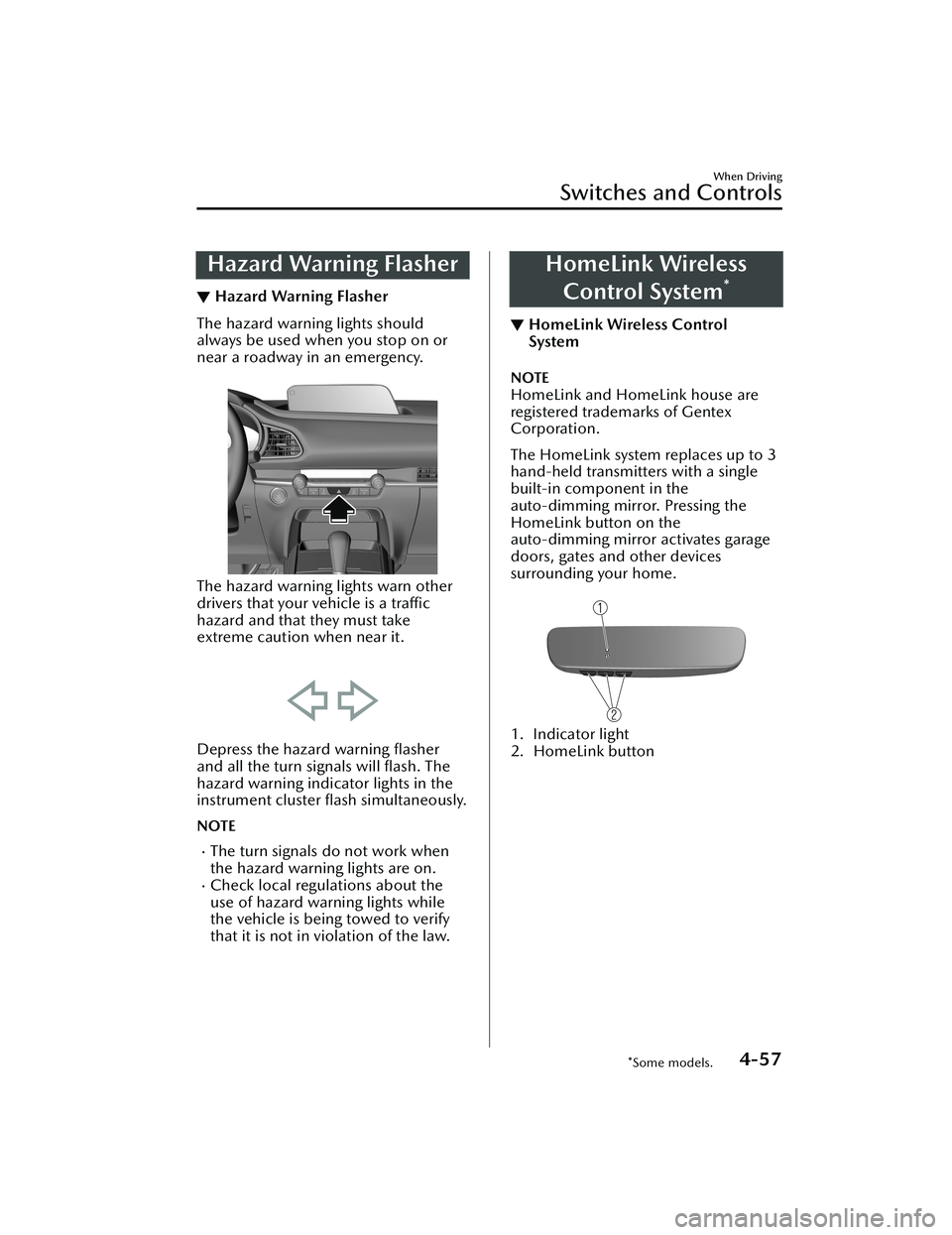
Hazard Warning Flasher
▼Hazard Warning Flasher
The hazard warning lights should
always be used when you stop on or
near a roadway in an emergency.
The hazard warning lights warn other
drivers that your vehicle is a traffic
hazard and that they must take
extreme caution when near it.
Depress the hazard warning flasher
and all the turn signals will flash. The
hazard warning indicator lights in the
instrument cluster flash simultaneously.
NOTE
The turn signals do not work when
the hazard warning lights are on.
Check local regulations about the
use of hazard warning lights while
the vehicle is being towed to verify
that it is not in violation of the law.
HomeLink Wireless
Control System
*
▼ HomeLink Wireless Control
System
NOTE
HomeLink and HomeLink house are
registered trademarks of Gentex
Corporation.
The HomeLink system replaces up to 3
hand-held transmitters with a single
built-in component in the
auto-dimming mirror. Pressing the
HomeLink button on the
auto-dimming mirror activates garage
doors, gates and other devices
surrounding your home.
1. Indicator light
2. HomeLink button
When Driving
Switches and Controls
*Some models.4-57
CX-30_8JP5-EA-20K_Edition1_new
2020-7-22 15:50:09
Page 204 of 594

WARNING
Do not use the HomeLink system with
any garage door opener that lacks the
safety stop and reverse feature:
Using the HomeLink system with any
garage door opener that lacks the
safety stop and reverse feature as
required by federal safety standards is
dangerous. (This includes garage doors
manufactured before April 1, 1982.)
Using these garage door openers can
increase the risk of serious injury or
death. For further information, contact
HomeLink at www.homelink.com or
www.youtube.com/HomeLinkGentex
or an Authorized Mazda Dealer.
Always check the areas surrounding
garage doors and gates for people or
obstructions before programming or
during operation of the HomeLink
system:
Programming or operating the
HomeLink system without verifying the
safety of areas surrounding garage
doors and gates is dangerous and
could result in an unexpected accident
and serious injury if someone were to
be hit.
NOTE
The programming will not be erased
even if the battery is disconnected.
▼Pre-programming the HomeLink
System
NOTE
It is recommended that a new battery
be placed in the hand-held transmitter
of the device being programmed to
HomeLink for quicker training and
accurate transmission of the
radio-frequency signal.
Verify that there is a remote control
transmitter available for the device
you would like to program.
▼Programming the HomeLink
System
The HomeLink system provides 3
buttons which can be individually
selected and programmed using the
transmitters for current, on-market
devices as follows:
1. Press and release the HomeLink
button you would like to program.
The indicator light flashes slowly in
amber when the button is pressed.
1. Indicator light
2. HomeLink button
2. Hold the hand-held transmitter 2.5 to 7.5 cm (1 to 3 in) away from the
HomeLink button you would like to
program while keeping the
indicator light in view.
When Driving
Switches and Controls
4-58
CX-30_8JP5-EA-20K_Edition1_new 2020-7-22 15:50:09
Page 205 of 594

NOTE
Depending on the hand-held
transmitter, it may be easier to do
the programming by holding it 15
to 20 cm (6 to 7.8 in) away from
the HomeLink button.
3. Press the hand-held transmitter button continuously until the
indicator light changes from amber
(flashing) to green (on/flashing).
NOTE
Some gate operators and garage
door openers may require you to
replace this Programming Step 3
with procedures noted in the “Gate
Operator/Canadian Programming”
section.
4. Press the HomeLink button again to check if the programming has been
completed.
If the indicator light remains on in
green, the programming is
complete and the device
becomes operational.
If the indicator light flashes
rapidly in green, firmly press and
hold the Homelink button and
release it after two seconds have
passed. Repeat this process up to
three times to complete the
programming. The device
becomes operational and
programming is complete. If the
device does not operate, go to
the next step.
5. At the garage door opener receiver (motor-head unit) in the garage,
locate the “learn” or “smart” button.
This can usually be found where the
hanging antenna wire is attached to
the motor-head unit.
6. Firmly press and release the “learn” or “smart” button. (The name and
color of the button may vary by
manufacturer.)
NOTE
Complete the programming within
30 seconds.
7. Return to the vehicle and firmly press and hold the Homelink
button, and then release it after
two seconds have passed. Repeat
the “ press/hold/release ” sequence
a second time, and, depending on
the brand of the garage door
opener (or other rolling code
equipped device), repeat this
sequence a third time to complete
the programming process.
Press the programmed HomeLink
button and make sure that the
HomeLink System operates.
8. If the status indicator arrows are flashing , refer to Garage Door
Two-Way Communication.
1. Indicator light
NOTE
To program the remaining two
HomeLink buttons, go back to Step 1
of Programming the HomeLink System
and repeat the procedure.
For questions or comments, please
contact HomeLink at
www.homelink.com or
www.youtube.com/
HomeLinkGentex , or the HomeLink
toll-free hotline at 1-800-355-3515
(for calls placed outside of the USA,
Canada, and Puerto Rico, international
rates will apply and may differ based
on landline or mobile phone).
When Driving
Switches and Controls
4-59
CX-30_8JP5-EA-20K_Edition1_new 2020-7-22 15:50:09
Page 206 of 594

▼Gate operator/Canadian
Programming
Canadian radio-frequency laws require
transmitter signals to “time-out” (or
quit) after several seconds of
transmission
― which may not be long
enough for HomeLink to pick up the
signal during programming. Similar to
this Canadian law, some U.S. gate
operators are designed to “time-out”
in the same manner.
If you live in Canada or are having
difficulties programming a gate
operator by using the programming
procedures (regardless of where you
live), replace Step 3 of Programming
the HomeLink System with the
following:
NOTE
If programming a garage door opener
or gate operator, it is advised to unplug
the device during the “cycling” process
to prevent possible overheating.
While the indicator light is flashing in
amber, press the button on the
hand-held transmitter for 2 seconds
and release it repeatedly until the
indicator light changes from amber to
green.
Go back to Step 4 of Programming the
HomeLink System to complete the
procedure.
▼ Operating the HomeLink System
Press the programmed HomeLink
button to operate a programmed
device.
▼Reprogramming the HomeLink
system
To program a device to HomeLink
using a HomeLink button previously
trained, follow these steps:
1. Press and hold the desired
HomeLink button. DO NOT release
the button.
2. After 20 seconds, the indicator light
flashes in amber. After the indicator
light flashes, release the HomeLink
button.
3. Go back to Step 2 of Programming the HomeLink System to complete
the procedure.
NOTE
If the programming has not been
completed, the system returns to the
previous programming.
When Driving
Switches and Controls
4-60
CX-30_8JP5-EA-20K_Edition1_new 2020-7-22 15:50:09
Page 207 of 594

▼Erasing Programmed HomeLink
Buttons
NOTE
All of the programmed HomeLink
buttons are reset. Individual buttons
cannot be reset, however, individual
buttons can be reprogrammed. For
individual button reprogramming,
refer to Reprogramming the
HomeLink System (page 4-60).
Verify that the programming has
been erased if you resell the vehicle.
1. Press the two outer HomeLink buttons continuously at the same
time until the indicator light flashes.
1. HomeLink button 3
2. HomeLink button 1
2. Stop pressing the HomeLink buttons.
▼Garage Door Two-Way
Communication
The garage door two-way
communication is a function that
communicates with the garage door
opener and indicates whether the
garages door is open or closed using
the indicator lights in the rear view
mirror. It can indicate the status of the
garage door within a range up-to 250
m (820 ft).
NOTE
The communication range may shorten
depending on obstructions.
Programming two-way
communication
Within five seconds after programming
a new HomeLink button, both of the
garage door status indicator lights will
flash rapidly in green indicating that
the garage door two-way
communication has been established.
If the garage door status indicator
lights flash, the two-way
communication programming is
complete.
If the garage door status indicator
lights do not flash, the two-way
communication programming is not
completed. For additional HomeLink
information and programming videos,
refer to the following Websites:
www.HomeLink.comwww.youtube.com/
HomeLinkGentex
When Driving
Switches and Controls
4-61
CX-30_8JP5-EA-20K_Edition1_new
2020-7-22 15:50:09
Page 208 of 594

Operating the garage door two-way
communication
By pressing HomeLink buttons 1 and 2
at the same time for two seconds, the
status of the garage door is indicated
for about 3 seconds as follows:
1. HomeLink button 2
2. HomeLink button 1
Garage door
status Indicator light
Closing Amber flashes
Opening Amber flashes
ClosedGreen turns on
Opened Green turns on
NOTE
The programming will not be erased
even if the battery is disconnected.
When Driving
Switches and Controls
4-62
CX-30_8JP5-EA-20K_Edition1_new
2020-7-22 15:50:09