cruise control MAZDA MODEL CX-5 2016 (in English) Owner's Manual
[x] Cancel search | Manufacturer: MAZDA, Model Year: 2016, Model line: MODEL CX-5, Model: MAZDA MODEL CX-5 2016Pages: 626, PDF Size: 13.81 MB
Page 257 of 626

Black plate (257,1)
lIn the following cases, the“MRCC
Cancelled”indication is displayed and
the beep sounds one time.
lThe vehicle speed decreases to less
than 25 km (16 mph).
lThe DSC has operated.lThe TCS has operated for a certain
period of time.
lThe Smart City Brake Support
(SCBS) has operated.
lThe Smart Brake Support (SBS) has
operated.
lWhen traveling on a down slope for
a long period of time.
lThere is a problem with the system.
NOTE
lThe Mazda Radar Cruise Control (MRCC)
system may be canceled during rain, fog,
snow or other inclement weather
conditions, or the front surface of the
radiator grille is dirty.
lIf you have temporarily canceled the Mazda
Radar Cruise Control (MRCC), you can
return to your previously set speed by
pressing the RES switch and after all of the
operation conditions have been met.
lIf the OFF switch is pressed to cancel the
Mazda Radar Cruise Control (MRCC), the
system does not return to the previously set
speed even if the RES switch is pressed.
qCruise Control Function
While this function is operating, the
headway control operation is canceled and
only the cruise control function operates.
The vehicle speed can be set more than
about 25 km/h (16 mph).
Use the cruise control function on
expressways and other highways which
do not require a lot of repeated
acceleration and deceleration.
WARNING
Do not use the cruise control function
in the following locations:
Otherwise, it could lead to an
accident.
ØRoads with sharp curves and
where vehicle traffic is heavy and
there is insufficient space between
vehicles. (Driving under these
conditions using the cruise control
function is not possible)
ØSteep down slopes (Set speed may
be exceeded because sufficient
engine braking cannot be applied)
ØSlippery roads such as ice or
snow-bound roads (Tires could
spin causing you to lose vehicle
control)
Always drive carefully:
The warnings and brake control will
not operate after the headway
control function is canceled and the
system is switched to only the cruise
control function. Depress the brake
pedal to decelerate according to the
surrounding conditions while keeping
a safer distance from the vehicle
ahead and always driving carefully.
Switching to cruise control function
When the ON switch is pressed
continuously for about 2 seconds while
the Mazda Radar Cruise Control (MRCC)
system is turned on, the system is
switched to the cruise control function.
The Mazda Radar Cruise Control
(MRCC) indicator light (green) in the
instrument cluster turns off and a message
is displayed in the multi-information
display at the same time.
When Driving
i-ACTIVSENSE
4-123
CX-5_8DV2-EA-14K_Edition3 Page257
Thursday, February 26 2015 5:33 PM
Form No.8DV2-EA-14K
Page 258 of 626
Black plate (258,1)
WARNING
Always turn off the cruise control
function when it is not in use:
Leaving the cruise control function
turned on when it is not in use is
dangerous as it could operate
unexpectedly, resulting in an
accident.
How to set the speed
Adjust the system to the desired vehicle
speed using the accelerator pedal.
Cruise control function begins when the
SET
or SETswitch is pressed.
NOTE
lThe system may not be able to maintain the
set speed constantly depending on driving
conditions such as steep up or down slopes.
lThe speed will continue increasing while
the SET
switch is pressed and held. The
speed will continue decreasing while the
SET
switch is pressed and held.
How to increase the set speed
The set speed can be increased using the
following operations:
To increase speed using the SET
switch
Press and hold the SET
switch and
release the switch at the desired speed.
The set speed can be adjusted
incrementally (1 km/h (1 mph)
increments) by pressing the switch and
releasing it immediately. For example, if
the switch is pressed 4 times, the set speed
increases by about 4 km/h (4 mph).To increase speed using accelerator
pedal
Depress the accelerator pedal and press
the SET
or SETswitch at the
desired speed.
If the switch is not operated, the system
returns to the set speed after you release
your foot from the accelerator pedal.
How to Decrease the Set Speed
Press the SET
switch continuously and
release the switch at the desired speed.
The set speed can be adjusted
incrementally (1 km/h (1 mph)
increments) by pressing the switch and
releasing it immediately. For example, if
the switch is pressed 4 times, the set
vehicle speed decreases by about 4 km/h
(4 mph).
Cancelling the function
Cancelling using OFF switch
When the OFF switch is pressed, the
cruise control function is cancelled.
Cancelling using ON switch
When the ON switch is pressed
continuously for about 2 seconds, the
cruise control function is canceled and the
headway control function is made
available for operation.
The cruise control function is canceled
automatically in the following cases. If the
RESUME switch is pressed while the
vehicle speed is 25 km/h (16 mph) or
higher, the speed returns to the original set
speed.
lThe CANCEL switch is pressed.lThe brake pedal is depressed.lThe parking brake is applied.lThe selector lever is shifted to P or N
position.
4-124
When Driving
i-ACTIVSENSE
CX-5_8DV2-EA-14K_Edition3 Page258
Thursday, February 26 2015 5:33 PM
Form No.8DV2-EA-14K
Page 259 of 626
Black plate (259,1)
NOTElIf the vehicle speed decreases by about 15
km/h (9.4 mph) or more than the set speed,
the cruise control function may be
canceled.
lWhen the vehicle speed is less than 21 km/h
(13 mph), the cruise control function is
canceled. In this case, the vehicle speed will
not return to the original set speed even if
the vehicle is accelerated to 25 km/h (16
mph) or higher and the RES switch is
pressed. Reset the cruise control function.
When Driving
i-ACTIVSENSE
4-125
CX-5_8DV2-EA-14K_Edition3 Page259
Thursday, February 26 2015 5:33 PM
Form No.8DV2-EA-14K
Page 271 of 626

Black plate (271,1)
Radar Sensor (Front)í
Your vehicle is equipped with a radar sensor (front).
The following systems also use the radar sensor (front).
lMazda Radar Cruise Control (MRCC)lDistance Recognition Support System (DRSS)lSmart Brake Support (SBS)
The radar sensor (front) functions by detecting the radio waves reflected off a vehicle
ahead or an obstruction sent from the radar sensor.
The radar sensor (front) is mounted behind the front emblem.
Radar Sensor (Front)
If“Front radar blocked”is displayed in the multi-information display of the instrument
cluster, clean the area around the radar sensor (front).
When Driving
i-ACTIVSENSE
4-137íSome models. CX-5_8DV2-EA-14K_Edition3 Page271
Thursday, February 26 2015 5:33 PM
Form No.8DV2-EA-14K
Page 278 of 626
Black plate (278,1)
Cruise Controlí
With cruise control, you can set and automatically maintain any speed of more than about
25 km/h (16 mph).
WARNING
Do not use the cruise control under the following conditions:
Using the cruise control under the following conditions is dangerous and could result
in loss of vehicle control.
ØHilly terrain
ØSteep inclines
ØHeavy or unsteady traffic
ØSlippery or winding roads
ØSimilar restrictions that require inconsistent speed
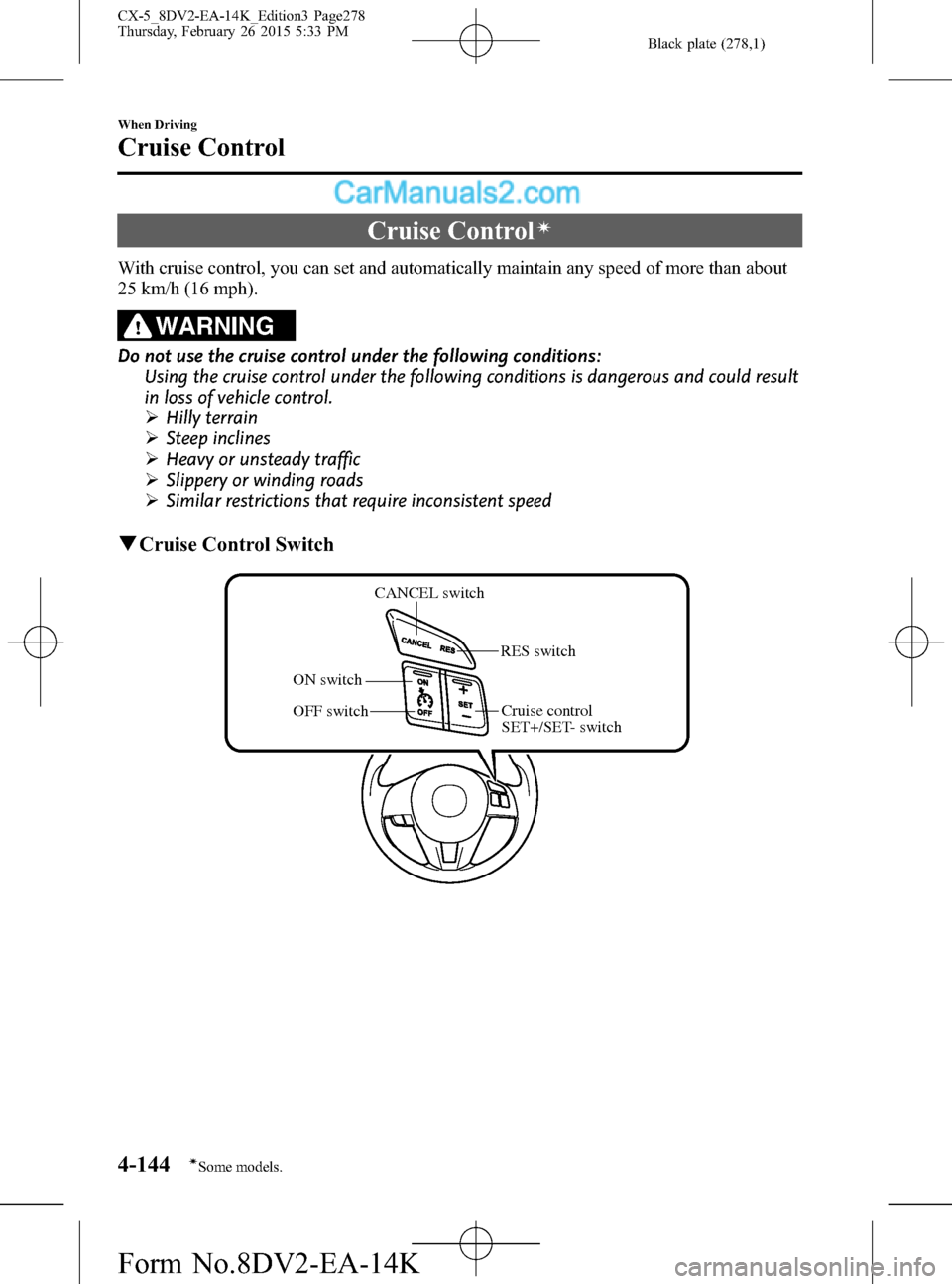
qCruise Control Switch
CANCEL switch
OFF switch ON switchRES switch
Cruise control
SET+/SET- switch
4-144
When Driving
íSome models.
Cruise Control
CX-5_8DV2-EA-14K_Edition3 Page278
Thursday, February 26 2015 5:33 PM
Form No.8DV2-EA-14K
Page 279 of 626
Black plate (279,1)
qActivation/Deactivation
To activate the system, press the ON
switch.
The cruise main indicator light (Amber)
illuminates.
Refer to Warning/Indicator Lights on page
4-20.
To deactivate the system, press the OFF
switch.
The cruise main indicator light (Amber)
turns off.
WARNING
Always turn off the cruise control
system when it is not in use:
Leaving the cruise control system in
an activation-ready state while the
cruise control is not in use is
dangerous as the cruise control could
unexpectedly activate if the
activation button is accidentally
pressed, and result in loss of vehicle
control and an accident.
NOTE
When the ignition is switched OFF, the system
status before it was turned off is maintained.
For example, if the ignition is switched OFF
with the cruise control system operable, the
system will be operable when the ignition is
switched ON the next time.
qTo Set Speed
1. Activate the cruise control system by
pressing the ON switch.
The cruise main indicator light
(Amber) illuminates. Refer to Warning/
Indicator Lights on page 4-20.
2. Accelerate to the desired speed, which
must be more than 25 km/h (16 mph).3. Set the cruise control by pressing the
SET
or SET - switch at the desired
speed. The cruise control is set at the
moment the SET
or SET - switch is
pressed. Release the accelerator pedal
simultaneously. The cruise set indicator
light (Green) illuminates.
NOTE
lThe cruise control speed setting cannot be
performed under the following conditions:
l(Automatic transaxle)
The selector lever is in the P or N
position.
l(Manual transaxle)
The shift lever is in the neutral position.
lThe parking brake is applied.lRelease the SETor SET - switch at the
desired speed, otherwise the speed will
continue increasing while the SET
switch is pressed and held, and continue
decreasing while the SET - switch is pressed
and held (except when the accelerator
pedal is depressed).
lOn a steep grade, the vehicle may
momentarily slow down while ascending,
or speed up while descending.
lCruise control will cancel if the vehicle
speed decreases below 21 km/h (13 mph)
when cruise is activated, such as when
climbing a steep grade.
lCruise control may cancel at about 15 km/h
(9 mph) below the preset speed (such as
may happen when climbing a long, steep
grade).
When Driving
Cruise Control
4-145
CX-5_8DV2-EA-14K_Edition3 Page279
Thursday, February 26 2015 5:33 PM
Form No.8DV2-EA-14K
Page 280 of 626

Black plate (280,1)
For the Type A instrument cluster, the
vehicle speed preset using the cruise
control is displayed in the instrument
cluster.
qTo Increase Cruising Speed
Follow either of these procedures.
To increase speed using cruise control
switch
Press the SET
switch and hold it. Your
vehicle will accelerate.
Release the switch at the speed you want.
Press the SET
and release it
immediately to adjust the preset speed.
Multiple operations will increase the
preset speed according to the number of
times it is operated.
Increasing speed with a single SET
operation
Meter display for vehicle speed indicated
in km/h: 1 km/h (0.6 mph)
Meter display for vehicle speed indicated
in mph: 1 mph (1.6 km/h)
To increase speed using accelerator
pedal
Depress the accelerator pedal to accelerate
to the desired speed. Press the SET
or
SET - switch and release it immediately.NOTE
Accelerate if you want to speed up temporarily
when the cruise control is on. Greater speed
will not interfere with or change the set speed.
Take your foot off the accelerator to return to
the set speed.
qTo Decrease Cruising Speed
Press the SET - switch and hold it. The
vehicle will gradually slow.
Release the switch at the speed you want.
Press the SET- switch and release it
immediately to adjust the preset speed.
Multiple operations will decrease the
preset speed according to the number of
times it is operated.
Decreasing speed with a single SET-
operation
Meter display for vehicle speed indicated
in km/h: 1 km/h (0.6 mph)
Meter display for vehicle speed indicated
in mph: 1 mph (1.6 km/h)
qTo Resume Cruising Speed at
More Than 25 km/h (16 mph)
If some other method besides the OFF
switch was used to cancel cruising speed
(such as applying the brake pedal) and the
system is still activated, the most recent
set speed will automatically resume when
the RES switch is pressed.
If vehicle speed is below 25 km/h (16
mph), increase the vehicle speed up to 25
km/h (16 mph) or more and press the RES
switch.
4-146
When Driving
Cruise Control
CX-5_8DV2-EA-14K_Edition3 Page280
Thursday, February 26 2015 5:33 PM
Form No.8DV2-EA-14K
Page 281 of 626

Black plate (281,1)
qTo Temporarily Cancel
To temporarily cancel the system, use one
of these methods:
lSlightly depress the brake pedal.l(Manual transaxle)
Depress the clutch pedal.
lPress the CANCEL switch.
If the RESUME switch is pressed when
the vehicle speed is 25 km/h (16 mph) or
higher, the system reverts to the
previously set speed.
NOTE
lIf any of the following conditions occur, the
cruise control system is temporarily
canceled.
lThe parking brake is applied.l(Automatic transaxle)
The selector lever is in the P or N
position.
l(Manual transaxle)
The shift lever is in the neutral position.
lWhen the cruise control system is
temporarily canceled by even one of the
applicable cancel conditions, the speed
cannot be re-set.
l(Automatic transaxle)
The cruise control cannot be cancelled
while driving in manual mode (selector
lever shifted from D to M position).
Therefore, engine braking will not be
applied even if the transaxle is shifted down
to a lower gear. If deceleration is required,
lower the set speed or depress the brake
pedal.
qTo Deactivate
To deactivate the system, press the OFF
switch.
When Driving
Cruise Control
4-147
CX-5_8DV2-EA-14K_Edition3 Page281
Thursday, February 26 2015 5:33 PM
Form No.8DV2-EA-14K
Page 535 of 626

Black plate (535,1)
qIf the security indicator light
illuminates or flashes
If the engine does not start with the
correct key, and the security indicator
light keeps illuminating or flashing, the
system may have a malfunction. Consult
an Authorized Mazda Dealer.
qIf the Mazda Radar Cruise
Control (MRCC) Warning Light
(Amber) illuminates
í
The warning light turns on if there is a
malfunction in the system while the
Mazda Radar Cruise Control (MRCC)
system is on. Have your vehicle inspected
at an Authorized Mazda Dealer.
qIf the blind spot monitoring
(BSM) system OFF indication/
indicator light illuminates
í
Type A
If the indication remains displayed even
though the Blind Spot Monitoring (BSM)
switch has been operated, it indicates a
problem in the system. Have your vehicle
inspected at an Authorized Mazda Dealer.
Type B
A problem in the system may be indicated
under the following conditions. Have your
vehicle inspected at an Authorized Mazda
Dealer.
lThe light does not turn on when the
ignition is switched ON.
lIt remains illuminated even though the
Blind Spot Monitoring (BSM) switch
has been switched off.
lIt turns on while driving the vehicle.
NOTE
If the vehicle is driven on a road with less
traffic and few vehicles that the radar sensors
can detect, the system may pause (The Blind
Spot Monitoring (BSM) OFF indication/
indicator light in the instrument cluster
illuminates). However, it does not indicate a
malfunction.
If Trouble Arises
Warning/Indicator Lights and Warning Sounds
7-33íSome models. CX-5_8DV2-EA-14K_Edition3 Page535
Thursday, February 26 2015 5:35 PM
Form No.8DV2-EA-14K
Page 540 of 626

Black plate (540,1)
qMazda Radar Cruise Control
(MRCC) System Warningsí
The Mazda Radar Cruise Control
(MRCC) system warnings notify the
driver of system malfunctions and
cautions on use when required.
Check based on the beep sound.
Cautions What to check
The beep sounds 1 time
while the Mazda Radar
Cruise Control (MRCC)
is operatingThe vehicle speed is
slower than 25 km/h
(16 mph) and the Mazda
Radar Cruise Control
(MRCC) system has been
canceled.
The beep continues to
sound while the vehicle
is being driven.The distance between
your vehicle and the
vehicle ahead is too
close. Verify the safety of
the surrounding area and
reduce vehicle speed.
When the Mazda Radar
Cruise Control (MRCC)
is operating, the beep
sounds and the Mazda
Radar Cruise Control
(MRCC) warning light
(amber) in the instrument
cluster turns on.A malfunction in the
system may be indicated.
Have your vehicle
inspected at an
Authorized Mazda
Dealer.
qCollision warningí
If there is the possibility of a collision
with a vehicle ahead, the beep sounds
continuously and a warning is indicated in
the display.
qPower Steering Warning Buzzer
If the power steering system has a
malfunction, the power steering
malfunction light turns on or flashes and
the buzzer operates at the same time.
Refer to Warning/Indicator Lights on page
4-20.
qElectric Parking Brake Warning
Beep
The warning buzzer is activated under the
following conditions:
lThe vehicle is driven with the electric
parking brake applied.
lThe electric parking brake switch is
pulled while the vehicle is driven.
7-38
If Trouble Arises
íSome models.
Warning/Indicator Lights and Warning Sounds
CX-5_8DV2-EA-14K_Edition3 Page540
Thursday, February 26 2015 5:35 PM
Form No.8DV2-EA-14K