ignition MAZDA MODEL CX-5 2018 (in English) User Guide
[x] Cancel search | Manufacturer: MAZDA, Model Year: 2018, Model line: MODEL CX-5, Model: MAZDA MODEL CX-5 2018Pages: 628, PDF Size: 82.38 MB
Page 79 of 628
NOTE
The driver must carry the key to ensure the
system functions properly.
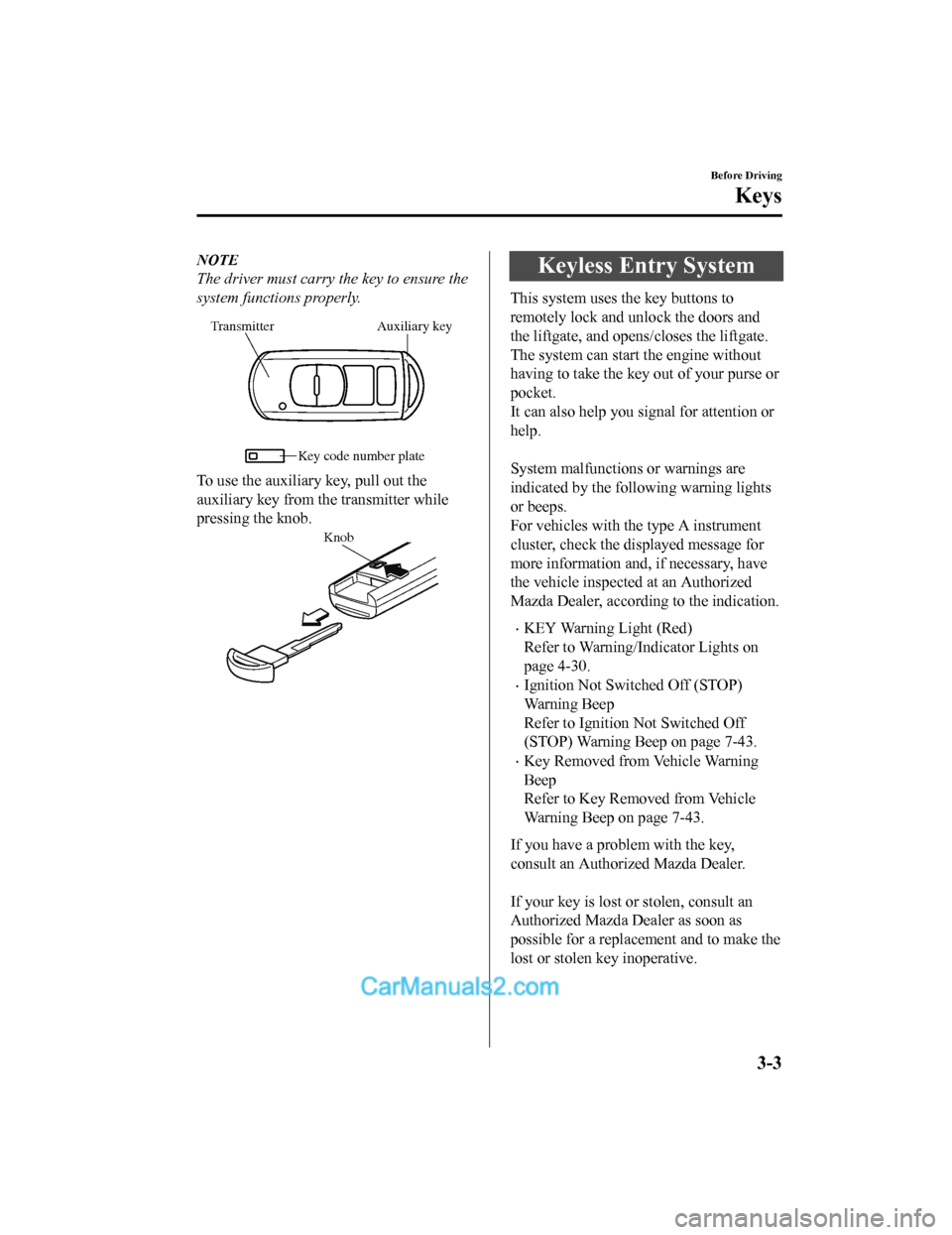
Auxiliary key
Transmitter
Key code number plate
To use the auxiliary key, pull out the
auxiliary key from th e transmitter while
pressing the knob.
Knob
Keyless Entry System
This system uses the key buttons to
remotely lock and unlock the doors and
the liftgate, and opens/closes the liftgate.
The system can start the engine without
having to take the key out of your purse or
pocket.
It can also help you signal for attention or
help.
System malfunctions or warnings are
indicated by the following warning lights
or beeps.
For vehicles with the type A instrument
cluster, check the displayed message for
more information and, if necessary, have
the vehicle inspected at an Authorized
Mazda Dealer, according to the indication.
•KEY Warning Light (Red)
Refer to Warning/Indicator Lights on
page 4-30.
•Ignition Not Switched Off (STOP)
Warning Beep
Refer to Ignition Not Switched Off
(STOP) Warning Beep on page 7-43.
•Key Removed from Vehicle Warning
Beep
Refer to Key Removed from Vehicle
Warning Beep on page 7-43.
If you have a problem with the key,
consult an Authorized Mazda Dealer.
If your key is lost or stolen, consult an
Authorized Mazda Dealer as soon as
possible for a replacement and to make the
lost or stolen k ey inoperative.
Before Driving
Keys
3-3
CX-5_8GN5-EA-17J_Edition1 2017-8-18 12:58:27
Page 80 of 628
CAUTION
Radio equipment like this is governed by
laws in the United States.
Changes or modifications not expressly
approved by the party responsible for
compliance could void the user's authority
to operate the equipment.
NOTE
•The keyless entry system operation may
vary due to local conditions.
•The keyless entry system is fully
operational (door/liftgate lock/unlock)
when the ignition is switched off. The
system does not operate if the ignition is
switched to any position other than off.
•If the key does not operate when
pressing a button or the operational
range becomes too small, the battery
may be weak. To install a new battery,
refer to Key Battery Replacement (page
6-29).
•Battery life is about one year. Replace
the battery with a new one if the KEY
indicator light (green) flashes in the
instrument cluster (for vehicles with a
type A instrument cluster (page 4-30),
messages are displayed in the
instrument cluster). Replacing the
battery about once a year is
recommended because the KEY warning
light/indicator light may not illuminate
or flash depending on the rate of battery
depletion.
•Additional keys can be obtained at an
Authorized Mazda Dealer. Up to 6 keys
can be used with the keyless functions
per vehicle. Bring all keys to an
Authorized Mazda Dealer when
additional keys are required.
▼Tr a n s m i t t e r
Operation buttons
Operation indicator light
NOTE
•The headlights turn on/off by operating
the transmitter. Refer to Leaving Home
Light on page 4-50.
•(With the advanced keyless function)
A beep sound can be heard for
confirmation when the doors and the
liftgate are locked/unlocked using the
key. If you prefer, the beep sound can be
turned off.
The volume of the beep sound can also
be changed.
Refer to Personalization Features on
page 9-9.
Use the following procedure to change the
setting.
1. Switch the ignition off and close all of the doors and the liftgate.
2. Open the driver's door.
Before Driving
Keys
3-4
CX-5_8GN5-EA-17J_Edition1 2017-8-18 12:58:27
Page 82 of 628
Unlock button
To unlock the driver's door, press the
unlock button and the hazard warning
lights will flash twice.
(With the advanced keyless function)
A beep sound will be heard twice.
To unlock all doors and the liftgate, press
the unlock button again within three
seconds and two more beep sounds will be
heard.
NOTE
•The system can be set to unlock all
doors by performing a single operation.
Refer to Personalization Features on
page 9-9.
Use the following procedure to change
the setting.
1. Switch the ignition off and close allof the doors and the liftgate.
2. Open the driver's door.
3. Within 30 seconds of opening the driver's door, press and hold the
UNLOCK button on the key for 5
seconds or longer (the sound of the
doors locking/unlocking can be
heard).
After this, the system switches the
setting each time the UNLOCK
button is pressed (the sound of the
doors locking/unlocking can be
heard).
4. The setting change is completed bydoing any one of the following:
•Switching the igni tion to ACC or
ON.
•Closing the driver's door.
•Opening the liftgate.
•Not operating the key for ten
seconds.
•Pressing any button except the
UNLOCK button on the key.
•Pressing a request switch.
•(Auto re-lock function)
After unlocking with the key, all doors
and the liftgate will automatically lock if
any of the following operations are not
performed within about 60 seconds.
The time required for the doors to lock
automatically can be changed.
Refer to Personalization Features on
page 9-9.
•A door or the liftgate is opened.
•The ignition is switched to any
position other than off.
Before Driving
Keys
3-6
CX-5_8GN5-EA-17J_Edition1 2017-8-18 12:58:27
Page 83 of 628
Power liftgate button*
To open/close the liftgate, press the power
liftgate button for one second or more with
the liftgate in the fully closed/open
position.
The hazard warning lights flash twice and
the liftgate opens/closes after the beep
sounds.
Panic button
If you witness from a distance someone
attempting to break into or damage your
vehicle, press and hold the panic button to
activate the vehicle's alarm. Call
emergency services if necessary.
NOTE
The panic button will work whether any
door or the liftgate is open or closed.
(Turning on the alarm)
Pressing the panic button for 1 second or
more will trigger the alarm for about 2
minutes and 30 seconds, and the following
will occur:
•The horn sounds intermittently.
•The hazard warning lights flash.
(Turning off the alarm)
The alarm stops by pressing any button on
the key.
▼ Operational Range
The system operates only when the driver
is in the vehicle or
within operational
range while the key is being carried.
Starting the Engine
NOTE
•Starting the engine may be possible even
if the key is outside of the vehicle and
extremely close to a door and window,
however, always start the engine from
the driver's seat.
If the vehicle is started and the key is not
in the vehicle, the vehicle will not restart
after it is shut off and the ignition is
switched to off.
•The luggage compartment is out of the
assured operational range, however, if
the key (transmitter) is operable the
engine will start.
With the advanced keyless function
Interior antenna
Operational range
Before Driving
Keys
*Some models.3-7
CX-5_8GN5-EA-17J_Edition1 2017-8-18 12:58:27
Page 88 of 628
•If the key is left in the following areas
and you leave the vehicle, the doors may
be locked depending on the radio wave
conditions even if the key is left in the
vehicle.
•Around the dashboard
•In the storage compartments such as
the glove compartment or the center
console
•Next to a communication device such
as a mobile phone
•When the ignition is switched to ACC or
ON, the vehicle lock-out prevention
feature prevents you from locking
yourself out of the vehicle.
All doors and the liftgate will
automatically unlock if they are locked
using the power door locks with any
door or the liftgate open.
The vehicle lock-out prevention feature
does not operate while the ignition is
switched off.
When all doors and the liftgate are
locked using the power door lock with
any door or the liftgate open, the closed
doors and the liftgate are locked. After
that, when all doors and the liftgate are
closed, all doors and the liftgate are
locked. However, if the key is inside the
vehicle, all doors and the liftgate are
automatically unlocked.
(With the advanced keyless function)
The beep sound is heard for about 10
seconds to notify the driver that the key
has been left in the vehicle.
(Without the advanced keyless
function)
The horn sound is heard twice to notify
the driver that the key has been left in
the vehicle.
•(Door unlock (control) system with
collision detection)
This system automatically unlocks the
doors and the liftgate in the event the
vehicle is involved in an accident to
allow passengers to get out of the
vehicle immediately and prevent being
trapped inside. While the ignition is
switched ON and in the event the vehicle
receives an impact strong enough to
inflate the air bags, all the doors and the
liftgate are automatically unlocked after
about 6 seconds have elapsed from the
time of the accident.
The doors and the liftgate may not
unlock depending on how an impact is
applied, the force of the impact, and
other conditions of the accident.
If door-related systems or the battery is
malfunctioning, the doors and the
liftgate will not unlock.
Before Driving
Doors and Locks
3-12
CX-5_8GN5-EA-17J_Edition12017-8-18 12:58:27
Page 89 of 628
▼Locking, Unlocking with Request
Switch (With the advanced keyless
function)
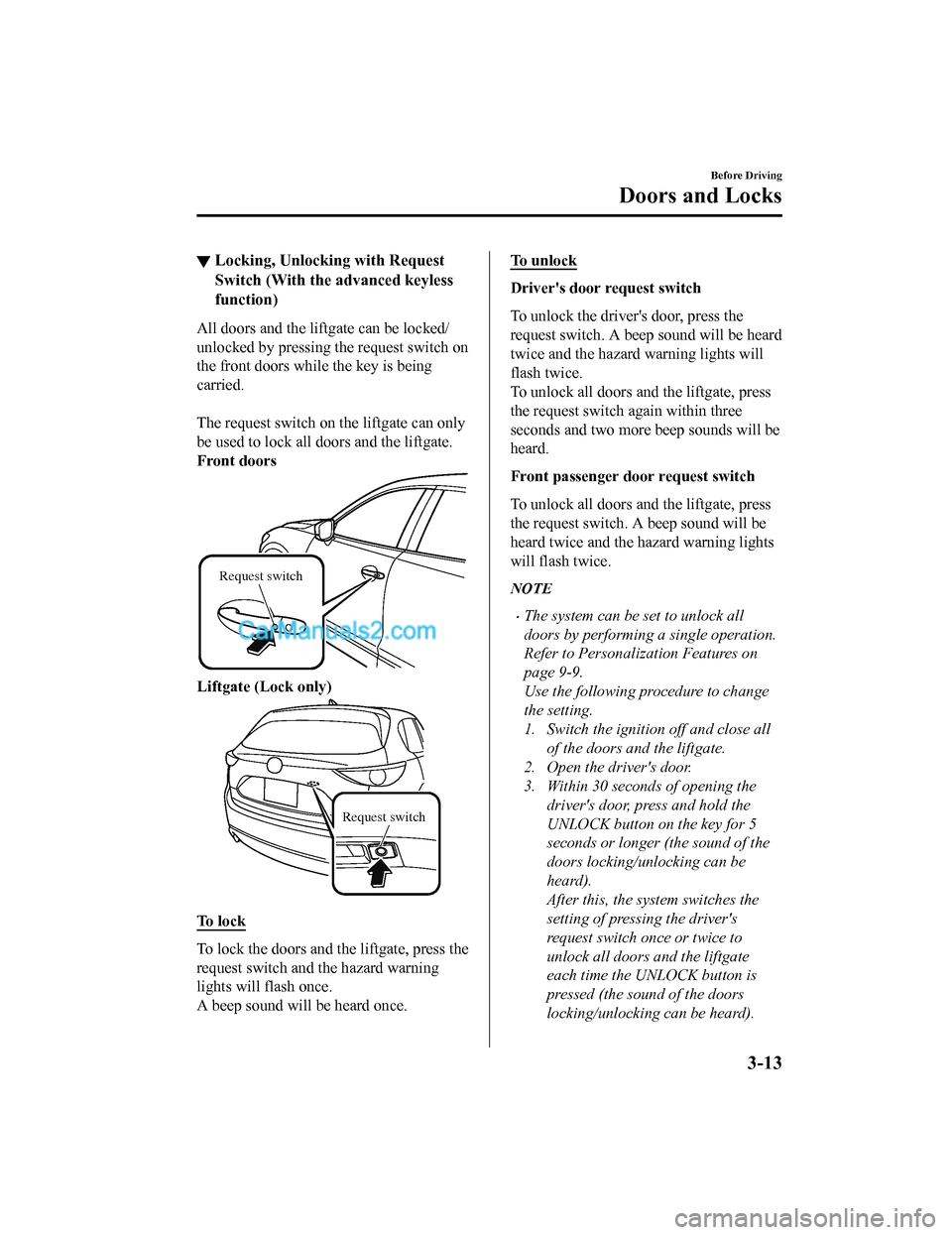
All doors and the liftgate can be locked/
unlocked by pressing the request switch on
the front doors while the key is being
carried.
The request switch on the liftgate can only
be used to lock all doors and the liftgate.
Front doors
Request switch
Liftgate (Lock only)
Request switch
To l o c k
To lock the doors and th
e liftgate, press the
request switch and the hazard warning
lights will flash once.
A beep sound will be heard once.
To unlock
Driver's door request switch
To unlock the driver's door, press the
request switch. A beep sound will be heard
twice and the hazard warning lights will
flash twice.
To unlock all doors and the liftgate, press
the request switch again within three
seconds and two more beep sounds will be
heard.
Front passenger doo r request switch
To unlock all doors and the liftgate, press
the request switch. A beep sound will be
heard twice and the hazard warning lights
will flash twice.
NOTE
•The system can be set to unlock all
doors by performing a single operation.
Refer to Personalization Features on
page 9-9.
Use the following procedure to change
the setting.
1. Switch the ignition off and close all of the doors and the liftgate.
2. Open the driver's door.
3. Within 30 seconds of opening the driver's door, press and hold the
UNLOCK button on the key for 5
seconds or longer (the sound of the
doors locking/unlocking can be
heard).
After this, the system switches the
setting of pressing the driver's
request switch once or twice to
unlock all doors and the liftgate
each time the UNLOCK button is
pressed (the sound of the doors
locking/unlocking can be heard).
Before Driving
Doors and Locks
3-13
CX-5_8GN5-EA-17J_Edition1 2017-8-18 12:58:27
Page 90 of 628
4. The setting change is completed bydoing any one of the following:
•Switching the ignition to ACC or
ON.
•Closing the driver's door.
•Opening the liftgate.
•Not operating the key for ten
seconds.
•Pressing any button except the
UNLOCK button on the key.
•Pressing a request switch.
•Confirm that all doors and the liftgate
are securely locked.
For the liftgate, move it without pressing
the electric liftgate opener to verify that
the liftgate has not been left ajar.
•All doors and the liftgate cannot be
locked when any door or the liftgate is
open.
•It may require a few seconds for the
doors to unlock after the request switch
is pressed.
•A beep sound is heard for confirmation
when the doors and the liftgate are
locked/unlocked using the request
switch. If you prefer, the beep sound can
be turned off.
The volume of the beep sound can also
be changed. Refer to Personalization
Features on page 9-9.
Use the following procedure to change
the setting.
1. Switch the ignition off and close allof the doors and the liftgate.
2. Open the driver's door.
3. Within 30 seconds of opening the driver's door, press and hold the
LOCK button on the key for 5
seconds or longer (All of the doors
and the liftgate are locked and
unlocked when the LOCK button on
the key is pressed and held for 5
seconds.).
The beep sound activates at the
currently set volume. The setting
changes each time the LOCK button
on the key is pressed and the beep
sound activates at the set volume. (If
the beep sound has been set to not
activate, it will not activate.)
4. The setting change is completed by
doing any one of the following:
•Switching the igni tion to ACC or
ON.
•Closing the driver's door.
•Opening the liftgate.
•Not operating the key for ten
seconds.
•Pressing any button except the
LOCK button on the key.
•Pressing a request switch.
•
Before Driving
Doors and Locks
3-14
CX-5_8GN5-EA-17J_Edition1 2017-8-18 12:58:27
Page 91 of 628
•The setting can be changed so that the
doors and the liftgate are locked
automatically without pressing the
request switch.
Refer to Personalization Features on
page 9-9.
(Auto-lock function)
A beep sound is heard when all doors
and the liftgate are closed while the
advanced key is being carried. All doors
and the liftgate are locked automatically
after about three seconds when the
advanced key is out of the operational
range. Also, the hazard warning lights
flash once. (Even if the driver is in the
operational range, all doors and the
liftgate are locked automatically after
about 30 seconds.) If you are out of the
operational range before the doors and
the liftgate are completely closed or
another key is left in the vehicle, the
auto-lock function will not work. Always
make sure that all doors and the liftgate
are closed and locked before leaving the
vehicle. The auto-lock function does not
close the power windows.
•Auto re-lock function
After unlocking with the request switch,
all doors and the liftgate will
automatically lock if any of the
following operations are not performed
within about 60 seconds.
The time required for the doors to lock
automatically can be changed.
Refer to Personalization Features on
page 9-9.
•Opening a door or the liftgate.
•Switching the ignition to any position
other than off.
▼ Locking, Unlocking with
Transmitter
All doors and the liftgate can be locked/
unlocked by operating the keyless entry
system transmitter,
refer to Keyless Entry
System (page 3-3).
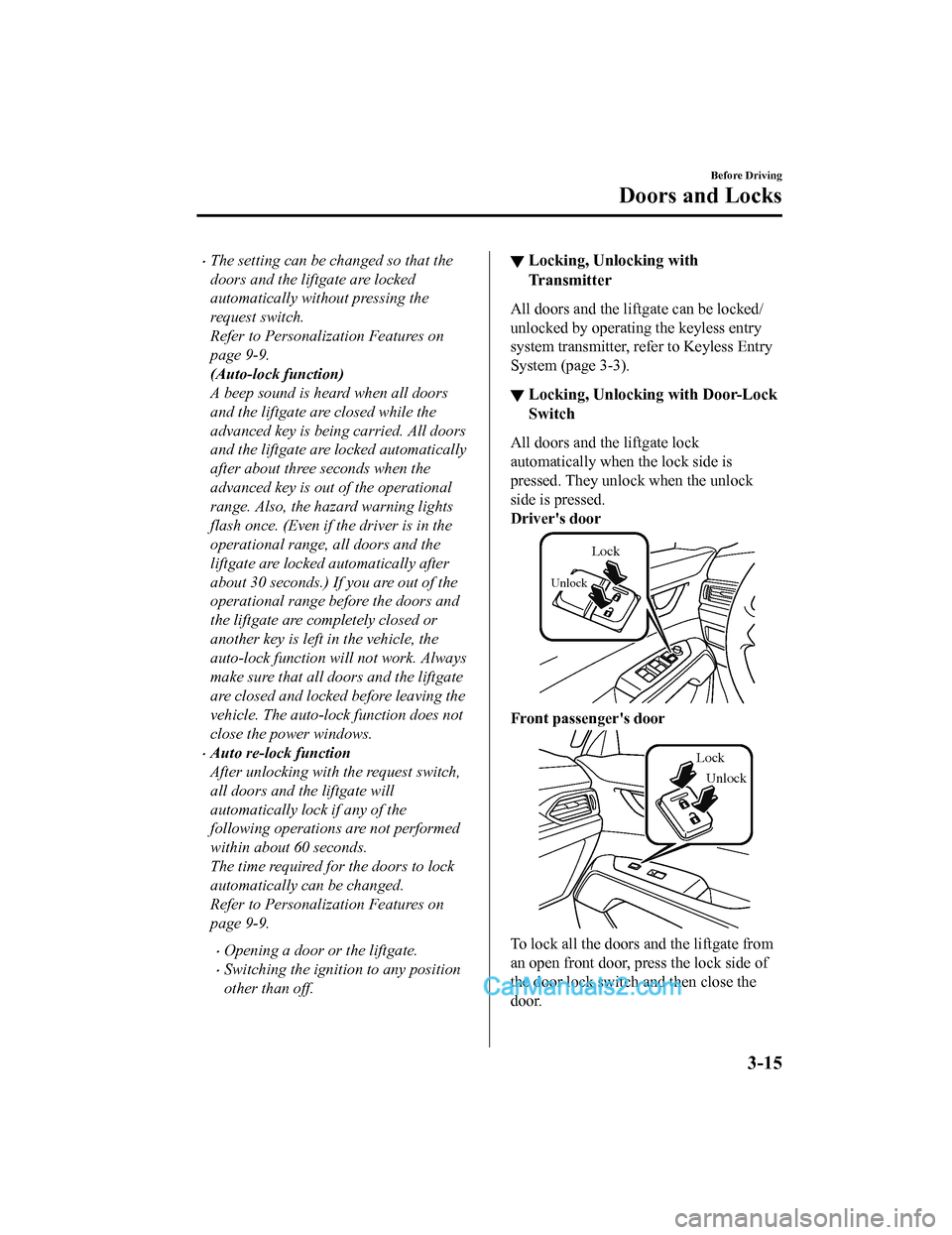
▼ Locking, Unlocking with Door-Lock
Switch
All doors and the liftgate lock
automatically when the lock side is
pressed. They unlock when the unlock
side is pressed.
Driver's door
Unlock
Lock
Front passenger's door
Unlock
Lock
To lock all the doors and the liftgate from
an open front door, press the lock side of
the door lock switch and then close the
door.
Before Driving
Doors and Locks
3-15
CX-5_8GN5-EA-17J_Edition1
2017-8-18 12:58:27
Page 92 of 628

NOTE
When locking the doors this way, be
careful not to leave the key inside the
vehicle.
▼Auto Lock/Unlock Function
WA R N I N G
Do not pull the inner handle on a front
door:
Pulling the inner handle on a front door
while the vehicle is moving is dangerous.
Passengers can fall out of the vehicle if the
door opens accidentally , which could
result in death or serious injury.
•When the vehicle speed exceeds 20
km/h (12 mph), all d
oors and the liftgate
lock automatically.
•When the ignition is switched off, all
doors and the liftgate unlock
automatically.
These functions can also be disabled so
that they do not operate.
Auto lock/unlock function setting
change using door-lock switch
The doors and the liftgate can be set to
lock or unlock automatically by selecting
any one of the functions from the
following table and using the driver's
door-lock switch on the interior door
panel.
NOTE
•Function number 3 in the following
table is the factory setting for your
vehicle.
•There are only a total of six auto lock/
unlock settings available. Be sure to
press the unlock side of the driver's
door-lock switch the correct number of
times according to the selected function
number. If the switch is mistakenly
pressed seven times, the procedure will
be cancelled. If this occurs, start the
procedure from the beginning.
Function
number Function*1
1The auto door-lock
function is disa-
bled.
2 All the doors and th
e liftgate lock au-
tomatically when the vehicle speed is
about 20 km/h (12 mph) or more.
3 (Factory Setting) All the doors and th
e liftgate lock au-
tomatically when the vehicle speed is
about 20 km/h (12 mph) or more. All
the doors and the liftgate unlock
when the ignition is switched from
ON to Off.
4 When the ignition is switched ON
and the selector lever is shifted from
park (P) to any other gear position, all
the doors and the liftgate lock auto-
matically.
5 When the ignition is switched ON
and the selector lever is shifted from
park (P) to any other gear position, all
the doors and the liftgate lock auto-
matically.
When the selector lever is shifted to
park (P) while the ignition is switched
ON, all the doors an
d the liftgate un-
lock automatically.
Before Driving
Doors and Locks
3-16
CX-5_8GN5-EA-17J_Edition1 2017-8-18 12:58:27
Page 93 of 628

Functionnumber Function*1
6All the doors and the liftgate lock au-
tomatically when the vehicle speed is
about 20 km/h (12 mph) or more.
When the selector lever is shifted to
park (P) while the ignition is switched
ON, all the doors and the liftgate un-
lock automatically.
*1 Other settings for the auto door lock function are
available at an Authorized Mazda Dealer. For
details consult an Aut horized Mazda Dealer.
Refer to Personalization Features on page 9-9.
Settings can be changed using the
following procedure.
1. Safely park the vehicle. All doors and
the liftgate must remain closed.
2. Switch the ignition ON.
3. Press and hold the lock side of the driver's door-lock switch within 20
seconds of switching the ignition ON,
and make sure a beep sound is heard
about eight seconds afterwards.
4. Refer to the auto lock/unlock function
setting table, determine the function
number for the desired setting. Press
the unlock side of the driver's
door-lock switch the same number of
times as the selected function number
(Ex. If you select f unction 2, press the
unlock side of the switch only 2 times).
5. Three seconds after the function
setting has been changed, a beep sound
will beep in the amount of the selected
function number. (Ex. Function
number 3 = 3 beep sounds)
Press unlock side of
lock switch once
Press 2 times
Press 3 times
Current Function Number
Function Number 1
Function Number 2
Press 4 times
Function Number 3
Press 5 times
Function Number 4
Press 7 times
Function Number 5
Press 6 times
Function Number 6
Cancel setting Cancel setting
Function set (The
number of beeps
heard is the same as
the selected function
number)
Press lock side of
lock switch
Wait for 3 second
NOTE
•The doors and the liftgate cannot be
locked or unlocked while the setting
function is being performed.
•The procedure can be cancelled by
pressing the lock side of the driver's
door-lock switch.
Before Driving
Doors and Locks
3-17
CX-5_8GN5-EA-17J_Edition1 2017-8-18 12:58:27