ignition MAZDA MODEL CX-5 2018 (in English) Repair Manual
[x] Cancel search | Manufacturer: MAZDA, Model Year: 2018, Model line: MODEL CX-5, Model: MAZDA MODEL CX-5 2018Pages: 628, PDF Size: 82.38 MB
Page 192 of 628
•If the headlight switch and the
windshield wiper switch are in
,
and the wipers are operated at low or
high speed by the auto wiper control for
several seconds, bad weather conditions
are determined and the headlights may
be turned on.
•The auto-wiper control functions can be
turned off. Refer to Personalization
Features on page 9-9.
▼ Windshield Washer
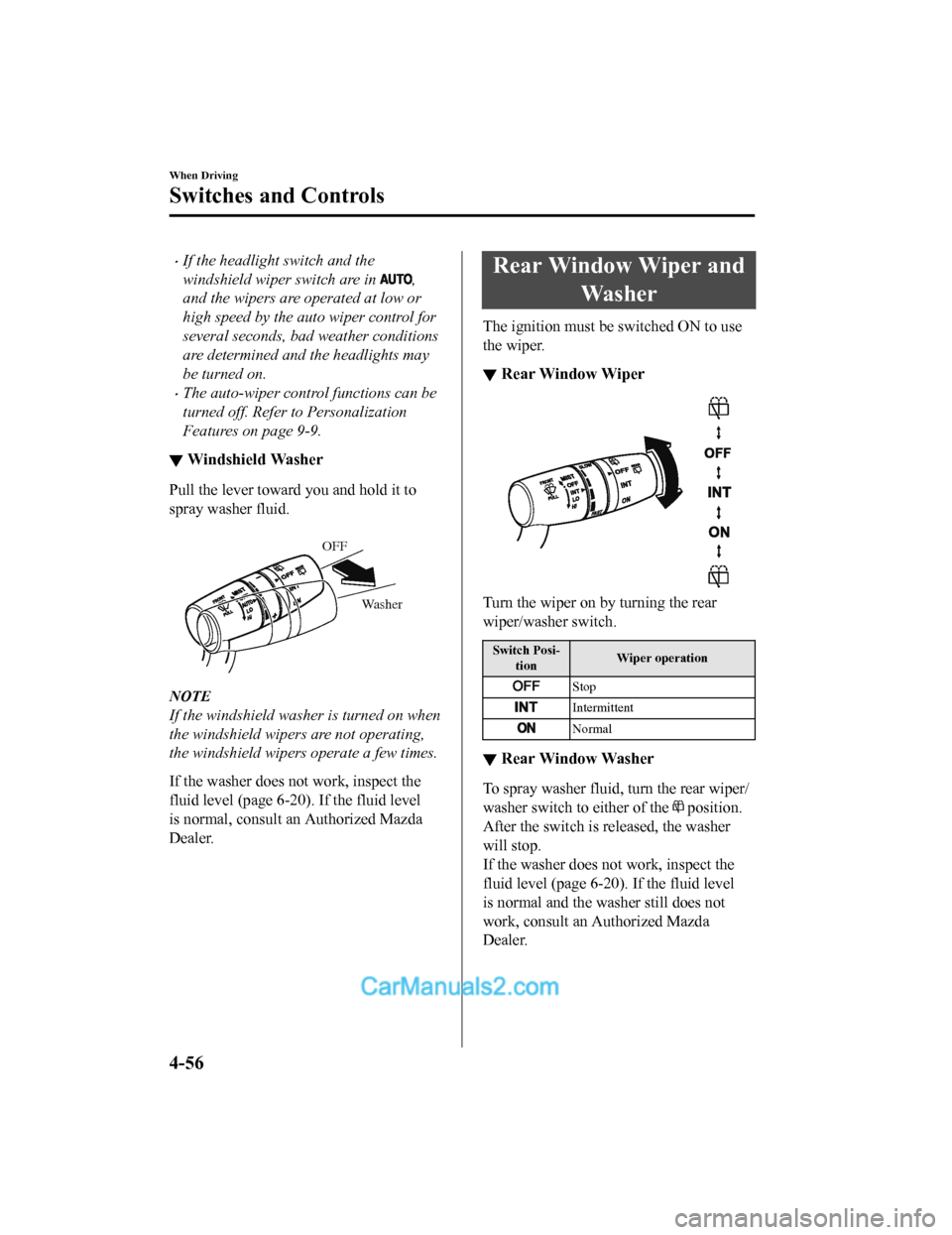
Pull the lever toward
you and hold it to
spray washer fluid.
Washer
OFF
NOTE
If the windshield washer is turned on when
the windshield wipers are not operating,
the windshield wipers operate a few times.
If the washer does not work, inspect the
fluid level (page 6-20). If the fluid level
is normal, consult an Authorized Mazda
Dealer.
Rear Window Wiper and
Wa s h e r
The ignition must be switched ON to use
the wiper.
▼Rear Window Wiper
Turn the wiper on by turning the rear
wiper/washer switch.
Switch Posi-
tion Wiper operation
Stop
Intermittent
Normal
▼
Rear Window Washer
To spray washer fluid,
turn the rear wiper/
washer switch to either of the
position.
After the switch is released, the washer
will stop.
If the washer does no t work, inspect the
fluid level (page 6-20). If the fluid level
is normal and the washer still does not
work, consult an Authorized Mazda
Dealer.
When Driving
Switches and Controls
4-56
CX-5_8GN5-EA-17J_Edition1 2017-8-18 12:58:27
Page 193 of 628
Rear Window Defogger
The rear window defogger clears fog from
the rear window.
The ignition must be switched ON to use
the defogger.
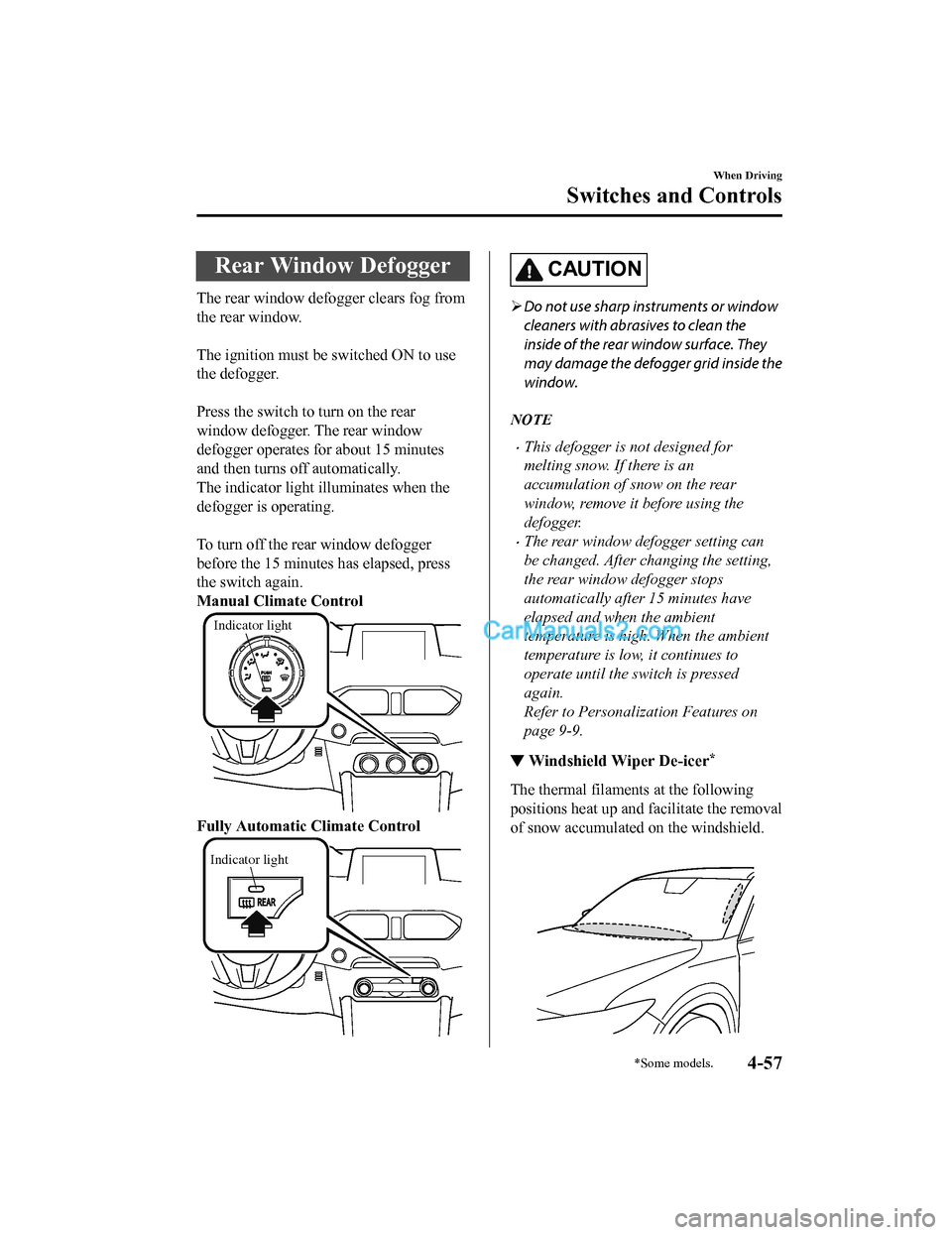
Press the switch to turn on the rear
window defogger. The rear window
defogger operates for about 15 minutes
and then turns off automatically.
The indicator light illuminates when the
defogger is operating.
To turn off the rear window defogger
before the 15 minutes has elapsed, press
the switch again.
Manual Climate Control
Indicator light
Fully Automatic Climate Control
Indicator light
CAUTION
Do not use sharp instruments or window
cleaners with abrasives to clean the
inside of the rear window surface. They
may damage the defogger grid inside the
window.
NOTE
•This defogger is not designed for
melting snow. If there is an
accumulation of snow on the rear
window, remove it before using the
defogger.
•The rear window defogger setting can
be changed. After changing the setting,
the rear window defogger stops
automatically after 15 minutes have
elapsed and when the ambient
temperature is high. When the ambient
temperature is low, it continues to
operate until the switch is pressed
again.
Refer to Personalization Features on
page 9-9.
▼ Windshield Wiper De-icer*
The thermal filaments
at the following
positions heat up and facilitate the removal
of snow accumulated on the windshield.
When Driving
Switches and Controls
*Some models.4-57
CX-5_8GN5-EA-17J_Edition1 2017-8-18 12:58:27
Page 194 of 628

The windshield wiper de-icer operates in
conjunction with the rear window
defogger.
To turn on the windshield wiper de-icer,
switch the ignition ON and press the rear
window defogger switch (page 4-57).
Manual Climate Control
Indicator light
Fully Automatic Climate Control
Indicator light
▼ Mirror Defogger*
The mirror defoggers defrost the outside
mirrors.
The mirror defoggers operate in
conjunction with the rear window
defogger.
To turn on the mirror defoggers, switch the
ignition ON and press the rear window
defogger switch (page 4-57).
Manual Climate Control
Indicator light
Fully Automatic Climate Control
Indicator light
When Driving
Switches and Controls
4-58*Some models.
CX-5_8GN5-EA-17J_Edition1
2017-8-18 12:58:27
Page 201 of 628
▼Electric Parking Brake (EPB)
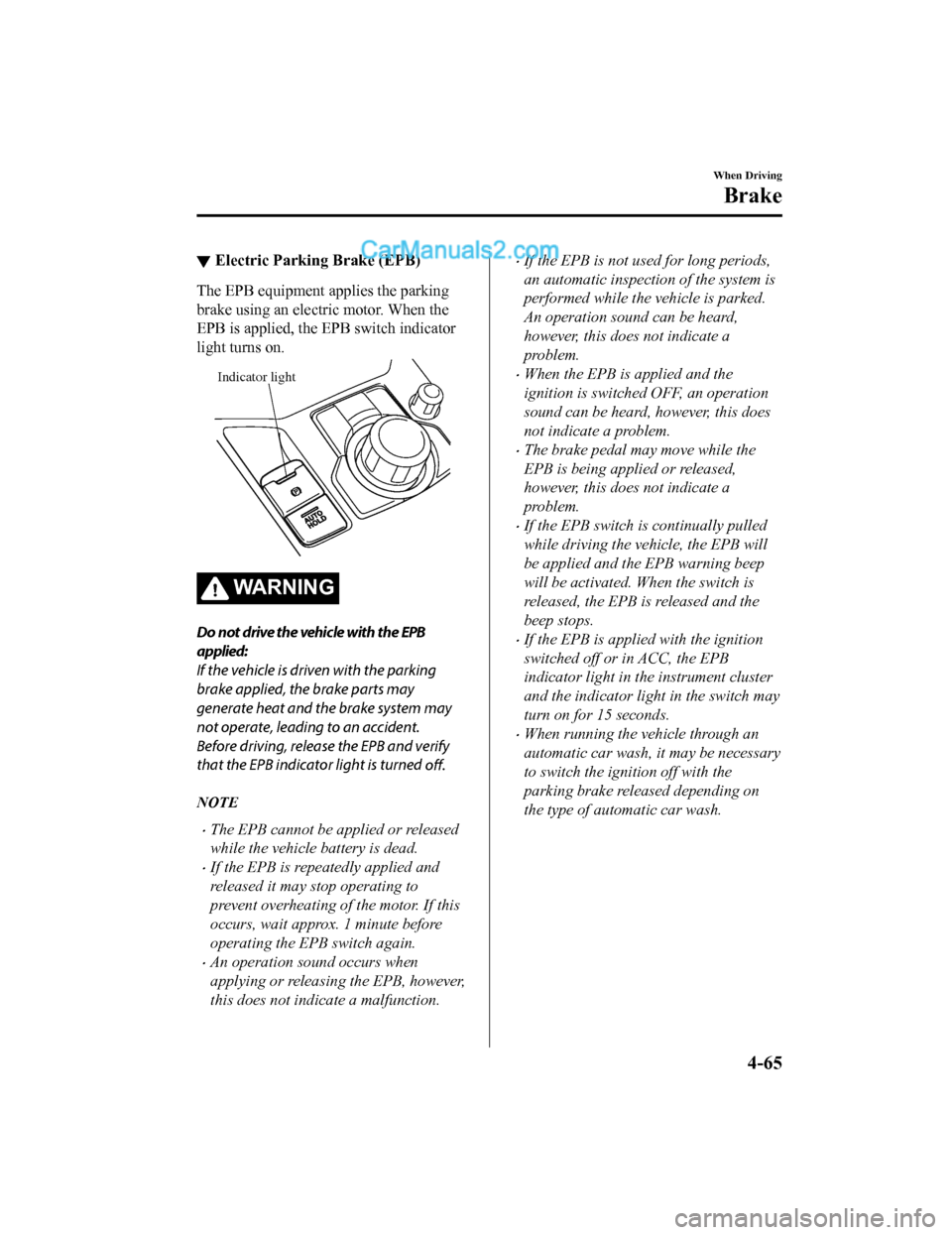
The EPB equipment applies the parking
brake using an electric motor. When the
EPB is applied, the EPB switch indicator
light turns on.
Indicator light
WA R N I N G
Do not drive the vehicle with the EPB
applied:
If the vehicle is driven with the parking
brake applied, the brake parts may
generate heat and the brake system may
not operate, leading to an accident.
Before driving, release the EPB and verify
that the EPB indicator light is turned
off.
NOTE
•The EPB cannot be applied or released
while the vehicle battery is dead.
•If the EPB is repeatedly applied and
released it may stop operating to
prevent overheating of the motor. If this
occurs, wait approx. 1 minute before
operating the EPB switch again.
•An operation sound occurs when
applying or releasing the EPB, however,
this does not indicate a malfunction.
•If the EPB is not used for long periods,
an automatic inspection of the system is
performed while the vehicle is parked.
An operation sound can be heard,
however, this does not indicate a
problem.
•When the EPB is applied and the
ignition is switched OFF, an operation
sound can be heard, however, this does
not indicate a problem.
•The brake pedal may move while the
EPB is being applied or released,
however, this does not indicate a
problem.
•If the EPB switch is continually pulled
while driving the vehicle, the EPB will
be applied and the EPB warning beep
will be activated. When the switch is
released, the EPB is released and the
beep stops.
•If the EPB is applied with the ignition
switched off or in ACC, the EPB
indicator light in the instrument cluster
and the indicator light in the switch may
turn on for 15 seconds.
•When running the vehicle through an
automatic car wash, it may be necessary
to switch the ignition off with the
parking brake released depending on
the type of automatic car wash.
When Driving
Brake
4-65
CX-5_8GN5-EA-17J_Edition1 2017-8-18 12:58:27
Page 202 of 628

When applying the EPB
The EPB can be applied regardless of the
ignition switch position.
Securely depress the brake pedal and pull
up the EPB switch.
The EPB is applied and the EPB indicator
light and the EPB switch indicator light
turn on.
Refer to Warning/Indicator Lights on page
4-30.
When releasing the EPB
The EPB can be released while the
ignition is switched ON or the engine is
running. When the EPB is released, the
EPB indicator light and the EPB switch
indicator light turn off.
EPB manual release
Firmly depress the brake pedal and press
the EPB switch.
If the EPB switch is pressed without
depressing the brake pedal, the display or
indicator light in the instrument cluster
notifies the driver that the brake is not
depressed.
(Type A instrument cluster)
A message is displayed on the
multi-information display in the
instrument cluster.
Refer to Message Indicated in
Multi-information Display on page 7-38.
(Type B instrument cluster)
The brake pedal operation demand
indicator light (green) in the instrument
cluster turns on.
(Green)
When Driving
Brake
4-66
CX-5_8GN5-EA-17J_Edition12017-8-18 12:58:27
Page 206 of 628

Always apply the electric parking brake (EPB) when parking the vehicle:
Not applying the electric parking brake (EPB) when parking the vehicle is dangerous as the
vehicle may move unexpectedly and result in an accident. When parking the vehicle, shift the
selector lever to the P position (automatic tr ansaxle vehicle) and apply the electric parking
brake (EPB).
CAUTION
If you stop operating the accelerator pedal befo re the vehicle starts moving, the force holding
the vehicle in the stopped position may weaken. Firmly depress the brake pedal or depress the
accelerator pedal to accelerate the vehicle.
NOTE
•Under the following conditions, a problem wi th the AUTOHOLD is occurring. Have your
vehicle inspected at an Authorized Mazda Dealer as soon as possible.
•The brake pedal operation demand warning ligh t (red) in the instrument cluster flashes
and the warning sound is activated for about five seconds while the AUTOHOLD is
operating or when you press the AUTOHOLD switch.
•A message is indicated on the multi-information display and a warning sound is
activated for about five seconds while the AUTOHOLD is operating or when your press
the AUTOHOLD switch.
•If you switch the ignition OFF while the AUTOHOLD is operating, the electric parking
brake (EPB) is applied automatically to assist you with parking the vehicle.
•The AUTOHOLD is canceled when the selector lever is shifted to R while the vehicle is on
level ground, or facing up a hill or grade (as shown below).
Level ground
: Driving in reverse (selector lever in R)
Vehicle tilts forward Vehicle tilts rearward
AUTOHOLD :
Operates AUTOHOLD :
Does not operate,
canceled
AUTOHOLD :
Does not operate,
canceled
When Driving
Brake
4-70
CX-5_8GN5-EA-17J_Edition1 2017-8-18 12:58:27
Page 207 of 628

▼AUTOHOLD System is Turned On
Press the AUTOHOLD
switch and when
the AUTOHOLD standby indicator light
turns on, the AUTOHOLD function turns
on.
AUTOHOLD standby
indicator light
NOTE
When all of the following conditions are
met, the AUTOHOLD standby indicator
light turns on when the AUTOHOLD
switch is pressed and the AUTOHOLD
function turns on.
•The ignition is switched ON (engine is
running).
•The driver's seat belt is fastened.
•The driver's door is closed.
•There is no problem with the
AUTOHOLD function.
To operate AUTOHOLD and hold the
brakes
1. Depress the brake pedal and bring the vehicle to a complete stop.
2. The AUTOHOLD active indicator
light in the instrume nt cluster turns on
and the brakes are held.
3. The vehicle is held in its stopped
position even with the brake pedal
released.
NOTE
When all of the following conditions are
met, the AUTOHOLD operates and the
brakes are held.
•The ignition is swit ched ON (engine is
running).
•The vehicle is stopped.
•The brake pedal is being depressed.
•The AUTOHOLD active indicator light
turns on.
•The accelerator pedal is not depressed.
•The driver's seat belt is fastened.
•The driver's door is closed.
•There is no problem with the
AUTOHOLD function.
•The electric parking brake (EPB) is
released.
•There is no problem with the electric
parking brake (EPB) function.
•The selector lever is in a position other
than R position or the vehicle tilts
forward with the selector lever in the R
position.
When Driving
Brake
4-71
CX-5_8GN5-EA-17J_Edition1 2017-8-18 12:58:27
Page 209 of 628

NOTE
•(Without multi-information display)
If the AUTOHOLD switch is pressed
without depressing the brake pedal
while the AUTOHOLD is operating
(AUTOHOLD active indicator light is
turned on), the brake pedal operation
demand indicator light (green) in the
instrument cluster turns on to notify the
driver that it is necessary to depress the
brake pedal.
(Green)
(With multi-information display)
If the AUTOHOLD switch is pressed
without depressing the brake pedal
while AUTOHOLD is operating
(AUTOHOLD active indicator light in
instrument cluster is turned on), the
message Depress Brake Pedal to
Release Parking Brake is indicated on
the multi-informati on display to notify
the driver to depress the brake pedal.
•If any of the follow ing conditions occurs
while the AUTOHOLD function is
operating (AUTOHOLD active indicator
light is turned on), the electric parking
brake (EPB) is applied automatically
and the AUTOHOLD function turns off.
For the electric parking brake (EPB)
operation, refer to the electric parking
brake (EPB) on page 4-65.
•The ignition is switched OFF.
•There is a problem with the
AUTOHOLD function.
Hill Launch Assist (HLA)
HLA is a function which assists the driver
in accelerating from a stop while on a
slope. When the driver releases the brake
pedal and depresses the accelerator pedal
while on a slope, the function prevents the
vehicle from rolling. T he braking force is
maintained automatically after the brake
pedal is released on a steep grade.
HLA operates on a downward slope when
the selector lever is in the reverse (R)
position, and on an upward slope when the
selector lever is in a forward gear.
WA R N I N G
Do not rely completely on HLA :
HLA is an auxiliary device for accelerating
from a stop on a slope. The system only
operates for about two seconds and
therefore, relying only on the system, when
accelerating from a stop is dangerous
because the vehicle may move (roll)
unexpectedly and cause an accident.
The vehicle could roll depending on the
vehicle's load or if it is towing something.
Always confirm the safety around the
vehicle before starting to drive the vehicle.
When Driving
Brake
4-73
CX-5_8GN5-EA-17J_Edition1 2017-8-18 12:58:27
Page 212 of 628

Traction Control System(TCS)
The Traction Control System (TCS)
enhances traction and safety by controlling
engine torque and braking. When the TCS
detects driving wheel slippage, it lowers
engine torque and operates the brakes to
prevent loss of traction.
This means that on a slick surface, the
engine adjusts autom atically to provide
optimum power to th e drive wheels,
limiting wheel spin a nd loss of traction.
The warning light turns on when the
system has a malfunction.
Refer to Warning Indication/Warning
Lights on page 4-30.
WA R N I N G
Do not rely on the Traction Control System
(TCS) as a substitute for safe driving:
The Traction Control System (TCS) cannot
compensate for unsafe and reckless
driving, excessive speed, tailgating
(following another vehicle too closely), and
hydroplaning (reduced tire friction and
road contact because of water on the road
surface). You can still have an accident.
Use snow tires or tire chains and drive at
reduced speeds when roads are covered
with ice and/or snow:
Driving without proper traction devices on
snow and/or ice-covered roads is
dangerous. The Traction Control System
(TCS) alone cannot provide adequate
traction and you could still have an
accident.
NOTE
To turn off the TCS, press the TCS OFF
switch (page 4-77).
▼ TCS/DSC Indicator Light
This indicator light stays on for a few
seconds when the ignition is switched ON.
If the TCS or DSC is operating, the
indicator light flashes.
If the light stays on, the TCS, DSC or the
brake assist system may have a
malfunction and they may not operate
correctly. Take your vehicle to an
Authorized Mazda Dealer.
NOTE
•In addition to the indicator light
flashing, a slight lugging sound will
come from the engine. This indicates
that the TCS/DSC is operating properly.
•On slippery surfaces, such as fresh
snow, it will be impossible to achieve
high rpm when the TCS is on.
When Driving
ABS/TCS/DSC
4-76
CX-5_8GN5-EA-17J_Edition1
2017-8-18 12:58:27
Page 213 of 628

▼TCS OFF Indicator Light
This indicator light
stays on for a few
seconds when the ignition is switched ON.
It also illuminates when the TCS OFF
switch is pressed and TCS is switched off.
Refer to TCS OFF Sw itch on page 4-77.
If the light remains i lluminated and the
TCS is not switched of f, take your vehicle
to an Authorized Mazda Dealer. The DSC
may have a malfunction.
▼ TCS OFF Switch
Press the TCS OFF switch to turn off the
TCS. The TCS OFF indicator light in the
instrument cluster will illuminate.
Press the switch agai
n to turn the TCS
back on. The TCS OFF indicator light will
turn off.
NOTE
•When TCS is on and you attempt to free
the vehicle when it is stuck, or drive it
out of freshly fallen snow, the TCS (part
of the DSC system) will activate.
Depressing the accelerator will not
increase engine power and freeing the
vehicle may be difficult. When this
happens, turn off the TCS.
•If the TCS is off when the engine is
turned off, it automatically activates
when the ignition is switched ON.
•Leaving the TCS on will provide the best
traction.
•If the TCS OFF switch is pressed and
held for 10 seconds or more, the TCS
OFF switch malfunction detection
function operates and the TCS system
activates automatically. The TCS OFF
indicator light turn s off while the TCS
system is operative.
When Driving
ABS/TCS/DSC
4-77
CX-5_8GN5-EA-17J_Edition1 2017-8-18 12:58:27