ABS MAZDA MODEL CX-5 2022 User Guide
[x] Cancel search | Manufacturer: MAZDA, Model Year: 2022, Model line: MODEL CX-5, Model: MAZDA MODEL CX-5 2022Pages: 723, PDF Size: 89.79 MB
Page 260 of 723

This indicator light stays on for a few
seconds when the ignition is switched ON.
It also illuminates when the TCS OFF
switch is pressed and TCS is switched off.
Refer to TCS OFF Switch on page 4-107.
If the light remains illuminated and the
TCS is not switched off, take your vehicle
to an Authorized Mazda Dealer. The DSC
may have a malfunction.
▼TCS OFF Switch*
Press the TCS OFF switch to turn off the
TCS. The TCS OFF indicator light in the
instrument cluster will illuminate.
Press the switch agai
n to turn the TCS
back on. The TCS OFF indicator light will
turn off.
NOTE
When TCS is on and you attempt to free
the vehicle when it is stuck, or drive it
out of freshly fallen snow, the TCS (part
of the DSC system) will activate.
Depressing the accelerator will not
increase engine power and freeing the
vehicle may be diff icult. When this
happens, turn off the TCS.
If the TCS is off when the engine is
turned off, it automatically activates
when the ignition is switched ON.
Leaving the TCS on will provide the best
traction.
If the TCS OFF switch is pressed and
held for 10 seconds or more, the TCS
OFF switch malfunction detection
function operates and the TCS system
activates automatically. The TCS OFF
indicator light turn s off while the TCS
system is operative.
When Driving
ABS/TCS/DSC/Off-Road Traction Assist
*Some models.4-107
CX-5_8KN5-EA-21K_Edition1_old 2021-9-9 8:35:12
Page 261 of 723
Dynamic Stability Control(DSC)
The Dynamic Stability Control (DSC)
automatically controls braking and engine
torque in conjunction with systems such as
ABS and TCS to help control side slip
when driving on slippery surfaces, or
during sudden or evasive maneuvering,
enhancing vehicle safety.
Refer to ABS (page 4- 105) and TCS (page
4-106).
DSC operation is possible at speeds
greater than 20 km/h (12 mph).
The warning light turns on when the
system has a malfunction.
Contact an Authorized Mazda Dealer and
Have Vehicle Inspected on page 7-25.
WA R N I N G
Do not rely on the Dynamic Stability
Control as a substitute for safe driving:
The Dynamic Stability Control (DSC)
cannot compensate for unsafe and reckless
driving, excessive speed, tailgating
(following another vehicle too closely), and
hydroplaning (reduced tire friction and
road contact because of water on the road
surface). You can still have an accident.
CAUTION
The DSC may not operate correctly
unless the following are observed:
Use tires of the correct size
specified for
your Mazda on all 4 wheels.
Use tires of the same manufacturer,
brand and tread pattern on all 4
wheels.
Do not mix worn tires.
The DSC may not operate correctly when
tire chains are used or a temporary spare
tire is installed because the tire diameter
changes.
▼ TCS/DSC Indicator Light
This indicator light stays on for a few
seconds when the ignition is switched ON.
If the TCS or DSC is operating, the
indicator light flashes.
If the light stays on, the TCS, DSC or the
brake assist system may have a
malfunction and they may not operate
correctly. Take your vehicle to an
Authorized Mazda Dealer.
When Driving
ABS/TCS/DSC/Off-Road Traction Assist
4-108
CX-5_8KN5-EA-21K_Edition1_old
2021-9-9 8:35:12
Page 262 of 723
Off-Road Traction Assist*
When the vehicle tires become embedded
in mud, sand, or deep snow, the Off-Road
Traction Assist functions to prevent
drive-wheel spinning and to assist in
freeing tires that are stuck.
Do not drive over rough rocky roads and
river beds.
WARNING
Do not rely completely on the Off-Road
Traction Assist.
The Off-Road Traction Assist has
limitations. Always drive the vehicle safely
according to the road conditions. Do not
drive the vehicle recklessly, otherwise it
may result in an accident. In addition, do
not drive the vehicle under the following
conditions while the Off-Road Traction
Assist is operating. Otherwise, it could
negatively affect the drivetrain parts which
could result in an accident.
Vehicle is driven on paved roads.
Temporary spare tire or tires of a
different specified size are used.
Tire chains are used.
CAUTION
The Off-Road Traction Assist is a function
to assist in freeing tires that are stuck.
When it is not necessary to use this
function, avoid driving the vehicle
continuously with the Off-Road Traction
Assist on.
(Vehicle equipped with Type A/ B
instrument cluster)
If the vehicle is driven continuously with
the Off-Road Traction Assist on, the AWD
warning indication may be displayed.
(Vehicle equipped with Type C instrument
cluster)
If the vehicle is driven continuously with
the Off-Road Traction Assist on, the AWD
warning light may flash.
Refer to If a Warning Light Turns On or
Flashes on page 7-22.
NOTE
The vehicle may vibrate or you might hear
an operation sound while the Off-Road
Traction Assist is operating or is
operational, however, this does not
indicate a problem.
▼ Off-Road Traction Assist Indicator
Light
When the ignition is switched ON, the
indicator light turns on and then turns
off after a few seconds.
When pressing the Off-Road Traction
Assist switch to operate the Off-Road
Traction Assist, the indicator light turns
on.
A problem in the system might be
indicated under the following
conditions. Have your vehicle inspected
by an Authorized Mazda Dealer.
The indicator light does not turn on
when the ignition is switched ON or it
remains on.
The indicator li
ght turns on even
though the Off-Road Traction Assist
was not operated.
When Driving
ABS/TCS/DSC/Off-Road Traction Assist
*Some models.4-109
CX-5_8KN5-EA-21K_Edition1_old 2021-9-9 8:35:12
Page 263 of 723
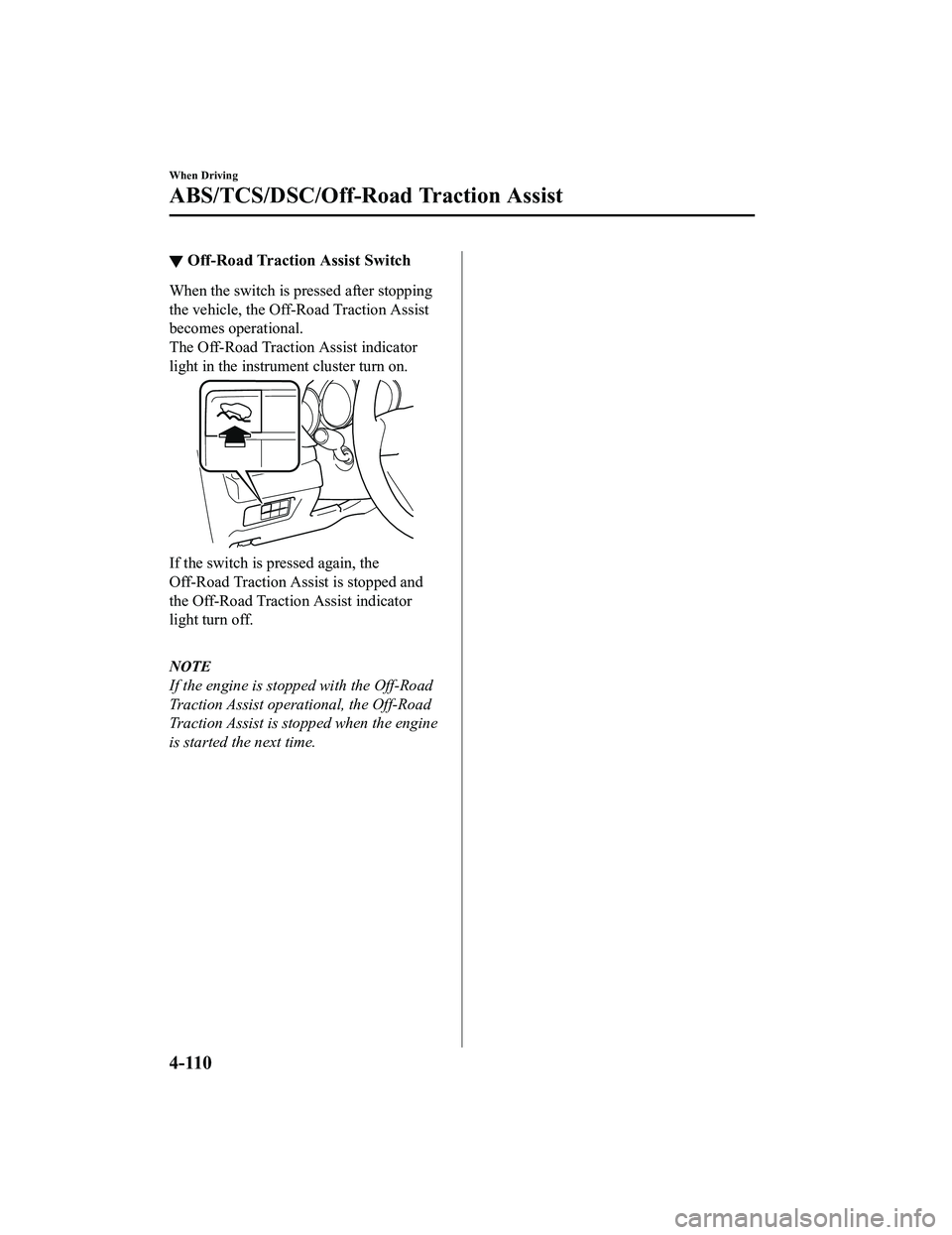
▼Off-Road Traction Assist Switch
When the switch is pressed after stopping
the vehicle, the Off-Road Traction Assist
becomes operational.
The Off-Road Traction Assist indicator
light in the instrument cluster turn on.
If the switch is pressed again, the
Off-Road Traction Assi
st is stopped and
the Off-Road Traction Assist indicator
light turn off.
NOTE
If the engine is stopped with the Off-Road
Traction Assist operational, the Off-Road
Traction Assist is stopped when the engine
is started the next time.
When Driving
ABS/TCS/DSC/Off-Road Traction Assist
4-110
CX-5_8KN5-EA-21K_Edition1_old 2021-9-9 8:35:12
Page 332 of 723

When the system becomes operational, the LAS & LDWS indication (white) is displayed on
the multi-information display and active driving display.
Multi-information display (Basic display)
Instrument Cluster (Type A)
Instrument Cluster (Type B)
Multi-information displ ay (i-ACTIVSENSE display)
Active driving display*
The LAS & LDWS goes on stand-by status in the following cases:
The system cannot detect white (yellow) lane lines.
The vehicle speed is less than about 56 km/h (35 mph).
The ABS/TCS is operating.
The TCS is turned off.
The Off-Road Traction Assist is turned on.
When Driving
i-ACTIVSENSE
*Some models.4-179
CX-5_8KN5-EA-21K_Edition1_old 2021-9-9 8:35:12
Page 437 of 723

Three-dimensional object on vehicle rear
Because the distance guide lines are displayed based on a flat surface, the distance to the
three-dimensional object displayed on the screen is different from the actual distance.
A
A
C B
CB
(Actual distance) B>C=A
Sensed distance on screen A>B>C (Screen display)
(Actual condition)
▼Picture Quality Adjustment
WA R N I N G
Always adjust the picture quality of the rear view monitor while the vehicle is stopped:
Do not adjust the picture quality of the rear vi
ew monitor while driving the vehicle. Adjusting
the picture quality of the rear view monitor such as brightness, contrast, color, and tint while
driving the vehicle is dangerous as it could di stract your attention from the vehicle operation
which could lead to an accident.
Picture quality adjustment must be done while the selector lever is in reverse (R).
There are four settings which can be adjusted including, brightness, contrast, tint, and color.
When adjusting, pay sufficient attention to the vehicle surroundings.
1. Select the
icon on the screen to display the tabs.
2. Select the desired tab item.
3. Adjust the brightness, contrast, tint, and color using the slider.
If you need to reset, press the reset button.
4. Select the
icon on the screen to close the tab.
When Driving
Rear View Monitor (Maz da Connect (Type A))
4-284
CX-5_8KN5-EA-21K_Edition1_old 2021-9-9 8:35:12
Page 447 of 723

Anything which generates ultrasound is near the vehicle, such as another vehicle's
horn, the engine sound of a motorcycle, the air brake sound of a large-sized vehicle, or
another vehicle's sensors.
The vehicle is driven in heavy rain or in road conditions causing water-splash.
A commercially-available fender pole or an antenna for a radio transmitter is installed
to the vehicle.
The vehicle is moving towards a tall or square curbstone.
An obstruction is too close to the sensor.
Obstructions under the bumper may not be detected. Obstructions that are lower than the
bumper or thin which may have been initially detected may no longer be detected as the
vehicle approaches more closely to the obstruction.
The following types of obstructions may not be detected:
Thin objects such as wire or rope
Things which absorb sonic waves easily such as cotton or snow
Angular shaped objects
Very tall objects, and those which are wide at the top
Small, short objects
Always have the system inspected at an Authorized Mazda Dealer if any shock is applied
to the bumpers, even in a minor accident. If the sensors are deviated, they cannot detect
obstructions.
The system may have a malfunction if the b eep does not operate or the indicator light
does not illuminate when the parking sensor switch is turned on. Consult an Authorized
Mazda Dealer.
The system may have a malfunction if the beep sound which indicates a system
malfunction is heard and the indicator light flashes. Consult an Authorized Mazda Dealer.
The beeper which indicates a system malfunction may not be heard if the ambient
temperature is extremely cold, or mud, ice, or snow adheres to the sensor area. Remove
any foreign material from the sensor area.
When installing a trailer hitch, c onsult an Authorized Mazda Dealer.
When Driving
Parking Sensor System (Mazda Connect (Type A))
4-294
CX-5_8KN5-EA-21K_Edition1_old 2021-9-9 8:35:12
Page 456 of 723

Anything which generates ultrasound is near the vehicle, such as another vehicle's
horn, the engine sound of a motorcycle, the air brake sound of a large-sized vehicle, or
another vehicle's sensors.
The vehicle is driven in heavy rain or in road conditions causing water-splash.
A commercially-available fender pole or an antenna for a radio transmitter is installed
to the vehicle.
The vehicle is moving towards a tall or square curbstone.
An obstruction is too close to the sensor.
Obstructions under the bumper may not be detected. Obstructions that are lower than the
bumper or thin which may have been initially detected may no longer be detected as the
vehicle approaches more closely to the obstruction.
The following types of obstructions may not be detected:
Thin objects such as wire or rope
Things which absorb sonic waves easily such as cotton or snow
Angular shaped objects
Very tall objects, and those which are wide at the top
Small, short objects
Always have the system inspected at an Authorized Mazda Dealer if any shock is applied
to the bumpers, even in a minor accident. If the sensors are deviated, they cannot detect
obstructions.
The system may have a malfunction if the beep does not operate or the indicator light
does not illuminate when the parking sensor switch is turned on. Consult an Authorized
Mazda Dealer.
The system may have a malfunction if the beep sound which indicates a system
malfunction is heard and the i ndicator light flashes. Consult an Authorized Mazda Dealer.
The beeper which indicates a system malf unction may not be heard if the ambient
temperature is extremely cold, or mud, ice, or snow adheres to the sensor area. Remove
any foreign material from the sensor area.
When installing a trailer hitch, consult an Authorized Mazda Dealer.
When Driving
Parking Sensor System (M azda Connect (Type B))
4-303
CX-5_8KN5-EA-21K_Edition1_old 2021-9-9 8:35:12
Page 565 of 723

until it contacts the end of the blade
holder.
Groove
6. After pulling the blade rubber in thedirection of the arrow and sliding the
blade rubber to a position to check the
blade holder groove, slide the blade
rubber end in the opposite direction.
Groove
7. Make sure that the blade rubber is
correctly installed to the blade holder.
8. Align the wiper arm tabs with the blade component grooves.
Tabs
Grooves
Maintenance and Care
Owner Maintenance
6-28
CX-5_8KN5-EA-21K_Edition1_old 2021-9-9 8:35:12
Page 571 of 723

3. Insert a tape-wrapped flatheadscrewdriver into the gap and slide it in
the direction of the arrow.
4. Twist the flathead screwdriver in thedirection of the arrow and remove the
upper cover.
5. Remove the cap using the
tape-wrapped flath ead screwdriver.
6. Remove the battery using
tape-wrapped flath ead screwdriver.
7. Insert a new battery into the transmitter
so that the positive pole is facing up.
8. Install the cap.
9. Install the upper cover.
10. Insert the tabs of the lower cover into
the slots of the transmitter and install
the lower cover.
Maintenance and Care
Owner Maintenance
6-34
CX-5_8KN5-EA-21K_Edition1_old 2021-9-9 8:35:12