lights MAZDA MODEL CX-5 2022 User Guide
[x] Cancel search | Manufacturer: MAZDA, Model Year: 2022, Model line: MODEL CX-5, Model: MAZDA MODEL CX-5 2022Pages: 723, PDF Size: 89.79 MB
Page 106 of 723

A beep sound is heard for confirmation
when the doors and the liftgate are
locked/unlocked using the request
switch. If you prefer, the beep sound can
be turned off.
The volume of the beep sound can also
be changed.
Refer to the Settings section in the
Mazda Connect Owner's Manual.
Use the following procedure to change
the setting.
1. Switch the ignition off and close allof the doors and the liftgate.
2. Open the driver's door.
3. Within 30 seconds of opening the driver's door, press and hold the
LOCK button on the key for 5
seconds or longer (All of the doors
and the liftgate are locked and
unlocked when the LOCK button on
the key is pressed and held for 5
seconds.).
The beep sound activates at the
currently set volume. The setting
changes each time the LOCK button
on the key is pressed and the beep
sound activates at the set volume. (If
the beep sound has been set to not
activate, it will not activate.)
4. The setting change is completed by doing any one of the following:
Switching the ignition to ACC or
ON.
Closing the driver's door.
Opening the liftgate.
Not operating the key for ten
seconds.
Pressing any button except the
LOCK button on the key.
Pressing a request switch.
(With theft-deterrent system)
The hazard warning lights flash when
the theft-deterrent system is armed or
turned off.
Refer to Theft-Deterrent System on page
3-43.
The setting can be changed so that the
doors and the liftgate are locked
automatically without pressing the
request switch.
Refer to the Settings section in the
Mazda Connect Owner's Manual.
(Walk-away auto lock function)
A beep sound is heard when all doors
and the liftgate are closed while the
advanced key is being carried. All doors
and the liftgate are locked automatically
after about three seconds when the
advanced key is out of the operational
range. Also, the hazard warning lights
flash once. (Even if the driver is in the
operational range, all doors and the
liftgate are locked automatically after
about 30 seconds.) If you are out of the
operational range before the doors and
the liftgate are completely closed or
another key is left in the vehicle, the
walk-away auto lock function will not
work. Always make sure that all doors
and the liftgate are closed and locked
before leaving the vehicle. The
walk-away auto lock function does not
close the power windows.
(Auto re-lock function)
After unlocking with the request switch,
all doors and the liftgate will
automatically lock if any of the
following operations are not performed
within about 60 seconds. If your vehicle
has a theft-deterrent system, the hazard
warning lights will flash for
confirmation.
Before Driving
Doors and Locks
3-15
CX-5_8KN5-EA-21K_Edition1_old 2021-9-9 8:35:12
Page 112 of 723

Never allow children to operate the power
liftgate system:
Allowing children to operate the power
liftgate switch and the keyless entry system
is dangerous. Children are not aware of the
dangers of people getting fingers and
hands caught in a moving liftgate. If
someone's neck, head or hands get caught
in a closing door, it could result in death or
serious injury.
CAUTION
When closing the power liftgate, make
sure there are no foreign objects around
the striker. If foreign objects are
obstructing the striker, the liftgate may
not close properly.
Striker
Do not install accessories to the power
liftgate other than
specified accessories.
Otherwise, it cannot be opened/closed
automatically and could result in a
malfunction.
Be careful when switching the power
liftgate from electrical to manual
operation. The power liftgate may open/
close unexpectedly depending on its
position which could result in injury.
NOTE
Do not apply unnecessary force to the
power liftgate when it is opening/closing
electrically. Unnecessary force on the
liftgate may cause it to reverse direction
of movement automatically. Also, it
could result in a malfunction.
The power liftgate may not open/close
electrically if the veh icle is parked on an
incline, or there is strong wind, or the
liftgate is laden with snow.
If a power liftgate system fuse has
blown, the liftgate cannot be opened
using the power liftgate switch or the
electric liftgate opener. Use the
emergency lever to open the liftgate.
Fully close the power liftgate before
disconnecting the vehicle battery. If the
battery is disconnected with the liftgate
open, it cannot be opened or closed
automatically after the battery is
reconnected. If this happens, fully close
the liftgate manually to restore the auto
full open/close function.
If the liftgate is snow-laden, remove the
snow before operating the power
liftgate. Operating the power liftgate
with excessive force applied to the
liftgate may damage the liftgate.
Operation using the transmitter
Press the power liftgate button for one
second or longer. The hazard warning
lights flash twice and the liftgate opens/
closes after the beep sounds.
Refer to Transmitter on page 3-5.
NOTE
When the ignition is switched ON, the
transmitter does not operate.
Before Driving
Doors and Locks
3-21
CX-5_8KN5-EA-21K_Edition1_old 2021-9-9 8:35:12
Page 113 of 723

When opening the liftgate by pressing
the power liftgate button on the
transmitter, the liftgate can be opened
even when it is locked.
If the power liftgate button on the
transmitter is pressed while the liftgate
is opening/closing electrically, the beep
is activated and the liftgate stops. When
pressing the power liftgate button again,
the liftgate moves in the reverse
direction.
Operation using each switch
Operation conditions
Opening the liftgate
If the vehicle has satisfied all the
following operation conditions, the power
liftgate can be opened using the power
function.
All doors and the liftgate are unlocked.
The ignition is swit ched OFF, or the
selector lever is in P with the ignition
switched ON.
Closing the liftgate
The ignition is swit ched OFF, or the
selector lever is in P with the ignition
switched ON.
NOTE
If the vehicle moves with the selector
lever shifted to a position other than P
while the liftgate is opening/closing
electrically, the liftgate moves as
follows:
While opening electrically
The buzzer is activated, and the liftgate
moves in the reverse direction
automatically and closes. When the
selector lever is shifted to P, you can
resume the power liftgate operation
using the switches.
While closing electrically
The buzzer is activated, but the liftgate
continues closing.
Operation from the driver's seat (To
open/close)
Press the power liftgate switch for about
one second or longer while the liftgate is
in the fully closed/open position. The
hazard warning lights flash twice and the
liftgate opens/closes fully after the beep
sound is heard.
Power liftgate switch
Operation from outside (To open)
Press the electric liftgate opener on the
liftgate and raise the liftgate. The hazard
warning lights flash twice and the liftgate
opens automatically after the beep sound
is heard.
(With the advanced keyless function)
Before Driving
Doors and Locks
3-22
CX-5_8KN5-EA-21K_Edition1_old 2021-9-9 8:35:12
Page 114 of 723

A locked liftgate can also be opened while
the key is being carried.
Electric liftgate
opener
Operation from outside (To close)
Press the power liftgate close switch while
the liftgate is fully opened. The hazard
warning lights flash twice and the liftgate
closes automatically after the beep sound
is heard.
Power liftgate
close switch
NOTE
If the power liftgate switch/power liftgate
close switch is pressed or the electric
liftgate opener is operated while the
liftgate is opening/closing electrically, the
beep sound is heard and the liftgate stops.
Then, it reverses when any of the switches
are pressed again.
Changing the power liftgate fully open
position
The power liftgate fully-open position can
be changed according to the height of a
garage.
When changing the position
1. Stop the liftgate at the desired position.
2. Press the power liftgate close switchfor about three seconds.
A beep sound is activated two times to
indicate that the position change has
been completed.
NOTE
Set the desired fully-open position of the
liftgate at the position where it is open
more than halfway. The position where it
is less than halfway open cannot be set.
To r e s e t
1. Open the liftgate.
2. Press the power liftgate close switchfor about seven seconds.
A beep sound is activated three times
to indicated that the reset has been
completed.
NOTE
After about 3 seconds have elapsed since
the switch was pressed, a beep sound is
activated 2 times to indicate that the
liftgate fully-open position has changed.
Continuously press the switch for about 7
seconds to complete the reset.
Jam-safe equipment
While the power liftgate is opening/
closing electrically and the system detects
a person or an object in the liftgate's path,
the liftgate will move in the reverse
direction automatically and stops.
Before Driving
Doors and Locks
3-23
CX-5_8KN5-EA-21K_Edition1_old 2021-9-9 8:35:12
Page 124 of 723
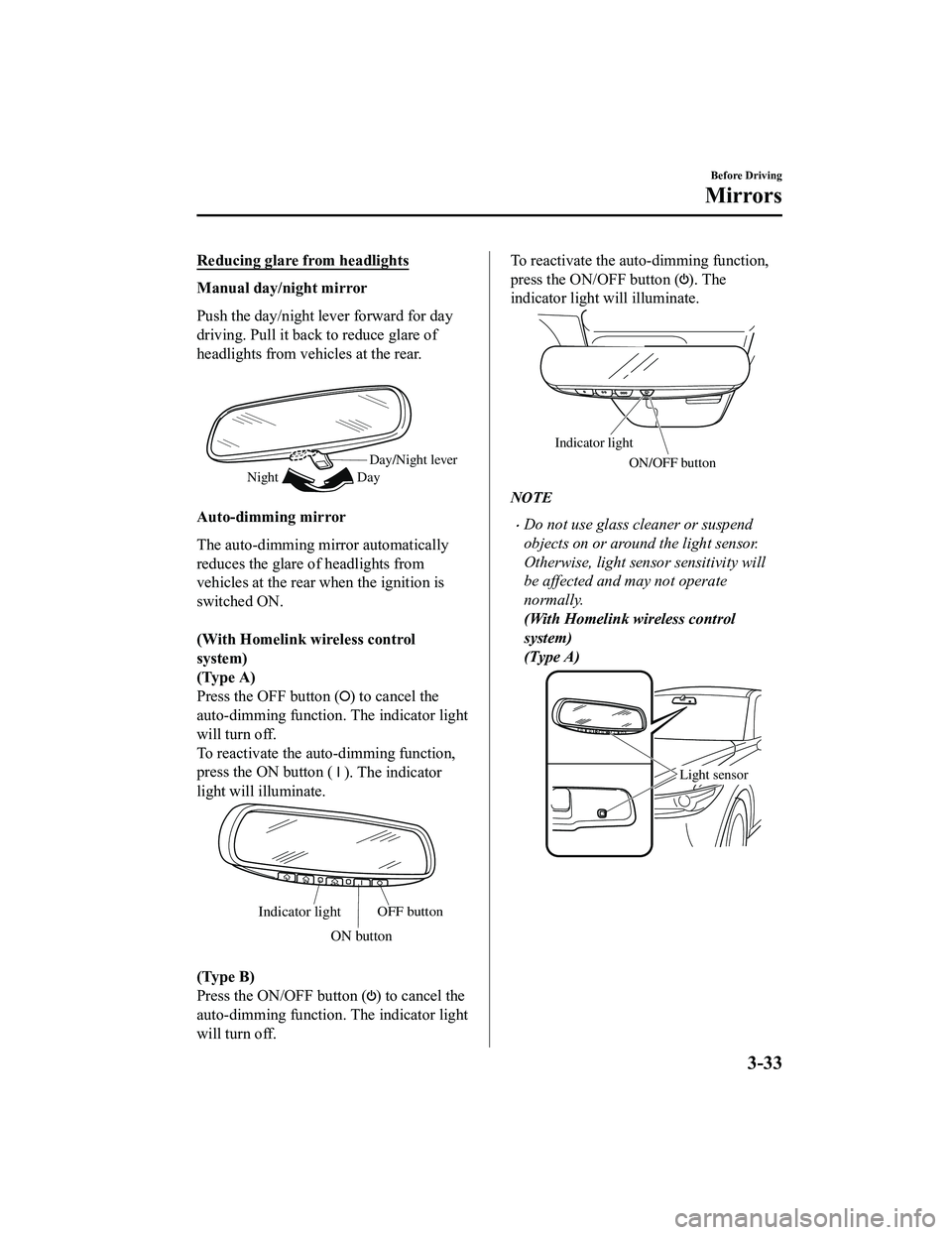
Reducing glare from headlights
Manual day/night mirror
Push the day/night lever forward for day
driving. Pull it back to reduce glare of
headlights from vehicles at the rear.
Day/Night lever
Day
Night
Auto-dimming mirror
The auto-dimming mirror automatically
reduces the glare of headlights from
vehicles at the rear when the ignition is
switched ON.
(With Homelink wireless control
system)
(Type A)
Press the OFF button (
) to cancel the
auto-dimming function . The indicator light
will turn off.
To reactivate the auto-dimming function,
press the ON button (
). The indicator
light will illuminate.
Indicator lightOFF button
ON button
(Type B)
Press the ON/OFF button (
) to cancel the
auto-dimming function . The indicator light
will turn off.
To reactivate the auto -dimming function,
press the ON/OFF button (
). The
indicator light will illuminate.
Indicator light
ON/OFF button
NOTE
Do not use glass cleaner or suspend
objects on or around the light sensor.
Otherwise, light sensor sensitivity will
be affected and may not operate
normally.
(With Homelink wireless control
system)
(Type A)
Light sensor
Before Driving
Mirrors
3-33
CX-5_8KN5-EA-21K_Edition1_old 2021-9-9 8:35:12
Page 134 of 723
Theft-Deterrent System*
If the theft-deterrent system detects an
inappropriate entry into the vehicle, which
could result in the vehicle or its contents
being stolen, the alarm alerts the
surrounding area of an abnormality by
sounding the horn and flashing the hazard
warning lights.
The system will not function unless it's
properly armed. So when you leave the
vehicle, follow the arming procedure
correctly.
▼Operation
System triggering conditions
The horn sounds intermittently and the
hazard warning lights flash for about 30
seconds when the system is triggered by
any one of the following:
Unlocking a door with the auxiliary key,
door lock switch, or an inside door-lock
knob.
Forcing open a door, the hood or the
liftgate.
Opening the hood by operating the hood
release handle.
Switching the ignition ON without using
the push button start.
If the system is triggered again, the lights
and horn will activate until the driver's
door or the liftgate is unlocked with the
transmitter.
(With the advanced keyless function)
The lights and horn can also be
deactivated by pressing the request switch
on a door.
NOTE
The liftgate does not open while the
theft-deterrent system is operating.
For vehicles equipped with the power
liftgate, the liftgate can be opened even
while the theft-deterrent system is
operating by pressing the power liftgate
button on the transmitter or the electric
liftgate opener switch while carrying the
key.
If the battery goes dead while the
theft-deterrent system is armed, the horn
will activate and the hazard warning
lights will flash when the battery is
charged or replaced.
▼ How to Arm the System
1. Close the windows and the moonroof*
securely.
2. Switch the ignition OFF.
3. Make sure the hood, the doors, and the
liftgate are closed.
4. Press the lock butt on on the transmitter
or lock the driver's door from the
outside with the auxiliary key.
The hazard warning lights will flash
once.
The following method will also arm
the theft-deterrent system:
Press the door-lock switch “
” while
any door is open and then close all of
the doors.
(With the advanced keyless function)
Press a request switch.
The security indicator light in the
instrument cluster flashes twice per
second for 20 seconds.
Before Driving
Security System
*Some models.3-43
CX-5_8KN5-EA-21K_Edition1_old 2021-9-9 8:35:12
Page 135 of 723

5. After 20 seconds, the system is fullyarmed.
NOTE
The theft-deterrent system can also be
armed by activating the auto relock
function with all the doors, the liftgate
and the hood closed.
Refer to Transmitter on page 3-5.
The system will disarm if one of the
following operations takes place within
20 seconds after pressing the lock
button:
Unlocking any door.
Opening any door.
Opening the hood.
Switching the ignition ON.
To rearm the system, do the arming
procedure again.
When the doors are locked by pressing
the lock button on the transmitter or
using the auxiliary key while the
theft-deterrent system is armed, the
hazard warning lights will flash once to
indicate that the system is armed.
▼ To Tu r n O f f a n A r m e d S y s t e m
An armed system can be turned off using
any one of the following methods:
Pressing the unlock button on the
transmitter.
Starting the engine with the push button
start.
(With the advanced keyless function)
Pressing a request switch on the
doors.
The hazard warning lights will flash twice.
NOTE
When the doors are unlocked by pressing
the unlock button on the transmitter while
the theft-deterrent system is turned off, the
hazard warning lights will flash twice to
indicate that the system is turned off.
▼ To Stop the Alarm
A triggered alarm can be turned off using
any one of the following methods:
Pressing the unlock button on the
transmitter.
Starting the engine with the push button
start.
(With the advanced keyless function)
Pressing a request switch on the
doors.
Pressing the electric liftgate opener
while the key is being carried.
Pressing the power liftgate button on
the transmitter.
The hazard warning lights will flash twice.
Before Driving
Security System
3-44
CX-5_8KN5-EA-21K_Edition1_old 2021-9-9 8:35:12
Page 148 of 723
WARNING
Make sure the safety chain is securely attached to both the trailer and the vehicle prior to
departure:
Towing a trailer without using a safety chain securely attached to both the trailer and the
vehicle is dangerous. If damage occurs to the coupling unit or hitch ball, the trailer could
wander into another lane and cause a collision.
▼ Trailer Lights
Trailer lights must comply with all federal, st
ate, and local regulations. Equip your trailer as
required before towing it day or night.
CAUTION
Do not connect a trailer lighting system directly to the lighting system of your Mazda. This
may damage your vehicle's electrical system an d lighting systems. Have a recreational vehicle
dealer or trailer rental agency connect the system, and inspect the brake lights and turn
signals yourself before each trip.
▼ Trailer Brakes
If the total trailer weight exceeds 450 kg (1,000 lb),
trailer brakes are required. If your trailer
has brakes, make sure they comply with all federal, state, and local regulations.
WARNING
Do not connect a hydraulic trailer-brake system to your vehicle's brake system:
Connecting a hydraulic trailer-brake system direc tly to the vehicle brake system is dangerous
and will result in inadequate braking and possible injury.
▼ Trailer Towing Tips
Verify that your Mazda maintains a near-normal attitude when a loaded or unloaded trailer
is connected. Do not drive if it has an abnormal front-up or front-down position. Inspect
for incorrect tongue load, worn suspension parts, and trailer overloading.
Make sure the trailer is properly loaded and the
cargo is secure to prevent it from shifting.
Make sure the mirrors conform to all government regulations. If they do not, install
required rear view mirrors appr opriate for towing purposes.
The three main causes of vehicle-trailer accidents are driver error, excessive speed, and
improper trailer loading.
Before Driving
To w i n g
3-57
CX-5_8KN5-EA-21K_Edition1_old 2021-9-9 8:35:12
Page 149 of 723

Before driving
Have your cooling and braking system checked by an Authorized Mazda Dealer.
Before starting out, inspect the operation of all vehicle and trailer lights and all
vehicle-to-trailer connections. Stop and re-ins pect all lights and connections after driving
a short distance.
Driving
Your Mazda will handle differently with a trailer in tow, so practice turning, backing, and
stopping in a traffic-free area.
Take time to get accustomed to the extra weight and length.
Allow more room between your vehicle and the one in front because braking distance
increases with a trailer. For each 16 km/h (10 mph) of speed, allow at least one vehicle
and trailer length between your Mazda and the vehicle ahead.
Avoid jerky starts or sudden acceleration.
Avoid sudden braking. It may cause loss of c ontrol and result in jackknifing, especially so
on wet or slippery roads.
Shift the selector lever to the D position wh en towing a trailer in hilly terrain or when
heavily loaded.
The D position will allow operating th e vehicle without frequent shifting.
Lane changes and turning
Avoid quick lane changes, sudden turns, and tight turns. Slow down before turning to avoid
the need of sudden braking.
A turning trailer will make a tighter arc than th e tow vehicle. Compensate with turns that are
larger than normal.
Passing
Plan well ahead to pass other vehicles, and provide plenty of room before changing lanes.
Crosswinds from passing vehicles, especially larger ones, and the effects of rough roads will
affect handling.
If swaying occurs, firmly grip the steering wheel and reduce speed immediately, but
gradually.
Steer straight ahead. If no extreme correc tion of steering or braking is made, the
combination of less speed and firm steering will result in stability.
Backing up
Backing a vehicle with a trailer requires practice and patience. Back slowly, and have a
helper outside at the rear of the trailer to reduce the risk of an accident.
Before Driving
To w i n g
3-58
CX-5_8KN5-EA-21K_Edition1_old 2021-9-9 8:35:12
Page 154 of 723

4When Driving
Information concerning safer driving and stopping.
Start/Stop Engine.............................. 4-4 Ignition Switch........ ..................... 4-4
Starting the Engine....................... 4-5
Turning the Engine Off...............4-10
Instrument Cluster and Display ............
........................................................... 4-11 Instrument Cluster and
Display........................................ 4-11
Instrument Cluster (Type A)....... 4-12
Instrument Cluster (Type B)....... 4-30
Instrument Cluster (Type C)....... 4-46
Active Driving Display
*............. 4-58
Automatic Transaxle....................... 4-60 Automatic Transaxle
Controls...................................... 4-60
Shift-Lock System...................... 4-61
Transaxle Ranges........................4-61
Manual Shift Mode..................... 4-63
Direct Mode
*.............................. 4-69
Driving Tips................................4-70
Switches and Controls..................... 4-71 Lighting Control......................... 4-71
Fog Lights
*................................. 4-78
Turn and Lane-Change
Signals........................................ 4-78
Windshield Wipers and
Washer........................................ 4-79
Rear Window Wiper and
Washer........................................ 4-83
Rear Window Defogg er.............. 4-83
Horn............................................ 4-86
Hazard Warning Flasher............. 4-86
HomeLink Wireless Control System
(Type A)
*.................................... 4-87
HomeLink Wireless Control System
(Type B)
*.................................... 4-90
Brake................................................ 4-95 Brake System.............................. 4-95
AUTOHOLD.............................. 4-99
Hill Launch Assist (HLA)........ 4-103
ABS/TCS/DSC/Off-Road Traction
Assist............................................... 4-105 Antilock Brake System
(ABS)........................................4-105
Traction Control System
(TCS)........................................ 4-106
Dynamic Stability Control
(DSC)........................................4-108
Off-Road Traction Assist
*........ 4-109
Mazda intelligent Drive Select (Mi-
Drive).............................................. 4-111 Mazda intelligent Drive Select (Mi-
Drive)........................................ 4-111
i-ACTIV AWD............................... 4-114 i-ACTIV AWD Operation
*....... 4-114
Power Steering............................... 4-116 Power Steering..........................4-116
*Some models.4-1
CX-5_8KN5-EA-21K_Edition1_old 2021-9-9 8:35:12