oil MAZDA MODEL CX-5 2022 User Guide
[x] Cancel search | Manufacturer: MAZDA, Model Year: 2022, Model line: MODEL CX-5, Model: MAZDA MODEL CX-5 2022Pages: 723, PDF Size: 89.79 MB
Page 193 of 723

▼Warning/Indicator Lights
Instrument Cluster varies depending on model and specifications.
Instrument Cluster
Center of Dashboard
Warning lights will appear in any of the highlighted areas
▼Warning Indication/Warning Lights
These lights turn on or flash to notify the user of the system operation status or a system
malfunction.
Signal
Warning Page
Brake System Warning Indication/Warning Light*1*27-22
ABS Warning Light*1
Electronic Brake
Force Distribu ‐
tion System Wa r n i n g 7-22
ABS warning 7-25
Charging System Warning Indication/Warning Light*17-22
Engine Oil Warning Light*17-22
(Red) High Engine Coolant Temperature Warning Light
*17-22
Power Steering Malfun
ction Indication 7-22
When Driving
Instrument Cluster and Display
4-40
CX-5_8KN5-EA-21K_Edition1_old 2021-9-9 8:35:12
Page 195 of 723

SignalWarning Page
Engine Oil Level Warning Light*17-31
Seat Belt Warning Light (Front seat) 7-31
(Red)Seat Belt Warning Light (Rear seat) 7-31
*Low Washer Fluid Level Warning Indication
7-31
Door-Ajar Warning Indication
7-31
Liftgate-Ajar Warning Indication 7-31
*1 The light turns on when the ignition is switched on for an operation check, and turns off a few seconds later or
when the engine is started. If the light does not turn on or remains turned on, have the vehicle inspected at an
Authorized Mazda Dealer.
*2 The light turns on continuously when the parking brake is applied.
▼ Indication/Indicator Lights
These lights turn on or flash to notify the user of the system operation status or a system
malfunction.
Signal
Indicator Page
(Green)Seat Belt Indicator Light (Rear seat)
2-30
*Front Passenger Air Bag Deactivation Indicator Light*12-71
Security Indicator Light*13-42
Wrench Indication 4-45
(Blue)Low Engine Coolant Temperature Indicator Light 4-45
When Driving
Instrument Cluster and Display
4-42*Some models.
CX-5_8KN5-EA-21K_Edition1_old
2021-9-9 8:35:12
Page 198 of 723

SignalIndicator Page
(Green)
*Cruise Set Indication 4-269
*1 The light turns on when the ignition is switched on for an operatio
n check, and turns off
a few seconds later or when the engine is star ted. If the light does not turn on or remains
turned on, have the vehicle inspected at an Authorized Mazda Dealer.
▼ Wrench Indication
The wrench indication is displayed under
the following conditions.
When the preset maintenance period has
arrived.
Refer to the Applications (Mazda
Connect (Type A))/Information (Mazda
Connect (Type B)) section in the Mazda
Connect Owner's Manual.
When the engine oil replacement period
has arrived.
NOTE
The wrench indication may display
earlier than the preset period depending
on vehicle usage conditions.
Whenever the engine oil is replaced, a
reset of the vehicle engine control unit is
necessary.
Refer to the Applications (Mazda
Connect (Type A))/Information (Mazda
Connect (Type B)) section in the Mazda
Connect Owner's Manual.
▼ Low Engine Coolant Temperature
Indicator Light (Blue)
The light illuminates continuously when
the engine coolant temperature is low and
turns off after the engine is warm.
When Driving
Instrument Cluster and Display
*Some models.4-45
CX-5_8KN5-EA-21K_Edition1_old
2021-9-9 8:35:12
Page 206 of 723

▼Warning/Indicator Lights
Instrument Cluster varies depending on model and specifications.
Instrument Cluster
Center of Dashboard Warning lights will appear in any of the highlighted areas
▼Warning Indication/Warning Lights
These lights turn on or flash to notify the us
er of the system operation status or a system
malfunction.
Signal Warning Page
Brake System Warning Light*1*27-22
ABS Warning Light*1
Electronic Brake
Force Distribu ‐
tion System Wa r n i n g 7-22
ABS warning 7-25
Charging System Warning Light*17-22
Engine Oil Warning Light*17-22
Power Steering Malfunction Indicator Light*17-22
Master Warning Light*17-25
Electric Parking Brake (EPB) Warning Light*17-25
When Driving
Instrument Cluster and Display
4-53
CX-5_8KN5-EA-21K_Edition1_old 2021-9-9 8:35:12
Page 207 of 723
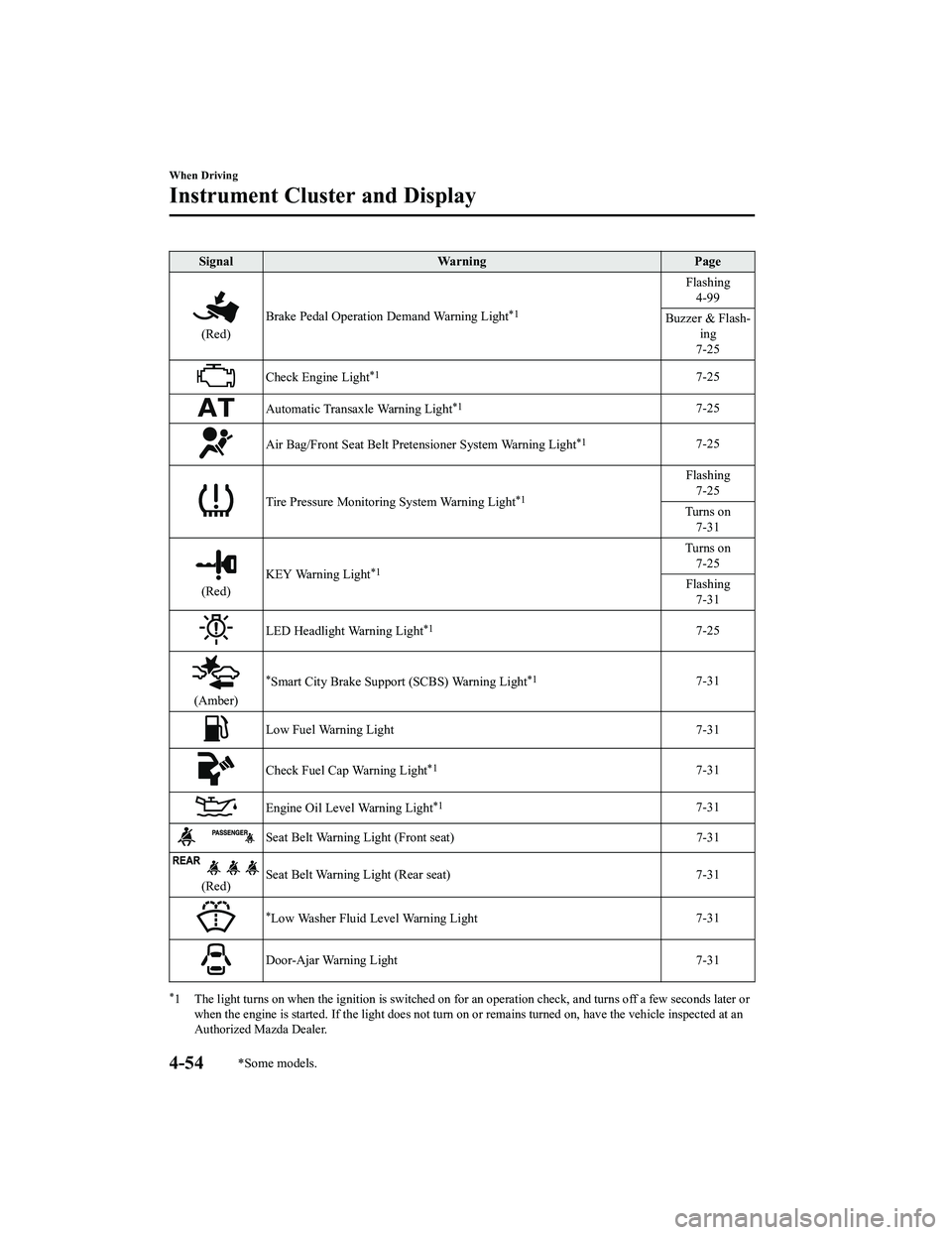
SignalWarning Page
(Red)Brake Pedal Operation Demand Warning Light
*1
Flashing
4-99
Buzzer & Flash ‐
ing
7-25
Check Engine Light*17-25
Automatic Transaxle Warning Light*17-25
Air Bag/Front Seat Belt Pretensioner System Warning Light*17-25
Tire Pressure Monitoring System Warning Light*1
Flashing 7-25
Turns on 7-31
(Red) KEY Warning Light
*1
Turns on
7-25
Flashing 7-31
LED Headlight Warning Light*17-25
(Amber)
*Smart City Brake Support (SCBS) Warning Light*17-31
Low Fuel Warning Light 7-31
Check Fuel Cap Warning Light*17-31
Engine Oil Level Warning Light*17-31
Seat Belt Warning Light (Front seat) 7-31
(Red)Seat Belt Warning Light (Rear seat) 7-31
*Low Washer Fluid Level Warning Light
7-31
Door-Ajar Warning Light
7-31
*1 The light turns on when the ignition is switched on for an operation check, and turns off a few seconds later or
when the engine is started. If the light does not turn on or remains turned on, have the vehicle inspected at an
Authorized Mazda Dealer.
When Driving
Instrument Cluster and Display
4-54*Some models.
CX-5_8KN5-EA-21K_Edition1_old 2021-9-9 8:35:12
Page 210 of 723

When it’s time to replace the engine oil.
Refer to the Applications (Mazda Connect
(Type A))/Information (Mazda Connect
(Type B)) section in the Mazda Connect
Owner's Manual.
NOTE
The wrench indicator light turns on
earlier than the preset period depending
on vehicle usage conditions.
Whenever the engine oil is replaced, a
reset of the vehicle engine control unit is
necessary.
Refer to the Applications (Mazda
Connect (Type A))/Information (Mazda
Connect (Type B)) section in the Mazda
Connect Owner's Manual.
When Driving
Instrument Cluster and Display
4-57
CX-5_8KN5-EA-21K_Edition1_old 2021-9-9 8:35:12
Page 267 of 723
i-ACTIV AWD Operation*
AWD provides excellent drivability on
snow-covered and ice-packed roads, sand
and mud, as well as on steep slopes and
other slippery surfaces.
A system malfunction or operation
conditions are indicated by a warning.
Contact an Authorized Mazda Dealer and
Have Vehicle Inspected on page 7-25.
WA R N I N G
Never spin a wheel that is off the ground:
Spinning a wheel that is off the ground as a
result of the vehicle being stuck or in a
ditch is dangerous. The drive assembly
could be seriously damaged which could
lead to an accident or could even lead to
overheating, oil leakage, and a fire.
▼ AWD Driving
WA R N I N G
Avoid sharp turns, excessive speed and
abrupt maneuvers when driving this
vehicle:
Sharp turns, excessive speed and abrupt
maneuvering of this
vehicle is dangerous
as it could result in the increased risk of loss
of vehicle control, vehicle roll-over,
personal injury or death.
This vehicle has a higher center of gravity.
Vehicles with a higher center of gravity
such as utility and AWD vehicles handle
differently than vehicles with a lower center
of gravity.
Utility and AWD vehicles are not designed
for cornering at high speeds any more than
low profile sports cars are designed to
perform satisfactorily under off-road
conditions. In addition, utility vehicles have
a significantly higher rollover rate than
other types of vehicles.
Drive carefully when the vehicle is loaded
by lowering vehicle speed and applying the
brakes earlier:
Abrupt maneuvering and sudden braking
when driving a loaded vehicle is dangerous
as the driving behavior of a vehicle with a
high center of gravity is different when it is
loaded compared to when it is not, and
could result in the loss of vehicle control
and an accident.
▼ Tires and Tire Chains
The condition of the tires plays a large role
in the performance of the vehicle.
Moreover, to prevent adverse effects to the
drive assembly, please note the following:
Tires
When replacing tires, always replace all
front and rear tires at the same time.
All tires must be of the same size,
manufacture, brand and tread pattern.
Pay particular attention when equipping
snow or other types of winter tires.
Do not mix tread-worn tires with normal
tires.
Inspect tire inflation pressures at the
specified periods adju
st to the specified
pressures.
NOTE
Check the tire inflation pressure label
attached to driver's door frame for the
correct tire inflation pressure.
When Driving
i-ACTIV AWD
4-114*Some models.
CX-5_8KN5-EA-21K_Edition1_old 2021-9-9 8:35:12
Page 315 of 723

Pedestrians
Stationary objects (stopped vehicles, obstructions)
If a vehicle ahead is traveling at an extremely low speed, the system may not detect it
correctly.
If there is a structure on the road or an object (such as a monorail) at a low height off the
ground in front of the vehicle, the system may operate. Therefore, do not use the TJA.
Do not use the TJA under conditions in which close proximity warnings are frequently
activated.
If it is necessary to accelerate for a lane change or the vehicle ahead brakes suddenly
causing you to close in on the vehicle rapidly, accelerate using the accelerator pedal or
decelerate using the brake pedal depending on the conditions.
While the TJA is in use, any intended engine braking does not occur even if you shift the
selector lever. If deceleration is required, lower the vehicle speed setting or depress the
brake pedal.
While braking by the TJA control is operating, you might hear an operation sound,
however, this does not indicate a problem.
The brake lights turn on while braking by the TJA control is operating, however, they may
not turn on while the vehicle is on a down slope at the set vehicle speed or traveling at a
constant speed and following a vehicle ahead.
Under the following conditions, the TJA may no t be able to detect white (yellow) lines or
vehicles ahead correctly and the TJA may not operate normally.
The forward sensing camera (FSC) cannot recognize the area in front of the vehicle due
to soiling or fog.
The white (yellow) lane lines are less vi sible because of dirt or paint flaking.
White (yellow) lane lines or vehicles ahe ad are less visible because of bad weather
(rain, fog, or snow).
The vehicle is driven on a temporary lane or section with a closed lane resulting from
construction where there might be multiple white (yellow) lane lines, or they are
interrupted.
The camera picks up an obscure line, such as a temporary line being used for
construction, or because of shade, unmelted snow, or grooves filled with water.
The road surface is wet and shiny after rain, or there are puddles on the road.
Heavy luggage is loaded in the luggage compartment or on the rear seat causing the
vehicle to tilt.
A vehicle in front of your vehicle is running near a white (yellow) lane line making it
less visible.
The windshield is dirty or foggy.
The vehicle is driven through an intersection, a junction, or a fork in the road.
While white (yellow) lane lines cannot be detected due to road or weather conditions.
The surrounding brightness suddenly changes such as when entering or exiting a
tunnel.
When Driving
i-ACTIVSENSE
4-162
CX-5_8KN5-EA-21K_Edition1_old 2021-9-9 8:35:12
Page 316 of 723

The illumination of the headlights is weakened because of dirt or the optical axis is
deviated at night.
Back-light is reflected off the road surface or the road surface is wet and shiny after
rain.
The shade of a guardrail parallel to a white (yellow) lane line is cast on the road.
The width of a lane is excessively narrow or wide.
The road is excessively uneven.
The vehicle is shaken after hitting a road bump.
There are various road markings or division lines (lane markings) of various shapes
near an intersection.
The area in front of the forward sensing camera (FSC) is soiled or an object that
obstructs the field of view is installed.
Exhaust gas from the vehicle in front, sand, snow, and water vapor rising from
manholes and grating, and water splashed into the air.
The surroundings are dark such as during the early evening or early morning.
A vehicle ahead with a certain taillight shape.
A vehicle ahead veers off course from your vehicle's line of travel.
A vehicle ahead is driving erratically.
The vehicle is driven on roads with tight curves.
Headway control function
If a vehicle ahead is detected while traveling at a constant speed, the vehicle-ahead
indication is displayed and h eadway control is performed.
Steering assist function
When lane lines are detected, the function assists the driver in keeping the vehicle within the
lane lines. If lane lines are not detected, th e function provides the driver driving assistance
in keeping the vehicle along the motion path with the vehicle ahead.
When Driving
i-ACTIVSENSE
4-163
CX-5_8KN5-EA-21K_Edition1_old 2021-9-9 8:35:12
Page 357 of 723

The front doors or the liftgate is not fully closed.
The vehicle is on a road incline.
The door mirrors are retracted.
Do not hit the front/rear camera, front bump er, and door mirrors forcefully. The camera
position or installation angle may shift.
The cameras are of a waterproof structure. Do not disassemble, modify, or remove a
camera.
The camera cover is made of hard plastic, therefore do not apply oil film remover, organic
solvents, wax, or coating agents. If any such agent gets on the camera cover, wipe it off
using a soft cloth immediately.
Do not rub the camera lens forcefully, or clean it with an abrasive or hard brush. Otherwise,
it could scratch the camera lens and negatively affect the images.
Consult an Authorized Mazda Dealer for repair , painting, or replacement of the front/rear
camera, front bumper and door mirrors.
Heed the following cautions to assure that the 360°View Monitor operates normally.
Do not modify the vehicle suspensions or lower/raise the vehicle body, or both.
Always use wheels of the specified type and size for the front and rear wheels. Consult an
Authorized Mazda Dealer for tire replacement.
When the display is cold, images may leave trails or the screen might be darker than usual,
making it difficult to check the vehicle surroundi ngs. Always confirm the safety at the front
and around the vehicle visually when driving.
The method for parking/stopping the vehicle using the 360°View Monitor differs depending
on the road circumstances/conditions and th e vehicle conditions. When and how much you
turn the steering wheel will differ depending on the situation, therefore always check the
vehicle surroundings directly with your eyes while using the system.
Also, before using the system, always make su re that the vehicle can be parked/stopped in
the parking/stopping space.
NOTE
If there are water droplets, snow, or mud on the camera lens, wipe it off using a soft cloth.
If the camera lens is especially dirt y, wash it off with mild detergent.
If the area where the camera is installed, such as the liftgate or door mirrors, has been
damaged in a vehicle accident, the camera (position, installation angle) may have shifted.
Always consult an Authorized Mazda Dealer to have the vehicle inspected.
If the camera is subjected to excessive changes in temperature such as by pouring hot
water on the camera during cold weather, the 360°View Monitor may not operate
normally.
If the battery voltage is low, the screen mi ght be temporarily difficult to view, however,
this does not indicate a problem.
When Driving
i-ACTIVSENSE
4-204
CX-5_8KN5-EA-21K_Edition1_old 2021-9-9 8:35:12