oil MAZDA MODEL CX-5 2022 Owner's Manual
[x] Cancel search | Manufacturer: MAZDA, Model Year: 2022, Model line: MODEL CX-5, Model: MAZDA MODEL CX-5 2022Pages: 723, PDF Size: 89.79 MB
Page 383 of 723
Icy or snow-covered roads.
Tire chains or a temporary spare tire is installed.
The front or rear doors are not fully closed.
The vehicle is on a road incline.
The door mirrors are retracted.
Do not hit the front/rear camera, front bumper , liftgate, and door mirrors forcefully. The
camera position or installation angle may shift.
The cameras are waterproof. Do not di sassemble, modify, or remove a camera.
The camera cover is made of hard plastic, therefore do not apply oil film remover, organic
solvents, wax, or coating agents. If any such agent gets on the camera cover, wipe it off
using a soft cloth immediately.
Do not rub the camera lens forcefully, or clean it with an abrasive or hard brush. Otherwise,
it could scratch the camera lens and negatively affect the images.
Consult an Authorized Mazda Dealer for repair , painting, or replacement of the front/rear
camera, front bumper, liftgate and door mirrors.
Heed the following cautions to assure that the 360°View Monitor operates normally.
Do not modify the vehicle suspensions or lower/raise the vehicle body, or both.
Always use tires of the specified type and size for the front and rear wheels. Consult an
Authorized Mazda Dealer for tire replacement.
When the display is cold, images may leave trails or the screen might be darker than usual,
making it
difficult to check the vehicle surroundings. Always
confirm the safety at the front
and around the vehicle visually when driving.
The method for parking/stopping the vehicle using the 360°View Monitor differs depending
on the road circumstances/conditions and th e vehicle conditions. When and how much you
turn the steering wheel will differ depending on the situation, therefore always check the
vehicle surroundings directly with your eyes while using the system.
Also, before using the system, always make su re that the vehicle can be parked/stopped in
the parking/stopping space.
NOTE
If there are water droplets, snow, or mud on the camera lens, wipe it off using a soft cloth.
If the camera lens is especially dirt y, wash it off with mild detergent.
If the camera lens is touched or there is any dirt on it, it could affect the screen image.
Wipe the lens using a soft cloth.
If the area where the camera is installed, such as the front bumper, liftgate or door
mirrors, has been damaged in a vehicle accident, the camera (position, installation angle)
may have shifted. Always consult an Authorized Mazda Dealer to have the vehicle
inspected.
When Driving
i-ACTIVSENSE
4-230
CX-5_8KN5-EA-21K_Edition1_old 2021-9-9 8:35:12
Page 411 of 723
The direction in which the Forward Sensing Camera (FSC) is pointed has been
finely
adjusted. Do not change the installation posi tion of the Forward Sensing Camera (FSC) or
remove it. Otherwise, it could result in damage or malfunction.
Always use tires for all wheels that are of the specified size, and the same manufacturer,
brand, and tread pattern. In addition, do no t use tires with significantly different wear
patterns on the same vehicle as the system may not operate normally.
The Forward Sensing Camera (FSC) includes a function for detecting a soiled windshield
and informing the driver, however, depending on the conditions, it may not detect plastic
shopping bags, ice or snow on the windshield. In such cases, the system cannot accurately
determine a vehicle ahead and may not be able to operate normally. Always drive carefully
and pay attention to the road ahead.
NOTE
In the following cases, the Forward Sensing Camera (FSC) cannot detect target objects
correctly, and each system may be unable to operate normally.
The height of the vehicle ahead is low.
You drive your vehicle at the same speed as the vehicle ahead.
Headlights are not turned on during the night or when going through a tunnel.
In the following cases, the Forward Sensing Camera (FSC) may not be able to detect
target objects correctly.
Under bad weather condition, such as rain, fog and snow.
The window washer is being used or the windshield wipers are not used when it's
raining.
Ice, fog, snow, frost, rainfall, dirt, or foreign matter such as a plastic bag is stuck on the
windshield.
Trucks with low loading plat forms and vehicles with an extremely low or high profile.
When driving next to walls with no patterning (including fences and longitudinally
striped walls).
The taillights of the vehicle ahead are turned off.
A vehicle is outside the illumi nation range of the headlights.
The vehicle is making a sharp turn, or ascending or descending a steep slope.
Entering or exiting a tunnel.
Heavy luggage is loaded causing the vehicle to tilt.
Strong light is shone at the front of the vehicle (back light or high-beam light from
on-coming vehicles).
There are many light emitters on the vehicle ahead.
When the vehicle ahead is not equipped with ta illights or the taillights are turned off at
nighttime.
Elongated luggage or cargo is loaded onto installed roof rails and covers the Forward
Sensing Camera (FSC).
When Driving
i-ACTIVSENSE
4-258
CX-5_8KN5-EA-21K_Edition1_old 2021-9-9 8:35:12
Page 414 of 723

Radar Sensor (Front)*
Your vehicle is equipped with a radar sensor (front).
The following systems also use the radar sensor (front).
Distance Recognition Support System (DRSS)
Mazda Radar Cruise Control with Stop & Go function (MRCC with Stop & Go function)
Smart Brake Support (SBS)
Traffic Jam Assist (TJA)
The radar sensor (front) functions by detecti ng the radio waves reflected off a vehicle ahead
or an obstruction sent from the radar sensor.
The radar sensor (front) is mo unted behind the front emblem.
Radar sensor (front)
If “Front Radar Sensor Blocked” is displa yed in the multi-information display of the
instrument cluster, clean the area around the radar sensor (front).
CAUTION
Heed the following precautions to a ssure correct operation of each system.
Do not adhere stickers (including transparent st ickers) to the surface of the radiator grille
and front emblem in and around the radar sens or (front), and do not replace the radiator
grille and front emblem with any product that is not a genuine product designed for use
with the radar sensor (front).
The radar sensor (front) includes a function fo r detecting soiling of the radar sensor's front
surface and informing the driver, however, depending on the conditions, it may require
time to detect or it may not detect plastic sh opping bags, ice or snow. If this occurs, the
system may not operate correctly, therefore al ways keep the radar sensor (front) clean.
Do not install a grille guard.
If the front part of the vehicle has been dama ged in a vehicle accident, the position of the
radar sensor (front) may have moved. Stop the system immediately and always have the
vehicle inspected at an Authorized Mazda Dealer.
When Driving
i-ACTIVSENSE
*Some models.4-261
CX-5_8KN5-EA-21K_Edition1_old 2021-9-9 8:35:12
Page 415 of 723
Do not use the front bumper to push other vehi cles or obstructions such as when pulling
out of a parking space. Otherwise, the radar sensor (front) could be hit and its position
deviated.
Do not remove, disassemble, or modify the radar sensor (front).
For repairs, replacement or paint work around the radar sensor (front), consult an
Authorized Mazda Dealer.
Do not modify the suspension. If the suspensi on are modified, the vehicle's posture could
change and the radar sensor (front) may not be able to correctly detect a vehicle ahead or
an obstruction.
NOTE
Under the following conditions, the radar sensor (front) may not be able to detect vehicles
ahead or obstructions correctly and each system may not operate normally.
The rear surface of a vehicle ahead does not reflect radio waves effectively, such as an
unloaded trailer or an automobile with a loading platform covered by a soft top,
vehicles with a hard plastic tailgate, and round-shaped vehicles.
Vehicles ahead with low vehicle height and thus less area for reflecting radio waves.
Visibility is reduced due to a vehicle ahead ca sting off water, snow, or sand from its tires
and onto your windshield.
The luggage compartment is loaded with heavy objects or the rear passenger seats are
occupied.
Ice, snow, or soiling is on the front surface of the front emblem.
During inclement weather such as rain, snow, or sand storms.
When driving near facilities or objects emitting strong radio waves.
Under the following conditions, the radar sensor (front) may not be able to detect vehicles
ahead or obstructions.
The beginning and end of a curve.
Roads with continuous curves.
Narrow lane roads due to road construction or lane closures.
The vehicle ahead enters the radar sensor's blind spot.
The vehicle ahead is running abnormally due to accident or vehicle damage.
Roads with repeated up and down slopes
Driving on poor roads or unpaved roads.
The distance between your vehicle and the vehicle ahead is extremely short.
A vehicle suddenly comes close such as by cutting into the lane.
To prevent incorrect operation of the system, use tires of the same specified size,
manufacturer, brand, and tread pattern on all four wheels. In addition, do not use tires
with significantly different wear patterns or tire pressures on the same vehicle (Including
the temporary spare tire).
If the battery power is weak, the system may not operate correctly.
When Driving
i-ACTIVSENSE
4-262
CX-5_8KN5-EA-21K_Edition1_old 2021-9-9 8:35:12
Page 452 of 723

Detection IndicatorSolution
System mal ‐
function
The system may have a malfunction. Have the
vehicle inspected at an Authorized Mazda Deal ‐
er as soon as possible.
Frost/soiling
Foreign matter may be on the sensor area corre ‐
sponding to the obstruction detection indication
shown. If the system does not recover, have the
vehicle inspected at an Authorized Mazda Deal ‐
er.
▼ Parking Sensor Warning Beep
The beeper sounds as follows while the system is operating.
Front Ultrasonic Sensor, Rear Ultrasonic Sensor
Distance detec‐
tion area Distance between vehicle and obstruction
Beeper sound*1Front ultrasonic sensorRear ultrasonic sensor
Farthest distance Approx. 100
―60 cm (39.3 ―23.6
in)
Approx. 150 ―60 cm (59.0― 23.6
in)
Slow intermittent
sound
Far distance Approx. 60
―45 cm (23.6 ―17.7
in)
Approx. 60 ―45 cm (23.6 ―17.7
in)
Medium intermit ‐
tent sound
When Driving
Parking Sensor System (M azda Connect (Type A))
4-299
CX-5_8KN5-EA-21K_Edition1_old 2021-9-9 8:35:12
Page 528 of 723

Charging may not operate normally
under the following conditions:
The mobile device is fully charged.
There is foreign matter between the
mobile device and the charging area.
The temperature of the mobile device
is high.
The mobile device is placed with the
charging side facing upward.
The mobile device is placed in a
position extremely deviating from the
center of the charging area.
Your vehicle is in an area where strong
radio waves or electrical noise occur
such as near a television tower, power
plant, or airport.
The Near Field Communication (NFC)
function setting of the mobile device is
on (depends on the model of the
mobile device).
Keep the following items away from the
charging area. Otherwise the data stored
on the mobile device could be erased or
the device could malfunction.
Magnetic items such as magnets,
magnetic cards, and magnetic
recording media.
High precision devices such as
wristwatches.
Before using the Wireless Charger (Qi),
make sure to back up the data stored on
the mobile device. The data on the
mobile device could be deleted.
Do not wipe the Wireless Charger (Qi)
using oil, alcohol, or thinner, or spray
hairspray or insecticide onto it.
Otherwise, it could cause damage or
cracking.Do not leave mobile devices in the cabin.
The temperature inside the cabin may
become very hot, causing the devices to
malfunction.
NOTE
A mobile device larger than the
charging area cannot be charged. In
addition, even if the mobile device is in
the charging area, the charging
efficiency may decrease or charging
may not be possible depending on where
the mobile device is placed.
If the function to reduce noise on the
radio is used, fast charging may be
disabled depending on the mobile device
being charged.
If the LED indicator is flashing in amber
or green, the charging efficiency is low.
Check that there is no foreign matter
between the mobile device and the
charging area, and position the mobile
device near the center of the charging
area.
Depending on the mobile device case or
accessories used, the mobile device may
not charge, or the charging efficiency
may be reduced resulting in a longer
charging time. If charging does not start
even when a mobile device is placed on
the charging area, remove the mobile
device case or any accessories.
While the keyless entry is operating,
charging may stop temporarily, however,
this does not indicate a problem.
During charging, the Wireless Charger
(Qi) and the mobile device become
warm, however, this does not indicate a
problem.
Interior Features
Interior Equipment
5-65
CX-5_8KN5-EA-21K_Edition1_old 2021-9-9 8:35:12
Page 538 of 723
6Maintenance and Care
How to keep your Mazda in top condition.
Essential Information........................6-2 Introduction.................................. 6-2
Scheduled Maintenance.................... 6-4 Scheduled Maintenance (U.S.A.,
Canada, and Puerto Rico)............. 6-4
Scheduled Maintenance
(Mexico)..................................... 6-10
Owner Maintenance........................ 6-15 Owner Maintenance
Precautions................................. 6-15
Hood........................................... 6-17
Engine Compartment
Overview.................................... 6-19
Engine Oil...................................6-20
Engine Coolant........................... 6-22
Brake Fluid............ ..................... 6-24
Washer Fluid............................... 6-24
Body Lubrication...... .................. 6-25
Wiper Blades.............................. 6-26
Battery........................................ 6-31
Key Battery Replacement........... 6-33
Tires............................................ 6-35
Light Bulbs................................. 6-39
Fuses........................................... 6-43
Appearance Care............................. 6-49 Exterior Care.............................. 6-49
Interior Care................................6-55
6-1
CX-5_8KN5-EA-21K_Edition1_old 2021-9-9 8:35:12
Page 541 of 723

Scheduled Maintenance (U.S.A., Canada, and Puerto
Rico)
Follow Schedule 1 if the vehicle is operated mainly where none of the following conditions
(severe driving conditions) apply.
Repeated short-distance driving
Driving in dusty conditions
Driving with extended use of brakes
Driving in areas where salt or other corrosive materials are used
Driving on rough or muddy roads
Extended periods of idling or low-speed operation
Driving for long periods in cold temperatures or extremely humid climates
Driving in extremely hot conditions
Driving in mountainous conditions continually
If any do apply, follow Schedule 2. (Canada residents follow Schedule 2.)
Vehicles using Engine Oil Flexible Maintenance
Engine Oil Flexible Maintenance is select ed by default for U.S.A. and Puerto Rico
residents.
If any following conditions do apply, follow Schedule 2 with engine oil fixed maintenance.
Extended periods of idling or low-speed opera tion such as police car, taxi or driving
school car
Driving in dusty conditions
The vehicle calculates the remaining oil life based on engine operating conditions. The
vehicle lets you know when an oil change is due by illuminating the wrench indicator light
in the instrument cluster. Change the oil as soon as possible within the next 1,000 km (600
mile) or 15 days. Refer to the Information section in the Mazda Connect Owner's Manual
for the details.
NOTE
Please ensure that the Flexible Oil Maintenance Setting is reset after each Oil and Filter
replacement.
For maintenance guidelines beyond the miles/months listed, follow the maintenance
intervals provided in the Scheduled Maintenance Tables.
Maintenance and Care
Scheduled Maintenance
6-4
CX-5_8KN5-EA-21K_Edition1_old 2021-9-9 8:35:12
Page 542 of 723
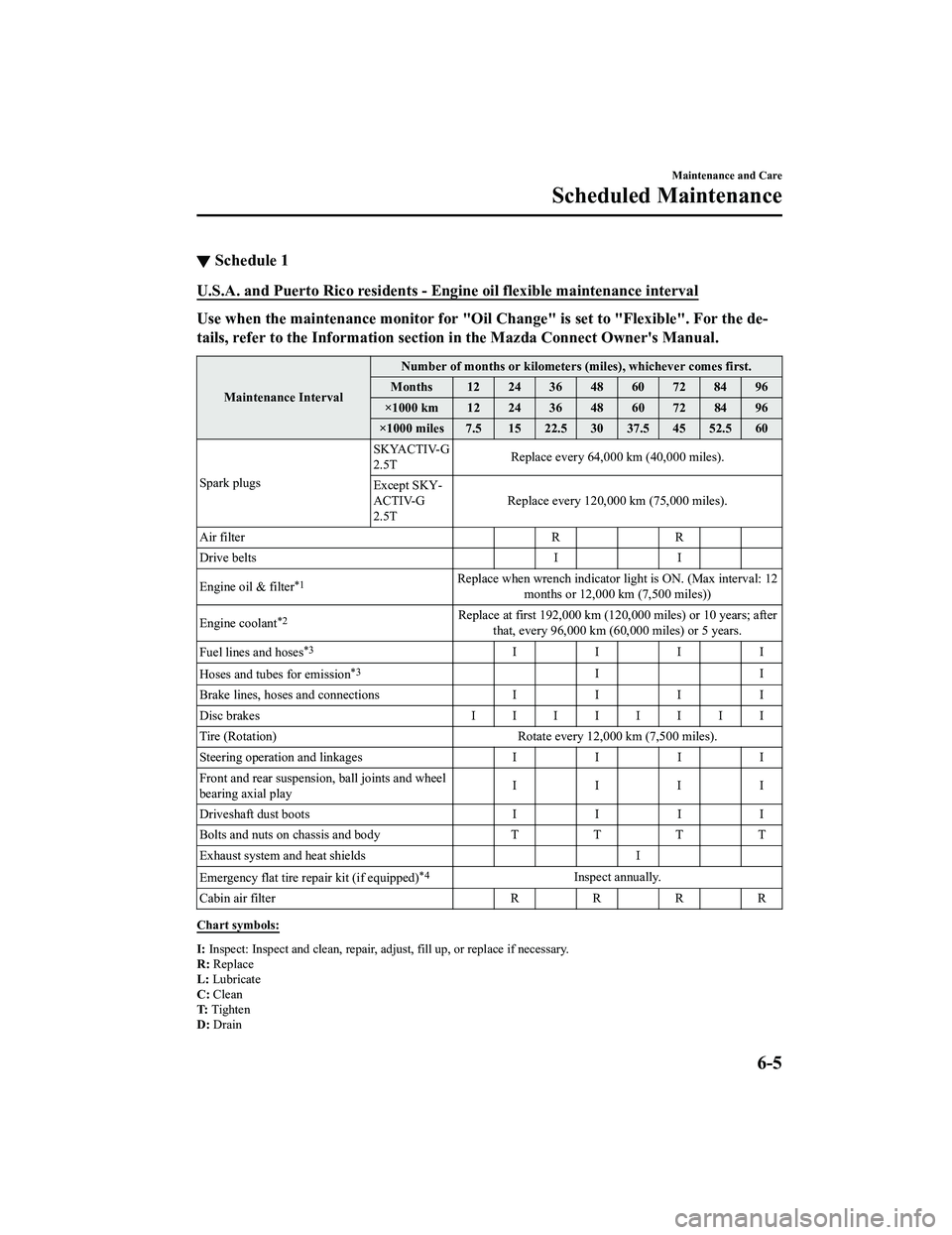
▼Schedule 1
U.S.A. and Puerto Rico residents - En
gine oil flexible maintenance interval
Use when the maintenance monitor for "Oil Change" is set to "Flexible". For the de ‐
tails, refer to the Inform ation section in the Mazda Connect Owner's Manual.
Maintenance Interval Number of months or kilometers (miles), whichever comes first.
Months 12 24 36 48 60 72 84 96
×1000 km 12 24 36 48 60 72 84 96
×1000 miles 7.5 15 22.5 30 37.5 45 52.5 60
Spark plugs SKYACTIV-G
2.5T
Replace every 64,000 km (40,000 miles).
Except SKY ‐
ACTIV-G
2.5T Replace every 120,000 km
(75,000 miles).
Air filter RR
Drive belts II
Engine oil & filter
*1Replace when wrench indicator light is ON. (Max interval: 12 months or 12,000 km (7,500 miles))
Engine coolant
*2Replace at first 192,000 km (120,0 00 miles) or 10 years; after
that, every 96,000 km (60,000 miles) or 5 years.
Fuel lines and hoses
*3IIII
Hoses and tubes for emission
*3II
Brake lines, hoses and connections I I I I
Disc brakes IIIIIIII
Tire (Rotation) Rotate every 12,000 km (7,500 miles).
Steering operation and linkages II II
Front and rear suspensi on, ball joints and wheel
bearing axial play IIII
Driveshaft dust boots II II
Bolts and nuts on chassis and body TTTT
Exhaust system and heat shields I
Emergency flat tire repair kit (if equipped)
*4Inspect annually.
Cabin air filter RRR R
Chart symbols:
I: Inspect: Inspect and clean, repair, adju st, fill up, or replace if necessary.
R: Replace
L: Lubricate
C: Clean
T: Tighten
D: Drain
Maintenance and Care
Scheduled Maintenance
6-5
CX-5_8KN5-EA-21K_Edition1_old 2021-9-9 8:35:12
Page 543 of 723
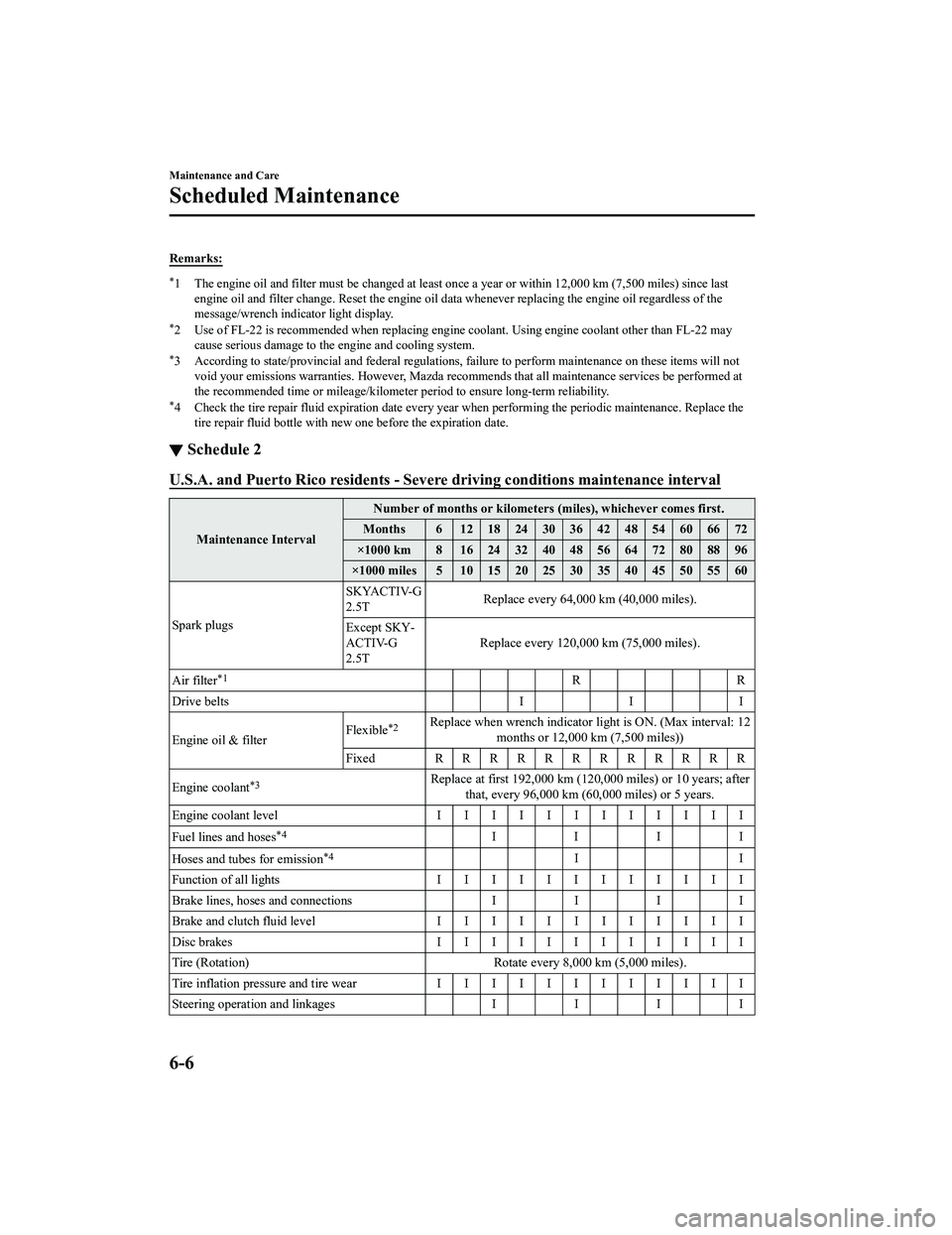
Remarks:
*1 The engine oil and filter must be changed at least once a year or within 12,000 km (7,500 miles) since last
engine oil and filter change. Reset the engine oil data whenever repl acing the engine oil regardless of the
message/wrench indicator light display.
*2 Use of FL-22 is recommended when replacing engine coolant. Using engine coolant other than FL-22 may
cause serious damage to the engine and cooling system.
*3 According to state/provincial and fede ral regulations, failure to perform maintenance on these items will not
void your emissions warranties. However, Mazda recomme nds that all maintenance services be performed at
the recommended time or mileage/kilometer period to ensure long-term reliability.
*4 Check the tire repair fluid expiration date every year when performing the periodic maintenance. Replace the
tire repair fluid bottle with new one before the expiration date.
▼ Schedule 2
U.S.A. and Puerto Rico residents - Severe
driving conditions maintenance interval
Maintenance IntervalNumber of months or kilometers (miles), whichever comes first.
Months 6 1218243036424854606672
×1000 km 8 1624324048566472808896
×1000 miles 5 10 15 20 25 30 35 40 45 50 55 60
Spark plugs SKYACTIV-G
2.5T
Replace every 64,000 km
(40,000 miles).
Except SKY ‐
ACTIV-G
2.5T Replace every 120,000
km (75,000 miles).
Air filter
*1RR
Drive belts I I I
Engine oil & filter Flexible
*2Replace when wrench indicator lig
ht is ON. (Max interval: 12
months or 12,000 km (7,500 miles))
Fixed RRRRRRRRRRRR
Engine coolant
*3Replace at first 192,000 km (120,000 miles) or 10 years; after
that, every 96,000 km (60,000 miles) or 5 years.
Engine coolant level IIIIIIIIIIII
Fuel lines and hoses
*4IIII
Hoses and tubes for emission
*4II
Function of all lights IIIIIIIIIIII
Brake lines, hoses and connections II II
Brake and clutch fluid level IIIIIIIIIIII
Disc brakes IIIIIIIIIIII
Tire (Rotation) Rotate every 8,000 km (5,000 miles).
Tire inflation pressure and tire wear IIIIIIIIIIII
Steering operation and linkages II II
Maintenance and Care
Scheduled Maintenance
6-6
CX-5_8KN5-EA-21K_Edition1_old 2021-9-9 8:35:12