tires MAZDA MODEL CX-5 2022 Owner's Manual
[x] Cancel search | Manufacturer: MAZDA, Model Year: 2022, Model line: MODEL CX-5, Model: MAZDA MODEL CX-5 2022Pages: 723, PDF Size: 89.79 MB
Page 314 of 723
When entering and exiting interchanges, servic e areas, and parking areas of expressways (If
you exit an expressway while headway control is in use, the vehicle ahead will no longer be
tracked and your vehicle may a ccelerate to the set speed).
Slippery roads such as icy or snow-covered roads and unpaved roads (Tires could spin
causing you to lose vehicle control, or the stop hold control may not operate.)
Long, descending slopes (to maintain distance between vehicles, the system automatically
and continuously applies the brakes which could result in the loss of brake power.)
Two-wheeled vehicles such as mo torcycles or bicycles are ahead.
Slopes with a steep gradient (The vehicle ahea d may not be detected correctly, your vehicle
may slip while stopped by the stop hold control, or it may accelerate suddenly after it starts
moving.)
Driving under bad weather conditions (rain, fog, and snow).
Tires of a
different
specified size are used, such as a temporary spare tire.
Tires with insufficient tread are used.
The tire pressures are not adjusted to the
specified pressure.
The vehicle is being used to tow a camper or boat trailer.
Tire chains are used.
The vehicle is driven on roads with lane lines other than white (yellow) lines, such as an
expressway.
Do not get out of the vehicle while the stop hold control is operating.
Getting out of the vehicle while the stop hold co ntrol is operating is dangerous as the vehicle
may move unexpectedly and result in an accident . Before getting out of the vehicle, switch the
TJA off, apply the parking brake, and then sh ift the selector lever to the P position.
CAUTION
Heed the following cautions so th at the TJA can operate normally.
Turn the system off when the vehicle is running on a chassis roller.
Do not modify the vehicle's suspensions.
Always use wheels of the specified size for th e front and rear wheels. Consult an Authorized
Mazda Dealer for tire replacement.
NOTE
The headway control does not detect the following as physical objects.
Vehicles approaching in the opposite direction
When Driving
i-ACTIVSENSE
4-161
CX-5_8KN5-EA-21K_Edition1_old 2021-9-9 8:35:12
Page 330 of 723
Driving on roads with tight curves.
Driving under bad weather conditions (rain, fog, and snow).
Slippery roads such as ice or snow-bound roads.
Roads with heavy traffic and insufficient distance between vehicles.
Roads with no white (yellow) lane lines.
Narrow roads resulting from road construction or lane closures.
The vehicle is driven on a temporary lane or section with a closed lane resulting from road
construction where there may be multiple white (yellow) lane lines or they are interrupted.
Vehicle is driven on roads oth er than expressways and highways.
The tire pressures are not adjusted to the
specified pressure.
The vehicle is being used to tow a camper or boat trailer.
Tires of a
different
specified size are used, such as an emergency spare tire.
CAUTION
Heed the following cautions so that the LAS & LDWS can operate normally.
Do not modify the suspensions.
Always use wheels of the specified type and size for the front and rear wheels. Consult an
Authorized Mazda Dealer for tire replacement.
NOTE
When the turn signal lever is operated for a lane change, the LAS & LDWS is
automatically disabled. The LAS & LDWS becomes operational again when the turn
signal lever is returned and the system detects white (yellow) lane lines while the vehicle
is being driven normally within its vehicle lane.
If the steering wheel, accelerator pedal, or brake pedal is operated abruptly and the
vehicle moves close to a white (yellow) line, the system de termines that the driver is
making a lane change and the LAS & LDWS operation is temporarily canceled. The LAS
& LDWS becomes operational again when the system detects white (yellow) lane lines
while the vehicle is being driven normally within its vehicle lane.
If the vehicle deviates from its lane repeatedly within a short period of time, the LAS &
LDWS may not operate.
When white (yellow) lane lines are not detected, the LAS & LDWS does not operate.
Under the following conditions, the LAS & LDWS may not be able to detect white (yellow)
lane lines correctly and it may not operate normally.
If an object placed on the dashboard is reflected in the windshield and picked up by the
camera.
Heavy luggage is loaded in the luggage compartment or on the rear seat and the
vehicle is tilted.
When Driving
i-ACTIVSENSE
4-177
CX-5_8KN5-EA-21K_Edition1_old 2021-9-9 8:35:12
Page 331 of 723

The tire pressures are not adjusted to the specified pressure.
Tires other than conventional tires are equipped.
Vehicle is driven on an intersection or junction, or on a forked road.
The white (yellow) lane lines are less visible because of dirt or fading/patchiness.
A vehicle in front of your vehicle is running near a white (yellow) lane line making it
less visible.
A white (yellow) lane line is less visible because of bad weather (rain, fog, or snow).
The vehicle is driven on a temporary lane or section with a closed lane resulting from
construction where there may be multiple white (yellow) lane lines or they are
interrupted.
A misleading line is picked up on the road such as a temporary line for construction, or
because of shade, lingering snow, or grooves filled with water.
The surrounding brightness suddenly changes such as when entering or exiting a
tunnel.
The illumination of the headlights is weakened because of dirt or the optical axis is
deviated.
The windshield is dirty or foggy.
The windshield, camera is fogged (water droplets).
Back-light is reflected off the road surface.
The road surface is wet and shiny after rain, or there are puddles on the road.
The shade of a guardrail parallel to a white (yellow) lane line is cast on the road.
The width of the driving lane is narrow or wide.
Driving on roads with tight curves.
The road is excessively uneven.
The vehicle is shaken after hitting a road bump.
There are 2 or more adjacent white (yellow) lane lines.
There are various road markings or lane markings of various shapes near an
intersection.
▼System Operation
System operation
When the ignition is switched ON, the system goes on standby.
Drive the vehicle in the center of the vehicle lane while the system is on standby. When all
of the following conditions are met, and the system becomes operational.
The engine is running.
The vehicle speed is about 64 km/h (40 mph) or faster.
The system detects white (yellow) lane lines on both the right and left sides.
The driver is operating the steering wheel.
The driving lane is neither narrow nor wide.
The steering assist function of the Traf
fic Jam Assist (TJA) is not operating.
When Driving
i-ACTIVSENSE
4-178
CX-5_8KN5-EA-21K_Edition1_old 2021-9-9 8:35:12
Page 348 of 723

If you suddenly come close to a vehicle ahead.
2-wheeled vehicles, pedestrians, animals or standing trees.
Vehicle is driven with some of the tires having significant wear.
▼Smart City Brake Support (SCBS)
Indicator Light (Red)*
If the Smart City Br
ake Support (SCBS) is
operating, the indicator light (red) flashes.
▼ Collision Warning*
If there is the possibility of a collision with
a vehicle ahead, the beep sounds
continuously and a warning is indicated in
the multi-information display and the
active driving display.
NOTE
The operation distance and volume of the
collision warning can be changed. Refer
to the Settings se
ction in the Mazda
Connect Owner's Manual.
▼ Automatic Brake Operation
Display*
The automatic brake operation display is
indicated on the multi-
information display
after the SCBS F is operated.
NOTE
The collision warning beep sounds
intermittently while the SCBS F brake or
brake assist (SCBS F brake assist) is
operating.
If the vehicle is stopped by the SCBS F
operation and the brake pedal is not
depressed, the warning beep sounds 1
time after about 2 seconds and the SCBS
F brake is automatically released.
▼ Stopping the Smart City Brake
Support (SCBS) System Operation
The SCBS F system can be temporarily
deactivated.
Refer to the Settings section in the Mazda
Connect Owner's Manual.
When the SCBS F system
is turned off, the
Smart City Brake Support (SCBS) OFF
indicator light turns on.
When the engine is restarted, the system
becomes operational.
NOTE
When the SCBS F system is set to
inoperable, the Smart Brake Support
(SBS) are also set to inoperable.
When Driving
i-ACTIVSENSE
*Some models.4-195
CX-5_8KN5-EA-21K_Edition1_old 2021-9-9 8:35:12
Page 350 of 723

Do not apply a strong force to an ultrasonic sensor (rear):
When washing the vehicle, do not spray highly pressurized water against an ultrasonic sensor
(rear), or rub it strongly. In addition, do no t hit the rear bumper forcefully when loading and
unloading cargo Otherwise, the sensors may no t detect obstructions correctly which could
cause the SCBS R system to not operate normally, or it could operate unnecessarily.
CAUTION
When driving off-road in areas where there is gr ass or foliage, it is recommended that the
SCBS R system be turned off.
Always use tires of the specified size and the same manufacturer, brand, and tread pattern
on all 4 wheels. In addition, do not use tires wi th significantly different wear patterns on the
same vehicle. Otherwise, the SCBS R system may not operate normally.
If ice or snow is stuck on the ultrasonic sensors (rear) they may not be able to detect
obstructions correctly depending on the condit ions. In such cases, the system may not be
able to perform controls correctly. Always dr ive carefully and pay attention to the rear of
the vehicle.
NOTE
The vehicle posture changes depending on the accelerator pedal, brake pedal and
steering wheel operations, which could make it difficult for the system to recognize an
obstruction, or it could facilitate unnecessary detection. In such cases, the SCBS R may or
may not operate.
The SCBS R system will operate under the following conditions.
The engine is running.
The selector lever is in the R (reverse) position.
“Reverse Smart City Brake Support Malfunction” is not displayed in the
multi-information display.
The vehicle speed is between about 2 to 8 km/h (2 to 4 mph).
The SCBS R is not turned off.
The DSC is not malfunctioning.
The SCBS R operates using ultrasonic sensors (rear) which detect obstructions at the rear
by emitting ultrasonic waves and then receiving the returning waves reflected off the
obstructions.
In the following cases, the ultrasonic sensors (rear) cannot detect obstructions and the
SCBS R may not operate.
The height of the obstruction is low such as low walls or trucks with low loading
platforms.
The height of the obstruction is high such as trucks with high loading platforms.
When Driving
i-ACTIVSENSE
4-197
CX-5_8KN5-EA-21K_Edition1_old 2021-9-9 8:35:12
Page 383 of 723
Icy or snow-covered roads.
Tire chains or a temporary spare tire is installed.
The front or rear doors are not fully closed.
The vehicle is on a road incline.
The door mirrors are retracted.
Do not hit the front/rear camera, front bumper , liftgate, and door mirrors forcefully. The
camera position or installation angle may shift.
The cameras are waterproof. Do not di sassemble, modify, or remove a camera.
The camera cover is made of hard plastic, therefore do not apply oil film remover, organic
solvents, wax, or coating agents. If any such agent gets on the camera cover, wipe it off
using a soft cloth immediately.
Do not rub the camera lens forcefully, or clean it with an abrasive or hard brush. Otherwise,
it could scratch the camera lens and negatively affect the images.
Consult an Authorized Mazda Dealer for repair , painting, or replacement of the front/rear
camera, front bumper, liftgate and door mirrors.
Heed the following cautions to assure that the 360°View Monitor operates normally.
Do not modify the vehicle suspensions or lower/raise the vehicle body, or both.
Always use tires of the specified type and size for the front and rear wheels. Consult an
Authorized Mazda Dealer for tire replacement.
When the display is cold, images may leave trails or the screen might be darker than usual,
making it
difficult to check the vehicle surroundings. Always
confirm the safety at the front
and around the vehicle visually when driving.
The method for parking/stopping the vehicle using the 360°View Monitor differs depending
on the road circumstances/conditions and th e vehicle conditions. When and how much you
turn the steering wheel will differ depending on the situation, therefore always check the
vehicle surroundings directly with your eyes while using the system.
Also, before using the system, always make su re that the vehicle can be parked/stopped in
the parking/stopping space.
NOTE
If there are water droplets, snow, or mud on the camera lens, wipe it off using a soft cloth.
If the camera lens is especially dirt y, wash it off with mild detergent.
If the camera lens is touched or there is any dirt on it, it could affect the screen image.
Wipe the lens using a soft cloth.
If the area where the camera is installed, such as the front bumper, liftgate or door
mirrors, has been damaged in a vehicle accident, the camera (position, installation angle)
may have shifted. Always consult an Authorized Mazda Dealer to have the vehicle
inspected.
When Driving
i-ACTIVSENSE
4-230
CX-5_8KN5-EA-21K_Edition1_old 2021-9-9 8:35:12
Page 411 of 723
The direction in which the Forward Sensing Camera (FSC) is pointed has been
finely
adjusted. Do not change the installation posi tion of the Forward Sensing Camera (FSC) or
remove it. Otherwise, it could result in damage or malfunction.
Always use tires for all wheels that are of the specified size, and the same manufacturer,
brand, and tread pattern. In addition, do no t use tires with significantly different wear
patterns on the same vehicle as the system may not operate normally.
The Forward Sensing Camera (FSC) includes a function for detecting a soiled windshield
and informing the driver, however, depending on the conditions, it may not detect plastic
shopping bags, ice or snow on the windshield. In such cases, the system cannot accurately
determine a vehicle ahead and may not be able to operate normally. Always drive carefully
and pay attention to the road ahead.
NOTE
In the following cases, the Forward Sensing Camera (FSC) cannot detect target objects
correctly, and each system may be unable to operate normally.
The height of the vehicle ahead is low.
You drive your vehicle at the same speed as the vehicle ahead.
Headlights are not turned on during the night or when going through a tunnel.
In the following cases, the Forward Sensing Camera (FSC) may not be able to detect
target objects correctly.
Under bad weather condition, such as rain, fog and snow.
The window washer is being used or the windshield wipers are not used when it's
raining.
Ice, fog, snow, frost, rainfall, dirt, or foreign matter such as a plastic bag is stuck on the
windshield.
Trucks with low loading plat forms and vehicles with an extremely low or high profile.
When driving next to walls with no patterning (including fences and longitudinally
striped walls).
The taillights of the vehicle ahead are turned off.
A vehicle is outside the illumi nation range of the headlights.
The vehicle is making a sharp turn, or ascending or descending a steep slope.
Entering or exiting a tunnel.
Heavy luggage is loaded causing the vehicle to tilt.
Strong light is shone at the front of the vehicle (back light or high-beam light from
on-coming vehicles).
There are many light emitters on the vehicle ahead.
When the vehicle ahead is not equipped with ta illights or the taillights are turned off at
nighttime.
Elongated luggage or cargo is loaded onto installed roof rails and covers the Forward
Sensing Camera (FSC).
When Driving
i-ACTIVSENSE
4-258
CX-5_8KN5-EA-21K_Edition1_old 2021-9-9 8:35:12
Page 412 of 723

Exhaust gas from the vehicle in front, sand, snow, and water vapor rising from
manholes and grating, and water splashed into the air.
When towing a malfunctioning vehicle.
The vehicle is driven with tires having significantly different wear.
The vehicle is driven on down slopes or bumpy roads.
There are water puddles on the road.
The surroundings are dark such as during the night, early evening, or early morning, or
in a tunnel or indoor parking lot.
The illumination brightness of the headlights is reduced or the headlight illumination is
weakened due to dirt or a deviated optical axis.
The target object enters the blind spot of the Forward Sensing Camera (FSC).
A person or object bursts onto the road from the shoulder or cuts right in front of you.
You change lanes and approach a vehicle ahead.
When driving extremely close to the target object.
Tire chains or a temporary spare tire is installed.
The vehicle ahead has a special shape. For example, a vehicle towing a trailer house or
a boat, or a vehicle carrier carrying a vehicle with its front pointed rearward.
If the Forward Sensing Camera (FSC) cannot operate normally due to backlight or fog,
the system functions related to the Forward Sensing Camera (FSC) are temporarily
stopped and the following warning lights turn on. However, this does not indicate a
malfunction.
High Beam Control System (HBC) warning light (amber)
Lane-keep Assist System (LAS) & Lane Departure Warning System (LDWS) warning
indication
Mazda Radar Cruise Control with Stop & Go function (MRCC with Stop & Go
function) warning indication
Traffic Jam Assist (TJA) warning indication
Smart Brake Support/Smart City Brake Support (SBS/SCBS) warning indication/
warning light (amber)
If the Forward Sensing Camera (FSC) cannot operate normally due to high temperatures,
the system functions related to the Forward Sensing Camera (FSC) are temporarily
stopped and the following warning lights turn on. However, this does not indicate a
malfunction. Cool down the area around the Forward Sensing Camera (FSC) such as by
turning on the air conditioner.
High Beam Control System (HBC) warning light (amber)
Lane-keep Assist System (LAS) & Lane Departure Warning System (LDWS) warning
indication
When Driving
i-ACTIVSENSE
4-259
CX-5_8KN5-EA-21K_Edition1_old 2021-9-9 8:35:12
Page 415 of 723
Do not use the front bumper to push other vehi cles or obstructions such as when pulling
out of a parking space. Otherwise, the radar sensor (front) could be hit and its position
deviated.
Do not remove, disassemble, or modify the radar sensor (front).
For repairs, replacement or paint work around the radar sensor (front), consult an
Authorized Mazda Dealer.
Do not modify the suspension. If the suspensi on are modified, the vehicle's posture could
change and the radar sensor (front) may not be able to correctly detect a vehicle ahead or
an obstruction.
NOTE
Under the following conditions, the radar sensor (front) may not be able to detect vehicles
ahead or obstructions correctly and each system may not operate normally.
The rear surface of a vehicle ahead does not reflect radio waves effectively, such as an
unloaded trailer or an automobile with a loading platform covered by a soft top,
vehicles with a hard plastic tailgate, and round-shaped vehicles.
Vehicles ahead with low vehicle height and thus less area for reflecting radio waves.
Visibility is reduced due to a vehicle ahead ca sting off water, snow, or sand from its tires
and onto your windshield.
The luggage compartment is loaded with heavy objects or the rear passenger seats are
occupied.
Ice, snow, or soiling is on the front surface of the front emblem.
During inclement weather such as rain, snow, or sand storms.
When driving near facilities or objects emitting strong radio waves.
Under the following conditions, the radar sensor (front) may not be able to detect vehicles
ahead or obstructions.
The beginning and end of a curve.
Roads with continuous curves.
Narrow lane roads due to road construction or lane closures.
The vehicle ahead enters the radar sensor's blind spot.
The vehicle ahead is running abnormally due to accident or vehicle damage.
Roads with repeated up and down slopes
Driving on poor roads or unpaved roads.
The distance between your vehicle and the vehicle ahead is extremely short.
A vehicle suddenly comes close such as by cutting into the lane.
To prevent incorrect operation of the system, use tires of the same specified size,
manufacturer, brand, and tread pattern on all four wheels. In addition, do not use tires
with significantly different wear patterns or tire pressures on the same vehicle (Including
the temporary spare tire).
If the battery power is weak, the system may not operate correctly.
When Driving
i-ACTIVSENSE
4-262
CX-5_8KN5-EA-21K_Edition1_old 2021-9-9 8:35:12
Page 426 of 723
Tire Pressure Monitoring System
The Tire Pressure Monitoring System (TPMS) monitors the pressure for each tire.
If tire pressure is too low in one or more t ires, the system will inform the driver via the
warning light in the instrument cluster and by the warning beep sound.
Refer to Contact Authorized Mazda Dealer and Have Vehicle Inspected on page 7-25.
Refer to Taking Action on page 7-31.
Refer to Tire Inflation Pressure Warning Beep on page 7-44.
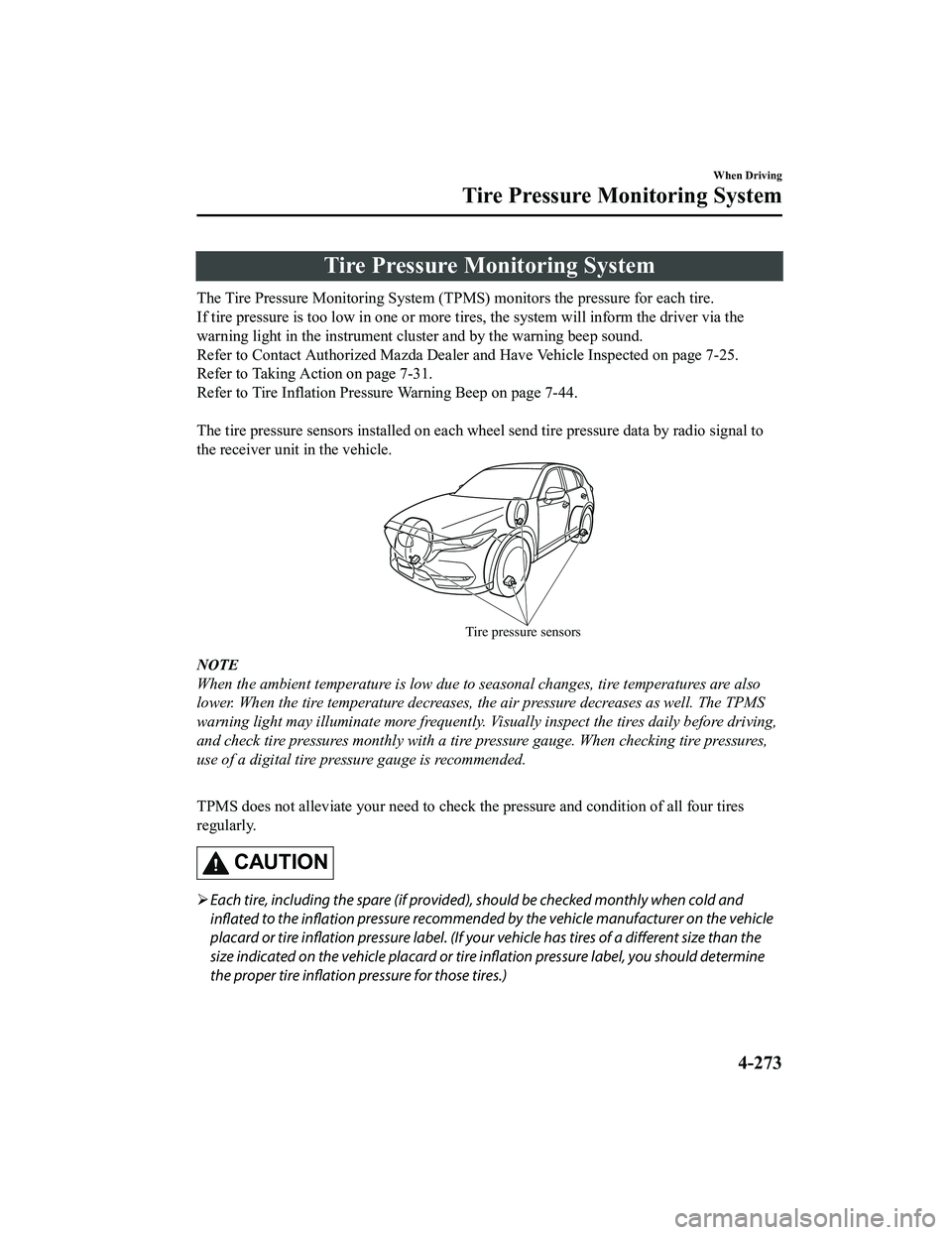
The tire pressure sensors installed on each wheel send tire pressure data by radio signal to
the receiver unit in the vehicle.
Tire pressure sensors
NOTE
When the ambient temperature is low due to seasonal changes, tire temperatures are also
lower. When the tire temperature decreases, the air pressure decreases as well. The TPMS
warning light may illuminate more frequently. Vi sually inspect the tires daily before driving,
and check tire pressures monthly with a tire pressure gauge. When checking tire pressures,
use of a digital tire pressure gauge is recommended.
TPMS does not alleviate your need to check the pressure and condition of all four tires
regularly.
CAUTION
Each tire, including the spare (if provided), should be checked monthly when cold and
inflated to the
inflation pressure recommended by the vehicle manufacturer on the vehicle
placard or tire inflation pressure label. (If your vehicle has tires of a different size than the
size indicated on the vehicle placard or tire inflation pressure label, you should determine
the proper tire inflation pressure for those tires.)
When Driving
Tire Pressure Monitoring System
4-273
CX-5_8KN5-EA-21K_Edition1_old
2021-9-9 8:35:12