lights MAZDA MODEL CX-5 SKYACTIV-D 2019 Owner's Manual
[x] Cancel search | Manufacturer: MAZDA, Model Year: 2019, Model line: MODEL CX-5 SKYACTIV-D, Model: MAZDA MODEL CX-5 SKYACTIV-D 2019Pages: 721, PDF Size: 97.68 MB
Page 163 of 721
ON
This is the normal running position after
the engine is started. The indicator light
(amber) turns off. (The indicator light
(amber) illuminates when the ignition is
switched ON and the engine is not
running.)
Some indicator lights/warning lights
should be inspected before the engine is
started (page 4-12).
NOTE
(SKYACTIV-G 2.0, SKYACTIV-G 2.5,
SKYACTIV-G 2.5T)
When the push button start is pressed to
ON, the sound of the fuel pump motor
operating near the fuel tank can be heard.
This does not indicate an abnormality.
Starting the Engine
WA R N I N G
Radio waves from the key may
affect
medical devices such as pacemakers:
Before using the key near people who use
medical devices, ask the medical device
manufacturer or your physician if radio
waves from the key will affect the device.
NOTE
The key must be carried because the key
carries an immobilizer chip that must
communicate with the engine controls at
short range.
The engine can be started when the push
button start is pressed from off, ACC, or
ON.
The push button start system functions
(function which can start the engine by
only carrying the key) can be
deactivated to prevent any possible
adverse effect on a user wearing a
pacemaker or other medical device. If
the system is deactivated, you will be
unable to start the engine by carrying
the key. Consult an Authorized Mazda
Dealer for details. If the push button
start system functions have been
deactivated, you can start the engine by
following the procedure indicated when
the key battery goes dead.
Refer to Engine Start Function When
Key Battery is Dead on page 4-8.
After starting a cold engine, the engine
speed increases and a whining sound
from the engine compartment can be
heard.
When Driving
Start/Stop Engine
4-5
CX-5_8HH4-EA-19A_Edition1
2018-11-21 10:03:20
Page 177 of 721

▼Dashboard Illumination
When the lights are turned on with the
ignition switched ON, the brightness of
the dashboard illumination is dimmed.
However, when the light sensor detects
that the surrounding area is bright such as
when the lights are turned on in the
daytime, the dashboard illumination does
not dim.
NOTE
When the ignition is
switched ON in the
early evening or at dusk, the dashboard
illumination is dimmed for several
seconds until the light sensor detects the
brightness of the surrounding area,
however, the dimming may cancel after
the brightness is detected.
When the lights are turned on, the
lights-on indicato r light in the
instrument cluster turns on.
Refer to Headlights on page 4-73.
The brightness of the instrument cluster
and dashboard illuminations can be
adjusted by rotating the knob.
The brightness decreases by rotating the
knob to the left. A beep sound will be
heard when the knob has been rotated to
the maximum dim position.
The brightness increases by rotating the
knob to the right.
Dim
Bright
Function for canceling illumination
dimmer
The illumination dimmer can be canceled
by rotating the dashboard illumination
knob to the right until a beep sound is
heard while the instrument cluster is
dimmed with the ignition switched ON. If
the instrument cluster's visibility is
reduced due to glare from surrounding
brightness, cancel the illumination
dimmer.
NOTE
When the illumination dimmer is
canceled, the instrument cluster cannot
be dimmed even if the lights are turned
on.
When the illumination dimmer is
canceled, the screen in the center
display switches to constant display of
the daytime screen.
▼Speed Unit Selector
In some countries, you may have to
change the speed units between km/h and
mph.
When pressing the selector knob, the
speed units in the instrument cluster will
change.
Selector knob
When Driving
Instrument Cluster and Display
4-19
CX-5_8HH4-EA-19A_Edition1
2018-11-21 10:03:20
Page 182 of 721
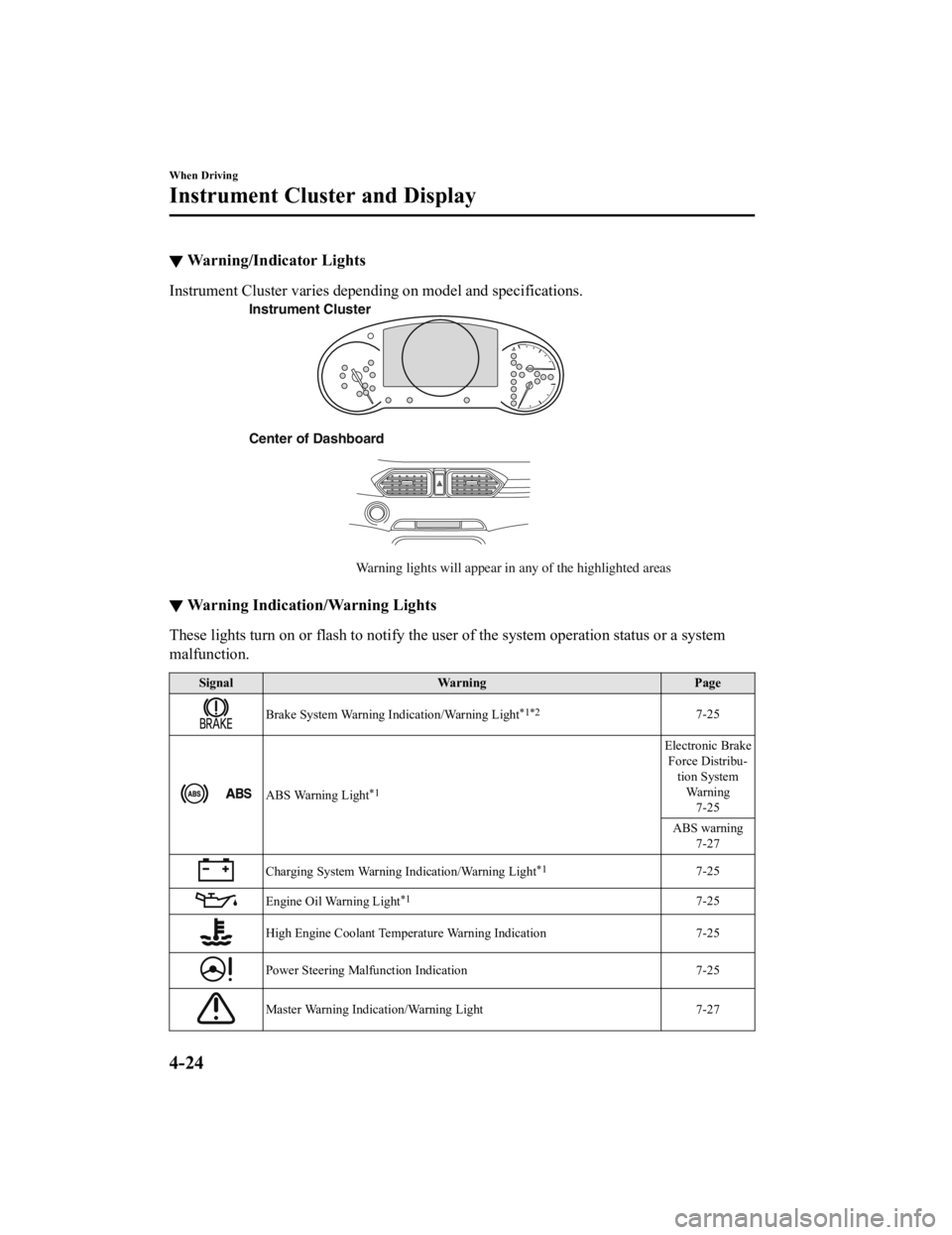
▼Warning/Indicator Lights
Instrument Cluster varies depending on model and specifications.
Center of Dashboard
Warning lights will appear in any of the highlighted areas
Instrument Cluster
▼
Warning Indication/Warning Lights
These lights turn on or flash to notify the user of the system operation status or a system
malfunction.
Signal
Warning Page
Brake System Warning Indication/Warning Light*1*27-25
ABS Warning Light*1
Electronic Brake
Force Distribu- tion SystemWa r n i n g 7-25
ABS warning 7-27
Charging System Warning Indication/Warning Light*17-25
Engine Oil Warning Light*17-25
High Engine Coolant Temperature Warning Indication 7-25
Power Steering Malfunction Indication 7-25
Master Warning Indication/Warning Light 7-27
When Driving
Instrument Cluster and Display
4-24
CX-5_8HH4-EA-19A_Edition1 2018-11-21 10:03:20
Page 184 of 721
SignalWarning Page
(Red)Seat Belt Warning Light (Rear seat) 7-34
Low Washer Fluid Level Warning Indication
7-34
Door-Ajar Warning Indication7-34
Liftgate-Ajar Warning Indication 7-34
Door-Ajar Warning Light7-34
*1 The light turns on when the ignition is switched on for an operation check, and turns off a few seconds later or
when the engine is started. If the light does not turn on or remains turned on, have the vehicle inspected at an
Authorized Mazda Dealer.
*2 The light turns on continuously when the parking brake is applied.
▼ Indication/Indicator Lights
These lights turn on or flash to notify the user of the system operation status or a system
malfunction.
Signal
Indicator Page
(Green)Seat Belt Indicator Light (Rear seat) 2-30
*Front Passenger Air Bag Deactivation Indicator Light*12-72
Security Indicator Light*13-47
Wrench Indication
4-29
*Glow Indicator Light*14-29
*Diesel Particulate Filter Indication4-225
Shift Position Indication
4-66
When Driving
Instrument Cluster and Display
4-26*Some models.
CX-5_8HH4-EA-19A_Edition1 2018-11-21 10:03:20
Page 185 of 721

SignalIndicator Page
Lights-On Indication/Indicator Light 4-73
Headlight High-Beam Indicator LightHeadlight
High-Low Beam 4-76
Flashing the Headlights 4-76
Turn Signal/Hazard Warning Indicator Lights Turn and
Lane-Change Signals4-79
Hazard Warning Flasher4-86
AUTOHOLD Active Indicator Light*14-102
Mazda Radar Cruise Control with Stop & Go function (MRCC with Stop &
Go function) indicator Light 4-154
TCS/DSC Indicator Light*1
Traction Control
System (TCS) 4-107
Dynamic Stabil- ity Control(DSC)4-109
Turns on 7-27
TCS OFF Indicator Light*14-108
Select Mode Indication 4-114
(Green)High Beam Control System
(HBC) Indicator Light 4-123
Blind Spot Monitoring (BSM) OFF Indicator Light*1
Malfunction
7-27
Except malfunc- tion
4-129
(White) Mazda Radar Cruise Control with Stop & Go function (MRCC with Stop &
Go function) Main Indication
4-149
When Driving
Instrument Cluster and Display
4-27
CX-5_8HH4-EA-19A_Edition1
2018-11-21 10:03:20
Page 193 of 721

(SKYACTIV-D 2.2)
If inconsistency in engine performance or
stalling occurs due to low fuel level
conditions, refuel the vehicle as soon as
possible and add at least 10 L (2.7 US gal,
2.2 Imp gal) of fuel.
▼Dashboard Illumination
When the lights are turned on with the
ignition switched ON, the brightness of
the dashboard illumination is dimmed.
However, when the light sensor detects
that the surrounding area is bright such as
when the lights are turned on in the
daytime, the dashboard illumination does
not dim.
NOTE
When the ignition is
switched ON in the
early evening or at dusk, the dashboard
illumination is dimmed for several
seconds until the light sensor detects the
brightness of the surrounding area,
however, the dimming may cancel after
the brightness is detected.
When the lights are turned on, the
lights-on indicato r light in the
instrument cluster turns on.
Refer to Headlights on page 4-73.
The brightness of the instrument cluster
and dashboard illuminations can be
adjusted by rotating the knob.
The brightness decreases by rotating the
knob to the left. A beep sound will be
heard when the knob has been rotated to
the maximum dim position.
The brightness increases by rotating the
knob to the right.
Dim
Bright
Function for canceling illumination
dimmer
The illumination dimmer can be canceled
by rotating the dashboard illumination
knob to the right until a beep sound is
heard while the instrument cluster is
dimmed with the ignition switched ON. If
the instrument cluster's visibility is
reduced due to glare from surrounding
brightness, cancel the illumination
dimmer.
NOTE
The illumination dimmer can be
canceled by pressing the dashboard
illumination knob.
When the illumination dimmer is
canceled, the instrument cluster cannot
be dimmed even if the lights are turned
on.
When the illumination dimmer is
canceled, the screen in the center
display switches to constant display of
the daytime screen.
When Driving
Instrument Cluster and Display
4-35
CX-5_8HH4-EA-19A_Edition1 2018-11-21 10:03:20
Page 198 of 721
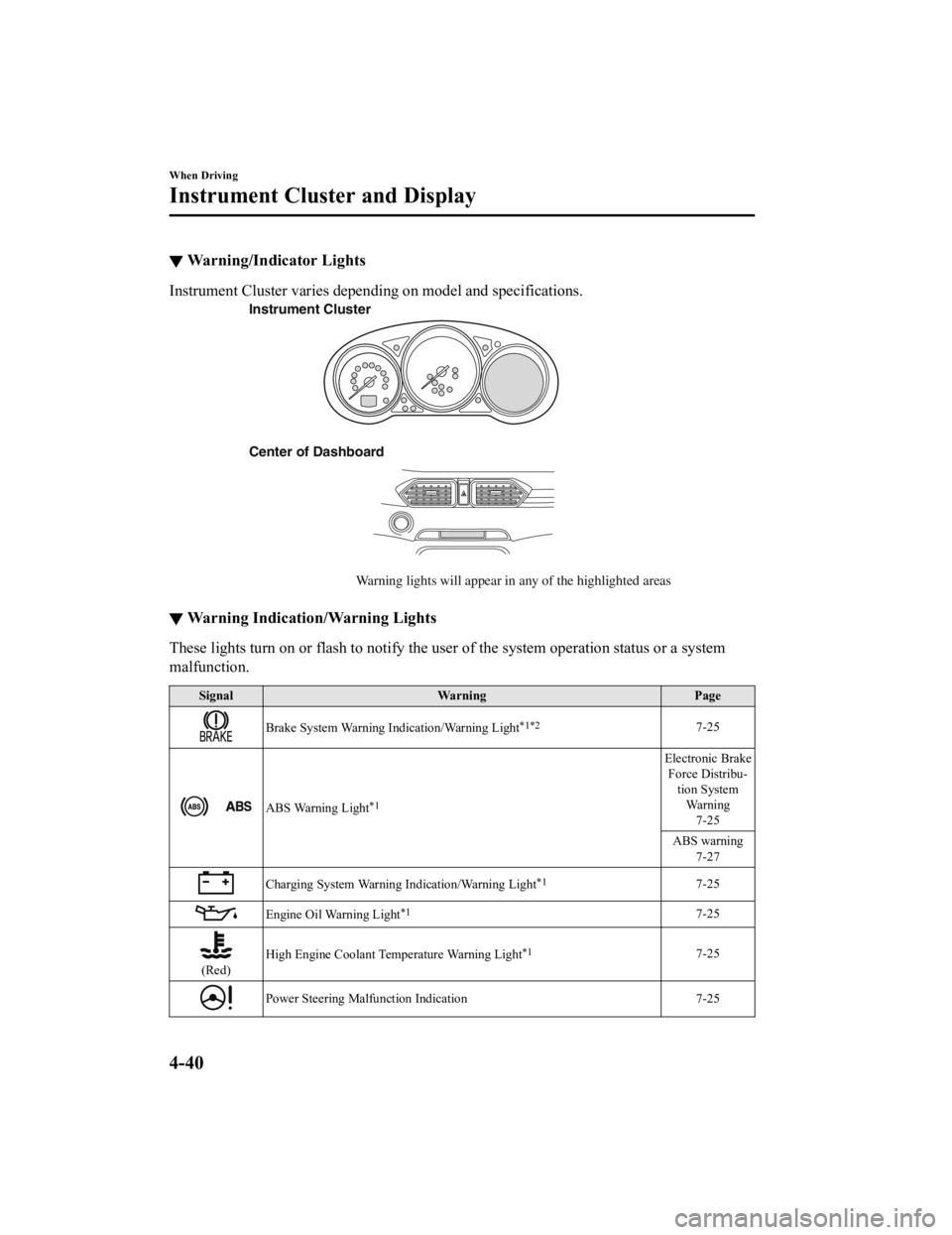
▼Warning/Indicator Lights
Instrument Cluster varies depending on model and specifications.
Instrument Cluster
Center of Dashboard
Warning lights will appear in any of the highlighted areas
▼Warning Indication/Warning Lights
These lights turn on or flash to notify the user of the system operation status or a system
malfunction.
Signal
Warning Page
Brake System Warning Indication/Warning Light*1*27-25
ABS Warning Light*1
Electronic Brake
Force Distribu- tion SystemWa r n i n g 7-25
ABS warning 7-27
Charging System Warning Indication/Warning Light*17-25
Engine Oil Warning Light*17-25
(Red) High Engine Coolant Temperature Warning Light
*17-25
Power Steering Malfun
ction Indication 7-25
When Driving
Instrument Cluster and Display
4-40
CX-5_8HH4-EA-19A_Edition1 2018-11-21 10:03:20
Page 200 of 721
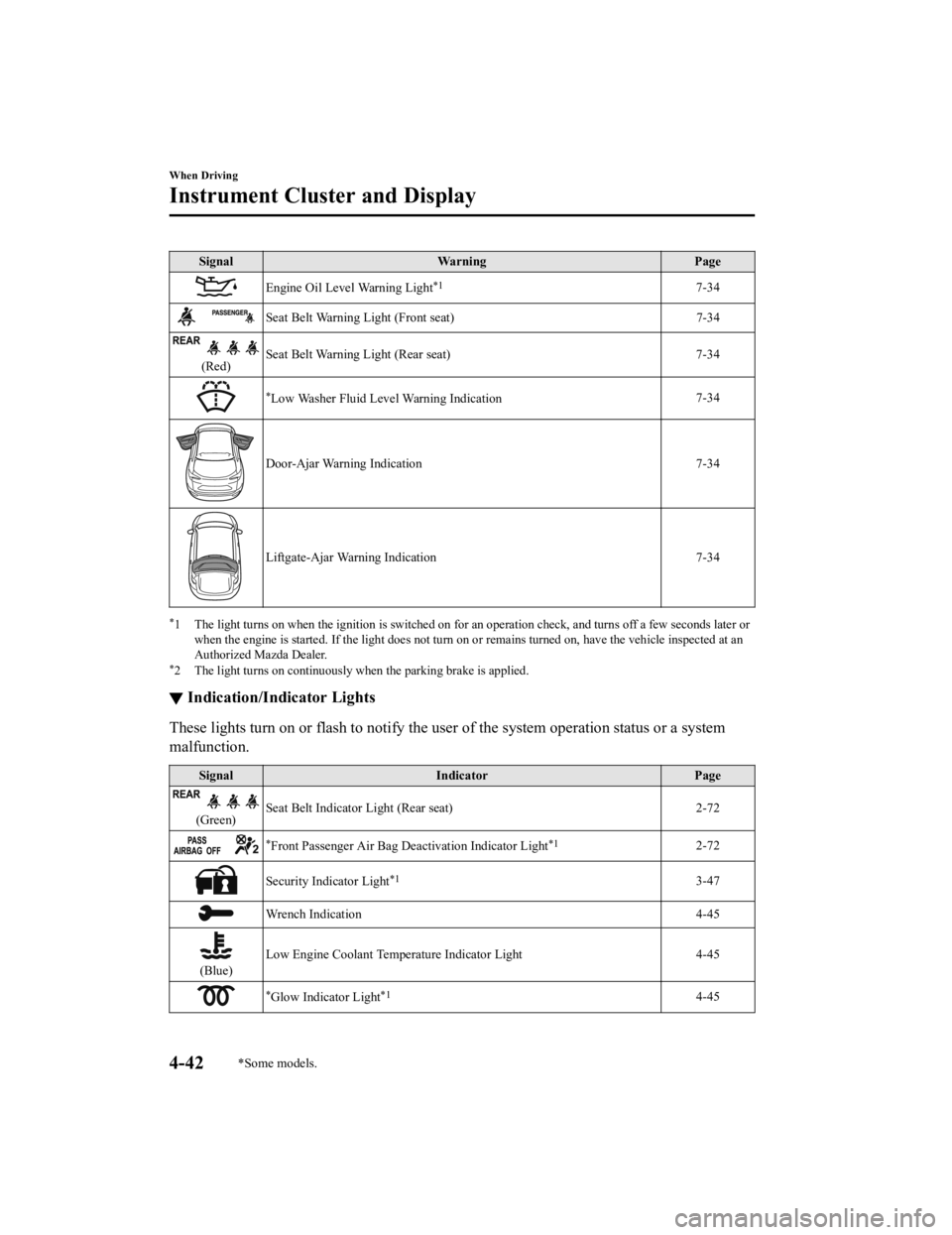
SignalWarning Page
Engine Oil Level Warning Light*17-34
Seat Belt Warning Light (Front seat) 7-34
(Red)Seat Belt Warning Light (Rear seat) 7-34
*Low Washer Fluid Level Warning Indication
7-34
Door-Ajar Warning Indication
7-34
Liftgate-Ajar Warning Indication 7-34
*1 The light turns on when the ignition is switched on for an operation check, and turns off a few seconds later or
when the engine is started. If the light does not turn on or remains turned on, have the vehicle inspected at an
Authorized Mazda Dealer.
*2 The light turns on continuously when the parking brake is applied.
▼ Indication/Indicator Lights
These lights turn on or flash to notify the user of the system operation status or a system
malfunction.
Signal
Indicator Page
(Green)Seat Belt Indicator Light (Rear seat) 2-72
*Front Passenger Air Bag Deactivation Indicator Light*12-72
Security Indicator Light*13-47
Wrench Indication
4-45
(Blue)Low Engine Coolant Temperature Indicator Light 4-45
*Glow Indicator Light*14-45
When Driving
Instrument Cluster and Display
4-42*Some models.
CX-5_8HH4-EA-19A_Edition1
2018-11-21 10:03:20
Page 201 of 721

SignalIndicator Page
*Diesel Particulate Filter Indication 4-225
Shift Position Indication
4-66
Lights-On Indication/Indicator Light 4-73
Headlight High-Beam Indicator LightHeadlight
High-Low Beam 4-76
Flashing the Headlights 4-76
Turn Signal/Hazard Warning Indicator Lights Turn and
Lane-Change Signals4-79
Hazard Warning Flasher4-86
AUTOHOLD Active Indicator Light*14-102
*Mazda Radar Cruise Control with Stop & Go function (MRCC with Stop
& Go function) indicator Light 4-154
TCS/DSC Indicator Light*1
Traction Control
System (TCS) 4-107
Dynamic Stabil- ity Control(DSC)4-109
Turns on 7-27
TCS OFF Indicator Light*14-108
Select Mode Indication 4-114
(Green)
*High Beam Control System (HBC) Indicator Light4-123
*Blind Spot Monitoring (BSM) OFF Indicator Light*1
Malfunction
7-27
Except malfunc- tion
4-129
When Driving
Instrument Cluster and Display
*Some models.4-43
CX-5_8HH4-EA-19A_Edition1 2018-11-21 10:03:20
Page 208 of 721

The direction of the arrow () indicates
that the fuel-filler lid is on the left side
of the vehicle.
▼ Dashboard Illumination
(Without auto-light control)
When the lights are
turned on with the
ignition switched ON, the brightness of
the dashboard illumi nation is dimmed.
(With auto-light control)
When the lights are turned on with the
ignition switched ON, the brightness of
the dashboard illumi nation is dimmed.
However, when the light sensor detects
that the surrounding area is bright such as
when the lights are turned on in the
daytime, the dashboard illumination does
not dim.
NOTE
(With auto-lig ht control)
When the ignition is switched ON in the
early evening or at dusk, the dashboard
illumination is dimmed for several
seconds until the light sensor detects the
brightness of the surrounding area,
however, the dimming may cancel after
the brightness is detected.
When the lights are turned on, the
lights-on indicator light in the
instrument cluster turns on.
Refer to Headlights on page 4-73.
The brightness of the instrument cluster
and dashboard illuminations can be
adjusted by rotating the knob.
The brightness decreases by rotating the
knob to the left. A beep sound will be
heard when the knob has been rotated to
the maximum dim position.
The brightness increases by rotating the
knob to the right.
Dim
Bright
Function for canceling illumination
dimmer
The illumination dimmer can be canceled
by rotating the dashboard illumination
knob to the right until a beep sound is
heard while the instrument cluster is
dimmed with the ignition switched ON. If
the instrument cluster's visibility is
reduced due to glare from surrounding
brightness, cancel the illumination
dimmer.
NOTE
When the illumination dimmer is
canceled, the instrument cluster cannot
be dimmed even if the lights are turned
on.
When the illumination dimmer is
canceled, the screen in the center
display switches to constant display of
the daytime screen.
▼Outside Temperature Display
When the ignition is switched ON, the
outside temperature is displayed.
When Driving
Instrument Cluster and Display
4-50
CX-5_8HH4-EA-19A_Edition1
2018-11-21 10:03:20