radio MAZDA MODEL CX-5 SKYACTIV-D 2019 Owner's Guide
[x] Cancel search | Manufacturer: MAZDA, Model Year: 2019, Model line: MODEL CX-5 SKYACTIV-D, Model: MAZDA MODEL CX-5 SKYACTIV-D 2019Pages: 721, PDF Size: 97.68 MB
Page 427 of 721
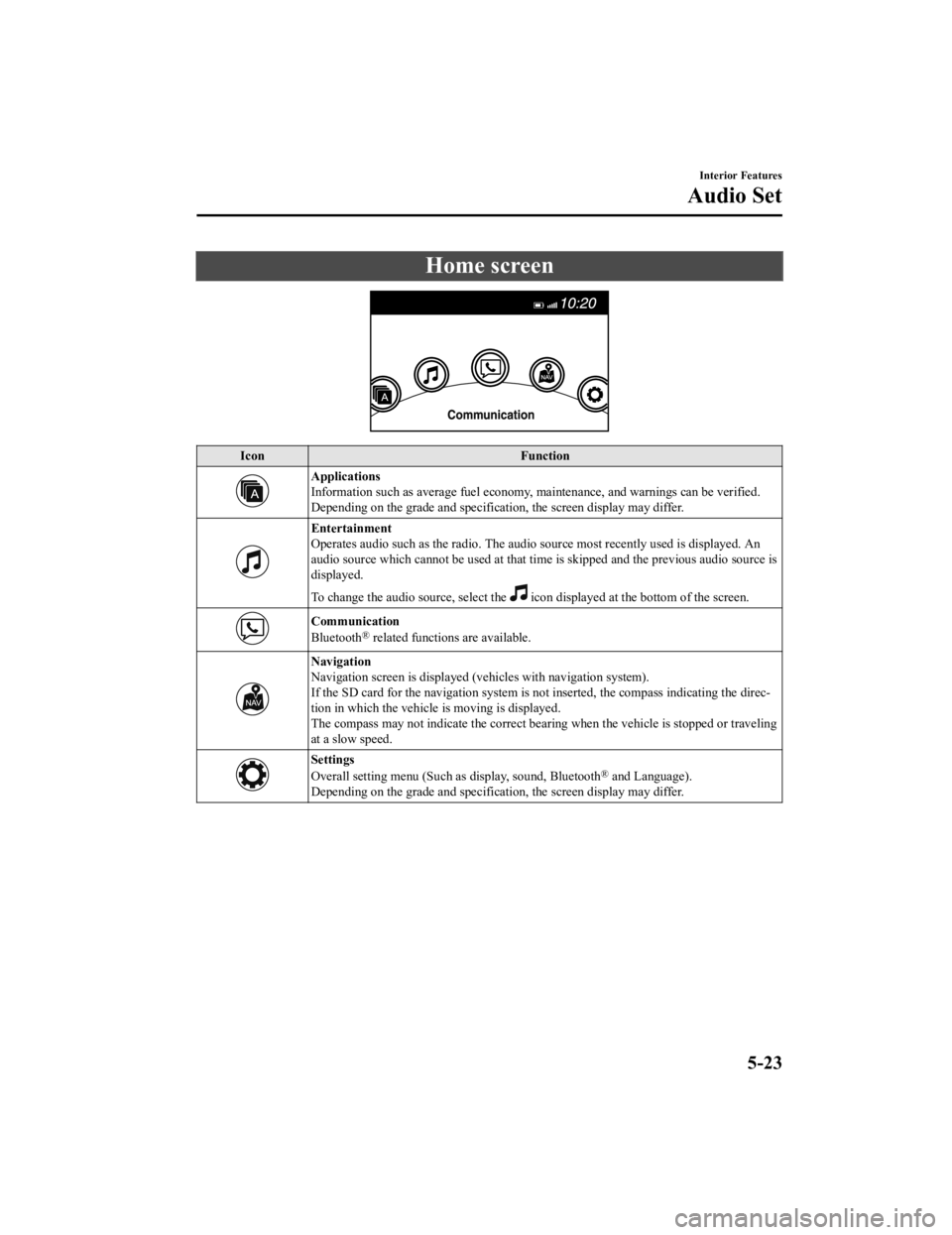
Home screen
IconFunction
Applications
Information such as average fuel economy, maintenance, and warnings can be verified.
Depending on the grade and specificatio n, the screen display may differ.
Entertainment
Operates audio such as the radio. The audio source most recently used is displayed. An
audio source which cannot be used at that tim e is skipped and the previous audio source is
displayed.
To change the audio source, select the
icon displayed at the bottom of the screen.
Communication
Bluetooth® related functions are available.
Navigation
Navigation screen is displayed (v ehicles with navigation system).
If the SD card for the navigation system is no t inserted, the compass indicating the direc-
tion in which the vehicle is moving is displayed.
The compass may not indicate the correct bearin g when the vehicle is stopped or traveling
at a slow speed.
Settings
Overall setting menu (Such as display, sound, Bluetooth® and Language).
Depending on the grade and specificatio n, the screen display may differ.
Interior Features
Audio Set
5-23
CX-5_8HH4-EA-19A_Edition1 2018-11-21 10:03:20
Page 428 of 721

Volume/Display/Sound Controls
Commander switchAudio control switch
Volume switch
Volume dial
▼Volume adjustment
Turn the commander switch volume dial.
The volume switch on the steering switch
can also be pressed.
NOTE
Press the volume knob to mute and pause.
However, while an
audio source which
cannot be paused such as FM radio is
playing, only mute is available. Press the
volume knob again to resume the audio.
▼ Display setting
Select the icon on the home screen to
display the Settings screen.
Select the
tab to select the item you
would like to change.
Display OFF/Clock
The center display can be turned off.
Select
to turn the display off.
When
is
selected the center di splay turns off and
the clock is displayed.
The center display can be turned back on
as follows:
Touch the center display.
Operate the commander switch.
Daytime/nighttime (System) screen
setting
The daytime or nighttime screen can be
selected.
:
(With auto-light control)
Switches screen automatically according
to parking lights illumination condition.
However, when the light sensor detects
that the surrounding area is bright such as
when the parking ligh ts are turned on in
the daytime, the screen is switched to the
daytime screen
*1
(Without auto-light control)
Switches screen automatically according
to parking lights illumination condition.
*1
: Daytime screen setting
: Nighttime screen setting
*1 The display is constantly on daytime screen when the illumination dimmer
is cancelled.
Brightness adjustment
Adjust the center display brightness using
the slider.
Interior Features
Audio Set
5-24
CX-5_8HH4-EA-19A_Edition1 2018-11-21 10:03:20
Page 431 of 721

Operating the Radio
▼Radio ON
Select the icon on the home screen to display th
e Entertainment screen. When selecting
the desired radio, the following icons are indi cated in the lower part of the center display.
AM/FM Radio
Icon Function
Displays the Entertainment menu. Use to switch to a different audio source.
Displays the station list.
Select
to display the frequencies of up to ten radio stations on the auto
memory preset list.
Select the desired frequency.
Displays the Favorites list. Long-press to store radio station currently being aired.
Switches the on and off. Displays the multi-cast channel list of the
.
You can search for receivable radio stations.
Scanning stops at each station for about five seconds.
Select again to continue receiving the radio station.
You can change the radio frequency manually.
Rotate the commander knob , slide the screen, or touch the radio frequency.
Press
or to change the radio freq uency one step at a time.
When
or is long-pressed, the radio frequency changes continually. It stops when you
remove your hand from the icon or the commander knob.
Launches the iTunes Tagging function (for Apple devices with USB use only). Can be
used when the
is on.
Automatic radio station selection.
When long-pressed, the radio frequency changes continually. It stops when you remove
your hand from the icon or the commander knob.
Displays sound settings to adjust audio quality level.
Refer to Volume/Display/Sound Controls on page 5-24.
▼ Favorites Radio
Selected stations can be registered for
convenient operation. Up to 50 stations
can be registered. The Favorites list is
common to AM, FM, and satellite radio.
Registering to Favorites
Long-press the
icon to register the
current radio station. The registration can
also be performed using the following
procedure.
Interior Features
Audio Set
5-27
CX-5_8HH4-EA-19A_Edition1 2018-11-21 10:03:20
Page 432 of 721

1. Select the icon to display the
Favorites list.
2. Select
.
3. Select
.
4. The station is added to the bottom of the Favorites list.
NOTE
If the battery is disconnected, your
Favorites list will not be deleted.
Selecting radio station from Favorites
1. Select the
icon to display the
Favorites list.
2. Select the radio frequency to tune in the radio station.
Deleting from Favorites
1. Select the
icon to display the
Favorites list.
2. Select
.
3. Select
.
4. Select the radio frequency you want to
delete.
5. Select
.
Changing Favorites list order
1. Select the
icon to display the
Favorites list.
2. Select
.
3. Select
.
4. Select a radio frequency. The selected radio station can be moved.
5. Slide the radio station or move it using
the commander switch, then select
.
▼Radio Broadcast Data System
(RBDS)*
Radio text info
rmation display
Radio text information sent from a
broadcasting station is displayed in the
center display.
NOTE
Radio text information is a function of FM
radio only. There is no text function on AM
radio. Text informati on is not displayed in
the following:
During reception
Not an RBDS broadcast
RBDS broadcast, but radio text is not
transmitted from the radio station
Genre Seek
Some FM stations transmit Genre codes
(Program type like Rock, News, and so
on). This code enables alternative stations
transmitting the same Genre code to be
found quickly.
(To scan for Genre Seek:)
1. Select the
icon while in the FM
mode.
2. Select
to open the genre list.
3. Select the genre type you want to select.
4. Select the
, icon.
Interior Features
Audio Set
5-28*Some models.
CX-5_8HH4-EA-19A_Edition1 2018-11-21 10:03:20
Page 433 of 721

NOTE
To change the desired genre, select the
icon.
Ex.)
89.3 is currently being received. With
Rock selected as the Genre, the radio
stations broadcasting Rock are at the
following frequencies.
98.3
*1, 98.7, 104.3*1, 107.1
*1 Radio stations with good reception
The frequency changes as follows each
time
is pressed.
89.3→98.3→104.3→ 98.3
NOTE
Only one Genre can be selected.
It may not be possible to receive any
station even if the Genre Seek function is
used.
If a program in the selected genre is not
broadcast to a region, reception is not
possible even if the Genre Seek function
is used.
The Genre Seek function searches for
genre code (program type) which FM
analog broadcasts transmit.
specialty programs (HD2-HD8) cannot
be searched because they are not FM
analog broadcasts.
If radio stations which are selected by
scanning using the Genre Seek function
are
broadcasting stations,
they are changed from analog
broadcasts to
broadcasts
after a few seconds if the reception
conditions are good. The genre is
displayed after the switch, however, the
genre for FM analog broadcasts may
differ.
▼ HD Radio
What is HD Radio™ Technology and
how does it work?
HD Radio™ Technology is the digital
evolution of analog AM/FM radio. Your
radio product has a special receiver which
allows it to receive digital broadcasts
(where available) in
addition to the analog
broadcasts it already receives. Digital
broadcasts have better sound quality than
analog broadcasts as digital broadcasts
provide free, crystal clear audio. For more
information, and a guide to available radio
stations and programming, please visit
www.hdradio.com.
Benefits of HD Radio™ Technology
(Information)
The song title, artist name, album name
and genre will appear on the screen when
available by the radio station.
(Multicast)
On the FM radio frequency most digital
stations have “multi ple” or supplemental
programs on each FM station.
Listening to HD Radio™ Technology
If
icon turns on by selecting a radio
station which is an
broadcasting
station, the analog broadcast is switched to
an
broadcast automatically after
a few seconds and then received.
If the
broadcast is stopped and
changed to an analog broadcast, press
down
to turn off .
Interior Features
Audio Set
5-29
CX-5_8HH4-EA-19A_Edition1 2018-11-21 10:03:20
Page 434 of 721

Multicast channel selection (FM)
If multi-cast channels are available for an
broadcast currently being
received, the multi-cast channel list is
displayed. Select the desired radio station.
NOTE
If an analog broadcast is received once
and
is received while HD1 is
selected, the audio unit switches to the
station automatically.
When the icon is illuminated, there
could be a noticeable difference in
sound quality and volume when a
change from digital to analog signals
occurs. If the sound quality and volume
become noticeably diminished or cut off,
select the
icon to turn off
( icon is not illuminated).
Once an analog broadcast is received
when HD1 is selected from the Favorite
channels, it is switched to
automatically. If the radio reception
conditions are poor, or HD is off,
switching to
broadcasts is not
possible.
When an HD specialty channel (HD2 to
HD8) is selected from the Favorite
channels, “Signal Lost” is displayed
and no audio is output until
is received. If the radio reception
conditions are poor, “Signal Lost”
continues to be displayed.
If the icon is not illuminated,
information such as song titles of the
station are received, however,
the audio output is analog.
iTunes Tagging (for Apple devices with
USB use only)
By tagging a song currently being aired,
the song can later be purchased from the
iTunes Store. One hundred tags can be
stored. A maximum of 100 tags (for 100
songs) can be stored for later
downloading.
1. Select the
icon. The tag is stored in
the audio unit.
2. Connect the device via the vehicle's
USB. Any stored ta g(s) will be sent
automatically to the connected device.
3. Once at home or after parking the vehicle safely, log onto the iTunes
Store with your device. Your
previously tagged song(s) can now be
easily purchased.
NOTE
Both AM and FM can be
used.
Because iTunes tagging only supports
purchases from the iTunes Store, direct
downloading of music from the vehicle's
audio unit is not possible.
If the available memory for the
connected device is insufficient, the tag
is not sent.
If an error occurs while the tag is being
sent, reconnect the device.
Interior Features
Audio Set
5-30
CX-5_8HH4-EA-19A_Edition1 2018-11-21 10:03:20
Page 435 of 721

Operating the SatelliteRadio
*
▼What is satellite radio?
SiriusXM® All Access Subscription.
Hopefully, you're already loving SiriusXM
in your new Mazda. But don't stop there
— you can also listen on the app and
online. All Access is the very best
subscription package – with the most
channels and the most
flexibility. With All
Access, you get every channel available
on satellite radio, plus you can listen on
the app and online — so you can enjoy
SiriusXM wherever you are. Here's what's
included:
-Over 150 satellite channels to enjoy in
your car, coast-to-coast, 24/7.
-All kinds of commercial-free music, plus
every major sport, world-class news and
the biggest names in talk & entertainment.
-All of our premium programming,
including Howard Stern, every NFL,
MLB
®, and NBA game, NHL® games,
every NASCAR
® race, 24/7 talk channels
dedicated to the biggest leagues, and much
more.
All SiriusXM services require a
subscription, sold separately or as a
package by SiriusXM Radio Inc. (or, in
Canada, SiriusXM Canada Inc.), after any
trial subscription which may be included
with your vehicle purchase or lease. To
subscribe after your trial subscription, call
1-877-447-0011 (U.S.A.) or
1-877-438-9677 (Canada).
CAUTION
It is prohibited to copy, decompile,
disassemble, reverse engineer, hack,
manipulate, or otherwise make available
any technology or software incorporated in
receivers compatible with the SiriusXM
satellite radio service or that support the
SiriusXM website, the online service or any
of its content. Furthermore, the AMBE
®
voice compression software included in this
product is protected by intellectual
property rights including patent rights,
copyrights, and trade secrets of Digital
Voice Systems, Inc. The SiriusXM Service
may include traffic, weather and other
content and emergency alert information
and data. Such information and data is not
for “safety for life”, but is merely
supplemental and advisory in nature and,
therefore, cannot be relied upon as safety
critical. Neither SiriusXM nor Mazda is
responsible for any errors in accuracies in
the SiriusXM data services or its use in
applications. The SiriusXM content is
subject to change without notice.
▼ Displaying the Radio ID
When channel 0 is selected, the radio ID is
displayed. Use the PREVIOUS or NEXT
channel buttons to select channel 0.
Interior Features
Audio Set
*Some models.5-31
CX-5_8HH4-EA-19A_Edition1
2018-11-21 10:03:20
Page 436 of 721

▼SiriusXM® operation
Select the icon on the home screen to displa
y the Entertainment screen. When is
selected, the following icons are indicated in the bottom part of the center display.
Icon Function
Displays the Entertainment menu. Use to switch to a different audio source.
Displays the channel list of the current category.
Displays the favorites list. Long-press to store the channel currently being aired.
Refer to Operating the Radio on page 5-27.
Plays each channel in the current channel list for 6 seconds.
Select again to continue receiving the channel.
The function can be select ed when the Tune Scan™ setting is turned off.
Each channel programmed to Smart Favorite is played for 6 seconds.
The function can be selected when all of the following conditions are met.
Two or more music channels have been programmed to Smart FavoriteThe Tune Scan™ setting is ON
Displays in red while a station in a TuneMix™ channel is being broadcast.
The TuneMix™ broadcast ends when the icon is pressed.
(During TuneMix™ broadcast/Tune Scan™ operation)
Returns to the beginning of the previous song.
Plays a radio. When selected again, playback is temporarily stopped.
(During TuneMix™ broadcast/Tune Scan™ operation)
Advances to the beginning of the next song.
(When in a mode other than TuneMix™/Tune Scan™)
Plays the previous channel.
(When in a mode other than TuneMix™/Tune Scan™)
Plays the next channel.
Displays the setting screen.
Displays sound settings to adjust audio quality level.
Refer to Volume/Display/Sound Controls on page 5-24.
Interior Features
Audio Set
5-32
CX-5_8HH4-EA-19A_Edition1 2018-11-21 10:03:20
Page 441 of 721

IconFunction
Displays sound settings to adjust audio quality level.
Refer to Volume/Display/Sound Controls on page 5-24.
NOTE
If a file name in the USB memory is too long , it could cause operation problems such as
not being able to playback the song.
(Recommended: Within 80 characters)
The album art may not display depending on the album art size.
To move to the desired location on the track, move the slider indicating the playback time.
The appearance of the repeat and shuffle icons changes depending on the type of
operation in which the function is used.
Category list
Select the
icon to display th e following category list.
Select a desired category and item.
Category Function
Playlist
*1Displays playlists on the device.
Artist Displays the artist name list.
All the tracks or tracks for each album of
the selected artist can be played.
Album Displays the album name list. Song All the tracks in the device are displayed.
Genre Displays the genre list.
All the tracks or tracks per album or artis
t in the selected genre can be played.
Audiobook
*2Displays the audiobook list.
Chapters can be se lected and played.
Podcast
*2Displays the podcast list.
Episode can be selected and played.
Apple Music Ra- dio
*2Displays Apple Music Radio stations.
A station can be selected and played.
Folder
*3Displays the folder/file list.
*1 Playlist folders of Apple devices are not supported.
*2 Apple device only
*3 USB-Sticks and USB-Android™ device only
Example of use (to play all tracks in
USB device)
(Method 1)
1. Select
to display the category list.
2. Select .
All the tracks in the USB device are
displayed.
Interior Features
Audio Set
5-37
CX-5_8HH4-EA-19A_Edition1 2018-11-21 10:03:20
Page 453 of 721

Bluetooth®
▼Introduction
Bluetooth® Hands-Free outline
When a Bluetooth® device (mobile phone) is connected to the vehicle's Bluetooth® unit via
radio wave transmission, a call can be made or received by pressing the talk button, pick-up
button, or hang-up button on the audio remote control switch, or by operating the center
display. For example, even if a device (mobile phone) is in your coat pocket, a call can be
made without taking the device (mobile phone) out and operating it directly.
Bluetooth
® audio outline
When a portable audio unit equipped with the Bluetooth® communication function is paired
to the vehicle, you can listen to music stored on the paired portable audio device from the
vehicle's speakers. It is not necessary to conn ect the portable audio device to the vehicle's
external input terminal. After programming, operate the vehicle audio control panel to play/
stop the audio.
NOTE
For your safety, a device can be paired only when the vehicle is parked. If the vehicle
starts to move, the pairing procedure will en d. Park the vehicle in a safe place before
pairing.
The communication range of a Bluetooth® equipped device is about 10 meters (32 ft) or
less.
Basic audio operation is available us ing voice commands even if Bluetooth® is not
connected.
For safety reasons, operation of the center di splay is disabled while the vehicle is being
driven. However, items not displayed in gray can be operated using the commander
switch while the vehicle is being driven.
CAUTION
Some Bluetooth® mobile devices are not compatible wi th the vehicle. Consult an Authorized
Mazda Dealer, Mazda's call center or Web support center for information regarding
Bluetooth
® mobile device compatibility:
U.S.A.
Phone: 800-430-0153
Web: www.mazdausa.com/mazdaconnect
Interior Features
Audio Set
5-49
CX-5_8HH4-EA-19A_Edition1 2018-11-21 10:03:20