radio MAZDA MODEL CX-5 SKYACTIV-D 2019 Service Manual
[x] Cancel search | Manufacturer: MAZDA, Model Year: 2019, Model line: MODEL CX-5 SKYACTIV-D, Model: MAZDA MODEL CX-5 SKYACTIV-D 2019Pages: 721, PDF Size: 97.68 MB
Page 457 of 721

After a device is registered, the system
automatically identifies the device. By
activating Bluetooth
® Hands-Free again,
or by activating Bluetooth
® Hands-Free
first after switching the ignition from OFF
to ACC, the device connection condition
is indicated in the center display.
IMPORTANT note about pairing and
automatic reconnection:
If pairing is re done on the same
mobile phone device, first clear
“Mazda” displayed on the Bluetooth
®
setting screen of the mobile device.
When the OS of the device is updated,
the pairing information may be deleted.
If this happens, reprogram the pairing
information to the Bluetooth
® unit.
Before you pair your device, make sure
that Bluetooth
® is “ON”, both on your
phone and on the vehicle.
▼ Device selection
If several devices have been paired, the
Bluetooth
® unit links the device last
paired. If you would like to link a different
paired device, it is necessary to change the
link. The order of device priority after the
link has been changed is maintained even
when the ignition is switched off.
Connecting other devices
1. Select the
icon on the home screen
to display the Settings screen.
2. Select the
tab.
3. Select
.
4. Turn the Bluetooth
® setting on.
5. Select the name of the device you would like to connect.
6. selection
Connects both devices as hands-free
and Bluetooth
® audio.
selection
Connects as a hands-free device.
selection
Connects as Bluetooth
® audio.
NOTE
The following functions can be used for
the Hands-free or audio.
Hands-free: Phone calls and
E-mail/SMS
Audio: Bluetooth® audio, Pandora®,
Aha™, Stitcher™ radio
Disconnecting a device
1. Select the
icon on the home screen
to display the Settings screen.
2. Select the
tab.
3. Select
.
4. Turn the Bluetooth
® setting on.
5. Select the device name which is currently connected.
6. Select
.
▼ Deleting a device
Selecting and de
leting devices
1. Select the
icon on the home screen
to display the Settings screen.
2. Select the
tab.
3. Select
.
4. Turn the Bluetooth
® setting on.
5. Select the device name which you would like to delete.
6. Select
.
7. Select
.
Interior Features
Audio Set
5-53
CX-5_8HH4-EA-19A_Edition1 2018-11-21 10:03:20
Page 460 of 721

▼Switching to Bluetooth® audio mode
To listen to music or voice
audio recorded to a Bluetooth® audio device, switch to the
Bluetooth
® audio mode to operate the audio device using the audio system control panel.
Any Bluetooth
® audio device must be paired to the vehicle's Bluetooth® unit before it can
be used.
Refer to Bluetooth
® Preparation on page 5-52.
1. Turn on the Bluetooth
® audio device's power.
2. Switch the ignition to ACC or ON.
3. Select the
icon on the home screen to di splay the Entertainment screen.
4. When
is selected, switches to the Bluetooth® audio mode to begin playback.
NOTE
If the Applications screen is not displayed on the device, Bluetooth® audio may not play
on the center display.
If Bluetooth® audio is used after using Pandora®, Aha™ or Stitcher™ radio, the
application on the mo bile device has to be closed first.
If the Bluetooth® audio device does not begin playback, select the icon.
If the mode is switched from Bluetooth® audio mode to another mode (radio mode), audio
playback from the Bluetooth
® audio device stops.
▼ Playback
To listen to a Bluetooth® audio device over the vehicle's speaker system, switch the mode to
Bluetooth
® audio mode. (Refer to “Switching to Bluetooth® audio mode”)
After switching to the Bluetooth
® audio mode, the following ic ons are displayed in the
lower part of the display. Icons which can be used differ depending on the version of the
Bluetooth
® audio device which you are currently using.
Icon Function
Displays the Entertainment menu. Use to switch to a different audio source.
(AVRCP Ver. 1.4 only)
Displays the top level folder/file list.
Select the folder which you want to select.
The files in the selected folder are displayed.
Select the file you want to play.
(AVRCP Ver. 1.3 or higher)
Replays the song currently being played repeatedly.
When selected again, the songs in the folder are played repeatedly.
Select it again to cancel.
Icons change when the song is repeated or the folder is repeated.
Interior Features
Audio Set
5-56
CX-5_8HH4-EA-19A_Edition1 2018-11-21 10:03:20
Page 462 of 721

How to Use Pandora®*
▼What is Pandora®?
Pandora®*1 is free personalized Internet radio. Si
mply enter a favorite artist, track, genre,
and Pandora
® will create a personalized station that plays their music and more like it. Rate
songs by giving thumbs-up and thumbs-down feedback to further refine your station,
discover new music and help Pandora
® play only music you like.
*1Pandora®, the Pandora® logo, and the Pandora® trade dress are trademarks or registered
trademarks of Pandora Media, Inc., used with permission.
NOTE
Pandora® may not be available outside of the U.S.A..
To operate Pandora® from your Bluetooth® device, perform the following in advance:
Create Pandora® account on the Web.
Create Pandora® station using Pandora® application.
Install Pandora® application on your device.
▼ Playback
Select the icon on the home screen to displa
y the Entertainment screen. When is
selected, the following icons are indicated in the bottom part of the center display.
Icon Function
Displays the Entertainment menu. Use to switch to a different audio source.
Displays the station list.
Use to switch to other stations.
Thumbs-Down
Press the
icon to tell Pandora® not to play this track.
Thumbs-Up
Press the
icon to tell Pandora® “you like this track” and it helps to bring in more tracks
like it to your station.
Bookmarking
Bookmarks the song or artist currently being played.
Plays the track. When selected again, playback is temporarily stopped.
Goes to the next song.
Interior Features
Audio Set
5-58*Some models.
CX-5_8HH4-EA-19A_Edition1 2018-11-21 10:03:20
Page 463 of 721

IconFunction
Displays sound settings to adjust audio quality level.
Refer to Volume/Display/Sound Controls on page 5-24.
NOTE
The skip function may not be available depending on the device.
The number of skips is limited by Pandora®.
If the icon is selected when the skip song function is running, the next song is skipped.
▼ Selection from station list
Selection can be made from a programmed
radio station list.
1. Select the
icon.
2. Select the desired radio station.
NOTE
When is selected, songs randomly
selected from the radio station list are
played.
Selecting the sort method
The displayed order of the station list can
be changed.
1. Select the
icon.
2. Select
.
3. Select
to display in the order
starting from the newly created station.
4. Select
to display in alphabetical
order.
NOTE
The displayed order of cannot be
changed.
▼ Bookmarking
You can bookmark song or artist to check
out later on the Web.
1. Select the
icon.
2. Select
to bookmark the
song.
3. Select
to bookmark the
artist.
Interior Features
Audio Set
5-59
CX-5_8HH4-EA-19A_Edition1 2018-11-21 10:03:20
Page 464 of 721

How to Use Aha™
▼What is Aha™?
Aha™*1 is an application which can be used to enjoy various Internet content such as
Internet radio and podcasts.
Stay connected to your friends activities by getting updates from Facebook and Twitter.
Using the location-based service, nearby services and destinations can be searched or
real-time local information can be obtained.
For details on Aha™, refer to “http://www.aharadio.com/”.
*1 Aha™, the Aha™ logo, and the Aha™ trade dress are trademarks or registered trademarks of Harman International Industries, Inc., used with permission.
NOTE
The service content provided by Aha™ varies depending on the country in which the user
resides. In addition, the service is not available in some countries.
To operate Aha™ from your Bluetooth® device, perform the following in advance:
Install the Aha™ applic ation to your device.
Create an Aha™ account for your device.
Log onto Aha™ using your device.
Select the preset station on your device.
If the Applications screen is not displayed on the device, Aha™ may not play on the
center display.
▼ Playback
Select the icon on the home screen to displa
y the Entertainment screen. When is
selected, the following icons are displayed at th e bottom of the center display. The displayed
icon differs depending on the selected station.
In addition, icons other than the following icons may be displayed.
Icon Function
Displays the Entertainment menu. Use to switch to a different audio source.
Displays the main menu.
Use to switch to other stations.
Displays the content list.
Use to switch to other desired content on the station.
Like*1
Evaluates the current content as “Like”.
Interior Features
Audio Set
5-60
CX-5_8HH4-EA-19A_Edition1 2018-11-21 10:03:20
Page 467 of 721

How to Use Stitcher™ Radio
▼What is Stitcher™ Radio?
Stitcher™*1 radio is an application which can be us
ed to listen to Internet radio or stream
podcasts.
Recommended content is automatically selected by registering content which you put into
your favorites, or by pressing the Like or Dislike button.
For details on Stitcher™ Radio, refer to “http://stitcher.com/”.
*1 Stitcher™, the Stitcher™ logo, and the Stitcher™ trade dress are trademarks or registered trademarks of Stitcher, Inc., used with permission.
NOTE
To operate Stitcher™ Radio from your Bluetooth® device, perform the following in
advance:
Install the Stitcher™ Radio application to your device.
Create a Stitcher™ Radio account for your device.
Log onto Stitcher™ Radio using your device.
If the Applications screen is not displayed on the device, Stitcher™ may not play on the
center display.
▼ Playback
Select the icon on the home screen to display the Entertainment screen. When is
selected, the following icons are indicated in the bottom part of the center display.
Icon Function
Displays the Entertainment menu. Use to switch to a different audio source.
Displays the station list.
Use to switch to other stations.
Dislike
Evaluates the current program as “Dislike”.
Like
Evaluates the current program as “Like”.
Adds the current station to your favorites or deletes the curr ent station from your favorites.
Reverses for 30 seconds.
Interior Features
Audio Set
5-63
CX-5_8HH4-EA-19A_Edition1 2018-11-21 10:03:20
Page 484 of 721
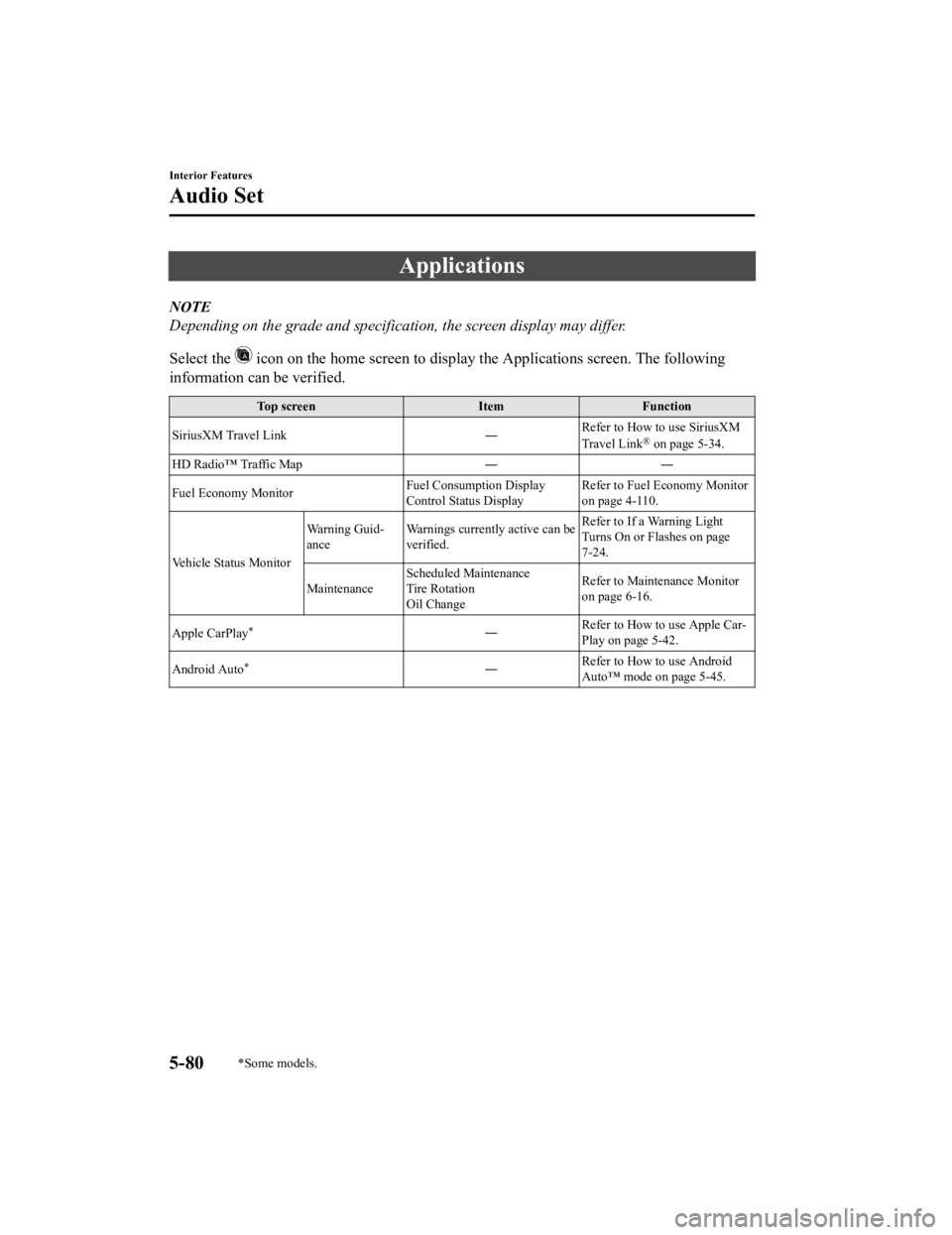
Applications
NOTE
Depending on the grade and specification, the screen display may differ.
Select the
icon on the home screen to display the Applications screen. The following
information can be verified.
Top screen ItemFunction
SiriusXM Travel Link ―Refer to How to use SiriusXM
Travel Link
® on page 5-34.
HD Radio™ Traffic Map ――
Fuel Economy Monitor Fuel Consumption Display
Control Status DisplayRefer to Fuel Economy Monitor
on page 4-110.
Vehicle Status Monitor Warning Guid-
ance
Warnings currently active can be
verified. Refer to If a Warning Light
Turns On or Flashes on page
7-24.
Maintenance Scheduled Maintenance
Tire Rotation
Oil Change Refer to Maintenance Monitor
on page 6-16.
Apple CarPlay
*― Refer to How to use Apple Car-
Play on page 5-42.
Android Auto
*― Refer to How to use Android
Auto™ mode on page 5-45.
Interior Features
Audio Set
5-80*Some models.
CX-5_8HH4-EA-19A_Edition1
2018-11-21 10:03:20
Page 488 of 721

SymptomCauseSolution method
Automatically connects, but then
disconnects suddenly
Disconnects intermittently The device is in a location in which
radio wave interference can occur
easily, such as inside a bag in a rear
seat, in a rear pocket of a pair of
pants.Move the device to a location in
which radio wave interference is
less likely to occur.
Does not connect automatically
when starting the engine The pairing information is updated
when the device OS is updated.Perform pairing using the following
procedure:
1. Delete the applicable Blue-
tooth
® device on the Mazda
Connect.
2. Delete “Mazda” from the Blue-
tooth
® search screen of the
Bluetooth® device.
3. Perform pairing again.
If pairing is not possible after trying
the procedure, turn off the power of
the Bluetooth
® device once, then
turn it back on. If pairing is still not
possible after this, contact an Au-
thorized Mazda Dealer or Mazda
Bluetooth
® Hands-Free Customer
Service.
*1 Setting which detects the existence of a device external to the Bluetooth® unit.
NOTE
When the OS of the device is updated, the pairing information may be deleted. If this
happens, reprogram the pairing information to the Bluetooth
® unit.
If you pair your phone which has already been paired to your vehicle more than once in
the past, you need to delete “Mazda” on your mobile device. Then, execute the
Bluetooth
® search on your mobile device once again, and pair to a newly detected
“Mazda”.
Before you pair your device, make sure that Bluetooth® is “ON”, both on your phone and
on the vehicle.
If Bluetooth®-enabled devices are used in the following locations or conditions,
connection via Bluetooth
® may not be possible.
The device is in a location hidden from the center display such as behind or under a
seat, or inside the glove compartment.
The device contacts or is covered by a metal object or body.
The device is set to power-saving mode.
Interior Features
Audio Set
5-84
CX-5_8HH4-EA-19A_Edition1 2018-11-21 10:03:20
Page 491 of 721

Things You Need to Know
WA R N I N G
Always adjust the audio while the vehicle is
stopped:
Do not adjust the audio control switches
while driving the vehicle. Adjusting the
audio while driving the vehicle is
dangerous as it could distract your
attention from the vehicle operation which
could lead to a serious accident.
Even if the audio control switches are
equipped on the steering wheel, learn to
use the switches without looking down at
them so that you can keep your maximum
attention on the road while driving the
vehicle.
CAUTION
For the purposes of safe driving, adjust the
audio volume to a level that allows you to
hear sounds outside of the vehicle
including car horns and particularly
emergency vehicle sirens.
NOTE
To prevent the battery from being
discharged, do not leave the audio
system on for a long period of time when
the engine is not running.
If a cellular phone or CB radio is used
in or near the vehicle, it could cause
noise to occur from the audio system,
however, this does no t indicate that the
system has been damaged.
Do not spill any liquid on the audio
system.
▼ Radio Reception
AM characteristics
AM signals bend around such things as
buildings or mountains and bounce off the
ionosphere.
Therefore, they can reach longer distances
than FM signals.
Because of this, 2 stations may sometimes
be picked up on the same frequency at the
same time.
Station 2
Station 1 Ionosphere
Interior Features
Appendix
5-87
CX-5_8HH4-EA-19A_Edition1
2018-11-21 10:03:20
Page 493 of 721
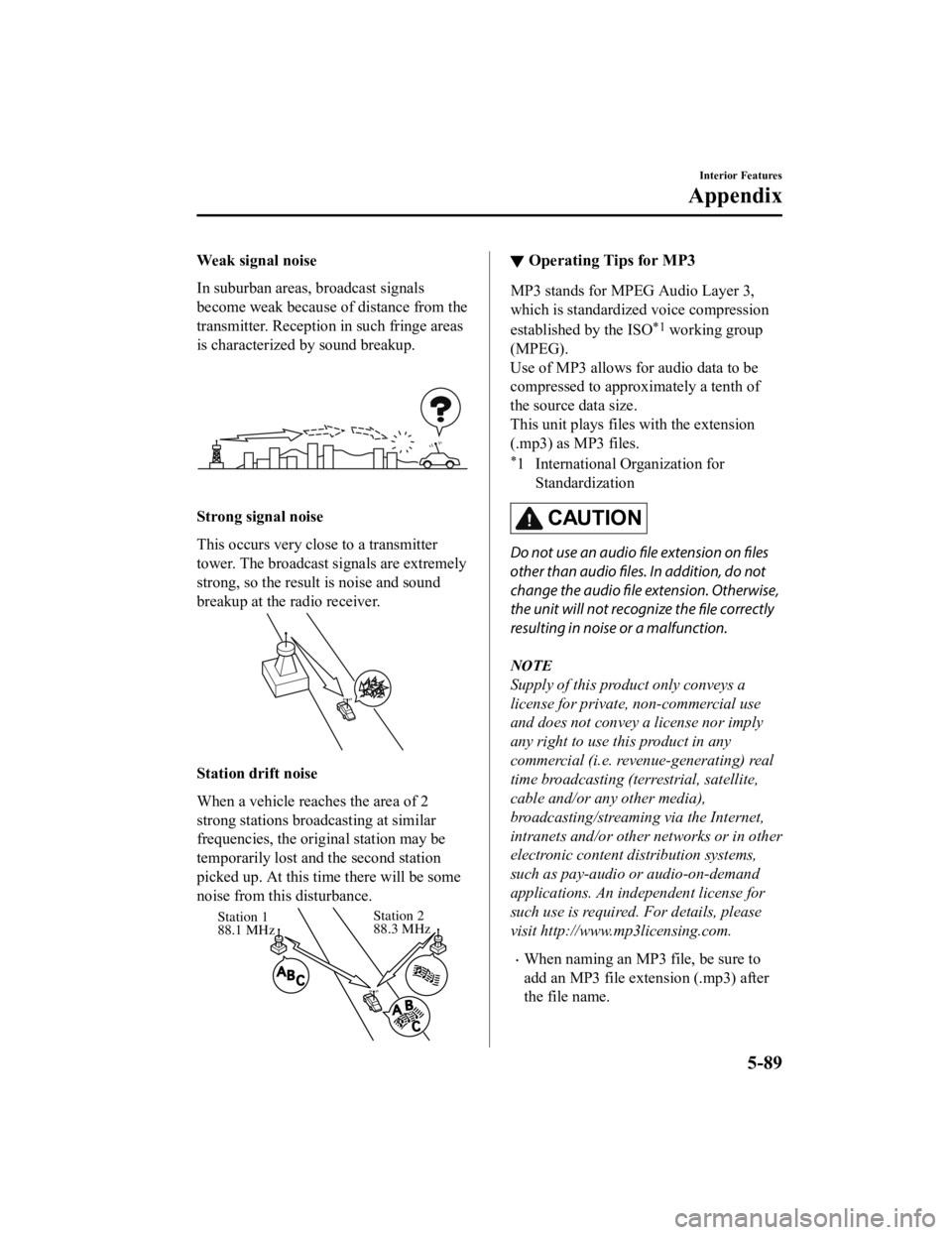
Weak signal noise
In suburban areas, broadcast signals
become weak because of distance from the
transmitter. Reception in such fringe areas
is characterized by sound breakup.
Strong signal noise
This occurs very close to a transmitter
tower. The broadcast signals are extremely
strong, so the result is noise and sound
breakup at the radio receiver.
Station drift noise
When a vehicle reaches the area of 2
strong stations broadcasting at similar
frequencies, the original station may be
temporarily lost and the second station
picked up. At this ti me there will be some
noise from this disturbance.
Station 2
88.3 MHz
Station 1
88.1 MHz
▼
Operating Tips for MP3
MP3 stands for MPEG Audio Layer 3,
which is standardized voice compression
established by the ISO
*1 working group
(MPEG).
Use of MP3 allows for audio data to be
compressed to approximately a tenth of
the source data size.
This unit plays files with the extension
(.mp3) as MP3 files.
*1 International Organization for
Standardization
CAUTION
Do not use an audio file extension on
files
other than audio files. In addition, do not
change the audio file extension. Otherwise,
the unit will not recognize the file correctly
resulting in noise or a malfunction.
NOTE
Supply of this product only conveys a
license for private, non-commercial use
and does not convey a license nor imply
any right to use this product in any
commercial (i.e. revenue-generating) real
time broadcasting (terrestrial, satellite,
cable and/or any other media),
broadcasting/streaming via the Internet,
intranets and/or other networks or in other
electronic content distribution systems,
such as pay-audio or audio-on-demand
applications. An independent license for
such use is required. For details, please
visit http://www.mp3licensing.com.
When naming an MP3 file, be sure to
add an MP3 file extension (.mp3) after
the file name.
Interior Features
Appendix
5-89
CX-5_8HH4-EA-19A_Edition1 2018-11-21 10:03:20