ad blue MAZDA MODEL CX-50 2023 User Guide
[x] Cancel search | Manufacturer: MAZDA, Model Year: 2023, Model line: MODEL CX-50, Model: MAZDA MODEL CX-50 2023Pages: 583, PDF Size: 85.63 MB
Page 396 of 583
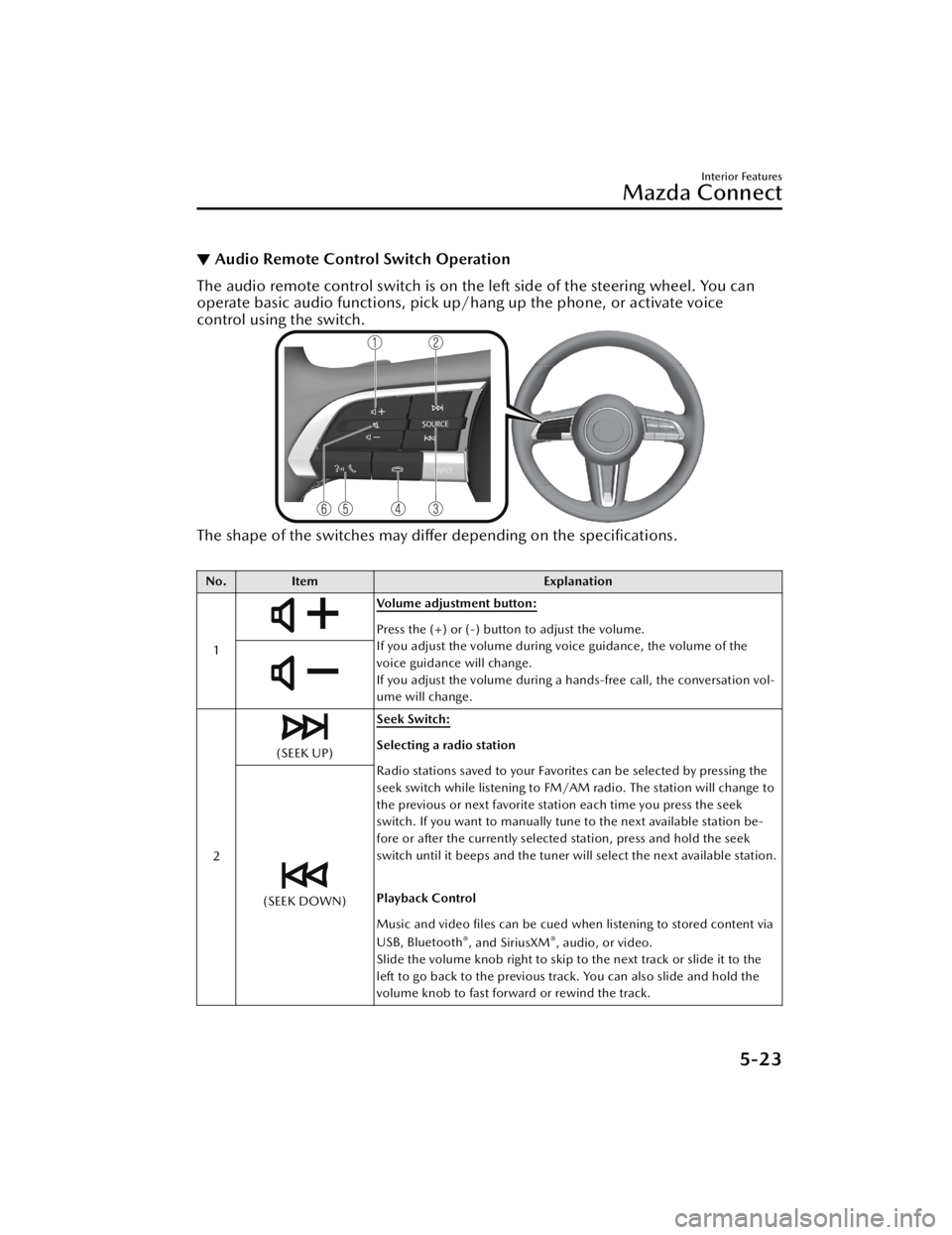
▼Audio Remote Control Switch Operation
The audio remote control switch is on the left side of the steering wheel. You can
operate basic audio functions, pick up/h
ang up the phone, or activate voice
control using the switch.
The shape of the switches may differ depending on the
specifications.
No. Item Explanation
1
Volume adjustment button:
Press the (+) or (-) button to adjust the volume.
If you adjust the volume during voice guidance, the volume of the
voice guidance will change.
If you adjust the volume during a hands-free call, the conversation vol-
ume will change.
2
(SEEK UP) Seek Switch:Selecting a radio station
Radio stations saved to your Favorites can be selected by pressing the
seek switch while listening to FM/AM radio. The station will change to
the previous or next favorite station each time you press the seek
switch. If you want to manually tune to the next available station be-
fore or after the currently selected station, press and hold the seek
switch until it beeps and the tuner will select the next available station.
Playback Control
Music and video files can be cued when listening to stored content via
USB, Bluetooth
®, and SiriusXM®, audio, or video.
Slide the volume knob right to skip to the next track or slide it to the
left to go back to the previous track. You can also slide and hold the
volume knob to fast forward or rewind the track.
(SEEK DOWN)
Interior Features
Mazda Connect
5-23
CX-50_8KB8-EA-22A_Edition2_new 2022-1-6 14:55:18
Page 397 of 583
No.Item Explanation
3 SOURCE SOURCE button:
The audio source can be switched each time the button is pressed.
In addition, when the button is pressed and held, the current au-
dio source is muted and the audio source selection screen is displayed.
(During Apple CarPlay™ or Android Auto™ playback)
Press and hold the SOURCE button to mute the current audio source.
4
Hang-up button:
(During a call)
Press the button to end the call.
(While receiving a call)
Press the button to refuse a call.
5
Talk/Pick-up button:
(While receiving a call)
Press the button to answer the call.
6
Mute button:
Press the button to mute.
Press it again to cancel the mute.
NOTE
If you press the mute button to mute an audio source which can be
paused, such as Apple CarPlay™, USB audio, or Bluetooth® audio,
while it is playing, the song play back pauses. Press the mute button
again to cancel the mute and the pause at the same time.
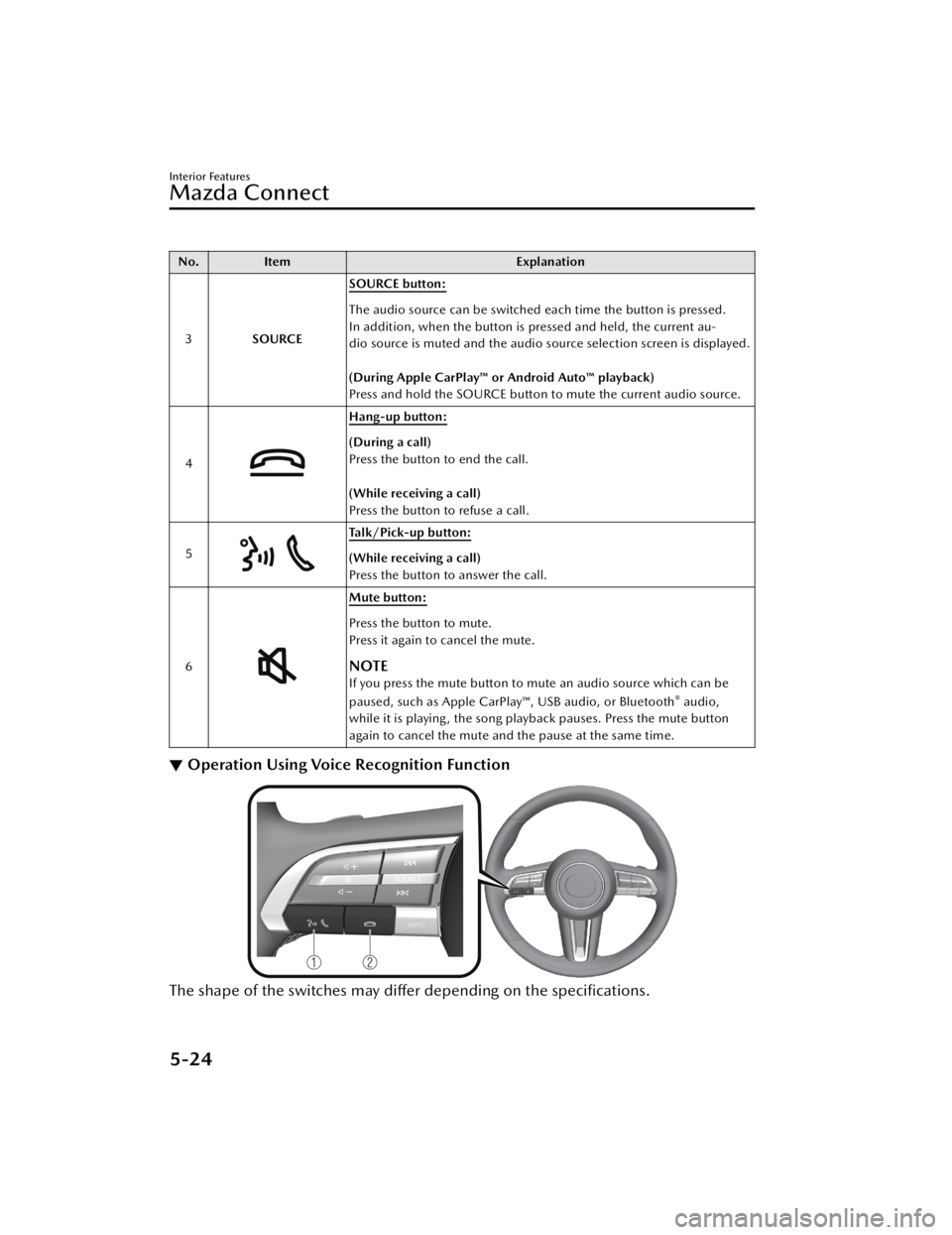
▼ Operation Using Voice Recognition Function
The shape of the switches may differ depending on the specifications.
Interior Features
Mazda Connect
5-24
CX-50_8KB8-EA-22A_Edition2_new
2022-1-6 14:55:18
Page 399 of 583

NOTE
The voice command examples shown in this manual are only a partial list of the
available commands. Some commands may be unusable depending on the
specifications.
Some commands cannot be used depending on the device connection conditions
and the use conditions.
When the Barge-In setting is on, voice commands can be made even while the
voice guidance is being announced. For details on Barge-In, refer to the System
Settings section in the Ma zda Connect Owner's Manual.
For details on voice commands which can be used on the navigation screen, refer
to the navigation system manual.
To prevent misunderstood voice commands, be aware of the following points:
Connect your mobile phone to Bluetooth® before operating the mobile phone
using voice recognition.
After pressing the talk/pick-up button, wait for the beep before speaking a
command.
Speaking in a slightly louder voice will improve voice recognition, but an
excessively loud voice is unnecessary. Try to speak in a slightly louder voice than
when talking to other passengers in the vehicle.
You do not need to speak slow ly. Speak at a normal speed.When calling a person in the device's phone book, the recognition rate increases
the longer the name is. Errors may occur with names that are short such as
“Mama”, “Home”, or “Wife”.
Speak clearly, without pausing between words or numbers.Voice commands other than those specified, cannot be recognized. Speak in the
wording
specified by the voice commands.
It is not necessary to face the microp
hone or approach it. Speak the voice
commands while maintaining a safe driving position.
Close the windows and the panorama sunroof* to reduce loud noises from outside
the vehicle and to prevent the airflow of the air-conditioning system from being a
disturbance when using Bluetooth
® Hands-Free.Make sure that the air flow from the air conditioner is not blowing on the
microphone.
If the voice recognition is poor with th e guidance volume set to high, set the
Barge-In to OFF.
Examples of available voice commands
The specified name and number are put into the {}.
Common
BackHelp (You can listen to help guidance at each screen.){Line Number} (You can select the line number on the screen.)Next PagePrevious Page
Interior Features
Mazda Connect
5-26*Some models.
CX-50_8KB8-EA-22A_Edition2_new 2022-1-6 14:55:18
Page 400 of 583

Cancel
Menu
AllNavigationEntertainmentCommunication
Setting
Voice Recognition SettingsDisplay Off
Music
Play Artist (You can also use “Play Artist {Artist name}”.)Play Album (You can also us e “Play Album {Album Name}”.)Play Playlist (You can also use “Play Playlist {Playlist Name}”.)Play Song (You can also use “Play Song {Song Name}”.)Play Audiobook (You can also use “Play Audiobook {Audiobook Name}”.)Play Podcast (You can also use “Play Podcast {Podcast Name}”.)
Radio
Tu n e t o { F re q u e n c y } A MTu n e t o { F re q u e n c y } F MTune to {Frequency} HD {Sub Channel}SiriusXM Channel {Channel Number}SiriusXM {Station Name}SiriusXM Genre (You can also use “SiriusXM {Genre Name}”.)
Source
Change Source (You can also use “Change Source to USB”*1 and “USB”*1.)Audio OFF (You can also use “Change Source to Audio OFF”.)
Phone
Dial Phone Number (You can al so use “Dial {Phone Number}”.)Call HistoryCall a Contact (You can also use “Call {Contact Name}” and “Call {Contact Name}
at {Number Type}”.)
Redial
*1 : Audio source names other than “USB” can also be used as follows:
Bluetooth/AM/FM/SiriusXM/Pandora/U SB1 Audio/USB2 Audio/USB1 Video/
USB2 Video
Interior Features
Mazda Connect
5-27
CX-50_8KB8-EA-22A_Edition2_new 2022-1-6 14:55:18
Page 401 of 583

▼Appendix
Gracenote® Database
When connecting a USB audio device or Bluetooth® audio device to this unit and
playing audio, the unit searches the database stored in the vehicle for the album art.
If there is a match in the vehicle's database compilation to the music being played,
the album art is displayed. The database information stored in this device uses
database information in the Gracenote
® music recognitions service.
SiriusXM Travel Link
®*
CAUTION
ADVISORY ONLY
The weather information is subject to service interruptions and may contain errors or
inaccuracies and consequently should not be relied upon exclusively. You are urged
to check alternate weather information sources prior to making safety related
decisions. You acknowledge and agree that you shall be solely responsible for use of
the information and all decisions taken with respect thereto. By using this weather
service, you release and waive any claims against Sirius XM Radio Inc. and Mazda
Motor Corporation and all of their respective affiliates with regard to this service.
SiriusXM
® Satellite Radio*
Products/applications shall display “Call [Appropriate Phone Number] to Enable
Services” for any unsubscribed SiriusXM Data Service(s).
This shall be shown on the same screen as the Radio ID and the service subscription
status:
Contact your SiriusXM Representative for the appropriate call center phone number.
U.S.A.: 1-877-447-0011Canada: 1-877-438-9677
SiriusXM
® All Access Subscription
Hopefully, you're already loving SiriusXM in your new Mazda. But don't stop there
— you can also listen on the app and online. All Access is the very best subscription
package – with the most channels and the most flexibility. With All Access, you get
every channel available on your vehicle, plus you can listen on the app, online, and
in your home on a variety of connecte d devices. — so you can enjoy SiriusXM
wherever you are. Here's what's included:
Over 150 satellite channels to enjoy in your car, coast-to-coast, 24/7.All kinds of commercial-free music, plus every major sport, world-class news and
the biggest names in talk & entertainment.
Interior Features
Mazda Connect
5-28*Some models.
CX-50_8KB8-EA-22A_Edition2_new 2022-1-6 14:55:18
Page 407 of 583
Use or distribution of such technology outside of this product is prohibited
without a license from Microsoft or an authorized Microsoft subsidiary and third
parties.
The Bluetooth® word mark and logos are registered trademarks owned by
Bluetooth SIG, Inc. and any use of such marks by Panasonic Corporation is under
license. Other trademarks and trade names are those of their respective owners.
SDHC Logo is a trademark of SD-3C, LLC.
Gracenote, the Gracenote logo and logotype are either a registered trademark or a
trademark of Gracenote, Inc. in the United States and/or other countries.
Regarding the license for the audio amplifier (except vehicles with Bose audio)
License for CMSIS-RTOS RTX Implementation
Copyright (c) 1999-2009 KEIL, 2009-2015 ARM Germany GmbH, 2013-2016 ARM
Ltd All rights reserved.
Redistribution and use in source and binary forms, with or without modification, are
permitted provided that the following conditions are met:
Redistributions of source code must retain the above copyright notice, this list of
conditions and the following disclaimer
Redistributions in binary form must repr oduce the above copyright notice, this list
of conditions and the following disclaimer in the documentation and/or other
materials provided with the distribution.
Neither the name of ARM nor the names of its contributors may be used to
endorse or promote products derived from this software without specific prior
written permission.
THIS SOFTWARE IS PROVIDED BY THE COPYRIGHT HOLDERS AND
CONTRIBUTORS “AS IS” AND ANY EXPRESS OR IMPLIED WARRANTIES,
Interior Features
Mazda Connect
5-34
CX-50_8KB8-EA-22A_Edition2_new 2022-1-6 14:55:18
Page 409 of 583

Connected Service (If applicable)
▼Connected Service Overview
Connected Service Overview (U.S.A.)
There are several types of connected services available via Mazda Connect. Some
services may require you to download the MyMazda app to your smartphone and
subscribe to the services, while others ma
y require you to pair your smartphone to
the vehicle via Bluetooth
®. In addition, on a regular basis and unless you opt-out,
your vehicle will automatically transmit certain geo-location, driving behavior data,
and vehicle health information to Mazda for product quality, data analysis, research,
and product development. Using the QR codes or URLs below, refer to the
Connected Service Owner's Manual and Privacy Policy for more details and opt-out
options.
Connected Service Owner's Manual
https://www.mazdausa.com/static/manuals/mazda-connected-service/
index.html
Connected Service Overview (Canada)
If your vehicle is equipped for connected services, there may be several types of
connected services available to you. The availability, terms and capability of
connected services vary by vehicle and other factors. Some services may require you
to download the MyMazda app to your compatible smartphone, purchase a
subscription or be in a supported area with wireless coverage, while others may
require you to pair your smartphone to the vehicle via Bluetooth
®. If your vehicle is
equipped for connected services, certain data may be collected and transmitted
through the connected vehicle system, including, without limitation, geo-location,
driving behaviour data and vehicle health information. Please refer to connected
services terms and privacy policy available on the Mazda Canada website for more
details.
Connected Services owner’s manual:
Interior Features
Mazda Connect
5-36
CX-50_8KB8-EA-22A_Edition2_new 2022-1-6 14:55:18