fuel MAZDA MODEL CX-7 2011 (in English) Owner's Manual
[x] Cancel search | Manufacturer: MAZDA, Model Year: 2011, Model line: MODEL CX-7, Model: MAZDA MODEL CX-7 2011Pages: 520, PDF Size: 8.75 MB
Page 204 of 520
Black plate (204,1)
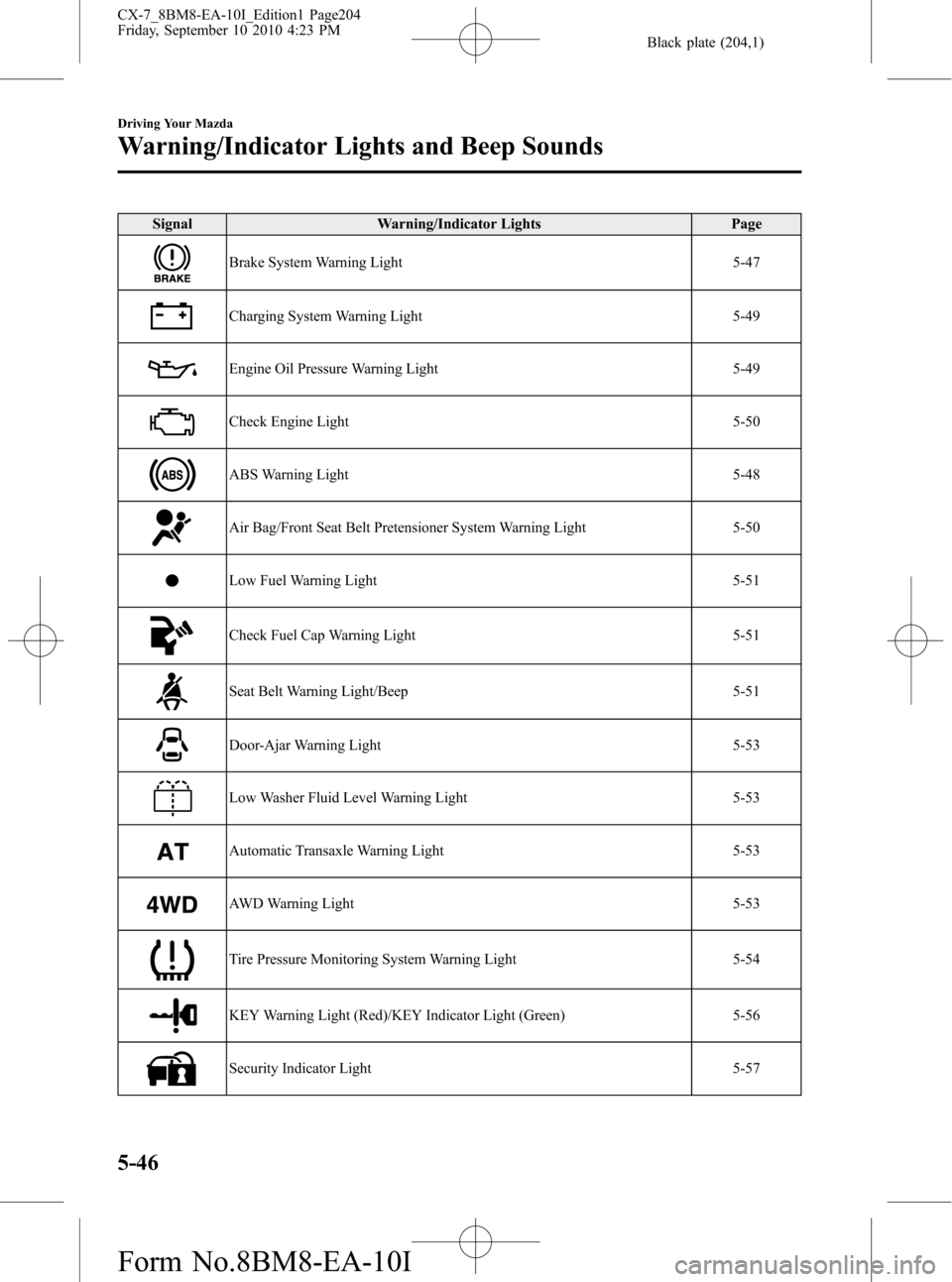
Signal Warning/Indicator Lights Page
Brake System Warning Light 5-47
Charging System Warning Light 5-49
Engine Oil Pressure Warning Light 5-49
Check Engine Light 5-50
ABS Warning Light 5-48
Air Bag/Front Seat Belt Pretensioner System Warning Light 5-50
Low Fuel Warning Light 5-51
Check Fuel Cap Warning Light 5-51
Seat Belt Warning Light/Beep 5-51
Door-Ajar Warning Light 5-53
Low Washer Fluid Level Warning Light 5-53
Automatic Transaxle Warning Light 5-53
AWD Warning Light 5-53
Tire Pressure Monitoring System Warning Light 5-54
KEY Warning Light (Red)/KEY Indicator Light (Green) 5-56
Security Indicator Light 5-57
5-46
Driving Your Mazda
Warning/Indicator Lights and Beep Sounds
CX-7_8BM8-EA-10I_Edition1 Page204
Friday, September 10 2010 4:23 PM
Form No.8BM8-EA-10I
Page 208 of 520

Black plate (208,1)
qCheck Engine Light
This indicator light illuminates when the
ignition is switched ON and turns off
when the engine is started.
If this light illuminates while driving, the
vehicle may have a problem. It is
important to note the driving conditions
when the light illuminated and consult an
Authorized Mazda Dealer.
The check engine light may illuminate in
the following cases:
lThe fuel tank level being very low or
approaching empty.
lThe engine's electrical system has a
problem.
lThe emission control system has a
problem.
lThe fuel-filler cap is missing or not
tightened securely.
If the check engine light remains on or
flashes continuously, do not drive at high
speeds and consult an Authorized Mazda
Dealer as soon as possible.
qAir Bag/Front Seat Belt
Pretensioner System Warning Light
If the air bag/front seat belt pretensioner
system is working properly, the warning
light illuminates when the ignition is
switched ON or after the engine is
cranked. The warning light turns off after
a specified period of time.
A system malfunction is indicated if the
warning light constantly flashes,
constantly illuminates or does not
illuminate at all when the ignition is
switched ON. If any of these occur,
consult an Authorized Mazda Dealer as
soon as possible. The system may not
work in an accident.
WARNING
Never tamper with the air bag/
pretensioner systems and always have
an Authorized Mazda Dealer perform
all servicing and repairs:
Self-servicing or tampering with the
systems is dangerous. An air bag/
pretensioner could accidentally
activate or become disabled causing
serious injury or death.
5-50
Driving Your Mazda
Warning/Indicator Lights and Beep Sounds
CX-7_8BM8-EA-10I_Edition1 Page208
Friday, September 10 2010 4:23 PM
Form No.8BM8-EA-10I
Page 209 of 520

Black plate (209,1)
qLow Fuel Warning Light
Low fuel
warning light
This warning light in the fuel gauge
signals that the fuel tank will soon be
empty.
Refuel as soon as possible.
qCheck Fuel Cap Warning Light
This warning light illuminates for a few
seconds when the ignition is switched
ON.
If the check fuel cap warning light
illuminates while driving, the fuel-filler
cap may not be installed properly. Stop
the engine and reinstall the fuel-filler cap.
Refer to Fuel-Filler Cap on page 3-39.
qSeat Belt Warning Light/Beep
The seat belt warning light illuminates
and a beep sound will be heard if the
driver's seat belt is not fastened when the
ignition is switched ON.
Conditions of operation
Condition Result
The driver's seat belt is not
fastened when the ignition is
switched ON.The warning light
flashes and a beep
sound will be heard
for about 6 seconds.
The driver's seat belt is
fastened while the warning
light and the beep sound are
activated.The warning light
turns off and the beep
sound stops.
The driver's seat belt is
fastened before the ignition
is switched ON.The warning light will
not illuminate and the
beep sound will not be
heard.
Belt reminder
NOTE
Consult an Authorized Mazda Dealer to
deactivate or restore the belt reminder. Though
the belt reminder can be deactivated, doing so
will defeat the purpose of the system to warn
the driver and the front passenger in the event
that their seat belts are not fastened. For the
safety of the driver and front passenger, Mazda
recommends not deactivating the belt
reminder.
Driving Your Mazda
Warning/Indicator Lights and Beep Sounds
5-51
CX-7_8BM8-EA-10I_Edition1 Page209
Friday, September 10 2010 4:23 PM
Form No.8BM8-EA-10I
Page 347 of 520

Black plate (347,1)
Switch Function
Enter (up/down) switch Used to select a menu and change numbers. Select up or down and press enter.
Right switch/Left
switchUsed to select digits when setting numbers.
Navi switch
(With navigation sys-
tem)Press to switch the system to the navigation system screen.
BACK switch Press during SETTINGS to return to the previous screen.
INFO switch Press to switch to the multi information display.
Switches the setting display in the order of Trip computer
(average fuel economy/average vehicle speed)→Trip computer
(current fuel economy/distance-to-empty)→Audio display→Settings
(reset averages/maintenance/preferences). Each time the switch is pressed, the multi
information display cycles through.
qMulti Information Display Functions
Function name Details See page
Clock Constant display of time. 6-112
Outside temperature
displayConstant display of ambient temperature. 6-113
Audio display Displays the audio operation status. Displayed when the INFO switch is
pressed.6-113
Trip computer Displays the average fuel economy, average vehicle speed, current fuel
economy, and distance-to-empty. Displayed when the INFO switch is
pressed.6-113
Maintenance monitor Notification of periodic inspection and tire rotation period 6-115
Warning indicator Notification of the need to take caution 6-119
Settings Used to change the multi information display settings. Displayed when the
INFO switch is pressed.6-119
Rear view monitor The rear view monitor is a visual assist system when reversing the vehicle
that provides images from the rear of the vehicle.6-121
Navigation system Refer to the separate manual
Interior Comfort
Interior Equipment
6-111
CX-7_8BM8-EA-10I_Edition1 Page347
Friday, September 10 2010 4:23 PM
Form No.8BM8-EA-10I
Page 349 of 520

Black plate (349,1)
qOutside Temperature Display
When the ignition is switched ON, the
ambient temperature is displayed.
NOTElUnder the following conditions, the ambient
temperature display may differ from the
actual ambient temperature depending on
the surroundings and vehicle conditions:
lSignificantly cold or hot temperatures.lSudden changes in ambient temperature.lThe vehicle is parked.lThe vehicle is driven at low speeds.lWhen the ignition is switched to ACC,
“---”is displayed.
qAudio Display
Press the INFO switch until the AUDIO
screen is displayed. The audio operation
status is displayed.
To operate the audio system, refer to
“Audio System”(page 6-14).
qTrip Computer
The trip computer can display the
following:
lThe average fuel economy.lThe average vehicle speed.lThe current fuel economy.
lThe approximate distance you can
travel on the available fuel.
1. Switch the ignition ON.
2. Press the INFO switch until the trip
computer screen is displayed.
If you have any problems with your trip
computer, consult an Authorized Mazda
Dealer.
Average fuel economy
This mode displays the average fuel
economy by calculating the total fuel
consumption and the total traveled
distance since purchasing the vehicle, re-
connecting the battery after disconnection,
or resetting the data. The average fuel
economy is calculated and displayed
every minute.
To erase the displayed data, Refer to
Settings on page 6-119.
After erasing, the calculated average fuel
economy in - - - L/100 km (- - - mpg) is
displayed after 1 minute has elapsed.
Average vehicle speed
This mode displays the average vehicle
speed by calculating the distance and the
time traveled since connecting the battery
or resetting the data.
Interior Comfort
Interior Equipment
6-113
CX-7_8BM8-EA-10I_Edition1 Page349
Friday, September 10 2010 4:24 PM
Form No.8BM8-EA-10I
Page 350 of 520

Black plate (350,1)
The average vehicle speed will be
calculated every 10 seconds.
To erase the displayed data, Refer to
Settings on page 6-119.
After erasing, the calculated average
vehicle speed in - - - km/h (- - - mph) is
displayed after 1 minute has elapsed.
Current fuel economy
This mode displays the current fuel
economy by calculating the amount of
fuel consumption and the distance
traveled.
The current fuel economy will be
calculated every 2 seconds.
When you've slowed to about 5 km/h (3
mph), - - - L/100 km (- - - mpg) will be
displayed.
Distance-to-empty
This mode displays the approximate
distance you can travel on the remaining
fuel based on the fuel economy.
The distance-to-empty will be calculated
every second.
NOTElEven though the distance-to-empty display
may indicate a sufficient amount of
remaining driving distance before refueling
is required, refuel as soon as possible if the
fuel gauge needle nears E or the low fuel
warning light illuminates.
lThe display will not change unless you add
more than approximately 5 L {6 US qt, 5
Imp qt} of fuel.
lWhen the ignition is switched to ACC,
“---”is displayed.
6-114
Interior Comfort
Interior Equipment
CX-7_8BM8-EA-10I_Edition1 Page350
Friday, September 10 2010 4:24 PM
Form No.8BM8-EA-10I
Page 355 of 520
Black plate (355,1)
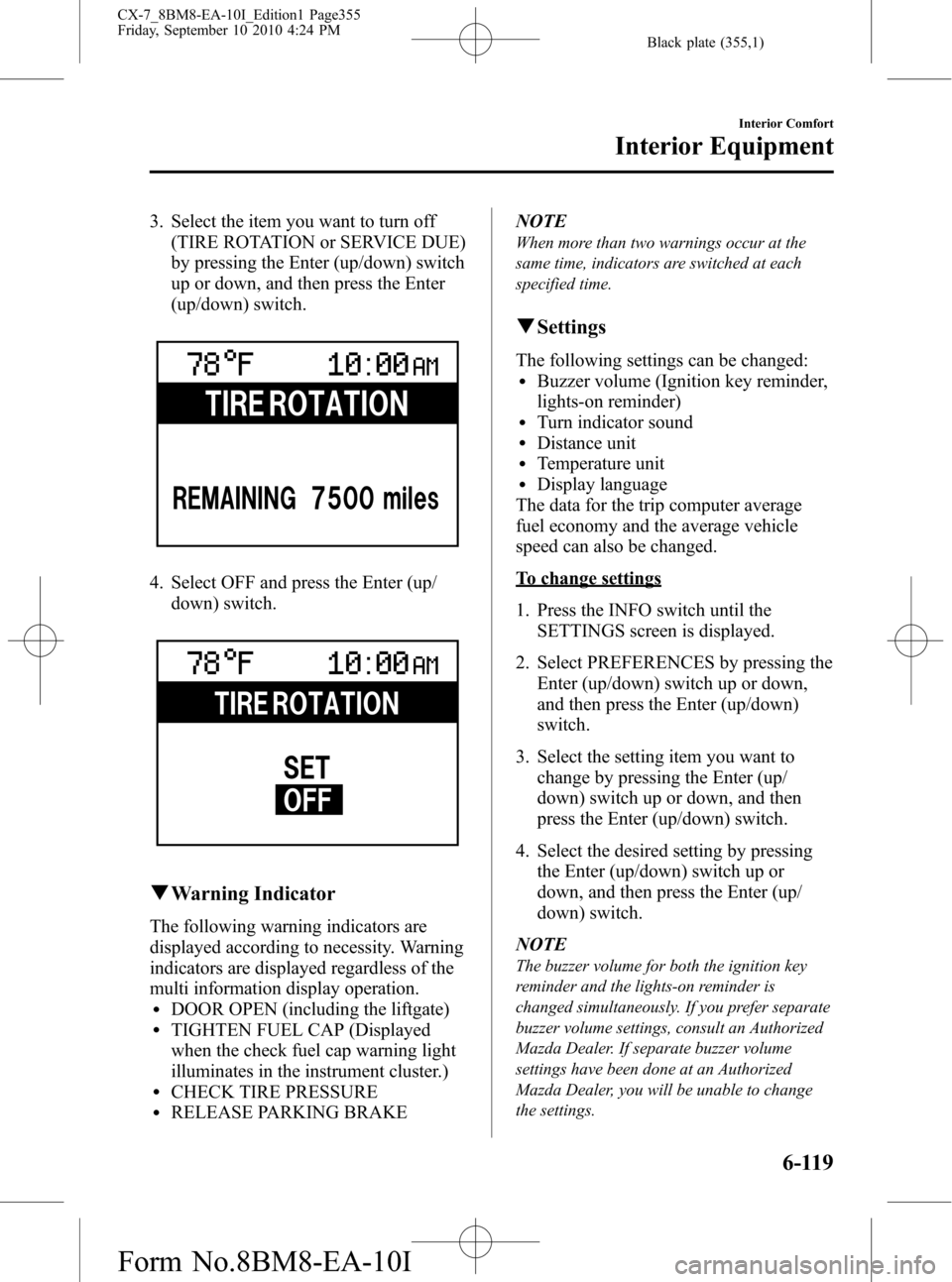
3. Select the item you want to turn off
(TIRE ROTATION or SERVICE DUE)
by pressing the Enter (up/down) switch
up or down, and then press the Enter
(up/down) switch.
4. Select OFF and press the Enter (up/
down) switch.
qWarning Indicator
The following warning indicators are
displayed according to necessity. Warning
indicators are displayed regardless of the
multi information display operation.
lDOOR OPEN (including the liftgate)lTIGHTEN FUEL CAP (Displayed
when the check fuel cap warning light
illuminates in the instrument cluster.)
lCHECK TIRE PRESSURElRELEASE PARKING BRAKENOTE
When more than two warnings occur at the
same time, indicators are switched at each
specified time.
qSettings
The following settings can be changed:lBuzzer volume (Ignition key reminder,
lights-on reminder)
lTurn indicator soundlDistance unitlTemperature unitlDisplay language
The data for the trip computer average
fuel economy and the average vehicle
speed can also be changed.
To change settings
1. Press the INFO switch until the
SETTINGS screen is displayed.
2. Select PREFERENCES by pressing the
Enter (up/down) switch up or down,
and then press the Enter (up/down)
switch.
3. Select the setting item you want to
change by pressing the Enter (up/
down) switch up or down, and then
press the Enter (up/down) switch.
4. Select the desired setting by pressing
the Enter (up/down) switch up or
down, and then press the Enter (up/
down) switch.
NOTE
The buzzer volume for both the ignition key
reminder and the lights-on reminder is
changed simultaneously. If you prefer separate
buzzer volume settings, consult an Authorized
Mazda Dealer. If separate buzzer volume
settings have been done at an Authorized
Mazda Dealer, you will be unable to change
the settings.
Interior Comfort
Interior Equipment
6-119
CX-7_8BM8-EA-10I_Edition1 Page355
Friday, September 10 2010 4:24 PM
Form No.8BM8-EA-10I
Page 356 of 520

Black plate (356,1)
Resetting the data for the trip computer
average fuel economy and the average
vehicle speed
1. Press the INFO switch until the
SETTINGS screen is displayed.
2. Select RESET AVERAGES and press
the Enter (up/down) switch.
3. Select FUEL ECONOMY or SPEED,
and press the Enter (up/down) switch.
6-120
Interior Comfort
Interior Equipment
CX-7_8BM8-EA-10I_Edition1 Page356
Friday, September 10 2010 4:24 PM
Form No.8BM8-EA-10I
Page 382 of 520

Black plate (382,1)
Starting a Flooded Engine
If the engine fails to start, it may be
flooded (excessive fuel in the engine).
Follow this procedure:
1. If the engine does not start within five
seconds on the first try, switch the
ignition off, wait ten seconds and try
again.
2. Depress the accelerator all the way and
hold it there.
3. Switch the ignition to START and hold
it there―for up to ten seconds. If the
engine starts, release the key and
accelerator immediately because the
engine will suddenly rev up.
4. If the engine fails to start, crank it
without depressing the accelerator―for
up to ten seconds.
If the engine still does not start using the
above procedure, have your vehicle
inspected by an Authorized Mazda
Dealer.
7-14
In Case of an Emergency
Emergency Starting
CX-7_8BM8-EA-10I_Edition1 Page382
Friday, September 10 2010 4:24 PM
Form No.8BM8-EA-10I
Page 396 of 520
Black plate (396,1)
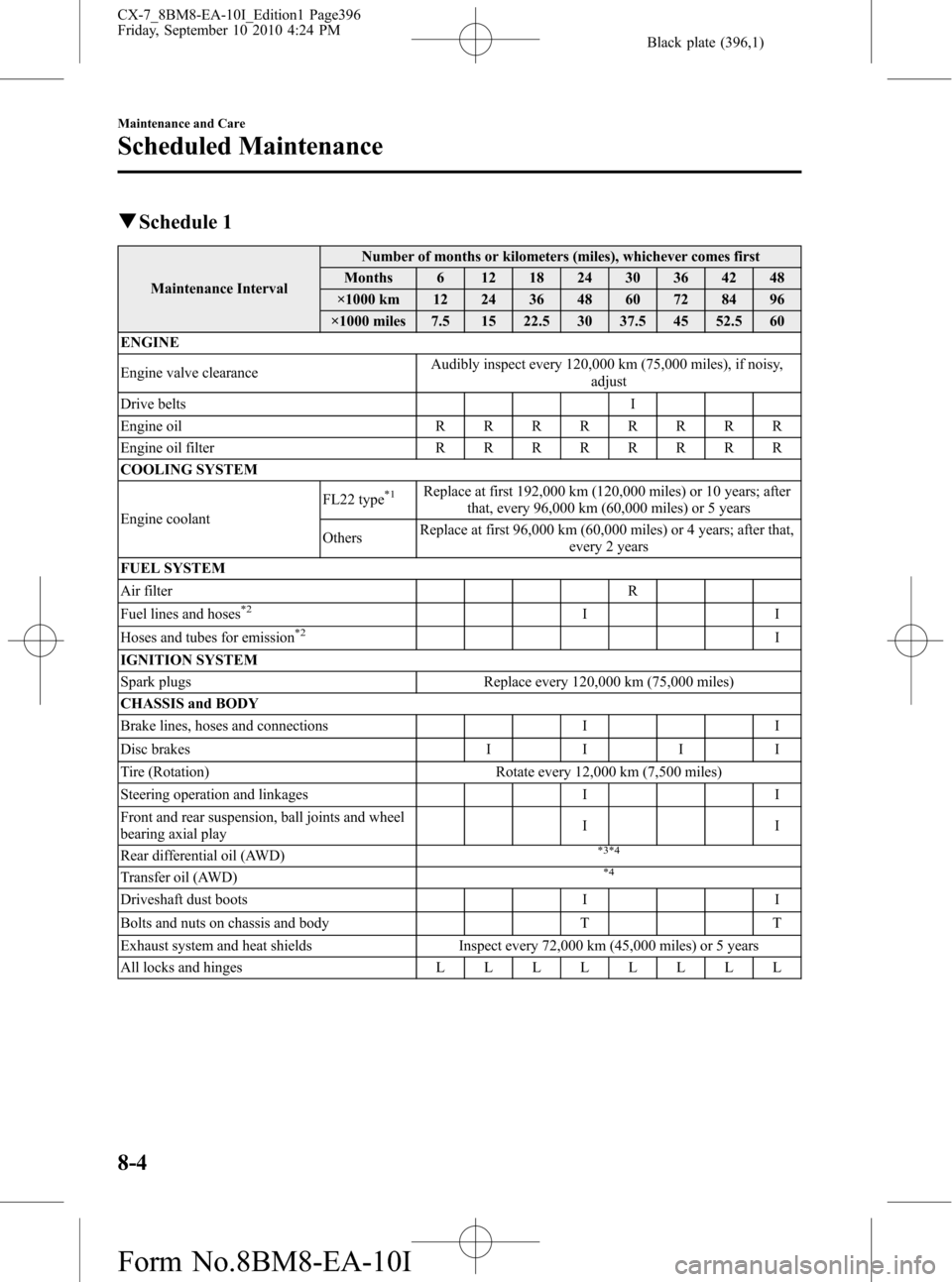
qSchedule 1
Maintenance IntervalNumber of months or kilometers (miles), whichever comes first
Months 6 12 18 24 30 36 42 48
×1000 km 12 24 36 48 60 72 84 96
×1000 miles 7.5 15 22.5 30 37.5 45 52.5 60
ENGINE
Engine valve clearanceAudibly inspect every 120,000 km (75,000 miles), if noisy,
adjust
Drive belts I
Engine oilRRRRRRRR
Engine oil filterRRRRRRRR
COOLING SYSTEM
Engine coolantFL22 type
*1Replace at first 192,000 km (120,000 miles) or 10 years; after
that, every 96,000 km (60,000 miles) or 5 years
OthersReplace at first 96,000 km (60,000 miles) or 4 years; after that,
every 2 years
FUEL SYSTEM
Air filter R
Fuel lines and hoses
*2II
Hoses and tubes for emission*2I
IGNITION SYSTEM
Spark plugs Replace every 120,000 km (75,000 miles)
CHASSIS and BODY
Brake lines, hoses and connections I I
Disc brakesIIII
Tire (Rotation) Rotate every 12,000 km (7,500 miles)
Steering operation and linkages I I
Front and rear suspension, ball joints and wheel
bearing axial playII
Rear differential oil (AWD)
*3*4
Transfer oil (AWD)*4
Driveshaft dust boots I I
Bolts and nuts on chassis and body T T
Exhaust system and heat shields Inspect every 72,000 km (45,000 miles) or 5 years
All locks and hingesLLLLLLLL
8-4
Maintenance and Care
Scheduled Maintenance
CX-7_8BM8-EA-10I_Edition1 Page396
Friday, September 10 2010 4:24 PM
Form No.8BM8-EA-10I