wheel MAZDA MODEL CX-7 2011 (in English) Workshop Manual
[x] Cancel search | Manufacturer: MAZDA, Model Year: 2011, Model line: MODEL CX-7, Model: MAZDA MODEL CX-7 2011Pages: 520, PDF Size: 8.75 MB
Page 310 of 520
Black plate (310,1)
Bluetooth Hands-Freeí
qWhat is Bluetooth Hands-Free?
Bluetooth Hands-Free Outline
By connecting a Bluetooth equipped
device (Mobile phone) to the hands-free
unit equipped on the vehicle, making and
receiving calls are possible using the talk
button, pick-up button and hang-up button
located on the steering wheel, and saying
the voice commands.
WARNING
Perform phonebook registration related
operations while the vehicle is parked:
Performing phonebook registration
while driving the vehicle could be a
distraction to your driving and result
in an accident. In addition, a mistake
in performing the phonebook
operation could result in the loss of
important data.
Bluetooth equipped device (Mobile
phone)
A Bluetooth equipped device (Mobile
phone) communicates with the hands-free
unit equipped on the vehicle using radio
transmission (Bluetooth).
For example, if the device (Mobile phone)
is placed in a coat pocket, the phone calls
can be made through your mobile service
without taking out and handling the
device (Mobile phone).
CAUTION
The types of devices (Mobile phone)
which can be connected to the
hands-free unit are limited.
Therefore, before purchasing or
changing your device (Mobile phone)
model, consult Mazda Bluetooth
Hands-Free Customer Service or visit
www.MazdaUSA.com/bluetooth for a
complete list of compatible phones.
Devices (Mobile phone) which can be
connected to the hands-free system
need to be compliant with Bluetooth
specifications and the appropriate
profile. However, even among these
Bluetooth devices (Mobile phone) are
some which will not connect with
your Mazda or will have limited
function. Therefore, consult Mazda
Bluetooth Hands-Free Customer
Service for information regarding
device (Mobile phone) compatibility:
ØU.S.A.
Phone: 800-430-0153
Web: www.MazdaUSA.com/
bluetooth
ØCanada
Phone: 800-430-0153
Web: www.mazdahandsfree.ca
ØMexico
Center of Attention to Client (CAC)
Phone: 01-800-01-MAZDA
Web: www.MazdaUSA.com/
bluetooth
Applicable Bluetooth specification
Ver. 2.0 or higher
Response profile
lHFP (Hands Free Profile) Ver. 1.5lDUN (Dial-up Networking Profile)
Ver. 1.1
lPBAP (Phone Book Access Profile)
Ver. 1.0
6-74
Interior Comfort
íSome models.
Bluetooth Hands-Free
CX-7_8BM8-EA-10I_Edition1 Page310
Friday, September 10 2010 4:23 PM
Form No.8BM8-EA-10I
Page 311 of 520

Black plate (311,1)
lA2DP (Advanced Audio Distribution
Profile) Ver. 1.0
lAVRCP (Audio/Video Remote Control
Profile) Ver. 1.0/1.3
lOPP (Object Push Profile) Ver. 1.1
Bluetooth is the registered trademark of
Bluetooth SIG. Inc.
NOTE
lThe Bluetooth Hands-Free system is
operable several seconds after the ignition
is switched to ACC or ON (requires less
than 15 seconds).
lIf the ignition is switched off during a
hands-free call, the line is transferred to the
device (Mobile phone) automatically.
lIf the device (Mobile phone) is in a location
where radio reception is difficult such as a
metal container or in the trunk, the call may
not be connected using Bluetooth. If
communication is not possible, change the
location of the device (Mobile phone).
qComponent Parts
Bluetooth Hands-Free consists of the
following items:
lTalk buttonlPick-up buttonlHang-up buttonlInformation displaylMicrophonelAudio unit/7-inch Navigation system
Talk button, Pick-Up button and Hang-
Up button
Basic functions of Bluetooth Hands-Free
can be used for such things as making
calls or hanging up using the talk button,
pick-up button and hang-up button on the
steering wheel.
Talk button
Pick-up buttonTalk button
Hang-up button Pick-up button
Talk button operations
A short press or a long press of the talk
button is used to operate the system as
follows:
lShort press (Press the button less than
0.7 sec.)
lLong press (Press the button 0.7 sec. or
more.)
Interior Comfort
Bluetooth Hands-Free
6-75
CX-7_8BM8-EA-10I_Edition1 Page311
Friday, September 10 2010 4:23 PM
Form No.8BM8-EA-10I
Page 320 of 520

Black plate (320,1)
7. When“Ye s”is spoken, the procedure
proceeds to Step 8.
When“No”is spoken, the procedure
returns to Step 3.
8.Prompt:“Dialing”
NOTE
The“Dial”command and a telephone number
can be combined.
Ex. In Step 2, say,“Dial 123-4567”, then,
Steps 3 and 4 can be skipped.
qReceiving an Incoming Call
1.Prompt:“Incoming call, press the
pickup button to answer”.
2. To accept the call, press the pick-up
button.
To reject the call, press the hang-up
button.
Pick-up button
Hang-up button Pick-up button
qHanging Up a Call
Press the hang-up button during the call.
A beep sound will confirm that call is
ended.
qVolume Adjustment
The power/volume dial of the audio unit
or the 7-inch navigation system is used to
adjust the volume. Turn the dial to the
right to increase volume, to the left to
decrease it.
Audio unit 7-inch navigation
system
NOTElThe volume can also be adjusted using the
volume button on the steering wheel.
lThe music volume of the audio unit and the
7-inch navigation system cannot be
adjusted while Bluetooth Hands-Free is
being used.
6-84
Interior Comfort
Bluetooth Hands-Free
CX-7_8BM8-EA-10I_Edition1 Page320
Friday, September 10 2010 4:23 PM
Form No.8BM8-EA-10I
Page 372 of 520
Black plate (372,1)
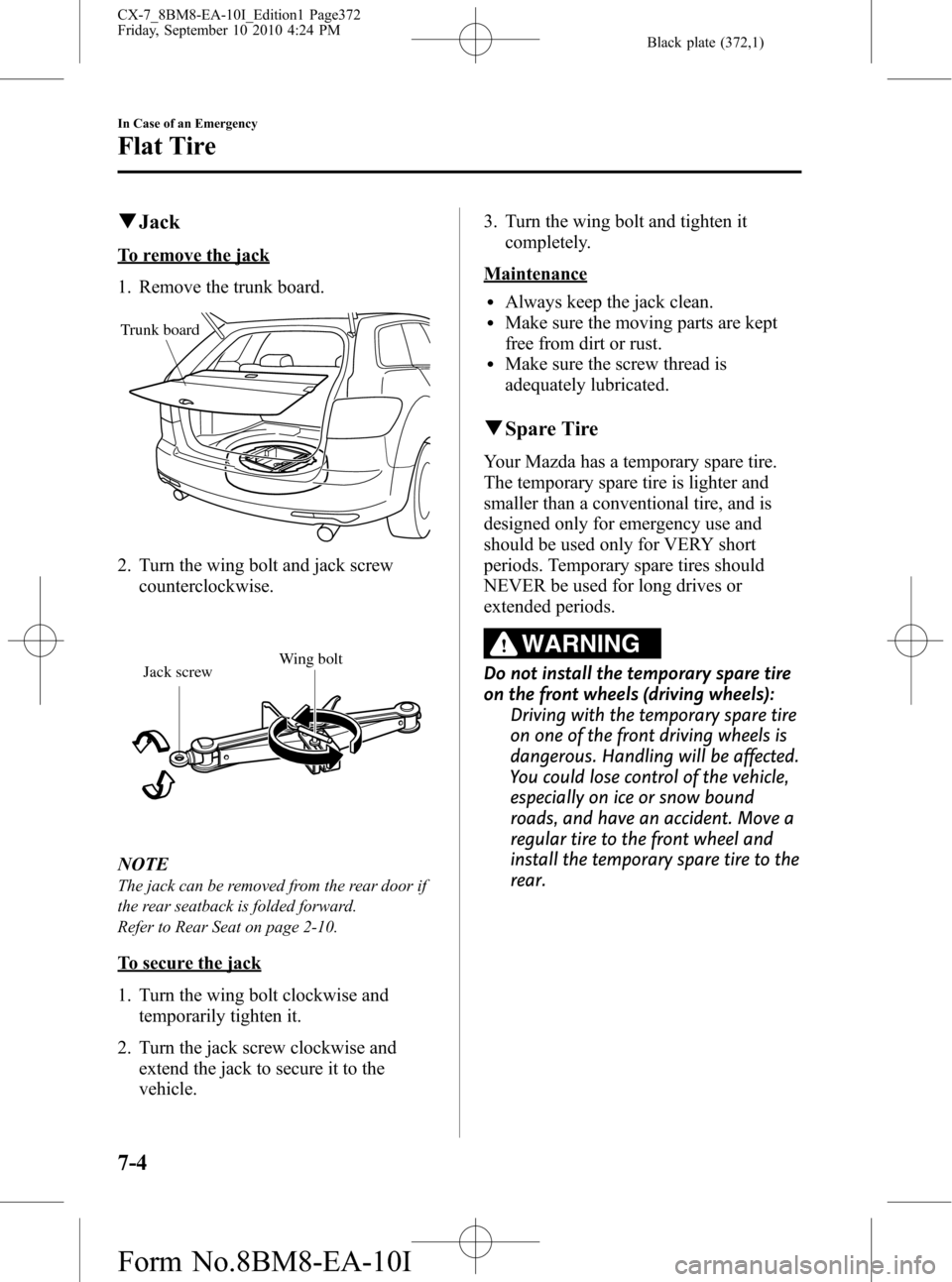
qJack
To remove the jack
1. Remove the trunk board.
Trunk board
2. Turn the wing bolt and jack screw
counterclockwise.
Wing bolt
Jack screw
NOTE
The jack can be removed from the rear door if
the rear seatback is folded forward.
Refer to Rear Seat on page 2-10.
To secure the jack
1. Turn the wing bolt clockwise and
temporarily tighten it.
2. Turn the jack screw clockwise and
extend the jack to secure it to the
vehicle.3. Turn the wing bolt and tighten it
completely.
Maintenance
lAlways keep the jack clean.lMake sure the moving parts are kept
free from dirt or rust.
lMake sure the screw thread is
adequately lubricated.
qSpare Tire
Your Mazda has a temporary spare tire.
The temporary spare tire is lighter and
smaller than a conventional tire, and is
designed only for emergency use and
should be used only for VERY short
periods. Temporary spare tires should
NEVER be used for long drives or
extended periods.
WARNING
Do not install the temporary spare tire
on the front wheels (driving wheels):
Driving with the temporary spare tire
on one of the front driving wheels is
dangerous. Handling will be affected.
You could lose control of the vehicle,
especially on ice or snow bound
roads, and have an accident. Move a
regular tire to the front wheel and
install the temporary spare tire to the
rear.
7-4
In Case of an Emergency
Flat Tire
CX-7_8BM8-EA-10I_Edition1 Page372
Friday, September 10 2010 4:24 PM
Form No.8BM8-EA-10I
Page 374 of 520
Black plate (374,1)
Changing a Flat Tire
NOTE
If the following occurs while driving, it could
indicate a flat tire.
lSteering becomes difficult.lThe vehicle begins to vibrate excessively.lThe vehicle pulls in one direction.
If you have a flat tire, drive slowly to a
level spot that is well off the road and out
of the way of traffic to change the tire.
Stopping in traffic or on the shoulder of a
busy road is dangerous.
WARNING
Be sure to follow the directions for
changing a tire:
Changing a tire is dangerous if not
done properly. The vehicle can slip off
the jack and seriously injure
someone. No person should place
any portion of their body under a
vehicle that is supported by a jack.
Never allow anyone inside a vehicle
supported by a jack:
Allowing someone to remain in a
vehicle supported by a jack is
dangerous. The occupant could cause
the vehicle to fall resulting in serious
injury.
CAUTION
(With Tire Pressure Monitoring
System)
The wheels equipped on your Mazda
are specially designed for installation
of the tire pressure sensors. Do not
use non-genuine wheels, otherwise it
may not be possible to install the tire
pressure sensors.NOTE
lMake sure the jack is well lubricated before
using it.
(With Tire Pressure Monitoring System)
lBe sure to register the tire pressure sensor
ID signal code whenever tires or wheels are
changed (page 5-33).
1. Park on a level surface off the right-of-
way and firmly set the parking brake.
2. Shift into Park (P) and turn off the
engine.
3. Turn on the hazard warning flasher.
4. Have everyone get out of the vehicle
and away from the vehicle and traffic.
5. Remove the jack, tool, and spare tire
(page 7-3).
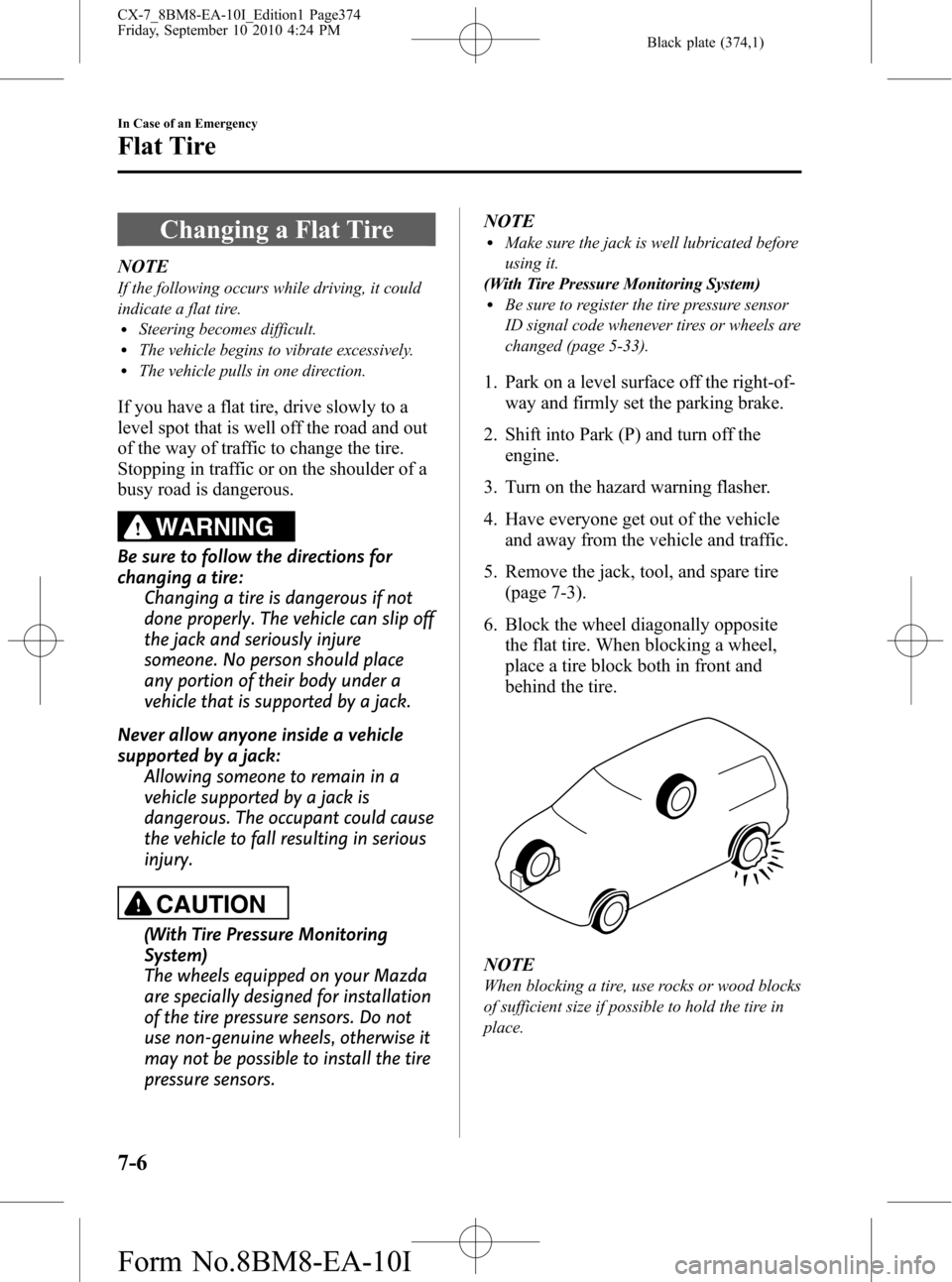
6. Block the wheel diagonally opposite
the flat tire. When blocking a wheel,
place a tire block both in front and
behind the tire.
NOTE
When blocking a tire, use rocks or wood blocks
of sufficient size if possible to hold the tire in
place.
7-6
In Case of an Emergency
Flat Tire
CX-7_8BM8-EA-10I_Edition1 Page374
Friday, September 10 2010 4:24 PM
Form No.8BM8-EA-10I
Page 377 of 520
Black plate (377,1)
WARNING
Do not jack up the vehicle higher than
is necessary:
Jacking up the vehicle higher than is
necessary is dangerous as it could
destabilize the vehicle resulting in an
accident.
Do not start the engine or shake the
vehicle while it is jacked up:
Starting the engine or shaking the
vehicle while it is jacked up is
dangerous as it could cause the
vehicle to fall off the jack resulting in
an accident.
Never go under the vehicle while it is
jacked up:
Going under the vehicle while it is
jacked up is dangerous as it could
result in death or serious injury if the
vehicle were to fall off the jack.
8. Remove the lug nuts by turning them
counterclockwise; then remove the
wheel and center cap.
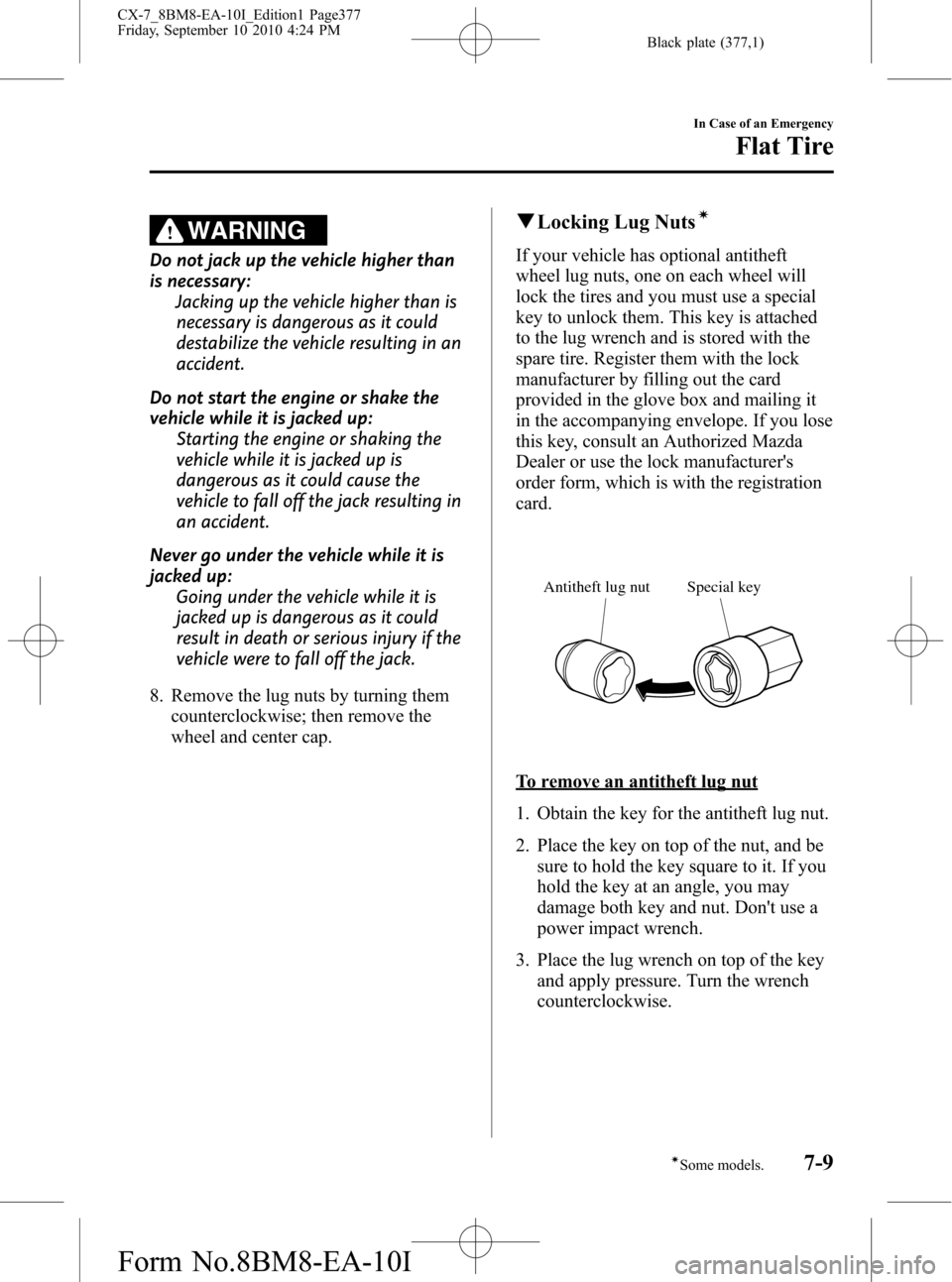
qLocking Lug Nutsí
If your vehicle has optional antitheft
wheel lug nuts, one on each wheel will
lock the tires and you must use a special
key to unlock them. This key is attached
to the lug wrench and is stored with the
spare tire. Register them with the lock
manufacturer by filling out the card
provided in the glove box and mailing it
in the accompanying envelope. If you lose
this key, consult an Authorized Mazda
Dealer or use the lock manufacturer's
order form, which is with the registration
card.
Special key Antitheft lug nut
To remove an antitheft lug nut
1. Obtain the key for the antitheft lug nut.
2. Place the key on top of the nut, and be
sure to hold the key square to it. If you
hold the key at an angle, you may
damage both key and nut. Don't use a
power impact wrench.
3. Place the lug wrench on top of the key
and apply pressure. Turn the wrench
counterclockwise.
In Case of an Emergency
Flat Tire
7-9íSome models. CX-7_8BM8-EA-10I_Edition1 Page377
Friday, September 10 2010 4:24 PM
Form No.8BM8-EA-10I
Page 378 of 520
Black plate (378,1)
To install the nut
1. Place the key on top of the nut, and be
sure to hold the key square to it. If you
hold the key at an angle, you may
damage both key and nut. Don't use a
power impact wrench.
2. Place the lug wrench on top of the key,
apply pressure, and turn it clockwise.
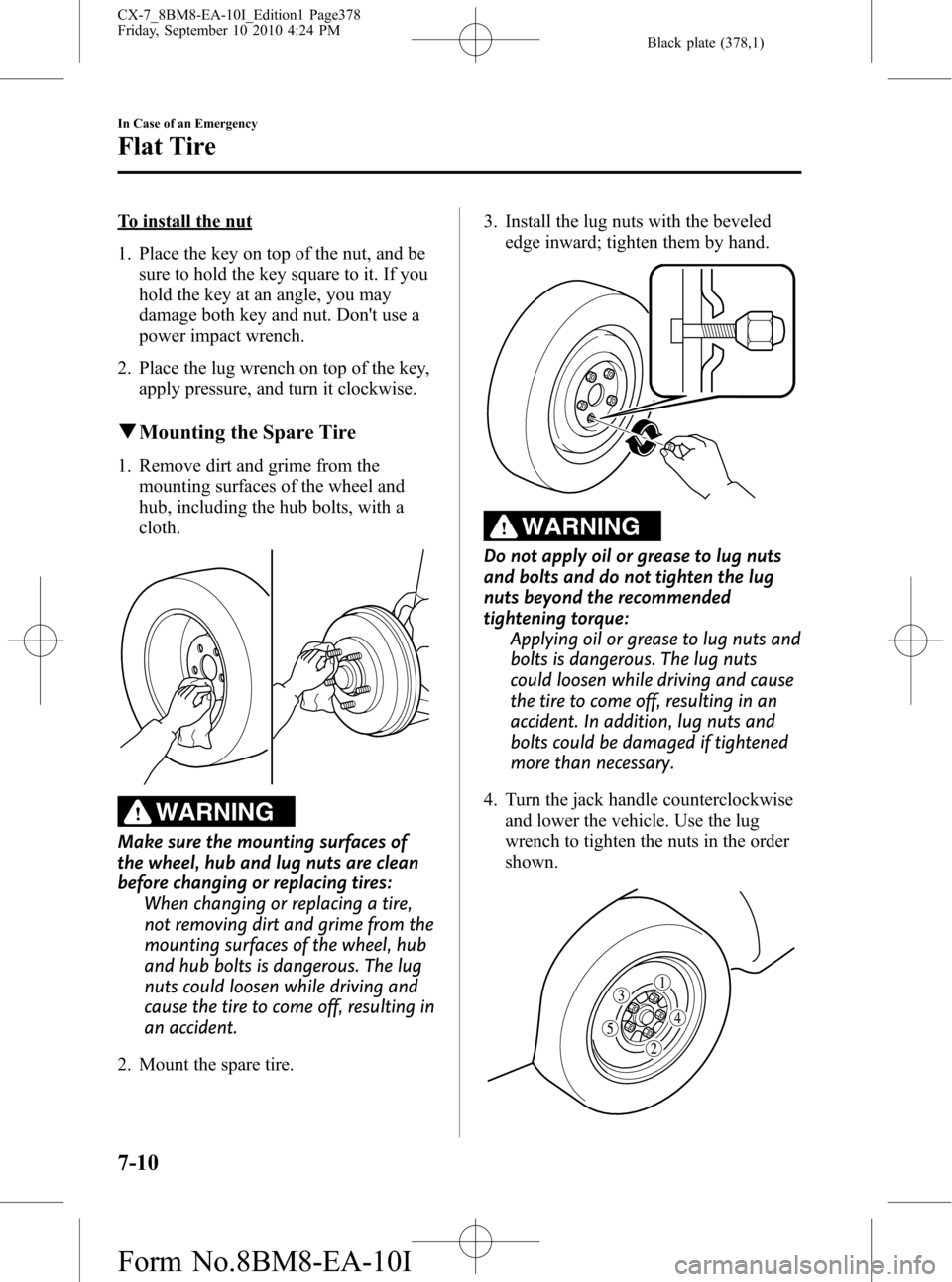
qMounting the Spare Tire
1. Remove dirt and grime from the
mounting surfaces of the wheel and
hub, including the hub bolts, with a
cloth.
WARNING
Make sure the mounting surfaces of
the wheel, hub and lug nuts are clean
before changing or replacing tires:
When changing or replacing a tire,
not removing dirt and grime from the
mounting surfaces of the wheel, hub
and hub bolts is dangerous. The lug
nuts could loosen while driving and
cause the tire to come off, resulting in
an accident.
2. Mount the spare tire.3. Install the lug nuts with the beveled
edge inward; tighten them by hand.
WARNING
Do not apply oil or grease to lug nuts
and bolts and do not tighten the lug
nuts beyond the recommended
tightening torque:
Applying oil or grease to lug nuts and
bolts is dangerous. The lug nuts
could loosen while driving and cause
the tire to come off, resulting in an
accident. In addition, lug nuts and
bolts could be damaged if tightened
more than necessary.
4. Turn the jack handle counterclockwise
and lower the vehicle. Use the lug
wrench to tighten the nuts in the order
shown.
7-10
In Case of an Emergency
Flat Tire
CX-7_8BM8-EA-10I_Edition1 Page378
Friday, September 10 2010 4:24 PM
Form No.8BM8-EA-10I
Page 379 of 520
Black plate (379,1)
If you are unsure of how tight the nuts
should be, have them inspected at an
Authorized Mazda Dealer.
Nut tightening torque
N·m (kgf·m, ft·lbf) 88―118 (9―12, 65―87)
WARNING
Always securely and correctly tighten
the lug nuts:
Improperly or loosely tightened lug
nuts are dangerous. The wheel could
wobble or come off. This could result
in loss of vehicle control and cause a
serious accident.
Be sure to reinstall the same nuts you
removed or replace them with metric
nuts of the same configuration:
Because the wheel studs and lug nuts
on your Mazda have metric threads,
using a non-metric nut is dangerous.
On a metric stud, it would not secure
the wheel and would damage the
stud, which could cause the wheel to
slip off and cause an accident.
5. Remove the center cap by tapping it
with the lug wrench.
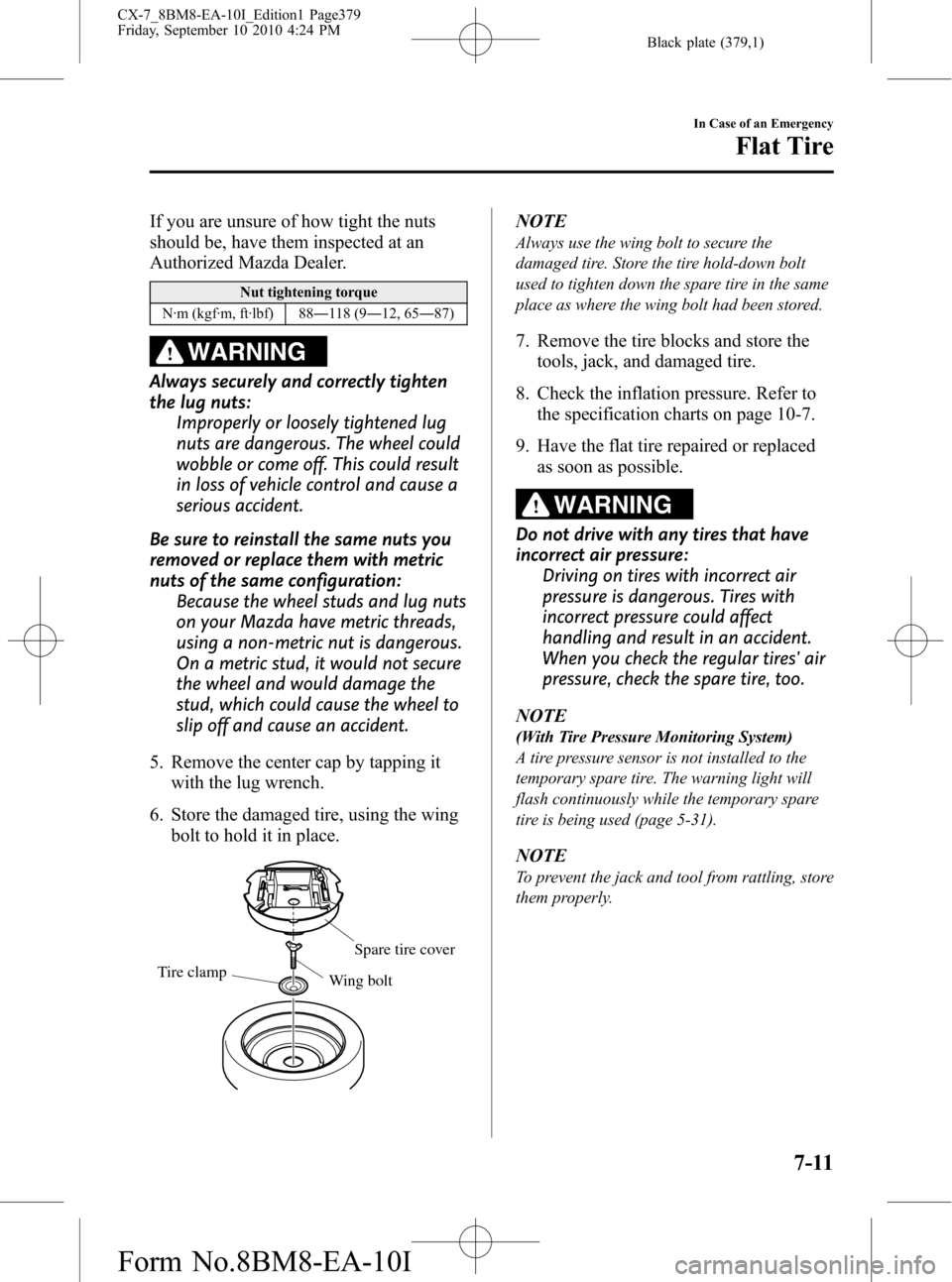
6. Store the damaged tire, using the wing
bolt to hold it in place.
Tire clamp
Spare tire cover
Wing bolt
NOTE
Always use the wing bolt to secure the
damaged tire. Store the tire hold-down bolt
used to tighten down the spare tire in the same
place as where the wing bolt had been stored.
7. Remove the tire blocks and store the
tools, jack, and damaged tire.
8. Check the inflation pressure. Refer to
the specification charts on page 10-7.
9. Have the flat tire repaired or replaced
as soon as possible.
WARNING
Do not drive with any tires that have
incorrect air pressure:
Driving on tires with incorrect air
pressure is dangerous. Tires with
incorrect pressure could affect
handling and result in an accident.
When you check the regular tires' air
pressure, check the spare tire, too.
NOTE
(With Tire Pressure Monitoring System)
A tire pressure sensor is not installed to the
temporary spare tire. The warning light will
flash continuously while the temporary spare
tire is being used (page 5-31).
NOTE
To prevent the jack and tool from rattling, store
them properly.
In Case of an Emergency
Flat Tire
7-11
CX-7_8BM8-EA-10I_Edition1 Page379
Friday, September 10 2010 4:24 PM
Form No.8BM8-EA-10I
Page 387 of 520

Black plate (387,1)
Towing Description
We recommend that towing be done only
by an Authorized Mazda Dealer or a
commercial tow-truck service.
Proper lifting and towing are necessary to
prevent damage to the vehicle.
Particularly when towing a AWD vehicle,
where all the wheels are connected to the
drive train, proper transporting of the
vehicle is absolutely essential to avoid
damaging the drive system. Government
and local laws must be followed.
Wheel dollies
A towed 2WD vehicle should have its
drive wheels (front wheels) off the
ground. If excessive damage or other
conditions prevent this, use wheel dollies.
When towing a 2WD vehicle with the rear
wheels on the ground, release the parking
brake.
A towed AWD vehicle must have all its
wheels off the ground.
CAUTION
Do not tow the vehicle pointed
backward with driving wheels on the
ground. This may cause internal
damage to the transaxle.
CAUTION
Do not tow with sling-type
equipment. This could damage your
vehicle. Use wheel-lift or flatbed
equipment.
In Case of an Emergency
Emergency Towing
7-19
CX-7_8BM8-EA-10I_Edition1 Page387
Friday, September 10 2010 4:24 PM
Form No.8BM8-EA-10I
Page 388 of 520
Black plate (388,1)
WARNING
Always tow a AWD vehicle with all four
wheels off the ground:
Towing a AWD vehicle with either the
front or rear wheels on the ground is
dangerous as the drive train could be
damaged, or the vehicle could trail
away from the tow truck and cause
an accident. If the drive train has
been damaged, transport the vehicle
on a flat bed truck.
Tiedown Hooks
CAUTION
Do not use the front and rear
tiedown eyelets for towing the
vehicle.
They have been designed only for
securing the vehicle to a transport
vessel during shipping.
Using the eyelets for any other
purpose could result in the vehicle
being damaged.
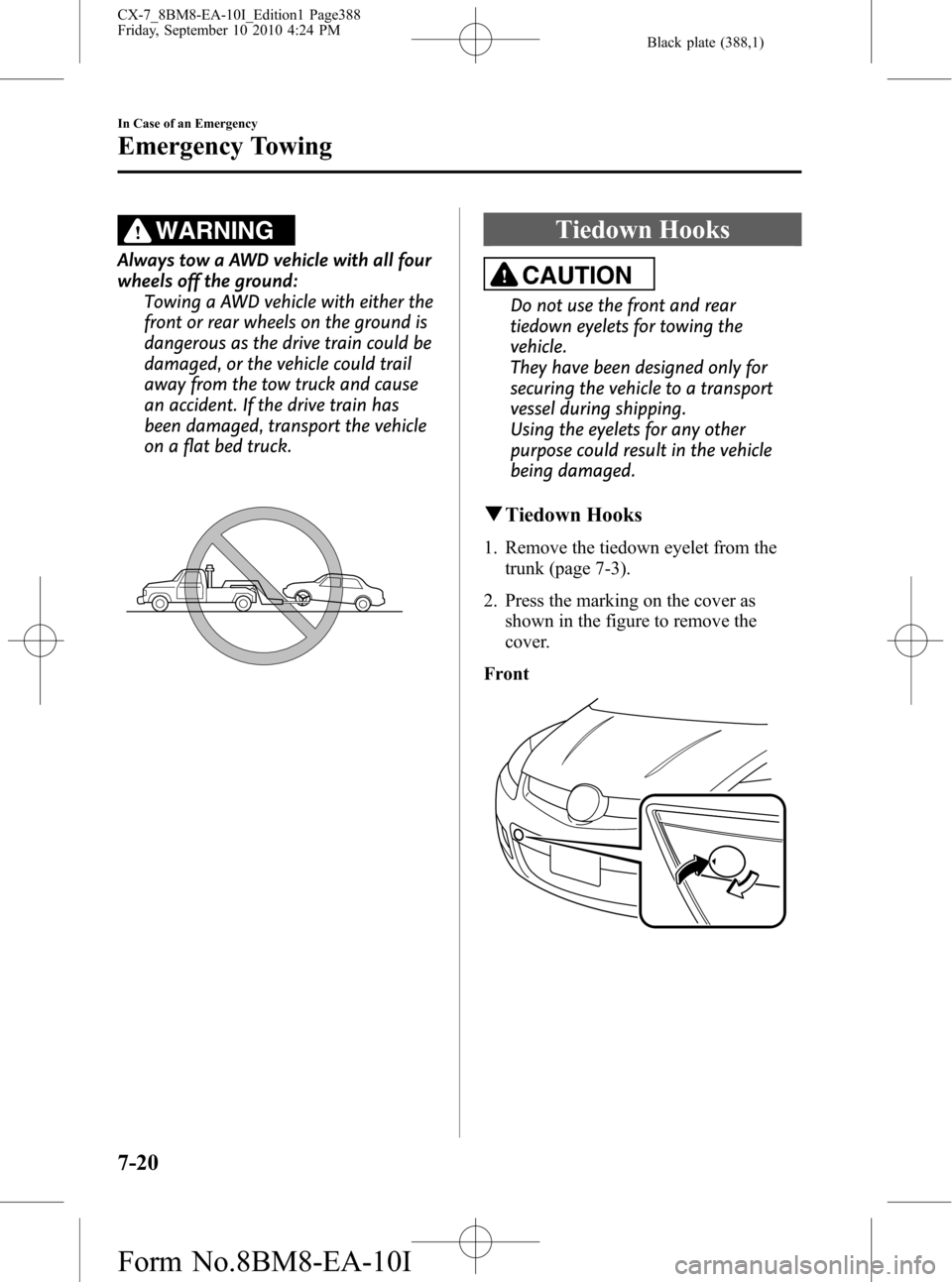
qTiedown Hooks
1. Remove the tiedown eyelet from the
trunk (page 7-3).
2. Press the marking on the cover as
shown in the figure to remove the
cover.
Front
7-20
In Case of an Emergency
Emergency Towing
CX-7_8BM8-EA-10I_Edition1 Page388
Friday, September 10 2010 4:24 PM
Form No.8BM8-EA-10I