battery MAZDA MODEL CX-9 2008 (in English) Owner's Guide
[x] Cancel search | Manufacturer: MAZDA, Model Year: 2008, Model line: MODEL CX-9, Model: MAZDA MODEL CX-9 2008Pages: 506, PDF Size: 11.52 MB
Page 204 of 506

Black plate (204,1)
qABS Warning Light
The warning light stays on for a few
seconds when the ignition switch is turned
to the ON position.
If the ABS warning light stays on while
you're driving, the ABS control unit has
detected a system malfunction. If this
occurs, your brakes will function normally
as if the vehicle had no ABS.
Should this happen, consult an Authorized
Mazda Dealer as soon as possible.
NOTE
When the engine is jump-started to charge the
battery, uneven rpm occurs and the ABS
warning light comes on. This is due to a weak
battery, not a malfunction.
Recharge the battery.
qElectronic Brake Force
Distribution System Warning
If the electronic brake force distribution
control unit determines that some
components are operating incorrectly, the
control unit may turn the brake system
warning light and the ABS warning light
on at the same time. The problem is likely
to be the electronic brake force
distribution system.
WARNING
Do not drive with both the ABS warning
light and brake warning light
illuminated. Have the vehicle towed to
an Authorized Mazda Dealer to have
the brakes inspected as soon as
possible:
Driving when the brake system
warning light and ABS warning light
are illuminated at the same time is
dangerous.
When both lights are illuminated, the
rear wheels could lock more quickly
in an emergency stop than under
normal circumstances.
5-44
Driving Your Mazda
Warning/Indicator Lights and Beep Sounds
CX-9_8Z28-EA-07J_Edition2 Page204
Thursday, November 22 2007 12:3 AM
Form No.8Z28-EA-07J
Page 212 of 506

Black plate (212,1)
If the warning light illuminates again even
after the tire pressures are adjusted, there
may be a tire puncture. Replace the
punctured tire with the temporary spare
tire (page 7-8).
NOTE
A tire pressure sensor is not installed to the
temporary spare tire. The warning light will
flash continuously while the temporary spare
tire is being used.
Warning light flashes
When the warning light flashes, there may
be a system malfunction. Consult an
Authorized Mazda Dealer.
qKEY Warning Light (Red)/KEY
Indicator Light (Green) (with
Advanced Key)
This indicator has two colors.
KEY Warning Light (Red)
When illuminated
lWhen the ignition switch is turned to
the ON position, it illuminates
momentarily and then goes out.
lIf any malfunction occurs in the
advanced keyless system, it illuminates
continuously.
WARNING
Do not drive the vehicle with the KEY
warning light illuminated:
If the KEY warning light remains
illuminated, do not continue to drive
using the advanced key system. Park
the vehicle in a safe place and use
the auxiliary key to continue driving
the vehicle. Have the vehicle
inspected at an Authorized Mazda
Dealer as soon as possible.
When flashing
lUnder the following conditions, the
KEY warning light (red) flashes to
inform the driver that the start knob
will not rotate to the ACC position
even if it is pushed in from the LOCK
position.
lThe advanced key battery is dead.lThe advanced key is not within
operational range.
lThe advanced key is placed in areas
where it is difficult for the system to
detect the signal (page 3-7).
lA key from another manufacturer
similar to the advanced key is in the
operational range.
5-52
Driving Your Mazda
Warning/Indicator Lights and Beep Sounds
CX-9_8Z28-EA-07J_Edition2 Page212
Thursday, November 22 2007 12:3 AM
Form No.8Z28-EA-07J
Page 213 of 506

Black plate (213,1)
lUnder the following conditions, the
KEY warning light (red) will flash
continuously when the start knob has
not been returned to the LOCK
position to notify the driver that the
advanced key has been removed from
the vehicle. It will stop flashing when
the advanced key is back inside the
vehicle.
lThe start knob has not been returned
to the LOCK position, the driver's
door is open, and the advanced key
is removed from the vehicle.
lThe start knob has not been returned
to the LOCK position and all the
doors are closed after removing the
advanced key from the vehicle.
NOTE
The flashing KEY warning light (red) and the
beep sound operate simultaneously (page
3-20).
KEY Indicator Light (Green)
When illuminated
When the start knob is pushed in from the
LOCK position, the system confirms that
the correct advanced key is inside the
vehicle, the KEY indicator light (green)
illuminates, and the start knob can be
turned to the ACC position (page 3-9).
When flashing
When the advanced key battery power is
low, the KEY indicator light flashes for 30
seconds after the start knob is turned from
the ON position to the ACC or LOCK
position. Replace with a new battery
before the advanced key becomes
unusable (page 3-6).NOTE
The advanced key can be set so that the KEY
indicator light (green) does not flash even if
the battery power is low.
Refer to Setting Change (Function
Customization)(page 3-19).
qSecurity Indicator Light
This indicator light starts flashing every 2
seconds when the ignition switch is turned
from the ON to the ACC position and the
immobilizer system is armed.
The light stops flashing when the ignition
switch is turned to the ON position with
the correct ignition key.
At this time, the immobilizer system is
disarmed and the light illuminates for
about 3 seconds and then goes out.
If the engine doesn't start with the correct
ignition key, and the security indicator
light keeps illuminating or flashing, the
system may have a malfunction. Consult
an Authorized Mazda Dealer.
Driving Your Mazda
Warning/Indicator Lights and Beep Sounds
5-53
CX-9_8Z28-EA-07J_Edition2 Page213
Thursday, November 22 2007 12:3 AM
Form No.8Z28-EA-07J
Page 218 of 506

Black plate (218,1)
Lighting Control
qHeadlights
Type A (Without AUTO position)
Turn the headlight switch to turn the
headlights, other exterior lights and
dashboard illumination on or off.
Switch Position
Headlights Off Off On
Taillights
Parking lights
License lights
Side-marker lights
Dashboard illuminationOff On On
NOTElIf the light switch is left on, the lights will
automatically switch off (if equipped)
approximately 30 seconds after turning the
ignition switch to the ACC or LOCK
position.
lTo prevent discharging the battery, don't
leave the lights on while the engine is off
unless safety requires them.
Type B (With AUTO position)
Turn the headlight switch to turn the
headlights, other exterior lights and
dashboard illumination on or off.
Switch Position
Headlights Off Off On
Auto Taillights
Parking lights
License lights
Side-marker
lights
Dashboard
illuminationOff On On
NOTElIf the light switch is left on, the lights will
automatically switch off approximately 30
seconds after turning the ignition switch to
the ACC or LOCK position.
lTo prevent discharging the battery, don't
leave the lights on while the engine is off
unless safety requires them.
AUTO (Auto-light control)
When the headlight switch is in the
AUTO position and the ignition switch is
in the ON position, the light sensor senses
the surrounding lightness or darkness and
automatically turns on or off the
headlights, other exterior lights and
dashboard illumination (see chart above).
5-58
Driving Your Mazda
Switches and Controls
CX-9_8Z28-EA-07J_Edition2 Page218
Thursday, November 22 2007 12:3 AM
Form No.8Z28-EA-07J
Page 230 of 506
Black plate (230,1)
Operating Tips
qOperating the Climate Control
System
Operate the climate control system with
the engine running.
NOTE
To prevent the battery from being discharged,
do not leave the fan control dial on for a long
period of time with the ignition switch in the
ACC position when the engine is not running.
qClearing the Air Inlet
Clear all obstructions like leaves, snow
and ice from the hood and the air inlet in
the cowl grille to improve the system
efficiency.
qFoggy Windows
The windows may fog up easily in humid
weather. Use the climate control system to
defog the windows.
To help defog the windows, operate the
air conditioner to dehumidify the air.
NOTE
The air conditioner may be used along with the
heater to dehumidify the air.
qOutside/Recirculated Air Position
Use the outside air position in normal
conditions. The recirculated air position
should be used only when driving on
dusty roads or for quick cooling of the
interior.
qParking in Direct Sunlight
If the vehicle has been parked in direct
sunlight during hot weather, open the
windows to let warm air escape, then run
the climate control system.
qNot Using for a Long Period
Run the air conditioner about 10 minutes
at least once a month to keep internal
parts lubricated.
qCheck the Refrigerant before the
Weather Gets Hot
Have the air conditioner checked before
the weather gets hot. Lack of refrigerant
may make the air conditioner less
efficient. Consult an Authorized Mazda
Dealer for refrigerant inspection.
The air conditioner is filled with
HFC134a (R134a), a refrigerant that will
not damage the ozone layer.
If the air conditioner is low on refrigerant
or has a malfunction, consult an
Authorized Mazda Dealer.
qReplacement of the Cabin Air Filter
If your vehicle is equipped with an air
filter for the air conditioner, it is necessary
to change the filter periodically as
indicated in scheduled maintenance (page
8-3). Consult an Authorized Mazda
Dealer for replacement of the cabin air
filter.
6-2
Interior Comfort
Climate Control System
CX-9_8Z28-EA-07J_Edition2 Page230
Thursday, November 22 2007 12:3 AM
Form No.8Z28-EA-07J
Page 245 of 506
Black plate (245,1)
Antenna
qRear Window Antenna
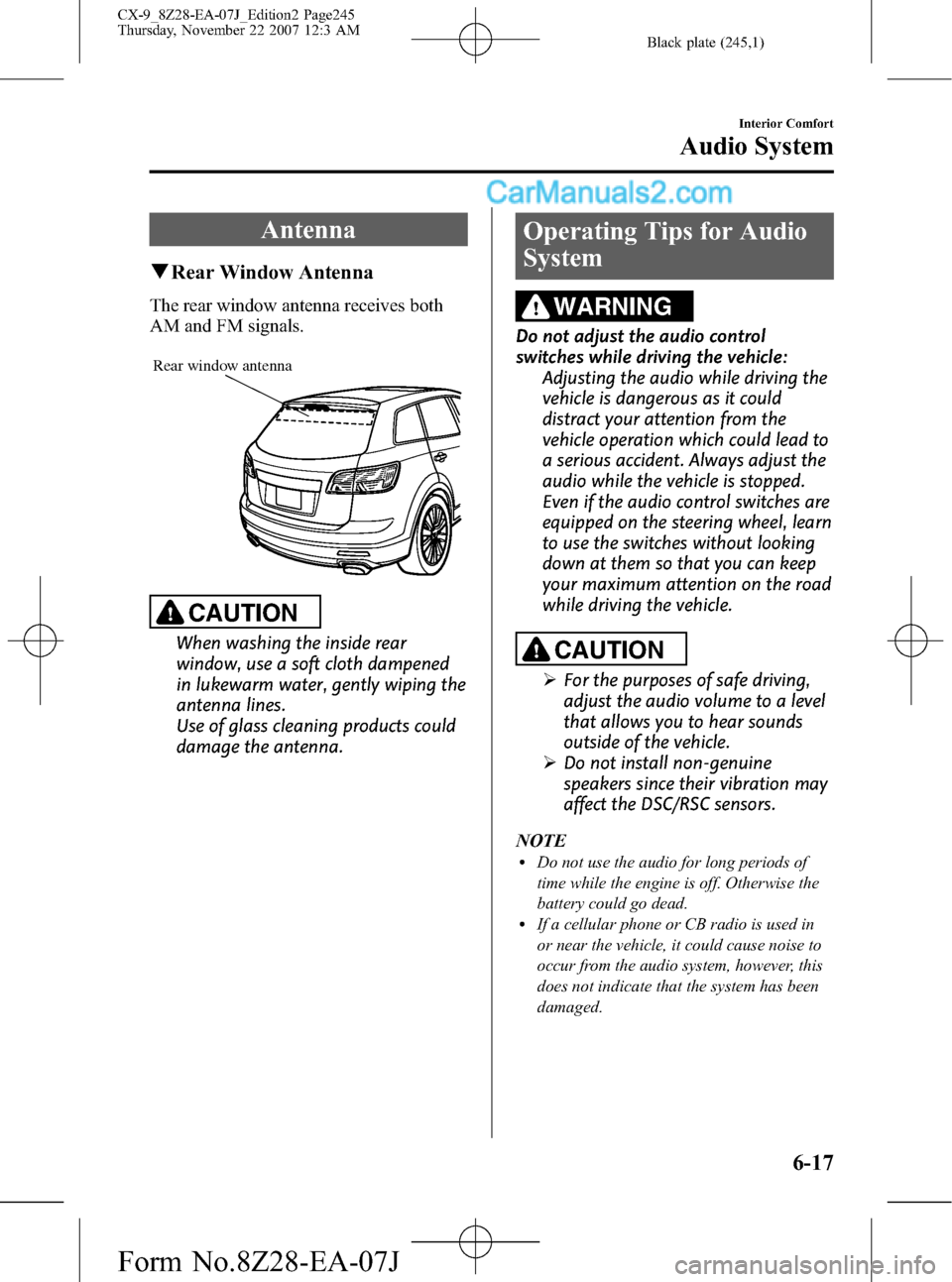
The rear window antenna receives both
AM and FM signals.
Rear window antenna
CAUTION
When washing the inside rear
window, use a soft cloth dampened
in lukewarm water, gently wiping the
antenna lines.
Use of glass cleaning products could
damage the antenna.
Operating Tips for Audio
System
WARNING
Do not adjust the audio control
switches while driving the vehicle:
Adjusting the audio while driving the
vehicle is dangerous as it could
distract your attention from the
vehicle operation which could lead to
a serious accident. Always adjust the
audio while the vehicle is stopped.
Even if the audio control switches are
equipped on the steering wheel, learn
to use the switches without looking
down at them so that you can keep
your maximum attention on the road
while driving the vehicle.
CAUTION
ØFor the purposes of safe driving,
adjust the audio volume to a level
that allows you to hear sounds
outside of the vehicle.
ØDo not install non-genuine
speakers since their vibration may
affect the DSC/RSC sensors.
NOTE
lDo not use the audio for long periods of
time while the engine is off. Otherwise the
battery could go dead.
lIf a cellular phone or CB radio is used in
or near the vehicle, it could cause noise to
occur from the audio system, however, this
does not indicate that the system has been
damaged.
Interior Comfort
Audio System
6-17
CX-9_8Z28-EA-07J_Edition2 Page245
Thursday, November 22 2007 12:3 AM
Form No.8Z28-EA-07J
Page 256 of 506

Black plate (256,1)
qPower/Volume/Sound Controls
Power/Volume dialAudio control dial
Power ON/OFF
Turn the ignition switch to the ACC or
ON position.
Press the power/volume dial to turn the
audio system on.
Press the power/volume dial again to turn
the audio system off.
NOTE
To prevent the battery from being discharged,
do not leave the audio system on for a long
period of time when the engine is not running.
Volume adjustment
To adjust the volume, turn the power/
volume dial.
Turn the power/volume dial to the right to
increase volume, to the left to decrease it.
Audio sound adjustment
1. Press the audio control dial to select the
function. The selected function will be
indicated.
Depending on the mode selected, the
indication changes. Standard audio-
equipped model
6-28
Interior Comfort
Audio System
CX-9_8Z28-EA-07J_Edition2 Page256
Thursday, November 22 2007 12:3 AM
Form No.8Z28-EA-07J
Page 262 of 506
Black plate (262,1)
qOperating the Radio
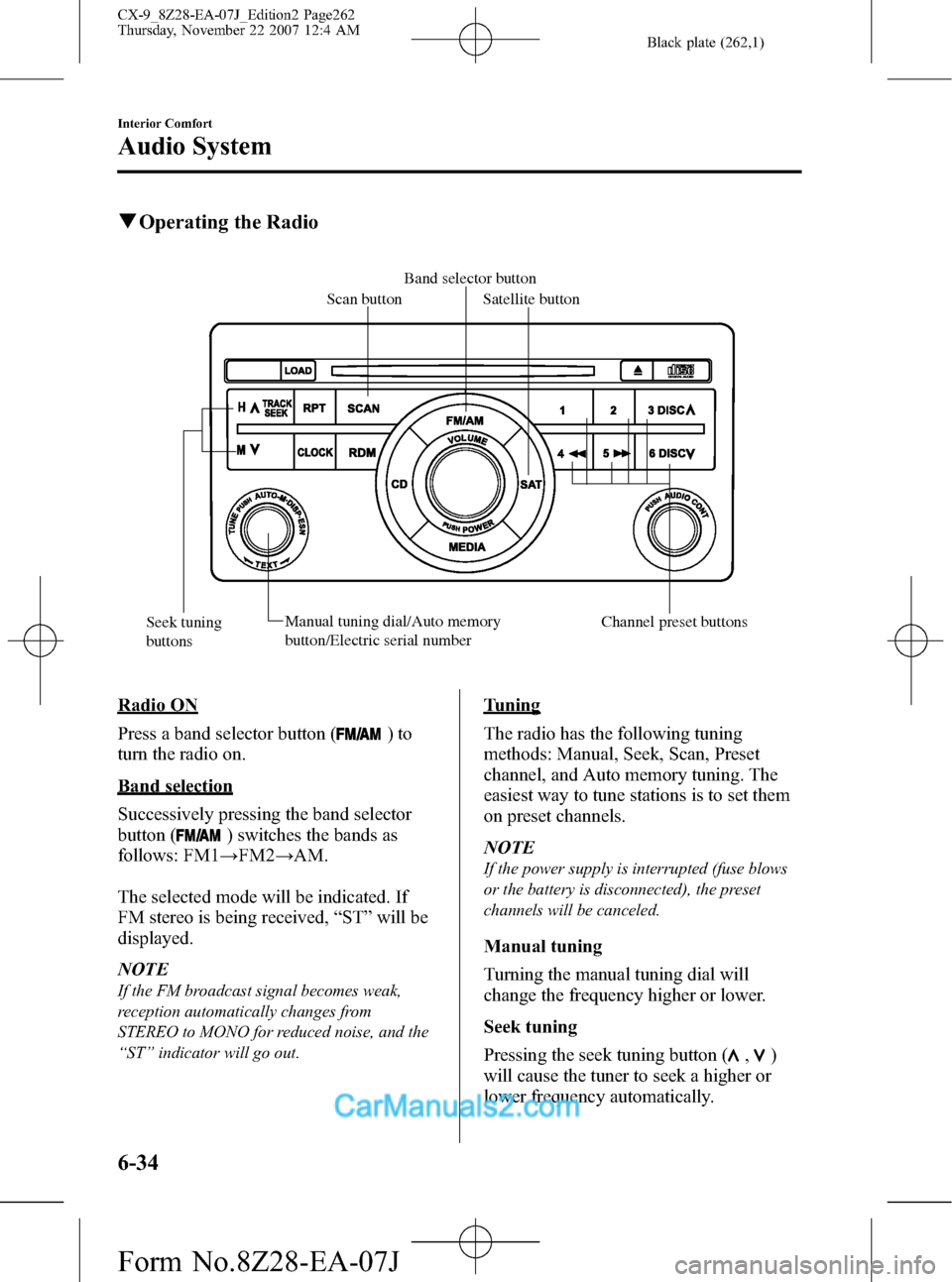
Band selector button
Scan button
Satellite button
Seek tuning
buttonsManual tuning dial/Auto memory
button/Electric serial number Channel preset buttons
Radio ON
Press a band selector button (
)to
turn the radio on.
Band selection
Successively pressing the band selector
button (
) switches the bands as
follows: FM1→FM2→AM.
The selected mode will be indicated. If
FM stereo is being received,“ST”will be
displayed.
NOTE
If the FM broadcast signal becomes weak,
reception automatically changes from
STEREO to MONO for reduced noise, and the
“ST”indicator will go out.
Tuning
The radio has the following tuning
methods: Manual, Seek, Scan, Preset
channel, and Auto memory tuning. The
easiest way to tune stations is to set them
on preset channels.
NOTE
If the power supply is interrupted (fuse blows
or the battery is disconnected), the preset
channels will be canceled.
Manual tuning
Turning the manual tuning dial will
change the frequency higher or lower.
Seek tuning
Pressing the seek tuning button (
,)
will cause the tuner to seek a higher or
lower frequency automatically.
6-34
Interior Comfort
Audio System
CX-9_8Z28-EA-07J_Edition2 Page262
Thursday, November 22 2007 12:4 AM
Form No.8Z28-EA-07J
Page 263 of 506

Black plate (263,1)
NOTE
If you continue to press and hold the button,
the frequency will continue changing without
stopping.
Scan tuning
Press the scan button (
)to
automatically sample strong stations.
Scanning stops at each station for about 5
seconds. To hold a station, press the scan
button (
) again during this interval.
Preset channel tuning
The 6 preset channels can be used to store
6 AM and 12 FM stations.
1. To set a channel first select AM, FM1,
or FM2. Tune to the desired station.
2. Depress a channel preset button for
about 2 seconds until a beep sound is
heard. The preset channel number and
station frequency will be displayed.
The station is now held in the memory.
3. Repeat this operation for the other
stations and bands you want to store.
To tune one in the memory, select AM,
FM1, or FM2 and then press its
channel preset button. The station
frequency and the channel number will
be displayed.
NOTE
If the power supply is interrupted (fuse blows
or the battery is disconnected), the preset
channels will be canceled.
Auto memory tuning
This is especially useful when driving in
an area where the local stations are not
known. Additional AM/FM stations can
be stored without disturbing the
previously set channels.Press and hold the auto memory button
(
) for about 2 seconds until a beep
sound is heard; the system will
automatically scan and temporarily store
up to 6 stations with the strongest
frequencies in each selected band in that
area.
After scanning is completed, the station
with the strongest frequency will be tuned
and its frequency displayed.
Press and release the auto memory button
(
) to recall stations from the auto-
stored stations. One stored station will be
selected each time; its frequency and
channel number will be displayed.
NOTE
If no stations can be tuned after scanning
operations,“A”will be displayed.
SATELLITE RADIO (SAT)
Vehicles equipped with the separately
purchased SIRIUS digital satellite radio
unit have the ability to receive channels of
digital quality programming coast to coast
via satellite. For information on use, read
the Satellite Radio Kit manual
accompanying the SIRIUS digital satellite
radio unit. A subscription to SIRIUS
digital satellite radio service is required
(available in the U.S. - Except Alaska and
Hawaii) to enable this feature once the
separately purchased SIRIUS digital
satellite radio unit has been installed. For
subscription and channel information, or
for digital satellite radio technical issues,
contact SIRIUS directly at:
- Web: www.siriusradio.com
- Phone (24 hrs/day, 7 days/week): 888-
539-SIRI (7474)
- E-mail: [email protected]
- Mailing Address: Sirius Satellite Radio
Interior Comfort
Audio System
6-35
CX-9_8Z28-EA-07J_Edition2 Page263
Thursday, November 22 2007 12:4 AM
Form No.8Z28-EA-07J
Page 277 of 506
Black plate (277,1)
NOTElBefore using the auxiliary jack, read the
manufacturer's instructions for the product
being connected.
lUse a commercially-available, non-
impedance (3.5
) stereo mini plug for
connecting the portable audio unit to the
auxiliary jack. Before using the auxiliary
jack, read the manufacture's instructions
for connecting a portable audio unit to the
auxiliary jack.
lTo prevent discharging of the battery, do
not use the auxiliary input for long periods
with the engine off or idling.
lNoise may occur depending on the product
connected to the auxiliary jack.
lWith regard to connecting a portable audio
or similar device to a power source, use the
battery for the device, not the accessory
socket.
WARNING
Do not allow the connection plug cord
to get tangled with the parking brake
or the shift lever:
Allowing the plug cord to become
tangled with the parking brake or
the shift lever is dangerous as it
could interfere with driving, resulting
in an accident.
CAUTION
ØDo not place objects or apply force
to the auxiliary jack with the plug
connected.
ØNoise may occur during playback
if the accessory socket equipped
on the vehicle is used. (If noise
occurs, do not use the accessory
socket.)NOTE
lInsert the plug to the auxiliary jack
securely.
lInsert or remove the plug with the plug
perpendicular to the auxiliary jack hole.
lInsert or remove the plug by holding its
base.
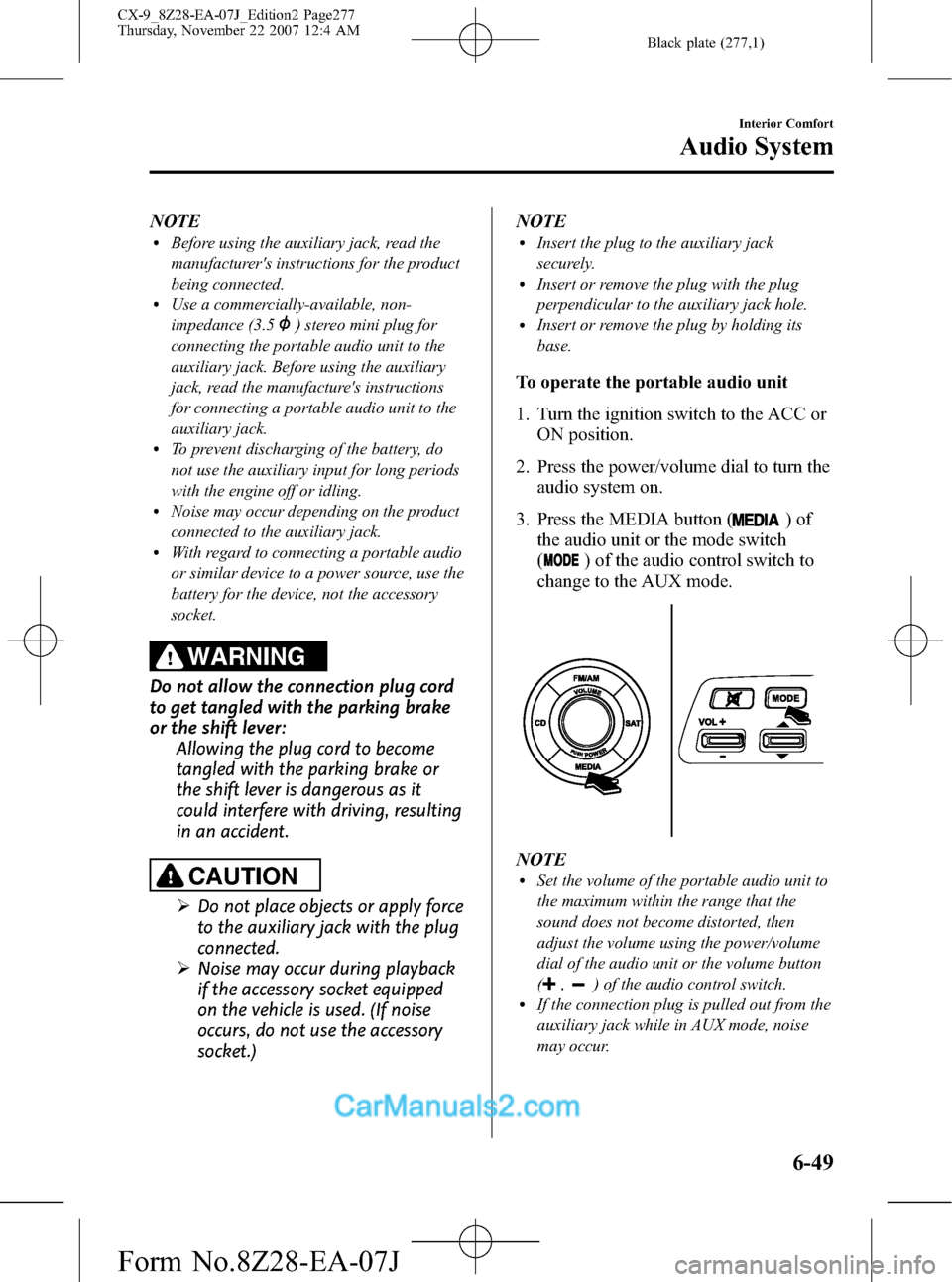
To operate the portable audio unit
1. Turn the ignition switch to the ACC or
ON position.
2. Press the power/volume dial to turn the
audio system on.
3. Press the MEDIA button (
)of
the audio unit or the mode switch
(
) of the audio control switch to
change to the AUX mode.
NOTElSet the volume of the portable audio unit to
the maximum within the range that the
sound does not become distorted, then
adjust the volume using the power/volume
dial of the audio unit or the volume button
(
,) of the audio control switch.lIf the connection plug is pulled out from the
auxiliary jack while in AUX mode, noise
may occur.
Interior Comfort
Audio System
6-49
CX-9_8Z28-EA-07J_Edition2 Page277
Thursday, November 22 2007 12:4 AM
Form No.8Z28-EA-07J