rear entertainment MAZDA MODEL CX-9 2010 (in English) User Guide
[x] Cancel search | Manufacturer: MAZDA, Model Year: 2010, Model line: MODEL CX-9, Model: MAZDA MODEL CX-9 2010Pages: 592
Page 324 of 592

Black plate (324,1)
Playable DISC specification
CD-R and CD-RW including MP3/WMA files can be played with this unit. Discs which
conform to the following formats can be played.
Name Standard Explanation
CD-R, CD-RW formatISO9660Level 1
Level 2
ISO9660 extensionJoliet
Romeo
Multi-session Supported
Maximum hierarchy
number8 hierarchies (Including root)
Maximum folder
number256 folders
Maximum file number512 files (Total capacity included in a disc.) Files other than MP3 or WMA are not
included.)
Operating tips for MP3
NOTE
Supply of this product only conveys a license for private, non-commercial use and does not convey a
license nor imply any right to use this product in any commercial (i.e. revenue-generating) real time
broadcasting (terrestrial, satellite, cable and/or any other media), broadcasting/streaming via the
Internet, intranets and/or other networks or in other electronic content distribution systems, such as
pay-audio or audio-on-demand applications. An independent license for such use is required. For
details, please visit http://www.mp3licensing.com.
Playable MP3 file specification
Playable MP3 files are as follows:
Item Content
SpecificationMPEG1 AUDIO LAYER3
MPEG2.5 AUDIO LAYER3
MPEG2 AUDIO LAYER3
Sampling frequencyMPEG1 32, 44.1, 48kHz
MPEG2 16, 22.05, 24kHz
Bit rateMPEG132, 40, 48, 56, 64, 80, 96, 112, 128, 160, 192, 224, 256, 320
kbps
MPEG2, 2.5 32, 40, 48, 56, 64, 80, 96, 112, 128, 144, 160 kbps
VBR (Variable Bit Rate) Supported
Channel mode Stereo, Joint stereo, Dual channel, Monaural
ID3 tag Ver. 1.0, Ver. 1.1 title, artist name, album name
lThis unit corresponds to MP3 files in which both header and data comply with the MP3
format.
6-76
Interior Comfort
Rear Entertainment System
CX-9_8AU2-EA-09G_Edition5 Page324
Thursday, May 6 2010 4:55 PM
Form No.8AU2-EA-09G
Page 325 of 592

Black plate (325,1)
lThis unit corresponds to multi-session recorded disc playback at a maximum of 49
sessions.
lSome data on multi-session recorded discs cannot be played.lPlayback of discs with added sessions is possible.lPacket Write recorded discs cannot be played.lThis unit does not correspond to MP3i (MP3 interactive), MP3 PRO, and RIFF-style
MP3 formats.
lThe maximum number of characters available for a file name is as follows, however, the
displayable number of characters on this unit is limited.
Maximum number of characters in a file name
(including a separator“.”and the three letters of the file exten-
sion)
ISO9660 level 1 12
*
ISO9660 level 2 31*
Joliet extended format 64
Romeo extended format 128
* English one-byte characters (capitalized only) and underbar“_”are available.
MP3
CAUTION
This unit plays files with the (.mp3) file extension as a MP3 file. Do not use the MP3
file extension for files other than MP3 files. It may cause noise or a malfunction.
lIn a MP3 file, the track name, artist name, album name and category name are recorded
with data called“ID3-Tag”, and the information can be displayed on the monitor.
lMP3 files which do not comply with the specific standard may not be played correctly
or its file and folder name may not be displayed correctly.
lThe file extension may not be provided depending on the computer operating system,
version, software, or settings. In this case, add the file extension“.mp3”to the end of the
file name, and then write the disc.
Playlist
This unit can play playlist files. Playlist is a function that allows free setting of the
playback order of MP3 files. The file extension of a playlist file in which the order of
playback is recorded is“. m3u”or“. pls”.
Operating tips for WMA
WMA is short for Windows Media Audio and is the audio compression format used by
Microsoft.
Audio data can be created and stored at a higher compression ratio than MP3.
*Microsoft and Window Media are registered trademarks of Microsoft Corporation U.S. in
the United States and other countries.
Interior Comfort
Rear Entertainment System
6-77
CX-9_8AU2-EA-09G_Edition5 Page325
Thursday, May 6 2010 4:55 PM
Form No.8AU2-EA-09G
Page 326 of 592

Black plate (326,1)
Playable WMA file specification
CD-R and CD-RW including WMA files can be played with this unit. Discs which
conform to the following formats can be played.
Playable WMA files are as follows:
Item Content
Specification Windows Media Audio Version7.0
Sampling frequency Bit rate22.05kHz....32kbps
32kHz.......48,64kbps
44.1kHz.....48,64,80,96,128, 160, 192, 256, 320 kbps
48kHz.......64,96,128, 160, 192 kbps
VBR (Variable Bit Rate) Supported
Channel mode Stereo/Monaural
WMA tag Title, artist name, album name
WMA
CAUTION
This unit plays files with the (.wma) file extension as a WMA file. Do not use the
WMA file extension for files other than WMA files. It may cause noise or a
malfunction.
lIn a WMA file, the track name, artist name, album name and category name are
recorded with data called“WMA-Tag”, and the information can be displayed on the
monitor.
lWMA files which do not comply with the specific standard may not be played correctly
or its file and folder name may not be displayed correctly.
lThe file extension may not be provided depending on the computer operating system,
version, software, or settings. In this case, add the file extension“.wma”to the end of
the file name, and then write the disc.
Operating tips for Dolby
Manufactured under license from Dolby Laboratories.
“Dolby”,“MLP Lossless”, and the double-D symbol are trademarks of Dolby Laboratories.
6-78
Interior Comfort
Rear Entertainment System
CX-9_8AU2-EA-09G_Edition5 Page326
Thursday, May 6 2010 4:55 PM
Form No.8AU2-EA-09G
Page 327 of 592

Black plate (327,1)
Operating tips for dts
“DTS”and“DTS Digital Surround”are registered trademarks of Digital Theater Systems,
Inc.
qOperation Tips for Headphones
To listen to audio other than from the speakers of the Rear Entertainment System, it is
necessary to use the wireless headphones that are included.
Specification
Item Content
Transmission system Infrared light
Modulation system Frequency modulation
Carrier frequency Right channel 2.8 MHz, left channel 2.3 MHz
Interior Comfort
Rear Entertainment System
6-79
CX-9_8AU2-EA-09G_Edition5 Page327
Thursday, May 6 2010 4:55 PM
Form No.8AU2-EA-09G
Page 328 of 592
Black plate (328,1)
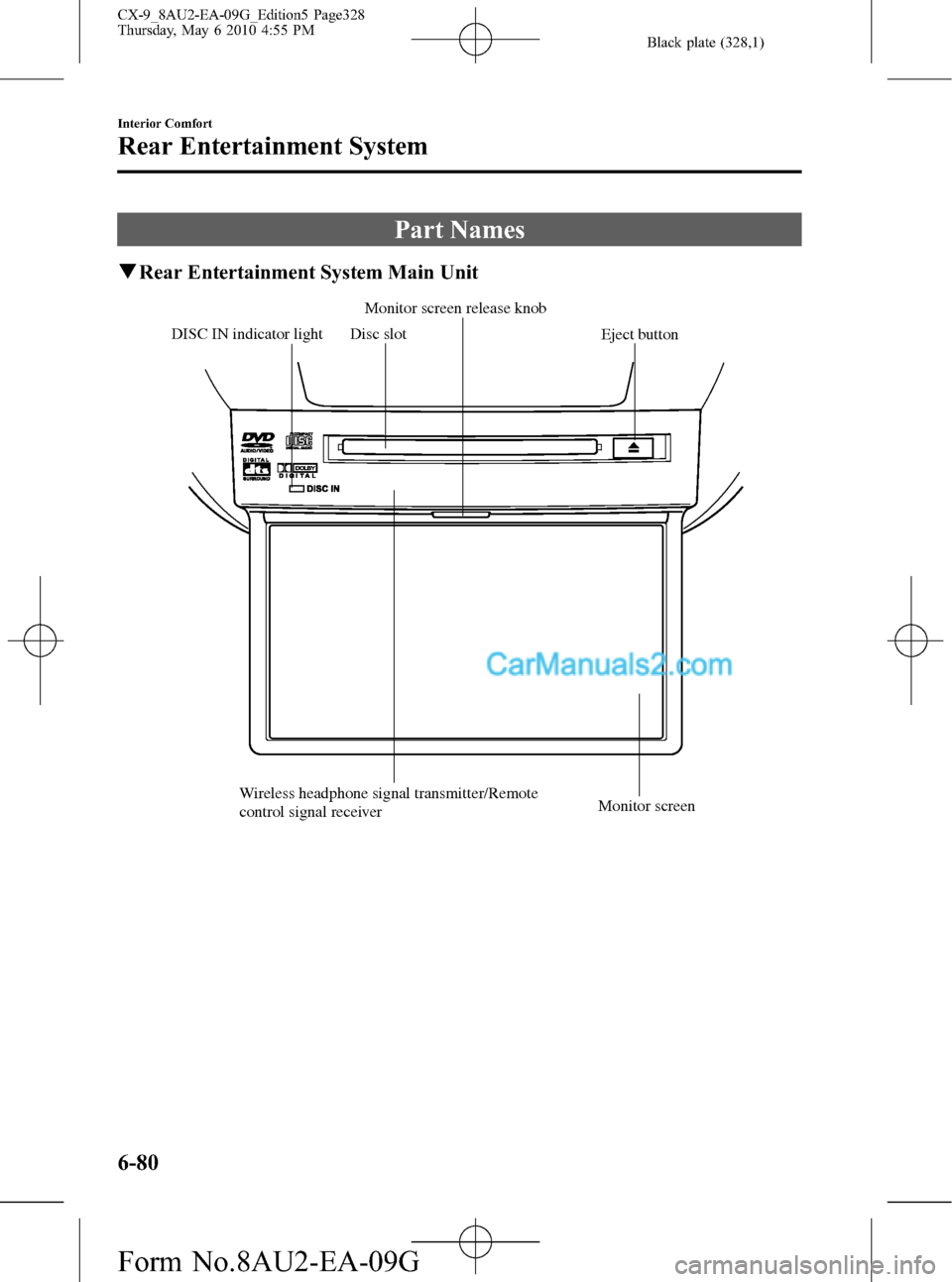
Part Names
qRear Entertainment System Main Unit
Disc slot
Eject button
Wireless headphone signal transmitter/Remote
control signal receiverMonitor screen Monitor screen release knob
DISC IN indicator light
6-80
Interior Comfort
Rear Entertainment System
CX-9_8AU2-EA-09G_Edition5 Page328
Thursday, May 6 2010 4:55 PM
Form No.8AU2-EA-09G
Page 329 of 592

Black plate (329,1)
qRemote Controller
No. Name No. Name
RETURN buttonPLAY button
MENU buttonSlow playback button
ENTER/Select buttonPOWER button
STOP buttonSOURCE button
PAUSE buttonPicture adjust mode button
Fast-forward buttonPicture adjust button
Rewind buttonSET UP button
PREVIOUS (Track down) buttonNumber keys
NEXT (Track up) buttonDISPLAY MODE button
DISPLAY button
Interior Comfort
Rear Entertainment System
6-81
CX-9_8AU2-EA-09G_Edition5 Page329
Thursday, May 6 2010 4:55 PM
Form No.8AU2-EA-09G
Page 330 of 592

Black plate (330,1)
qHeadphone
Arm
Volume dial
Infrared receiver R (right) sidePower button
Power indicator
L (left) side
6-82
Interior Comfort
Rear Entertainment System
CX-9_8AU2-EA-09G_Edition5 Page330
Thursday, May 6 2010 4:55 PM
Form No.8AU2-EA-09G
Page 331 of 592

Black plate (331,1)
Before Operation
qDisplay Opening/Closing
CAUTION
ØClose the display while the Rear
Entertainment System is not in
use. If the display is left open, a
passenger could be injured by
hitting the display, or the display
could be damaged.
ØDo not press the monitor screen
while opening the display. It may
cause a malfunction.
Opening the display
Press the monitor screen release knob and
open the display until it is in the lock
position.
Monitor screen
release knob
Closing the display
Close and press the display until a
clicking sound can be heard.NOTE
lIf the display is closed while the power is
on, it automatically turns off.
lThe display locks in two positions when
opened to 100 or 120-degrees.
qDisc Insertion/Ejection
CAUTION
If the signal surface of a disc is
touched, it could cause the sound to
skip. Pick up a disc by grasping the
edge of the hole and the outer edge.
NOTE
When no disc is inserted,“No Disc”is
displayed on the monitor.
Interior Comfort
Rear Entertainment System
6-83
CX-9_8AU2-EA-09G_Edition5 Page331
Thursday, May 6 2010 4:55 PM
Form No.8AU2-EA-09G
Page 332 of 592

Black plate (332,1)
Inserting the disc
Insert the disc into the disc slot with the
label-side up.
Disc slot
CAUTION
Insert the disc with its label-side
(decorated side) facing upward. If the
disc is inserted upside-down, it may
cause a malfunction.
NOTE
If a disc is inserted while the Rear
Entertainment System is turned off but the
display is open, and when the ignition switch is
in the ACC or ON position, the system
automatically turns on and starts playback.
Ejecting the disc
Press the eject button to eject the disc.
Eject button
NOTElWhen the eject button is pressed, the disc is
ejected halfway.
lA disc can be ejected with the Rear
Entertainment System turned off.
qPicture Adjustment
The brightness (BRIGHT), color
adjustment (TINT), color density
(COLOR), and contrast (CONTRAST) of
the screen can be adjusted.
Press the picture adjust button
(PICTURE) on the remote controller to
change to the picture adjustment mode.
The picture mode changes in the order of
BRIGHT→TINT→COLOR
→CONTRAST→OFF each time the
button is pressed in this mode.
Press the picture adjust button (
)or(),
positioned to top/bottom of the picture
adjustment mode button (PICTURE), to
adjust each picture mode.
NOTE
lIf the picture adjustment mode is on and no
operation has been done for about 5
seconds, the mode is canceled
automatically.
lIf the picture is no longer adjustable by
pressing the picture adjust button (
)or
(
), it indicates that the adjustment value
has reached the maximum/minimum value.
Adjusting the brightness
1. Press the picture adjustment mode
button (PICTURE) and select the
BRIGHT mode.
2. Press the picture adjust button (
)or
(
) to adjust.
lPicture adjust button (): Brighten
6-84
Interior Comfort
Rear Entertainment System
CX-9_8AU2-EA-09G_Edition5 Page332
Thursday, May 6 2010 4:56 PM
Form No.8AU2-EA-09G
Page 333 of 592

Black plate (333,1)
lPicture adjust button (): Darken
Adjusting the color adjustment
1. Press the picture adjustment mode
button (PICTURE) and select the TINT
mode.
2. Press the picture adjust button (
)or
(
) to adjust.
lPicture adjust button (): GreenlPicture adjust button (): Red
Adjusting the color density
1. Press the picture adjustment mode
button (PICTURE) and select the
COLOR mode.
2. Press the picture adjust button (
)or
(
) to adjust.
lPicture adjust button (): Darken
lPicture adjust button (): Lighten
Adjusting the contrast (definition)
1. Press the picture adjustment mode
button (PICTURE) and select the
CONTRAST mode.
2. Press the picture adjust button (
)or
(
) to adjust.
lPicture adjust button (): HigherlPicture adjust button (): Lower
qScreen Size Setting
The size of the screen can be changed.
Press the DISPLAY MODE button to set
the desired screen size.
The screen size changes in the order of
Full→Normal→Wide→Cinema each
time the button is pressed.
Interior Comfort
Rear Entertainment System
6-85
CX-9_8AU2-EA-09G_Edition5 Page333
Thursday, May 6 2010 4:56 PM
Form No.8AU2-EA-09G