radio MAZDA MODEL CX-9 2014 (in English) Owner's Manual
[x] Cancel search | Manufacturer: MAZDA, Model Year: 2014, Model line: MODEL CX-9, Model: MAZDA MODEL CX-9 2014Pages: 600
Page 290 of 600
Black plate (290,1)
qRadio Reception
AM characteristics
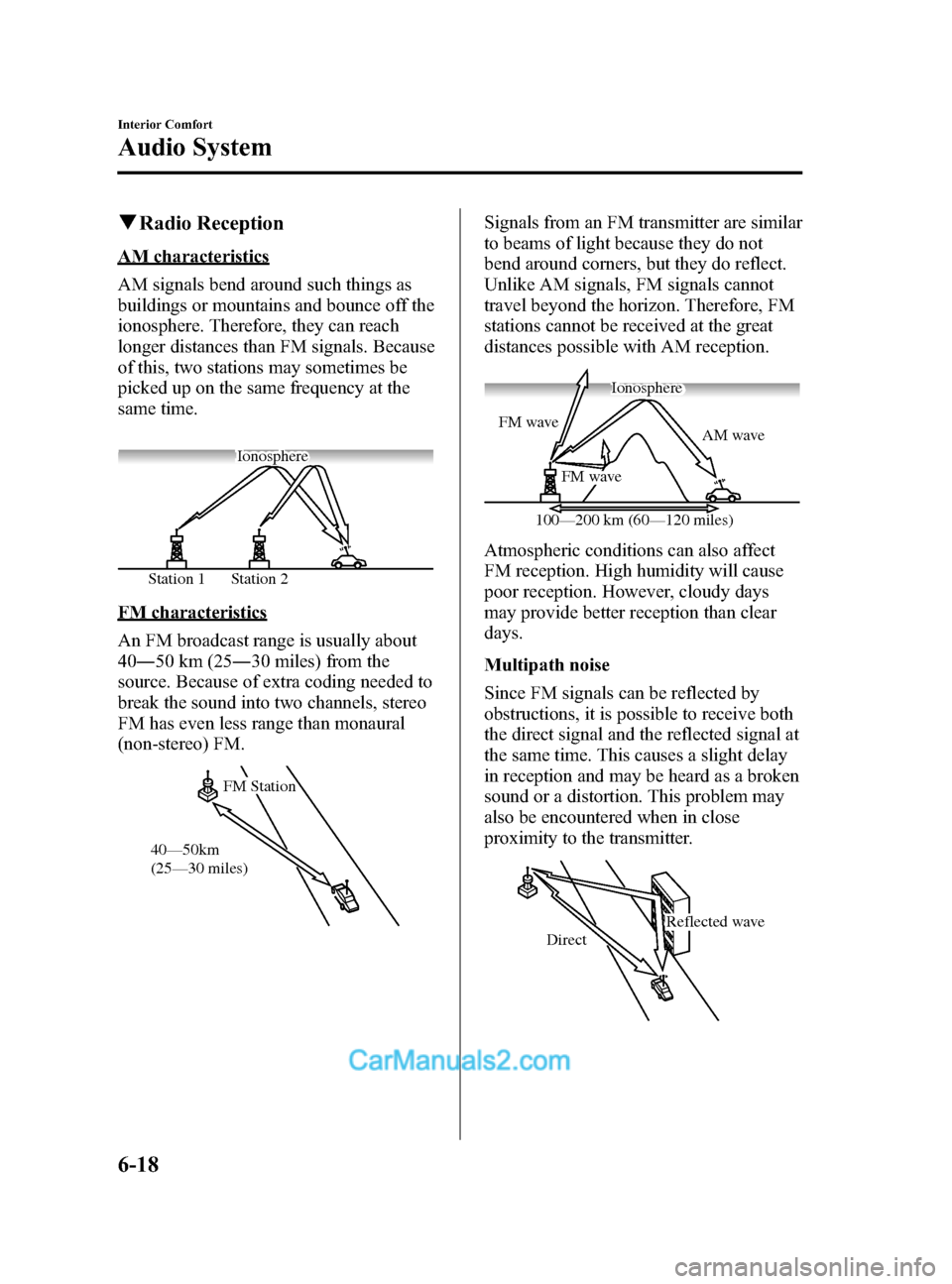
AM signals bend around such things as
buildings or mountains and bounce off the
ionosphere. Therefore, they can reach
longer distances than FM signals. Because
of this, two stations may sometimes be
picked up on the same frequency at the
same time.
Station 2
Station 1 Ionosphere
FM characteristics
An FM broadcast range is usually about
40
―50 km (25 ―30 miles) from the
source. Because of extra coding needed to
break the sound into two channels, stereo
FM has even less range than monaural
(non-stereo) FM.
FM Station
40—50km
(25—30 miles)
Signals from an FM transmitter are similar
to beams of light because they do not
bend around corners, but they do reflect.
Unlike AM signals, FM signals cannot
travel beyond the horizon. Therefore, FM
stations cannot be received at the great
distances possible with AM reception.
AM wave
FM wave
FM wave
100—200 km (60—120 miles) Ionosphere
Atmospheric conditions can also affect
FM reception. High humidity will cause
poor reception. However, cloudy days
may provide better reception than clear
days.
Multipath noise
Since FM signals can be reflected by
obstructions, it is possible to receive both
the direct signal and the reflected signal at
the same time. This causes a slight delay
in reception and may be heard as a broken
sound or a distortion. This problem may
also be encountered when in close
proximity to the transmitter.
Reflected wave
Direct
6-18
Interior Comfort
Audio System
CX-9_8DA3-EA-13G_Edition2 Page290
Monday, September 9 2013 4:8 PM
Form No.8DA3-EA-13G
Page 291 of 600

Black plate (291,1)
Flutter/Skip noise
Signals from an FM transmitter move in
straight lines and become weak in valleys
between tall buildings, mountains, and
other obstacles. When a vehicle passes
through such an area, the reception
conditions may change suddenly, resulting
in annoying noise.
Weak signal noise
In suburban areas, broadcast signals
become weak because of distance from
the transmitter. Reception in such fringe
areas is characterized by sound breakup.
Strong signal noise
This occurs very close to a transmitter
tower. The broadcast signals are
extremely strong, so the result is noise and
sound breakup at the radio receiver.
Station drift noise
When a vehicle reaches the area of two
strong stations broadcasting at similar
frequencies, the original station may be
temporarily lost and the second station
picked up. At this time there will be some
noise from this disturbance.
Station 2
88.3 MHz
Station 1
88.1 MHz
Interior Comfort
Audio System
6-19
CX-9_8DA3-EA-13G_Edition2 Page291
Monday, September 9 2013 4:8 PM
Form No.8DA3-EA-13G
Page 298 of 600

Black plate (298,1)
qOperating Tips for USB device
This unit supports playback of MP3/
WMA/AAC files recorded to USB device.
NOTE
lMusic data (MP3/WMA/AAC (.m4a)
format) stored in a USB mass-storage class
compliant device (such as USB flash
memory) can be played.
lPlayback may not be possible depending on
the type and condition of the USB flash
memory even if the audio file complies with
the standard above.
lA copyright protected WMA/AAC file
cannot be played in this unit.
lThe order of the music data stored in the
device may differ from the playback order.
lTo prevent loss or damage of stored data,
we recommend that you always back up
your data.
lIf a device exceeds the maximum electric
current value of 500 mA, it may not operate
or recharge when connected.
lDo not pull out the USB device while in the
USB mode (only pull it out while in FM/AM
radio or CD mode).
lThe device will not operate if the data is
password protected.
Playable MP3 file specifications
Playable MP3 files are as follows:
Item Content
Specification MPEG1 AUDIO LAYER
III
MPEG2 AUDIO LAYER
III
MPEG2.5
Sampling rate 44.1/48/32 kHz
(MPEG1)
22.05/24/16 kHz
(MPEG2)
11.025/12/8 kHz
(MPEG2.5)
Bit rate 32
―320 kbps (MPEG1)
8 ― 160 kbps (MPEG2)
8 ― 160 kbps (MPEG2.5)
CAUTION
This unit plays files with the file
extension (mp3) as an MP3 file. Do
not use the MP3 file extension for
files other than MP3 files. Otherwise,
it could result in noise or a
malfunction.
lMP3 files written under specifications
other than the indicated specification
may not play normally or files or folder
names may not display correctly.
lThe file extension may not be provided
depending on the computer operating
system, version, software, or settings.
In this case, add the file extension
“.mp3 ”to the end of the file name, and
then write it to the memory.
6-26
Interior Comfort
Audio System
CX-9_8DA3-EA-13G_Edition2 Page298
Monday, September 9 2013 4:8 PM
Form No.8DA3-EA-13G
Page 301 of 600

Black plate (301,1)
Audio Set
CAUTION
Do not press the panel strongly or press it with a sharp-pointed object. Otherwise,
the panel could be damaged.
Power/Volume/Display/Sound Controls ............................................................ page 6-30
Operating the Radio ........................................................................................... page 6-34
Operating the Satellite Radio ............................................................................. page 6-38
Operating the Compact Disc (CD) Player .......................................................... page 6-46
Operating the Auxiliary jack/USB port ............................................................. page 6-49
Error Indications ................................................................................................ page 6-49
Setup .................................................................................................................. page 6-50
Interior Comfort
Audio System
6-29
CX-9_8DA3-EA-13G_Edition2 Page301
Monday, September 9 2013 4:8 PM
Form No.8DA3-EA-13G
Page 304 of 600
Black plate (304,1)
AudioPilot®2*4
AudioPilot®2 automatically adjusts audio
volume and sound quality in accordance
with the level of noise entering the vehicle
interior while driving. When AudioPilot
®
2 is turned on, the system automatically
calculates the conditions for optimum
hearing of sound which may be difficult
to hear depending on exterior noise.
AudioPilot
®2 can be set on or off.
*4 AudioPilot®2 is a registered
trademark of Bose Corporation.
Centerpoint
®*5
Centerpoint®offers you the experience of
5.1-channel surround sound in your
vehicle even with your conventional 2-
channel stereo CDs. Centerpoint
®can be
set on or off.
*5 Centerpoint
®is a registered trademark
of Bose Corporation.
NOTE
lCenterpoint®operates optimally with a 2-
channel stereo CD. Audio files encoded
with high compression can be played,
however, they may result in poor sound
quality.
lCenterpoint®is available for 2-channel
stereo audio except for AM radio/FM radio/
AUX/Bluetooth® audio.
Sound setting reset
The settings for bass, treble, balance, and
fade can be returned to their initial
settings.
1. Touch the
on-screen button.
2. Touch the
on-screen button.
6-32
Interior Comfort
Audio System
CX-9_8DA3-EA-13G_Edition2 Page304
Monday, September 9 2013 4:8 PM
Form No.8DA3-EA-13G
Page 306 of 600

Black plate (306,1)
qOperating the Radio
Audio button
Seek tuning
buttons
Manual tuning
dial
Radio ON
(Connected Satellite Radio)
Press the audio button (
) and touch
the
on-screen tab.
(Unconnected Satellite Radio)
Press the audio button (
) and touch
the
oron-screen tab.
Band selection
(Connected Satellite Radio)
Touch the
on-screen tab to switch
the band as follows:
FM1 →FM2 →AM
NOTE
lis displayed when FM1 is selected,
is displayed when FM2 is
selected, and
is displayed when AM
is selected.
lIf the FM broadcast signal becomes weak,
reception automatically changes from
STEREO to MONO for reduced noise, and
the “STEREO ”indicator will no longer
display.
(Unconnected Satellite Radio)
Touch the
on-screen tab to select
AM. Touch the
on-screen tab to
select FM1 and FM2.
NOTE
lWhen FM1 is selected,is displayed.
When FM2 is selected,
is displayed.lIf the FM broadcast signal becomes weak,
reception automatically changes from
STEREO to MONO for reduced noise, and
the “STEREO ”indicator will no longer
display.
Tuning
The radio has the following tuning
methods: Manual, Seek, Scan, Preset
channel, and Auto memory tuning. The
easiest way to tune stations is to set them
on preset channels.
NOTE
If the power supply is interrupted (fuse blows
or the battery is disconnected), the preset
channels will be erased.
6-34
Interior Comfort
Audio System
CX-9_8DA3-EA-13G_Edition2 Page306
Monday, September 9 2013 4:8 PM
Form No.8DA3-EA-13G
Page 307 of 600
Black plate (307,1)
Manual tuning
Turning the manual tuning dial will
change the frequency higher or lower.
NOTE
When anbroadcast is being
received, a receivable multicast channel is also
received.
Seek tuning
Pressing the seek tuning button (
,)
will cause the tuner to seek a higher or
lower frequency automatically.
NOTE
lIf you continue to press and hold the seek
tuning button (
,) the frequency will
continue changing without stopping.
lWhen anbroadcast is being
received, a receivable multicast channel is
also received.
Scan tuning
You can search for receivable radio
stations by touching the
on-screen
button.
Scanning stops at each station for about
five seconds.
Touch the
on-screen button one time
during reception to continue receiving a
broadcasting station.
Preset channel tuning
The six preset channels can be used to
store six AM and twelve FM stations.
1. To set a channel, first select AM, FM1, or FM2. Tune to the desired station.
2. Press and hold any of the preset on- screen buttons. The reception
frequency is programmed and
displayed on the preset button. 3. Repeat this operation for the other
stations and bands you want to store.
When receiving a programmed
frequency, select AM, FM1, or FM2
and touch the preset on-screen button.
NOTE
The programmed frequency is displayed on the
preset button.
Auto memory tuning
This is especially useful when driving in
an area where the local stations are
unknown. Additional AM/FM stations
can be stored without disturbing the
previously set channels.
1. Touch the
on-screen button. The
auto memory preset list is displayed
and the previously tuned frequency is
received.
2. Touch the
on-screen button to
display the frequencies of up to ten
radio stations on the auto memory
preset list.
3. Touch the desired frequency.
NOTE
Touch theon-screen button during
auto memory tuning to return to the AM/FM
main screen.
Radio Broadcast Data System (RBDS)
Radio text information display
A maximum of 64 characters of radio text
information sent from a broadcasting
station is displayed in the audio display.
Interior Comfort
Audio System
6-35
CX-9_8DA3-EA-13G_Edition2 Page307
Monday, September 9 2013 4:8 PM
Form No.8DA3-EA-13G
Page 308 of 600

Black plate (308,1)
NOTE
Radio text information is a function of FM
radio. Text information is not displayed in the
following:
lDuringreceptionlNot an RBDS broadcastlDuring HD receptionlRBDS broadcast, but radio text is not
transmitted from the radio station
Genre Seek
Some FM stations transmit Genre codes
(Program type like a Rock, News, and so
on). This code enables alternative stations
transmitting the same Genre code to be
found quickly. To select from the genre
list, touch the
on-screen button
while in the FM mode and the desired
Genre Seek.
(To scan for Genre Seek:)
1. Touch the genre type which you want to select.
2. Touch the
,on-screen
button.
Ex.)
89.3 is currently being received. With
Rock selected as the Genre, the radio
stations broadcasting Rock are at the
following frequencies.
98.3
*1, 98.7, 104.3*1, 107.1
*1 Radio stations with good reception
The frequency changes as follows each
time the Genre Seek on-screen button is
pressed.
89.3 →98.3 →104.3 →98.3 NOTE
lOnly one Genre can be selected.lTouch theon-screen button to
return to the FM1 or FM2 main screen.
lIt may not be possible to receive any station
even if the Genre Seek function is used.
lIf a program in the selected genre is not
broadcast to a region, reception is not
possible even if the Genre Seek function is
used.
lThe Genre Seek function searches for genre
code (program type) which FM analog
broadcasts transmit.
specialty
programs (HD2-HD8) cannot be searched
because they are not FM analog
broadcasts.
lIf radio stations which are selected by
scanning using the Genre Seek function are
broadcasting stations, they are
changed from analog broadcasts to
broadcasts after a few seconds
if the reception conditions are good. The
genre is displayed after the switch,
however, the genre for FM analog
broadcasts may differ.
HD Radio
What is HD Radio ™Technology and
how does it work?
HD Radio ™Technology is the digital
evolution of analog AM/FM radio. Your
radio product has a special receiver which
allows it to receive digital broadcasts
(where available) in addition to the analog
broadcasts it already receives. Digital
broadcasts have better sound quality than
analog broadcasts as digital broadcasts
provide free, crystal clear audio. For more
information, and a guide to available radio
stations and programming, please visit
www.hdradio.com.
6-36
Interior Comfort
Audio System
CX-9_8DA3-EA-13G_Edition2 Page308
Monday, September 9 2013 4:8 PM
Form No.8DA3-EA-13G
Page 309 of 600
Black plate (309,1)
Benefits of HD Radio™Technology
(Information)
The song title, artist name and genre will
appear on the screen when available by
the radio station.
(Multicast)
On the FM radio frequency most digital
stations have “multiple ”or supplemental
programs on each FM station.
Listening to HD Radio ™Technology
If
turns on by selecting a radio
station which is an
broadcasting station, the analog broadcast
is switched to an
broadcast
automatically after a few seconds and then
received. For FM,
, and for AM,
is displayed, and theilluminates
in orange.
If the HD Radio broadcast is stopped and
changed to an analog broadcast, press
down
to turn off.
Multicast channel selection (FM)
Press
on-screen button to
switch to the multi-cast channel for the
displayed number.
The number of multi-cast channels which
can be received differs depending on the
radio station. NOTE
lIf an analog broadcast is received once and
is received while HD1 is
selected, the audio unit switches to the
station automatically.lWhen thebutton is
illuminated, there could be a noticeable
difference in sound quality and volume
when a change from digital to analog
signals occurs. If the sound quality and
volume become noticeably diminished or
cut off, touch the HD button to turn off
(button is not
illuminated).
lOnce an analog broadcast is received when
HD1 is selected from the preset channels, it
is switched to
automatically. If
the radio reception conditions are poor, or
is off, switching to
broadcasts is not possible.lWhen an HD specialty channel (HD2 to
HD8) is selected from the preset channels,
“ No HD signal ”is displayed and no audio
is output until
is received. If
the radio reception conditions are poor,
“ No HD signal ”continues to be displayed.
lIf theis not illuminated or does not
illuminate in orange, information such as
song titles of the
station are
received, however, the audio output is
analog. If information can no longer be
received and the non-reception condition
continues,
andon-
screen buttons disappear.
Interior Comfort
Audio System
6-37
CX-9_8DA3-EA-13G_Edition2 Page309
Monday, September 9 2013 4:8 PM
Form No.8DA3-EA-13G
Page 310 of 600

Black plate (310,1)
qOperating the Satellite Radioí
Audio button
Seek tuning
buttons
Manual tuning
dial
NOTE
This equipment has been tested and found to
comply with the limits for a Class B digital
device, pursuant to Part 15 of the FCC Rules.
These limits are designed to provide
reasonable protection against harmful
interference in a residential installation. This
equipment generates, uses, and can radiate
radio frequency energy and if not installed and
used in accordance with the instructions, may
cause harmful interference to radio
communications. However, there is no
guarantee that interference will not occur in a
particular installation. If this equipment does
cause harmful interference to radio or
television reception, which can be determined
by turning the equipment off and on, the user
is encouraged to try to correct the interference
by one or more of the following measures:
- Increase the separation between the
equipment and tuner.
- Connect the equipment into an outlet on a
circuit different from that to which the tuner is
connected.
- Consult the dealer or an experienced radio/
TV technician for help.
What is satellite radio?
With over 130 channels, SIRIUS Satellite
Radio brings you more of what you love.
Get channels and channels of commercial-
free music, plus sports, news, talk,
entertainment and more.
Commercial-free music from nearly
every genre―rock to pop, hip-hop to
country, jazz, classical and more. Plus live
performances and artist-dedicated
channels.
Live sports Play-by-Play & Expert Talk
― every NFL game, every NASCAR
®
race, 24/7 sports talk, college sports and
more.
Exclusive entertainment, comedy and
talk ―The biggest names, compelling
talk, hilarious comedy.
World-class news plus local traffic and
weather.
Sign up for SIRIUS Satellite Radio today!
6-38
Interior Comfort
íSome models.
Audio System
CX-9_8DA3-EA-13G_Edition2 Page310
Monday, September 9 2013 4:8 PM
Form No.8DA3-EA-13G