battery MAZDA MODEL CX-9 2015 (in English) Workshop Manual
[x] Cancel search | Manufacturer: MAZDA, Model Year: 2015, Model line: MODEL CX-9, Model: MAZDA MODEL CX-9 2015Pages: 604, PDF Size: 9.15 MB
Page 422 of 604

Black plate (422,1)
Other problemsSymptom Cause Solution method
The indication for the remaining
battery is different between the
vehicle and the device The indication method is different
between the vehicle and the device.
―
When a call is made from the
vehicle, the telephone number is
updated in the incoming/outgoing
call record but the name does not
appear The number has not been registered
into the phonebook.
If the number has been registered
into the phonebook, the
incoming/outgoing call record is
updated by the name in the
phonebook when the engine is
restarted.
The cell phone does not synchronize
with the vehicle regarding the
incoming/outgoing call record Some types of cell phones do not
synchronize automatically.
Operate the cell phone for
synchronization.
It takes a long time to complete the
function for changing the language A maximum of 60 seconds is
required.
―
6-148
Interior Comfort
Bluetooth®
CX-9_8DU1-EA-14H_Edition1 Page422
Thursday, June 5 2014 4:20 PM
Form No.8DU1-EA-14H
Page 426 of 604

Black plate (426,1)
NOTElIf water, snow, or mud is stuck on the camera lens, wipe it off using a soft cloth. If it cannot be
wiped off, use a mild detergent.
lIf the camera temperature changes rapidly, such as by pouring hot water on it under cold
temperature conditions, the rear view monitor may not operate correctly.
lWhen replacing the tires, consult an Authorized Mazda Dealer. Replacing the tires could result in
deviation of the guide lines which appear on the display.
lIf the vehicle's front, side, or rear has been involved in a collision, the alignment of the rear view
parking camera (location, installation angle) may have deviated. Always consult an Authorized
Mazda Dealer to have the vehicle inspected.
l(With navigation system)
The screen may not change to the camera image while the navigation system is being activated
immediately after the vehicle battery has been connected. If this occurs, activate the rear-view
monitor camera again soon after the navigation system.
qRear View Parking Camera Location
Rear View Parking Camera
qSwitching to the Rear View Monitor Display
Shift the shift lever to R with the ignition switched ON to switch the display to the rear
view monitor display.
NOTE
When the shift lever is shifted from R to another shift lever position, the screen returns to the previous
display.
6-152
Interior Comfort
Rear View Monitor
CX-9_8DU1-EA-14H_Edition1 Page426
Thursday, June 5 2014 4:20 PM
Form No.8DU1-EA-14H
Page 436 of 604

Black plate (436,1)
Sunvisors
When you need a sunvisor, lower it for
use in front or swing it to the side.
Sunvisor
qSide Extension Sunvisors
The visor extender extends the sunvisor's
range of sun shading.
To use, pull it out.
CAUTION
When moving the sunvisor, retract
the visor extender to its original
position. Otherwise, the visor
extender could hit the rearview
mirror.
qVanity Mirrors
To use the vanity mirror, lower the
sunvisor.
The vanity mirror light will illuminate
when you open the cover.
To prevent the battery from being
discharged, the vanity mirror will only
illuminate in the tilt range shown below.
off
off
on
6-162
Interior Comfort
Interior Equipment
CX-9_8DU1-EA-14H_Edition1 Page436
Thursday, June 5 2014 4:20 PM
Form No.8DU1-EA-14H
Page 437 of 604
Black plate (437,1)
Interior Lights
qIlluminated Entry System
When the illuminated entry system
operates, the overhead light (switch is in
the DOOR position)and the courtesy
lights turn on for:
lAbout 30 seconds after the driver's
door is unlocked and the ignition is
switched off (with the ignition key
removed).
lAbout 15 seconds after all doors are
closed.
(With Advanced key)
About 5 seconds after all doors are
closed when the advanced key is
outside of the vehicle.
lAbout 15 seconds after the ignition is
switched off (with the ignition key
removed) with all doors closed.
The light also turns off when:
lThe ignition is switched ON and all
doors are closed.
lThe driver's door is locked.
NOTE
Battery saver
If any door is left opened, the light turns off
after about 30 minutes to save the battery.
The light turns on again when the ignition is
switched ON, or when any door is opened after
all doors have been closed.
q Overhead Lights
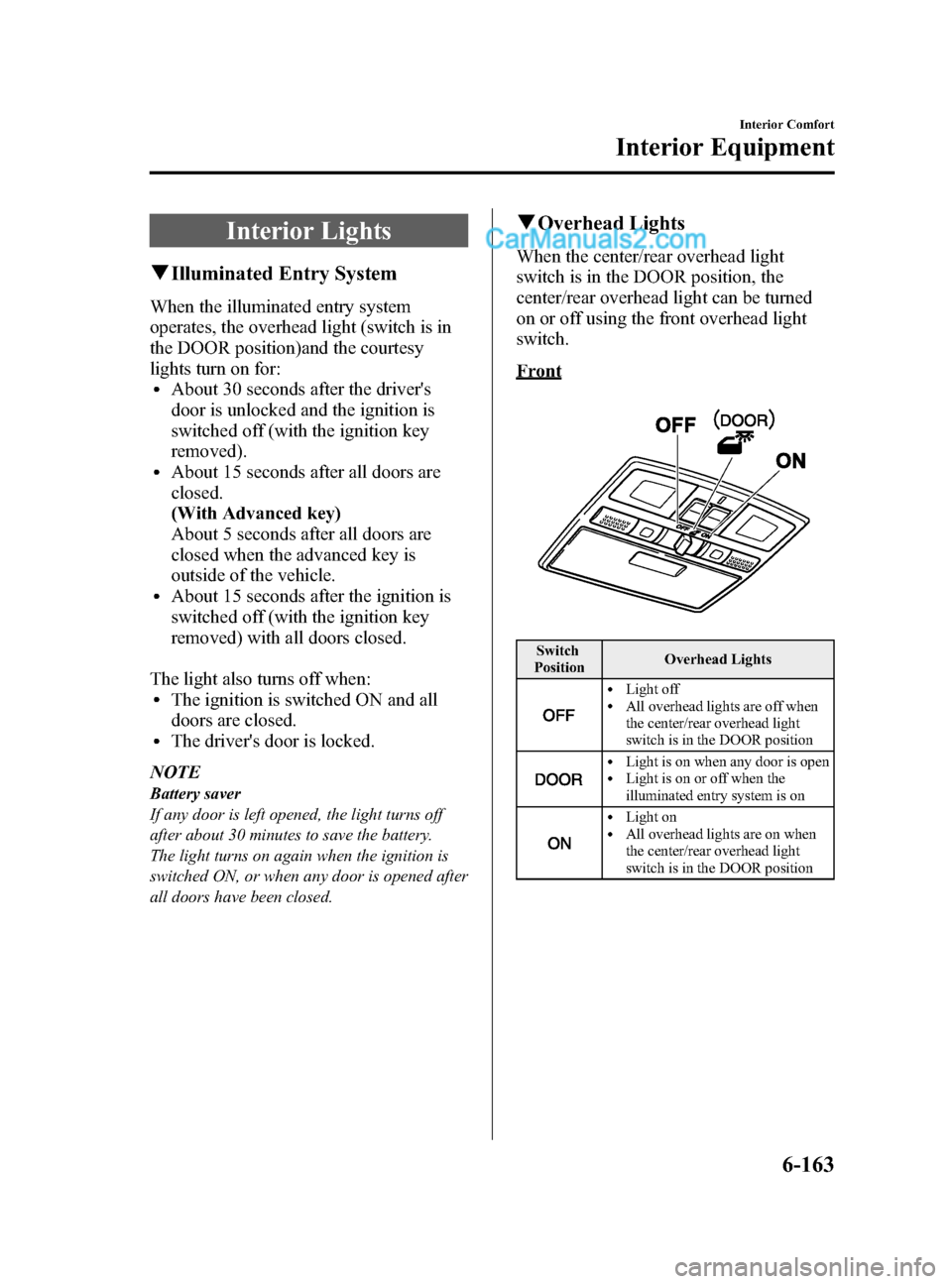
When the center/rear overhead light
switch is in the DOOR position, the
center/rear overhead light can be turned
on or off using the front overhead light
switch.
Front
Switch
Position Overhead Lights
lLight offlAll overhead lights are off when
the center/rear overhead light
switch is in the DOOR position
lLight is on when any door is openlLight is on or off when the
illuminated entry system is on
lLight onlAll overhead lights are on when
the center/rear overhead light
switch is in the DOOR position
Interior Comfort
Interior Equipment
6-163
CX-9_8DU1-EA-14H_Edition1 Page437
Thursday, June 5 2014 4:20 PM
Form No.8DU1-EA-14H
Page 441 of 604
Black plate (441,1)
qTrip Computer
The trip computer can display the
following:
lThe current fuel economy.lThe average fuel economy.lThe approximate distance you can
travel on the available fuel.
lThe average vehicle speed.
Switch the ignition ON.
Press the INFO switch to change the
display mode.
If you have any problems with your trip
computer, consult an Authorized Mazda
Dealer.
Current fuel economy mode
This mode displays the current fuel
economy by calculating the amount of
fuel consumption and the distance
traveled.
Current fuel economy will be calculated
and displayed every 2 seconds.
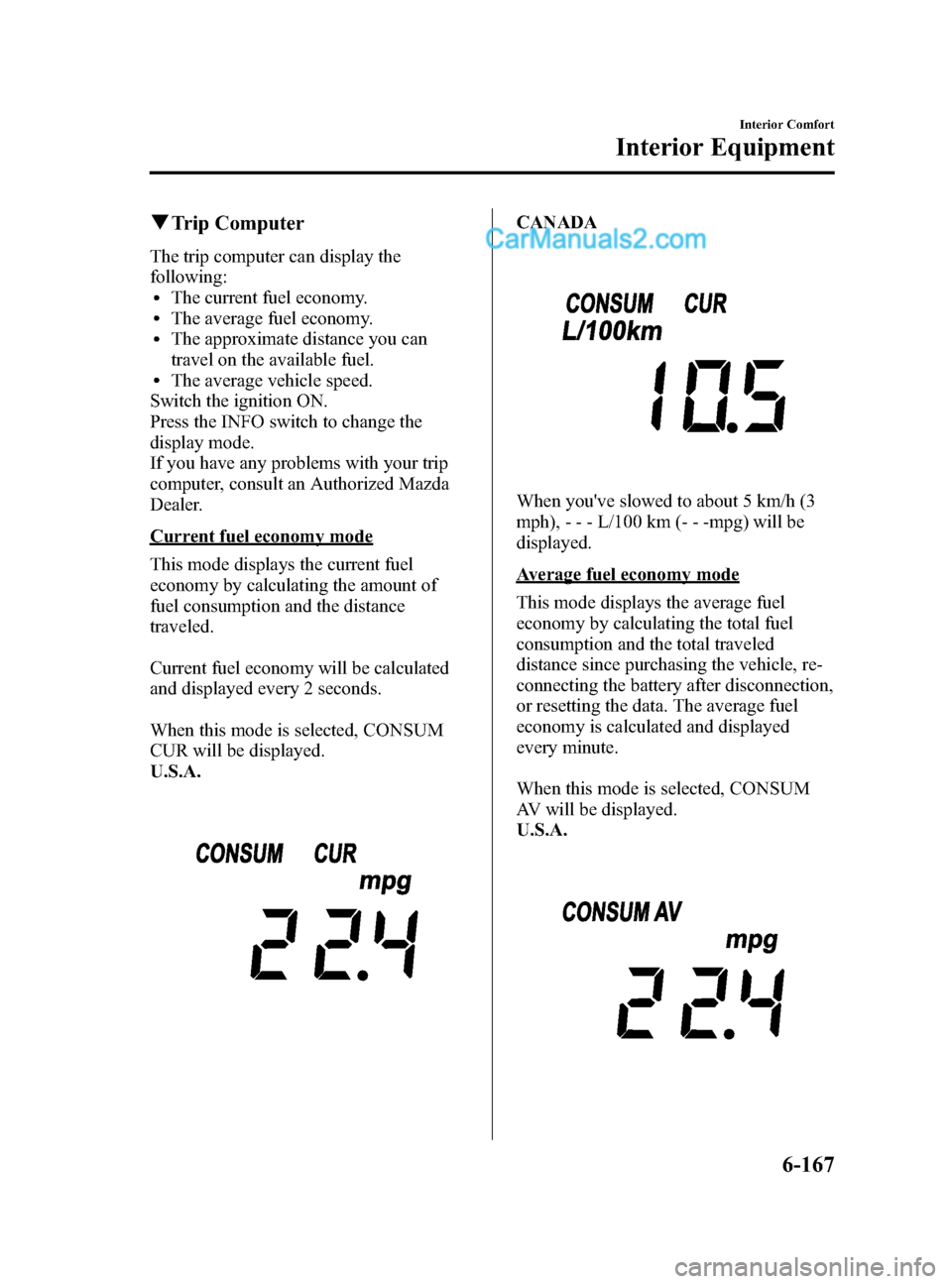
When this mode is selected, CONSUM
CUR will be displayed.
U.S.A.
CANADA
When you've slowed to about 5 km/h (3
mph), - - - L/100 km (- - -mpg) will be
displayed.
Average fuel economy mode
This mode displays the average fuel
economy by calculating the total fuel
consumption and the total traveled
distance since purchasing the vehicle, re-
connecting the battery after disconnection,
or resetting the data. The average fuel
economy is calculated and displayed
every minute.
When this mode is selected, CONSUM
AV will be displayed.
U.S.A.
Interior Comfort
Interior Equipment
6-167
CX-9_8DU1-EA-14H_Edition1 Page441
Thursday, June 5 2014 4:20 PM
Form No.8DU1-EA-14H
Page 442 of 604

Black plate (442,1)
CANADA
To clear the data being displayed, press
the INFO switch for more than 1.5
second.
After pressing the INFO switch, - - - L/
100 km (- - - mpg) will be displayed for
about 1 minute before the fuel economy is
recalculated and displayed.
Distance-to-empty mode
This mode displays the approximate
distance you can travel on the remaining
fuel based on the fuel economy.
The distance-to-empty will be calculated
and displayed every second.
When this mode is selected, REMNG will
be displayed.
U.S.A.
CANADA
NOTElEven though the distance-to-empty display
may indicate a sufficient amount of
remaining mileage before refueling is
required, refuel as soon as possible if the
fuel gauge needle nears E or the low fuel
warning light illuminates.
lThe display won't change unless you add
more than approximately 20 L (5.3 US gal,
4.5 Imp gal) of fuel.
Average vehicle speed mode
This mode displays the average vehicle
speed by calculating the distance and the
time traveled since connecting the battery
or resetting the data.
Average vehicle speed will be calculated
and displayed every 10 seconds.
When this mode is selected, AV will be
displayed.
6-168
Interior Comfort
Interior Equipment
CX-9_8DU1-EA-14H_Edition1 Page442
Thursday, June 5 2014 4:20 PM
Form No.8DU1-EA-14H
Page 450 of 604

Black plate (450,1)
RearCAUTION
ØTo prevent accessory socket
damage or electrical failure, pay
attention to the following:
ØDo not use accessories that
require more than 120 W (DC 12
V, 10 A).
ØDo not use accessories that are
not genuine Mazda accessories
or the equivalent.
ØClose the cover when the
accessory socket is not in use to
prevent foreign objects and
liquids from getting into the
accessory socket.
ØCorrectly insert the plug into
the accessory socket.
Ø Noise may occur on the audio
playback depending on the device
connected to the accessory socket.
Ø Depending on the device
connected to the accessory socket,
the vehicle's electrical system may
be affected, which could cause the
warning light to illuminate.
Disconnect the connected device
and make sure that the problem is
resolved. If the problem is
resolved, disconnect the device
from the socket and switch the
ignition off. If the problem is not
resolved, consult an Authorized
Mazda Dealer.
NOTE
To prevent discharging of the battery, do not
use the socket for long periods with the engine
off or idling.
6-176
Interior Comfort
Interior Equipment
CX-9_8DU1-EA-14H_Edition1 Page450
Thursday, June 5 2014 4:20 PM
Form No.8DU1-EA-14H
Page 470 of 604
Black plate (470,1)
Jump-Starting
Jump-starting is dangerous if done incorrectly. So follow the procedure carefully. If you
feel unsure about jump-starting, we strongly recommend that you have a competent service
technician do the work.
WARNING
Follow These Precautions Carefully:
To ensure safe and correct handling of the battery, read the following precautions
carefully before using the battery or inspecting it.
Always wear eye protection when working near the battery:
Working without eye protection is dangerous. Battery fluid contains SULFURIC ACID
which could cause blindness if splashed into your eyes. Also, hydrogen gas produced
during normal battery operation, could ignite and cause the battery to explode.
Wear eye protection and protective gloves to prevent contact with battery
fluid: Spilled battery fluid is dangerous.
Battery fluid contains SULFURIC ACID which could cause serious injuries if it gets in
eyes, skin or clothing. If this happens, immediately flush your eyes with water for 15
minutes or wash your skin thoroughly and get medical attention.
Always keep batteries out of the reach of children:
Allowing children to play near batteries is dangerous. Battery fluid could cause
serious injuries if it gets in the eyes or on the skin.
Do not allow the positive () terminal to contact any other metal object that
could cause sparks: Flames and sparks near open battery cells are dangerous. Hydrogen gas, produced
during normal battery operation, could ignite and cause the battery to explode. An
exploding battery can cause serious burns and injuries. When working near a
battery, do not allow metal tools to contact the positive (
) or negative ()
terminal of the battery.
7-18
In Case of an Emergency
Emergency Starting
CX-9_8DU1-EA-14H_Edition1 Page470
Thursday, June 5 2014 4:20 PM
Form No.8DU1-EA-14H
Page 471 of 604
Black plate (471,1)
Keep all flames, including cigarettes, and sparks away from open battery cells:
Flames and sparks near open battery cells are dangerous. Hydrogen gas, produced
during normal battery operation, could ignite and cause the battery to explode. An
exploding battery can cause serious burns and injuries.
Do not jump-start a frozen battery or one with a low fluid level: Jump-starting a frozen battery or one with a low fluid level is dangerous. It may
rupture or explode, causing serious injury.
Connect the negative cable to a good ground point away from the battery: Connecting the end of the second jumper cable to the negative (
) terminal of the
discharged battery is dangerous.
A spark could cause the gas around the battery to explode and injure someone.
Route the jumper cables away from parts that will be moving: Connecting a jumper cable near or to moving parts (cooling fans, belts) is dangerous.
The cable could get caught when the engine starts and cause serious injury.
CAUTION
Use only a 12 V booster system. You can damage a 12 V starter, ignition system, and
other electrical parts beyond repair with a 24 V power supply (two 12 V batteries in
series or a 24 V motor generator set).
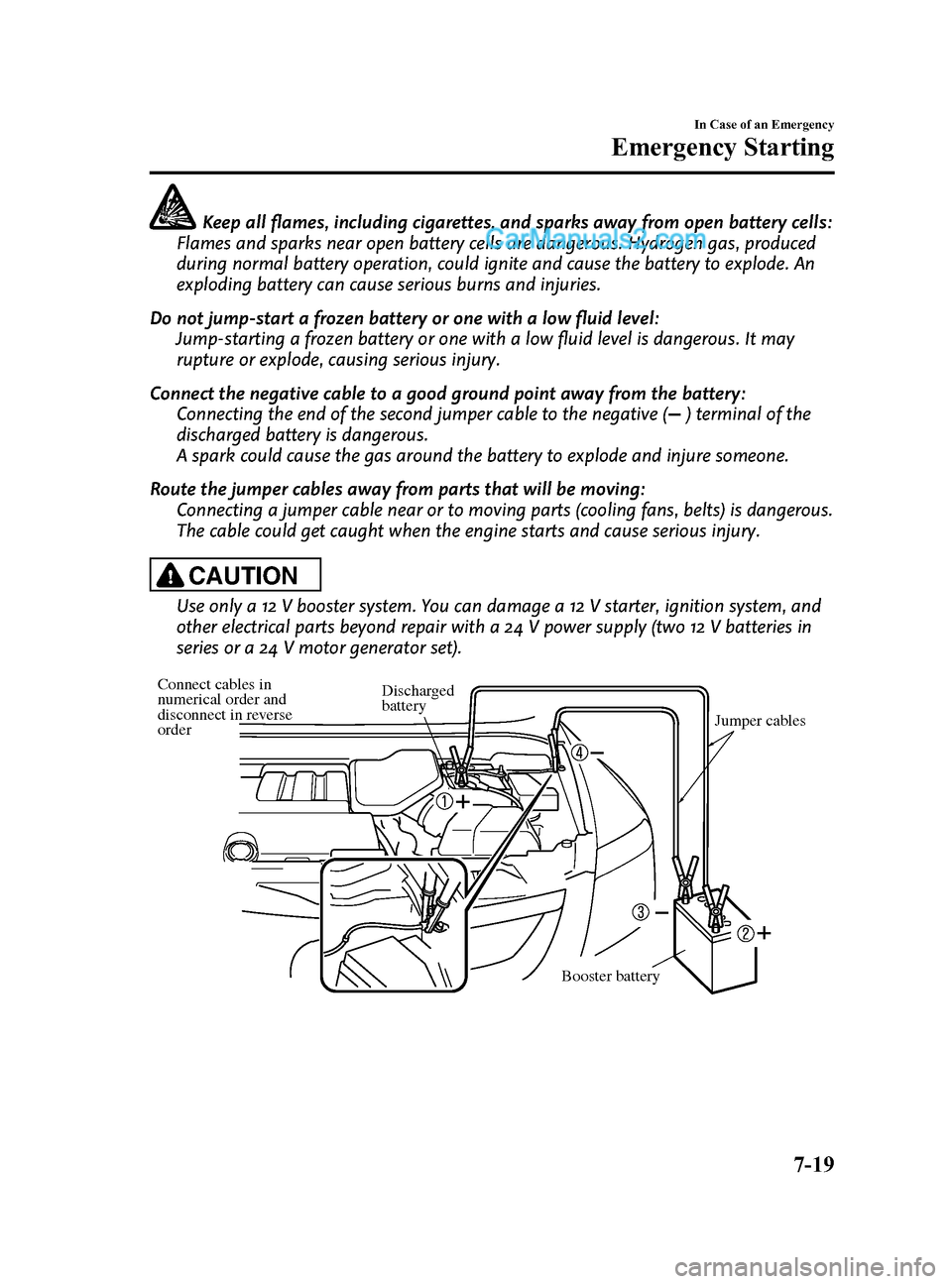
Connect cables in
numerical order and
disconnect in reverse
order Jumper cables
Discharged
battery
Booster battery
In Case of an Emergency
Emergency Starting
7-19
CX-9_8DU1-EA-14H_Edition1 Page471
Thursday, June 5 2014 4:20 PM
Form No.8DU1-EA-14H
Page 472 of 604
Black plate (472,1)
1. Make sure the booster battery is 12 Vand that its negative terminal is
grounded.
2. If the booster battery is in another vehicle, don't allow both vehicles to
touch. Turn off the engine of the
vehicle with the booster battery and all
unnecessary electrical loads in both
vehicles.
3. Connect the jumper cables in the exact sequence as in the illustration.
lConnect one end of a cable to the
positive terminal on the discharged
battery (1).
lAttach the other end to the positive
terminal on the booster battery (2).
lConnect one end of the other cable
to the negative terminal of the
booster battery (3).
lConnect the other end to the ground
point indicated in the illustration
away from the discharged battery
(4).
4. Start the engine of the booster vehicle and run it a few minutes. Then start the
engine of the other vehicle.
5. When finished, carefully disconnect the cables in the reverse order described in
the illustration.
Push-Starting
Do not push-start your Mazda.
NOTE
You can't start a vehicle with an automatic
transaxle by pushing it.
7-20
In Case of an Emergency
Emergency Starting
CX-9_8DU1-EA-14H_Edition1 Page472
Thursday, June 5 2014 4:20 PM
Form No.8DU1-EA-14H