lights MAZDA MODEL CX-9 2017 (in English) Repair Manual
[x] Cancel search | Manufacturer: MAZDA, Model Year: 2017, Model line: MODEL CX-9, Model: MAZDA MODEL CX-9 2017Pages: 612
Page 251 of 612

4–103
When Driving
i-ACTIVSENSE
WARNING
Always check the surrounding area visually before actually putting the vehicle in
reverse:
The system is only designed to assist you in checking for vehicles at the rear when putting
the vehicle in reverse. Due to certain limitations with the operation of this system, the
Blind Spot Monitoring (BSM) warning indicator lights may not fl ash or it might be delayed
even though a vehicle is behind your vehicle. Always make it your responsibility as a
driver to check the rear.
NOTE
In the following cases, the Blind Spot Monitoring (BSM) warning indication/warning
light turns on and operation of the system is stopped. If the Blind Spot Monitoring (BSM)
warning indication/warning light remains illuminated, have the vehicle inspected at an
Authorized Mazda Dealer as soon as possible.
Some problem with the system including the Blind Spot Monitoring (BSM) warning
indicator lights has occurred.
A large deviation in the installation position of a radar sensor (rear) on the vehicle has
occurred.
There is a large accumulation of snow or ice on the rear bumper near a radar sensor
(rear).
Driving on snow-covered roads for long periods.
The temperature near the radar sensors becomes extremely hot due to driving for long
periods on slopes during the summer.
The battery voltage has decreased.
CX-9_8FS7-EA-16K_Edition2.indb 103CX-9_8FS7-EA-16K_Edition2.indb 1032016/12/15 18:34:212016/12/15 18:34:21
Page 252 of 612

4–104
When Driving
i-ACTIVSENSE
Under the following conditions, the radar sensors (rear) cannot detect target objects or it
may be diffi cult to detect them.
The vehicle speed when reversing is about 15 km/h (9 mph) or faster.
The radar sensor (rear) detection area is obstructed by a nearby wall or parked
vehicle. (Reverse the vehicle to a position where the radar sensor detection area is no
longer obstructed.)
Your vehicle
A vehicle is approaching directly from the rear of your vehicle.
Your vehicle
The vehicle is parked on a slant.
Your vehicle
Directly after pressing the Blind Spot Monitoring (BSM) OFF switch and the system
becomes operable.
In the following cases, it may be diffi cult to view the illumination/fl ashing of the Blind
Spot Monitoring (BSM) warning indicator lights equipped on the door mirrors.
Snow or ice adheres to the door mirrors.
The front door glass is fogged or covered in snow, frost or dirt.
Turn off the Rear Cross Traffi c Alert (RCTA) system while pulling a trailer or while an
accessory such as a bicycle carrier is installed to the rear of the vehicle. Otherwise,
the radio waves emitted by the radar will be blocked causing the system to not operate
normally.
CX-9_8FS7-EA-16K_Edition2.indb 104CX-9_8FS7-EA-16K_Edition2.indb 1042016/12/15 18:34:212016/12/15 18:34:21
Page 255 of 612

4–107
When Driving
i-ACTIVSENSE
NOTE
The Mazda Radar Cruise Control (MRCC) system operates when all of the following
conditions are met.
The vehicle speed is about 30 km/h (19 mph) to 145 km/h (90 mph).
The Mazda Radar Cruise Control (MRCC) system is turned on.
The parking brake is not applied.
The Smart Brake Support (SBS) is not malfunctioning.
The Dynamic Stability Control (DSC) is operating normally.
The selector lever is in the drive (D) position or manual (M) position (manual mode).
All doors are closed.
The driver's seat belt is fastened.
In the following cases, the warnings may not activate even if your vehicle starts closing in
on the vehicle ahead.
You are driving at the same speed as the vehicle ahead.
Directly after the Mazda Radar Cruise Control (MRCC) system has been set.
When the accelerator pedal is depressed or directly after the accelerator pedal is
released.
Another vehicle cuts into the driving lane.
The following are not detected as physical objects.
Vehicles approaching in the opposite direction
Pedestrians
Stationary objects (stopped vehicles, obstructions)
If a vehicle ahead is traveling at an extremely low speed, the system may not detect it
correctly.
During headway control travel, do not set the system on two-wheeled vehicles such as
motorcycles and bicycles.
Do not use the Mazda Radar Cruise Control (MRCC) system under conditions in which
the close proximity warnings are frequently activated.
During headway control travel, the system accelerates and decelerates your vehicle in
conjunction with the speed of the vehicle ahead. However, if it is necessary to accelerate
for a lane change or if the vehicle ahead brakes suddenly causing you to close in on the
vehicle rapidly, accelerate using the accelerator pedal or decelerate using the brake
pedal depending on the conditions.
While the Mazda Radar Cruise Control (MRCC) system is in use, it does not cancel
even if the selector lever is operated and any intended engine braking will not occur. If
deceleration is required, lower the vehicle speed setting or depress the brake pedal.
The brake lights are illuminated while the Mazda Radar Cruise Control (MRCC)
automatic braking is operating.
CX-9_8FS7-EA-16K_Edition2.indb 107CX-9_8FS7-EA-16K_Edition2.indb 1072016/12/15 18:34:222016/12/15 18:34:22
Page 267 of 612

4–119
When Driving
i-ACTIVSENSE
When white (yellow) lane lines are not detected, the Lane-keep Assist System (LAS) &
Lane Departure Warning System (LDWS) does not operate.
Under the following conditions, the Lane-keep Assist System (LAS) & Lane Departure
Warning System (LDWS) may not be able to detect white (yellow) lane lines correctly and
it may not operate normally.
If an object placed on the dashboard is refl ected in the windshield and picked up by the
camera.
Heavy luggage is loaded in the luggage compartment or on the rear seat and the
vehicle is tilted.
The tire pressures are not adjusted to the specifi ed pressure.
Tires other than conventional tires are equipped.
When the vehicle is driven on the guiding branch to or from the rest area or tollgate of
a highway.
The white (yellow) lane lines are less visible because of dirt or fading/patchiness.
A vehicle in front of your vehicle is running near a white (yellow) lane line making it
less visible.
A white (yellow) lane line is less visible because of bad weather (rain, fog, or snow).
The vehicle is driven on a temporary lane or section with a closed lane resulting
from construction where there may be multiple white (yellow) lane lines or they are
interrupted.
A misleading line is picked up on the road such as a temporary line for construction,
or because of shade, lingering snow, or grooves fi lled with water.
The surrounding brightness suddenly changes such as when entering or exiting a
tunnel.
The illumination of the headlights is weakened because of dirt or the optical axis is
deviated.
The windshield is dirty or foggy.
The windshield, camera is fogged (water droplets).
Back-light is refl ected off the road surface.
The road surface is wet and shiny after rain, or there are puddles on the road.
The shade of a guardrail parallel to a white (yellow) lane line is cast on the road.
The width of the driving lane is narrow or wide.
Driving on roads with tight curves.
The road is excessively uneven.
The vehicle is shaken after hitting a road bump.
There are two or more adjacent white (yellow) lane lines.
There are various road markings or lane markings of various shapes near an
intersection.
CX-9_8FS7-EA-16K_Edition2.indb 119CX-9_8FS7-EA-16K_Edition2.indb 1192016/12/15 18:34:292016/12/15 18:34:29
Page 279 of 612

4–131
When Driving
i-ACTIVSENSE
Under the following conditions, the Smart City Brake Support (SCBS) system may not
operate normally.
Heavy luggage is loaded in the luggage compartment or on the rear seat.
If there is the possibility of partial contact with a vehicle ahead.
When driving on continuously curving roads, and entering and exiting exits.
Elongated luggage or cargo is loaded onto installed roof rails and covers the laser
sensor (front).
Exhaust gas from the vehicle in front, sand, snow, and water vapor rising from
manholes and grating, and water splashed into the air.
When towing a malfunctioning vehicle.
When driving with tires having signifi cantly different wear.
When the vehicle is driven in the following locations, the smart city brake support (SCBS)
may determine that there is a possibility of a collision and may operate.
Objects on the road at the entrance to a curve.
Vehicles passing in the opposite lane while making a curve.
Metal objects, bumps, or protruding objects on the road.
When passing through a toll gate equipped with a bar.
When passing under a vinyl curtain or fl ag.
Plastic objects such as pylons.
Two-wheeled vehicles, pedestrians, animals or standing trees.
When the vehicle is driven in the following locations with the inner/outer side of the near-
infrared laser irradiation part (black printed area in the center of the upper portion of the
windshield) fogged or covered in water droplets, the smart city brake support (SCBS) may
determine that there is a possibility of a collision and may operate.
The vehicle is driven into tunnels with low ceilings and on roads with structures above
the road such as road signs.
The vehicle is driven close to structures on the road such as road signs and guardrails.
When the system operates, the user is notifi ed by the multi-information display.
The Smart City Brake Support (SCBS) warning indication (amber) turns on when the
system has a malfunction.
Refer to Warning Indication/Warning Lights on page 4-32 .
CX-9_8FS7-EA-16K_Edition2.indb 131CX-9_8FS7-EA-16K_Edition2.indb 1312016/12/15 18:34:332016/12/15 18:34:33
Page 282 of 612

4–134
When Driving
i-ACTIVSENSE
NOTE
The Smart Brake Support (SBS) system operates when all of the following conditions are
met:
The ignition is switched ON.
The Smart Brake Support (SBS) system is on.
The vehicle speed is about 15 km/h or faster (10 mph or faster).
The relative speed between your vehicle and the vehicle ahead is about 15 km/h or
faster (10 mph or faster).
The Dynamic Stability Control (DSC) is not operating.
The Smart Brake Support (SBS) system may not operate under the following conditions:
If the vehicle is accelerated rapidly and it comes close to a vehicle ahead.
The vehicle is driven at the same speed as the vehicle ahead.
The accelerator pedal is depressed.
The brake pedal is depressed.
The steering wheel is being operated.
The selector lever is being operated.
The turn signal is being used.
When the vehicle ahead is not equipped with taillights or the taillights are turned off.
When warnings and messages, such as a dirty windshield, related to the Forward
Sensing Camera (FSC)/laser sensor (front) are being displayed in the multi-
information display.
Although the objects which activate the system are four-wheeled vehicles, the radar
sensor (front) could detect the following objects, determine them to be an obstruction, and
operate the Smart Brake Support (SBS) system.
Objects on the road at the entrance to a curve (including guardrails and snow banks).
A vehicle appears in the opposite lane while cornering or rounding a curve.
When crossing a narrow bridge.
When passing under a low gate or through a tunnel or narrow gate.
When entering an underground parking area.
Metal objects, bumps, or protruding objects on the road.
If you suddenly come close to a vehicle ahead.
When driving in areas where there is high grass or forage.
Two-wheeled vehicles such as motorbikes or bicycles.
Pedestrians or non-metallic objects such as standing trees.
When the system operates, the user is notifi ed by the multi-information display.
The Smart Brake Support (SBS) warning indication (amber) turns on when the system has
a malfunction.
Refer to Warning Indication/Warning Lights on page 4-31 .
CX-9_8FS7-EA-16K_Edition2.indb 134CX-9_8FS7-EA-16K_Edition2.indb 1342016/12/15 18:34:342016/12/15 18:34:34
Page 286 of 612

4–138
When Driving
i-ACTIVSENSE
NOTE
In the following cases, the Forward Sensing Camera (FSC) cannot detect target objects
correctly, and each system may be unable to operate normally.
The height of the vehicle ahead is low.
You drive your vehicle at the same speed as the vehicle ahead.
Headlights are not turned on during the night or when going through a tunnel.
In the following cases, the Forward Sensing Camera (FSC) may not be able to detect
target objects correctly.
When driving next to walls with no patterning (including fences and longitudinally
striped walls).
The taillights of the vehicle ahead are turned off.
A vehicle is outside the illumination range of the headlights.
The vehicle is making a sharp turn, or ascending or descending a steep slope.
Entering or exiting a tunnel.
Heavy luggage is loaded causing the vehicle to tilt.
Strong light is shone at the front of the vehicle (back light or high-beam light from on-
coming vehicles).
There are many light emitters on the vehicle ahead.
When the vehicle ahead is not equipped with taillights or the taillights are turned off at
nighttime.
The vehicle ahead has a special shape. For example, a vehicle towing a trailer house
or a boat, or a vehicle carrier carrying a vehicle with its front pointed rearward.
CX-9_8FS7-EA-16K_Edition2.indb 138CX-9_8FS7-EA-16K_Edition2.indb 1382016/12/15 18:34:362016/12/15 18:34:36
Page 298 of 612
4–150
When Driving
Tire Pressure Monitoring System
*Some models.
Tire Pressure Monitoring System *
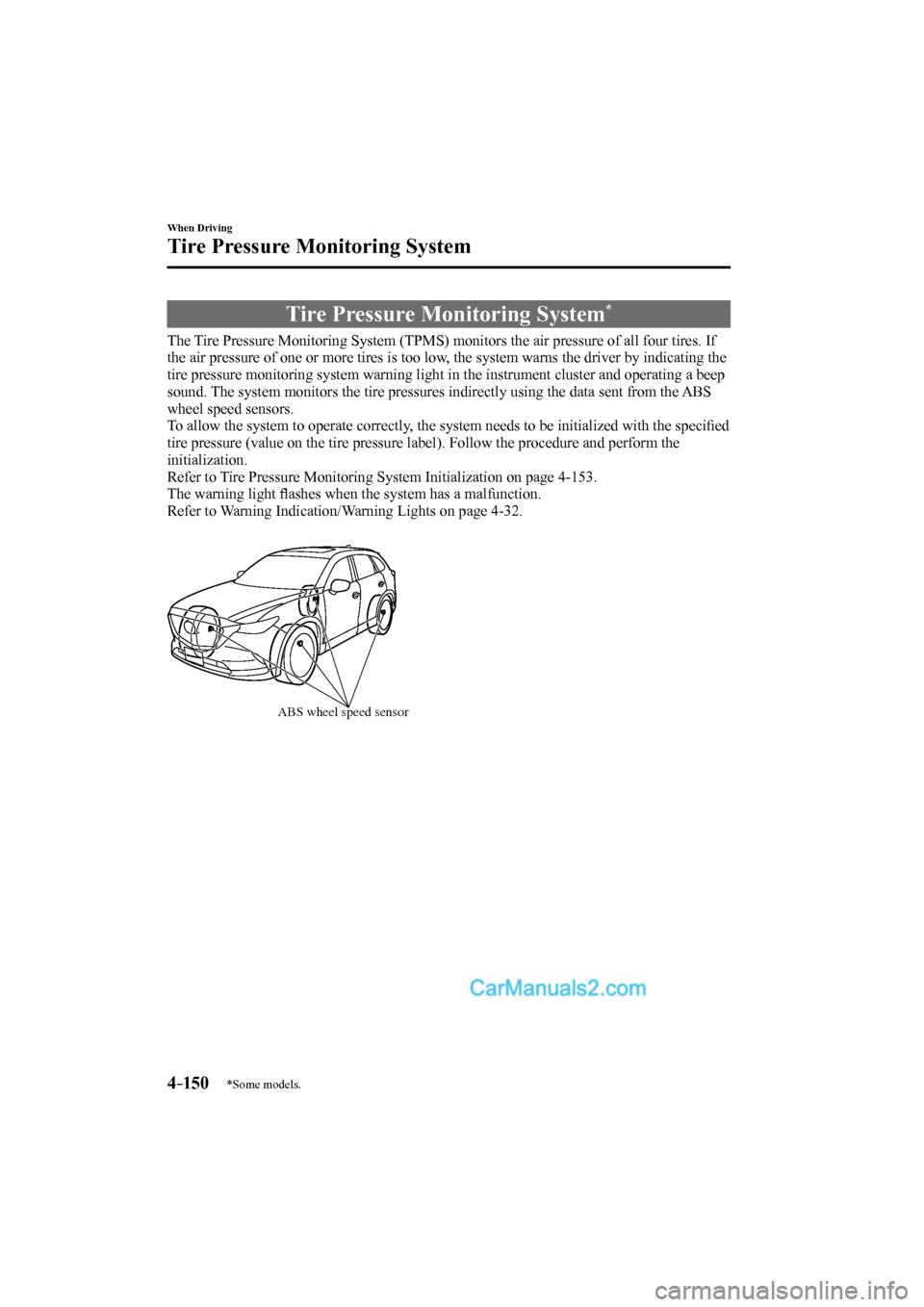
The Tire Pressure Monitoring System (TPMS) monitors the air pressure of all four tires. If
the air pressure of one or more tires is too low, the system warns the driver by indicating the
tire pressure monitoring system warning light in the instrument cluster and operating a beep
sound. The system monitors the tire pressures indirectly using the data sent from the ABS
wheel speed sensors.
To allow the system to operate correctly, the system needs to be initialized with the specifi ed
tire pressure (value on the tire pressure label). Follow the procedure and perform the
initialization.
Refer to Tire Pressure Monitoring System Initialization on page 4-153 .
The warning light fl ashes when the system has a malfunction.
Refer to Warning Indication/Warning Lights on page 4-32 .
ABS wheel speed sensor
CX-9_8FS7-EA-16K_Edition2.indb 150CX-9_8FS7-EA-16K_Edition2.indb 1502016/12/15 18:34:412016/12/15 18:34:41
Page 319 of 612
5–1
*Some models.
5Interior Features
Use of various features for ride comfort, including air-conditioning and
audio system.
Climate Control System...................... 5-2
Operating Tips ................................ 5-2
Vent Operation (Front) ................... 5-3
Front Air Conditioner ..................... 5-5
Vent Operation (Rear) .................... 5-9
Rear Air Conditioner .................... 5-11
Before Using the Audio System ........ 5-14
Audio Control Switch .................. 5-14
AUX/USB .................................... 5-15
Antenna ........................................ 5-18
Audio Set ............................................ 5-19
Basic Operation Method .............. 5-19
Home screen ................................. 5-23
Volume/Display/Sound
Controls ........................................ 5-24
Operating the Radio ..................... 5-26
Operating the Satellite Radio
* ...... 5-30
How to use AUX mode ................ 5-34
How to use USB mode ................. 5-35
Bluetooth
® .................................... 5-40
Bluetooth® Preparation ................. 5-43
Available Language ...................... 5-45
Bluetooth
® Audio ......................... 5-46
How to Use Pandora® ................... 5-49
How to Use Aha™ ....................... 5-51
How to Use Stitcher™ Radio ....... 5-55
Bluetooth
® Hands-Free ................ 5-57
Voice Recognition ........................ 5-67
Settings ......................................... 5-70
Applications ................................. 5-72
Troubleshooting ........................... 5-73
Appendix ............................................ 5-76
Things You Need to Know ........... 5-76
Interior Equipment ........................... 5-81
Sunvisors ...................................... 5-81
Interior Lights .............................. 5-82
Accessory Sockets ....................... 5-85
USB Power Outlet
* ...................... 5-86
Cup Holder ................................... 5-87
Bottle Holder ................................ 5-89
Storage Compartments ................. 5-89
Sunshade
(Rear Door Window)
* .................. 5-93
CX-9_8FS7-EA-16K_Edition2.indb 1CX-9_8FS7-EA-16K_Edition2.indb 12016/12/15 18:34:492016/12/15 18:34:49
Page 400 of 612

5–82
Interior Features
Interior Equipment
Interior Lights
NOTE
Do not leave the lights on for long periods
while the engine is turned off. Otherwise
the battery power could be depleted.
Overhead Lights
Switch
Position Overhead Lights
Light off
Light is on when any door is open
Light is on or off when the
illuminated entry system is on
Light on
Front
Center
Rear
NOTE
The rear overhead light and the center
map lights also turn on and off when the
front overhead light switch is operated.
Map Lights
When the overhead light switch is in the
door or off position, press the lens to
illuminate the map lights, and then press
the lens again to turn them off.
Front
Center
CX-9_8FS7-EA-16K_Edition2.indb 82CX-9_8FS7-EA-16K_Edition2.indb 822016/12/15 18:35:452016/12/15 18:35:45