park assist MAZDA MODEL CX-9 2019 (in English) User Guide
[x] Cancel search | Manufacturer: MAZDA, Model Year: 2019, Model line: MODEL CX-9, Model: MAZDA MODEL CX-9 2019Pages: 692
Page 343 of 692

Do not turn the steering wheel any more until the vehicle has passed the obstruction, even
if the obstruction is not visible on the side vi ew image. If the steering wheel is turned even
more, the vehicle may contact the obstruction if it is turned sharply.
NOTE
Because there might be a difference between the image displayed on the screen and the
actual conditions, always check the safety of the surrounding area using the mirrors and
directly with your eyes when driving.
Even though the object displayed on the screen, such as a road curb or a division line of a
parking space, and the vehicle parallel guide lines appear parallel, they may not actually
be parallel.
▼ Top View/Rear View
Use the top view/rear view to assist in checking the safety of
the surrounding area when
accelerating from a stop, parking, or stopping the vehicle.
Range of display ed screen image
(Actual condition) (Screen display)
Target object
NOTE
In the top view screen, the areas in black at the front and rear of the vehicle image and the
seams where each of the camera images merge are blind spots.
Because images displayed in the top view screen are processed from each camera, the top
view screen may display in the following ways.
When Driving
i-ACTIVSENSE
4-183
CX-9_8HB2-EA-18G_Edition1 2018-5-11 13:09:27
Page 346 of 692

1. Back the vehicle into the parking space by turning the steering wheel so that the vehicleenters the center of the parking space.
(Actual condition)
(Screen display)
2. After the vehicle starts entering the parking space, stop and adjust the steering wheel so
that the distance between the vehicle width lines and the sides of the parking space on
the left and right are roughly e qual, and then continue backing up slowly.
3. Once the vehicle width lines and the sides of the parking spa ce on the left and right are
parallel, straighten the wheels and back the vehicle slowly int o the parking space.
Continue checking the vehicle's surroundings and then stop the vehicle in the best
possible position. (If t he parking space has division lines, ch eck whether the vehicle
width guide lines are parallel to them.)
(Actual condition)
(Screen display)
▼ Rear Wide View
Use the rear wide view to assist in checking the safety of the
surrounding area when
accelerating from a stop, parking, or stopping the vehicle.
When Driving
i-ACTIVSENSE
4-186
CX-9_8HB2-EA-18G_Edition1 2018-5-11 13:09:27
Page 355 of 692

The surroundings are dark such as during the night, early evening, or early morning, or
in a tunnel or indoor parking lot.
The illumination brightness of the headlights is reduced or the headlight illumination is
weakened due to dirt or a deviated optical axis.
The target object enters the blind spot of the Forward Sensing Camera (FSC).
A person or object bursts onto the road from the shoulder or cuts right in front of you.
You change lanes and approach a vehicle ahead.
When driving extremely close to the target object.
Tire chains or a temporary spare tire is installed.
The vehicle ahead has a special shape. For example, a vehicle towing a trailer house or
a boat, or a vehicle carrier carrying a vehicle with its front pointed rearward.
If the Forward Sensing Camera (FSC) cannot operate normally due to backlight or fog,
the system functions related to the Forward Sensing Camera (FSC) are temporarily
stopped and the following warning lights turn on. However, this does not indicate a
malfunction.
High Beam Control System (HBC) warning light (amber)
Lane-keep Assist System (LAS) & Lane Departure Warning System (LDWS) warning
indication
Mazda Radar Cruise Control with Stop & Go function (MRCC with Stop & Go
function) warning indication
Smart Brake Support/Smart City Brake Support (SBS/SCBS) warning indication
(amber)
If the Forward Sensing Camera (FSC) cannot operate normally due to high temperatures,
the system functions related to the Forward Sensing Camera (FSC) are temporarily
stopped and the following warning lights turn on. However, this does not indicate a
malfunction. Cool down the area around the Forward Sensing Camera (FSC) such as by
turning on the air conditioner.
High Beam Control System (HBC) warning light (amber)
Lane-keep Assist System (LAS) & Lane Departure Warning System (LDWS) warning
indication
Mazda Radar Cruise Control with Stop & Go function (MRCC with Stop & Go
function) warning indication
Smart Brake Support/Smart City Brake Support (SBS/SCBS) warning indication
(amber)
When Driving
i-ACTIVSENSE
4-195
CX-9_8HB2-EA-18G_Edition1 2018-5-11 13:09:27
Page 380 of 692

Parking Sensor System*
The parking sensors use ultrasonic sensors which detect obstructions around the vehicle
when the vehicle is driven at lo w speeds, such as during garage or parallel parking, and a
buzzer sound and detection indicator notify the driver of the a pproximate distance from the
vehicle to the surrounding obstruction.
Rear corner sensor
Front corner sensor
Rear sensor
Front sensorSome models.
WA R N I N G
Do not rely completely on the parking sensor system and be sure to confirm the safety around
your vehicle visually when driving:
This system can assist the driver in opera ting the vehicle in the forward and backward
directions while parking. The detection ranges of the sensors are limited, therefore, driving the
vehicle while relying only on the system may cause an accident. Always confirm the safety
around your vehicle visually when driving.
NOTE
Do not install any accessories within the detection ranges of the sensors. It may affect the
system operation.
Depending on the type of obstruction and th e surrounding conditions, the detection range
of a sensor may narrow, or the sensors may not be able to detect obstructions.
The system may not operate norma lly under the following conditions:
Mud, ice, or snow is adhering to the sensor area (Returns to normal operation when
removed).
The sensor area is frozen (Returns to normal operation when the ice is thawed).
The sensor is covered by a hand.
The sensor is excessively shocked.
The vehicle is excessively tilted.
Under extremely hot or cold weather conditions.
When Driving
Parking Sensor System
4-220*Some models.
CX-9_8HB2-EA-18G_Edition1 2018-5-11 13:09:27
Page 381 of 692

The vehicle is driven on bumps, inclines, gravel, or grass covered roads.
Anything which generates ultrasound is near the vehicle, such as another vehicle's
horn, the engine sound of a motorcycle, the air brake sound of a large-sized vehicle, or
another vehicle's sensors.
The vehicle is driven in heavy rain or in road conditions causing water-splash.
A commercially-available fender pole or an antenna for a radio transmitter is installed
to the vehicle.
The vehicle is moving towards a tall or square curbstone.
An obstruction is too close to the sensor.
Obstructions under the bumper may not be detected. Obstructions that are lower than the
bumper or thin which may have been initially detected may no longer be detected as the
vehicle approaches more closely to the obstruction.
The following types of obstructions may not be detected:
Thin objects such as wire or rope
Things which absorb sonic waves easily such as cotton or snow
Angular shaped objects
Very tall objects, and those which are wide at the top
Small, short objects
Always have the system inspected at an Authorized Mazda Dealer if any shock is applied
to the bumpers, even in a minor accident. If the sensors are deviated, they cannot detect
obstructions.
(With front sensor and front corner sensor)
The system may have a malfunction if the beep does not operate or the indicator light
does not illuminate when the park assist sensors switch is turned on. Consult an
Authorized Mazda Dealer.
(Without front sensor an d front corner sensor)
The system may have a malfunction if the be ep does not operate. Consult an Authorized
Mazda Dealer.
(With front sensor and front corner sensor)
The system may have a malfunction if the beep sound which indicates a system
malfunction is heard and the i ndicator light flashes. Consult an Authorized Mazda Dealer.
The beeper which indicates a system malf unction may not be heard if the ambient
temperature is extremely cold, or mud, ice, or snow adheres to the sensor area. Remove
any foreign material from the sensor area.
When installing a trailer hitch, consult an Authorized Mazda Dealer.
When Driving
Parking Sensor System
4-221
CX-9_8HB2-EA-18G_Edition1 2018-5-11 13:09:27
Page 384 of 692

▼Park Assist Sensor System Operation
With front sensor and front corner sensor
The switch can be activated when the ignition is switched ON, t
he selector lever is in any
position except reverse (R), and the vehicle speed is about 10 km/h (6 mph) or less.
When the parking sensor switch is pressed, a beep sound is hear d, the obstruction detection
indication is displayed in the a udio screen, and the indicator light in the switch illuminates.
Indicator light
NOTE
If the system is cancelled, it will not restor e automatically even when the vehicle speed is
decreased to 10 km/h (6 mph) or less.
When the ignition is switched OFF, the syst em status before it was turned off is
maintained. For example, if th e ignition is switched OFF while the parking sensor is
activated, the system will be activated when the ignition is switched ON the next time.
Sensor detection condition
The system can be used when the ignition is switched ON and the Park Assist Sensor
Switch has been turned on.
The sensors detect obstructions under the following conditions:
Sensor Condition
Front Sensor The selector lever is in any pos
ition except reverse (R), and the vehicle speed is
about 10 km/h (6 mph) or less.
Front Corner Sensor The vehicle speed is about 10 km/h (6 mph) o r less.
Rear Sensor The selector lever is in reverse (R).
Rear Corner Sensor The selector lever is in reverse
(R), and the vehicle speed is about 10 km/h (6 mph)
or less.
The system is cancelled under the following conditions:
The parking sensor switch is pressed while the parking sensor i s in operation.
When Driving
Parking Sensor System
4-224
CX-9_8HB2-EA-18G_Edition1 2018-5-11 13:09:27
Page 455 of 692

6. Slide the contact or move it using thecommander switch, then select
.
Changing contact name of your
favorites
1. Select the
icon on the home screen
to display the Communication screen.
2. Select
to display the favorites
list.
3. Select
.
4. Select
.
5. Select the contact to display the keyboard screen.
6. If a new name is input and
is
selected, the contact name is stored.
NOTE
If the contact is long-pressed when the
favorites list is displayed, the contact
information can be edited (deleted,
moved).
Telephone Number Input
NOTE
Practice this while parked until you are
confident you can do it while driving in a
non-taxing road situation. If you are not
completely comfortable, make all calls
from a safe parking position, and only
start driving when you can devote your
full attention to driving.
1. Select the
icon on the home screen
to display the Communication screen.
2. When
is pressed, the dial pad
is displayed.
3. Input the telephone number using the dial pad.
4. Select
to make the call.
Numeral or symbol entry
Use the dial pad.
Long-press the
to input +.
Select
to delete the currently input
value.
Long-press
to delete all input values.
Redial Function
Makes a call to the last person called
(latest person on outgoing call record)
from the mobile phone/vehicle.
1. Press the talk button.
2. Wait for the beep sound.
3. Say: “Redial”
Call back Function
Makes a call to the last person who called
your (latest person on incoming call
record) mobile phone/vehicle.
1. Press the talk button.
2. Wait for the beep sound.
3. Say: “Call back”
Mobile 911 (U.S.A./Canada only)
If the vehicle is involved in a moderate to
severe collision, a call is made
automatically to 911 from the connected
device. The “Emergency Assistance Call”
setting must be on.
Refer to Communication Settings on page
5-73.
CAUTION
Though the system can be set to not call
911, doing so will defe at the purpose of the
system. Mazda recommends that the
Mobile 911 system remain activated.
Interior Features
Audio Set
5-67
CX-9_8HB2-EA-18G_Edition1 2018-5-11 13:09:27
Page 591 of 692

SignalWarning
Power Steering Mal‐
function Indication*
The message is displayed if the electric power steering has a m alfunction.
If the message is displayed, stop the vehicle in a safe place a nd do not operate the
steering wheel. There is no probl em if the message in the display turns off after a
while. Contact an Authorized Mazda Dealer if the message is dis played continuously.
NOTE
If the message is displayed, the power steering will not operate normally. In this
case, the steering wheel can still be op erated, however, the operation may feel
heavy compared to normal, or the steer ing wheel could vibrate when turning.
Repeatedly jerking the steering wheel left and right while the vehicle is stopped or
moving extremely slowly will cause the power steering system to go into protective
mode which will make the steerin g feel heavy, but this does not indicate a problem.
If this occurs, park the vehicle safely and wait several minutes for the system to
return to normal.
Power Steering Mal‐ function Indicator
Light
*
The light illuminates/flashes if the electric power steering ha s a malfunction.
If the light illuminates/flashes, stop the vehicle in a safe pl ace and do not operate the
steering wheel. There is no problem if the light turns off afte r a while. Contact an Au‐
thorized Mazda Dealer if the lig ht illuminates/flashes continuously.
NOTE
If the indicator light illuminates/flashes, the power steering will not operate nor‐
mally. If this happens, the steering wheel can still be operated, however, the opera‐
tion may feel heavy compared to normal , or the steering wheel could vibrate when
turning.
Repeatedly jerking the steering wheel left and right while the vehicle is stopped or
moving extremely slowly will cause the power steering system to go into protective
mode which will make the steerin g feel heavy, but this does not indicate a problem.
If this occurs, park the vehicle safely and wait several minutes for the system to
return to normal.
▼ Contact Authorized Mazda Deale
r and Have Vehicle Inspected
If any of the following warning lights or the indicator light turns on/flashes, the system may
have a malfunction. Contact an Authorized Mazda Dealer to have your vehicle inspected.
SignalWarning
ABS Warning LightIf the ABS warning light stays on while you're driving, the ABS
control unit has detected
a system malfunction. If this o ccurs, your brakes will function normally as if the vehicle
had no ABS.
Should this happen, consult an Authorized Mazda Dealer as soon as possible.
NOTE
When the engine is jump-started to charge the battery, uneven rpm occurs and the ABS
warning light may illuminate. If this occurs, it is the result of the weak battery and does
not indicate an ABS malfunction.
Recharge the battery.
The brake assist system does not operate while the ABS warning light is illuminated.
If Trouble Arises
Warning/Indicator Lights and Warning Sounds
*Some models.7-31
CX-9_8HB2-EA-18G_Edition1 2018-5-11 13:09:27
Page 593 of 692
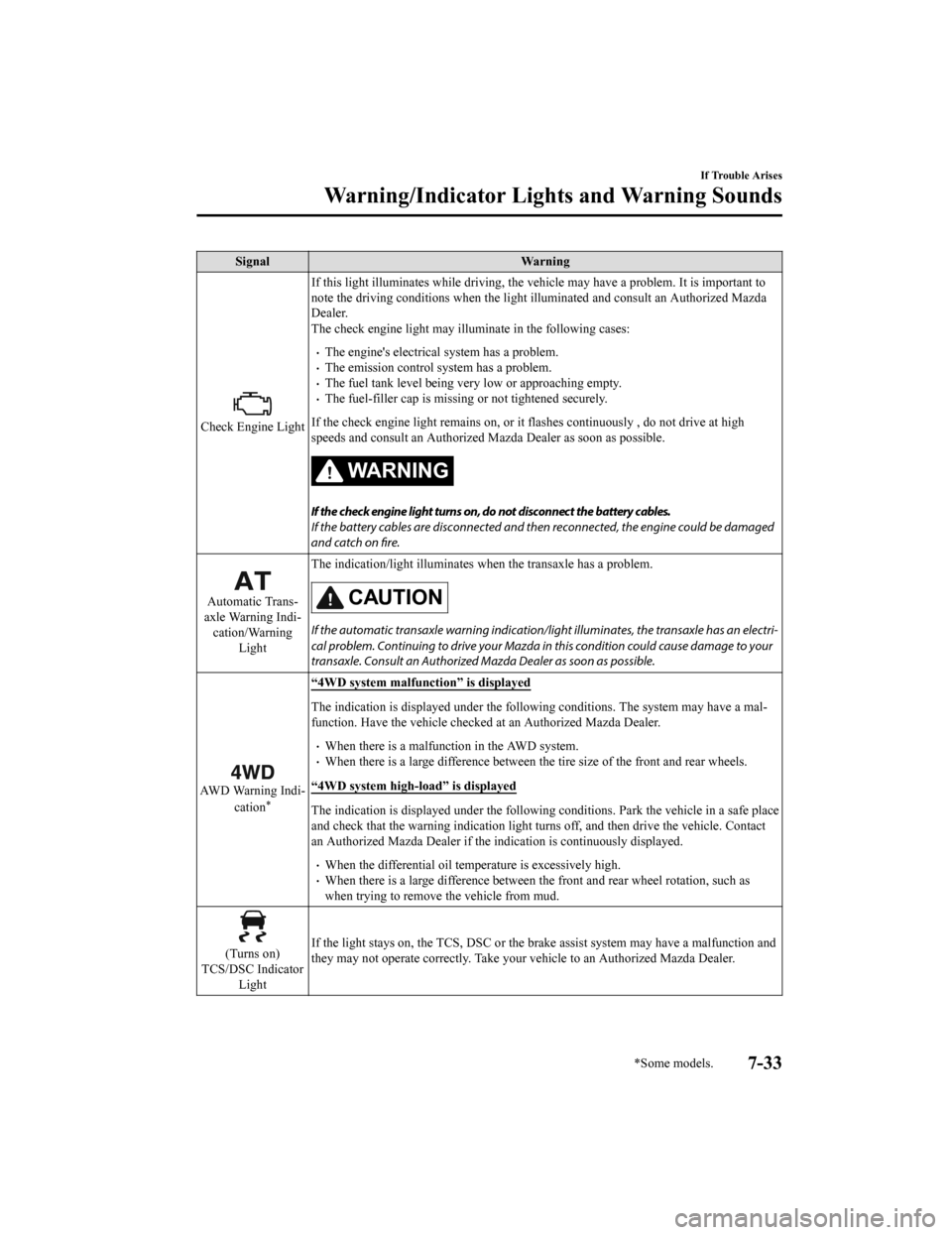
SignalWarning
Check Engine LightIf this light illuminates while dr
iving, the vehicle may have a problem. It is important to
note the driving conditions when the light illuminated and cons ult an Authorized Mazda
Dealer.
The check engine light may illumi nate in the following cases:
The engine's electrical system has a problem.The emission control system has a problem.The fuel tank level being very low or approaching empty.The fuel-filler cap is missing or not tightened securely.
If the check engine light remains on, or it flashes continuously , do not drive at high
speeds and consult an Authorized Mazda Dealer as soon as possible.
WA R N I N G
If the check engine light turns on, do not disconnect the battery cables.
If the battery cables are disconnected and then reconnected, the engine could be damaged
and catch on fire.
Automatic Trans‐
axle Warning Indi‐ cation/Warning Light The indication/light illuminates
when the transaxle has a problem.CAUTION
If the automatic transaxle warning indication/ light illuminates, the transaxle has an electri‐
cal problem. Continuing to drive your Mazda in this condition could cause damage to your
transaxle. Consult an Authorized Mazda Dealer as soon as possible.
AWD Warning Indi‐
cation*
“4WD system malfunction” is displayed
The indication is displayed under the following conditions. The system may have a mal‐
function. Have the vehicle checked at an Authorized Mazda Deale r.
When there is a malfunction in the AWD system.When there is a large difference between the tire size of the front and rear wheels.
“4WD system high-load” is displayed
The indication is displayed unde r the following conditions. Park the vehicle in a safe place
and check that the warning indi cation light turns off, and then drive the vehicle. Contact
an Authorized Mazda Dealer if th e indication is continuously displayed.
When the differential oil temp erature is excessively high.When there is a large difference between the front and rear whe el rotation, such as
when trying to remove the vehicle from mud.
(Turns on)
TCS/DSC Indicator Light If the light stays on, the TCS, DSC or the brake assist system may have a malfunction and
they may not operate correctly.
Take your vehicle to an Authori zed Mazda Dealer.
If Trouble Arises
Warning/Indicator Lights and Warning Sounds
*Some models.7-33
CX-9_8HB2-EA-18G_Edition1 2018-5-11 13:09:27
Page 682 of 692

Index
A
Accessory Socket.............................. 5-97
Active Driving Display..................... 4-56
Adaptive Front Lighting System
(AFS)............................................... 4-110
Add-On Non-Genuine Parts and
Accessories........................................ 8-19
Advanced Key
Advanced keyless entry system..... 3-9
Operational range........................ 3-10
Advanced Key Removed from Vehicle
Warning Beep.................................... 7-47
Advanced Smart City Brake Support
(Advanced SCBS)........................... 4-158
Collision warning.... .................. 4-160
Stopping the Advanced Smart City
Brake Support (Advanced SCBS)
system operation........................ 4-160
Air Bag Systems............................... 2-62
Air Bag/Seat Belt Pr etensioner System
Warning Beep.................................... 7-46
Antilock Brake System (ABS).......... 4-94
Armrest Box.................................... 5-102
Audio Control Switch Adjusting the Volume.................. 5-15
Seek Switch................................. 5-15
Audio Set Android Auto™........................... 5-45
Apple CarPlay............................. 5-42
Applications................................. 5-79
AUX.............................................5-35
Bluetooth®.................................. 5-49
Radio............................................5-27
Satellite Radio........ ..................... 5-31
Settings........................................ 5-77
Troubleshooting.......... ................. 5-80
USB............................................. 5-36
Voice Recognition.... ................... 5-74
Volume/Display/Sound
Controls....................................... 5-24
Audio System Antenna........................................5-18
Appendix..................................... 5-85
Audio Control Switch................. 5-15
Audio Set..................................... 5-19
AUX/USB mode..........................5-16
Before Using the Audio
System......................................... 5-15
Automatic Transaxle......................... 4-59 Active Adaptive Shift (AAS)...... 4-62
Automatic transaxle controls....... 4-59
Driving tips..................................4-67
Manual shift mode.......................4-62
Shift-lock system......................... 4-60
Transaxle ranges.......................... 4-60
B
Battery............................................... 6-34
Maintenance.................................6-35
Replacement................................ 6-35
Specifications.................................9-4
Battery Runs Out.............................. 7-19 Jump-starting............................... 7-19
Blind Spot Monitoring (BSM)........ 4-114 Canceling operation of Blind Spot
Monitoring (BSM)..................... 4-119
Blind Spot Monitoring (BSM) Warning
Beep...................................................7-49
Bluetooth® Bluetooth® Audio....................... 5-55
Bluetooth® Hands-Free...............5-65
Bluetooth® Preparation............... 5-52
Body Lubrication.............................. 6-28
Bottle Holder................................... 5-100
Brakes Brake assist.................................. 4-92
Electric parking brake (EPB)...... 4-90
Foot brake....................................4-89
Pad wear indicator....................... 4-92
Warning light............................... 4-92
10-2
CX-9_8HB2-EA-18G_Edition1 2018-5-11 13:09:27