ignition MAZDA MODEL CX-9 2021 User Guide
[x] Cancel search | Manufacturer: MAZDA, Model Year: 2021, Model line: MODEL CX-9, Model: MAZDA MODEL CX-9 2021Pages: 723, PDF Size: 10.61 MB
Page 109 of 723
Switching the ignition to ACC or
ON.
Closing the driver's door.
Opening the liftgate.
Not operating the key for ten
seconds.
Pressing any button except the
LOCK button on the key.
Pressing a request switch.
The operation indicato r light flashes when
the buttons are pressed.
Lock button
To lock the doors and the liftgate, press the
lock button and the hazard warning lights
will flash once.
(With the advanced keyless function)
A beep sound will be heard once.
To confirm that all doors and the liftgate
have been locked, press the lock button
again within 5 seconds. If they are closed
and locked, the horn will sound.
NOTE
The doors and the liftgate can be locked
by pressing the lock button while any
other door or the liftgate is open. The
hazard warning lights will not flash.
When the lock button is pressed while
any door is open and then the door is
closed, all the doors and the liftgate are
locked.
Confirm that all doors and the liftgate
are locked visually or audibly by use of
the double click.
Make sure all doors and the liftgate are
locked after pressing the button.
(With theft-deterrent system)
When the doors are locked by pressing
the lock button on the key while the
theft-deterrent system is armed, the
hazard warning lights will flash once to
indicate that the system is armed.
Unlock button
To unlock the driver's door, press the
unlock button and the hazard warning
lights will flash twice.
(With the advanced keyless function)
A beep sound will be heard twice.
To unlock all doors and the liftgate, press
the unlock button again within three
seconds and two more beep sounds will be
heard.
NOTE
The system can be set to unlock all
doors by performing a single operation.
Refer to the Settings section in the
Mazda Connect Owner's Manual.
Use the following procedure to change
the setting.
1. Switch the ignition off and close all of the doors and the liftgate.
2. Open the driver's door.
3. Within 30 seconds of opening the driver's door, press and hold the
UNLOCK button on the key for 5
seconds or longer (the sound of the
doors locking/unlocking can be
heard).
Before Driving
Keys
3-6
CX-9_8JK1-EA-20G_Edition6_old 2021-12-8 9:30:44
Page 110 of 723
After this, the system switches the
setting each time the UNLOCK
button is pressed (the sound of the
doors locking/unlocking can be
heard).
4. The setting change is completed by doing any one of the following:
Switching the ignition to ACC or
ON.
Closing the driver's door.
Opening the liftgate.
Not operating the key for ten
seconds.
Pressing any button except the
UNLOCK button on the key.
Pressing a request switch.
(Auto re-lock function)
After unlocking with the key, all doors
and the liftgate will automatically lock if
any of the following operations are not
performed within about 60 seconds. If
your vehicle has a theft-deterrent
system, the hazard warning lights will
flash for confirmation.
The time required for the doors to lock
automatically can be changed.
Refer to the Settings section in the
Mazda Connect Owner's Manual.
A door or the liftgate is opened.
The ignition is switched to any
position other than off.
(With theft-deterrent system)
When the doors are unlocked by
pressing the unlock button on the key
while the theft-deterrent system is turned
off, the hazard warn ing lights will flash
twice to indicate that the system is
turned off.
Power liftgate button*
To open/close the liftgate, press the power
liftgate button for one second or longer
with the liftgate in the fully closed/open
position.
The hazard warning lights flash twice and
the liftgate opens/closes after the beep
sounds.
Panic button
If you witness from a distance someone
attempting to break into or damage your
vehicle, press and hold the panic button to
activate the vehicle's alarm. Call
emergency services if necessary.
NOTE
The panic button will work whether any
door or the liftgate is open or closed.
(Turning on the alarm)
Pressing the panic button for 1 second or
longer will trigger the alarm for about 2
minutes and 30 seconds, and the following
will occur:
The horn sounds intermittently.
The hazard warning lights flash.
(Turning off the alarm)
The alarm stops by pressing any button on
the key.
Before Driving
Keys
*Some models.3-7
CX-9_8JK1-EA-20G_Edition6_old 2021-12-8 9:30:44
Page 111 of 723

Power saving function
By turning on the transmitter power saving
function, the advanced keyless entry
*1 and
push button start system functions turn off
and the battery power consumption of the
transmitter is restricted.
The remote control function is operational
by operating the transmitter switch even
while the power saving function is turned
on. However, the operation indicator light
of the transmitter does not turn on/flash.
Turning on the power saving function
After you have turned on the power saving
function according to the following
procedure, the hazard warning lights and
sound operate
*1 one time.
1. Press the lock butt on on the transmitter
4 times within 3 seconds to turn on the
operation indicator light.
2. Press the lock button continuously for 1.5 seconds or longer while the
operation indicator light turns on (for 5
seconds).
3. Press any of the buttons on the transmitter to make sure that the
operation indicator light does not turn
on/flash.
Turning off the power saving function
After you have turned off the power
saving function according to the following
procedure, the hazard warning lights and
sound operate
*1 one time.
1. Press any of the buttons on the
transmitter to make sure that the
operation indicator light does not turn
on/flash.
2. Press the lock butt on on the transmitter
4 times within 3 seconds to turn on the
operation indicator light.
3. Press the lock button continuously for
1.5 seconds or longer while the
operation indicator light turns on (for 5
seconds).
*1 With the advanced keyless function
▼Operational Range
The system operates only when the driver
is in the vehicle or within operational
range while the key is being carried.
Starting the Engine
NOTE
Starting the engine may be possible even
if the key is outside of the vehicle and
extremely close to a door and window,
however, always start the engine from
the driver's seat.
If the vehicle is started and the key is not
in the vehicle, the vehic
le will not restart
after it is shut off and the ignition is
switched to off.
The luggage compartment is out of the
assured operational range, however, if
the key (transmitter) is operable the
engine will start.
With the advanced keyless function
Interior antenna
Operational range
Before Driving
Keys
3-8
CX-9_8JK1-EA-20G_Edition6_old 2021-12-8 9:30:44
Page 116 of 723
In the storage compartments such as
the glove compartment or the center
console
Next to a communication device such
as a mobile phone
When the ignition is switched to ACC or
ON, the vehicle lock-out prevention
feature prevents you from locking
yourself out of the vehicle.
All doors and the liftgate will
automatically unlock if they are locked
using the power door locks with any
door or the liftgate open.
The vehicle lock-out prevention feature
does not operate while the ignition is
switched off.
When all doors and the liftgate are
locked using the power door lock with
any door or the liftgate open, the closed
doors and the liftgate are locked. After
that, when all doors and the liftgate are
closed, all doors and the liftgate are
locked. However, if the key is inside the
vehicle, all doors and the liftgate are
automatically unlocked.
(With the advanced keyless function)
The beep sound is heard for about 10
seconds to notify the driver that the key
has been left in the vehicle.
(Without the advanced keyless
function)
The horn sound is heard twice to notify
the driver that the key has been left in
the vehicle.
(Door unlock (control) system with
collision detection)
This system automatically unlocks the
doors and the liftgate in the event the
vehicle is involved in an accident to
allow passengers to get out of the
vehicle immediatel y and prevent being
trapped inside. While the ignition is
switched ON and in the event the vehicle
receives an impact strong enough to
inflate the air bags, all the doors and the
liftgate are automatically unlocked after
about 6 seconds have elapsed from the
time of the accident.
The doors and the liftgate may not
unlock depending on how an impact is
applied, the force of the impact, and
other conditions of the accident.
If door-related systems or the battery is
malfunctioning, the doors and the
liftgate will not unlock.
▼ Locking, Unlocking with Auxiliary
Key
Turn the auxiliary key toward the front to
lock, toward the back to unlock.
To l o c k
All doors lock automatically when the
driver's door is locked using the auxiliary
key.
To unlock
The driver’s door unlocks when the
auxiliary key is turned briefly to the
unlock position and then immediately
returned to the center position.
All doors unlock when the driver's door is
unlocked and the auxiliary key is held in
Before Driving
Doors and Locks
3-13
CX-9_8JK1-EA-20G_Edition6_old
2021-12-8 9:30:44
Page 118 of 723
Use the following procedure to change
the setting.
1. Switch the ignition off and close allof the doors and the liftgate.
2. Open the driver's door.
3. Within 30 seconds of opening the
driver's door, press and hold the
UNLOCK button on the key for 5
seconds or longer (the sound of the
doors locking/unlocking can be
heard).
After this, the system switches the
setting of pressing the driver's
request switch once or twice to
unlock all doors and the liftgate
each time the UNLOCK button is
pressed (the sound of the doors
locking/unlocking can be heard).
4. The setting change is completed by
doing any one of the following:
Switching the ignition to ACC or
ON.
Closing the driver's door.
Opening the liftgate.
Not operating the key for ten
seconds.
Pressing any button except the
UNLOCK button on the key.
Pressing a request switch.
Confirm that all doors and the liftgate
are securely locked.
For the liftgate, move it without pressing
the electric liftgate opener to verify that
the liftgate has not been left ajar.
All doors and the liftgate cannot be
locked when any door or the liftgate is
open.
It may require a few seconds for the
doors to unlock after the request switch
is pressed.
A beep sound is heard for confirmation
when the doors and the liftgate are
locked/unlocked using the request
switch. If you prefer, the beep sound can
be turned off.
The volume of the beep sound can also
be changed.
Refer to the Settings section in the
Mazda Connect Owner's Manual.
Use the following procedure to change
the setting.
1. Switch the ignition off and close allof the doors and the liftgate.
2. Open the driver's door.
3. Within 30 seconds of opening the driver's door, press and hold the
LOCK button on the key for 5
seconds or longer (All of the doors
and the liftgate are locked and
unlocked when the LOCK button on
the key is pressed and held for 5
seconds.).
The beep sound activates at the
currently set volu me. The setting
changes each time the LOCK button
on the key is pressed and the beep
sound activates at the set volume. (If
the beep sound has been set to not
activate, it will not activate.)
4. The setting change is completed by doing any one of the following:
Switching the ignition to ACC or
ON.
Closing the driver's door.
Opening the liftgate.
Not operating the key for ten
seconds.
Pressing any button except the
LOCK button on the key.
Pressing a request switch.
(With theft-deterrent system)
Before Driving
Doors and Locks
3-15
CX-9_8JK1-EA-20G_Edition6_old 2021-12-8 9:30:44
Page 119 of 723
The hazard warning lights flash when
the theft-deterrent system is armed or
turned off.
Refer to Theft-Deterrent System on page
3-47.
The setting can be changed so that the
doors and the liftgate are locked
automatically without pressing the
request switch.
Refer to the Settings section in the
Mazda Connect Owner's Manual.
(Walk-away auto lock function)
A beep sound is heard when all doors
and the liftgate are closed while the
advanced key is being carried. All doors
and the liftgate are locked automatically
after about three seconds when the
advanced key is out of the operational
range. Also, the hazard warning lights
flash once. (Even if the driver is in the
operational range, all doors and the
liftgate are locked automatically after
about 30 seconds.) If you are out of the
operational range before the doors and
the liftgate are completely closed or
another key is left in the vehicle, the
walk-away auto lock function will not
work. Always make sure that all doors
and the liftgate are closed and locked
before leaving the vehicle. The
walk-away auto lock function does not
close the power windows.
(Auto re-lock function)
After unlocking with the request switch,
all doors and the liftgate will
automatically lock if any of the
following operations are not performed
within about 60 seconds. If your vehicle
has a theft-deterrent system, the hazard
warning lights will flash for
confirmation.
The time required for the doors to lock
automatically can be changed.
Refer to the Settings section in the
Mazda Connect Owner's Manual.
Opening a door or the liftgate.
Switching the ignition to any position
other than off.
▼Locking, Unlocking with
Tr a n s m i t t e r
All doors and the liftgate can be locked/
unlocked by operating the keyless entry
system transmitter, refer to Keyless Entry
System (page 3-4).
▼Locking, Unlocking with Door-Lock
Switch
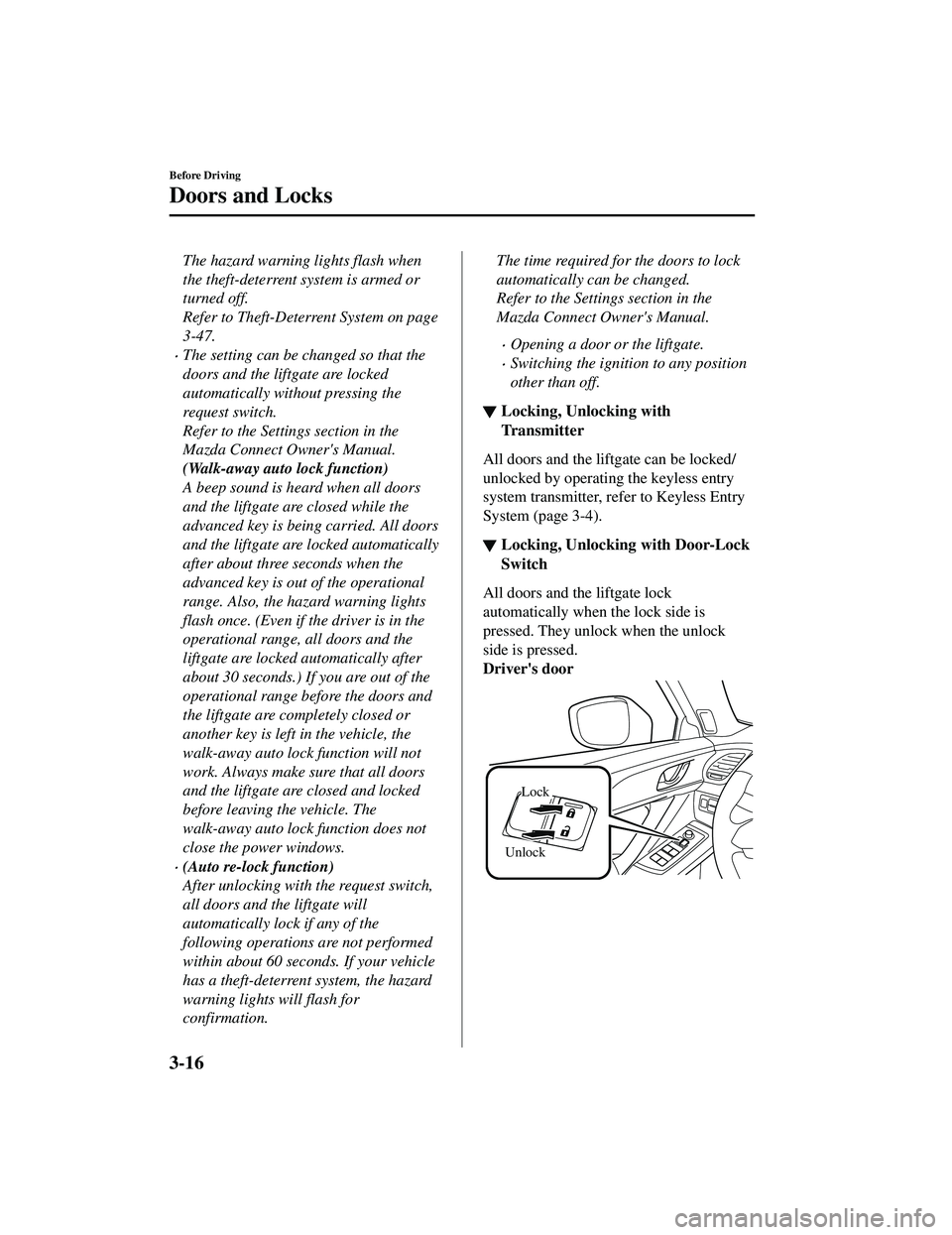
All doors and the liftgate lock
automatically when the lock side is
pressed. They unlock when the unlock
side is pressed.
Driver's door
Unlock
Lock
Before Driving
Doors and Locks
3-16
CX-9_8JK1-EA-20G_Edition6_old
2021-12-8 9:30:44
Page 120 of 723
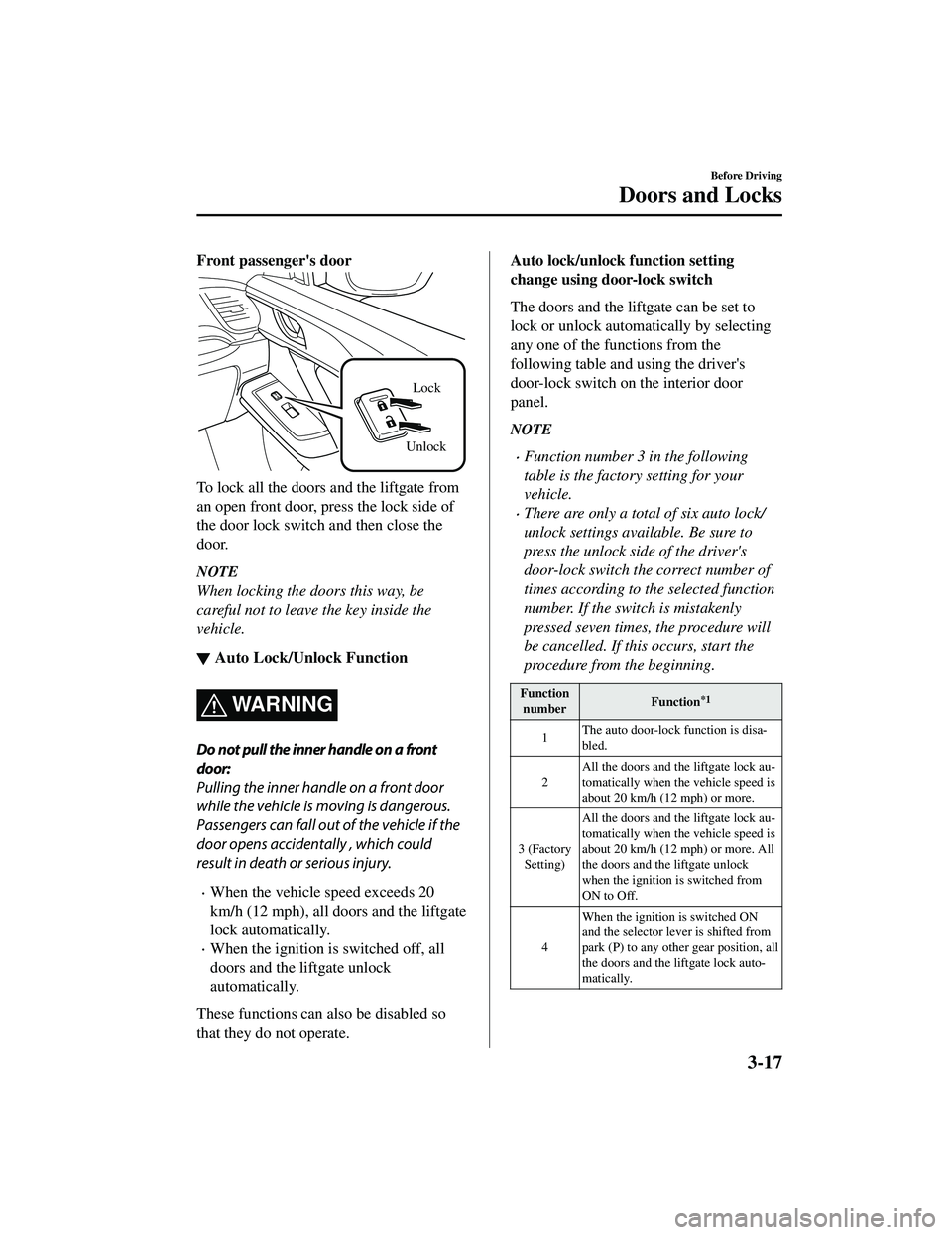
Front passenger's door
UnlockLock
To lock all the door
s and the liftgate from
an open front door, press the lock side of
the door lock switch and then close the
door.
NOTE
When locking the doors this way, be
careful not to leave the key inside the
vehicle.
▼ Auto Lock/Unlock Function
WARNING
Do not pull the inner handle on a front
door:
Pulling the inner handle on a front door
while the vehicle is moving is dangerous.
Passengers can fall out of the vehicle if the
door opens accidentally , which could
result in death or serious injury.
When the vehicle speed exceeds 20
km/h (12 mph), all doors and the liftgate
lock automatically.
When the ignition is
switched off, all
doors and the liftgate unlock
automatically.
These functions can also be disabled so
that they do not operate.
Auto lock/unlock function setting
change using door-lock switch
The doors and the liftgate can be set to
lock or unlock automatically by selecting
any one of the functions from the
following table and using the driver's
door-lock switch on the interior door
panel.
NOTE
Function number 3 in the following
table is the factory setting for your
vehicle.
There are only a total of six auto lock/
unlock settings available. Be sure to
press the unlock side of the driver's
door-lock switch the correct number of
times according to the selected function
number. If the switch is mistakenly
pressed seven times, the procedure will
be cancelled. If th is occurs, start the
procedure from the beginning.
Function number Function*1
1The auto door-lock function is disa
‐
bled.
2 All the doors and the liftgate lock au
‐
tomatically when the vehicle speed is
about 20 km/h (12 mph) or more.
3 (Factory Setting) All the doors and the liftgate lock au
‐
tomatically when the vehicle speed is
about 20 km/h (12 mph) or more. All
the doors and the liftgate unlock
when the ignition is switched from
ON to Off.
4 When the ignition is switched ON
and the selector lever is shifted from
park (P) to any othe
r gear position, all
the doors and the liftgate lock auto ‐
matically.
Before Driving
Doors and Locks
3-17
CX-9_8JK1-EA-20G_Edition6_old 2021-12-8 9:30:44
Page 121 of 723
Functionnumber Function*1
5When the ignition is switched ON
and the selector lever is shifted from
park (P) to any other gear position, all
the doors and the liftgate lock auto
‐
matically.
When the selector lever is shifted to
park (P) while the ignition is switched
ON, all the doors and the liftgate un ‐
lock automatically.
6 All the doors and th
e liftgate lock au‐
tomatically when the vehicle speed is
about 20 km/h (12 mph) or more.
When the selector lever is shifted to
park (P) while the ignition is switched
ON, all the doors and the liftgate un ‐
lock automatically.
*1 Other settings for the auto door lock function are available at an Authorized Mazda Dealer. For
details consult an Authorized Mazda Dealer.
Refer to the Settings section in the Mazda
Connect Owner's Manual.
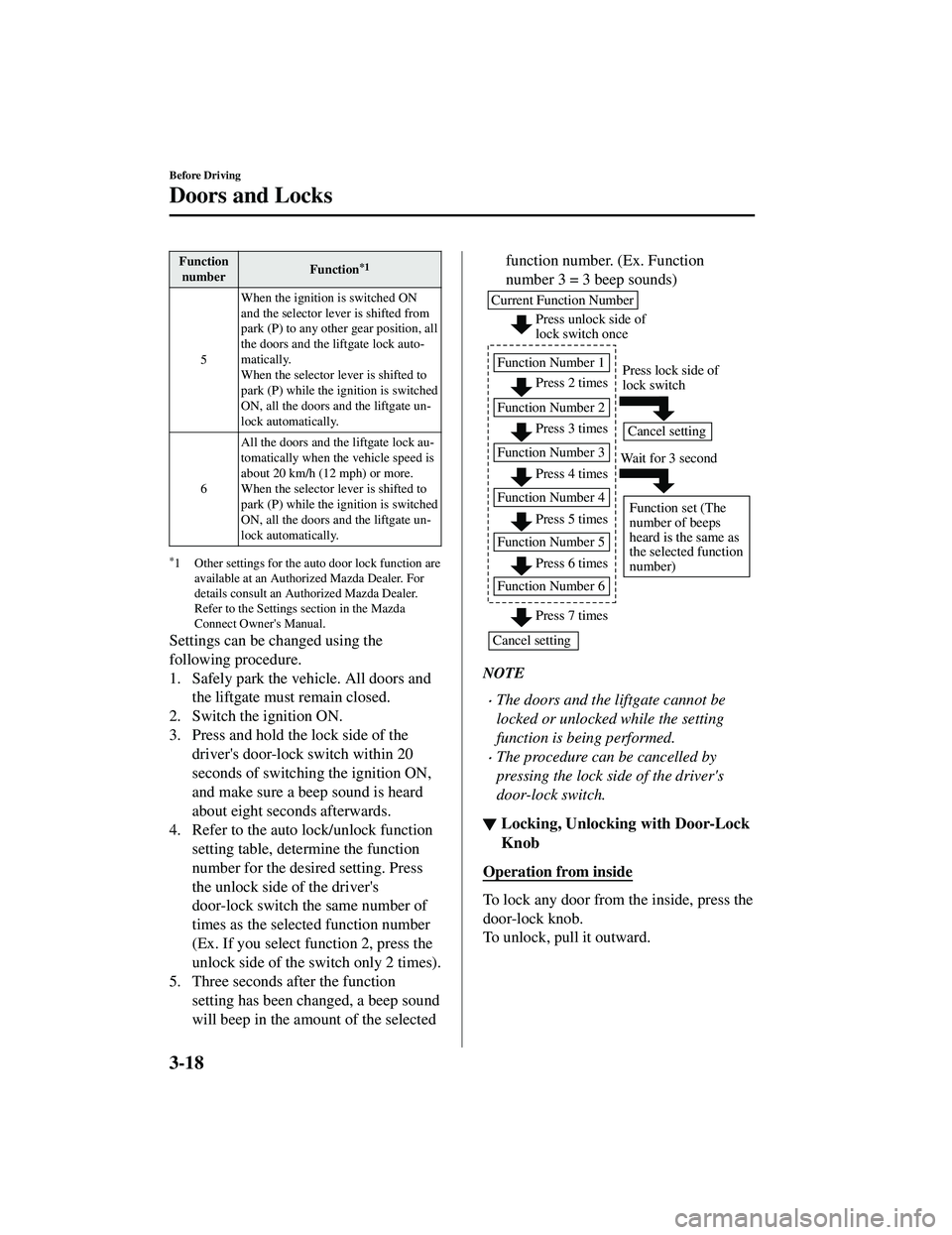
Settings can be changed using the
following procedure.
1. Safely park the vehicle. All doors andthe liftgate must remain closed.
2. Switch the ignition ON.
3. Press and hold the lock side of the driver's door-lock switch within 20
seconds of switching the ignition ON,
and make sure a beep sound is heard
about eight seconds afterwards.
4. Refer to the auto lock/unlock function setting table, determine the function
number for the desired setting. Press
the unlock side of the driver's
door-lock switch the same number of
times as the selected function number
(Ex. If you select function 2, press the
unlock side of the switch only 2 times).
5. Three seconds after the function setting has been changed, a beep sound
will beep in the amount of the selected
function number. (Ex. Function
number 3 = 3 beep sounds)
NOTE
The doors and the liftgate cannot be
locked or unlocked while the setting
function is being performed.
The procedure can be cancelled by
pressing the lock side of the driver's
door-lock switch.
▼Locking, Unlocking with Door-Lock
Knob
Operation from inside
To lock any door from the inside, press the
door-lock knob.
To unlock, pull it outward.
Before Driving
Doors and Locks
3-18
CX-9_8JK1-EA-20G_Edition6_old
2021-12-8 9:30:44
Page 126 of 723

NOTE
Do not apply unnecessary force to the
power liftgate when it is opening/closing
electrically. Unnecessary force on the
liftgate may cause it to reverse direction
of movement automatically. Also, it
could result in a malfunction.
The power liftgate may not open/close
electrically if the vehicle is parked on an
incline, or there is strong wind, or the
liftgate is laden with snow.
If a power liftgate system fuse has
blown, the liftgate cannot be opened
using the power liftgate switch or the
electric liftgate opener. Use the
emergency lever to open the liftgate.
Fully close the power liftgate before
disconnecting the vehicle battery. If the
battery is disconnect ed with the liftgate
open, it cannot be opened or closed
automatically after the battery is
reconnected. If this happens, fully close
the liftgate manually to restore the auto
full open/close function.
If the liftgate is snow-laden, remove the
snow before operating the power
liftgate. Operating the power liftgate
with excessive forc e applied to the
liftgate may damage the liftgate.
Operation using the transmitter
Press the power liftgate button for one
second or longer. The hazard warning
lights flash twice and the liftgate opens/
closes after the beep sounds.
Refer to Transmitter on page 3-5.
NOTE
When the ignition is switched ON, the
transmitter does not operate.
When opening the liftgate by pressing
the power liftgate button on the
transmitter, the liftgate can be opened
even when it is locked.
If the power liftgate button on the
transmitter is pressed while the liftgate
is opening/closing electrically, the beep
is activated and the liftgate stops. When
pressing the power liftgate button again,
the liftgate moves in the reverse
direction.
Operation using each switch
Operation conditions
Opening the liftgate
If the vehicle has satisfied all the
following operation conditions, the power
liftgate can be opened using the power
function.
All doors and the liftgate are unlocked.
The ignition is swit ched OFF, or the
selector lever is in P with the ignition
switched ON.
Closing the liftgate
The ignition is swit ched OFF, or the
selector lever is in P with the ignition
switched ON.
NOTE
If the vehicle moves with the selector
lever shifted to a position other than P
while the liftgate is opening/closing
electrically, the liftgate moves as
follows:
While opening electrically
Before Driving
Doors and Locks
3-23
CX-9_8JK1-EA-20G_Edition6_old 2021-12-8 9:30:44
Page 128 of 723

Hands-free liftgate*
When the hands-free liftgate sensor on the
center bottom of the rear bumper detects
foot movement (kick-activated liftgate),
the liftgate opens/closes automatically.
The liftgate can be opened/closed even
with both hands full, such as when
carrying baggage.
Operation conditions
Do the kicking motion with your foot
when all of the following conditions are
met while the vehicle is stopped.
(When ignition is switched OFF)
You are carrying the transmitter.
The hands-free liftgate is on.
(When ignition is switched ON)
You are carrying the transmitter.
The hands-free liftgate is on.
The selector lever is in the P position.
How to do the kicking motion
A: About 30 cm (12 in) B: About 10 cm (3.9 in)
A
B
1. Stand at the position about 30 cm (12 in) behind the center of the rear
bumper.
2. Move your foot to the position about 10 cm (3.9 in) from the center bottom
of the rear bumper.
3. Move your foot away from under the bumper within about 1 second after
moving it under the bumper.
When the kicking motion is done
correctly, the hazard warning lights flash 2
times, a beep sound is activated, and the
liftgate opens/closes automatically. Be
careful not to contact the liftgate.
If the kicking motion is done while the
liftgate is opening/closing automatically,
the liftgate will stop. If the kicking motion
is done again, the liftgate moves in the
direction opposite to the direction it was
moving before it stopped.
CAUTION
Do not do the kicking motion while
wearing footwear such as sandals, or
with your bare foot. If your foot contacts
the hot exhaust pipe, it could cause
serious burns.
Do not do the kicking motion while the
area where you are standing is unstable
such as a slope or icy road. Otherwise,
you could fall down, resulting in injury.
Do not paint the rear bumper or install
any add-on equipment to it. Otherwise,
the hands-free liftgate sensor may not
operate normally.
Before Driving
Doors and Locks
*Some models.3-25
CX-9_8JK1-EA-20G_Edition6_old 2021-12-8 9:30:44