steering wheel MAZDA MODEL CX-9 2021 Workshop Manual
[x] Cancel search | Manufacturer: MAZDA, Model Year: 2021, Model line: MODEL CX-9, Model: MAZDA MODEL CX-9 2021Pages: 723, PDF Size: 10.61 MB
Page 391 of 723
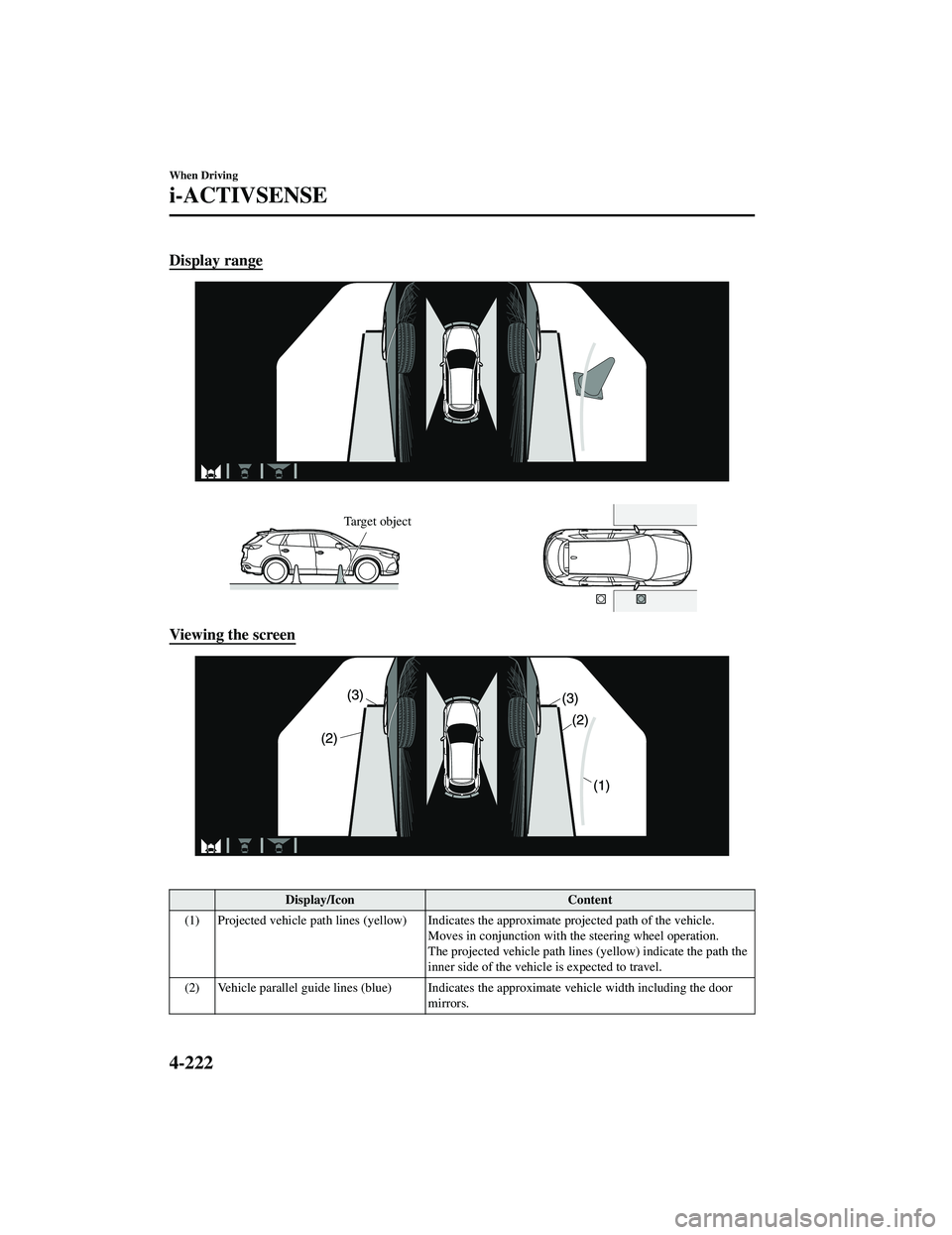
Display range
Target object
Viewing the screen
Display/IconContent
(1) Projected vehicle path lines (yellow) Indicates the approximate projected path of the vehicle.
Moves in conjunction with th e steering wheel operation.
The projected vehicle path lines (yellow) indicate the path the
inner side of the vehicle is expected to travel.
(2) Vehicle parallel guide lines (blue) Indicates the approximate vehicle width including the door
mirrors.
When Driving
i-ACTIVSENSE
4-222
CX-9_8JK1-EA-20G_Edition6_old 2021-12-8 9:30:44
Page 392 of 723
Display/IconContent
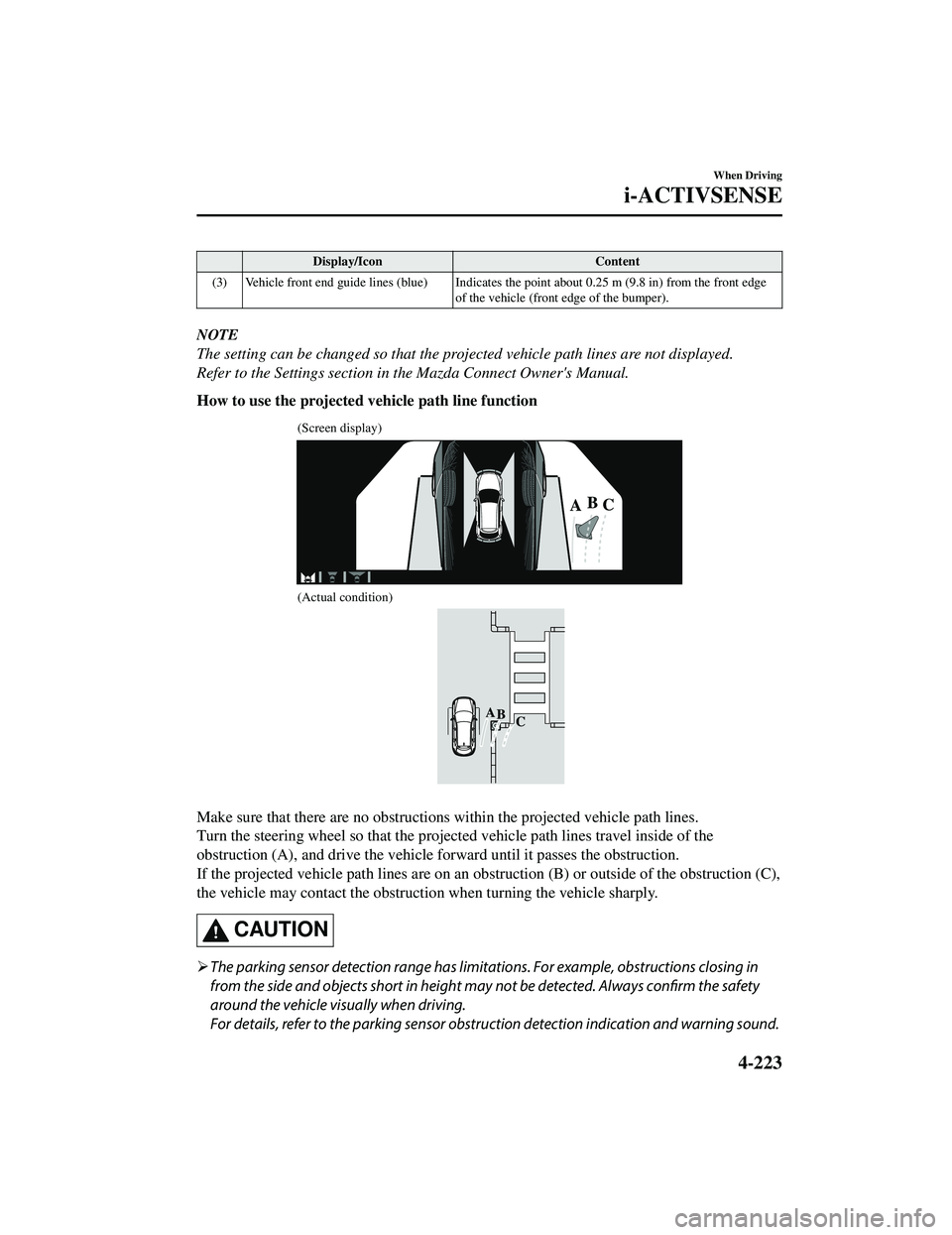
(3) Vehicle front end guide lines (blue) Indicates th e point about 0.25 m (9.8 in) from the front edge
of the vehicle (front edge of the bumper).
NOTE
The setting can be changed so that the projected vehicle path lines are not displayed.
Refer to the Settings section in the Mazda Connect Owner's Manual.
How to use the projected vehicle path line function
(Screen display)
(Actual condition)
Make sure that there are no obstructions within the projected vehicle path lines.
Turn the steering wheel so that the projected vehicle path lines travel inside of the
obstruction (A), and drive the vehicle forward until it passes the obstruction.
If the projected vehicle path lines are on an obs truction (B) or outside of the obstruction (C),
the vehicle may contact the obstruction when turning the vehicle sharply.
CAUTION
The parking sensor detection range has limita tions. For example, obstructions closing in
from the side and objects short in height may not be detected. Always confirm the safety
around the vehicle vi sually when driving.
For details, refer to the parking sensor obstruction detection indication and warning sound.
When Driving
i-ACTIVSENSE
4-223
CX-9_8JK1-EA-20G_Edition6_old 2021-12-8 9:30:44
Page 393 of 723
Refer to Parking Sensor System on page 4-282.
Do not turn the steering wheel any more until the vehicle has passed the obstruction, even
if the obstruction is not visible on the side view image. If the steering wheel is turned even
more, the vehicle may contact the obst ruction if it is turned sharply.
NOTE
Because there might be a difference between the image displayed on the screen and the
actual conditions, always check the safety of the surrounding area using the mirrors and
directly with your eyes when driving.
Even though the object displayed on the screen, such as a road curb or a division line of a
parking space, and the vehicle parallel guide lines appear parallel, they may not actually
be parallel.
▼Top View/Rear View
Use the top view/rear view to assist in checking the safety of the surrounding area when
accelerating from a stop, park
ing, or stopping the vehicle.
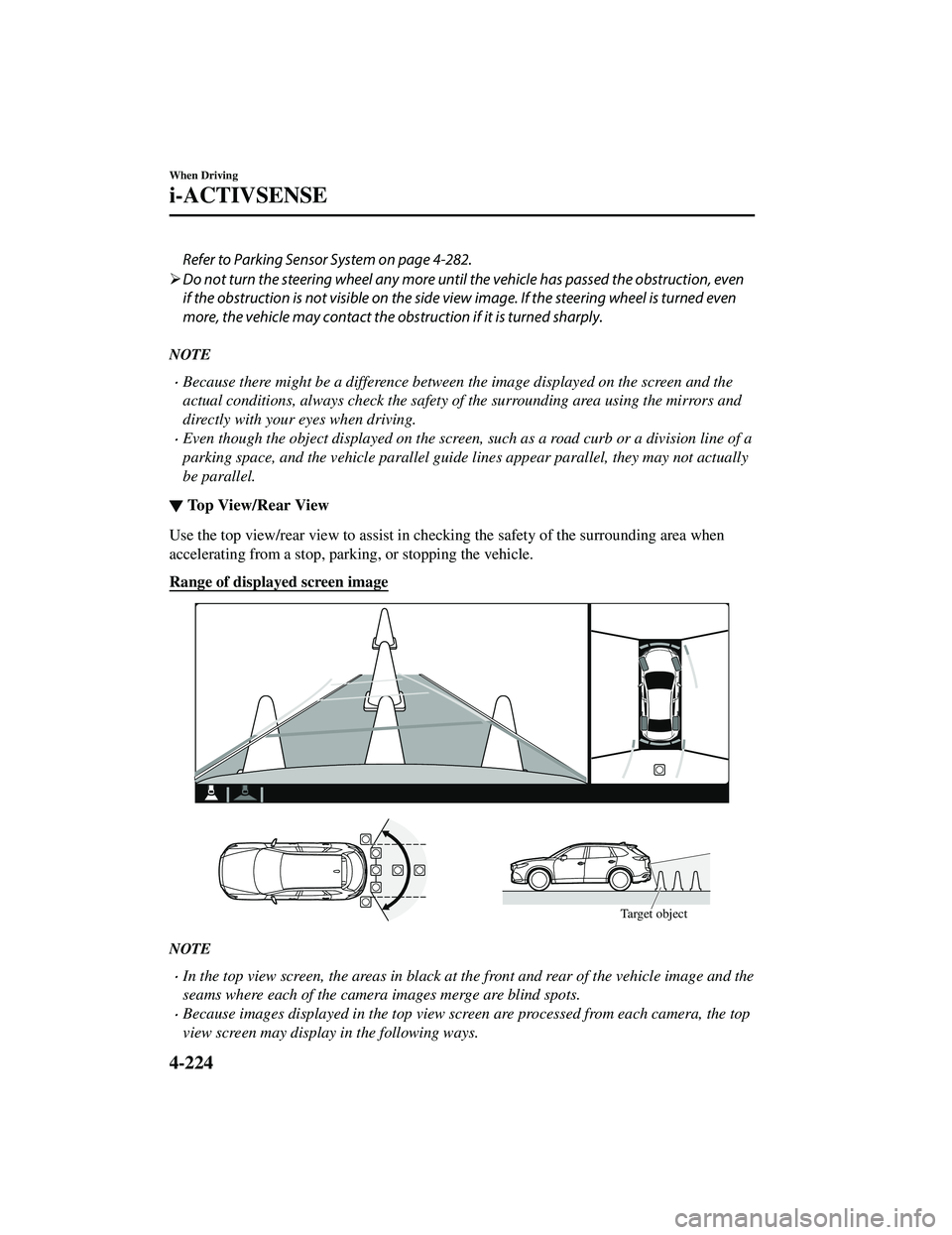
Range of displayed screen image
Target object
NOTE
In the top view screen, the areas in black at the front and rear of the vehicle image and the
seams where each of the camera images merge are blind spots.
Because images displayed in the top view screen are processed from each camera, the top
view screen may display in the following ways.
When Driving
i-ACTIVSENSE
4-224
CX-9_8JK1-EA-20G_Edition6_old 2021-12-8 9:30:44
Page 394 of 723
If an image containing an object with a conspicuous color is picked up by any of the
cameras, the screen area for each camera may be affected and it may display in that
color.
Obstructions displayed in the rear view may not display on the top view screen.
If the position or angle of each camera changes due to tilting of the vehicle, the image
may appear distorted.
Lines on the road may appear distorted at the seams where each of the camera images
merge.
The screen area for each camera may appear bright/dark depending on the illumination
level around any of the cameras.
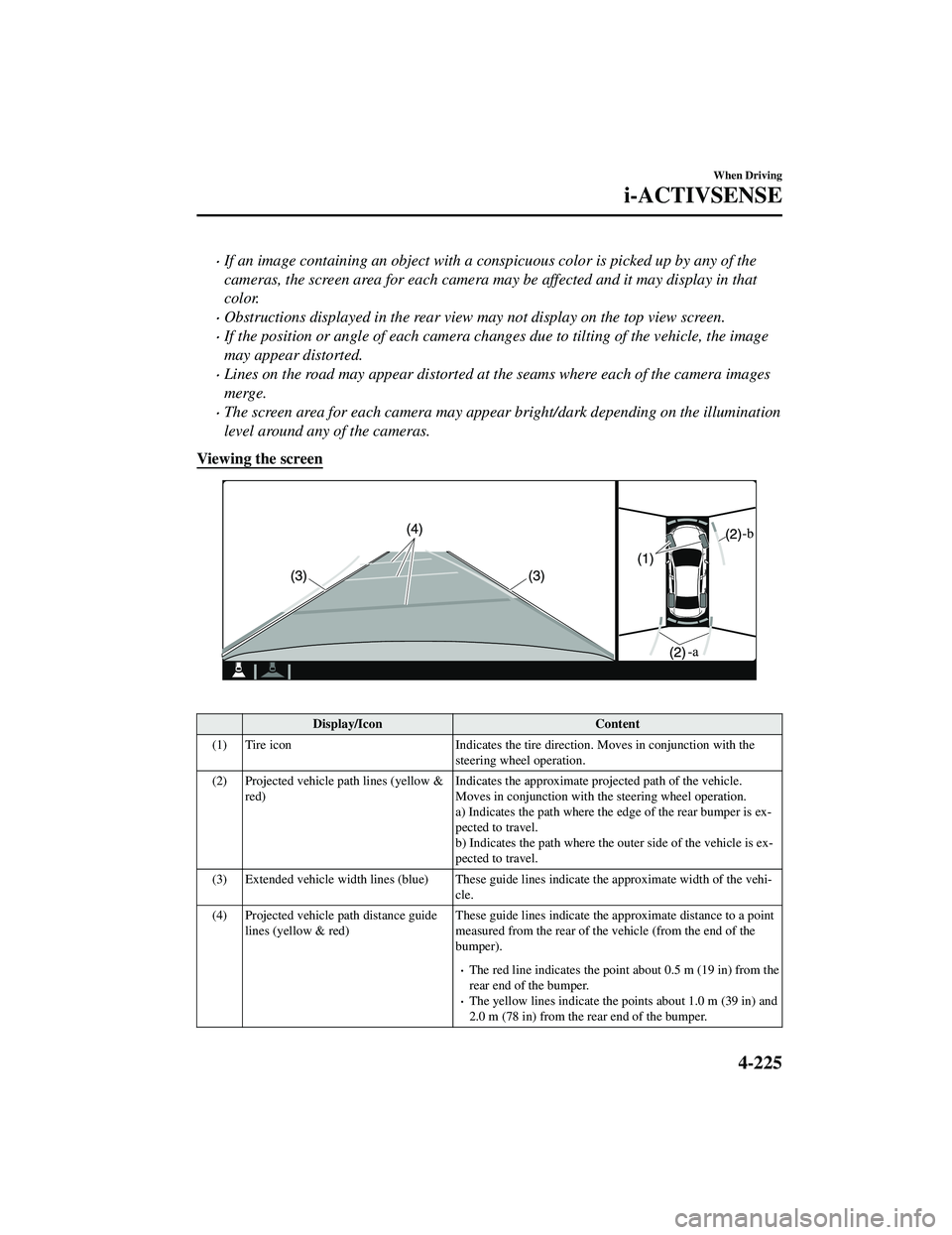
Viewing the screen
Display/Icon Content
(1) Tire icon Indicates the tire direction. Moves in conjunction with the
steering wheel operation.
(2) Projected vehicle path lines (yellow & red) Indicates the approximate proj
ected path of the vehicle.
Moves in conjunction with the steering wheel operation.
a) Indicates the path where the edge of the rear bumper is ex ‐
pected to travel.
b) Indicates the path where the outer side of the vehicle is ex ‐
pected to travel.
(3) Extended vehicle width lines (blue) These guide lines indicate the approximate width of the vehi‐
cle.
(4) Projected vehicle path distance guide lines (yellow & red) These guide lines indicate the ap
proximate distance to a point
measured from the rear of the vehicle (from the end of the
bumper).
The red line indicates the poin t about 0.5 m (19 in) from the
rear end of the bumper.
The yellow lines indicate the poi nts about 1.0 m (39 in) and
2.0 m (78 in) from the rear end of the bumper.
When Driving
i-ACTIVSENSE
4-225
CX-9_8JK1-EA-20G_Edition6_old 2021-12-8 9:30:44
Page 395 of 723
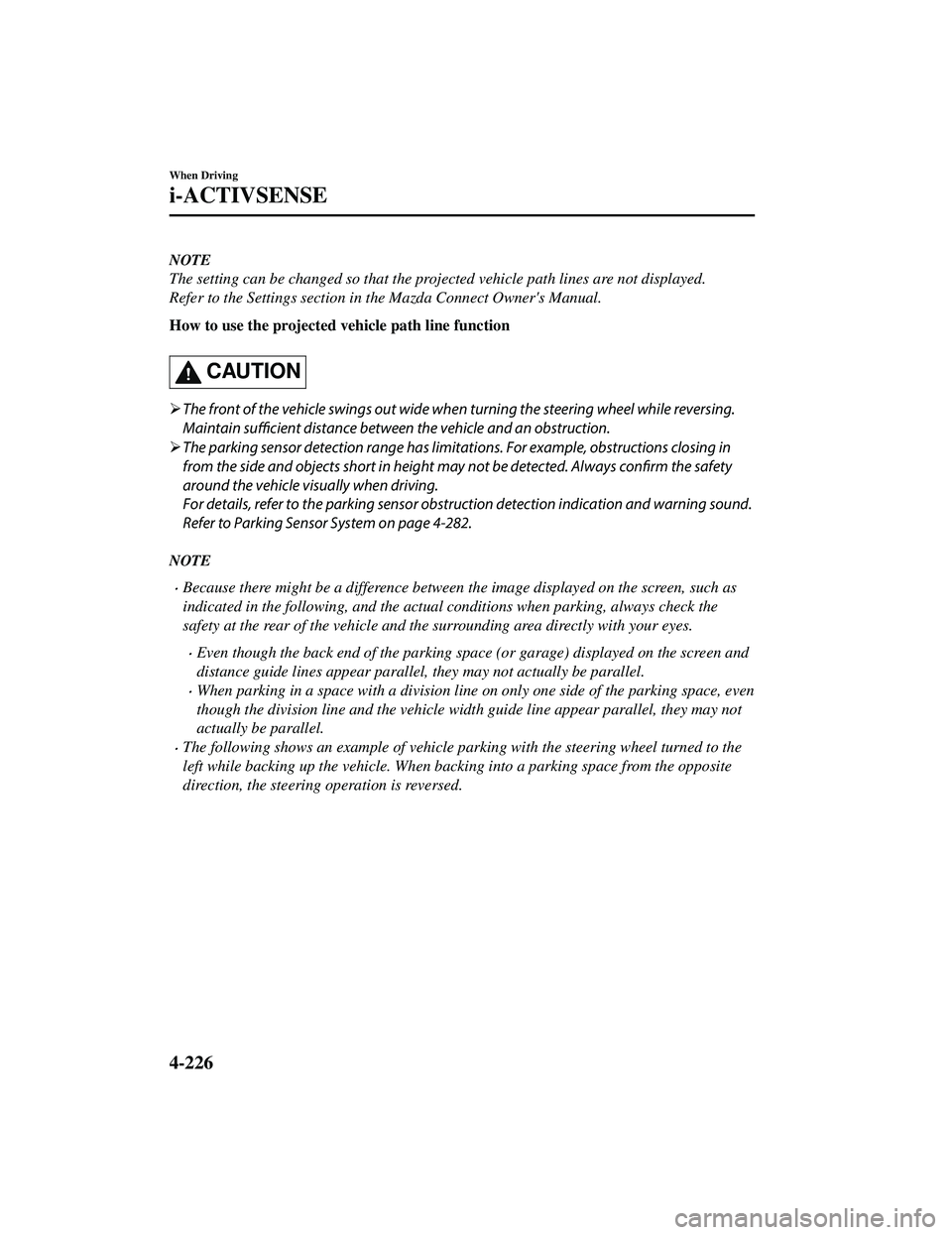
NOTE
The setting can be changed so that the projected vehicle path lines are not displayed.
Refer to the Settings section in the Mazda Connect Owner's Manual.
How to use the projected vehicle path line function
CAUTION
The front of the vehicle swings out wide wh en turning the steering wheel while reversing.
Maintain sufficient distance between the vehicle and an obstruction.
The parking sensor detection range has limitat ions. For example, obstructions closing in
from the side and objects short in height ma y not be detected. Always confirm the safety
around the vehicle visually when driving.
For details, refer to the parking sensor obstru ction detection indication and warning sound.
Refer to Parking Sensor System on page 4-282.
NOTE
Because there might be a difference between the image displayed on the screen, such as
indicated in the following, and the actual conditions when parking, always check the
safety at the rear of the vehicle and the surrounding area directly with your eyes.
Even though the back end of the parking space (or garage) displayed on the screen and
distance guide lines appear parallel, they may not actually be parallel.
When parking in a space with a division line on only one side of the parking space, even
though the division line and the vehicle wi dth guide line appear parallel, they may not
actually be parallel.
The following shows an example of vehicle parking with the steering wheel turned to the
left while backing up the vehicle. When backing into a parking space from the opposite
direction, the steering operation is reversed.
When Driving
i-ACTIVSENSE
4-226
CX-9_8JK1-EA-20G_Edition6_old 2021-12-8 9:30:44
Page 396 of 723
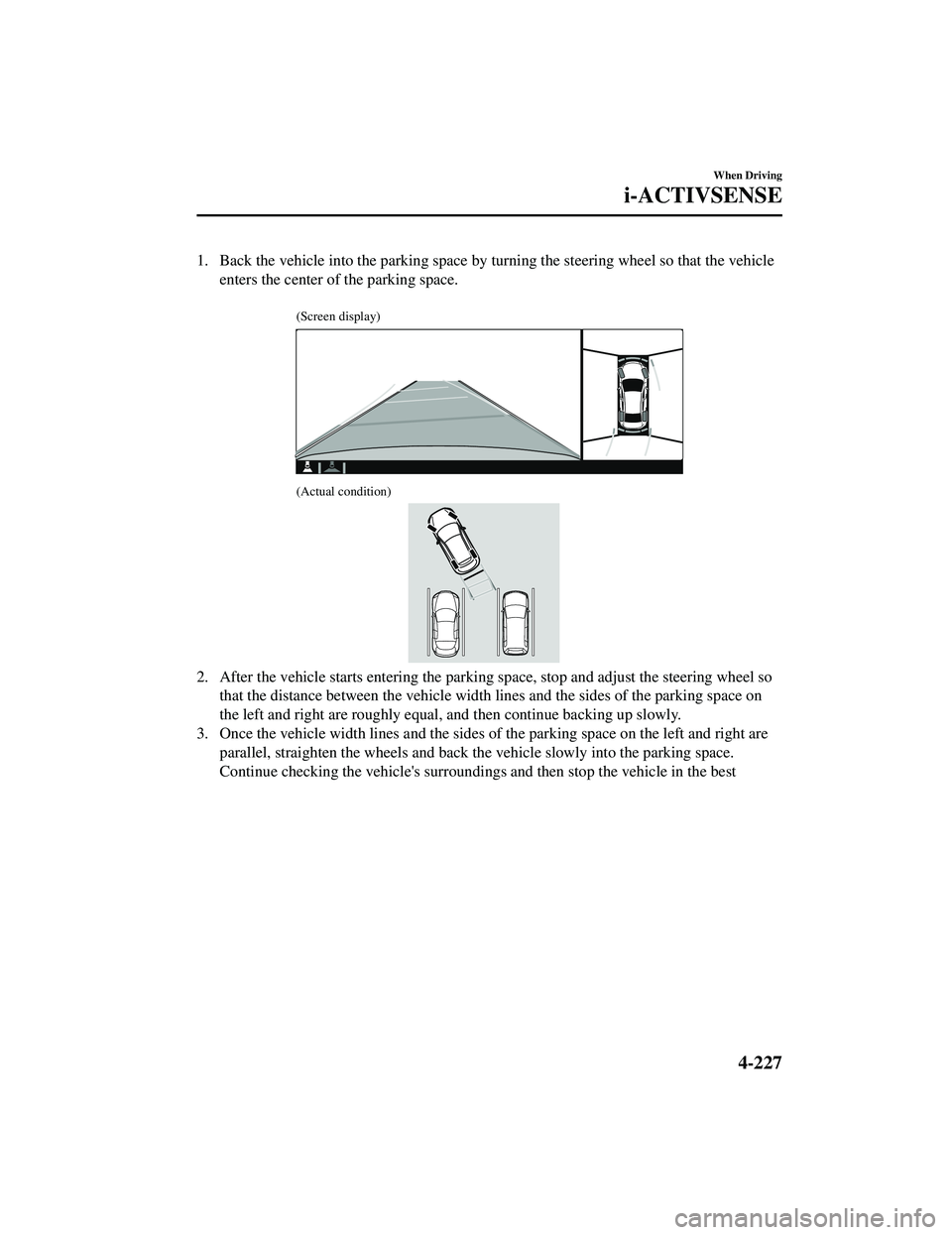
1. Back the vehicle into the parking space by turning the steering wheel so that the vehicleenters the center of the parking space.
(Screen display)
(Actual condition)
2. After the vehicle starts entering the parking space, stop and adjust the steering wheel sothat the distance between the vehicle width lines and the sides of the parking space on
the left and right are roughly equal, and then continue backing up slowly.
3. Once the vehicle width lines and the sides of the parking space on the left and right are
parallel, straighten the wheels and back the vehicle slowly into the parking space.
Continue checking the vehicle's surroundings and then stop the vehicle in the best
When Driving
i-ACTIVSENSE
4-227
CX-9_8JK1-EA-20G_Edition6_old 2021-12-8 9:30:44
Page 428 of 723
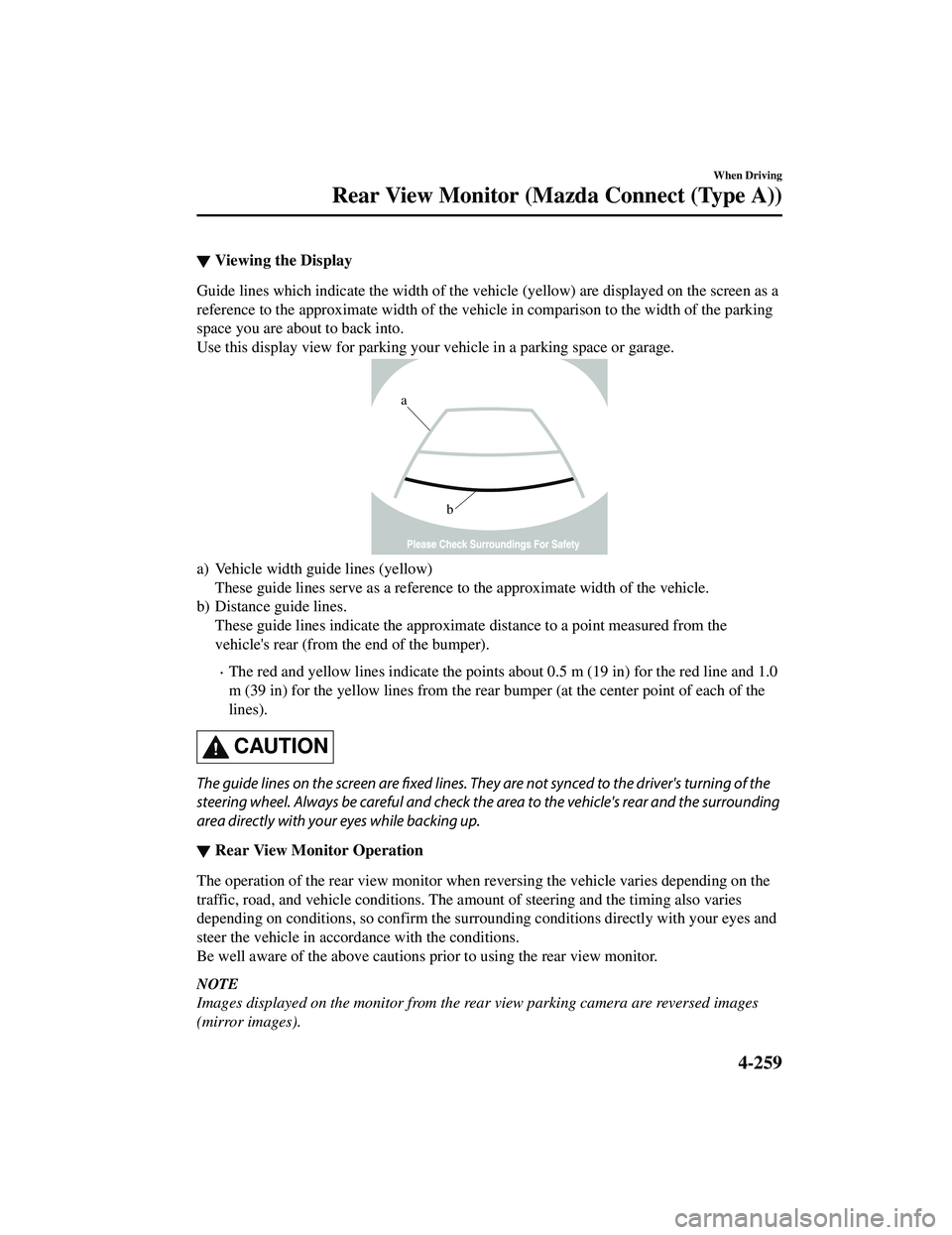
▼Viewing the Display
Guide lines which indicate the width of the vehi
cle (yellow) are displayed on the screen as a
reference to the approximate width of the vehicl e in comparison to the width of the parking
space you are about to back into.
Use this display view for parking your vehicle in a parking space or garage.
b
a
a) Vehicle width guide lines (yellow) These guide lines serve as a reference to the approximate width of the vehicle.
b) Distance guide lines. These guide lines indicate the approximate distance to a point measured from the
vehicle's rear (from the end of the bumper).
The red and yellow lines indicate the points about 0.5 m (19 in) for the red line and 1.0
m (39 in) for the yellow lines from the rear bumper (at the center point of each of the
lines).
CAUTION
The guide lines on the screen are fixed lines. They are not synced to the driver's turning of the
steering wheel. Always be careful and check the area to the vehicle's rear and the surrounding
area directly with your eyes while backing up.
▼ Rear View Monitor Operation
The operation of the rear view monitor when reversing the vehicle varies depending on the
traffic, road, and vehicle conditions. The amount of steering and the timing also varies
depending on conditions, so confirm the surround
ing conditions directly with your eyes and
steer the vehicle in accordance with the conditions.
Be well aware of the above cautions prior to using the rear view monitor.
NOTE
Images displayed on the monitor from the rear view parking camera are reversed images
(mirror images).
When Driving
Rear View Monitor (Maz da Connect (Type A))
4-259
CX-9_8JK1-EA-20G_Edition6_old 2021-12-8 9:30:44
Page 475 of 723
WA R N I N G
Always adjust Mazda Connect while the vehicle is stopped:
Do not adjust Mazda Connect with the Commander switch while driving the vehicle.
Adjusting Mazda Connect with the Commander switch while driving the vehicle is dangerous
as it could distract your attention from the vehicle operation which could lead to a serious
accident.
Even if the audio remote control switches are eq uipped on the steering wheel, learn to use the
switches without looking down at them so that you can keep your maximum attention on the
road while driving the vehicle.
Do not allow the connection plug cord to get tangled with the selector lever:
Allowing the plug cord to become tangled with the selector lever is dangerous as it could
interfere with driving, resulting in an accident.
Do not adjust a mobile device or a similar product while driving the vehicle:
Adjusting a mobile device or a similar product while driving the vehicle is dangerous as it
could distract your attention from the vehicle operation which could lead to a serious
accident. Always adjust a mobile device or a similar product while the vehicle is stopped.
CAUTION
For the purposes of safe driving, adjust the au dio volume to a level that allows you to hear
sounds outside of the vehicle including car horns and particul arly emergency vehicle sirens.
NOTE
Do not use Mazda Connect for a long time with the engine stopped. Otherwise, the battery
power could be depleted.
If a mobile phone or CB radio is used in or near the vehicle, it could cause noise to occur
from the audio system. However, this does not indicate a problem.
Interior Features
Mazda Connect [Mazda Connect (Type A)]
5-16
CX-9_8JK1-EA-20G_Edition6_old 2021-12-8 9:30:44
Page 493 of 723
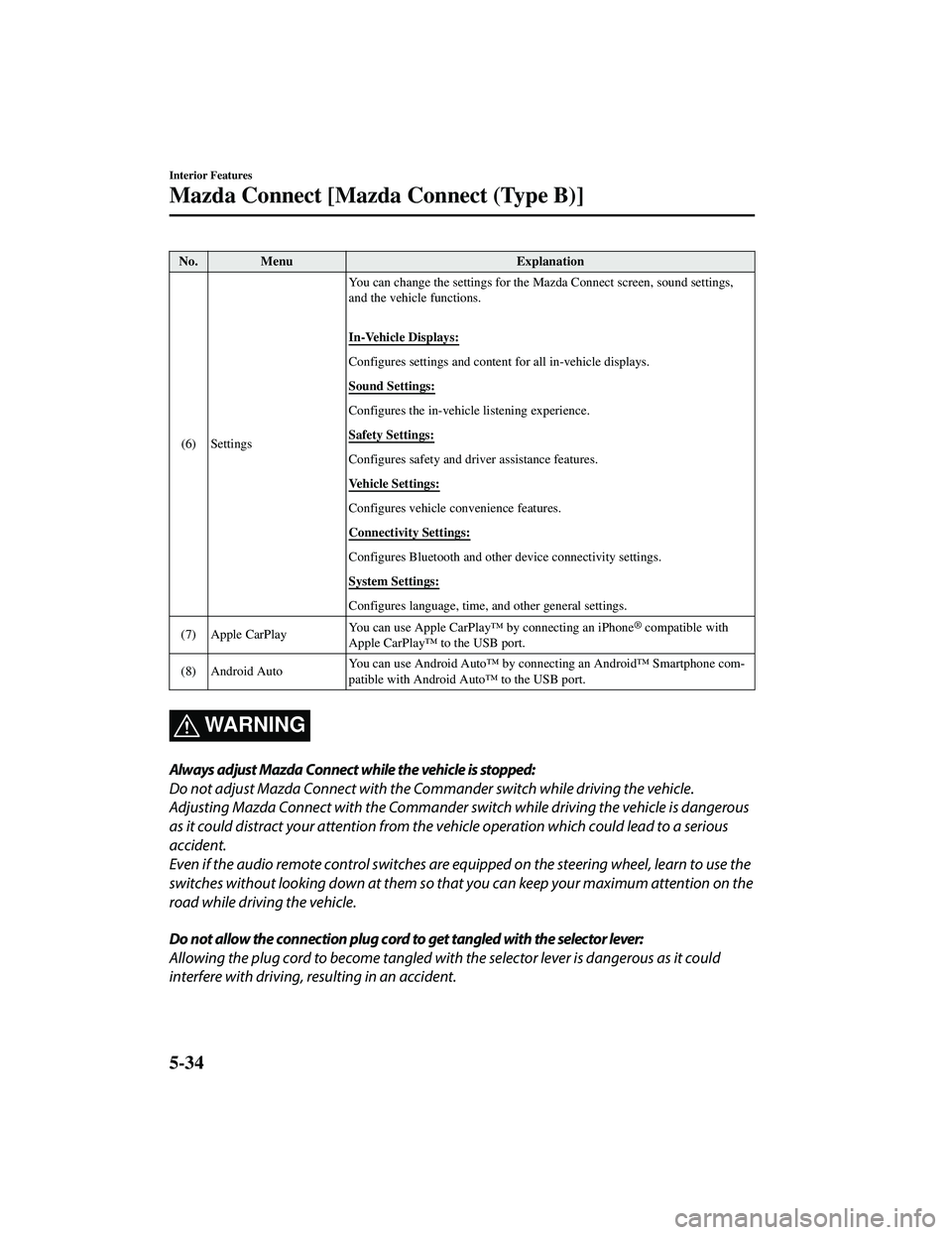
No. MenuExplanation
(6) Settings You can change the settings for the
Mazda Connect screen, sound settings,
and the vehicle functions.
In-Vehicle Displays:
Configures settings and content for all in-vehicle displays.
Sound Settings:
Configures the in-vehicle listening experience.
Safety Settings:
Configures safety and driver assistance features.
Vehicle Settings:
Configures vehicle convenience features.
Connectivity Settings:
Configures Bluetooth and other device connectivity settings.
System Settings:
Configures language, time, and other general settings.
(7) Apple CarPlay You can use Apple CarPlay™ by connecting an iPhone
® compatible with
Apple CarPlay™ to the USB port.
(8) Android Auto You can use Android Auto™ by connecting an Android™ Smartphone com
‐
patible with Android Auto™ to the USB port.
WA R N I N G
Always adjust Mazda Connect while the vehicle is stopped:
Do not adjust Mazda Connect with the Commander switch while driving the vehicle.
Adjusting Mazda Connect with the Commander switch while driving the vehicle is dangerous
as it could distract your attention from the vehicle operation which could lead to a serious
accident.
Even if the audio remote control switches are eq uipped on the steering wheel, learn to use the
switches without looking down at them so that you can keep your maximum attention on the
road while driving the vehicle.
Do not allow the connection plug cord to get tangled with the selector lever:
Allowing the plug cord to become tangled with the selector lever is dangerous as it could
interfere with driving, resulting in an accident.
Interior Features
Mazda Connect [Mazda Connect (Type B)]
5-34
CX-9_8JK1-EA-20G_Edition6_old 2021-12-8 9:30:44
Page 498 of 723
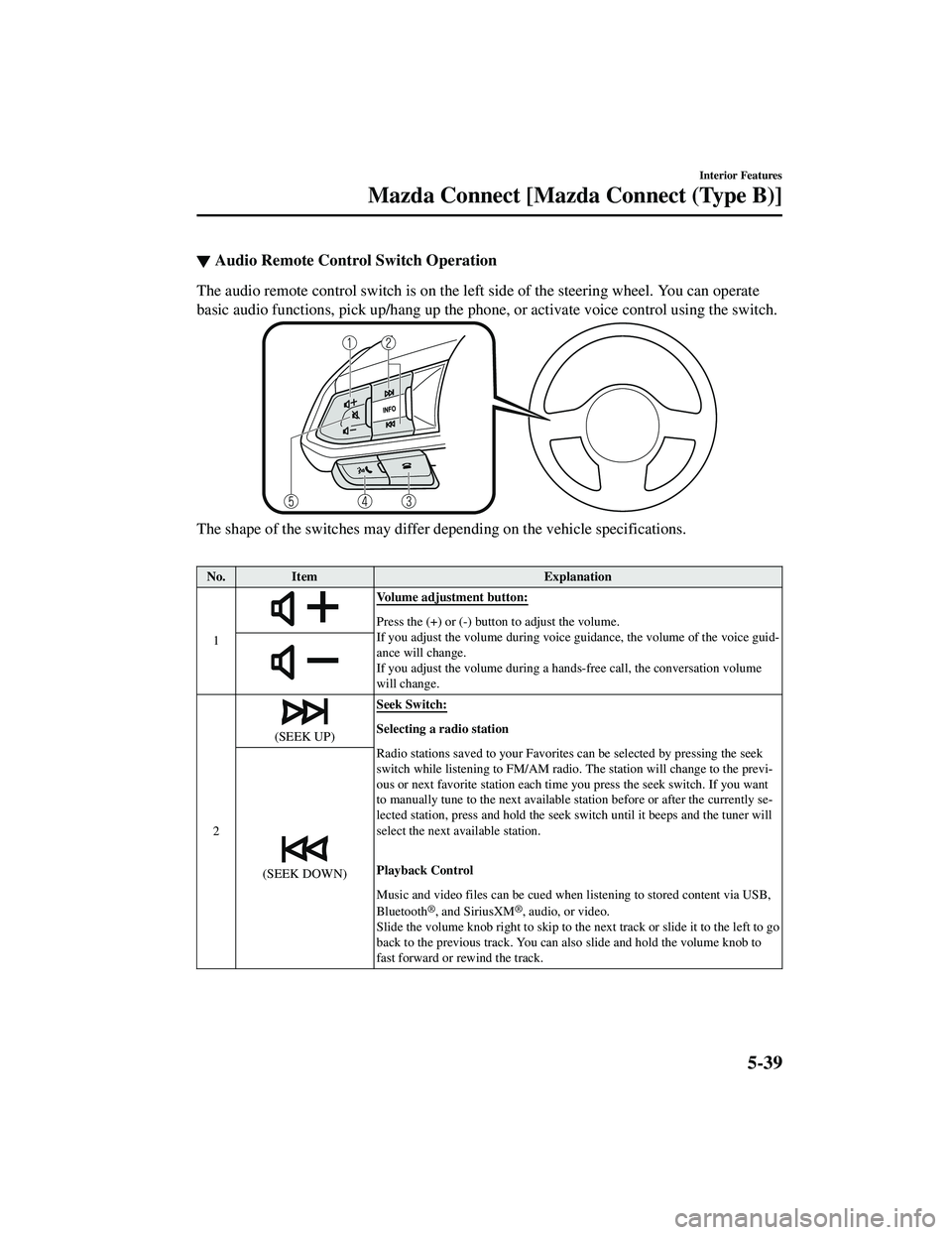
▼Audio Remote Control Switch Operation
The audio remote control switch is on the left side of the steering wheel. You can operate
basic audio functions, pick up/hang up the phone
, or activate voice control using the switch.
The shape of the switches may differ depending on the vehicle specifications.
No.Item Explanation
1
Volume adjustment button:
Press the (+) or (-) butto n to adjust the volume.
If you adjust the volume during voice guidance, the volume of the voice guid‐
ance will change.
If you adjust the volume during a ha nds-free call, the conversation volume
will change.
2
(SEEK UP) Seek Switch:Selecting a radio station
Radio stations saved to your Favorites can be selected by pressing the seek
switch while listening to FM/AM radio.
The station will change to the previ‐
ous or next favorite station each time you press the seek switch. If you want
to manually tune to the next available station before or after the currently se‐
lected station, press and hold the seek switch until it beeps and the tuner will
select the next available station.
Playback Control
Music and video files can be cued when listening to stored content via USB,
Bluetooth
®, and SiriusXM®, audio, or video.
Slide the volume knob right to skip to the next track or slide it to the left to go
back to the previous track. You can also slide and hold the volume knob to
fast forward or rewind the track.
(SEEK DOWN)
5-39
CX-9_8JK1-EA-20G_Edition6_old 2021-12-8 9:30:44