key battery MAZDA MODEL MAZDASPEED 3 2012 (in English) Owner's Manual
[x] Cancel search | Manufacturer: MAZDA, Model Year: 2012, Model line: MODEL MAZDASPEED 3, Model: MAZDA MODEL MAZDASPEED 3 2012Pages: 508, PDF Size: 9.01 MB
Page 163 of 508
Black plate (163,1)
WARNING
Remove the key only when the vehicle
is parked (with steering lock
mechanism):
Removing the key from the ignition
switch while the vehicle is moving is
dangerous. Removing the key allows
the steering wheel to lock. You will
lose steering control and a serious
accident could occur.
Before leaving the driver's seat, always
switch the ignition off, set the parking
brake, and make sure the shift lever is
in P (automatic transaxle) or in 1st gear
or R (manual transaxle):
Leaving the driver's seat without
switching the ignition off, setting the
parking brake, and shifting the shift
lever to P (automatic transaxle) or to
1st gear or R (manual transaxle) is
dangerous. Unexpected vehicle
movement could occur which could
result in an accident.
In addition, if your intention is to
leave the vehicle for even a short
period, it is important to switch the
ignition off, as leaving it in another
position will disable some of the
vehicle's security systems and run the
battery down.
NOTE
If turning the key is difficult, jiggle the steering
wheel from side to side.
Leaving the key in any position but the OFF/
LOCK position also disables some of the
security features and may run the battery
down.
ACC (Accessory)
In this position, some electrical
accessories will operate.
ON
This is the normal running position after
the engine is started. Some indicator
lights/warning lights should be inspected
before the engine is started (page 5-41).
NOTE
When the ignition is switched ON, the sound of
the fuel pump motor operating near the fuel
tank can be heard. This does not indicate an
abnormality.
NOTE
(With headlight auto-leveling)
When the ignition is switched ON, the sound of
the headlight leveling motors operating at the
front of the engine compartment can be heard.
This does not indicate an abnormality.
START
The engine is started in this position. It
will crank until you release the key. It
then returns to the ON position.
qIgnition Key Reminder
If the ignition is switched off or the
ignition is switched to ACC with the key
inserted, a continuous beep sound will be
heard when the driver's door is opened.
NOTE
A personalized function is available to change
the sound volume for the ignition key reminder.
Refer to Personalization Features on page
10-12.
Driving Your Mazda
Starting and Driving
5-3
Mazda3_8BM5-EA-10F_Edition2 Page163
Monday, July 26 2010 1:52 PM
Form No.8BM5-EA-10F
Page 164 of 508

Black plate (164,1)
Starting the Engine
With advanced key
Refer to“Starting the engine (page 3-12)”
for information on how to start the engine.
NOTE
Engine-starting is controlled by the spark
ignition system.
This system meets all Canadian Interference-
Causing Equipment Standard requirements
regulating the impulse electrical field strength
of radio noise.
1. Occupants should fasten their seat
belts.
2. Make sure the parking brake is on.
3. Depress the brake pedal.
4.(Manual transaxle)
Depress the clutch pedal all the way
and shift into neutral.
Keep the clutch pedal depressed while
cranking the engine.
(Automatic transaxle)
Put the vehicle in park (P). If you must
restart the engine while the vehicle is
moving, shift into neutral (N).
NOTE
(Manual transaxle)
The starter will not operate unless the clutch is
depressed sufficiently.
(Automatic transaxle)
The starter will not operate if the shift lever is
notin P or N.
5. Switch the ignition to START and hold
(up to 10 seconds at a time) until the
engine starts.
CAUTION
Do not try the starter for more than
10 seconds at a time. If the engine
stalls or fails to start, wait 10 seconds
before trying again. Otherwise, you
may damage the starter and drain
the battery.
6. After starting the engine, let it idle for
about 10 seconds.
NOTE
lIn extremely cold weather or after the
vehicle has not been driven in several days,
let the engine warm up without operating
the accelerator.
lWhether the engine is cold or warm, it
should be started without use of the
accelerator.
lIf the engine does not start the first time,
refer to Starting a Flooded Engine under
Emergency Starting. If the engine still does
not start, have your vehicle inspected by an
Authorized Mazda Dealer (page 7-17).
5-4
Driving Your Mazda
Starting and Driving
Mazda3_8BM5-EA-10F_Edition2 Page164
Monday, July 26 2010 1:52 PM
Form No.8BM5-EA-10F
Page 212 of 508

Black plate (212,1)
If the warning light illuminates again even
after the tire pressures are adjusted, there
may be a tire puncture. Replace the
punctured tire with the temporary spare
tire (page 7-9).
NOTE
A tire pressure sensor is not installed to the
temporary spare tire. The warning light will
flash continuously while the temporary spare
tire is being used.
Warning light flashes
When the warning light flashes, there may
be a system malfunction. Consult an
Authorized Mazda Dealer.
qKEY Warning Light (Red)/KEY
Indicator Light (Green) (with
Advanced Key)
This indicator has two colors.
KEY Warning Light (Red)
When illuminated
lWhen the push button start is pressed
ON, it illuminates momentarily and
then turns off.
lIf any malfunction occurs in the
advanced keyless system, it illuminates
continuously.
WARNING
Do not drive the vehicle with the KEY
warning light illuminated:
If the KEY warning light remains
illuminated, do not continue to drive
using the advanced key system. Park
the vehicle in a safe place and use
the auxiliary key to continue driving
the vehicle. Have the vehicle
inspected at an Authorized Mazda
Dealer as soon as possible.
When flashing
lUnder the following conditions, the
KEY warning light (red) flashes to
inform the driver that the push button
start will not switch to ACC even if it
is pressed from off.
lThe advanced key battery is dead.lThe advanced key is not within
operational range.
lThe advanced key is placed in areas
where it is difficult for the system to
detect the signal (page 3-7).
lA key from another manufacturer
similar to the advanced key is in the
operational range.
5-52
Driving Your Mazda
Warning/Indicator Lights and Beep Sounds
Mazda3_8BM5-EA-10F_Edition2 Page212
Monday, July 26 2010 1:53 PM
Form No.8BM5-EA-10F
Page 213 of 508
Black plate (213,1)
lUnder the following conditions, the
KEY warning light (red) will flash
continuously when the push button
start has not been pressed off to notify
the driver that the advanced key has
been removed. The KEY warning light
(red) will stop flashing when the
advanced key is back inside the
vehicle:
lThe push button start has not been
pressed off, the driver's door is
open, and the advanced key is
removed from the vehicle.
lThe push button start has not been
pressed off and all the doors are
closed after removing the advanced
key from the vehicle.
NOTE
Because the advanced key utilizes low-intensity
radio waves, the Advanced Key Removed From
Vehicle Warning may activate if the advanced
key is carried together with a metal object or it
is placed in a poor signal reception area.
KEY Indicator Light (Green)
When illuminated
When the brake pedal is depressed with
an automatic transaxle or the clutch pedal
is depressed with a manual transaxle, the
system confirms that the correct advanced
key is inside the vehicle, the KEY
indicator light (green) illuminates, and the
push button start can be pressed to ACC
(page 3-12).
When flashing
When the push button start is pressed off
from ON, the KEY indicator light (green)
flashes for approximately 30 seconds
indicating that the remaining battery
power is low. Replace with a new battery
before the advanced key becomes
unusable.Refer to Advanced Key Maintenance on
page 3-7.
NOTE
The advanced key can be set so that the KEY
indicator light (green) does not flash even if
the battery power is low.
Refer to Personalization Features on page
10-12.
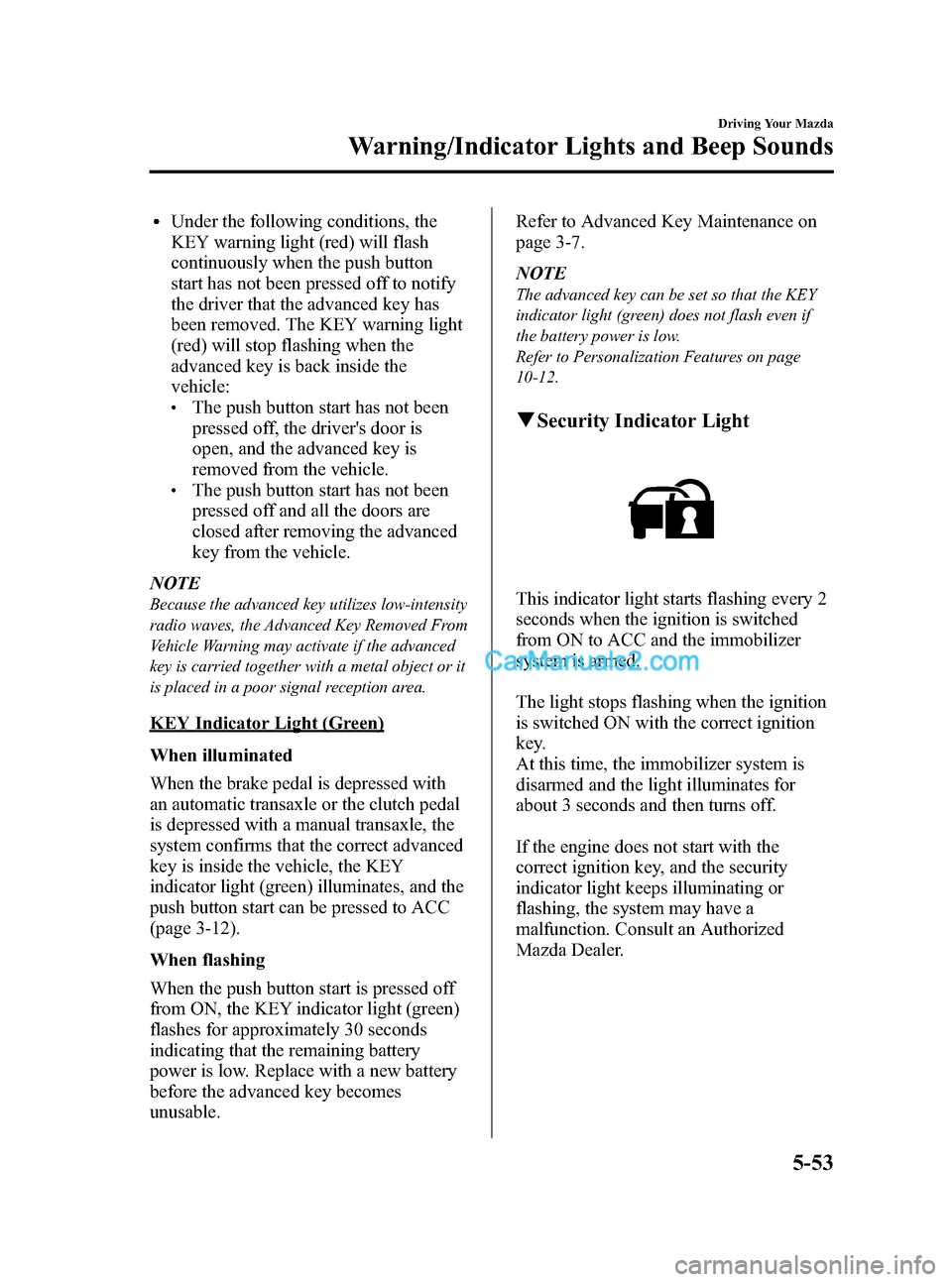
qSecurity Indicator Light
This indicator light starts flashing every 2
seconds when the ignition is switched
from ON to ACC and the immobilizer
system is armed.
The light stops flashing when the ignition
is switched ON with the correct ignition
key.
At this time, the immobilizer system is
disarmed and the light illuminates for
about 3 seconds and then turns off.
If the engine does not start with the
correct ignition key, and the security
indicator light keeps illuminating or
flashing, the system may have a
malfunction. Consult an Authorized
Mazda Dealer.
Driving Your Mazda
Warning/Indicator Lights and Beep Sounds
5-53
Mazda3_8BM5-EA-10F_Edition2 Page213
Monday, July 26 2010 1:53 PM
Form No.8BM5-EA-10F
Page 326 of 508
Black plate (326,1)
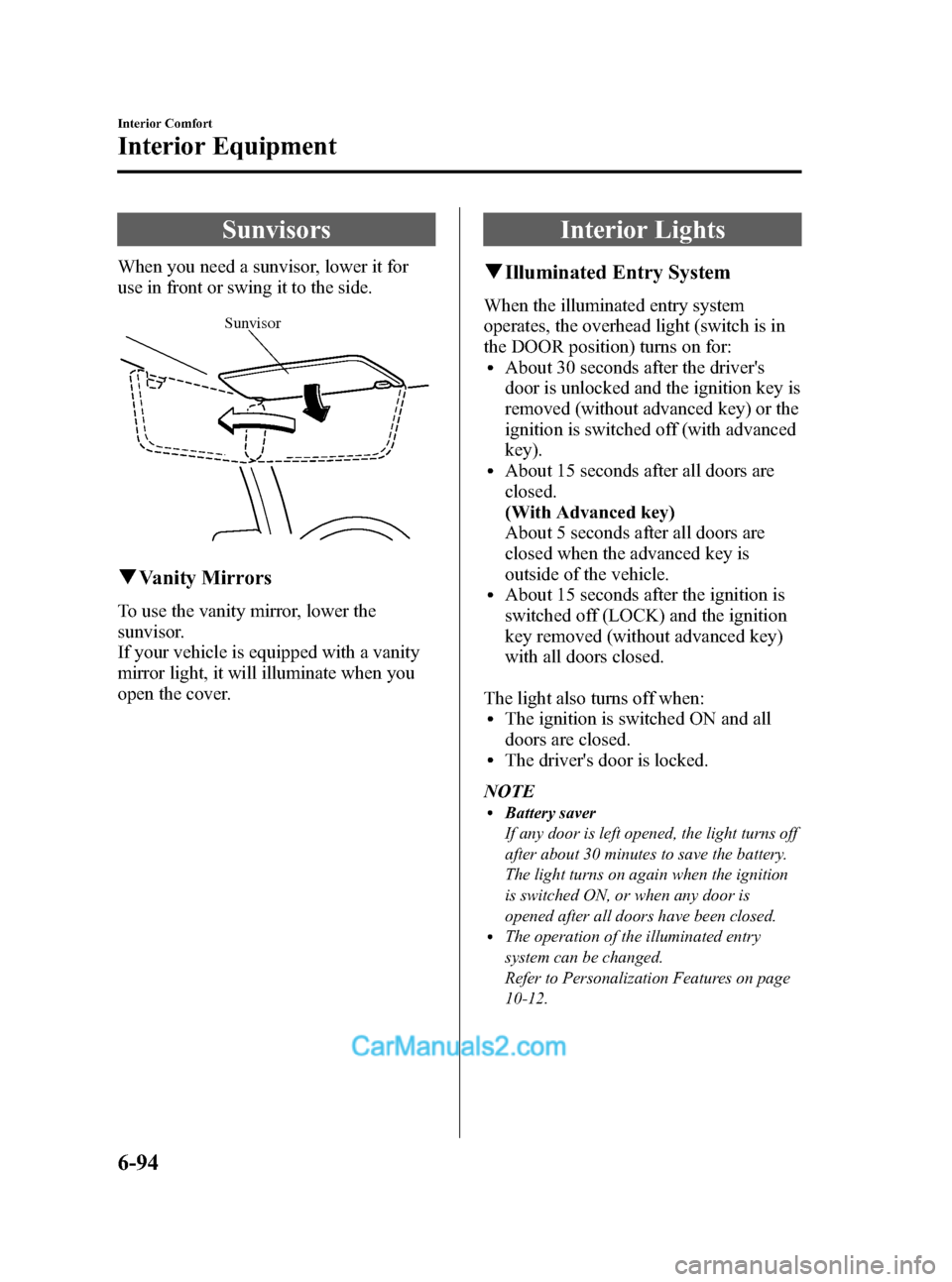
Sunvisors
When you need a sunvisor, lower it for
use in front or swing it to the side.
Sunvisor
qVanity Mirrors
To use the vanity mirror, lower the
sunvisor.
If your vehicle is equipped with a vanity
mirror light, it will illuminate when you
open the cover.
Interior Lights
qIlluminated Entry System
When the illuminated entry system
operates, the overhead light (switch is in
the DOOR position) turns on for:
lAbout 30 seconds after the driver's
door is unlocked and the ignition key is
removed (without advanced key) or the
ignition is switched off (with advanced
key).
lAbout 15 seconds after all doors are
closed.
(With Advanced key)
About 5 seconds after all doors are
closed when the advanced key is
outside of the vehicle.
lAbout 15 seconds after the ignition is
switched off (LOCK) and the ignition
key removed (without advanced key)
with all doors closed.
The light also turns off when:
lThe ignition is switched ON and all
doors are closed.
lThe driver's door is locked.
NOTE
lBattery saver
If any door is left opened, the light turns off
after about 30 minutes to save the battery.
The light turns on again when the ignition
is switched ON, or when any door is
opened after all doors have been closed.
lThe operation of the illuminated entry
system can be changed.
Refer to Personalization Features on page
10-12.
6-94
Interior Comfort
Interior Equipment
Mazda3_8BM5-EA-10F_Edition2 Page326
Monday, July 26 2010 1:54 PM
Form No.8BM5-EA-10F
Page 339 of 508
Black plate (339,1)
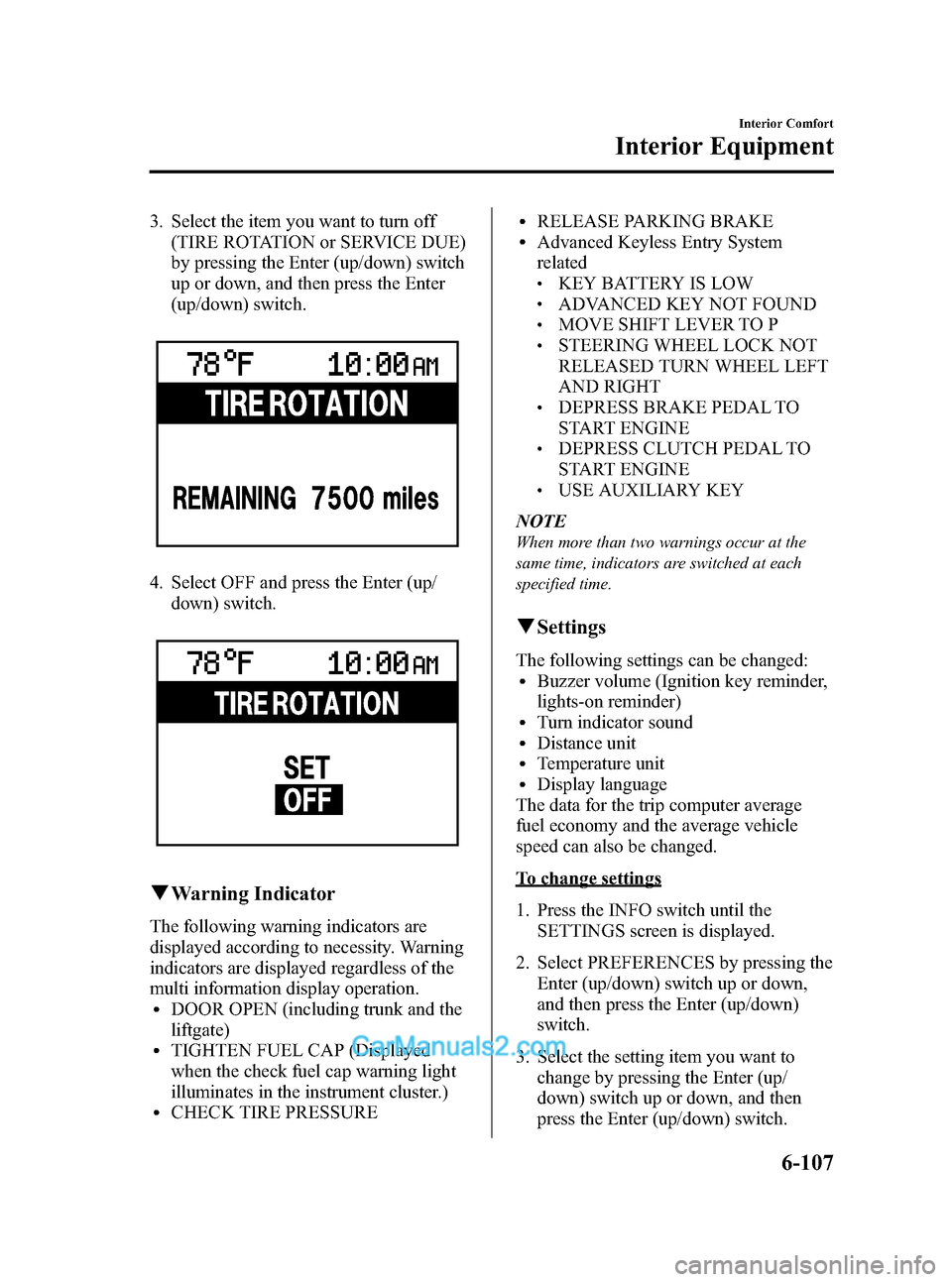
3. Select the item you want to turn off
(TIRE ROTATION or SERVICE DUE)
by pressing the Enter (up/down) switch
up or down, and then press the Enter
(up/down) switch.
4. Select OFF and press the Enter (up/
down) switch.
qWarning Indicator
The following warning indicators are
displayed according to necessity. Warning
indicators are displayed regardless of the
multi information display operation.
lDOOR OPEN (including trunk and the
liftgate)
lTIGHTEN FUEL CAP (Displayed
when the check fuel cap warning light
illuminates in the instrument cluster.)
lCHECK TIRE PRESSURE
lRELEASE PARKING BRAKElAdvanced Keyless Entry System
related
lKEY BATTERY IS LOWlADVANCED KEY NOT FOUNDlMOVE SHIFT LEVER TO PlSTEERING WHEEL LOCK NOT
RELEASED TURN WHEEL LEFT
AND RIGHT
lDEPRESS BRAKE PEDAL TO
START ENGINE
lDEPRESS CLUTCH PEDAL TO
START ENGINE
lUSE AUXILIARY KEY
NOTE
When more than two warnings occur at the
same time, indicators are switched at each
specified time.
qSettings
The following settings can be changed:lBuzzer volume (Ignition key reminder,
lights-on reminder)
lTurn indicator soundlDistance unitlTemperature unitlDisplay language
The data for the trip computer average
fuel economy and the average vehicle
speed can also be changed.
To change settings
1. Press the INFO switch until the
SETTINGS screen is displayed.
2. Select PREFERENCES by pressing the
Enter (up/down) switch up or down,
and then press the Enter (up/down)
switch.
3. Select the setting item you want to
change by pressing the Enter (up/
down) switch up or down, and then
press the Enter (up/down) switch.
Interior Comfort
Interior Equipment
6-107
Mazda3_8BM5-EA-10F_Edition2 Page339
Monday, July 26 2010 1:54 PM
Form No.8BM5-EA-10F
Page 498 of 508
Black plate (498,1)
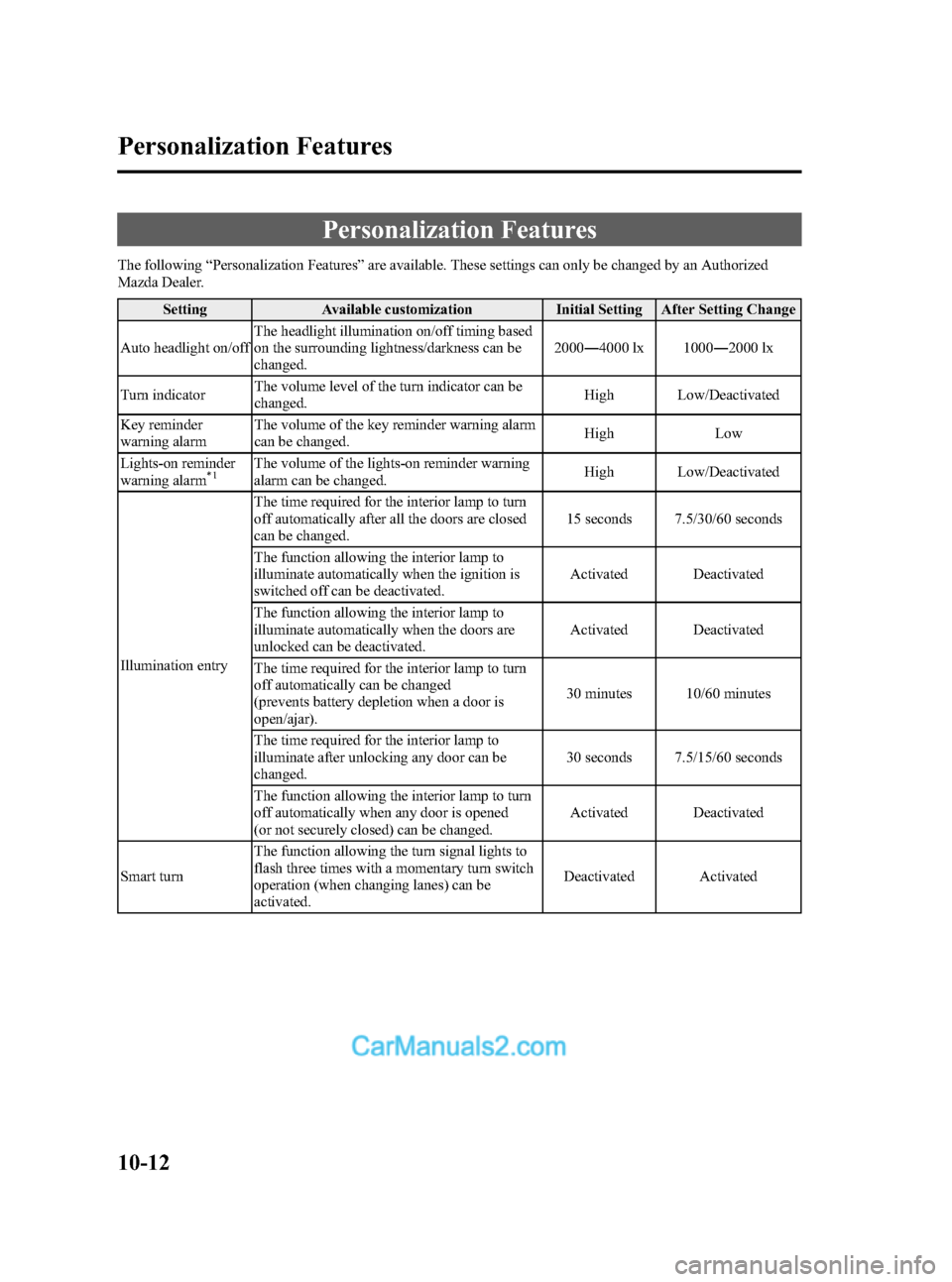
Personalization Features
The following“Personalization Features”are available. These settings can only be changed by an Authorized
Mazda Dealer.
Setting Available customization Initial Setting After Setting Change
Auto headlight on/offThe headlight illumination on/off timing based
on the surrounding lightness/darkness can be
changed.2000―4000 lx 1000―2000 lx
Turn indicatorThe volume level of the turn indicator can be
changed.High Low/Deactivated
Key reminder
warning alarmThe volume of the key reminder warning alarm
can be changed.High Low
Lights-on reminder
warning alarm
*1The volume of the lights-on reminder warning
alarm can be changed.High Low/Deactivated
Illumination entryThe time required for the interior lamp to turn
off automatically after all the doors are closed
can be changed.15 seconds 7.5/30/60 seconds
The function allowing the interior lamp to
illuminate automatically when the ignition is
switched off can be deactivated.Activated Deactivated
The function allowing the interior lamp to
illuminate automatically when the doors are
unlocked can be deactivated.Activated Deactivated
The time required for the interior lamp to turn
off automatically can be changed
(prevents battery depletion when a door is
open/ajar).30 minutes 10/60 minutes
The time required for the interior lamp to
illuminate after unlocking any door can be
changed.30 seconds 7.5/15/60 seconds
The function allowing the interior lamp to turn
off automatically when any door is opened
(or not securely closed) can be changed.Activated Deactivated
Smart turnThe function allowing the turn signal lights to
flash three times with a momentary turn switch
operation (when changing lanes) can be
activated.Deactivated Activated
10-12
Personalization Features
Mazda3_8BM5-EA-10F_Edition2 Page498
Monday, July 26 2010 1:55 PM
Form No.8BM5-EA-10F
Page 500 of 508
Black plate (500,1)
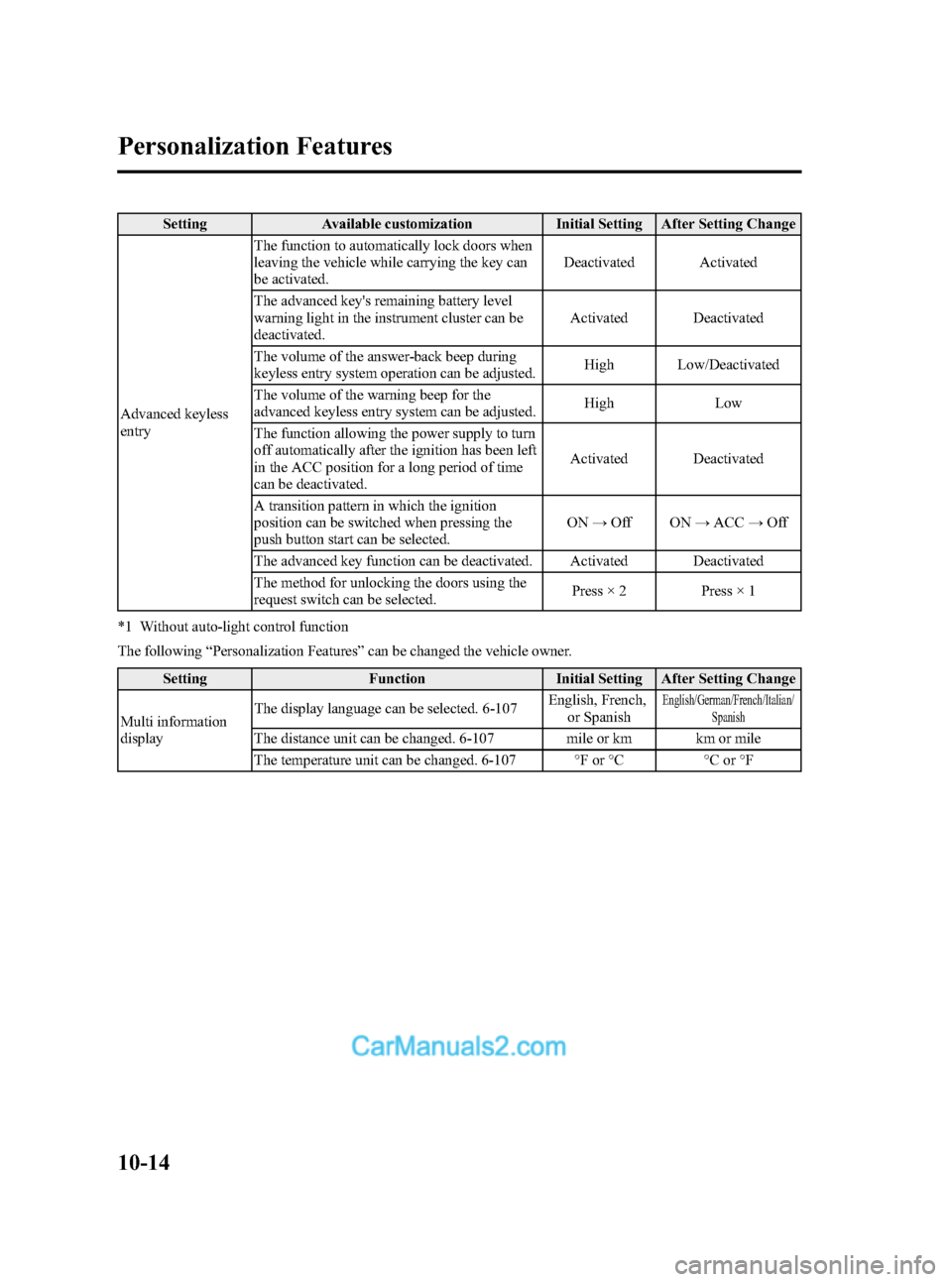
Setting Available customization Initial Setting After Setting Change
Advanced keyless
entryThe function to automatically lock doors when
leaving the vehicle while carrying the key can
be activated.Deactivated Activated
The advanced key's remaining battery level
warning light in the instrument cluster can be
deactivated.Activated Deactivated
The volume of the answer-back beep during
keyless entry system operation can be adjusted.High Low/Deactivated
The volume of the warning beep for the
advanced keyless entry system can be adjusted.High Low
The function allowing the power supply to turn
off automatically after the ignition has been left
in the ACC position for a long period of time
can be deactivated.Activated Deactivated
A transition pattern in which the ignition
position can be switched when pressing the
push button start can be selected.ON→Off ON→ACC→Off
The advanced key function can be deactivated. Activated Deactivated
The method for unlocking the doors using the
request switch can be selected.Press × 2 Press × 1
*1 Without auto-light control function
The following“Personalization Features”can be changed the vehicle owner.
Setting Function Initial Setting After Setting Change
Multi information
displayThe display language can be selected. 6-107English, French,
or Spanish
English/German/French/Italian/
Spanish
The distance unit can be changed. 6-107 mile or km km or mile
The temperature unit can be changed. 6-107 °F or °C °C or °F
10-14
Personalization Features
Mazda3_8BM5-EA-10F_Edition2 Page500
Monday, July 26 2010 1:55 PM
Form No.8BM5-EA-10F
Page 502 of 508

Black plate (502,1)
A
Accessory Socket ............................ 6-113
Adaptive Front Lighting System
(AFS) ................................................ 5-63
Add-On Non-Genuine Parts and
Accessories ....................................... 9-19
Advanced Key ..................................... 3-2
Advanced key maintenance ......... 3-5
Advanced key suspend
function ...................................... 3-21
Auxiliary key .............................. 3-21
Locking, unlocking with request
switch ........................................... 3-9
Opening the liftgate/trunk lid ..... 3-11
Operational range ......................... 3-7
Remote control function ............. 3-17
Service ......................................... 3-7
Warning and beep sounds .......... 3-22
When warning indicator/beep is
activated ..................................... 3-25
Air Bag Systems ............................... 2-43
Antenna ............................................. 6-16
Anti-Lock Brake System (ABS) ......... 5-8
Warning light ............................... 5-9
Appearance Care ............................... 8-60
Audio System ................................... 6-16
Audio control switch .................. 6-56
Audio set .................................... 6-27
AUX mode ................................. 6-59
Operating tips for audio
system ........................................ 6-17
Safety certification ..................... 6-61
Automatic Transaxle
Driving tips ................................ 5-19
Fluid ........................................... 8-24
Manual shift mode ..................... 5-16
Shift-lock override ..................... 5-15
Shift-lock system ....................... 5-15
Transaxle ranges ........................ 5-14
B
Battery
Emergency starting .................... 7-17
Maintenance ............................... 8-31
Specifications ............................. 10-4
Beep Sounds
Ignition key reminder ................. 5-57
Lights-on reminder ..................... 5-57
Seat belt warning ........................ 5-57
Tire inflation pressure warning ... 5-58
Before Starting the Engine .................. 4-6
After getting in ............................. 4-6
Before getting in .......................... 4-6
Bluetooth Audio ............................... 6-62
Bluetooth Hands-Free ....................... 6-71
Basic Bluetooth Hands-Free
operation .................................... 6-75
Convenient use of the hands-free
system ........................................ 6-80
Hands-free setting ...................... 6-86
Mazda Bluetooth Hands-Free
customer service ......................... 6-93
Safety certification ..................... 6-93
When Bluetooth Hands-Free cannot
be used ....................................... 6-92
Body Lubrication .............................. 8-27
Boost Gauge ..................................... 5-39
Bottle Holder ................................... 6-109
Brake/Clutch
Fluid ........................................... 8-23
Brakes
Anti-lock brake system (ABS) ..... 5-8
Brakes assist ............................... 5-10
Foot brake .................................... 5-5
Parking brake ............................... 5-7
Warning light ............................... 5-8
Break-In Period ................................... 4-7
Bulb Replacement ............................. 8-42
11-2
Index
Mazda3_8BM5-EA-10F_Edition2 Page502
Monday, July 26 2010 1:55 PM
Form No.8BM5-EA-10F