brakes MAZDA MODEL MX-30 EV 2022 User Guide
[x] Cancel search | Manufacturer: MAZDA, Model Year: 2022, Model line: MODEL MX-30 EV, Model: MAZDA MODEL MX-30 EV 2022Pages: 547, PDF Size: 79.35 MB
Page 212 of 547

Antilock Brake System(ABS)
▼Antilock Brake System (ABS)
The ABS control unit continuously
monitors the speed of each wheel. If
one wheel is about to lock up, the ABS
responds by automatically releasing
and reapplying that wheel's brake.
The driver will feel a slight vibration in
the brake pedal and may hear a
chattering noise from the brake system.
This is normal ABS system operation.
Continue to depress the brake pedal
without pumping the brakes.
The warning light turns on when the
system has a malfunction.
Refer to ABS Warning Indication/
Warning Light on page 7-26.
WARNING
Do not rely on ABS as a substitute for
safe driving:
The ABS cannot compensate for unsafe
and reckless driving , excessive speed,
tailgating (following another vehicle
too closely), driving on ice and snow,
and hydroplaning (reduced tire friction
and road contact because of water on
the road surface). You can still have an
accident.
NOTE
Braking distances may be longer on
loose surfaces (snow or gravel, for
example) which usually have a hard
foundation. A vehicle with a normal
braking system may require less
distance to stop under these
conditions because the tires will
build up a wedge of surface layer
when the wheels skid.
You might hear the sound of a motor
when starting the EV system or
immediately after starting to drive
the vehicle. However, it does not
indicate a problem.
When Driving
ABS/TCS/DSC
4-63
MX
-30_8JD4-EA -21G_Edition2_new 2021-5-18 14:38:07
Page 260 of 547

Mazda Radar Cruise
Control with Stop & Go function (MRCC with
Stop & Go function)
*
▼ Mazda Radar Cruise Control with
Stop & Go function (MRCC with
Stop & Go function)
The MRCC with Stop & Go function is
a system designed to enable
constant-speed driving at a set speed
and headway control to maintain a
constant distance with a vehicle ahead
according to your vehicle speed. The
system automatically accelerates,
decelerates, and stops your vehicle
without you having to depress the
accelerator or brake pedal.
Also refer to the following information
before using the MRCC with Stop &
Go function.
Refer to Forward Sensing Camera
(FSC) on page 4-71.
Refer to Front Radar Sensor on page
4-77.
WARNING
Do not rely completely on the MRCC
with Stop & Go function and always
drive carefully:
The MRCC with Stop & Go function
may not be able to detect a vehicle
ahead depending on the type of
vehicle and its conditions, the weather
conditions, and the road conditions.
Additionally, the system might be
unable to decelerate su
fficiently if the
vehicle ahead applies the brakes
suddenly or another vehicle cuts into
your lane, which could result in an
accident.
Always check the surrounding
conditions and depress the brake
pedal or accelerator pedal while
keeping a safe distance from a vehicle
ahead or a vehicle following behind
you.
Do not use the system under the
following conditions. Otherwise, it
may result in an accident:
The vehicle is driven on roads other
than highways.
The vehicle is driven on roads with
sharp curves or with heavy tra ffic
where su fficient distances between
vehicles cannot be kept.
The vehicle is driven on roads where
acceleration and deceleration are
frequently repeated.
The vehicle is exiting the main lane
on an expressway to enter an
interchange, a rest area, or a parking
area.
The vehicle is driven on slippery
roads such as icy roads,
snow-covered roads, and unpaved
roads.
The vehicle is driven on a long
downslope.
The vehicle is driven on a steep
slope.
A two-wheeled vehicle such as a
motorcycle or bicycle is traveling
ahead.
The vehicle is being towed.
Proximity warnings activate
frequently.
Switch the MRCC with Stop & Go
function off when it is not being used.
Leaving the MRCC with Stop & Go
function on when it is not in use is
dangerous as it could operate
unexpectedly, resulting in an accident.
When Driving
i-ACTIVSENSE
*Some models.4-111
MX -30_8JD4-EA -21G_Edition2_new 2021-5-18 14:38:07
Page 261 of 547
Do not get out of the vehicle while
the stop hold control is operating.
Getting out of the vehicle while the
stop hold control is operating is
dangerous as the vehicle may move
unexpectedly and result in an accident.
Before leaving the vehicle, switch the
MRCC with Stop & Go function off,
shift the selector lever to the P
position, and apply the parking brake.
NOTE
The MRCC with Stop & Go function
does not operate with the following
objects.
On-coming vehiclesPe de st r i a nsStationary objects (such as
stopped vehicles, obstructions)
If a vehicle ahead is traveling at an
extremely low speed, the system may
not detect it correctly.
A brake operation sound may be
heard by the MRCC with Stop & Go
function control, however it does not
indicate a problem.
The brake lights turn on while the
brakes and stop hold control are
operating by the MRCC with Stop &
Go function control.
If the distance between vehicles
control is disabled using [Settings] in
Mazda Connect, the MRCC with
Stop & Go function switches to
cruise control.
Refer to the Settings section in the
Mazda Connect Owner's Manual.
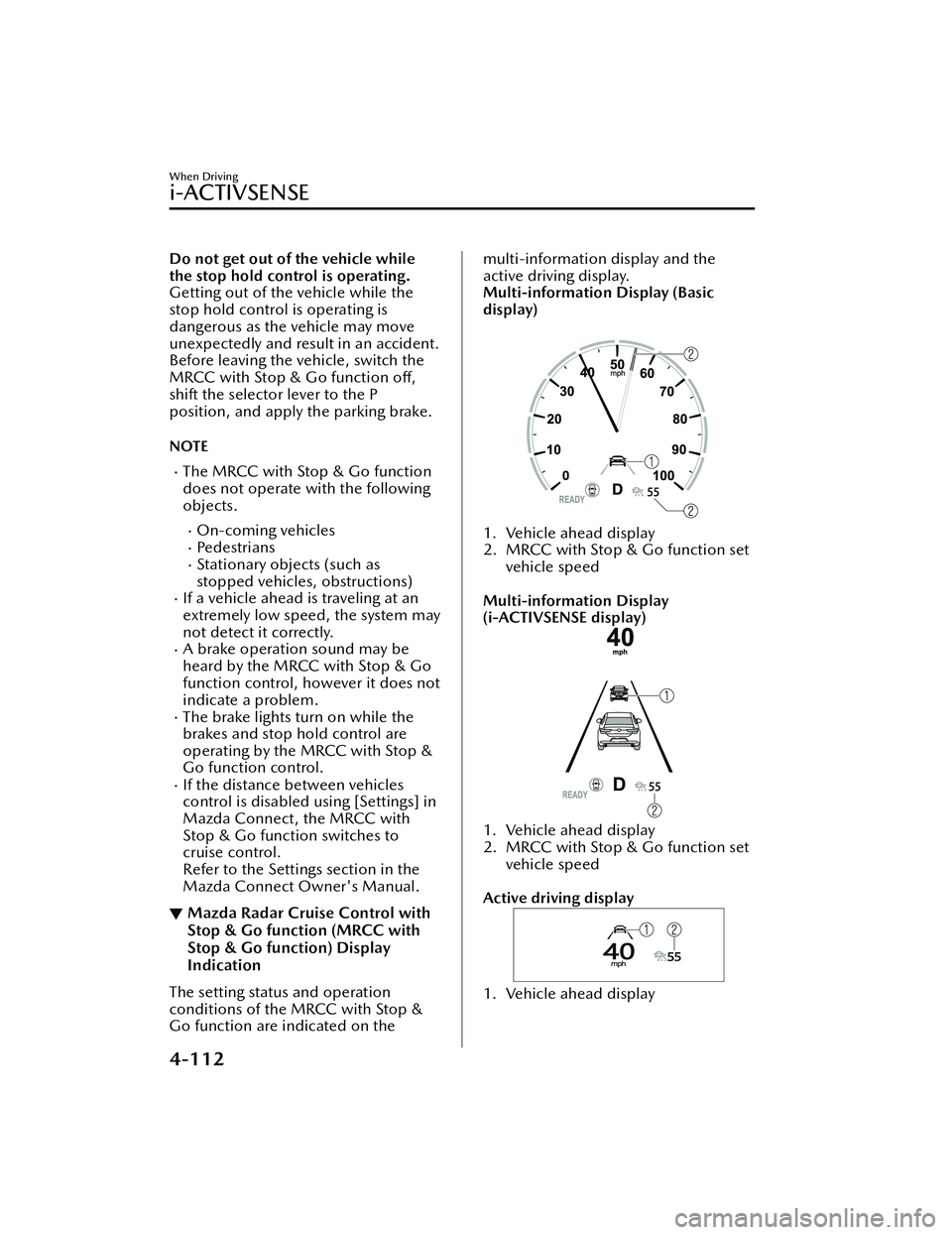
▼ Mazda Radar Cruise Control with
Stop & Go function (MRCC with
Stop & Go function) Display
Indication
The setting status and operation
conditions of the MRCC with Stop &
Go function are indicated on the
multi-information display and the
active driving display.
Multi-information Display (Basic
display)
1. Vehicle ahead display
2. MRCC with Stop & Go function set
vehicle speed
Multi-information Display
(i-ACTIVSENSE display)
1. Vehicle ahead display
2. MRCC with Stop & Go function set vehicle speed
Active driving display
1. Vehicle ahead display
When Driving
i-ACTIVSENSE
4-112
MX -30_8JD4-EA -21G_Edition2_new 2021-5-18 14:38:07
Page 262 of 547

2. MRCC with Stop & Go function setvehicle speed
If there is a problem with the MRCC
with Stop & Go function, messages are
displayed on the displays. Check the
details of the problem and then have
your vehicle inspected by an
Authorized Mazda Dealer.
Refer to If a Warning Light Turns On or
Flashes on page 7-21.
▼ Close Proximity Warning
If your vehicle approaches a vehicle
ahead while in headway control using
the Mazda Radar Cruise Control with
Stop & Go function (MRCC with Stop
& Go function), a warning sound is
activated and a brake warning is
displayed on the multi-information
display. Check the surrounding
conditions and keep a safe distance
from the vehicle ahead.
1. “Depress Brake Pedal” message is
displayed
CAUTION
While the accelerator pedal is being
depressed, the warnings and brake
control do not operate even if your
vehicle approaches the vehicle
ahead.
In the following cases, the warnings
and brakes may not operate even if
your vehicle approaches the vehicle
ahead.
Your vehicle is being driven at the
same speed as the vehicle ahead.
Immediately after the MRCC with
Stop & Go function is set.
Immediately after the accelerator
pedal is released.
Another vehicle cuts into the
driving lane.
When Driving
i-ACTIVSENSE
4-113
MX -30_8JD4-EA -21G_Edition2_new 2021-5-18 14:38:07
Page 267 of 547

Traffic Jam Assist (TJA)*
▼ Tra
ffic Jam Assist (TJA)
The TJA is a system designed to reduce
driver fatigue during
traffic jams when
driving on expressways or highways.
The TJA consists of a headway control
function and a steering assist function.
Headway control function
The function performs headway
control to maintain a constant distance
between your vehicle and a vehicle
ahead at a preset vehicle speed
without you having to depress the
accelerator or brake pedal.
Steering assist function
When vehicle lane lines are detected,
the function assists your steering
operation to follow the vehicle lane
lines.
When vehicle lane lines are not
detected, the function assists your
steering operation to follow the
trajectory of the vehicle ahead.
Also refer to the fo llowing information
before using the TJA.
Refer to Forward Sensing Camera
(FSC) on page 4-71.
Refer to Front Radar Sensor on page
4-77.
WARNING
Do not rely completely on the TJA and
always drive carefully:
The TJA is not an automated driving
system. Therefore, the function has
limitations. Do not rely completely
on the system and always stay on
course using the steering wheel.
Set a vehicle speed within the speed
limit according to the road
conditions and the weather
conditions.
The TJA may not be able to detect a
vehicle ahead depending on the type
of vehicle ahead and its conditions,
the weather conditions, and the road
conditions. Additionally, the system
might be unable to decelerate
suffi ciently if the vehicle ahead
applies the brakes suddenly or
another vehicle cuts into your lane,
which could result in an accident.
Do not use the system under the
following conditions. Otherwise, it
may result in an accident:
The vehicle is driven on roads other
than expressways and highways.
The vehicle is driven on roads with
sharp curves or with heavy tra ffic
where su fficient distances between
vehicles cannot be kept.
The vehicle is driven on roads where
acceleration and deceleration are
frequently repeated.
The vehicle is exiting the main lane
on an expressway to enter an
interchange, a rest area, or a parking
area.
The vehicle is driven on slippery
roads such as icy roads,
snow-covered roads, and unpaved
roads.
The vehicle is driven on a long
downslope.
The vehicle is driven on a steep
slope.
A two-wheeled vehicle such as a
motorcycle or bicycle is traveling
ahead.
The vehicle is being towed.
Proximity warnings activate
frequently.
When Driving
i-ACTIVSENSE
4-118*Some models.
MX -30_8JD4-EA -21G_Edition2_new 2021-5-18 14:38:07
Page 268 of 547

Under bad weather conditions (rain,
fog , and snow).
Tires other than the speci fied size are
used, such as when tire chains or
temporary spare tires are used.
Switch the TJA off when it is not being
used.
Leaving the TJA on when it is not in use
is dangerous as it could operate
unexpectedly, resulting in an accident.
Do not get out of the vehicle while
the stop hold control is operating.
Getting out of the vehicle while the
stop hold control is operating is
dangerous as the vehicle may move
unexpectedly and result in an accident.
Before leaving the vehicle, switch the
TJ A off, shift the selector lever to the P
position, and apply the parking brake.
NOTE
The TJA does not operate with the
following objects.
On-coming vehiclesPe d e s t r i a n sStationary objects (such as
stopped vehicles, obstructions)
If a vehicle ahead is traveling at an
extremely low speed, the system may
not detect it correctly.
A brake operation sound may be
heard by the TJA control, however, it
does not indicate a problem.
The brake lights turn on while the
brakes and stop hold control are
operating by the TJA control.
When any of the following
conditions is met, the TJA may not be
able to detect white (yellow) lane
lines or vehicles ahead correctly and
the TJA may not operate normally.
A condition under which the
Forward Sensing Camera (FSC)
cannot detect a target object is
met.
Refer to Forward Sensing Camera
(FSC) on page 4-71.
The Forward Sensing Camera (FSC)
cannot recognize the area in front
of the vehicle.
The visibility of white (yellow) lane
lines is poor.
There are multiple white (yellow)
lane lines.
There is a misleading line which
looks like a white (yellow) lane
line.
The distance to the vehicle ahead
is close.
The width of the vehicle lane is
narrow or wide.
A vehicle ahead is driving
erratically.
A vehicle ahead veers o ff course
from your vehicle's line of travel.
The vehicle is driven through an
intersection, a junc tion, or a fork in
the road.
▼ Tra
ffic Jam Assist (TJA) Display
Indication
The TJA setting status and operation
conditions are indicated on the
multi-information display and the
active driving display.
When Driving
i-ACTIVSENSE
4-119
MX -30_8JD4-EA -21G_Edition2_new 2021-5-18 14:38:07
Page 270 of 547

Active (lane line)
If there is a problem with the TJA, a
message is displayed on the display.
Check the details of the problem and
then have your vehicle inspected by an
Authorized Mazda Dealer.
Refer to If a Warning Light Turns On or
Flashes on page 7-21.
▼Steering Assist Limit Warning
If the steering assist function cannot
keep the vehicle within the lane lines,
a warning sound is activated and the
lane line of the direction reaching the
limit is displayed on the
multi-information display to urge you
to operate the steering wheel.
▼Close Proximity Warning
If your vehicle approaches the vehicle
ahead while traveling under headway
control using the Tra
ffic Jam Assist
(TJA), a warning sound is activated and
a brake warning is indicated on the
multi-information display. Check the
surrounding conditions and keep a
safe distance from the vehicle ahead.
1. “Depress Brake Pedal” message is displayed
CAUTION
While the accelerator pedal is being
depressed, the warnings and brake
control do not operate even if your
vehicle approaches the vehicle
ahead.
In the following cases, the warnings
and brakes may not operate even if
your vehicle approaches the vehicle
ahead.
Your vehicle is being driven at the
same speed as the vehicle ahead.
Immediately after the Tra ffic Jam
Assist (TJA) is set.
Immediately after the accelerator
pedal is released.
Another vehicle cuts into the
driving lane.
When Driving
i-ACTIVSENSE
4-121
MX -30_8JD4-EA -21G_Edition2_new 2021-5-18 14:38:07
Page 285 of 547
Smart Brake Support(SBS)
*
▼Smart Brake Support (SBS)
The SBS is a system designed to detect
target objects using sensors and
cameras equipped on the vehicle, and
to reduce damage in the event of a
collision by operating the brake control
if there is the possibi
lity of your vehicle
colliding with a target object.
One part of the SBS functions when
you are driving forward and the other
part functions when you are driving in
reverse.
Refer to Forward drive detection on
page 4-136.
Refer to Reverse drive detection on
page 4-138.
▼ Forward drive detection
When you are driving forward, the
following functions of the Smart Brake
Support (SBS) operate.
Forward detection function
WARNING
Do not rely completely on the
SBS:
The SBS is only designed to reduce
damage in the event of a collision.
The system may not operate normally
depending on the target object,
weather conditions, or tra ffic
conditions. Over reliance on the
system leading to the accelerator pedal
or brake pedal being mistakenly
operated could result in an accident.
CAUTION
In the following cases, turn the SBS o ff
to prevent a mis-operation.
The vehicle is being towed.
The vehicle is driven on rough roads
such as in areas where there is grass
and foliage or o ff-road.
Refer to Stopping the Smart Brake
Support (SBS) System Operation on
page 4-143.
Forward detection function
The forward detection function is
designed to reduce damage in the
event of a collision with target objects
at the front.
The forward detection function detects
target objects (vehicles ahead,
pedestrians, and bicycles) using the
front radar sensor and the Forward
Sensing Camera (FSC). If there is a
possibility of your vehicle colliding with
a target object at the front, you are
noti fied of possible danger by a
warning sound and a warning
indication on the display.
Furthermore, if the possibility of a
collision increases, the brake control is
performed to reduce damage in the
event of a collision. In addition, when
the driver depresses the brake pedal,
the brakes are applied firmly and
quickly to assist.
(Vehicles with Driver Monitoring
(DM))
If the system determines that the driver
is not paying attention to the road, it
activates the collision warning earlier
than normal.
Operation conditions
The forward detection function
operates when all of the following
conditions are met.
The power switch is switched ON.The SBS is on.(Object is vehicle ahead)
When Driving
i-ACTIVSENSE
4-136*Some models.
MX -30_8JD4-EA -21G_Edition2_new 2021-5-18 14:38:07
Page 286 of 547

The vehicle speed is about 4 km/h
(3 mph) or higher.
(Object is a pedestrian or bicycle)
The vehicle speed is between about
10 and 80 km/h (6.3 to 49 mph).
The DSC does not operate.
NOTE
When any of the following
conditions is met, the forward
detection function may not operate.
If there is the possibility of hitting
only a part of a vehicle or
obstruction ahead.
You are driving your vehicle at the
same speed as the vehicle ahead.
When the driver deliberately
performs driving operations
(accelerator operation, steering
wheel operation).
The accelerator pedal is depressed
abruptly.
The brake pedal is depressed.The steering wheel is being
operated.
The selector lever is being shifted.The turn signal lever is being
operated.
Warnings and messages, such as a
dirty windshield, related to the
Forward Sensing Camera (FSC) or
front radar sensor are being
displayed on the multi-information
display.
When any of the following
conditions is met, the forward
detection function may operate.
There is an object in the road at
the entrance to a curve (including
guardrails and snow banks).
Passing an approaching vehicle
while rounding a curve.
When crossing a narrow bridge,
going under a low overhang, or
passing through a narrow gate, a
car washing machine, or tunnel.
When passing through a toll gate.When entering an underground
parking area.
There is a metal object, bump, or a
protruding object on the road.
If you suddenly come close to a
vehicle ahead.
An animal, wall, or standing tree is
detected.
While the system is operating, the
driver is notified by the
multi-information display and the
active driving display.
If a malfunction is detected or the
system temporarily stops the
function due to dirt on the sensors or
cameras, the i-ACTIVSENSE warning
light turns on and a message is
displayed on the multi-information
display.
If the system performs brake control
and the vehicle is stopped, the
system will continue to hold the
brakes for a brief time unless there is
an operation performed by the
driver.
Collision warning
If there is the possibility of your vehicle
colliding with a target object at the
front, the warning sound is activated
continuously and a warning is
displayed on the multi-information
display and the active driving display.
When Driving
i-ACTIVSENSE
4-137
MX -30_8JD4-EA -21G_Edition2_new 2021-5-18 14:38:07
Page 289 of 547

The obstruction is soft such as a
hanging curtain or snow stuck to a
vehicle.
The obstruction is shaped
irregularly.
The obstruction is extremely close.When any of the following
conditions is met, the rearward
detection function may not operate
normally.
Snow, ice, or mud adheres to the
area around a rear ultrasonic
sensor.
The vehicle posture is unstable due
to sudden operation of the steering
wheel, accelerator pedal, or brake
pedal.
There is another obstruction near
one obstruction.
During inclement weather such as
rain, fog , and snow.
High or low humidity.High or low temperatures.Strong winds.The path of travel is not flat.Heavy luggage is loaded in the
luggage compartment or on the
rear seat and the vehicle is tilted.
Objects such as a wireless antenna,
fog light, or illuminated license
plate is installed near a rear
ultrasonic sensor.
The orientation of a rear ultrasonic
sensor has deviated for reasons
such as a collision.
The vehicle is a ffected by other
sound waves such as the horn,
engine noise, or rear ultrasonic
sensor of another vehicle.
When any of the following
conditions is met, the rearward
detection function may operate.
Reversing towards a steep
ascending slope.
There are grating, wheel blocks, a
road curb, or a bump.
There is a hanging curtain or
railroad crossing gate.
Reversing near objects such as
foliage, barriers, vehicles, walls, or
fences.
The vehicle is driven on rough
roads such as in areas where there
is grass and foliage or o ff-road.
When reversing through low gates,
narrow gates, car washing
machines, tunnels, or into a
mechanical parking garage.
A towing bar is installed or a trailer
is connected.
If the system performs brake control
and the vehicle is stopped, the
system will continue to hold the
brakes for a brief time unless there is
an operation performed by the
driver.
Collision warning
If there is the possibility of your vehicle
colliding with a vehicle approaching
from the rear on the left or right, or
from the rear while you are driving in
reverse, a warning sound is activated
continuously and a warning is
displayed on the multi-information
display and the active driving display.
Multi-information display
1. “BRAKE!” message is displayed
Active driving display
When Driving
i-ACTIVSENSE
4-140
MX -30_8JD4-EA -21G_Edition2_new 2021-5-18 14:38:07