change time MAZDA MODEL MX-30 EV 2022 User Guide
[x] Cancel search | Manufacturer: MAZDA, Model Year: 2022, Model line: MODEL MX-30 EV, Model: MAZDA MODEL MX-30 EV 2022Pages: 547, PDF Size: 79.35 MB
Page 116 of 547

NOTE
The system can be set to unlock all
the doors, liftgate, and charge lid
when pressing the unlock button
once.
Refer to the Settings section in the
Mazda Connect Owner's Manual.
(Auto re-lock function)
After unlocking with the key, all the
doors, liftgate, and charge lid will
automatically lock if any of the
following operations are not
performed within about 60 seconds.
The time required for the doors to
lock automatically can be changed.
Refer to the Settings section in the
Mazda Connect Owner's Manual.
A door or the liftgate is opened.The power switch is switched to
any position other than off.
Panic button
If you witness from a distance
someone attempting to break into or
damage your vehicle, press and hold
the panic button to activate the
vehicle's alarm. Call emergency
services if necessary.
NOTE
The panic button will work whether
any door or the liftgate is open or
closed.
(Turning on the alarm)
Pressing the panic button for 1 second
or more will trigger the alarm for about
2 minutes and 30 seconds, and the
following will occur:
The horn sounds intermittently.
The hazard warning lights flash.
(Turning off the alarm)
The alarm stops by pressing any button
on the key.
Po we r s av i n g f u nc t io n
By turning on the transmitter power
saving function, the advanced keyless
entry
*1 system functions turn off and
the battery power consumption of the
transmitter is restricted.
The remote control function is
operational by operating the
transmitter switch even while the
power saving function is turned on.
However, the operation indicator light
of the transmitter does not turn on/
fl ash.
Turning on the power saving function
After you have turned on the power
saving function according to the
following procedure, the hazard
warning lights and sound operate
*1
one time.
1. Press the lock button on the transmitter 4 times within 3
seconds to turn on the operation
indicator light.
2. Press the lock button continuously for 1.5 seconds or longer while the
operation indicator light turns on
(for 5 seconds).
3. Press any of the buttons on the transmitter to make sure that the
operation indicator light does not
turn on/fl ash.
Tu r n i n g o ff the power saving function
After you have turned off the power
saving function according to the
following procedure, the hazard
warning lights and sound operate
*1
one time.
Before Driving
Keys
3-29
MX -30_8JD4-EA -21G_Edition2_new 2021-5-18 14:38:07
Page 123 of 547

Locking
When locking, touch the sensing area
of the door lock touch sensor with all
of the following conditions met.
The power switch is switched OFF.All the doors are closed.You are carrying the transmitter.
The following locations are locked by
touching the sensing area of the door
lock touch sensor.
All doorsCharge lidLiftgate
When locking, the hazard warning
lights and sound operate one time.
Unlocking
When unlocking, touch the sensing
area of the door release touch sensor
with all of the following conditions
met.
The power switch is switched OFF.The driver’s door is locked.Three seconds or longer have passed
since the doors were locked.
You are carrying the transmitter.
(Unlocking from the driver's door)
The following locations are unlocked
by touching the sensing area of the
door release touch sensor of the
driver's door.
Driver’s doorCharge lid
NOTE
The location to be unlocked can be
changed.
Refer to the Settings section in the
Mazda Connect Owner's Manual.
When unlocking , the hazard warning
lights and sound operate two times.
(Unlocking from the front passenger’s
door)
The following locations are unlocked
by touching the sensing area of the
door release touch sensor of the front
passenger's door.
All doorsCharge lidLiftgate
When unlocking , the hazard warning
lights and sound operate two times.
NOTE
Con firm that all the doors and
liftgate are securely locked.
For the liftgate, move it without
pressing the electric liftgate opener
to verify that the liftgate has not been
left ajar.
A beep sound is heard for con firmation when the doors, charge
lid, and liftgate are locked/unlocked
using the touch sensor. If you prefer,
the beep sound can be turned off.
The volume of the beep sound can
also be changed. Refer to the
Settings section in the Mazda
Connect Owner's Manual.
The setting can be changed so that
the doors, charge lid, and liftgate are
locked automatically without
touching the sensing area of the
touch sensor.
Refer to the Settings section in the
Mazda Connect Owner's Manual.
(Walk-away auto lock function)
Before Driving
Doors and Locks
3-36
MX -30_8JD4-EA -21G_Edition2_new 2021-5-18 14:38:07
Page 124 of 547

A beep sound is heard when all
doors and the liftgate are closed
while the transmitter is being carried.
All the doors, charge lid, and liftgate
are locked automatically when the
transmitter is out of the operational
range. Also, the hazard warning
lights flash once. (Even if the driver is
in the operational range, all the
doors, charge lid, and liftgate are
locked automatically after about 30
seconds.) If you are out of the
operational range before the doors
and the liftgate are completely
closed or another transmitter is left
in the vehicle, the walk-away auto
lock function will not work. Always
make sure that all doors and the
liftgate are closed and locked before
leaving the vehicle. The walk-away
auto lock function does not close the
power windows.
(Auto re-lock function)
After unlocking with the touch
sensor, all the doors , charge lid, and
liftgate will automatically lock if any
of the following operations are not
performed within about 60 seconds.
Opening a door or the liftgate.Switching the power switch to any
position other than o ff.
The time required for the doors to
lock automatically can be changed.
Refer to the Settings section in the
Mazda Connect Owner's Manual.
▼ Locking , Unlocking with
Transmitter
The following locations can be locked/
unlocked by operating the keyless
entry system transmitter. Refer to
Keyless Entry System (page 3-27).
All doorsCharge lid
Liftgate
▼
Locking, Unlocking with
Door-Lock Switch
Door-lock switch on driver’s and front
passenger's door
The following locations are locked/
unlocked by pressing the door-lock
switch.
All doorsCharge lidLiftgate
Driver's door
1. Unlock
2. Lock
Front passenger's door
1. Unlock
2. Lock
NOTE
To prevent the transmitter from being
left in the vehicle, make sure that you
carry the transmitter before locking.
Before Driving
Doors and Locks
3-37
MX -30_8JD4-EA -21G_Edition2_new 2021-5-18 14:38:07
Page 125 of 547

After locking by pressing the
door-lock switch and when the
liftgate is closed last with the
transmitter left in the vehicle, only
the liftgate is unlocked.
Locking from the outside using the
door-lock switch
When locking from the outside using
the door-lock switch, press the lock
side of the door-lock switch with all of
the following condit ions met and then
close all the doors.
The power switch is switched OFF.Any door is open.
NOTE
After locking by pressing the door-lock
switch and when all the doors are
closed with the transmitter left in the
vehicle, all the doors, liftgate, and
charge lid are unlocked.
Door-lock switch on liftgate (With the
advanced keyless function)
All doors, charge lid, and the liftgate
can be locked by pressing the
door-lock switch.
When locking using the door-lock
switch, press the door-lock switch with
all of the following conditions met and
then close the liftgate.
You are carrying the transmitter.The power switch is switched OFF.All the doors are closed.
When locking , the hazard warning
lights and a beep sound operate 1
time.
NOTE
To prevent the transmitter from being
left in the vehicle, make sure that you
carry the transmitter before locking.
After locking by pressing the
door-lock switch and when the
liftgate is closed with the transmitter
left in the vehicle, the liftgate is
unlocked.
▼ Auto Lock/Unlock Function
WARNING
Do not pull the inner handle on a
front door:
Pulling the inner handle on a front
door while the vehicle is moving is
dangerous. Passengers can fall out of
the vehicle if the door opens
accidentally, which could result in
death or serious injury.
When the vehicle speed exceeds 20
km/h (12 mph), all the doors,
charge lid, and liftgate lock
automatically.
When the power switch is switched
o ff, all the doors, charge lid, and
liftgate unlock automatically.
The auto lock/unlock function settings
can be changed.
Refer to the Settings section in the
Mazda Connect Owner's Manual.
Before Driving
Doors and Locks
3-38
MX -30_8JD4-EA -21G_Edition2_new 2021-5-18 14:38:07
Page 156 of 547

Spare keys or keys for other vehicles
equipped with an immobilizer
system touch or come near the key.
Devices for electronic purchases, or
security passage touch or come near
the key.
If the EV system cannot be started
because of a dead key battery, the EV
system can be started using the
following procedure:
1. Continue to depress the brake pedal firmly.
2. Make sure that the KEY indicator light in the instrument cluster and
power switch indicator light (green)
flashes.
3. Align the center area of the emblem on the transmitter with the
center area of the power switch
while the power switch indicator
light (green) flashes.
1. Indicator light
2. Power switch
3. Transmitter
4. Emblem
4. After the power switch indicator light (green) changes to full
illumination, press the power
switch.
NOTE
The EV system cannot start unless
the brake pedal is completely
depressed.
If there is a problem with starting
the EV system, the power switch
indicator light (amber) flashes. In
this case, the EV system could be
started, however, have the vehicle
inspected by an Authorized
Mazda Dealer as soon as
possible.
If the power switch indicator light
(green) does not turn on, perform
the operation from the beginning.
If it still does not turn on, have
the vehicle inspected by an
Authorized Mazda Dealer.
To change the power switch
position, release the brake pedal
after the power switch indicator
light (green) turns on, then press
the power switch.
The power switch is switched in
the order of OFF, ACC, and ON
each time it is pressed. Once the
power switch is switched OFF,
the power switch position can no
longer be changed. Therefore, to
start the EV system, perform the
operation from the beginning.
5. Make sure that the READY indication is displayed in the
instrument cluster.
When Driving
Starting and Stopping the EV System
4-7
MX -30_8JD4-EA -21G_Edition2_new 2021-5-18 14:38:07
Page 161 of 547

The screen content changes each time the INFO switch is pressed.
1. Basic display
2. Drive information display
3. i-ACTIVSENSE display
4. Charge status display
*1
When Driving
Instrument Cluster and Display
4-12
MX-30_8JD4-EA -21G_Edition2_new 2021-5-18 14:38:07
Page 164 of 547

current dimmer setting is at
maximum dimness.
1. Bright
2. Dim
Function for canceling illumination
dimmer
The illumination dimmer can be
canceled by pressing the + switch
while the instrument cluster is at
maximum dimness and while the
power switch is switched ON. If you
press the + switch again while the
illumination dimmer is canceled, a
sound is activated to notify you that it
is canceled. If the instrument cluster's
visibility is reduced due to glare from
surrounding brightness, cancel the
illumination dimmer.
NOTE
When the illumination dimmer is
canceled, the instrument cluster
cannot be dimmed even if the lights
are turned on.
When the illumination dimmer is
canceled, the screen in the center
display switches to constant display
of the daytime screen.
▼ Outside Temperature Display
When the power switch is switched
ON, the outside temperature is
displayed.
NOTE
Under the following conditions, the
outside temperature display may
di ffer from the actual outside
temperature depending on the
surroundings and vehicle conditions:
Signi ficantly cold or hot
temperatures.
Sudden changes in outside
temperature.
The vehicle is parked.The vehicle is driven at low speeds.
Changing the Temperature Unit of the
Outside Temperature Display
The outside temperature unit can be
switched between Celsius and
Fahrenheit.
Settings can be changed by operating
the center display screen.
Refer to the Settings section in the
Mazda Connect Owner's Manual.
When Driving
Instrument Cluster and Display
4-15
MX -30_8JD4-EA -21G_Edition2_new 2021-5-18 14:38:07
Page 179 of 547

Switch the power switch ON.The selector lever is shifted to the P position.
NOTE
Neutral hold mode (automatic car wash mode) is canceled automatically after about
25 minutes have passed since it was operated, and the power switch is switched
OFF.
At this time, the AUTO P (parking lock) function operates and the shift position
changes to the P position.
Shift position restrictions
If you do any of the following operations, the shift position selection is restricted for
the purpose of safety.
Shift posi-tion be-
fore oper- ation Operation/driving
conditions Selector
lever oper-
ation Shift posi-
tion after
operation Action
N The brake pedal is
not depressed while
the vehicle is stop-
ped.
Shift to R
or D posi-
tionN
*1Release accelerator pedal and depress brake
pedal.
Shift position changes to R or D.
The accelerator pedal
is depressed while
the vehicle is stop-
ped.
R/D While driving (vehicle
speed of about 5
km/h (4 mph) or
faster) Shift to P
position
NMethod 1 for resolving problem
Depress brake pedal so that vehicle speed is
less than about 5 km/h (3 mph).
Shift position changes to P.
Method 2 for resolving problem
Return selector lever to position (R or D)
before operating it.
Shift position changes to position before
operating selector lever.
R While driving in re-
verse (vehicle speed
of about 10 km/h
(6.3 mph) or faster) Shift to D
position
NMethod 1 for resolving problem
Depress brake pedal so that vehicle speed is
less than about 10 km/h (6.2 mph).
Shift position changes to D.
Method 2 for resolving problem
Return selector lever to position (R) before
operating it.
Shift position changes to position before
operating selector lever.
When Driving
Selector Lever Position Functions
4-30
MX
-30_8JD4-EA -21G_Edition2_new 2021-5-18 14:38:07
Page 182 of 547

There is the possibility of forgetting
that the selector lever is shifted to
the R position when only reversing
the vehicle a little. After reversing the
vehicle, immediately shift the
selector lever to the N or P position,
and before starting to drive the
vehicle again, check the shift
position indication in the instrument
cluster.
When driving
WARNING
Do not shift the selector lever to the N
position while driving:
Decelerat ion using the regenerat ive
braking is not possible which could
result in an accident.
Normal driving
Shift the selector lever to the D
position to drive the vehicle.
Acceleration/deceleration is
performed using the accelerator and
brake pedals.
Driving on steep upslopes
Slowly depress the accelerator pedal to
adjust the vehicle speed.
Driving on downslopes
On long or steep downslopes, increase
the amount deceleration using the
regenerative braking in regenerative
braking level change mode.
CAUTION
On long downslopes, operate the
regenerative braking and the foot
brake together. Frequent
deceleration by depressing the brake
pedal could cause the disc brakes to
overheat and become ine ffective.
If only strong regenerative braking is
used continuously, it could stop
working temporarily.
Regeneration braking is less e ffective
the closer the high voltage battery is
to a full charge, and regeneration
braking will not work when the high
voltage battery is fully charged.
Stopping the vehicles
1. After completely stopping the vehicle, continue to depress the
brake pedal firmly.
2. If necessary, apply the parking brake with the brake pedal
depressed.
3. If the vehicle is going to be parked for a long time, shift the selector
lever to the P position with the
brake pedal depressed.
WARNING
Do not depress the accelerator pedal
unnecessarily while the vehicle is
stopped:
If the accelerator pedal is mistakenly
depressed when the selector lever is in
a position other than the P or N
position, the vehicle could suddenly
accelerate resulting in an accident.
After stopping the vehicle, check the
shift position indication in the
instrument cluster before
re-accelerating:
If the vehicle were to move in the
unintended direction, it could lead to
an accident.
CAUTION
Do not depress the accelerator pedal
and the brake pedal at the same time,
or rev the motor with the selector lever
in the forward drive position while the
vehicle is stopped on an upslope. The
motor could overheat and lead to
damage.
When Driving
Selector Lever Position Functions
4-33
MX -30_8JD4-EA -21G_Edition2_new 2021-5-18 14:38:07
Page 185 of 547
*2 During the daytime, the daytime running lights turn on automatically. During the nighttime, theheadlights, parking lights, taillights, and the license plate lights turn on automatically.
*3 During the daytime, the daytime running lights, parking lights, taillights, and the license plate lights
turn on automatically. During the nighttime, the headlights, parking lights, taillights, and the license
plate lights turn on automatically.
*4 When the light switch is switched to the OFF posit ion while the vehicle is stopped, all of the lights
that are turned on turn o ff. When the light switch is switched from a position other than
to the
position while the vehicle is stopped,the daytime running lights or the headlights turn o ff.
When starting to drive the vehicle, the lights that are turned o ff turn on again.
Auto-light control
When the power switch is switched ON, the light sensor detects the brightness of
the surrounding area and the headlights and the exterior lights turn on/off
automatically according to the surrounding brightness. When the power switch is
switched OFF, the headlights an d the exterior lights turn off automatically.
CAUTION
Do not shade the light sensor by adhering a sticker or a label on the windshield.
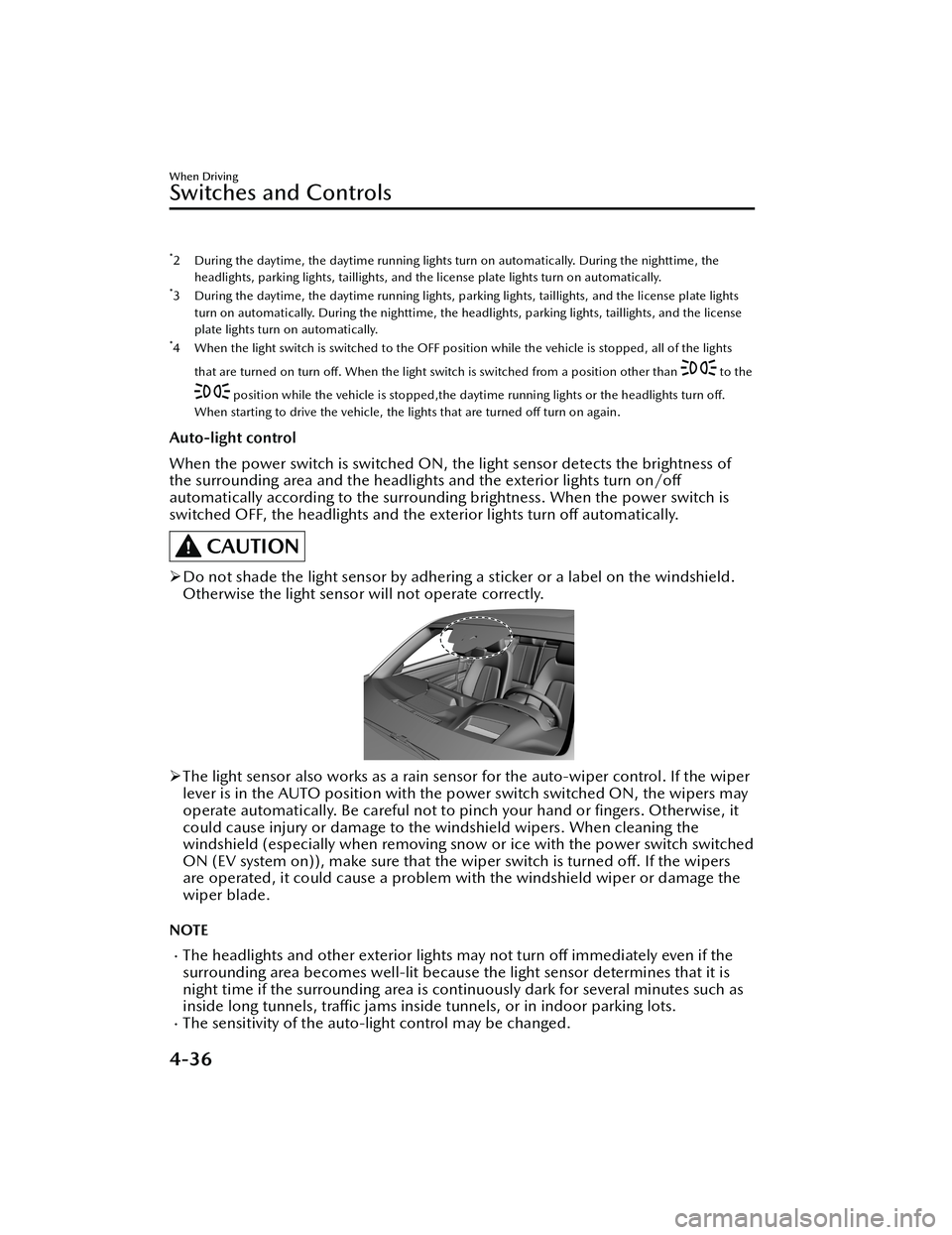
Otherwise the light sensor will not operate correctly.
The light sensor also works as a rain sensor for the auto-wiper control. If the wiper
lever is in the AUTO position with the power switch switched ON, the wipers may
operate automatically. Be careful not to pinch your hand or fingers. Otherwise, it
could cause injury or damage to the windshield wipers. When cleaning the
windshield (especially when removing snow or ice with the power switch switched
ON (EV system on)), make sure that the wiper switch is turned o ff. If the wipers
are operated, it could cause a problem wi th the windshield wiper or damage the
wiper blade.
NOTE
The headlights and other exte rior lights may not turn off immediately even if the
surrounding area becomes well-lit because the light sensor determines that it is
night time if the surrounding area is cont inuously dark for several minutes such as
inside long tunnels, traffi c jams inside tunnels, or in indoor parking lots.
The sensitivity of the auto-light control may be changed.
When Driving
Switches and Controls
4-36
MX-30_8JD4-EA -21G_Edition2_new 2021-5-18 14:38:07