high beam MAZDA MODEL MX-30 EV 2022 User Guide
[x] Cancel search | Manufacturer: MAZDA, Model Year: 2022, Model line: MODEL MX-30 EV, Model: MAZDA MODEL MX-30 EV 2022Pages: 547, PDF Size: 79.35 MB
Page 232 of 547

High Beam ControlSystem (HBC)
*
▼ High Beam Control System (HBC)
The HBC determines the conditions in
front of the vehicle using the Forward
Sensing Camera (FSC) while driving in
darkness to automatically switch the
headlights between high and low
beams.
CAUTION
Do not rely excessively on the HBC and
drive the vehicle while paying
sufficient
attention to safety. Switch the
headlights between the high beams
and low beams manually if necessary.
NOTE
The distance in which the HBC can
detect objects varies depending on
the surrounding conditions.
The Forward Sensing Camera (FSC)
may not be able to detect target
objects correctly, and the system may
not operate normally.
Refer to Forward Sensing Camera
(FSC) on page 4-71.
The system switches the headlights to
low beams when one of the following
occurs:
The vehicle is driven at less than
about 20 km/h (12 mph).
The system detects a vehicle or the
headlights/lights of a vehicle
approaching in the opposite
direction.
The vehicle is driven on roads lined
with streetlamps or on roads in
well-lit cities and towns.
The headlight high-beam indicator
light turns on while the high beams
are on.
While driving the vehicle at a speed of
about 30 km/h (19 mph) or more, the
headlights are switched to high beams
when there are no vehicles ahead or
approaching in the opposite direction.
▼ To Operate the System
The HBC operates to switch the
headlights automatically between high
and low beams after the power switch
is switched ON and the headlight
switch is in the AUTO and low beam
position.
The HBC determines that it is dark
based on the brightness of the
surrounding area. At the same time,
the HBC indicator light (green) in the
instrument cluster illuminates.
NOTE
Operation of the HBC function can be
disabled.
Refer to the Settings section in the
Mazda Connect Owner's Manual.
When Driving
i-ACTIVSENSE
*Some models.4-83
MX
-30_8JD4-EA -21G_Edition2_new 2021-5-18 14:38:07
Page 233 of 547

▼Manual Switching
Switching to low beams
Switch the headlight switch to the
position, or press the high beam
control switch.
The HBC indicator light (green) turns
o
ff.
1. High beam control switch
If the HBC is turned o ff using the high
beam control switch, press the high
beam control switch again to turn the
HBC back on.
Switching to high beams
Shift the lever to the high beam
position.
The HBC indicator light (green) turns
o ff and the headlight high-beam
indicator light is illuminated.
Lane Departure Warning
System (LDWS)
*
▼Lane Departure Warning System
(LDWS)
The LDWS noti
fies the driver that the
vehicle might be deviating from its
lane.
The LDWS detects white (yellow) lines
using the Forward Sensing Camera
(FSC). If your vehicle may be deviating
from its lane, the lane departure
warning noti fies the driver.
Use the LDWS when you drive the
vehicle on roads with white (yellow)
lines.
WARNING
Do not rely completely on the LDWS
and always drive carefully:
The LDWS is not designed to
compensate for a driver’s lack of
caution and relying too much on the
system could lead to an accident.
The functions of the LDWS have
limitations. Always stay on course
using the steering wheel.
When Driving
i-ACTIVSENSE
4-84*Some models.
MX -30_8JD4-EA -21G_Edition2_new 2021-5-18 14:38:07
Page 235 of 547

The brake pedal is operated.
The function is temporarily stopped.
The LDWS stops functioning in the
following cases:
The temperature in the Forward
Sensing Camera (FSC) is too high or
too low.
The windshield around the Forward
Sensing Camera (FSC) is foggy.
The windshield around the Forward
Sensing Camera (FSC) is blocked by
an obstruction, causing poor forward
visibility.
Strong light (such as sunlight, or
headlights (high-beam) of
on-coming vehicles) is directed at
the Forward Sensing Camera (FSC).
System malfunction
If there is a problem with the system,
the i-ACTIVSENSE status symbol
(warning/risk avoidance support
system) (white) and the i-ACTIVSENSE
warning indication/warning light on
the multi-information display turns on
and a message is indicated.
Refer to i-ACTIVSENSE Status Symbol
(Warning/Risk Avoidance Support
System) on page 4-69.
▼ Lane Departure Warning
If the system determines that the
vehicle may deviate from its lane, a
warning (beep sound, steering wheel
vibration) is activated and the direction
in which the system determines that
the vehicle may deviate is indicated on
the multi-information display and the
active driving display.
Multi-information display
Active driving display
NOTE
The LDWS settings can be changed.
Refer to the Settings section in the
Mazda Connect Owner's Manual.
You may not be able to hear the
LDWS warning sound depending on
the surrounding conditions such as
outside noise.
If you set the LDWS to vibrate the
steering wheel, you may not feel the
vibrations depending on the road
surface conditions.
▼
Canceling the System
The LDWS can be set to inoperable.
(If only the LDWS is turned o
ff)
Refer to the Settings section in the
Mazda Connect Owner's Manual.
(If the LDWS is turned o ff by
operating the i-ACTIVSENSE OFF
switch)
Refer to i-ACTIVSENSE OFF Switch
on page 4-70.
When Driving
i-ACTIVSENSE
4-86
MX -30_8JD4-EA -21G_Edition2_new 2021-5-18 14:38:07
Page 244 of 547
An object placed on the dashboard is reflected in the windshield and picked up
by the camera.
Heavy luggage is loaded in the luggage compartment or on the rear seat and the
vehicle is tilted.
The tire pressures are not adjusted to the speci fied pressure.Tires other than standard tires are equipped.The vehicle is driven on the ramp and surrounding area to or from a rest area or
a tollgate on a highway.
When surrounding brightness suddenly changes such as when entering or exiting
a tunnel.
The illumination of the headlights is weak ened because of dirt or the optical axis
is deviated.
The windshield is dirty or foggy.The windshield and camera are fogged (water droplets).Strong light is directed at the front of the vehicle (such as backlight or high-beam
headlights of on-coming vehicles).
The vehicle is making a sharp turn.Strong light re flects o ff the road.A tra ffic sign is in a position which makes it di fficult to re flect the light from the
vehicle's headlights, such as when the vehi cle is driven at night or in a tunnel.
The vehicle is driven under weather conditions such as rain, fog, or snow.The stored map data for the navigation system is not current.A traffic sign is obscured by mud or snow.A tra ffic sign is concealed by trees or a vehicle.A tra ffic sign is partially shaded.A tra ffic sign is bent or warped.A tra ffic sign is too low or too high.A tra ffic sign is too bright or too dark (including electronic tra ffic signs).A tra ffic sign is too big or too small.There is an object similar to the traffi c sign being read (such as another tra ffic
sign or other signs resembling it).
The TSR can be set to invisible on the active driving display.
Refer to the Settings section in the Mazda Connect Owner's Manual.
▼ Tra
ffic Sign Display Indication
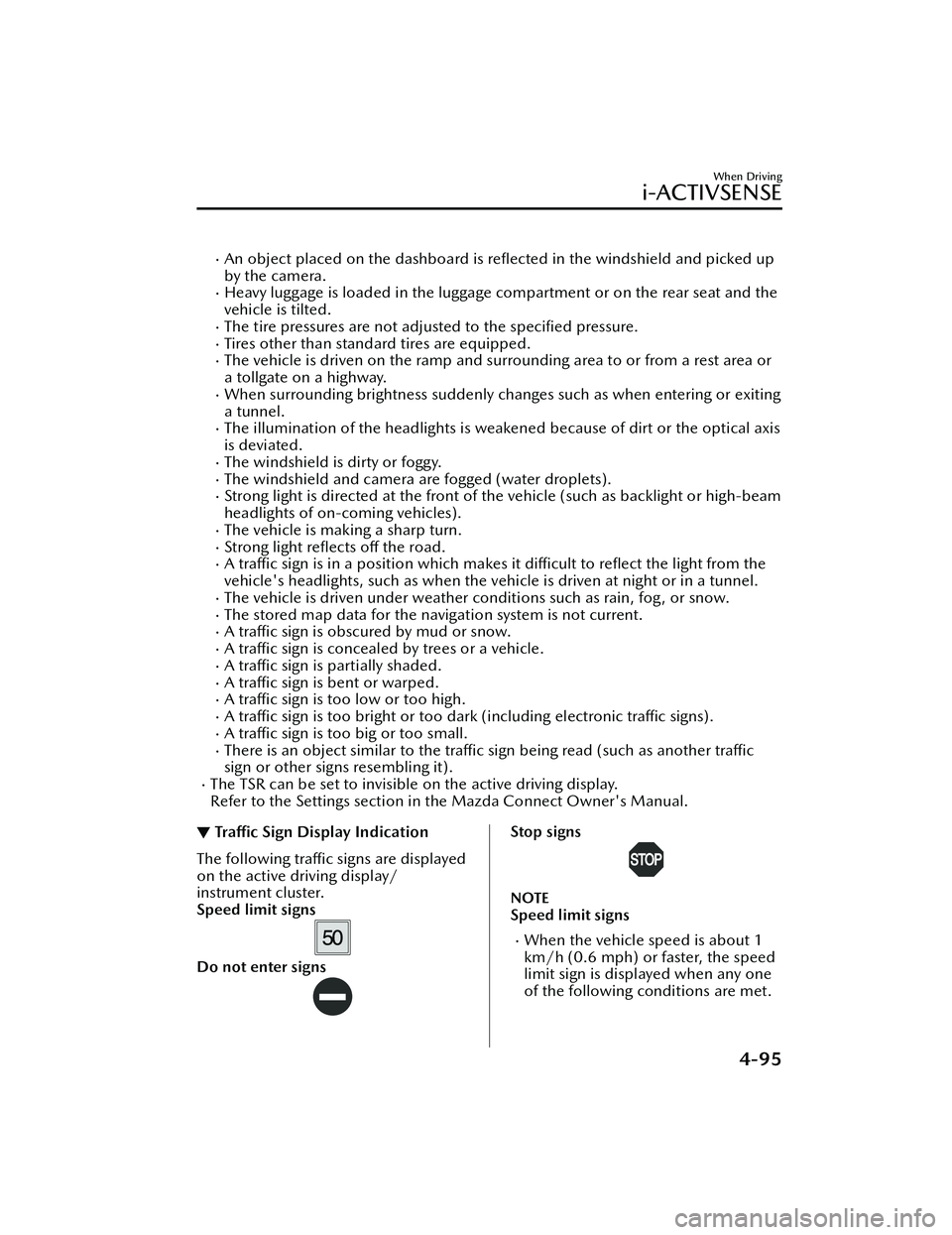
The following tra ffic signs are displayed
on the active driving display/
instrument cluster.
Speed limit signs
Do not enter signs
Stop signs
NOTE
Speed limit signs
When the vehicle speed is about 1
km/h (0.6 mph) or faster, the speed
limit sign is displayed when any one
of the following co nditions are met.
When Driving
i-ACTIVSENSE
4-95
MX-30_8JD4-EA -21G_Edition2_new 2021-5-18 14:38:07
Page 277 of 547

The vehicle is driven on a forked
road or junction.
▼System Operation
Operation conditions
The Lane-keep Assist System (LAS)
becomes operational when all of the
following conditions are met.
The vehicle speed is about 64 km/h
(40 mph) or faster.
The system detects white (yellow)
lane lines.
NOTE
When the system does not detect a
white (yellow) lane line on one side
only, the system does not operate on
the side that is not being detected.
When temporarily canceling the
system
The LAS goes on stand-by when any of
the following condit
ions is met. The
LAS is automatically restored when its
operation conditions are met.
The system cannot detect white
(yellow) lane lines.
The vehicle speed is less than about
56 km/h (35 mph).
The turn signal lever is operated.The accelerator pedal is depressed
abruptly.
The TCS/DSC is operating.The TCS is turned off.The steering wheel is operated.The brake pedal is operated.
The function is temporarily stopped.
The LAS stops functioning in the
following cases:
The temperature in the forward
sensing camera (FSC) is too high or
too low.
The windshield around the forward
sensing camera (FSC) is foggy.
The windshield around the forward
sensing camera (FSC) is blocked by
an obstruction, causing poor forward
visibility.
Strong light (such as sunlight, or
headlights (high-beam) of
on-coming vehicles) is directed at
the forward sensing camera (FSC).
▼ Steering Wheel Operation Assist
When the system determines that the
vehicle might be deviating from its
lane, the steering wheel operation
assist operates.
The system noti
fies the driver that it
provided steering wheel operation
assistance on the multi-information
display and the active driving display.
Multi-information display (Basic
display)
Multi-information display
(i-ACTIVSENSE display)
When Driving
i-ACTIVSENSE
4-128
MX -30_8JD4-EA -21G_Edition2_new 2021-5-18 14:38:07
Page 335 of 547
Images displayed on the monitor from the rear view parking camera are reversed
images (mirror images).
Some optionally installed vehicle accessories may be picked up by the camera. Do
not install any optional parts that can interfere with the camera view, such as
illuminating parts or parts made of re flective material.
It may be di fficult to see the display under the following conditions, however, it
does not indicate a malfunction.
In darkened areas.When the temperature around the lens is high/low.When the camera is wet such as on a rainy day or during periods of high
humidity.
When foreign material such as mud is stuck around the camera.When the camera lens reflects sunlight or headlight beams.The surroundings are illuminated by vehicle lights,
fluorescent lights, or LED
lights (display may flicker).
Extremely small dark or white dots appear on the screen (dots may flicker).Image display may be delayed if the temperature around the camera is low.
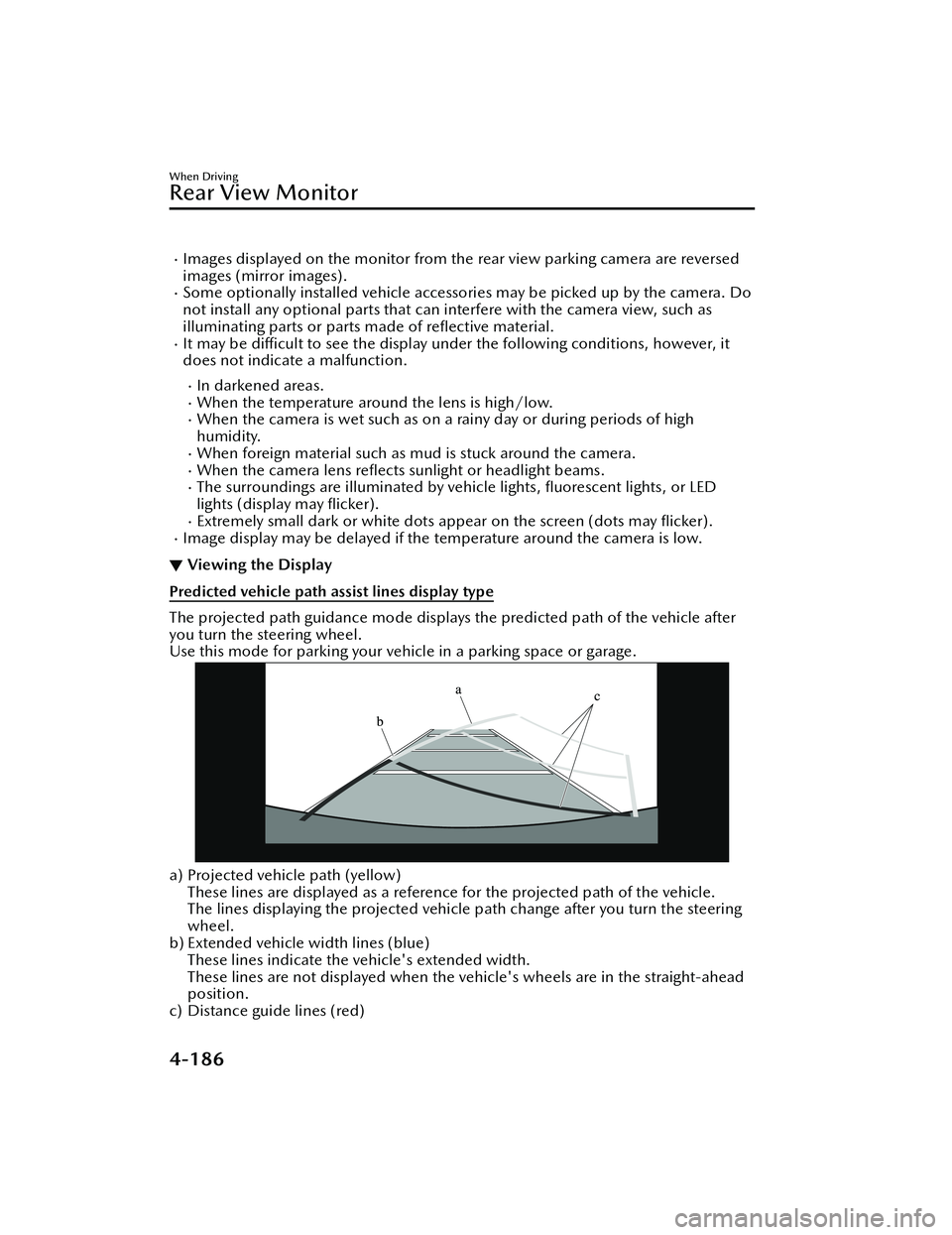
▼ Viewing the Display
Predicted vehicle path assist lines display type
The projected path guidance mode displays the predicted path of the vehicle after
you turn the steering wheel.
Use this mode for parking your vehi
cle in a parking space or garage.
a) Projected vehicle path (yellow)
These lines are displayed as a reference for the projected path of the vehicle.
The lines displaying the projected vehicle path change after you turn the steering
wheel.
b) Extended vehicle width lines (blue)
These lines indicate the vehicle's extended width.
These lines are not displayed when the vehicle's wheels are in the straight-ahead
position.
c) Distance guide lines (red)
When Driving
Rear View Monitor
4-186
MX -30_8JD4-EA -21G_Edition2_new 2021-5-18 14:38:07
Page 427 of 547

Light Bulbs
▼Light Bulbs
Front
1. Side turn signal lights
2. Front side-marker lights
3. Front turn signal lights/Parking
lights
4. Headlights (High/Low beam)/ Daytime running lights
Rear
1. High-mount brake light
2. Rear side-marker lights
3. Brake lights/Taillights
4. Rear turn signal lights
5. Reverse lights
6. Taillights
*
7. License plate lights
▼ Replacing Light Bulbs
All the light bulbs are the LED type.
The LED bulb cannot be replaced as a
single unit because it is an integrated
unit.
The LED bulb has to be replaced with
the unit. We recommend an
Authorized Mazda Dealer when the
replacement is necessary.
Maintenance and Care
Owner Maintenance
6-26*Some models.
MX
-30_8JD4-EA -21G_Edition2_new 2021-5-18 14:38:07
Page 473 of 547

▼KEY Warning Indication/Warning
Light (Red)
“Keyless Entry System Malfunction.
Have the Vehicle Inspected” is
displayed
This message is displayed if the system
has a problem.
Contact an Authorized Mazda Dealer.
CAUTION
If the power switch indicator light
(amber)
flashes at the same time, the
EV system may not start. Have the
vehicle inspected by an Authorized
Mazda Dealer as soon as possible.
Refer to When Stopping the EV System
on page 4-8.
“Key Not Detected” is displayed
The KEY warning indication/warning
light (red) displays/turns on under the
following conditions. Bring the key into
the operation range.
The key is outside of the operation
range or it is placed in the cabin but
in a position where it is di fficult to be
detected.
Without the power switch switched
OFF, the key is taken out of the
cabin, then all the doors are closed.
▼ Security Indicator Light
If the security indicator light turns on/
fl
ashes while driving , do not stop the
EV system (leave it operating) and have
the vehicle inspected at an Authorized
Mazda Dealer. If the EV system is
stopped, it may not be restarted.
If the EV system cannot be started,
switch the power switch OFF, place the
key in another position within the
operation range, and then restart the
EV system.
Check the security indicator light and if
it does not turn o ff, such as it remains
on or flashes, switch the power switch
OFF, wait for a while, and then restart
the system.
If the EV system does not start after
three attempts, a system malfunction
may have occurred. Have the vehicle
inspected by an Authorized Mazda
Dealer.
NOTE
Because the electronic codes are reset
when the immobilizer system is
repaired, the keys are needed. Make
sure to bring all the keys to an
Authorized Mazda Dealer so that they
can be programmed.
▼ High Beam Control System (HBC)
Warning Indication/Warning Light
(Amber)
*
The light remains turned on if there is a
problem with the system. Have your
vehicle inspected at an Authorized
Mazda Dealer.
If Trouble Arises
Warning/Indicator Lights and Warning Sounds
7-28*Some models.
MX
-30_8JD4-EA -21G_Edition2_new 2021-5-18 14:38:07
Page 541 of 547

Index
Starting the EV System............ 4-5
Starting the EV System When the
Key Battery is Dead................ 4-6
When Stopping the EV
System................................... 4-8
Excessive Speed Warning........... 7-40
Exterior Care............................. 6-34 Aluminum wheel
maintenance........................ 6-39
Bright-metal maintenance..... 6-38
Camera and Lens
Maintenance........................ 6-38
Maintaining the finish........... 6-35
Plastic part maintenance....... 6-39
F
Flasher Hazard warning.................... 4-47
Headlights............................4-35
Flat Tire...................................... 7-3
Floor Mat................................. 3-57
Fluids Brake................................... 6-12
Classi fication.......................... 9-4
Washer................................ 6-13
Foot Brake................................ 4-52
Forward Sensing Camera (FSC)... 4-71
Front Camera/Side Cameras/Rear
Camera.................................... 4-81
Front Cross Tra ffic Alert (FCTA) ..........
.............................................. 4-104
Front Cross Tra ffic Alert (FCTA)
Warning Beep........................... 7-40
Front Radar Sensor.................... 4-75
Front Side Radar Sensor............. 4-77
Fully Discharged High Voltage Battery Actions to take if the remaining
high voltage battery power is
completely depleted............. 7-16
Fuses........................................ 6-27
Panel description.................. 6-29
Replacement........................ 6-27
G
Gauges....................................... 4-9
Glove Compartment..................5-45
H
Hazardous Driving.....................3-56
Hazard Warning Flasher............. 4-47
Headlights Coming home light...............4-37
Flashing................................4-37
High-low beam.................... 4-37
Leaving home light............... 4-37
Leveling................................4-38
Head Restraint.......................... 2-18
High Beam Control System
(HBC)....................................... 4-83 High Beam Control System (HBC)
indicator light (green)........... 4-83
High Voltage Battery.................... 9-3
Hill Launch Assist (HLA)............. 4-61
HomeLink Wireless Control
System...................................... 4-47
Hood Release............................. 6-8
Horn........................................ 4-46
I
If a Warning Light Turns On or
Flashes......................................7-21
If the Active Driving Display Does Not
Operate.................................... 7-43
Illuminated Entry System............ 5-38
Immobilizer System................... 3-54
Inspecting Brake Fl uid Level........6-12
Inspecting Coolan t Level............ 6-11
Inspecting Washer Fluid Level..... 6-13
Instrument Cluster.......................4-9 Average Energy E fficiency.......4-16
10-4
MX -30_8JD4-EA -21G_Edition2_new 2021-5-18 14:38:07
Page 542 of 547
Index
Compass display.................. 4-18
Dashboard illumination........ 4-14
Distance-to-full Discharge..... 4-16
High Voltage Battery Power
Gauge..................................4-14
High Voltage Battery Temperature
Gauge..................................4-13
Indication/indicator lights..... 4-21
Instantaneous Energy Efficiency .....
........................................... 4-17
i-ACTIVSENSE display........... 4-17
Message Display................... 4-18
Message indicated on multi-
information display............... 7-33
Multi-information display...... 4-11
Odometer............................ 4-13
Outside temperature
display................................. 4-15
Power Meter.......................... 4-9
Remaining High Voltage Battery
Power Indication.................. 4-16
Speedometer......................... 4-9
Trip meter............................ 4-13
Warning indication/warning
lights....................................4-19
Interior Care............................. 6-40 Active driving display
maintenance........................ 6-42
Cleaning the floor mats......... 6-42
Glass and Mirror
Maintenance........................ 6-42
Instrument panel top (Soft pad)
maintenance........................ 6-41
Leather upholstery
maintenance........................ 6-41
Panel and Cork Area
Maintenance........................ 6-42
Plastic part maintenance....... 6-41
Seat belt maintenance.......... 6-40
Upholstery and synthetic leather
maintenance........................ 6-40Vinyl upholstery
maintenance........................ 6-40
Interior Lights............................ 5-37 Luggage compartment light... 5-37
Map lights............................5-37
Overhead lights.................... 5-37
i-ACTIVSENSE........................... 4-68 Active safety technology........ 4-68
Adaptive Front Lighting System
(AFS)................................... 4-82
Blind Spot Monitoring
(BSM).................................. 4-87
Camera and sensors............. 4-69
Cruising & Traffic Support
(CTS)................................. 4-118
Distance & Speed Alert
(DSA).................................. 4-99
Driver Attention Alert
(DAA)................................ 4-100
Driver monitoring camera..... 4-81
Driver Monitoring (DM)...... 4-102
Emergency Lane Keeping
(ELK).................................. 4-129
Forward Sensing Camera
(FSC)................................... 4-71
Front camera/side cameras/rear
camera................................ 4-81
Front Cross Traffic Alert
(FCTA)............................... 4-104
Front radar sensor.................4-75
Front side radar sensor.......... 4-77
High Beam Control System
(HBC).................................. 4-83
i-ACTIVSENSE OFF Switch..... 4-70
i-ACTIVSENSE status symbol
(warning/risk avoidance support
system)................................ 4-69
Lane Departure Warning System
(LDWS)................................ 4-84
Lane-keep Assist System
(LAS)..................................4-127
10-5
MX -30_8JD4-EA -21G_Edition2_new 2021-5-18 14:38:07