lights MAZDA MODEL MX-30 EV 2022 User Guide
[x] Cancel search | Manufacturer: MAZDA, Model Year: 2022, Model line: MODEL MX-30 EV, Model: MAZDA MODEL MX-30 EV 2022Pages: 547, PDF Size: 79.35 MB
Page 164 of 547

current dimmer setting is at
maximum dimness.
1. Bright
2. Dim
Function for canceling illumination
dimmer
The illumination dimmer can be
canceled by pressing the + switch
while the instrument cluster is at
maximum dimness and while the
power switch is switched ON. If you
press the + switch again while the
illumination dimmer is canceled, a
sound is activated to notify you that it
is canceled. If the instrument cluster's
visibility is reduced due to glare from
surrounding brightness, cancel the
illumination dimmer.
NOTE
When the illumination dimmer is
canceled, the instrument cluster
cannot be dimmed even if the lights
are turned on.
When the illumination dimmer is
canceled, the screen in the center
display switches to constant display
of the daytime screen.
▼ Outside Temperature Display
When the power switch is switched
ON, the outside temperature is
displayed.
NOTE
Under the following conditions, the
outside temperature display may
di ffer from the actual outside
temperature depending on the
surroundings and vehicle conditions:
Signi ficantly cold or hot
temperatures.
Sudden changes in outside
temperature.
The vehicle is parked.The vehicle is driven at low speeds.
Changing the Temperature Unit of the
Outside Temperature Display
The outside temperature unit can be
switched between Celsius and
Fahrenheit.
Settings can be changed by operating
the center display screen.
Refer to the Settings section in the
Mazda Connect Owner's Manual.
When Driving
Instrument Cluster and Display
4-15
MX -30_8JD4-EA -21G_Edition2_new 2021-5-18 14:38:07
Page 167 of 547

▼Compass Display
The direction the vehicle is moving is
displayed in one of eight directions
while the vehicle is being driven.
Display
Direction
N North
SS outh
EE ast
WW est
NE Northeast
NW Northwest
SE Southeast
SW Southwest
▼Message Display
A message such as the system
operation status, a malfunction, or an
abnormality is indicated.
Warning/indicator light in instrument
cluster turns on/
flashes or symbol is
indicated on display at same time as
message
Check the information regarding the
warning/indicator light or indicated
symbol.
Refer to If a Wa rning Indication/
Warning Lights on page 4-19.
Refer to If a Indication/Indicator Lights
on page 4-21.
Message only is indicated on display
Follow the instructions indicated on
the display. For the display content,
refer to the next page.
Refer to If a Me ssage Indicated on
Multi-information Display on page
7-33.
▼ Warning/Indicator Lights
Instrument Cluster varies depending
on model and speci
fications.
1. Instrument Cluster
2. Front Center of Headliner
Warning lights will appear in any of the
highlighted areas
When Driving
Instrument Cluster and Display
4-18
MX-30_8JD4-EA -21G_Edition2_new 2021-5-18 14:38:07
Page 168 of 547

▼Warning Indication/Warning Lights
These lights turn on or
flash to notify the user of the system operation status or a
system malfunction.
Signal Warning Refer to
Brake System Warning Indication/Warning Light*17-21
ABS Warning Indication/Warning Light*1
Electronic
Brake Force
Distribution
System Warn- ing
7-22
ABS warning 7-26
Lead-acid Battery Charging System Warning Indication/Warning
Light*17-22
EV System Problem Warning Indication/Warning Light*17-22
High Voltage Battery Temperature Warning Indication 7-23
Remaining High Voltage Battery Power Warning Indication/Warning
Light*17-23
Charging System Warning Indication/Warning Light*17-24
Output Restriction Warning Indication/Warning Light*17-24
Power Steering Malfunction Indication/Indicator Light*17-25
Shift Control System Warning Indication/Warning light*17-25
Master Warning Indication7-26
Brake Control System Warning Indication/Warning Light*17-26
Brake Override Warning Indication7-26
When Driving
Instrument Cluster and Display
4-19
MX-30_8JD4-EA -21G_Edition2_new 2021-5-18 14:38:07
Page 170 of 547

▼Indication/Indicator Lights
These lights turn on or
flash to notify the user of the system operation status or a
system malfunction.
Signal Indicator Refer to
(Green)Seat Belt Indicator Light (Rear seat)
2-30
Front Passenger Air Bag Deactivation Indicator Light 2-64
Security Indicator LightImmobilizer
System3-55
Malfunction 7-28
(Green) KEY Indicator Light
4-5
Wrench Indication/Indicator Light*14-23
Shift Position Indication4-26
Lights-On Indicator Light4-35
Headlight High-Beam Indicator LightHeadlight
High-Low
Beam4-37
Flashing the Headlights 4-37
Turn Signal/Hazard Warning Indicator Lights Tu r n a n d
Lane-Change Signals4-39
Hazard Warn- ing Flasher
4-47
When Driving
Instrument Cluster and Display
4-21
MX -30_8JD4-EA -21G_Edition2_new 2021-5-18 14:38:07
Page 184 of 547

Lighting Control
▼Headlights
Turn the headlight switch to turn the head
lights and other exterior lights on or off.
When the taillights, parking lights, and th e license plate lights are turned on, the
lights-on indicator light in th e instrument cluster turns on.
NOTE
Do not leave the headlights and exterior lights on while the EV system is turned
o ff. Otherwise, the battery power could be depleted.
Headlights do not blind drivers approaching in the opposite direction no matter
what side of the road you must drive yo ur vehicle (left-hand or right-hand traffic).
Therefore, it is not necessary to adjust the optical axis of the headlights when
switching temporarily to driving on the opposite side of the road (left-hand or
right-hand tra ffic).
Power switch posi-
tion ACC or OFF ON
Switch Position OFF
*1AUTOOFF*1AUTO
Headlights Off Off OffOff
Auto
*2*4Auto*3*4
On
Daytime running
lights Off
Off OffOff Off
Taillights
Parking lights
License plate lights Off
Off On
Off On
*1 The light switch returns to the AUTO position automatically.
When Driving
Switches and Controls
4-35
MX
-30_8JD4-EA -21G_Edition2_new 2021-5-18 14:38:07
Page 185 of 547
*2 During the daytime, the daytime running lights turn on automatically. During the nighttime, theheadlights, parking lights, taillights, and the license plate lights turn on automatically.
*3 During the daytime, the daytime running lights, parking lights, taillights, and the license plate lights
turn on automatically. During the nighttime, the headlights, parking lights, taillights, and the license
plate lights turn on automatically.
*4 When the light switch is switched to the OFF posit ion while the vehicle is stopped, all of the lights
that are turned on turn o ff. When the light switch is switched from a position other than
to the
position while the vehicle is stopped,the daytime running lights or the headlights turn o ff.
When starting to drive the vehicle, the lights that are turned o ff turn on again.
Auto-light control
When the power switch is switched ON, the light sensor detects the brightness of
the surrounding area and the headlights and the exterior lights turn on/off
automatically according to the surrounding brightness. When the power switch is
switched OFF, the headlights an d the exterior lights turn off automatically.
CAUTION
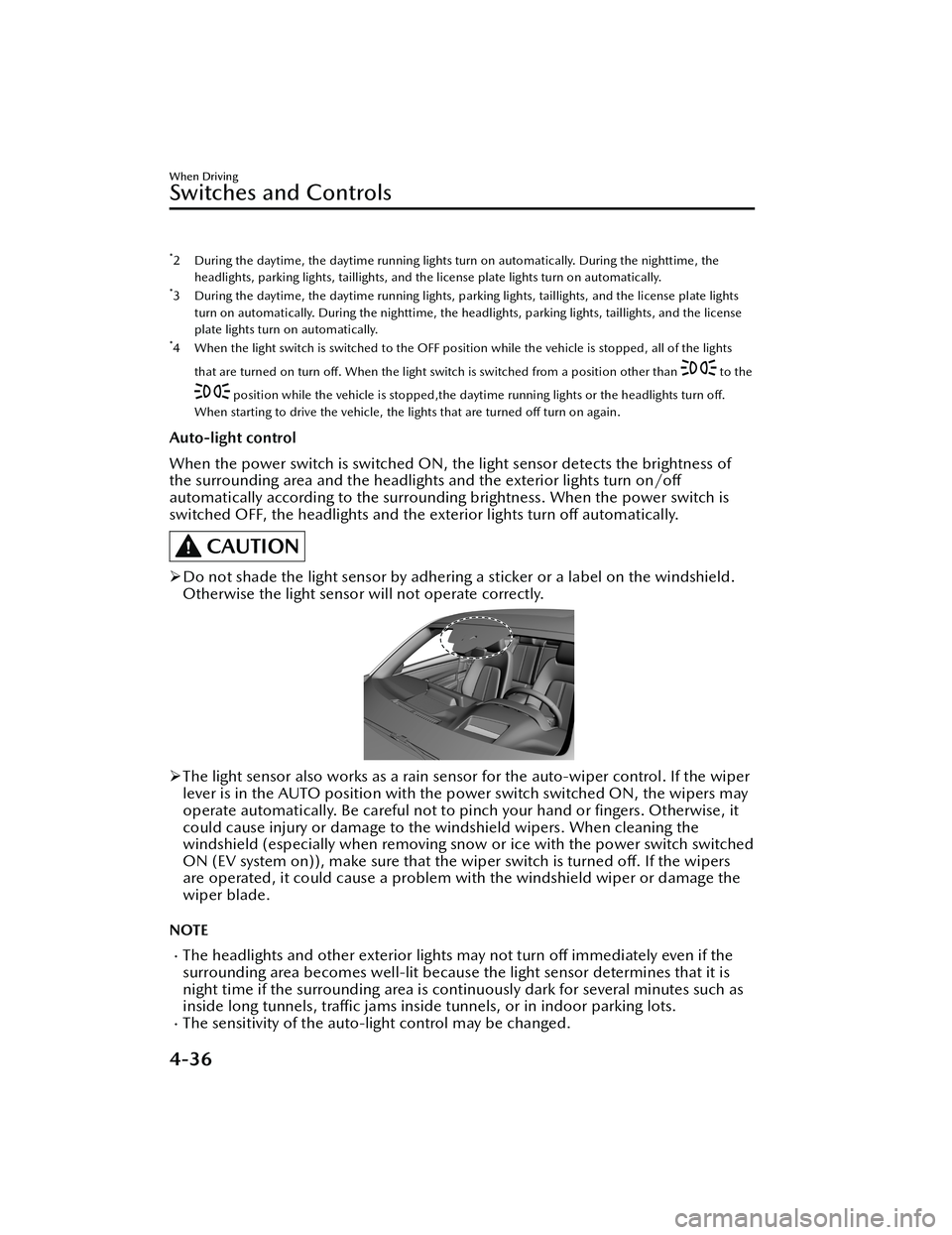
Do not shade the light sensor by adhering a sticker or a label on the windshield.
Otherwise the light sensor will not operate correctly.
The light sensor also works as a rain sensor for the auto-wiper control. If the wiper
lever is in the AUTO position with the power switch switched ON, the wipers may
operate automatically. Be careful not to pinch your hand or fingers. Otherwise, it
could cause injury or damage to the windshield wipers. When cleaning the
windshield (especially when removing snow or ice with the power switch switched
ON (EV system on)), make sure that the wiper switch is turned o ff. If the wipers
are operated, it could cause a problem wi th the windshield wiper or damage the
wiper blade.
NOTE
The headlights and other exte rior lights may not turn off immediately even if the
surrounding area becomes well-lit because the light sensor determines that it is
night time if the surrounding area is cont inuously dark for several minutes such as
inside long tunnels, traffi c jams inside tunnels, or in indoor parking lots.
The sensitivity of the auto-light control may be changed.
When Driving
Switches and Controls
4-36
MX-30_8JD4-EA -21G_Edition2_new 2021-5-18 14:38:07
Page 186 of 547

Refer to the Settings section in the Mazda Connect Owner's Manual.
▼Headlight High-Low Beam
The headlights switch between high
and low beams by moving the lever
forward or backward.
1. High beam
2. Low beam
When the headlight high-beams are
on, the headlight high-beam indicator
light is turned on.
▼Flashing the Headlights
When the power switch is switched
ON, and regardless of the headlight
position, the headlights switch to high
beams while the lever is being pulled.
1. OFF
2. Headlight
flashing
The headlight high-beam indicator
light in the instrument cluster
illuminates simultaneously. The lever
will return to the normal position when
released.
▼ Coming Home Light
The coming home light turns on the
headlights (low beams) when the lever
is operated.
To turn on the lights
When the lever is pulled with the
power switch switched to ACC or OFF,
the low beam headlights turn on.
The headlights turn o
ff after a certain
period of time has elapsed after all of
the doors are closed.
NOTE
The time until the headlights turn off
after all of the doors are closed can
be changed.
Refer to the Settings section in the
Mazda Connect Owner's Manual.
If no operations are done for 3
minutes after the lever is pulled, the
headlights turn off.
The headlights turn o ff if the lever is
pulled again while the headlights are
illuminated.
▼ Leaving Home Light
The leaving home light turns on the
lights when the transmitter unlock
When Driving
Switches and Controls
4-37
MX
-30_8JD4-EA -21G_Edition2_new 2021-5-18 14:38:07
Page 187 of 547

button is pressed while away from the
vehicle.
The following lights turn on when the
leaving home light is operated.
Low beams, Parking lights, Taillights,
License plate lights.
To turn on the lights
The headlights and the exterior lights
turn on when the unlock switch on the
key is pressed and the vehicle receives
the key signal with the power switch
and the headlight switch under the
following conditions:
Powe r sw i tch : OF F
Headlight switch: AUTO, , or
The headlights turn off after a certain
period of time has elapsed (30
seconds).
1. Lock button
2. Unlock button
NOTE
Operation of the leaving home light
can be turned on or o ff.
Refer to the Settings section in the
Mazda Connect Owner's Manual.
When the transmitter lock button is
pressed and the vehicle receives the
transmitter signal, the headlights turn
o ff.
When the headlight switch is turned
to the OFF position, the headlights
turn o ff.
▼ Headlight Leveling
The number of passengers and weight
of cargo in the luggage compartment
change the angle of the headlights.
Auto type
The angle of the headlights will be
automatically adjusted when turning
on the headlights.
A system malfunction or operation
conditions are indicated by a warning.
Refer to Exterior Light Warning
Indication/Warning Light on page
7-29.
Manual type
When adjusting the illumination angle
of the headlights, refer to the Settings
section in the Mazda Connect
Owner's Manual.
Select the proper headlight angle from
the following chart.
Front seat
Rearseat LoadIllumi-
nation angle
(num- ber)
Driver Passenger
× ――― 0
×× ――0
××× ―1
× × ××2
× ―― ×2.5
×: Yes
―: No
When Driving
Switches and Controls
4-38
MX -30_8JD4-EA -21G_Edition2_new 2021-5-18 14:38:07
Page 188 of 547

▼Daytime Running Lights
Some countries require moving
vehicles to have their lights on
(daytime running lights) during the
daytime.
The daytime running lights turn on
automatically.
NOTE
(Except Canada)
The daytime running lights can be
deactivated.
Refer to the Settings section in the
Mazda Connect Owner's Manual.
Turn and Lane-Change
Signals
▼Turn and Lane-Change Signals
The turn and lane-change signals can
be used when the power switch is
switched ON.
▼Tu r n S i g n a l s
Move the signal lever down (for a left
turn) or up (for a right turn) to the stop
position. The signal will self-cancel
after the turn is completed.
If the indicator light continues to
flash
after a turn, manually return the lever
to its original position.
1. Right turn
2. Right lane change
3. OFF
4. Left lane change
5. Left turn
The turn signal indicators in the
instrument cluster flash according to
the operation of the turn signal lever to
show which signal is working.
When Driving
Switches and Controls
4-39
MX -30_8JD4-EA -21G_Edition2_new 2021-5-18 14:38:07
Page 189 of 547

NOTE
There may be a problem with the
turn signal lights if they do not flash
but remain turned on, or they flash
abnormally. Have your vehicle
inspected by an Authorized Mazda
Dealer.
A personalized function is available
to change the turn indicator sound
volume.
Refer to the Settings section in the
Mazda Connect Owner's Manual.
▼ Lane-Change Signals
Move the lever halfway toward the
direction of the lane change
―until the
indicator flashes ― and hold it there. It
will return to the o ff position when
released.
▼ Three-Flash Turn Signal
After releasing the turn signal lever
from the halfway point, the turn signal
indicator
flashes 3 times. The
operation can be canceled by moving
the lever in the direction opposite to
which it was operated.
NOTE
The three- flash turn signal function can
be switched to on/o ff using the
personalization function.
Refer to the Settings section in the
Mazda Connect Owner's Manual.
Windshield Wipers and
Washer
▼Windshield Wipers and Washer
The windshield wipers and washer can
be used when the power switch is
switched ON.
WARNING
Use only windshield washer
fluid or
plain water in the reservoir:
Using radiator antifreeze as washer
fl uid is dangerous. If sprayed on the
windshield, it will dirty the windshield,
a ff ect your visibility, and could result in
an accident.
Only use windshield washer fluid
mixed with anti-freeze protection in
freezing weather conditions:
Using windshield washer fluid without
anti-freeze protection in freezing
weather conditions is dangerous as it
could freeze on the windshield and
block your vision which could cause an
accident. In addition, make sure the
windshield is su fficiently warmed using
the defroster before spraying the
washer fluid.
CAUTION
When the wipers are not used during
freezing temperatures or for a long
time, the wiper rubber may adhere
to the glass. If the wipers are
operated while adhered to the glass,
it could damage the wiper rubber
and motor.
When Driving
Switches and Controls
4-40
MX -30_8JD4-EA -21G_Edition2_new 2021-5-18 14:38:07