warning lights MAZDA MODEL MX-30 EV 2022 Owner's Manual
[x] Cancel search | Manufacturer: MAZDA, Model Year: 2022, Model line: MODEL MX-30 EV, Model: MAZDA MODEL MX-30 EV 2022Pages: 547, PDF Size: 79.35 MB
Page 256 of 547

(If only the FCTA is turned off)
Refer to the Settings section in the
Mazda Connect Owner's Manual.
(If the FCTA is turned o ff by
operating the i-ACTIVSENSE OFF
switch)
Refer to i-ACTIVSENSE OFF Switch
on page 4-70.
NOTE
If the power switch is switched OFF
while you have canceled the system
using the i-ACTIVSENSE OFF switch,
the system is automatically enabled the
next time the power switch is switched
ON. However, if the system is canceled
using [Settings] in Mazda Connect, the
system is not automatically enabled.
Rear Cross Tra ffic Alert
(RCTA)
*
▼ Rear Cross Traffi
c Alert (RCTA)
The RCTA system is designed to assist
the driver in checking the area to the
rear left and right sides of your vehicle
while your vehicle is reversing by
alerting the driver to the presence of
vehicles approaching the rear of your
vehicle.
The RCTA system detects vehicles
approaching from the rear left and
right sides of your vehicle and the rear
of your vehicle while your vehicle is
being reversed out of a parking space,
and notifies the driver of possible
danger using the Blind Spot Monitoring
(BSM) warning indicator lights and the
warning buzzer.
1. Your vehicle
2. Detection areas
When Driving
i-ACTIVSENSE
*Some models.4-107
MX-30_8JD4-EA -21G_Edition2_new 2021-5-18 14:38:07
Page 257 of 547

WARNING
Always check the surrounding area
visually before actually putting the
vehicle in reverse:
The system is only designed to assist
you in checking for vehicles at the rear
when putting the vehicle in reverse.
Due to certain limitations with the
operation of this system, the Blind Spot
Monitoring (BSM) warning indicator
lights may not flash or it might be
delayed even though a vehicle is
behind your vehicle. Always make it
your responsibility as a driver to check
the rear.
RCTA operation
1. The RCTA system operates when the selector lever is shifted to the
reverse (R) position.
2. If there is the possibility of a collision with an approaching
vehicle, the Blind Spot Monitoring
(BSM) warning indicator lights
flashes and the warning beep is
activated simultaneously.
Rear view monitor (vehicles with
Rear view monitor)
The RCTA warning indication in the
rearview monitor also synchronizes
with the Blind Spot Monitoring
(BSM) warning indicator light on
the door mirrors.
360°view monitor (vehicles with
360°view monitor)
The RCTA warning indication in the
360°view monitor also
synchronizes with the Blind Spot
Monitoring (BSM) warning
indicator light on the door mirrors.
Function for canceling illumination
dimmer
If the BSM warning indicator lights turn
on when the parking lights are turned
on, the brightness of the BSM warning
indicator lights is dimmed.
If the BSM warning indicator lights are
di fficult to see due to glare from
surrounding brightness when traveling
on snow-covered roads or under foggy
conditions, press the dimmer
cancellation button to cancel the
dimmer and increase the brightness of
BSM warning indicator lights when
they turn on.
Refer to Dashboard Illumination on
page 4-14.
NOTE
The system may operate under the
following conditions even if a vehicle
is not approaching.
An object that re flects the radio
waves of the radar such as a
parked vehicle, guardrail, or wall is
directly next to your vehicle.
A vehicle approaching from the
rear left and right side of your
vehicle slows down.
A vehicle approaching from the
rear left and right side of your
vehicle makes a right or left turn
directly in front of your vehicle.
When Driving
i-ACTIVSENSE
4-108
MX -30_8JD4-EA -21G_Edition2_new 2021-5-18 14:38:07
Page 258 of 547

A vehicle overtakes your vehicle
while it is stopped.
Your vehicle is in an area where
strong radio waves or electrical
noise may occur such as near a
television tower or power plant.
In the following cases, the
i-ACTIVSENSE warning indication/
warning light turns on and operation
of the system is stopped. If the
i-ACTIVSENSE warning indication/
warning light remains illuminated,
have the vehicle inspected at an
Authorized Mazda Dealer as soon as
possible.
Some problem with the system
including the Blind Spot
Monitoring (BSM) warning
indicator lights has occurred.
A large deviation in the installation
position of a rear side radar sensor
on the vehicle has occurred.
There is a large accumulation of
snow or ice on the rear bumper
near a rear side radar sensor.
Driving on snow-covered roads for
long periods.
The temperature near the radar
sensors becomes extremely hot
due to driving for long periods on
slopes during the summer.
The lead-acid battery voltage has
decreased.
Under the following conditions, the
rear side radar sensor cannot detect
approaching vehicles or it might be
difficult to detect them, and the
system may not operate normally.
The vehicle speed when reversing
is about 15 km/h (9 mph) or
faster.
The rear side radar sensor
detection area is obstructed by a
nearby wall or parked vehicle.
(Reverse the vehicle to a position
where the radar sensor detection
area is no longer obstructed.)
1. Your vehicle
A vehicle is approaching directly
from the rear of your vehicle.
1. Your vehicle
The vehicle is parked at an angle.
1. Your vehicle
Directly after the RCTA system
becomes operable using [Settings]
in Mazda Connect.
Radio wave interference from a
radar sensor equipped on a nearby
parked vehicle.
When Driving
i-ACTIVSENSE
4-109
MX -30_8JD4-EA -21G_Edition2_new 2021-5-18 14:38:07
Page 259 of 547

In the following cases, it may bedi fficult to view the illumination/
fl ashing of the Blind Spot Monitoring
(BSM) warning indicator lights
equipped on the door mirrors.
Snow or ice adheres to the door
mirrors.
The front door glass is fogged or
covered in snow, frost or dirt.
Tu r n o ff the RCTA system while
pulling a trailer or while an accessory
such as a bicycle carrier is installed to
the rear of the vehicle. Otherwise,
the radio waves emitted by the radar
will be blocked causing the system to
not operate normally.
The rear side radar sensor of the
RCTA may be regulated under the
radio wave related laws of the
country where the vehicle is driven. If
this system is used abroad, it may be
necessary to turn o ff the system.
Refer to Rear Side Radar Sensor on
page 4-79.
▼ Canceling Operation of Rear Cross
Tra
ffic Alert (RCTA)
The RCTA can be set to inoperable.
(If only the RCTA is turned o
ff)
Refer to the Settings section in the
Mazda Connect Owner's Manual.
(If the RCTA is turned o ff by
operating the i-ACTIVSENSE OFF
switch)
Refer to i-ACTIVSENSE OFF Switch
on page 4-70.
NOTE
If the power switch is switched OFF
while you have canceled the system
using the i-ACTIVSENSE OFF switch,
the system is automatically enabled the
next time the power switch is switched
ON. However, if the system is canceled
using [Settings] in Mazda Connect, the
system is not automatically enabled.
When Driving
i-ACTIVSENSE
4-110
MX -30_8JD4-EA -21G_Edition2_new 2021-5-18 14:38:07
Page 294 of 547

The Rear Cross Traffic Alert (RCTA)
uses rear side radar sensor to detect
vehicles approaching from the rear
left and right sides of the vehicle,
and it assists the driver in checking
the rear of the vehicle while reversing
by flashing the Blind Spot Monitoring
(BSM) warning lights and activating
the warning sound.
Refer to Rear Cross Tra ffic Alert
(RCTA) on page 4-107.
360°View Monitor Range
1. Cameras
2. Ultrasonic sensors
3. Front/Rear side radar sensors
WARNING
Always con firm the safety of the area
around the vehicle with the mirrors
and directly with your eyes when
driving:
The 360°View Monitor is an auxiliary
device which assists the driver in
checking the safety of the area around
the vehicle.
The shooting range of the cameras and
detection range of the sensors are
limited. For example, the areas in black
at the front and rear of the vehicle
image and the seams where each of
the camera images merge are blind
spots where an obstruction may not be
visible. In addition, the extended
vehicle width lines and projected
vehicle path lines are only to be used
as references, and the images on the
screen may di ffer from the actual
conditions.
CAUTION
Do not use the 360°View Monitor
under any of the following
conditions.
Icy or snow-covered roads.
Tire chains or a temporary spare
tire is installed.
The front or rear doors are not fully
closed.
The vehicle is on a road incline.
The door mirrors are retracted.
Do not hit the front/rear camera,
front bumper, liftgate, and door
mirrors forcefully. The camera
position or installation angle may
shift.
The cameras are waterproof. Do not
disassemble, modify, or remove a
camera.
The camera cover is made of hard
plastic, therefore do not apply oil
film remover, organic solvents, wax,
or coating agents. If any such agent
gets on the camera cover, wipe it o ff
using a soft cloth immediately.
Do not rub the camera lens
forcefully, or clean it with an abrasive
or hard brush. Otherwise, it could
scratch the camera lens and
negatively a ffect the images.
When Driving
i-ACTIVSENSE
4-145
MX -30_8JD4-EA -21G_Edition2_new 2021-5-18 14:38:07
Page 446 of 547
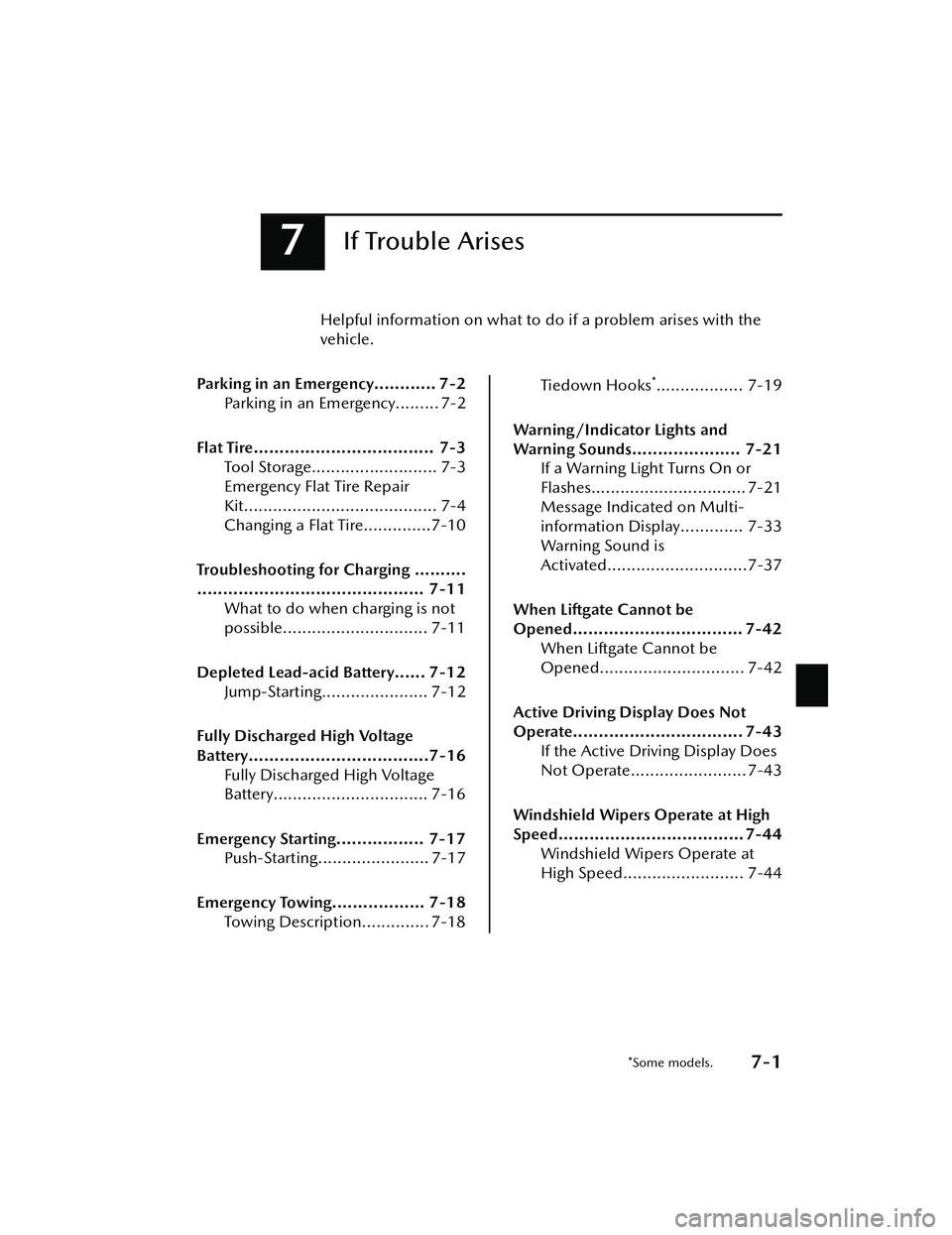
7If Trouble Arises
Helpful information on what to do if a problem arises with the
vehicle.
Parking in an Emergency............ 7-2 Parking in an Emergency......... 7-2
Flat Tire................................... 7-3 Tool Storage.......................... 7-3
Emergency Flat Tire Repair
Kit........................................ 7-4
Changing a Flat Tire..............7-10
Troubleshooting for Charging ..........
............................................ 7-11 What to do when charging is not
possible.............................. 7-11
Depleted Lead-acid Battery...... 7-12 Jump-Starting...................... 7-12
Fully Discharged High Voltage
Battery...................................7-16 Fully Discharged High Voltage
Battery................................ 7-16
Emergency Starting................. 7-17 Push-Starting....................... 7-17
Emergency Towing.................. 7-18 Towing Description.............. 7-18
Tiedown Hooks*.................. 7-19
Warning/Indicator Lights and
Warning Sounds..................... 7-21 If a Warning Light Turns On or
Flashes................................ 7-21
Message Indicated on Multi-
information Display............. 7-33
Warning Sound is
Activated.............................7-37
When Liftgate Cannot be
Opened................................. 7-42 When Liftgate Cannot be
Opened.............................. 7-42
Active Driving Display Does Not
Operate................................. 7-43 If the Active Driving Display Does
Not Operate........................ 7-43
Windshield Wipers Operate at High
Speed.................................... 7-44 Windshield Wipers Operate at
High Speed......................... 7-44
*Some models.7-1
MX-30_8JD4-EA -21G_Edition2_new 2021-5-18 14:38:07
Page 447 of 547

Parking in an Emergency
▼Parking in an Emergency
The hazard warning lights should
always be used when you stop on or
near a roadway in an emergency.
The hazard warning lights warn other
drivers that your vehicle is a
traffic
hazard and that they must take
extreme caution when near it.
Depress the hazard warning flasher
and all the turn signals will flash. The
hazard warning indicator lights in the
instrument cluster flash simultaneously.
NOTE
The turn signals do not work when
the hazard warning lights are on.
Check local regulations about the
use of hazard warning lights while
the vehicle is being towed to verify
that it is not in violation of the law.
If Trouble Arises
Parking in an Emergency
7-2
MX
-30_8JD4-EA -21G_Edition2_new 2021-5-18 14:38:07
Page 453 of 547

12.Adhere the speed restriction stickerto an area where it can be viewed
easily by the driver.
13.Adhere the repaired tire sticker tothe wheel of the flat tire.
WARNING
Do not adhere the speed
restriction sticker to the padded
area on the steering wheel:
Adhering the speed restriction
sticker to the padded area on the
steering wheel is dangerous
because the air bag may not
operate (deploy) normally resulting
in serious injury. In addition, do not
adhere the sticker to areas where
warning lights or the speedometer
cannot be viewed.
14.When the tire in flates to the
specified tire in flation pressure, turn
the air compressor switch o ff, turn
the sleeve of the injection hose to
the left, and pull it out of the tire
valve.
15.Remove the air compressor hose from the injection valve of the
bottle. After that, install the
injection hose to the injection valve
of the bottle to prevent leakage of
any remaining sealant.
CAUTION
The remaining sealant in the hose
may spray out when the hose is
removed. Remove the hose
carefully because you may not be
able to remove the sealant
contacting clothing or other
objects.
16.Install the tire valve cap.
17.Put the emergency flat tire repair kit
into the trunk.
18.Start driving immediately to spread the sealant in the tire.
CAUTION
Carefully drive the vehicle at a
speed of 80 km/h (50 mph) or less.
If the vehicle is driven at a speed of
80 km/h (50 mph) or more, the
vehicle may vibrate.
If Trouble Arises
Flat Tire
7-8
MX -30_8JD4-EA -21G_Edition2_new 2021-5-18 14:38:07
Page 457 of 547
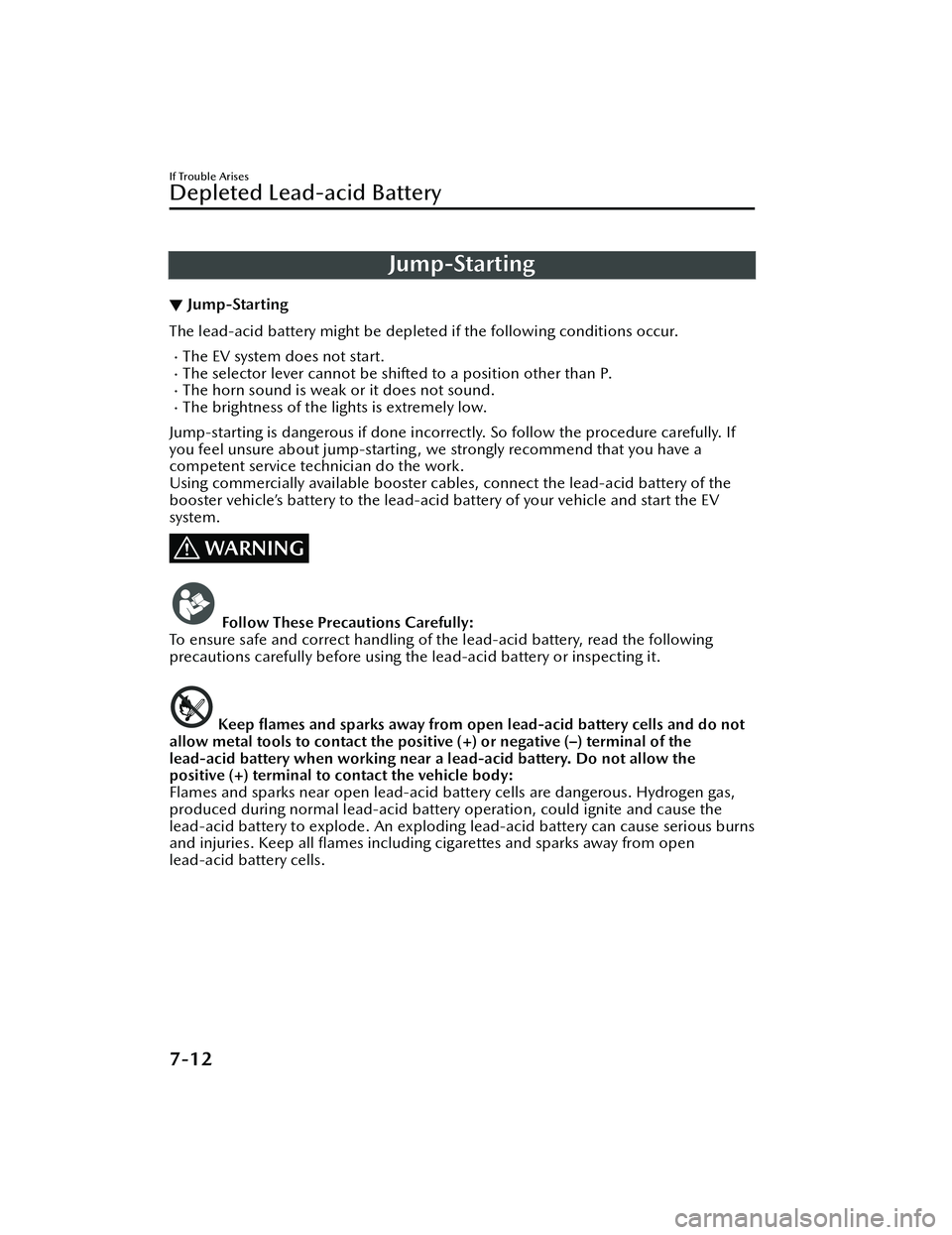
Jump-Starting
▼Jump-Starting
The lead-acid battery might be depleted
if the following conditions occur.
The EV system does not start.The selector lever cannot be shifted to a position other than P.The horn sound is weak or it does not sound.The brightness of the lights is extremely low.
Jump-starting is dangerous if done incorrectly. So follow the procedure carefully. If
you feel unsure about jump-starting, we strongly recommend that you have a
competent service technician do the work.
Using commercially available booster cables, connect the lead-acid battery of the
booster vehicle’s battery to the lead-acid battery of your vehicle and start the EV
system.
WARNING
Follow These Precautions Carefully:
To ensure safe and correct handling of the lead-acid battery, read the following
precautions carefully before using the lead-acid battery or inspecting it.
Keep flames and sparks away from open lead-acid battery cells and do not
allow metal tools to contact the positive (+) or negative (–) terminal of the
lead-acid battery when working near a lead-acid battery. Do not allow the
positive (+) terminal to contact the vehicle body:
Flames and sparks near open lead-acid battery cells are dangerous. Hydrogen gas,
produced during normal lead-acid battery operation, could ignite and cause the
lead-acid battery to explode. An exploding lead-acid battery can cause serious burns
and injuries. Keep all flames including cigarettes and sparks away from open
lead-acid battery cells.
If Trouble Arises
Depleted Lead-acid Battery
7-12
MX -30_8JD4-EA -21G_Edition2_new 2021-5-18 14:38:07
Page 466 of 547

If a Warning Light TurnsOn or Flashes
▼If a Warning Light Turns On or
Flashes
If any warning light turns on/
flashes,
take appropriate action for each light.
There is no problem if the light turns
o ff, however if the light does not turn
o ff or turns
on/flashes again, consult
an Authorized Mazda Dealer.
WARNING
If the warning light/indicator light
turns on or flashes, park the vehicle in
a safe place immediately and take
appropriate measures.
Continuing to drive the vehicle while
ignoring the illumination/ flashing of
the warning light/indicator light is
dangerous because a problem may
occur to a vehicle system, or it could
lead to an accident.
The details for some warnings can be
viewed on the center display or
multi-information display in the
instrument cluster.
Center display
1. Select “Information” on the home
screen.
2. Select “Vehicle Status Monitor”.
3. Select the applicable warning to view the warning details.
Multi-information display
1. Press the INFO switch on the steering switch to display the
warning indication screen.
Refer to Multi-information Display
on page 4-11.
▼Brake System Warning Indication/
Warning Light
This warning has the following
functions:
Warning light inspection
For an operation check, make sure that
the light turns on when the power
switch is switched on and turns o
ff a
few seconds later, or when the EV
system is started.
When the light turns on
If the brake system warning light
remains illuminated the brake fluid
may be low or there could be a
problem with the brake system. Park
the vehicle in a safe place immediately
and contact an Authorized Mazda
Dealer.
Refer to Inspecting Brake Fluid Level on
page 6-12.
WARNING
Do not drive with the brake system
warning light illuminated. Contact an
Authorized Mazda Dealer to have the
brakes inspected as soon as possible:
Driving with the brake system warning
light illuminated is dangerous. It
indicates that your brakes may not
work at all or that they could
completely fail at any time. If this light
remains illuminated, after checking
that the parking brake is fully released,
have the brakes inspected
immediately.
If Trouble Arises
Warning/Indicator Lights and Warning Sounds
7-21
MX -30_8JD4-EA -21G_Edition2_new 2021-5-18 14:38:07