park assist MAZDA MODEL MX-30 EV 2022 Owners Manual
[x] Cancel search | Manufacturer: MAZDA, Model Year: 2022, Model line: MODEL MX-30 EV, Model: MAZDA MODEL MX-30 EV 2022Pages: 547, PDF Size: 79.35 MB
Page 151 of 547
Lane Departure Warning System
(LDWS)
*.............................. 4-84
Blind Spot Monitoring (BSM)
*......
.......................................... 4-87 Tra ffic Sign Recognition System
(TSR)
*..................................4-93
Distance & Speed Alert (DSA)
*.....
.......................................... 4-99
Driver Attention Alert (DAA)
*.......
........................................ 4-100
Driver Monitoring (DM)
*.... 4-102
Front Cross Tra ffic Alert
(FCTA)
*............................. 4-104
Rear Cross Tra ffic Alert (RCTA)
*....
........................................ 4-107
Mazda Radar Cruise Control with
Stop & Go function (MRCC with
Stop & Go function)
*......... 4-111
Tra ffic Jam Assist (TJA)
*....... 4-118
Lane-keep Assist System (LAS)
*.....
........................................ 4-127
Emergency Lane Keeping
(ELK)
*................................ 4-129
Smart Brake Support (SBS)
*..........
........................................ 4-136
360° View Monitor
*........... 4-144
Cruise Control......................4-176 Cruise Control................... 4-176
Tire Pressure Monitoring System
(TPMS)................................ 4-180 Tire Pressure Monitoring System
(TPMS)..............................4-180
Rear View Monitor................4-183 Rear View Monitor
*........... 4-183
Parking Sensor System........... 4-198 Parking Sensor System
*....... 4-198
4-2*Some models.
MX-30_8JD4-EA -21G_Edition2_new 2021-5-18 14:38:07
Page 171 of 547

SignalIndicator Refer to
Electric Parking Brake (EPB) Indication/Indicator Light*1*27-26
AUTOHOLD Active Indicator Light*14-59
*Mazda Radar Cruise Control with Stop & Go function (MRCC with
Stop & Go function) indicator Light 4-117
*Tra
ffic Jam Assist (TJA) Indicator Light 4-126
TCS/DSC Indication/Indicator Light*1
Tra c t i o n C o n -
trol System (TCS)4-64
Dynamic Sta- bility Control (DSC)4-66
Tu r n s o n 7-27
READY Indication 4-4
TCS OFF Indicator Light*14-64
(White)
i-ACTIVSENSE Status Symbol (Warning/Risk Avoidance Support Sys-
tem) 4-69
(Green)
(Amber)
i-ACTIVSENSE OFF Symbol (Warning/Risk Avoidance Support Sys-
tem)
4-69
(Green)
*High Beam Control System (HBC) Indicator Light
4-83
When Driving
Instrument Cluster and Display
4-22*Some models.
MX
-30_8JD4-EA -21G_Edition2_new 2021-5-18 14:38:07
Page 172 of 547
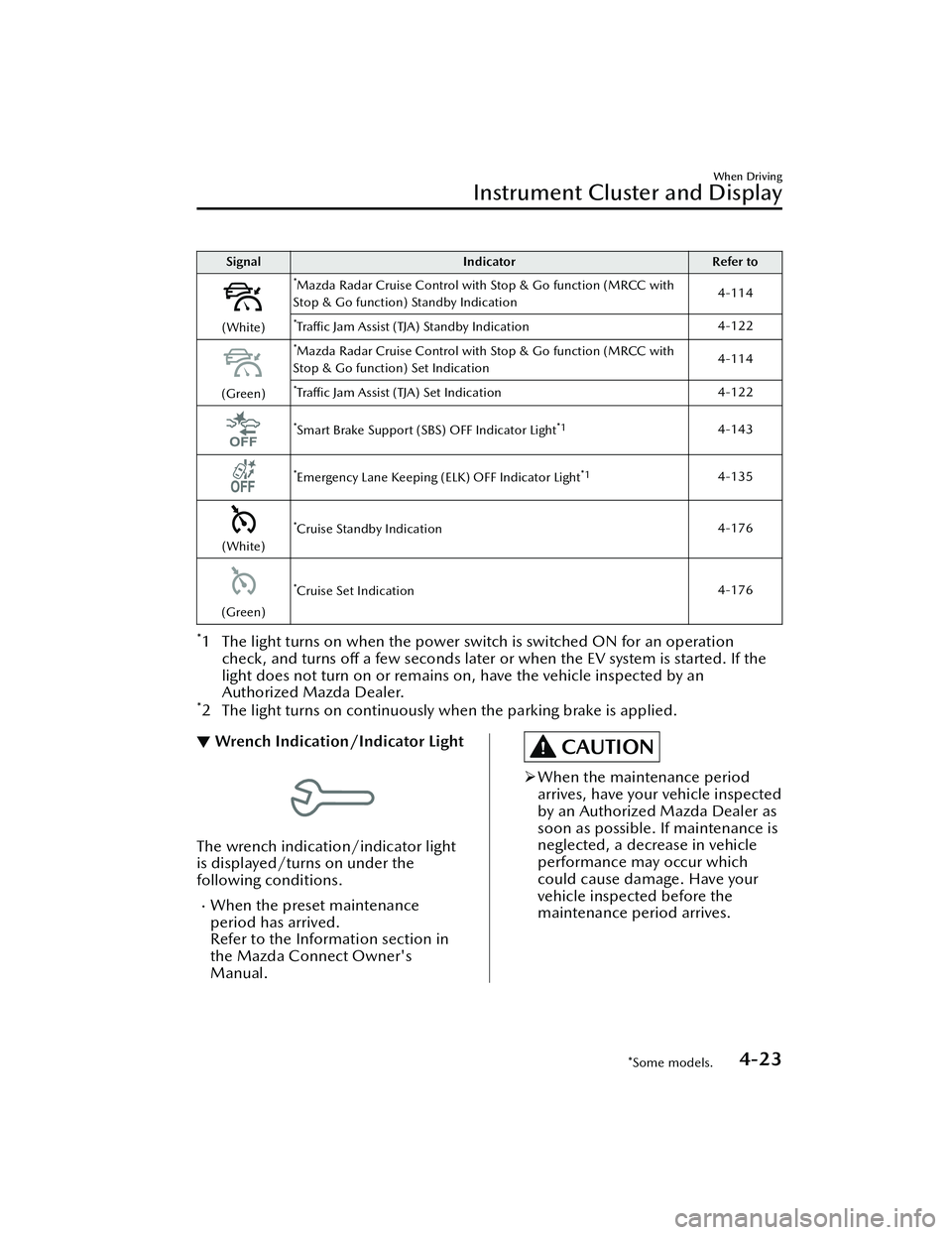
SignalIndicator Refer to
(White)
*Mazda Radar Cruise Control with Stop & Go function (MRCC with
Stop & Go function) Standby Indication 4-114
*Tra
ffic Jam Assist (TJA) Standby Indication 4-122
(Green)
*Mazda Radar Cruise Control with Stop & Go function (MRCC with
Stop & Go function) Set Indication 4-114
*Tra
ffic Jam Assist (TJA) Set Indication 4-122
*Smart Brake Support (SBS) OFF Indicator Light*14-143
*Emergency Lane Keeping (ELK) OFF Indicator Light*14-135
(White)
*Cruise Standby Indication 4-176
(Green)
*Cruise Set Indication4-176
*1 The light turns on when the power swit
ch is switched ON for an operation
check, and turns off a few seconds later or when the EV system is started. If the
light does not turn on or remains on, have the vehicle inspected by an
Authorized Mazda Dealer.
*2 The light turns on continuously when the parking brake is applied.
▼Wrench Indication/Indicator Light
The wrench indication/indicator light
is displayed/turns on under the
following conditions.
When the preset maintenance
period has arrived.
Refer to the Information section in
the Mazda Connect Owner's
Manual.
CAUTION
When the maintenance period
arrives, have your vehicle inspected
by an Authorized Mazda Dealer as
soon as possible. If maintenance is
neglected, a decrease in vehicle
performance may occur which
could cause damage. Have your
vehicle inspected before the
maintenance period arrives.
When Driving
Instrument Cluster and Display
*Some models.4-23
MX -30_8JD4-EA -21G_Edition2_new 2021-5-18 14:38:07
Page 201 of 547
Brake System
▼Foot Brake
This vehicle has power-assisted brakes
that adjust automatically through
normal use.
Should power-assist fail, you can stop
by applying greater force than normal
to the brake pedal. But the distance
required to stop will be greater than
usual.
WARNING
Do not coast with the EV system
stopped and stop the vehicle in a safe
place:
Coasting the vehicle with the EV
system stopped is dangerous. Braking
will require more
eff ort, and the
brake's power-assist could be
depleted if you pump the brake. This
will cause longer stopping distances or
even an accident.
Shift to a lower gear when going
down steep hills:
Driving with your foot continuously on
the brake pedal or steadily applying
the brakes for long distances is
dangerous. This causes overheated
brakes, resulting in longer stopping
distances or even total brake failure.
This could cause loss of vehicle control
and a serious accident. Avoid
continuous application of the brakes.
Dry off brakes that have become wet
by driving slowly, releasing the
accelerator pedal and lightly applying
the brakes several times until the
brake performance returns to normal:
Driving with wet brakes is dangerous.
Increased stopping distance or the
vehicle pulling to one side when
braking could result in a serious
accident. Light braking will indicate
whether the brakes have been
a ff ected.
CAUTION
Do not drive with your foot held on
the brake pedal. Doing so could
result in the following:
The brake parts will wear out more
quickly.
The brakes can overheat and
adversely
aff ect brake
performance.
Always depress the brake pedal with
the right foot. Applying the brakes
with the unaccustomed left foot
could slow your reaction time to an
emergency situation resulting in
insu fficient braking operation.
Wear shoes appropriate for driving in
order to avoid your shoe contacting
the brake pedal when depressing the
accelerator pedal.
▼ Electric Parking Brake (EPB)
The EPB system applies the parking
brake using an electric motor. The
system can operate automatically and
manually.
The EPB switch indicator light turns on
when applying the parking brake and it
When Driving
Brake
4-52
MX
-30_8JD4-EA -21G_Edition2_new 2021-5-18 14:38:07
Page 206 of 547

AUTOHOLD
▼AUTOHOLD
The AUTOHOLD function automatically holds the vehicle stopped, even if you take
your foot
off the brake pedal. This function can be best used while stopped in
traffic
or at a traffic light. The brakes are released when you start driving the vehicle.
WARNING
Do not rely completely on the AUTOHOLD function:
The AUTOHOLD function is only designed to assist the brake operation while the
vehicle is stopped. Neglecting to operate the brakes and relying only on the
AUTOHOLD system is dangerous and could result in an unexpected accident if the
vehicle were to suddenly move. Operate the brakes appropriately in accordance
with the road and surrounding conditions.
Do not release your foot from the brake pedal while the vehicle is stopped on a
steep grade:
Because there is a possibility of the vehicl
e not being held in the stopped position by
the AUTOHOLD function, the vehicle may move unexpectedly and result in an
accident.
Do not use the AUTOHOLD function on slippery roads such as icy or
snow-covered roads, or unpaved roads:
Even if the vehicle is held in the stopped position by the AUTOHOLD function, the
vehicle may move unexpectedly and result in an accident. Operate the accelerator
pedal, brakes, or steering wheel appropriately as necessary.
Immediately depress the brake pedal in the following cases:
Because the AUTOHOLD function is canceled forcibly, the vehicle may move
unexpectedly and result in an accident.
“Depress Brake Pedal. Brake Hold Disabled” is displayed in the multi-information
display and the warning sound is activated at the same time.
Always apply the parking brake when parking the vehicle:
Not applying the parking brake when parking the vehicle is dangerous as the vehicle
may move unexpectedly and result in an accident. When parking the vehicle, shift
the selector lever to the P position and apply the parking brake.
When Driving
Brake
4-57
MX -30_8JD4-EA -21G_Edition2_new 2021-5-18 14:38:07
Page 207 of 547

CAUTION
If you stop operating the accelerator pedal before the vehicle starts moving, the
force holding the vehicle in the stopped position may weaken. Firmly depress the
brake pedal or depress the accelerato r pedal to accelerate the vehicle.
NOTE
Under the following conditions, a problem with the AUTOHOLD is occurring.
Have your vehicle inspected at an Authorized Mazda Dealer as soon as possible.
A message is indicated on the multi-information display and a warning sound is
activated for about 5 seconds while the AUTOHOLD is operating or when you
press the AUTOHOLD switch.
If you switch the power switch OFF while the AUTOHOLD is operating, the
parking brake is applied automatically to assist you with parking the vehicle.
The AUTOHOLD is canceled when the selector lever is shifted to R position while
the vehicle is on level ground, or facing up a hill or grade (as shown below).
Vehicle posture and road surface gradient AUTOHOLD operation status
Ve h i c l e t i l t s f o r wa r d
Operates
Level ground
Does not operate, canceled
Ve h i c l e t i l t s rea r wa rd
Does not operate, canceled
: Reverse driving (selector lever in the reverse (R) position)
When Driving
Brake
4-58
MX -30_8JD4-EA -21G_Edition2_new 2021-5-18 14:38:07
Page 217 of 547

i-ACTIVSENSE
▼i-ACTIVSENSE
i-ACTIVSENSE is a collective term
covering a series
of advanced safety
and driver support systems which
make use of cameras and sensors. The
systems consist of active safety and
pre-crash safety systems.
These systems are designed to assist
the driver in safer driving by reducing
the load on the driver and helping to
avert collisions or reduce their severity.
However, because each system has its
limitations, always drive carefully and
do not rely solely on the systems.
▼ Active Safety Technology
Active Safety Technology supports safer
driving by helping the driver to
recognize potential hazards and avert
accidents.
Driver awareness support systems
Nighttime visibility
Adaptive Front Lighting System
(AFS).................................. page 4-82
High Beam Control System
(HBC).................................page 4-83
Left/right side and rear side detection
Lane Departure Warning System
(LDWS).............................. page 4-84
Blind Spot Monitoring (BSM)...............
.......................................... page 4-87
Road sign recognition
Tra
ffic Sign Recognition System
(TSR).................................. page 4-93
Inter-vehicle distance recognition
Distance & Speed Alert (DSA) .............
.......................................... page 4-99
Front obstruction detection when
approaching a crosswalk
Front Cross Tra ffic Alert (FCTA) ............
........................................ page 4-104
Rear obstruction detection when
leaving a parking space
Rear Cross Tra ffic Alert (RCTA) .............
........................................ page 4-107
Full-surround recognition
360°View Monitor............ page 4-144
Driver fatigue detection
Driver Attention Alert (DAA) ...............
........................................ page 4-100
Driver Monitoring (DM).... page 4-102
Driver support systems
Inter-vehicle distance
Mazda Radar Cruise Control with Stop
& Go function (MRCC with Stop & Go
function).......................... page 4-111
Lane departure
Lane-keep Assist System (LAS) .............
........................................ page 4-127
Lane keeping
Emergency Lane Keeping (ELK) ............
........................................ page 4-129
Inter-vehicle distance and lane
keeping
Tra ffic Jam Assist (TJA)........ page 4-118
▼ Pre-Crash Safety Technology
Pre-crash safety technology is designed
to assist the driver in averting collisions
or reducing their severity in situations
where they cannot be avoided.
Collision damage reduction
Smart Brake Support (SBS) ..................
........................................ page 4-136
When Driving
i-ACTIVSENSE
4-68
MX
-30_8JD4-EA -21G_Edition2_new 2021-5-18 14:38:07
Page 256 of 547

(If only the FCTA is turned off)
Refer to the Settings section in the
Mazda Connect Owner's Manual.
(If the FCTA is turned o ff by
operating the i-ACTIVSENSE OFF
switch)
Refer to i-ACTIVSENSE OFF Switch
on page 4-70.
NOTE
If the power switch is switched OFF
while you have canceled the system
using the i-ACTIVSENSE OFF switch,
the system is automatically enabled the
next time the power switch is switched
ON. However, if the system is canceled
using [Settings] in Mazda Connect, the
system is not automatically enabled.
Rear Cross Tra ffic Alert
(RCTA)
*
▼ Rear Cross Traffi
c Alert (RCTA)
The RCTA system is designed to assist
the driver in checking the area to the
rear left and right sides of your vehicle
while your vehicle is reversing by
alerting the driver to the presence of
vehicles approaching the rear of your
vehicle.
The RCTA system detects vehicles
approaching from the rear left and
right sides of your vehicle and the rear
of your vehicle while your vehicle is
being reversed out of a parking space,
and notifies the driver of possible
danger using the Blind Spot Monitoring
(BSM) warning indicator lights and the
warning buzzer.
1. Your vehicle
2. Detection areas
When Driving
i-ACTIVSENSE
*Some models.4-107
MX-30_8JD4-EA -21G_Edition2_new 2021-5-18 14:38:07
Page 257 of 547

WARNING
Always check the surrounding area
visually before actually putting the
vehicle in reverse:
The system is only designed to assist
you in checking for vehicles at the rear
when putting the vehicle in reverse.
Due to certain limitations with the
operation of this system, the Blind Spot
Monitoring (BSM) warning indicator
lights may not flash or it might be
delayed even though a vehicle is
behind your vehicle. Always make it
your responsibility as a driver to check
the rear.
RCTA operation
1. The RCTA system operates when the selector lever is shifted to the
reverse (R) position.
2. If there is the possibility of a collision with an approaching
vehicle, the Blind Spot Monitoring
(BSM) warning indicator lights
flashes and the warning beep is
activated simultaneously.
Rear view monitor (vehicles with
Rear view monitor)
The RCTA warning indication in the
rearview monitor also synchronizes
with the Blind Spot Monitoring
(BSM) warning indicator light on
the door mirrors.
360°view monitor (vehicles with
360°view monitor)
The RCTA warning indication in the
360°view monitor also
synchronizes with the Blind Spot
Monitoring (BSM) warning
indicator light on the door mirrors.
Function for canceling illumination
dimmer
If the BSM warning indicator lights turn
on when the parking lights are turned
on, the brightness of the BSM warning
indicator lights is dimmed.
If the BSM warning indicator lights are
di fficult to see due to glare from
surrounding brightness when traveling
on snow-covered roads or under foggy
conditions, press the dimmer
cancellation button to cancel the
dimmer and increase the brightness of
BSM warning indicator lights when
they turn on.
Refer to Dashboard Illumination on
page 4-14.
NOTE
The system may operate under the
following conditions even if a vehicle
is not approaching.
An object that re flects the radio
waves of the radar such as a
parked vehicle, guardrail, or wall is
directly next to your vehicle.
A vehicle approaching from the
rear left and right side of your
vehicle slows down.
A vehicle approaching from the
rear left and right side of your
vehicle makes a right or left turn
directly in front of your vehicle.
When Driving
i-ACTIVSENSE
4-108
MX -30_8JD4-EA -21G_Edition2_new 2021-5-18 14:38:07
Page 267 of 547

Traffic Jam Assist (TJA)*
▼ Tra
ffic Jam Assist (TJA)
The TJA is a system designed to reduce
driver fatigue during
traffic jams when
driving on expressways or highways.
The TJA consists of a headway control
function and a steering assist function.
Headway control function
The function performs headway
control to maintain a constant distance
between your vehicle and a vehicle
ahead at a preset vehicle speed
without you having to depress the
accelerator or brake pedal.
Steering assist function
When vehicle lane lines are detected,
the function assists your steering
operation to follow the vehicle lane
lines.
When vehicle lane lines are not
detected, the function assists your
steering operation to follow the
trajectory of the vehicle ahead.
Also refer to the fo llowing information
before using the TJA.
Refer to Forward Sensing Camera
(FSC) on page 4-71.
Refer to Front Radar Sensor on page
4-77.
WARNING
Do not rely completely on the TJA and
always drive carefully:
The TJA is not an automated driving
system. Therefore, the function has
limitations. Do not rely completely
on the system and always stay on
course using the steering wheel.
Set a vehicle speed within the speed
limit according to the road
conditions and the weather
conditions.
The TJA may not be able to detect a
vehicle ahead depending on the type
of vehicle ahead and its conditions,
the weather conditions, and the road
conditions. Additionally, the system
might be unable to decelerate
suffi ciently if the vehicle ahead
applies the brakes suddenly or
another vehicle cuts into your lane,
which could result in an accident.
Do not use the system under the
following conditions. Otherwise, it
may result in an accident:
The vehicle is driven on roads other
than expressways and highways.
The vehicle is driven on roads with
sharp curves or with heavy tra ffic
where su fficient distances between
vehicles cannot be kept.
The vehicle is driven on roads where
acceleration and deceleration are
frequently repeated.
The vehicle is exiting the main lane
on an expressway to enter an
interchange, a rest area, or a parking
area.
The vehicle is driven on slippery
roads such as icy roads,
snow-covered roads, and unpaved
roads.
The vehicle is driven on a long
downslope.
The vehicle is driven on a steep
slope.
A two-wheeled vehicle such as a
motorcycle or bicycle is traveling
ahead.
The vehicle is being towed.
Proximity warnings activate
frequently.
When Driving
i-ACTIVSENSE
4-118*Some models.
MX -30_8JD4-EA -21G_Edition2_new 2021-5-18 14:38:07