ignition MAZDA MODEL MX-5 MIATA 2018 Owners Manual
[x] Cancel search | Manufacturer: MAZDA, Model Year: 2018, Model line: MODEL MX-5 MIATA, Model: MAZDA MODEL MX-5 MIATA 2018Pages: 576, PDF Size: 55.37 MB
Page 363 of 576

Noise may occur on the audio playback
depending on the device connected to
the accessory socket.
Depending on the device connected to
the accessory socket, the vehicle's
electrical system may be affected, which
could cause the warning light to
illuminate. Disconnect the connected
device and make sure that the problem is
resolved. If the problem is resolved,
disconnect the device from the socket
and switch the ignition off. If the problem
is not resolved, consult an Authorized
Mazda Dealer.
NOTE
To prevent discharging of the battery, do
not use the socket for long periods with the
engine off or idling.
Interior Features
Interior Equipment
5-141
MX-5_8GF7-EA-17J_Edition2 2017-10-31 14:07:27
Page 385 of 576

Maintenance Monitor
▼Maintenance Monitor (Type A audio)
“Oil Change” with a flexible setting*1 is available. Consult your Authorized Mazda Dealer
when you want to change the setting
*2. Once the system turns on, the wrench indicator light
in the instrument cluster will be illuminated when remaining oi l life becomes less than 1,000
km (600 mile), or remaining days are less than 15 (whichever co mes first).
Reset method
Press and hold the selector with the ignition switched off, the n switch it on. Keep pressing
the selector for more than 5 seconds. The master warning light will flash for a few seconds
when the reset is completed.
Selector
*1 The flexible setting is available in the United States and Pue rto Rico. Based on the
engine operating conditions, the onboard computer in your vehic le calculates the
remaining oil life. Mazda Genuine 0W-20 oil and Castrol
® 0W-20 oil are required to
achieve optimum calculation performance.
*2 Once the Flexible Oil Maintenance Setting is selected, the system must be reset whenever replacing the engine oil.
▼Maintenance Monitor (Type B audio)
1. Select the icon on the home screen to display the “Applications” screen.
2. Select “Vehicle Status Monitor”.
3. Select “Maintenance” to display the maintenance list screen.
4. Switch the tab and select the setting item you want to change .
Maintenance and Care
Scheduled Maintenance
6-15
MX-5_8GF7-EA-17J_Edition2 2017-10-31 14:07:27
Page 388 of 576

WA R N I N G
Do not perform maintenance work if you lack sufficient knowledge and experience or the
proper tools and equipment to do the work. Have maintenance work done by a qualified
technician:
Performing maintenance work on a vehicle is dangerous if not done properly. You can be
seriously injured while performing some maintenance procedures.
If you must run the engine while working under the hood, make certain that you remove all
jewelry (especially rings, bracelets, watches, and necklaces) and all neckties, scarves, and
similar loose clothing before getting near the engine or cooling fan which may turn on
unexpectedly:
Working under the hood with the engine ru nning is dangerous. It becomes even more
dangerous when you wear jewelry or loose clothing.
Either can become entangled in moving parts and result in injury.
Pull over to a safe location, then switch the ignition off and make sure the fan is not
running before attempting to work near the cooling fan:
Working near the cooling fan when it is runn ing is dangerous. The fan could continue running
indefinitely even if the engine has stopped an d the engine compartment temperature is high.
You could be hit by the fan and seriously injured.
Do not leave items in the engine compartment:
After you have finished checking or doing servicing in the engine compartment, do not forget
and leave items such as tools or rags in the engine compartment.
Tools or other items left in the engine co mpartment could cause engine damage or a
fire
leading to an unexpected accident.
Maintenance and Care
Owner Maintenance
6-18
MX-5_8GF7-EA-17J_Edition2 2017-10-31 14:07:27
Page 394 of 576
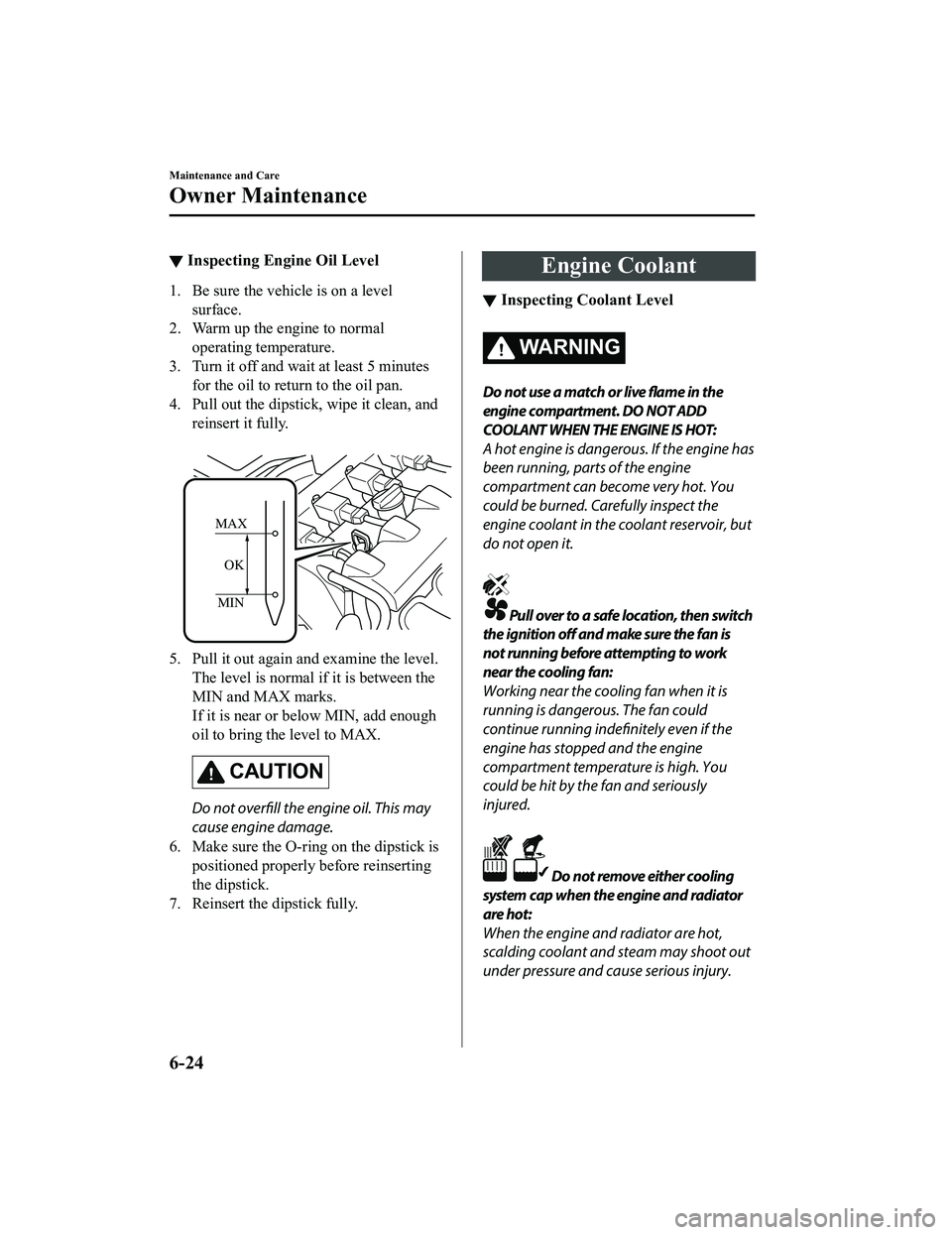
▼Inspecting Engine Oil Level
1. Be sure the vehicle is on a level
surface.
2. Warm up the engine to normal operating temperature.
3. Turn it off and wait at least 5 minutes for the oil to return to the oil pan.
4. Pull out the dipstick, wipe it clean, and
reinsert it fully.
MIN
MAX
OK
5. Pull it out again and examine the level. The level is normal if it is between the
MIN and MAX marks.
If it is near or below MIN, add enough
oil to bring the level to MAX.
CAUTION
Do not overfill the engine oil. This may
cause engine damage.
6. Make sure the O-ring on the dipstick is positioned properly before reinserting
the dipstick.
7. Reinsert the dipstick fully.
Engine Coolant
▼ Inspecting Coolant Level
WA R N I N G
Do not use a match or live flame in the
engine compartment. DO NOT ADD
COOLANT WHEN THE ENGINE IS HOT:
A hot engine is dangerous. If the engine has
been running, parts of the engine
compartment can become very hot. You
could be burned. Carefully inspect the
engine coolant in the coolant reservoir, but
do not open it.
Pull over to a safe location, then switch
the ignition off and make sure the fan is
not running before attempting to work
near the cooling fan:
Working near the cooling fan when it is
running is dangerous. The fan could
continue running indefinitely even if the
engine has stopped and the engine
compartment temperature is high. You
could be hit by the fan and seriously
injured.
Do not remove either cooling
system cap when the engine and radiator
are hot:
When the engine and radiator are hot,
scalding coolant and steam may shoot out
under pressure and cause serious injury.
Maintenance and Care
Owner Maintenance
6-24
MX-5_8GF7-EA-17J_Edition2 2017-10-31 14:07:27
Page 398 of 576

Wiper Blades
CAUTION
Hot waxes applied by automatic car
washers have been known to
affect the
wiper's ability to clean windows.
To prevent damage to the wiper blades,
do not use gasoline, kerosene, paint
thinner, or other solvents on or near
them.
When the wiper lever is in the AUTO
position and the ignition is switched ON,
the wipers may move automatically in
the following cases:
If the windshield above the rain sensor
is touched.
If the windshield above the rain sensor
is wiped with a cloth.
If the windshield is struck with a hand
or other object.
If the rain sensor is struck with a hand
or other object from inside the vehicle.
Be careful not to pinch hands or fingers
as it may cause injury, or damage the
wipers. When washing or servicing the
vehicle, make sure the wiper lever is in
the OFF position.
Contamination of either the windshield or
the blades with foreign matter can reduce
wiper effectiveness. Common sources are
insects, tree sap, and hot wax treatments
used by some commercial car washes.
If the blades are not wiping properly, clean
the window and blades with a good
cleaner or mild detergent; then rinse
thoroughly with clean water. Repeat if
necessary.
▼ Replacing Windshield Wiper Blades
When the wipers no longer clean well, the
blades are probably worn or cracked.
Replace them.
CAUTION
To prevent damage to the wiper arms and
other components, do not try to sweep the
wiper arm by hand.
NOTE
When raising both windshield wiper arms,
raise the driver's side wiper arm first.
When lowering the wiper arms, slowly
lower the wiper arm fr
om the passenger's
side first while supporting it with your
hand. Forcefully lowering the wiper arms
could damage the wiper arm and blade,
and may scratch or crack the windshield.
(Type A)
1. Raise the wiper arm.
2. Open the clip and slide the blade assembly in the direction of the arrow.
Maintenance and Care
Owner Maintenance
6-28
MX-5_8GF7-EA-17J_Edition2 2017-10-31 14:07:27
Page 411 of 576
CAUTION
When removing the lens or lamp unit using
a flathead screwdriver, make sure that the
flathead screwdriver does not contact the
interior terminal. If the flathead screwdriver
contacts the terminal, a short circuit may
occur.
NOTE
To replace the bulb, contact an
Authorized Mazda Dealer.
Use the protective cover and carton for
the replacement bulb to dispose of the
old bulb promptly and out of the reach
of children.
▼Replacing Exterior Light Bulbs
Headlights, Daytime running lights
(LED type), Parking lights, High-mount
brake light, Brake
lights, Taillights
The LED bulb cannot be replaced as a
single unit because it is an integrated unit.
The LED bulb has to be replaced with the
unit. We recommend an Authorized
Mazda Dealer when the replacement is
necessary.
Daytime running lights (Bulb type)
1. Make sure the ignition is switched off,
and the headlight switch is off.
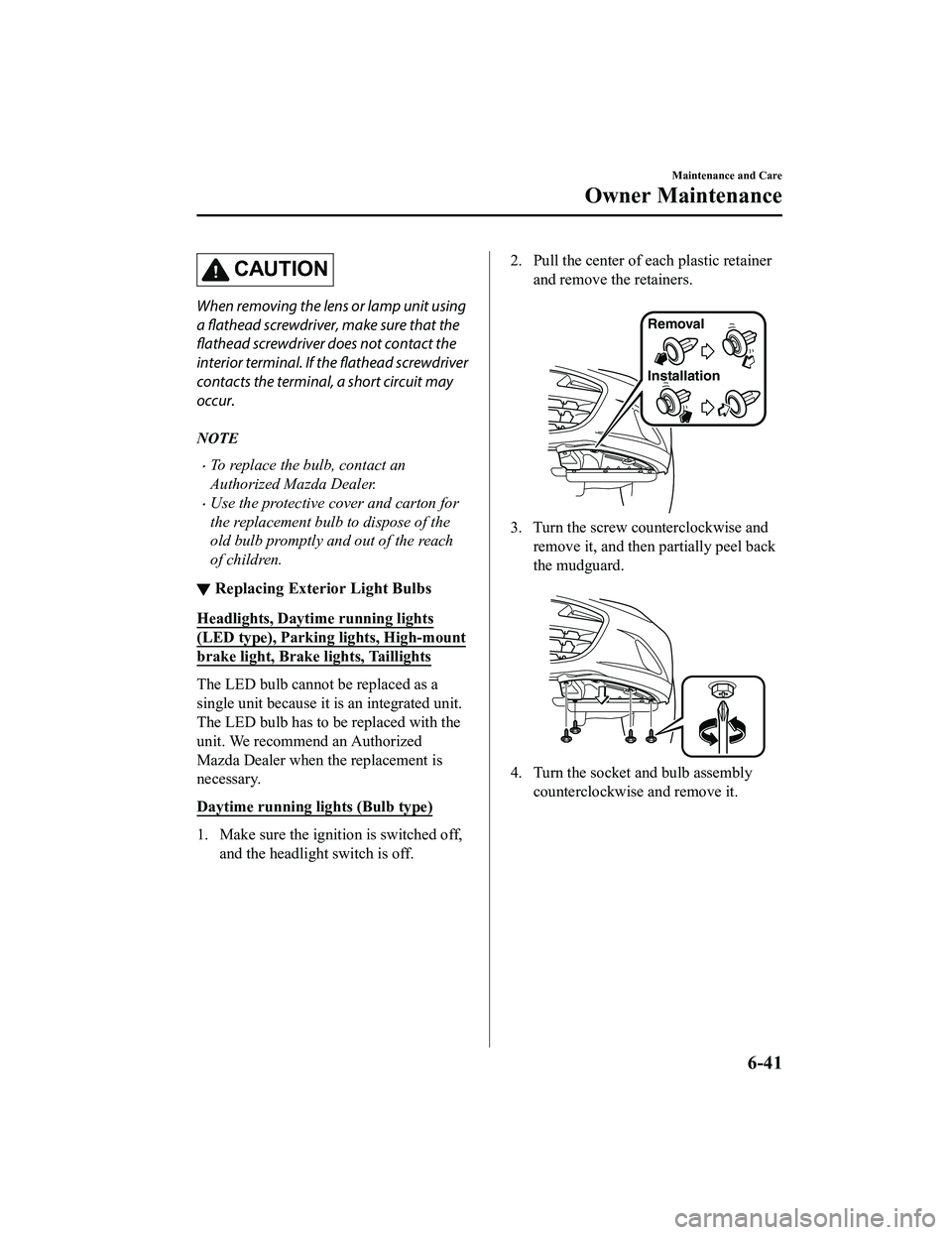
2. Pull the center of each plastic retainer
and remove the retainers.
Removal
Installation
3. Turn the screw counterclockwise andremove it, and then partially peel back
the mudguard.
4. Turn the socket and bulb assembly counterclockwise and remove it.
Maintenance and Care
Owner Maintenance
6-41
MX-5_8GF7-EA-17J_Edition2 2017-10-31 14:07:27
Page 412 of 576

5. Disconnect the bulb from the socket.
6. Install the new bulb in the reverseorder of the removal procedure.
Front side-marker lights
1. Make sure the ignition is switched off, and the headlight switch is off.
2. If you are changing the right bulb, start the engine, turn the steering wheel all
the way to the right, and turn off
engine. If you are changing the left
bulb, turn the steering wheel to the left.
3. Pull the center of each plastic retainer
and remove the retainers, and then
partially peel back the mudguard.
Removal
Installation
4. Turn the socket and bulb assembly
counterclockwise and remove it.
5. Disconnect the bulb from the socket.
6. Install the new bulb in the reverseorder of the removal procedure.
Front turn signal lights
1. Make sure the ignition is switched off, and the headligh t switch is off.
2. If you are changing the right bulb, start the engine, turn the steering wheel all
the way to the right, and turn off
engine. If you are changing the left
bulb, turn the steering wheel to the left.
3. Pull the center of each plastic retainer and remove the retainers, and then
partially peel back the mudguard.
Removal
Installation
Maintenance and Care
Owner Maintenance
6-42
MX-5_8GF7-EA-17J_Edition2 2017-10-31 14:07:27
Page 413 of 576

4. Disconnect the connector from the unitby pressing the tab on the connector
with your finger and pulling the
connector rearward.
5. Turn the socket and bulb assemblycounterclockwise and remove it.
6. Disconnect the bulb from the socket.
7. Install the new bulb in the reverseorder of the removal procedure.
Side turn signal lights
1. Make sure the ignition is switched off,and the headlight switch is off.
2. If you are changing the right bulb, start the engine, turn the steering wheel all
the way to the right, and turn off
engine. If you are changing the left
bulb, turn the steering wheel to the left.
3. Pull the center of each plastic retainer and remove the retainers, and then
partially peel back the mudguard.
Removal
Installation
4. Remove the unit by pressing the tab onthe unit with your finger and pulling
the unit forward.
Maintenance and Care
Owner Maintenance
6-43
MX-5_8GF7-EA-17J_Edition2 2017-10-31 14:07:27
Page 414 of 576

5. Detach the electrical connector fromthe unit by pulling it to the rear.
6. Install the new side turn signal unit inthe reverse order of the removal
procedure.
Rear turn signal lights
1. Make sure the ignition is switched off, and the headlight switch is off.
2. Pull the center of each plastic retainer
and remove the retainers and the trunk
end trim.
Removal
Installation
3. Disconnect the connector from the unit by pressing the tab on the connector
with your finger and pulling the
connector downward.
4. Pull the center of each plastic retainerand remove the retainers, and then
partially peel back the trunk side trim.
Removal
Installation
Maintenance and Care
Owner Maintenance
6-44
MX-5_8GF7-EA-17J_Edition2 2017-10-31 14:07:27
Page 416 of 576

8. To remove the rear combination lampunit, insert your finger from inside the
trunk and into the hole from which the
grommet was removed in Step 5, and
while holding the lamp lens (round
part) of the rear combination lamp with
your hand, press the rear combination
lamp unit until the hook detaches from
the clip.
Rear combination lamp unit
Hook
Grommet installation
hole
9. After the hook is detached, pull out the
rear combination lamp unit in the
direction of the arrow and remove it.
Grommet installation hole
Clip
Hook Rear combination
lamp unit
CAUTION
Carefully pull out the rear combination
lamp unit when removing it from the
body.
The wiring may become damaged if the
rear combination lamp unit is forcefully
pulled out.
10. Turn the socket and bulb assembly counterclockwise and remove it.
11. Disconnect the bulb from the socket.
12. Install the new bulb in the reverseorder of the removal procedure.
Rear side-marker lights
1. Make sure the ignition is switched off, and the headligh t switch is off.
2. Turn the socket and bulb assembly counterclockwise and remove it.
Maintenance and Care
Owner Maintenance
6-46
MX-5_8GF7-EA-17J_Edition2 2017-10-31 14:07:27