lights MAZDA MODEL MX-5 MIATA 2018 Owner's Manual
[x] Cancel search | Manufacturer: MAZDA, Model Year: 2018, Model line: MODEL MX-5 MIATA, Model: MAZDA MODEL MX-5 MIATA 2018Pages: 576, PDF Size: 55.37 MB
Page 142 of 576

Warning/Indicator Lights
Instrument Cluster varies depending on model and specifications.
Center of Dashboard
Warning/Indicator lights will appear in any of the highlighted areas
Type A
(With Multi-information Display)
Type B
(Without Multi-information Display)
Instrument Cluster
▼
Warning Indication/Warning Lights
These lights turn on or flash to notify the user of the system
operation status or a system
malfunction.
Signal Warning Lights Page
Brake System Warning Light*1*27-33
Charging System Warning Indication/Warning Light*17-33
Engine Oil Warning Light*17-33
(Red)High Engine Coolant Temperature Warning Indication/Warning
Light*17-33
Power Steering Malfunction Indicator Light*17-33
*Master Warning Indication/Warning Light*17-36
Electric Vacuum Pump Warning Light*17-36
When Driving
Instrument Cluster and Display
4-26*Some models.
MX-5_8GF7-EA-17J_Edition2
2017-10-31 14:07:27
Page 143 of 576

SignalWarning Lights Page
ABS Warning Light*1
Electronic Brake Force
Distribution System Wa r n i n g
7-33
ABS warning 7-36
Check Engine Light*17-36
*Automatic Transmission Warni ng Indication/Warning Light*17-36
Air Bag/Seat Belt Pretensioner System Warning Light*17-36
Tire Pressure Monitoring System Warning Light*1
Flashing
7-36
Turns on 7-41
(Red)
*KEY Warning Indication/Warning Light*1
Turns on7-36
Flashing 7-41
(Amber)
*KEY Warning Indication 7-36
*Lane Departure Warning System (LDWS) Warning Indication/
Wa r n i n g L i g h t*1
Turns on 7-36
Flashing 4-83
(Amber)
*High Beam Control System (HB C) Warning Indication/Warn-
ing Light*17-36
*Blind Spot Monitoring (BS M) Warning Indication 7-36
*Retractable Hardtop Warning Indication
7-36
LED Headlight Warning Light*17-36
Seat Belt Warning Light
7-41
*Door-Ajar Warning Light7-41
When Driving
Instrument Cluster and Display
*Some models.4-27
MX-5_8GF7-EA-17J_Edition2
2017-10-31 14:07:27
Page 144 of 576

SignalWarning Lights Page
*Door-Ajar Warning Indication 7-41
*Trunk lid-Ajar Wa
rning Indication 7-41
*Low Fuel Warning Indication/Warning Light
7-41
Check Fuel Cap Warning Light*17-41
*Low Washer Fluid Level Warni
ng Indication/Warning Light 7-41
*1 The light turns on when the ignition is switched on for an ope
ration check, and turns off a few seconds later or
when the engine is started. If the light does not turn on or remains turned on, have the vehicle inspected at an
Authorized Mazda Dealer.
*2 The light turns on continuously when the parking brake is applied.
▼Indication/Indicator Lights
These lights turn on or flash to notify the user of the system
operation status or a system
malfunction.
Signal Indicator Lights Page
*Passenger Air Bag Deactivation Indicator Light*12-40
(White/Green)
*KEY Indicator/Indicator Light 3-9
Security Indicator Light*13-47
*Retractable Hardtop Operation Indicator Light3-42
*Wrench Indication/Indicator Light*14-30
(Blue)Low Engine Coolant Temperature Indicator Light 4-30
*Shift Position Indication
4-36
Lights-On Indicator Light
4-44
When Driving
Instrument Cluster and Display
4-28*Some models.
MX-5_8GF7-EA-17J_Edition2 2017-10-31 14:07:27
Page 145 of 576

SignalIndicator Lights Page
Headlight High-Beam Indicator Light Headlight High-Low
Beam4-47
Flashing the Headlights 4-47
Turn Signal/Hazard Warning Indicator Lights Turn and Lane-Change
Signals4-49
Hazard Warning Flasher 4-55
TCS/DSC Indicator Light*1
Traction Control System(TCS)4-65
Dynamic Stability Con- trol (DSC)4-66
(Turns on) 7-36
DSC OFF Indicator Light*14-67
*Select Mode Indication 4-72
(Green)
*High Beam Control System (HBC) Indicator Light4-77
*Blind Spot Monitoring (BSM) OFF Indicator Light*14-89
*Lane Departure Warning System (LDWS) OFF Indicator
Light*14-82
(White/Amber) Cruise Main Indication/Indicator Light 4-99
(Green)Cruise Set Indication/Indicator Light 4-99
*1 The light turns on when the ignition is switched on for an ope
ration check, and turns off
a few seconds later or when the engine is started. If the light does not turn on or remains
turned on, have the vehicle inspected at an Authorized Mazda De aler.
When Driving
Instrument Cluster and Display
*Some models.4-29
MX-5_8GF7-EA-17J_Edition2 2017-10-31 14:07:27
Page 151 of 576
Shift-Lock System
The shift-lock system prevents shifting out
of P unless the brake pedal is depressed.
To shift from P:
1. Depress and hold the brake pedal.
2. Start the engine.
3. Press and hold the lock-release button.
4. Move the selector lever.
NOTE
When the ignition is switched to ACC or
the ignition is switch ed off, the selector
lever cannot be shifted from P.
The ignition cannot be switched to OFF
if the selector lever is not in P.
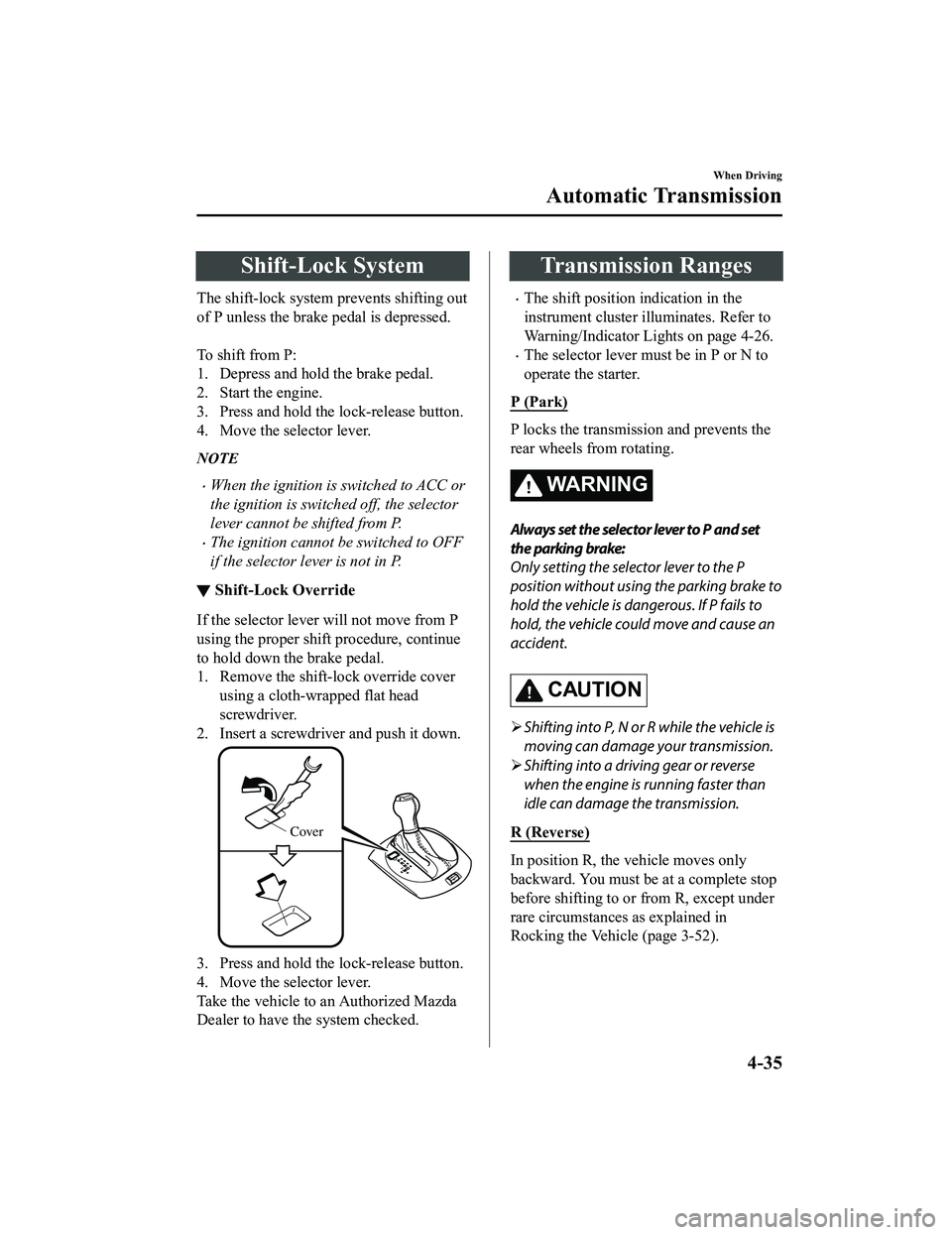
▼ Shift-Lock Override
If the selector lever will not move from P
using the proper shift procedure, continue
to hold down the brake pedal.
1. Remove the shift-lock override cover
using a cloth-wrapped flat head
screwdriver.
2. Insert a screwdriver and push it down.
Cover
3. Press and hold the lock-release button.
4. Move the selector lever.
Take the vehicle to an Authorized Mazda
Dealer to have the system checked.
Transmission Ranges
The shift position indication in the
instrument cluster illuminates. Refer to
Warning/Indicator Lights on page 4-26.
The selector lever must be in P or N to
operate the starter.
P (Park)
P locks the transmission and prevents the
rear wheels from rotating.
WA R N I N G
Always set the selector lever to P and set
the parking brake:
Only setting the selector lever to the P
position without using the parking brake to
hold the vehicle is dangerous. If P fails to
hold, the vehicle could move and cause an
accident.
CAUTION
Shifting into P, N or R while the vehicle is
moving can damage your transmission.
Shifting into a driving gear or reverse
when the engine is running faster than
idle can damage the transmission.
R (Reverse)
In position R, the vehicle moves only
backward. You must be at a complete stop
before shifting to or from R, except under
rare circumstances as explained in
Rocking the Vehicle (page 3-52).
When Driving
Automatic Transmission
4-35
MX-5_8GF7-EA-17J_Edition2 2017-10-31 14:07:27
Page 160 of 576

Lighting Control
▼Headlights
Turn the headlight switch to turn the headlights, other exterior lights and dashboard
illumination on or off.
When the lights are turned on, the lights-on indicator light in
the instrument cluster turns on.
NOTE
If the light switch is left on, the lights will automatically switch off approximately 30
seconds after switching the ignition off.
The time setting can be changed.
Refer to Personalization Features on page 9-9.
To prevent discharging the battery, do not leave the lights on while th e engine is off unless
safety requires them.
Without auto-light control
Switch Position
Ignition Position ONACC or
OFF ON
ACC or
OFF ON
ACC or
OFF
Headlights Off Off Off Off On
On
*2
Daytime running lightsOn*1OffOn*1Off Off Off
Taillights
Parking lights
License plate lights
Side-marker lights Off Off On
On
*2OnOn*2
*1 The lights are turned on wh ile the vehicle is driven.*2 The lights are turned on for th e specified period by the auto headlight off function.
When Driving
Switches and Controls
4-44
MX-5_8GF7-EA-17J_Edition2 2017-10-31 14:07:27
Page 161 of 576

With auto-light control
Switch Position
Ignition PositionONACC or
OFF ONACC or
OFF ONACC or
OFF ONACC or
OFF
Headlights Off Off
Auto
*2Auto*3Off Off On On*5
Daytime running lights On*1OffOn*4OffOn*1Off Off Off
Taillights
Parking lights
License plate lights
Side-marker lights Off Off
Auto
*2Auto*3OnOn*5OnOn*5
*1 The lights are turned on wh ile the vehicle is driven.*2 The lights are turned on by the auto light function.*3 The lights are turned on con tinuously if the ignition is switched from ON to any other position with the lights
turned on. The lights are turned on for the specified period by the auto headlight off function.
*4 The lights are turned on while t he vehicle is driven, and turned off when the headlights are turned on by the
auto light function.
*5 The lights are turned on for the specified period by the auto headlight off function.
Auto-light control*
When the headlight switch is in the position and the ignition is switched ON, the light
sensor senses the surrounding lightness or darkness and automat ically turns the headlights
and other exterior lights on or off.
When Driving
Switches and Controls
*Some models.4-45
MX-5_8GF7-EA-17J_Edition2 2017-10-31 14:07:27
Page 162 of 576

CAUTION
Do not shade the light sensor by adhering a st icker or a label on the windshield. Otherwise
the light sensor will not operate correctly.
The light sensor also works as a rain sensor for the auto-wiper control. Keep hands and
scrapers clear of the windshield when the wiper lever is in the
position and the ignition
is switched ON as fingers could be pinched or the wipers and wiper blades could be
damaged when the wipers activate automaticall y. If you are going to clean the windshield,
be sure the wipers are turned off completely wh en it is particularly tempting to leave the
engine running. This is particularly important when clearing ice and snow.
NOTE
The headlights, other exterior lights and dashboard illumination may not turn off
immediately even if the surrounding area becomes well-lit because the light sensor
determines that it is night time if the surrounding area is continuously dark for several
minutes such as inside long tunnels, traffic jams inside tunnels, or in indoor parking lots.
In this case, the lights turn off if the light switch is turned to the
position.
If the headlight switch and the windshield wiper switch are in , and the wipers are
operated at low or high speed by the auto wiper control for several seconds, bad weather
conditions are determined and the headlights may be turned on.
The sensitivity of the auto-light control may be changed.
Refer to Personalization Features on page 9-9.
When Driving
Switches and Controls
4-46
MX-5_8GF7-EA-17J_Edition2 2017-10-31 14:07:27
Page 163 of 576

▼Headlight High-Low Beam
The headlights switch between high and
low beams by moving the lever forward or
backward.
High beam
Low beam
When the headlight high-beams are on, the
headlight high-beam indicator light is
turned on.
▼Flashing the Headlights
Can be used when the ignition is switched
ON.
To flash the headlight
s, pull the lever fully
towards you (th e headlight switch does not
need to be on).
OFF
Headlight
flashing
The headlight high-beam indicator light in
the instrument cluster illuminates
simultaneously. The lever will return to
the normal position when released.
▼ Coming Home Light
The coming home light turns on the
headlights (low beams) when the lever is
operated.
To turn on the lights
When the lever is pulled with the ignition
switched to ACC or OFF, the low beam
headlights turn on.
The headlights turn off after a certain
period of time has elapsed after the doors
are closed.
NOTE
The time until the headlights turn off
after all of the doors are closed can be
changed.
Refer to Personalization Features on
page 9-9.
If no operations are done for 3 minutes
after the lever is pulled, the headlights
turn off.
When Driving
Switches and Controls
4-47
MX-5_8GF7-EA-17J_Edition2
2017-10-31 14:07:27
Page 164 of 576

The headlights turn off if the lever is
pulled again while the headlights are
illuminated.
▼ Leaving Home Light
The leaving home light turns on the lights
when the transmitte
r unlock button is
pressed while away from the vehicle.
The following light s turn on when the
leaving home light is operated.
Low beams, Parking lights, Taillights,
License plate lights.
To turn on the lights
When the ignition switch and the headlight
switch are in the following conditions, the
headlights will il luminate when the
transmitter unlock button is pressed and
the vehicle receives the transmitter signal.
The headlights turn off after a certain
period of time has elapsed (30 seconds).
Ignition switch: off
Headlight switch: , , or
Lock button
Unlock
button
NOTE
Operation of the leaving home light can
be turned on or off.
Refer to Personalization Features on
page 9-9.
When the transmitter lock button is
pressed and the vehicle receives the
transmitter signal, the headlights turn
off.
When the headlight switch is turned to
the
position, the headlights turn off.
▼ Headlight Leveling
The number of passengers and weight of
cargo in the luggage compartment change
the angle of the headlights.
The angle of the headlights will be
automatically adjusted when turning on
the headlights.
▼Daytime Running Lights
Some countries requir
e moving vehicles to
have their lights on (daytime running
lights) during the daytime.
The daytime running lights turn on
automatically when the vehicle starts
moving.
They turn off when the parking brake is
operated or the shift lever is shifted to the
P position (automatic transmission
vehicle).
NOTE
(Except Canada)
The daytime running lights can be
deactivated.
Refer to Personalization Features on page
9-9.
When Driving
Switches and Controls
4-48
MX-5_8GF7-EA-17J_Edition2 2017-10-31 14:07:27