trunk MAZDA MODEL MX-5 MIATA 2018 Owner's Manual
[x] Cancel search | Manufacturer: MAZDA, Model Year: 2018, Model line: MODEL MX-5 MIATA, Model: MAZDA MODEL MX-5 MIATA 2018Pages: 576, PDF Size: 55.37 MB
Page 101 of 576

▼Opening the Roof
When opening the roof, make sure objects
inside the vehicle are not blown away by
the wind. Secure all loose objects inside
before driving with
the roof down.
1. Park the vehicle on level ground in a safe place where the vehicle does not
obstruct traffic.
Shift the shift lever to neutral on a
manual transmission vehicle.
Shift the selector lever to P on an
automatic transmi ssion vehicle.
Apply the parking brake.
2. Make sure that the trunk is closed.
3. Start the engine to prevent the battery
from going dead.
4. Continue pressing the retractable
hardtop switch in the open direction
until the roof opening operation is
completed. When the opening
operation is completed, a beep sound is
activated and the operation indicator
light turns off.
NOTE
If the retractable hardtop switch is
pressed in the open direction, a
warning beep sounds.
When pressing the retractable
hardtop switch while the windows
are closed, the windows open
slightly. If the switch is continuously
pressed in the open direction until
the roof opening operation is
completed, the windows return to
their original positions. However,
the windows may not return to their
original positions depending on the
conditions.
The roof keeps opening and the
operation indicator light flashes
while the retractable hardtop switch
is pressed in the open direction.
If the switch is released while the
roof is opening, the roof stops
opening. If the switch is pressed in
the open direction again, the roof
resumes opening.
When the roof is half-open, the front
roof resumes opening after the rear
roof is completely open.
▼Closing the Roof
1. Park the vehicle on level ground in a
safe place where the vehicle does not
obstruct traffic.
Shift the shift lever to neutral on a
manual vehicle.
Shift the selector lever to P on an
automatic vehicle.
Apply the parking brake.
2. Make sure that the trunk is closed.
3. Slightly slide the seats back if they are in the foremost position.
4. Start the engine to prevent the battery from going dead.
Before Driving
Convertible Top (Hardtop)
3-43
MX-5_8GF7-EA-17J_Edition2 2017-10-31 14:07:27
Page 102 of 576

5. Continue pressing the retractablehardtop switch in the close direction
until the roof closing operation is
completed. When the closing operation
is completed, a beep sound is activated
and the operation indicator light turns
off.
6. Close the windows using the powerwindow switch.
NOTE
If the retractable hardtop switch is
pressed in the close direction, a warning
beep sounds.
When pressing the retractable hardtop
switch while the windows are closed, the
windows open slightly. The windows do
not return to their original positions
even after the roof closing operation is
completed.
The roof keeps closing and the operation
indicator light flashes while the
retractable hardtop switch is pressed in
the close direction.
If the switch is released while the roof is
closing, the roof stops closing. If the
switch is pressed in the close direction
again, the roof resumes closing.
▼Operation Conditions
If the following conditions have been
satisfied, the roof can be opened/closed.
The ignition is switched ON.
Shift/selector lever is in a position other
than R (reverse).
Vehicle speed is 10 km/h (6.2 mph) or
less.
The trunk lid is closed.
The vehicle is tilted at an angle of 15
degrees or less.
CAUTION
If the vehicle speed exceeds 10 km/h (6.2
mph) during the opening/closing
operation, the opening/closing operation
of the roof stops midstream. If the roof
stops midstream, visibility at the rear may
be impaired or damage to the roof may
occur which could lead to an accident.
Operate the switch again with the vehicle
stopped, depending on the road and traffic
conditions, to complete opening/closing
operation of the roof.
NOTE
For the purposes of safety when
opening/closing the roof, follow the
instructions for Opening the Roof and
Closing the Roof.
If the roof cannot be closed even after
the operation conditions are all met,
have it checked at an Authorized Mazda
Dealer.
The roof can be closed manually as an
emergency measure.
Refer to When the Roof Cannot be
Closed on page 7-58.
Before Driving
Convertible Top (Hardtop)
3-44
MX-5_8GF7-EA-17J_Edition2
2017-10-31 14:07:27
Page 106 of 576

Theft-Deterrent System*
If the theft-deterrent system detects an
inappropriate entry into the vehicle, which
could result in the vehicle or its contents
being stolen, the alarm alerts the
surrounding area of an abnormality by
sounding the horn and flashing the hazard
warning lights.
The system will not function unless it's
properly armed. So when you leave the
vehicle, follow the arming procedure
correctly.
▼ Operation
System triggering conditions
The horn sounds intermittently and the
hazard warning lights flash for about 30
seconds when the sys
tem is triggered by
any one of the following:
Unlocking a door with the auxiliary key,
door lock switch, or an inside door-lock
knob.
Forcing open a door, the hood or the
trunk lid.
Opening the hood by operating the hood
release handle.
Switching the ignition ON without using
the push button start.
If the system is triggered again, the lights
and horn will activate until the driver's
door is unlocked with the transmitter.
(With the advanced keyless function)
The lights and horn can also be
deactivated by pressing the request switch
on a door.
NOTE
The trunk lid does not open while the
theft-deterrent system is operating.
If the battery goes dead while the
theft-deterrent system is armed, the horn
will activate and the hazard warning
lights will flash wh en the battery is
charged or replaced.
▼ How to Arm the System
1. Close the windows and the convertible
top securely.
2. Switch the ignition OFF.
3. Make sure the hood, the doors, and the
trunk lid are closed.
4. Press the lock butto n on the transmitter
or lock the driver's door from the
outside with the auxiliary key.
The hazard warning lights will flash
once.
The following method will also arm
the theft-deterrent system:
Press the door-lock switch “
” while
any door is open and then close both of
the doors.
(With the advanced keyless function)
Press a request switch.
The security indicator light in the
instrument cluster flashes twice per
second for 20 seconds.
5. After 20 seconds, the system is fully armed.
Before Driving
Security System
3-48*Some models.
MX-5_8GF7-EA-17J_Edition2 2017-10-31 14:07:27
Page 107 of 576

NOTE
The theft-deterrent system can also be
armed by activating the auto relock
function with both the doors, the trunk
lid and the hood closed.
Refer to Transmitter on page 3-4.
The system will disarm if one of the
following operations takes place within
20 seconds after pressing the lock
button:
Unlocking any door.
Opening any door.
Opening the hood.
Switching the ignition ON.
To rearm the system, do the arming
procedure again.
When the doors are locked by pressing
the lock button on the transmitter or
using the auxiliary key while the
theft-deterrent system is armed, the
hazard warning lights will flash once to
indicate that the system is armed.
▼ To Turn Off an Armed System
An armed system can be turned off using
any one of the following methods:
Pressing the unlock button on the
transmitter.
Starting the engine with the push button
start.
(With the advanced keyless function)
Pressing a reque
st switch on the
doors.
The hazard warning lights will flash twice.
NOTE
When the doors are unlocked by pressing
the unlock button on the transmitter while
the theft-deterrent system is turned off, the
hazard warning lights will flash twice to
indicate that the system is turned off.
▼ To S t o p t h e A l a r m
A triggered alarm can be turned off using
any one of the following methods:
Pressing the unlock button on the
transmitter.
Starting the engine with the push button
start.
(With the advanced keyless function)
Pressing a request switch on the
doors.
Pressing the electric trunk lid opener
while the key is being carried.
The hazard warning lights will flash twice.
Before Driving
Security System
3-49
MX-5_8GF7-EA-17J_Edition2 2017-10-31 14:07:27
Page 144 of 576

SignalWarning Lights Page
*Door-Ajar Warning Indication 7-41
*Trunk lid-Ajar Wa
rning Indication 7-41
*Low Fuel Warning Indication/Warning Light
7-41
Check Fuel Cap Warning Light*17-41
*Low Washer Fluid Level Warni
ng Indication/Warning Light 7-41
*1 The light turns on when the ignition is switched on for an ope
ration check, and turns off a few seconds later or
when the engine is started. If the light does not turn on or remains turned on, have the vehicle inspected at an
Authorized Mazda Dealer.
*2 The light turns on continuously when the parking brake is applied.
▼Indication/Indicator Lights
These lights turn on or flash to notify the user of the system
operation status or a system
malfunction.
Signal Indicator Lights Page
*Passenger Air Bag Deactivation Indicator Light*12-40
(White/Green)
*KEY Indicator/Indicator Light 3-9
Security Indicator Light*13-47
*Retractable Hardtop Operation Indicator Light3-42
*Wrench Indication/Indicator Light*14-30
(Blue)Low Engine Coolant Temperature Indicator Light 4-30
*Shift Position Indication
4-36
Lights-On Indicator Light
4-44
When Driving
Instrument Cluster and Display
4-28*Some models.
MX-5_8GF7-EA-17J_Edition2 2017-10-31 14:07:27
Page 268 of 576
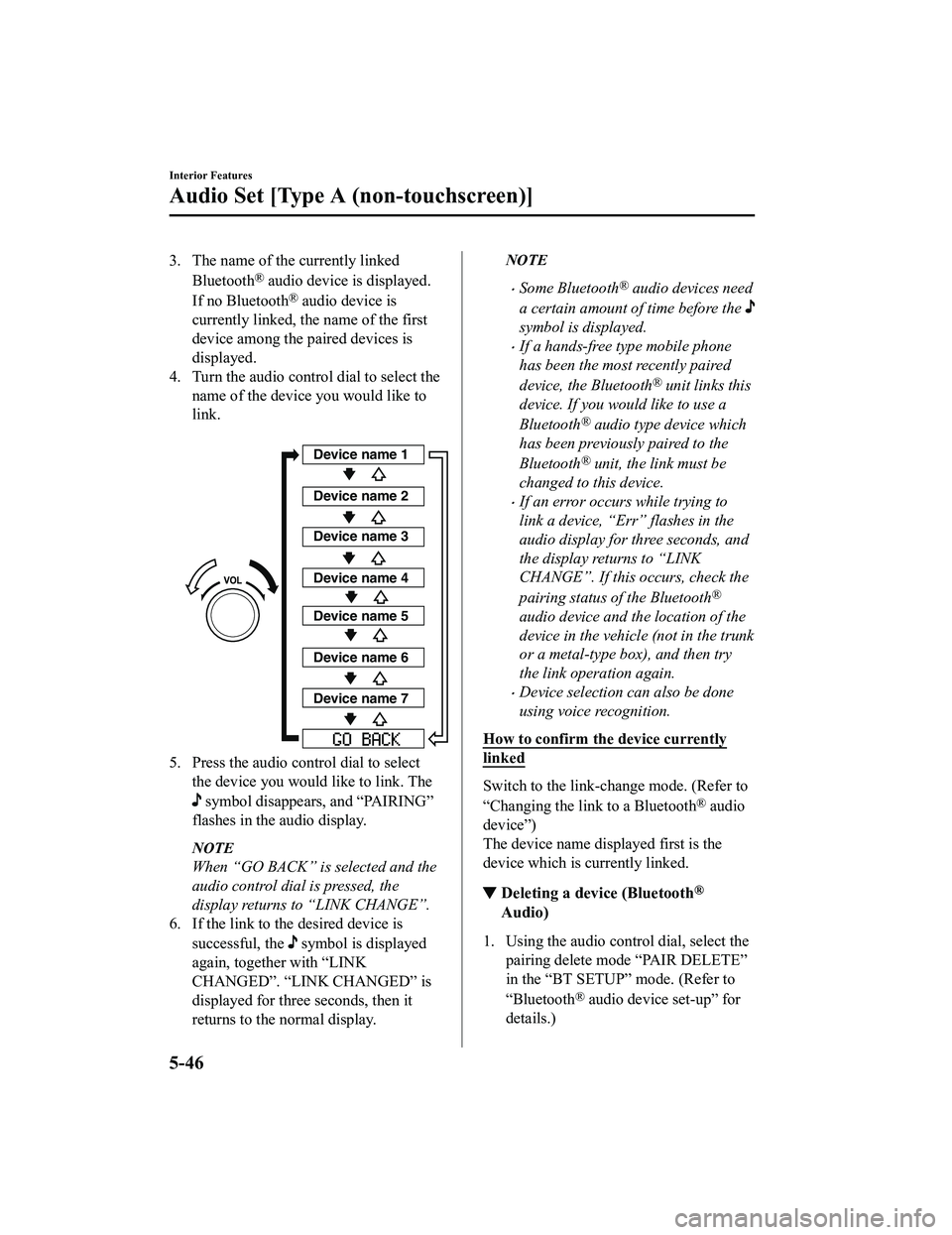
3. The name of the currently linkedBluetooth
® audio device is displayed.
If no Bluetooth
® audio device is
currently linked, the name of the first
device among the paired devices is
displayed.
4. Turn the audio control dial to select the name of the device you would like to
link.
Device name 1
Device name 2
Device name 3
Device name 4
Device name 5
Device name 6
Device name 7
5. Press the audio control dial to selectthe device you woul d like to link. The
symbol disappears, and “PAIRING”
flashes in the audio display.
NOTE
When “GO BACK” is selected and the
audio control dial is pressed, the
display returns to “LINK CHANGE”.
6. If the link to the desired device is
successful, the
symbol is displayed
again, together with “LINK
CHANGED”. “LINK CHANGED” is
displayed for three seconds, then it
returns to the normal display.
NOTE
Some Bluetooth® audio devices need
a certain amount of time before the
symbol is displayed.
If a hands-free type mobile phone
has been the most recently paired
device, the Bluetooth
® unit links this
device. If you would like to use a
Bluetooth
® audio type device which
has been previously paired to the
Bluetooth
® unit, the link must be
changed to this device.
If an error occurs while trying to
link a device, “Err” flashes in the
audio display for three seconds, and
the display returns to “LINK
CHANGE”. If this occurs, check the
pairing status of the Bluetooth
®
audio device and the location of the
device in the vehicle (not in the trunk
or a metal-type box), and then try
the link operation again.
Device selection can also be done
using voice recognition.
How to confirm the device currently
linked
Switch to the link-change mode. (Refer to
“Changing the link to a Bluetooth
® audio
device”)
The device name displayed first is the
device which is currently linked.
▼ Deleting a device (Bluetooth®
Audio)
1. Using the audio control dial, select the
pairing delete mode “PAIR DELETE”
in the “BT SETUP” mode. (Refer to
“Bluetooth
® audio device set-up” for
details.)
Interior Features
Audio Set [Type A (non-touchscreen)]
5-46
MX-5_8GF7-EA-17J_Edition2 2017-10-31 14:07:27
Page 361 of 576

Sunvisors
When you need a sunvisor, lower it for use
in front.
▼Va n i t y M i r r o r s
To use the vanity mirror, lower the
sunvisor.
Interior Lights
NOTE
Do not leave the lights on for long periods
while the engine is turned off. Otherwise
the battery power could be depleted.
Overhead Light
Switch Posi-
tion Overhead Light
Light off
Light is on when any door is openLight is on or off when the illumi-
nated entry system is on
Light on
Trunk Light
The trunk light is on when the lid is open
and off when it's closed.
Interior Features
Interior Equipment
5-139
MX-5_8GF7-EA-17J_Edition2
2017-10-31 14:07:27
Page 362 of 576

NOTE
To prevent the battery from being
discharged, do not leave the trunk open
for a long period when the engine is not
running.
▼Illuminated Entry System
The overhead lights turn on when any of
the following operations is done with the
overhead light switch in the DOOR
position.
The driver's door i
s unlocked with the
ignition is switched OFF.
The ignition is switched OFF with all
doors closed.
NOTE
The illumination time differs depending
on the operation.
Battery saver
If an interior light is left on with the
ignition switched OFF, the light is
turned off automatically after about 30
minutes to prevent battery depletion.
The operation of the illuminated entry
system can be changed.
Refer to Personalization Features on
page 9-9.
Accessory Sockets
The accessory socket is located deep in the
back of the footwell on the passenger side.
Only use genuine Mazda accessories or
the equivalent requiring no greater than
120 W (DC 12 V, 10 A).
The ignition must be switched to ACC or
ON.
CAUTION
To prevent accessory socket damage or
electrical failure, pay attention to the
following:
Do not use accessories that require
more than 120 W (DC 12 V, 10 A).
Do not use accessories that are not
genuine Mazda accessories or the
equivalent.
Close the cover when the accessory
socket is not in use to prevent foreign
objects and liquids from getting into
the accessory socket.
Correctly insert the plug into the
accessory socket.
Do not insert the cigarette lighter into
the accessory socket.
Interior Features
Interior Equipment
5-140
MX-5_8GF7-EA-17J_Edition2 2017-10-31 14:07:27
Page 410 of 576

Light Bulbs
Overhead lightSide turn signal lights
High-mount brake light
Trunk light
Front side-marker lights
Front turn signal lights
Headlights (Low/High beam)
P
arking lights
Daytime running lights
License plate lights
Brake lights
Taillights
Rear side-marker lights
Reverse lights
Rear turn signal lights
Maintenance and Care
Owner Maintenance
6-40
MX-5_8GF7-EA-17J_Edition2 2017-10-31 14:07:27
Page 414 of 576

5. Detach the electrical connector fromthe unit by pulling it to the rear.
6. Install the new side turn signal unit inthe reverse order of the removal
procedure.
Rear turn signal lights
1. Make sure the ignition is switched off, and the headlight switch is off.
2. Pull the center of each plastic retainer
and remove the retainers and the trunk
end trim.
Removal
Installation
3. Disconnect the connector from the unit by pressing the tab on the connector
with your finger and pulling the
connector downward.
4. Pull the center of each plastic retainerand remove the retainers, and then
partially peel back the trunk side trim.
Removal
Installation
Maintenance and Care
Owner Maintenance
6-44
MX-5_8GF7-EA-17J_Edition2 2017-10-31 14:07:27