phone MAZDA MODEL MX-5 MIATA 2018 Owner's Guide
[x] Cancel search | Manufacturer: MAZDA, Model Year: 2018, Model line: MODEL MX-5 MIATA, Model: MAZDA MODEL MX-5 MIATA 2018Pages: 576, PDF Size: 55.37 MB
Page 286 of 576
Troubleshooting
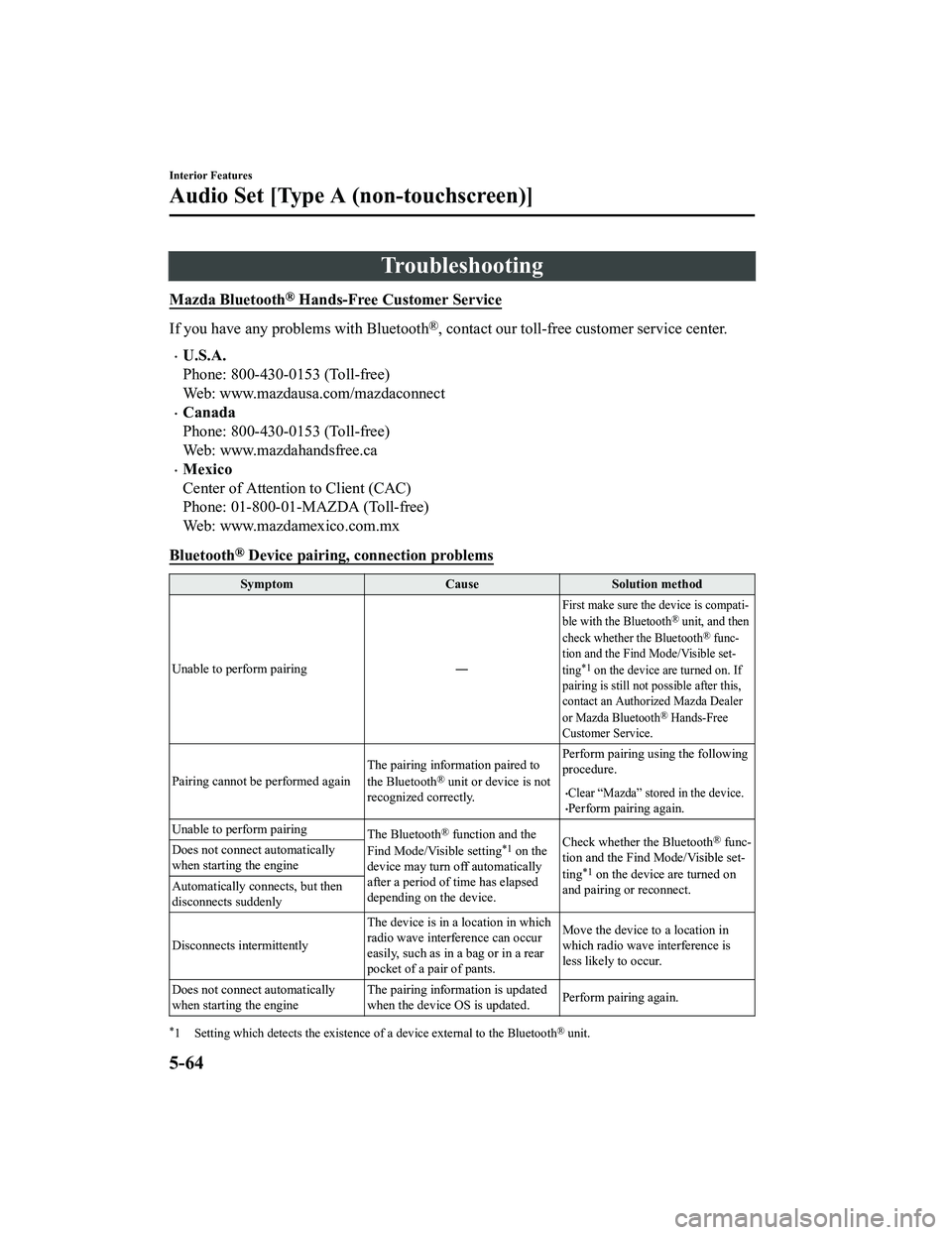
Mazda Bluetooth® Hands-Free Customer Service
If you have any problems with Bluetooth®, contact our toll-free customer service center.
U.S.A.
Phone: 800-430-0153 (Toll-free)
Web: www.mazdausa.com/mazdaconnect
Canada
Phone: 800-430-0153 (Toll-free)
Web: www.mazdahandsfree.ca
Mexico
Center of Attention to Client (CAC)
Phone: 01-800-01-MAZDA (Toll-free)
Web: www.mazdamexico.com.mx
Bluetooth
® Device pairing, c onnection problems
Symptom CauseSolution method
Unable to perform pairing ―
First make sure the device is compati-
ble with the Bluetooth® unit, and then
check whether the Bluetooth® func-
tion and the Find Mode/Visible set-
ting
*1 on the device are turned on. If
pairing is still not possible after this,
contact an Authorized Mazda Dealer
or Mazda Bluetooth
® Hands-Free
Customer Service.
Pairing cannot be performed again The pairing information paired to
the Bluetooth® unit or device is not
recognized correctly. Perform pairing using the following
procedure.Clear “Mazda” stored in the device.Perform pairing again.
Unable to perform pairing The Bluetooth
® function and the
Find Mode/Visible setting*1 on the
device may turn off automatically
after a period of time has elapsed
depending on the device. Check whether the Bluetooth® func-
tion and the Find Mode/Visible set-
ting
*1 on the device are turned on
and pairing or reconnect.
Does not connect automatically
when starting the engine
Automatically connects, but then
disconnects suddenly
Disconnects intermittently
The device is in a location in which
radio wave interference can occur
easily, such as in a bag or in a rear
pocket of a pair of pants.Move the device to a location in
which radio wave interference is
less likely to occur.
Does not connect automatically
when starting the engine The pairing information is updated
when the device OS is updated.
Perform pairing again.
*1 Setting which detects the existe
nce of a device external to the Bluetooth® unit.
Interior Features
Audio Set [Type A (non-touchscreen)]
5-64
MX-5_8GF7-EA-17J_Edition2 2017-10-31 14:07:27
Page 287 of 576
NOTE
When the OS of the device is updated, the pairing information may be deleted. If this
happens, reprogram the pairing information to the Bluetooth
® unit.
If you pair your phone which has already been paired to your vehicle more than once in
the past, you need to delete “Mazda” on your mobile device. Then, execute the
Bluetooth
® search on your mobile device once again, and pair to a newly detected
“Mazda”.
Before you pair your device, make sure that Bluetooth® is “ON”, both on your phone and
on the vehicle.
If Bluetooth®-enabled devices are used in the following locations or conditions,
connection via Bluetooth
® may not be possible.
The device is in a location hidden from the unit such as behind or under a seat, or
inside the glove compartment.
The device contacts or is covered by a metal object or body.
The device is set to power-saving mode.
Different Bluetooth®-enabled devices can be used for Bluetooth® Hands-Free and
Bluetooth
® audio. For example, device A can be connected as a Bluetooth® Hands-Free
device and device B can be connected as a Bluetooth
® audio device. However, the
following may occur when they are used at the same time.
The Bluetooth® connection of the device is disconnected.
Noise occurs in the Hands-Free audio.
Hands-Free operates slowly.
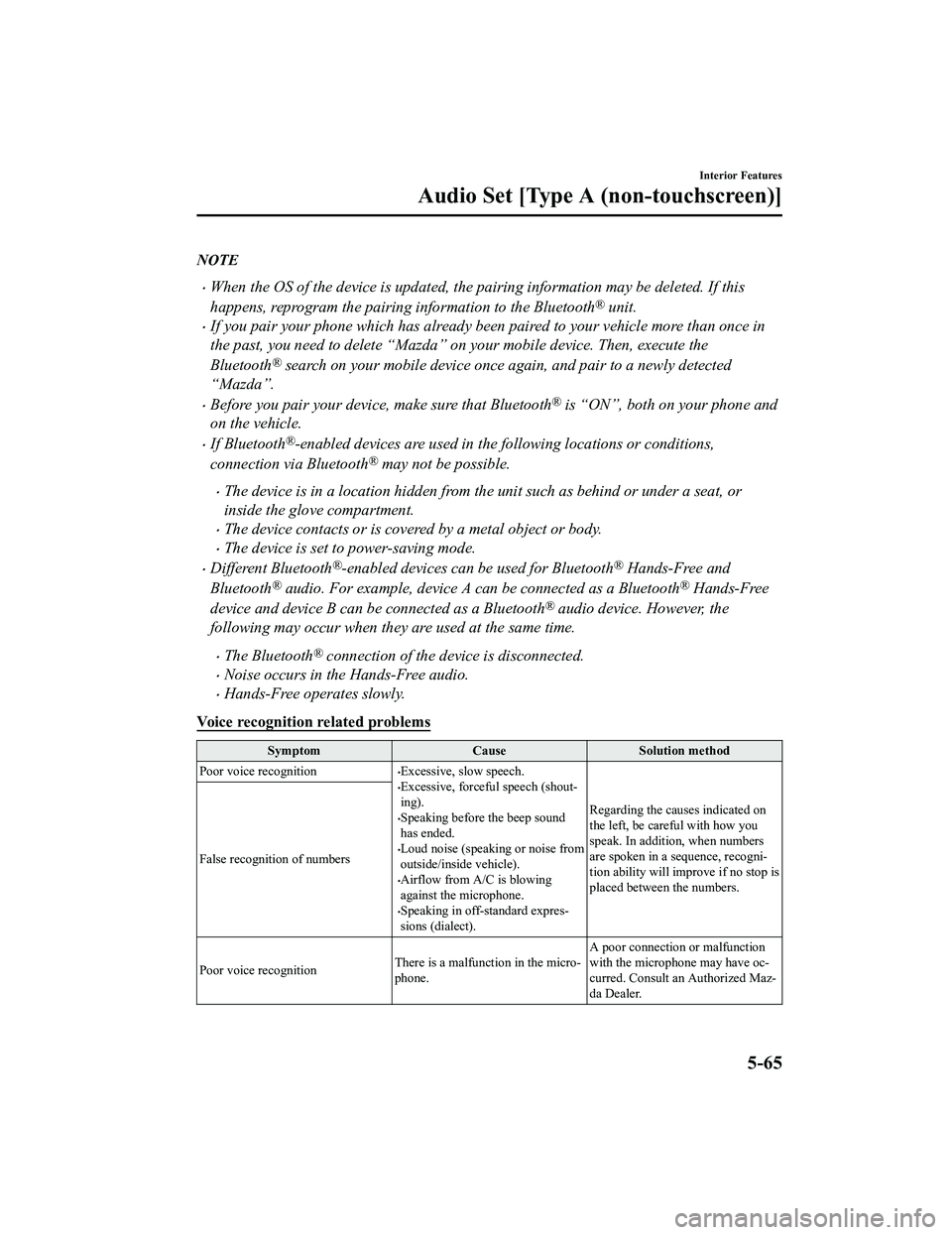
Voice recognition related problems
Symptom CauseSolution method
Poor voice recognition
Excessive, slow speech.Excessive, forceful speech (shout-
ing).
Speaking before the beep sound
has ended.
Loud noise (speaking or noise from
outside/inside vehicle).
Airflow from A/C is blowing
against the microphone.
Speaking in off-standard expres-
sions (dialect). Regarding the causes indicated on
the left, be careful with how you
speak. In addition,
when numbers
are spoken in a sequence, recogni-
tion ability will improve if no stop is
placed between the numbers.
False recognition of numbers
Poor voice recognition
There is a malfunction in the micro-
phone.A poor connection or malfunction
with the microphone may have oc-
curred. Consult an Authorized Maz-
da Dealer.
Interior Features
Audio Set [Type A (non-touchscreen)]
5-65
MX-5_8GF7-EA-17J_Edition2
2017-10-31 14:07:27
Page 288 of 576
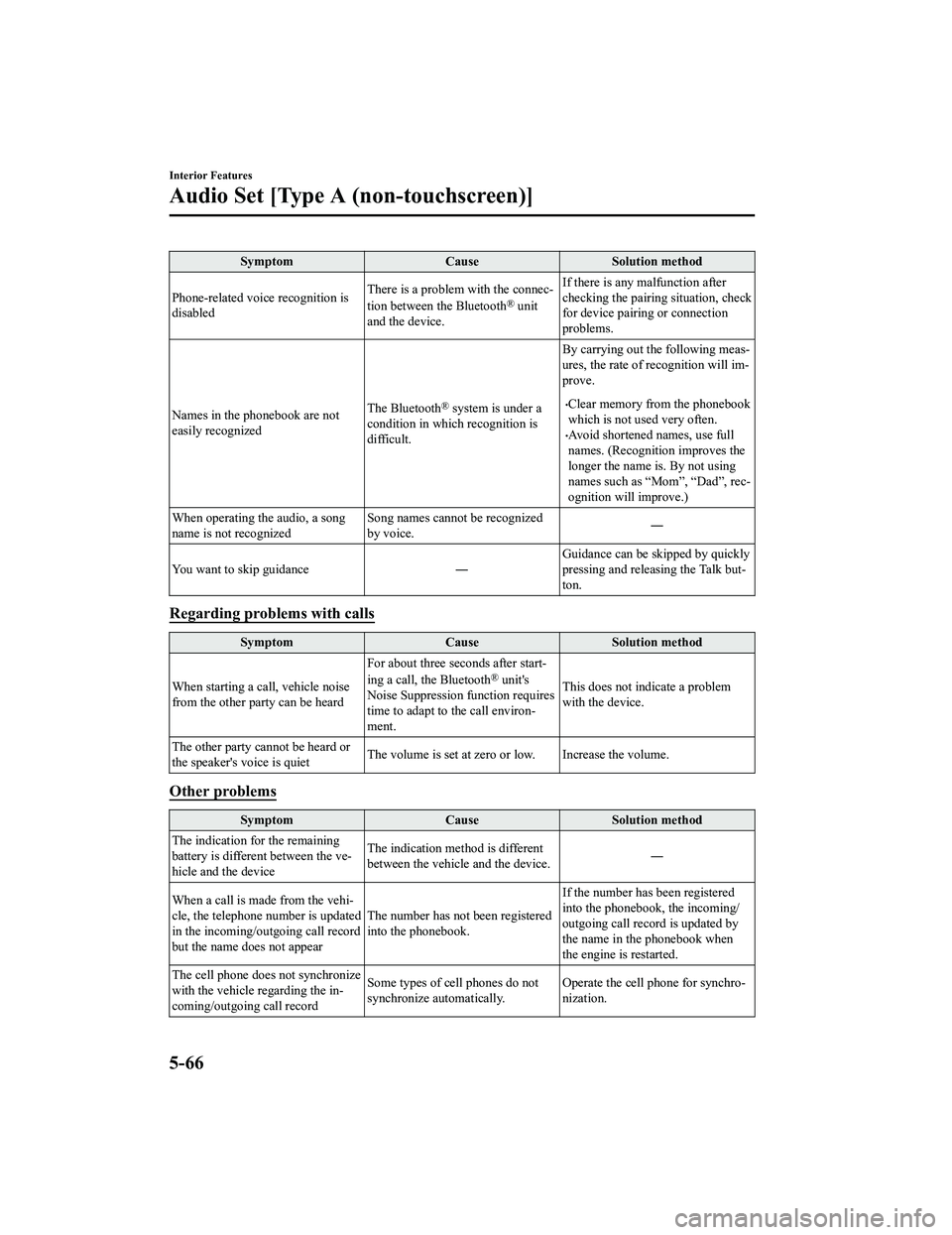
SymptomCauseSolution method
Phone-related voice recognition is
disabled There is a problem with the connec-
tion between the Bluetooth
® unit
and the device. If there is any malfunction after
checking the pairing situation, check
for device pairing or connection
problems.
Names in the phonebook are not
easily recognized The Bluetooth
® system is under a
condition in whi ch recognition is
difficult. By carrying out th
e following meas-
ures, the rate of recognition will im-
prove.Clear memory from the phonebook
which is not used very often.
Avoid shortened names, use full
names. (Recognition improves the
longer the name is. By not using
names such as “Mom”, “Dad”, rec-
ognition will improve.)
When operating the audio, a song
name is not recognized Song names cannot be recognized
by voice.
―
You want to skip guidance ― Guidance can be skipped by quickly
pressing and releasing the Talk but-
ton.
Regarding problems with calls
Symptom
CauseSolution method
When starting a call, vehicle noise
from the other party can be heard For about three seconds after start-
ing a call, the Bluetooth
® unit's
Noise Suppression function requires
time to adapt to the call environ-
ment. This does not indicate a problem
with the device.
The other party cannot be heard or
the speaker's voice is quiet The volume is set at zero or low. Increase the volume.
Other problems
Symptom
CauseSolution method
The indication for the remaining
battery is different between the ve-
hicle and the device The indication method is different
between the vehicle and the device.
―
When a call is made from the vehi-
cle, the telephone number is updated
in the incoming/outgoing call record
but the name does not appear The number has not
been registered
into the phonebook. If the number has been registered
into the phonebook, the incoming/
outgoing call record is updated by
the name in the phonebook when
the engine is restarted.
The cell phone does not synchronize
with the vehicle regarding the in-
coming/outgoing call record Some types of cell phones do not
synchronize automatically.
Operate the cell p
hone for synchro-
nization.
Interior Features
Audio Set [Type A (non-touchscreen)]
5-66
MX-5_8GF7-EA-17J_Edition2 2017-10-31 14:07:27
Page 290 of 576

Basic Operation Method
NOTE
The explanation of functions described in this manual may differ from the actual
operation, and the shapes of screens and buttons and the letters and characters displayed
may also differ from the actual appearance.
Additionally, depending on future software updates, the content may successively change
without notice.
For additional information regarding Mazda Connect, please refer to the following
Website.
http://infotainment.mazdahandsfree.com/
Audio Set (Type B) has three different human interfaces.
Commander switch
Touch panel
Voice recognition with steering switch and microphone
Refer to Voice Recognition on page 5-120.
▼Commander switch operation
NOTE
For safety reasons, some operations are disabled while the vehicle is being driven.
Volume dial operation
Volume dial
Press the volume dia
l to switch the audio MUTE on and off.
Turn the volume dial to adjust the volume. The volume increases by turning the dial
clockwise, and decreases by turning it counterclockwise.
Interior Features
Audio Set [Type B (touchscreen)]
5-68
MX-5_8GF7-EA-17J_Edition2 2017-10-31 14:07:27
Page 291 of 576

Switches around commander knob
The following operations can be done by pressing the switches around the commander
knob.
: Displays the home screen.
: Displays the Ente rtainment screen.
: Displays the Navigation screen (Only navigation-equipped vehicles). For operation
of the Navigation screen, refer to the navigation system manual . If the SD card for the
navigation system is not inserted , the compass indicating the direction in which the vehicle
is moving is displayed.
: Displays the Favor ites screen. Long-press to store particula r items in Favorites. (Radio,
phonebook and destination of the navigation system can be progr ammed.)
: Returns to previous screen.
Commander knob operation
Interior Features
Audio Set [Type B (touchscreen)]
5-69
MX-5_8GF7-EA-17J_Edition2 2017-10-31 14:07:27
Page 315 of 576

Bluetooth®
▼Introduction
Bluetooth® Hands-Free outline
When a Bluetooth® device (mobile phone) is connected to the vehicle's Bluetooth® unit via
radio wave transmission, a call c an be made or received by pressing the talk button, pick-up
button, or hang-up button on th e audio remote control switch, o r by operating the center
display. For example, even if a device (mobile phone) is in you r coat pocket, a call can be
made without taking the device (mobile phone) out and operating it directly.
Bluetooth
® audio outline
When a portable audio unit equipped with the Bluetooth® communication function is paired
to the vehicle, you can listen to music stored on the paired portable audio device from the
vehicle's speakers. It is not necessary to connect the portable audio device to the vehicle's
external input terminal. After programming, operate the vehicle audio control panel to play/
stop the audio.
NOTE
For your safety, a device can be paired only when the vehicle is parked. If the vehicle
starts to move, the pairing procedure will en d. Park the vehicle in a safe place before
pairing.
The communication range of a Bluetooth® equipped device is about 10 meters (32 ft) or
less.
Basic audio operation is available us ing voice commands even if Bluetooth® is not
connected.
For safety reasons, operation of the center di splay is disabled while the vehicle is being
driven. However, items not displayed in gray can be operated using the commander
switch while the vehicle is being driven.
Interior Features
Audio Set [Type B (touchscreen)]
5-93
MX-5_8GF7-EA-17J_Edition2 2017-10-31 14:07:27
Page 316 of 576

CAUTION
Some Bluetooth® mobile devices are not compatible with the vehicle. Consult an Authorized
Mazda Dealer, Mazda's call center or Web support center for information regarding
Bluetooth
® mobile device compatibility:
U.S.A.
Phone: 800-430-0153
Web: www.mazdausa.com/mazdaconnect
Canada
Phone: 800-430-0153
Web: www.mazdahandsfree.ca
Mexico
Center of Attention to Client (CAC)
Phone: 01-800-01-MAZDA
Web: www.mazdamexico.com.mx
Applicable Bluetooth
® specification (Recommended)
Ver. 1.1/1.2/2.0
EDR/2.1 EDR/3.0 (conformity)
Interior Features
Audio Set [Type B (touchscreen)]
5-94
MX-5_8GF7-EA-17J_Edition2 2017-10-31 14:07:27
Page 317 of 576
▼Component Parts
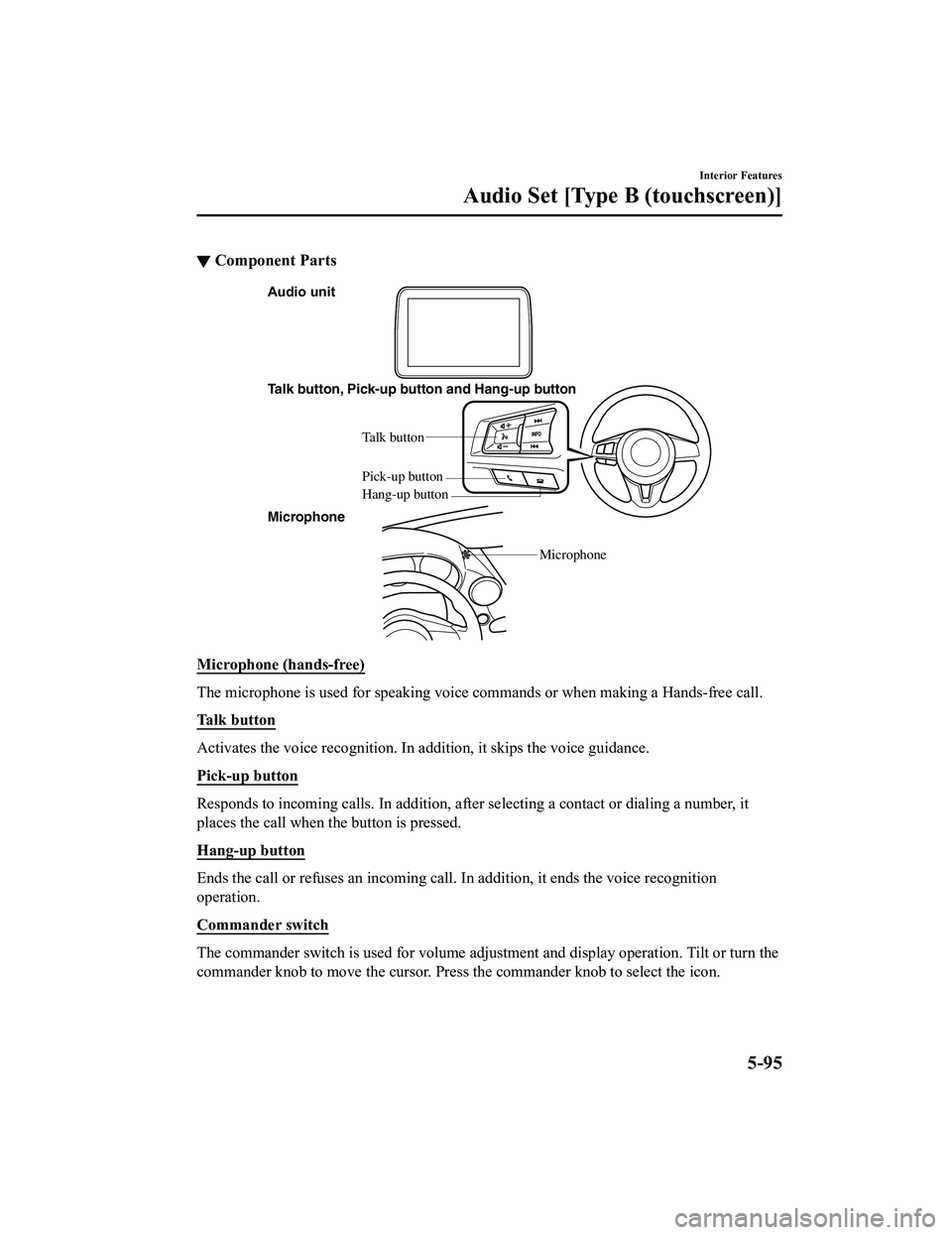
Audio unit
Talk button, Pick-up button and Hang-up button
Talk button
Hang-up b utton
Pick-up b
utton
Microphone
Microphone
Microphone (hands-free)
The microphone is used for speaking voice commands or when maki ng a Hands-free call.
Talk button
Activates the voice recognition. In addition, it skips the voice guidance.
Pick-up button
Responds to incoming c alls. In addition, after selecting a cont act or dialing a number, it
places the call when the button is pressed.
Hang-up button
Ends the call or refuses an incoming call. In addition, it ends the voice recognition
operation.
Commander switch
The commander switch is used for volume adjustment and display operation. Tilt or turn the
commander knob to move the cursor. Press the commander knob to select the icon.
Interior Features
Audio Set [Type B (touchscreen)]
5-95
MX-5_8GF7-EA-17J_Edition2 2017-10-31 14:07:27
Page 319 of 576

Bluetooth® Preparation
▼Device pairing
To use Bluetooth® audio and Hands-Free,
the device equipped with Bluetooth
® has
to be paired to the un it using the following
procedure. A maximum of seven devices
including Bluetooth
® audio devices and
hands-free mobile phones can be paired.
NOTE
The Bluetooth® system may not operate
for 1 or 2 minutes after the ignition is
switched to ACC or ON. However, this
does not indicate a problem. If the
Bluetooth
® system does not connect
automatically after 1 or 2 minutes have
elapsed, make sure that the Bluetooth
®
setting on the device is normal and
attempt to reconn ect the Bluetooth
®
device from the vehicle side.
If Bluetooth®-enabled devices are used
in the following locations or conditions,
connection via Bluetooth
® may not be
possible.
The device is in a location hidden
from the center display such as behind
or under a seat, or inside the glove
compartment.
The device contacts or is covered by a
metal object or body.
The device is set to power-saving
mode.
Pairing Procedure
1. Select the
icon on the home screen
to display the Settings screen.
2. Select the
tab.
3. Select
.
4. Turn the Bluetooth® setting on.
5. Select
to display the
message and switch to the device
operation.
6. Using your device, perform a search
for the Bluetooth
® device (Peripheral
device).
7. Select “Mazda” from the device list searched by the device.
8. (Device with Bluetooth
® version 2.0)
Input the displayed 4-digit pairing
code into the device.
(Device with Bluetooth
® version 2.1
or higher)
Make sure the disp layed 6-digit code
on the audio is also displayed on the
device, and touch the
.
Connection permission and phonebook
access permission for your mobile
device may be required depending on
the mobile device.
9. If pairing is successful, the functions
of the device connected to Bluetooth
®
are displayed.
10. (Devices compatible with Mazda
E-mail / SMS function)
SMS (Short Message Service)
messages, and E-mail for the device
are downloaded automatically. A
download permission operation for
your device may be required
depending on the device.
NOTE
When Call history and messages are
downloaded automatical ly, each automatic
download setting must be on.
Refer to Communication Settings on page
5-119.
Interior Features
Audio Set [Type B (touchscreen)]
5-97
MX-5_8GF7-EA-17J_Edition2 2017-10-31 14:07:27
Page 320 of 576

After a device is registered, the system
automatically identifies the device. By
activating Bluetooth
® Hands-Free again,
or by activating Bluetooth
® Hands-Free
first after switching t he ignition from OFF
to ACC, the device c onnection condition
is indicated in the center display.
IMPORTANT note about pairing and
automatic reconnection:
If pairing is redone on the same
mobile phone device, first clear
“Mazda” displayed on the Bluetooth
®
setting screen of the mobile device.
When the OS of the device is updated,
the pairing information may be deleted.
If this happens, reprogram the pairing
information to the Bluetooth
® unit.
Before you pair your device, make sure
that Bluetooth
® is “ON”, both on your
phone and on the vehicle.
▼ Device selection
If several devices have been paired, the
Bluetooth
® unit links the device last
paired. If you would lik e to link a different
paired device, it is necessary to change the
link. The order of device priority after the
link has been changed is maintained even
when the ignition is switched off.
Connecting other devices
1. Select the
icon on the home screen
to display the Settings screen.
2. Select the
tab.
3. Select
.
4. Turn the Bluetooth
® setting on.
5. Select the name of the device you would like to connect.
6. selection
Connects both devices as hands-free
and Bluetooth
® audio.
selection
Connects as a hands-free device.
selection
Connects as Bluetooth
® audio.
NOTE
The following functions can be used for
the Hands-free or audio.
Hands-free: Phone calls and
E-mail/SMS
Audio: Bluetooth® audio, Pandora®,
Aha™, Stitcher™ radio
Disconnecting a device
1. Select the
icon on the home screen
to display the Settings screen.
2. Select the
tab.
3. Select
.
4. Turn the Bluetooth
® setting on.
5. Select the device name which is currently connected.
6. Select
.
▼ Deleting a device
Selecting and deleting devices
1. Select the
icon on the home screen
to display the Settings screen.
2. Select the
tab.
3. Select
.
4. Turn the Bluetooth
® setting on.
5. Select the device name which you would like to delete.
6. Select
.
7. Select
.
Interior Features
Audio Set [Type B (touchscreen)]
5-98
MX-5_8GF7-EA-17J_Edition2 2017-10-31 14:07:27