phone MAZDA MODEL MX-5 MIATA 2018 Service Manual
[x] Cancel search | Manufacturer: MAZDA, Model Year: 2018, Model line: MODEL MX-5 MIATA, Model: MAZDA MODEL MX-5 MIATA 2018Pages: 576, PDF Size: 55.37 MB
Page 322 of 576
Bluetooth® Audio
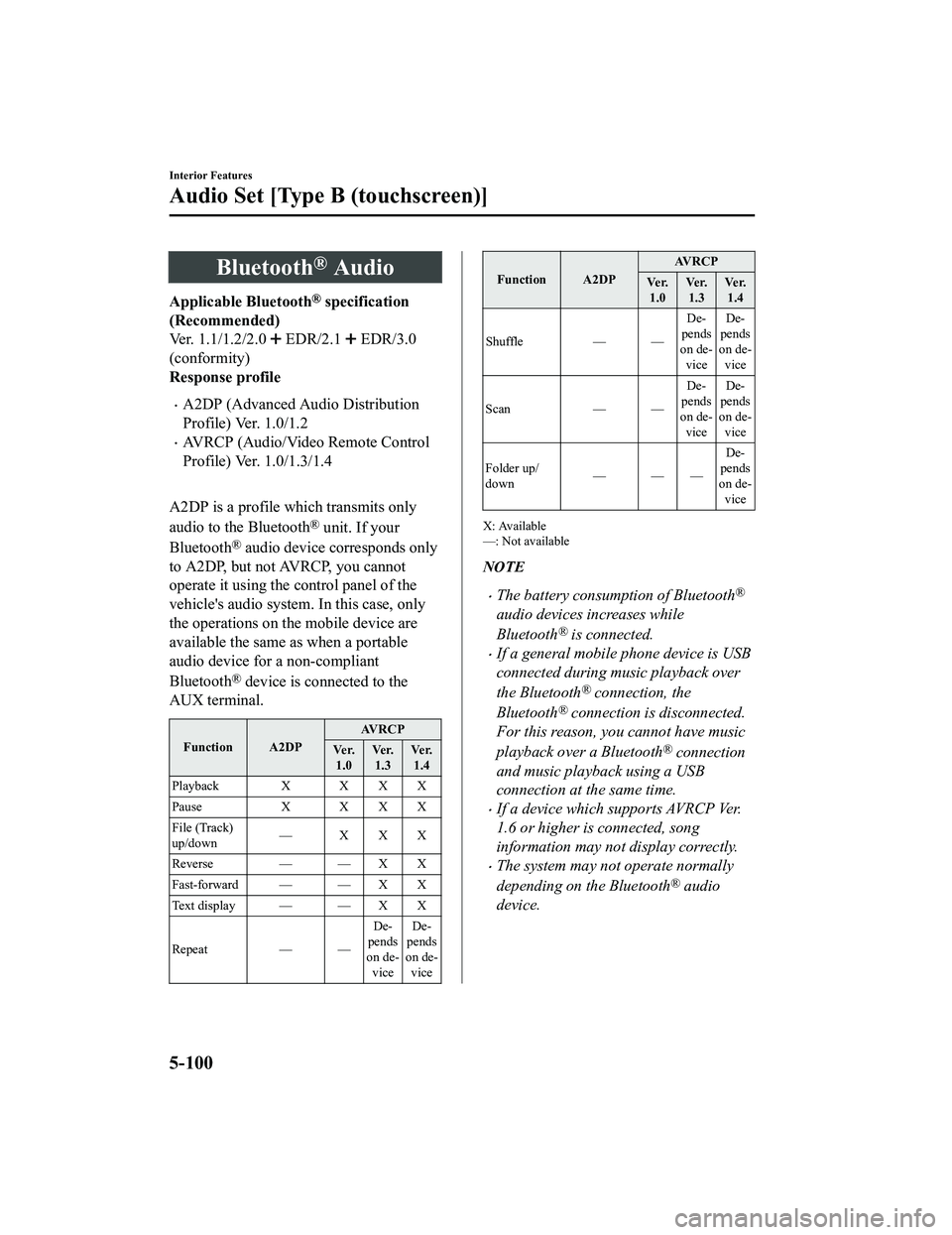
Applicable Bluetooth® specification
(Recommended)
Ver. 1.1/1.2/2.0
EDR/2.1 EDR/3.0
(conformity)
Response profile
A2DP (Advanced Audio Distribution
Profile) Ver. 1.0/1.2
AVRCP (Audio/Video Remote Control
Profile) Ver. 1.0/1.3/1.4
A2DP is a profile which transmits only
audio to the Bluetooth
® unit. If your
Bluetooth
® audio device corresponds only
to A2DP, but not AVRCP, you cannot
operate it using the control panel of the
vehicle's audio system. In this case, only
the operations on the mobile device are
available the same as when a portable
audio device for a non-compliant
Bluetooth
® device is connected to the
AUX terminal.
Function A2DP AV R C P
Ve r. 1.0 Ve r.
1.3 Ve r.
1.4
Playback X X X X
Pause X X X X
File (Track)
up/down —XXX
Reverse — — X X
Fast-forward — — X X
Te x t d i s p l a y — — X X
Repeat — —De-
pends
on de- vice De-
pends
on de- vice
Function A2DP AV R C P
Ve r. 1.0 Ve r.
1.3 Ve r.
1.4
Shuffle — — De-
pends
on de- vice De-
pends
on de- vice
Scan — —De-
pends
on de- vice De-
pends
on de- vice
Folder up/
down ——— De-
pends
on de-
vice
X: Available
—: Not available
NOTE
The battery consumption of Bluetooth®
audio devices increases while
Bluetooth
® is connected.
If a general mobile phone device is USB
connected during music playback over
the Bluetooth
® connection, the
Bluetooth
® connection is disconnected.
For this reason, you cannot have music
playback over a Bluetooth
® connection
and music playback using a USB
connection at the same time.
If a device which supports AVRCP Ver.
1.6 or higher is connected, song
information may not display correctly.
The system may not operate normally
depending on the Bluetooth
® audio
device.
Interior Features
Audio Set [Type B (touchscreen)]
5-100
MX-5_8GF7-EA-17J_Edition2 2017-10-31 14:07:27
Page 329 of 576

TabFunction
Nearby Select the desired station.
Guidance is provided to the searched destination near the vehic
le's posi-
tion.
You can designate desired categor ies previously set using the filter setting
on your device.
NOTE
The available Location Based Services may differ because the services depend on the
content provided by Aha™.
Example of use (Location Based
Services)
1. Select the desired station from the “Nearby” tab on the main menu.
The destination name or address
playback starts in the order of the
destination name list.
2. When the icon is selected, the
currently displayed destination is
displayed on the navigation system
(vehicles with nav igation system).
3. When the
icon is selected, a phone
call is placed to the currently displayed
destination.
4. Select the icon to display the
content list.
Selection of other destinations from
the list can be made.
Interior Features
Audio Set [Type B (touchscreen)]
5-107
MX-5_8GF7-EA-17J_Edition2 2017-10-31 14:07:27
Page 332 of 576

Bluetooth® Hands-Free
▼Making a Call
For Mazda Connect, making calls is
possible using any of the following six
methods:
Phonebook downloaded from
Bluetooth
® device (mobile phone)
(voice recognition function can be used)
Favorites
Call record
Dialing a telephone number (voice
recognition function can be used)
“Redial” - Voice recognition command
for making a call to the latest outgoing
call record.
“Call back” - Voice recognition
command for making a call to the latest
incoming call record.
Phonebook Usage
Telephone calls can be made by saying the
contact name in the downloaded
phonebook or the name of a person whose
phone number has been registered in the
Bluetooth
® Hands-Free. Refer to Import
contact (Download Phonebook).
1. Press the talk button.
2. Wait for the beep sound.
3. Say: “Call XXXXX... (Ex. “John”)
Mobile”. (You can also say, “Home”,
“Work”, or “Other” instead of
“Mobile”, depending on how you set
up your contact information.)
4. Follow the voice gu idance to make the
call, or simple press the pick-up button
on the steering switch during or after
the guidance to make the call.
Screen operation
1. Select the
icon on the home screen
to display the Communication screen.
2. Select
to display the contact
list.
3. Select the contact you would like to
call to display the details for the
contact.
4. Select the desired phone number to
make the call.
Import contact (Download Phonebook)
Phonebook data from your device (Mobile
phone) can be sent and registered to your
Bluetooth
® Hands-Free phonebook using
Bluetooth
®.
(Automatic downloading)
The “Auto Download Contacts” setting
must be on. When hands-free is connected
to the device, the phonebook is
downloaded automatically.
Refer to Communication Settings on page
5-119.
(Manually downloading)
If the “Auto Downlo ad Contacts” setting
is off, download the phonebook using the
following procedure.
1. Select the
icon on the home screen
to display the Communication screen.
2. Select
to display the contact
list.
3. Select
.
4. Select
or
to switch to the
device operation.
5. If
is selected, select
.
Interior Features
Audio Set [Type B (touchscreen)]
5-110
MX-5_8GF7-EA-17J_Edition2 2017-10-31 14:07:27
Page 333 of 576

6. Download will be started from the
mobile phone.
NOTE
If “Import All Contacts” is performed
after saving the phonebook to the
Bluetooth
® unit, the phonebook will be
overwritten.
A maximum of 1,000 contacts can be
registered to the phonebook.
Phonebook, incoming/outgoing call
record, and favorite memories are
exclusive to each mobile phone to
protect privacy.
Favorites Contacts
A maximum of 50 contacts can be
registered. It will take less time to make a
call after registering the telephone number.
In addition, you do not have to look for the
person you want to call in the phonebook.
Registering your favorites
1. Select the
icon on the home screen
to display the Communication screen.
2. Select
to display the favorites
list.
3. Select
.
4. Select
or
.
5. Select from the displayed list.
NOTE
When “Add New Contact” is selected,
information such as the selected person’s
name is also registered. In addition, when
“Add New Contact Details” is selected,
only the telephone number of the selected
person is registered.
Calling a favorite
1. Select the
icon on the home screen
to display the Communication screen.
2. Select
to display the favorites
list.
3. (If only one phone number is
registered to contact)
Select the contact information you
would like to call. Go to Step 5.
(If multiple phone numbers are
registered to contact)
Select the contact you would like to
call to display the screen indicating the
details for the contact. Go to Step 4.
4. Select the phone number you would
like to call.
5. Select
.
Deleting a favorite
1. Select the
icon on the home screen
to display the Communication screen.
2. Select
to display the favorites
list.
3. Select
.
4. Select
.
5. Select the contact information which you would like to delete.
6. Select
.
Changing the display order of your
favorites list
1. Select the
icon on the home screen
to display the Communication screen.
2. Select
to display the favorites
list.
3. Select
.
4. Select
.
5. The contact can be moved after it is
selected.
Interior Features
Audio Set [Type B (touchscreen)]
5 - 111
MX-5_8GF7-EA-17J_Edition2 2017-10-31 14:07:27
Page 334 of 576

6. Slide the contact or move it using thecommander switch, then select
.
Changing contact name of your
favorites
1. Select the
icon on the home screen
to display the Communication screen.
2. Select
to display the favorites
list.
3. Select
.
4. Select
.
5. Select the contact to display the keyboard screen.
6. If a new name is input and
is
selected, the contact name is stored.
NOTE
If the contact is long-pressed when the
favorites list is di splayed, the contact
information can be edited (deleted,
moved).
Telephone Number Input
NOTE
Practice this while parked until you are
confident you can do it while driving in a
non-taxing road situation. If you are not
completely comfortable, make all calls
from a safe parking position, and only
start driving when you can devote your
full attention to driving.
1. Select the
icon on the home screen
to display the Communication screen.
2. When
is pressed, the dial pad
is displayed.
3. Input the telephone number using the dial pad.
4. Select
to make the call.
Numeral or symbol entry
Use the dial pad.
Long-press the
to input +.
Select
to delete the currently input
value.
Long-press
to delete all input values.
Redial Function
Makes a call to the last person called
(latest person on outgoing call record)
from the mobile phone/vehicle.
1. Press the talk button.
2. Wait for the beep sound.
3. Say: “Redial”
Call back Function
Makes a call to the last person who called
your (latest person on incoming call
record) mobile phone/vehicle.
1. Press the talk button.
2. Wait for the beep sound.
3. Say: “Call back”
Interior Features
Audio Set [Type B (touchscreen)]
5-112
MX-5_8GF7-EA-17J_Edition2 2017-10-31 14:07:27
Page 336 of 576

▼Receiving an Incoming Call
When an incoming call is received, the incoming call notificati
on screen is displayed. The
“Incoming Call Notifications” setting must be on.
Refer to Communication Settings on page 5-119.
To accept the call, press the pick-up button on the audio contr ol switch or select
on
the screen.
To reject the call, press the hang-up button on the audio contr ol switch or select
on the
screen.
The following icons are displayed on the screen during a call. Icons which can be used
differ depending on use conditions.
Icon Function
Displays the Communication menu.
Ends the call.
Transferring a call from hands-free to a mobile phone
Communication between the Bluetooth® unit and a device (mobile phone) is canceled,
and an incoming call will be recei ved by the device (mobile phone) like a standard call.
Transferring a call from a device (mobile phone) to hands-free
Communication between devices (mobile phone) can be switched to Bluetooth®
Hands-Free.
Mute
The microphone can be muted during a call.
When selected again, the mute is canceled.
To make a 3-way call, select the contacts from the following:
: Call History is displayed.
: The phonebook is displayed.
: The dial pad is displayed. Input the phone number.
The device may be unusable dependi ng on the contractual content.
The call on hold is made to make a 3-way call.
The device may be unusable dependi ng on the contractual content.
Switches the call on hold.
DTMF (Dual Tone Multi-Frequency Signal) Transmission
This function is used when trans mitting DTMF via the dial pad. The receiver of a DTMF
transmission is generally a home telephone answering machine or a company's automated
guidance call center.
Input the number u sing a dial pad.
Interior Features
Audio Set [Type B (touchscreen)]
5-114
MX-5_8GF7-EA-17J_Edition2 2017-10-31 14:07:27
Page 337 of 576

NOTE
If the ignition is switched off during a
hands-free call, the line is transferred to
the device (Mobile phone)
automatically.
If the DTMF code has two or more
digits or symbols, each one must be
transmitted individually.
▼Call Interrupt
A call can be interrupted to receive an
incoming call from a third party.
When
is selected or the
pick-up button on the steering wheel is
pressed, the current call is held and the
system switches to the new incoming call.
When
is selected, the current
call is ended and the system switches to
the new incoming call (GSM network
only).
When
is selected or the hang-up
button on the steering wheel is pressed, an
incoming call is refused.
NOTE
The function may not be available
depending on the contractual content of
the mobile device.
The function may not be operable
depending on the type of the telephone
network and the mobile device.
▼ Receiving and Reply
ing to Messages
(available only with E-mail/SMS
compatible phones)
SMS (Short Message Service) messages,
and E-mail received by connected devices
can be downloaded, displayed, and played
(read by the system).
Additionally, replies can also be made to
calls and messages in the received
messages.
Downloading messages
Up to 20 new messages can be
downloaded and displayed from a
connected device.
NOTE
For E-mail, 20 messages for each account
can be downloaded.
(Automatic downloading)
The “Auto Download Email” (E-mail) or
“Auto Download Text Message” (SMS)
setting must be on. A message is
downloaded automatically when the
Bluetooth
® unit is connected to the device.
Refer to Communication Settings on page
5-119.
(Manually downloading)
When the “Auto Download Email”
(E-mail) or “Auto Download Text
Message” (SMS) setting is off, the
message is downloaded using the
following procedure.
1. Select the
icon on the home screen
to display the Communication screen.
2. Select
or to display
the Inbox.
3. Select
.
Interior Features
Audio Set [Type B (touchscreen)]
5-115
MX-5_8GF7-EA-17J_Edition2 2017-10-31 14:07:27
Page 338 of 576
4. Download will be started from themobile phone.
NOTE
Attached data is not downloaded.
Messages up to 1 kilobyte (E-mail)/
140-bytes (SMS) can be downloaded.
A message list is created for each
device.
If the connected device does not
correspond to MAP 1.0, the AT
command is used to download. The
downloaded message indicates that it is
already read.
Downloading using the AT command
may not function depending on the
connected device.
If an iPhone is connected, the following
functions cannot be used.
Downloading past messages
Replying to messages
iPhone is a trademark of Apple Inc.,
registered in the U.S. and other
countries.
Receiving messages
(Method 1)
When a device receives a message, a
message received notification is displayed.
The “Email Notificat ions” (E-mail) or
“Text Notifications” (SMS) setting must
be on.
Refer to Communication Settings on page
5-119.
Select
and display the message.
(Method 2)
1. Select the
icon on the home screen
to display the Communication screen.
2. Select
and display the new
message list for E-mail and SMS.
3. Select the message you would like to display.
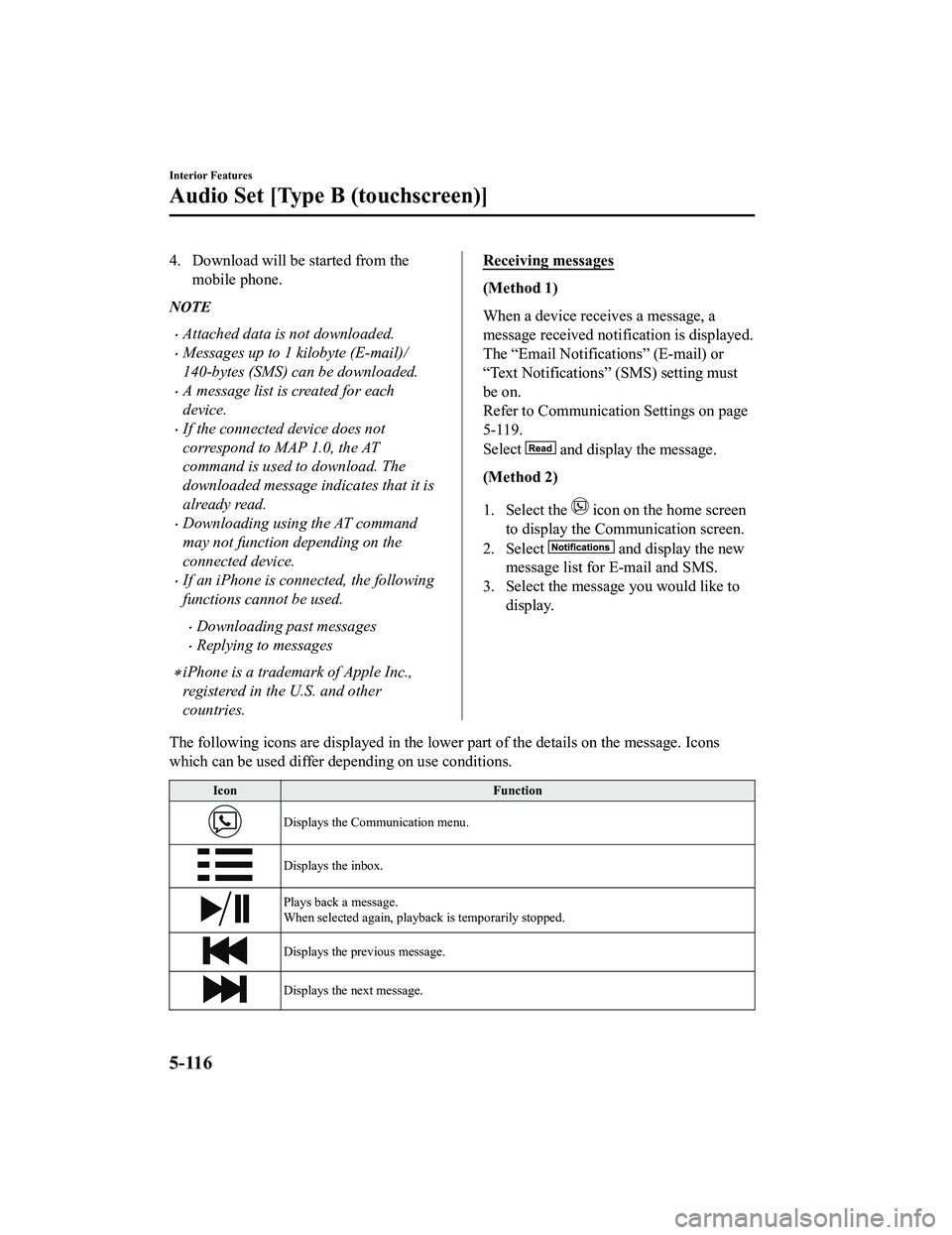
The following icons are displayed in the lower part of the details on the message. Icons
which can be used differ depending on use conditions.
Icon Function
Displays the Communication menu.
Displays the inbox.
Plays back a message.
When selected again, playback is temporarily stopped.
Displays the previous message.
Displays the next message.
Interior Features
Audio Set [Type B (touchscreen)]
5-116
MX-5_8GF7-EA-17J_Edition2 2017-10-31 14:07:27
Page 341 of 576
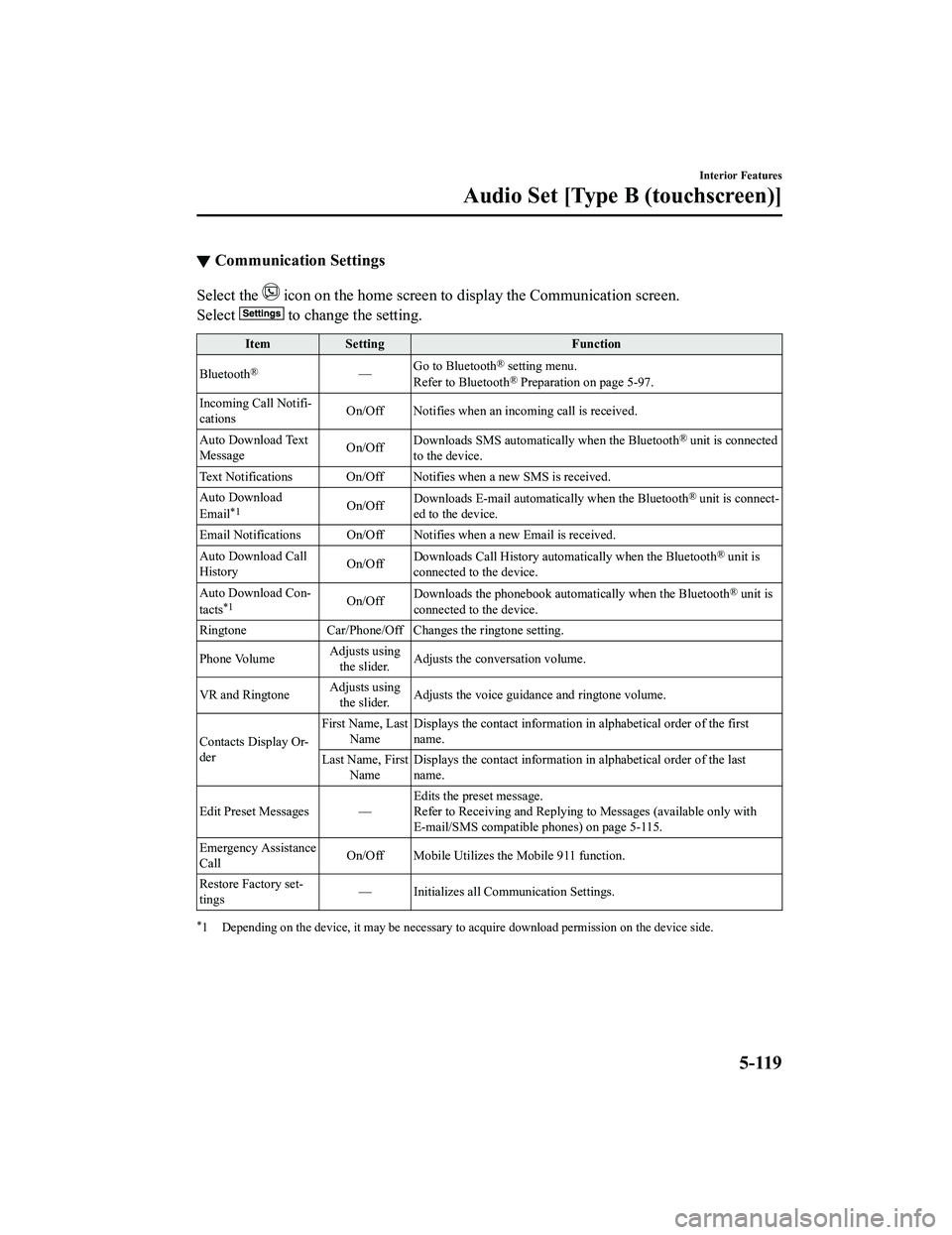
▼Communication Settings
Select the icon on the home screen to display the Communication screen.
Select
to change the setting.
Item Setting Function
Bluetooth
®— Go to Bluetooth® setting menu.
Refer to Bluetooth® Preparation on page 5-97.
Incoming Call Notifi-
cations On/Off Notifies when an in
coming call is received.
Auto Download Text
Message On/Off
Downloads SMS automatically when the Bluetooth
® unit is connected
to the device.
Text Notifications On/Off Notifies when a new SMS is received.
Auto Download
Email
*1On/Off Downloads E-mail automati
cally when the Bluetooth® unit is connect-
ed to the device.
Email Notifications On/Off Notifies when a new Email is received.
Auto Download Call
History On/Off
Downloads Call History automatically when the Bluetooth
® unit is
connected to the device.
Auto Download Con-
tacts
*1On/Off Downloads the phonebook auto
matically when the Bluetooth® unit is
connected to the device.
Ringtone Car/Phone/Off Chan ges the ringtone setting.
Phone Volume Adjusts using
the slider. Adjusts the conversation volume.
VR and Ringtone Adjusts using
the slider. Adjusts the voice guidan
ce and ringtone volume.
Contacts Display Or-
der First Name, Last
Name Displays the contact information
in alphabetical order of the first
name.
Last Name, First Name Displays the contact information
in alphabetical order of the last
name.
Edit Preset Messages — Edits the preset message.
Refer to Receiving and Replying to Messages (available only wit
h
E-mail/SMS compatible phones) on page 5-115.
Emergency Assistance
Call On/Off Mobile Utilizes the Mobile 911 function.
Restore Factory set-
tings — Initializes all Communication Settings.
*1 Depending on the device, it may
be necessary to acquire download permission on the device side.
Interior Features
Audio Set [Type B (touchscreen)]
5-119
MX-5_8GF7-EA-17J_Edition2 2017-10-31 14:07:27
Page 342 of 576
Voice Recognition
▼Basic Operation Method
Activating Voice Recognition
Press the talk button.
Ending Voice Recognition
Use one of the following methods:
Press the hang-up button.
Say, “Cancel”.
Operate the commander switch or the
center display (only when vehicle is
stopped).
Skipping Voice Guidance (for faster
operation)
Press and release the talk button.
Troubleshooting for Voice Recognition
If you do not understand an operation
method while in the voice recognition
mode, say “Tutorial” or “Help”.
Commands useable anytime during
voice recognition
“Go Back” and “Cancel” are commands
which can be used at anytime during voice
recognition.
Returning to previous operation
To return to the previous operation, say,
“Go Back” while in voice recognition
mode.
Cancel
To put the Bluetooth
® Hands-Free system
in standby mode, say, “Cancel” while in
voice recognition mode.
To prevent a deterioration in the voice
recognition rate and voice quality, the
following points should be observed:
The voice recognition cannot be
performed while voi ce guidance or the
beep sound is operating. Wait until
the voice guidance or the beep sound
is finished before saying your
commands.
Phone related commands are available
only when your phone is connected via
Bluetooth
®. Make sure your phone is
connected via Bluetooth
® before you
operate phone related voice commands.
Music play commands, such as Play
Artist and Play Album can be used only
in USB audio mode.
Do not speak too sl owly or loudly (no
loud voice).
Speak clearly, without pausing between
words or numbers.
Dialects or different wording other than
hands-free prompts cannot be
recognized by voice recognition. Speak
in the wording specified by the voice
commands.
It is not necessary to face the
microphone or approach it. Speak the
voice commands while maintaining a
safe driving position.
Close the windows and/or the
convertible top to reduce loud noises
from outside the vehicle, or turn down
the airflow of the cl imate control system
while Bluetooth
® Hands-Free is being
used.
Make sure the vents are not directing air
up towards the microphone.
Interior Features
Audio Set [Type B (touchscreen)]
5-120
MX-5_8GF7-EA-17J_Edition2 2017-10-31 14:07:27