on off MAZDA MODEL MX-5 MIATA 2019 Owners Manual
[x] Cancel search | Manufacturer: MAZDA, Model Year: 2019, Model line: MODEL MX-5 MIATA, Model: MAZDA MODEL MX-5 MIATA 2019Pages: 553, PDF Size: 59 MB
Page 434 of 553
Do not start the engine or shake the
vehicle while it is jacked up:
Starting the engine or shaking the
vehicle while it is jacked up is
dangerous as it could cause the vehicle
to fall off the jack resulting in an
accident.
Never go under the vehicle while it is
jacked up:
Going under the vehicle while it is
jacked up is dangerous as it could result
in death or serious injury if the vehicle
were to fall off the jack.
8. Remove the lug nuts by turning them counterclockwise; then remove the
wheel.
▼Locking Lug Nuts*
If your vehicle has Mazda optional
antitheft wheel lug
nuts, each wheel will
have one locking lug nut that locks the
wheel and tire, and you must use a special
key to unlock the locking lug nut. This key
is stored in the glove compartment.
Register the key and lug nuts with the lock
manufacturer by filling out the card
provided in the glove compartment and
mailing it in the accompanying envelope.
If you lose this key, consult an Authorized
Mazda Dealer or use the lock
manufacturer's order form, which is with
the registration card.
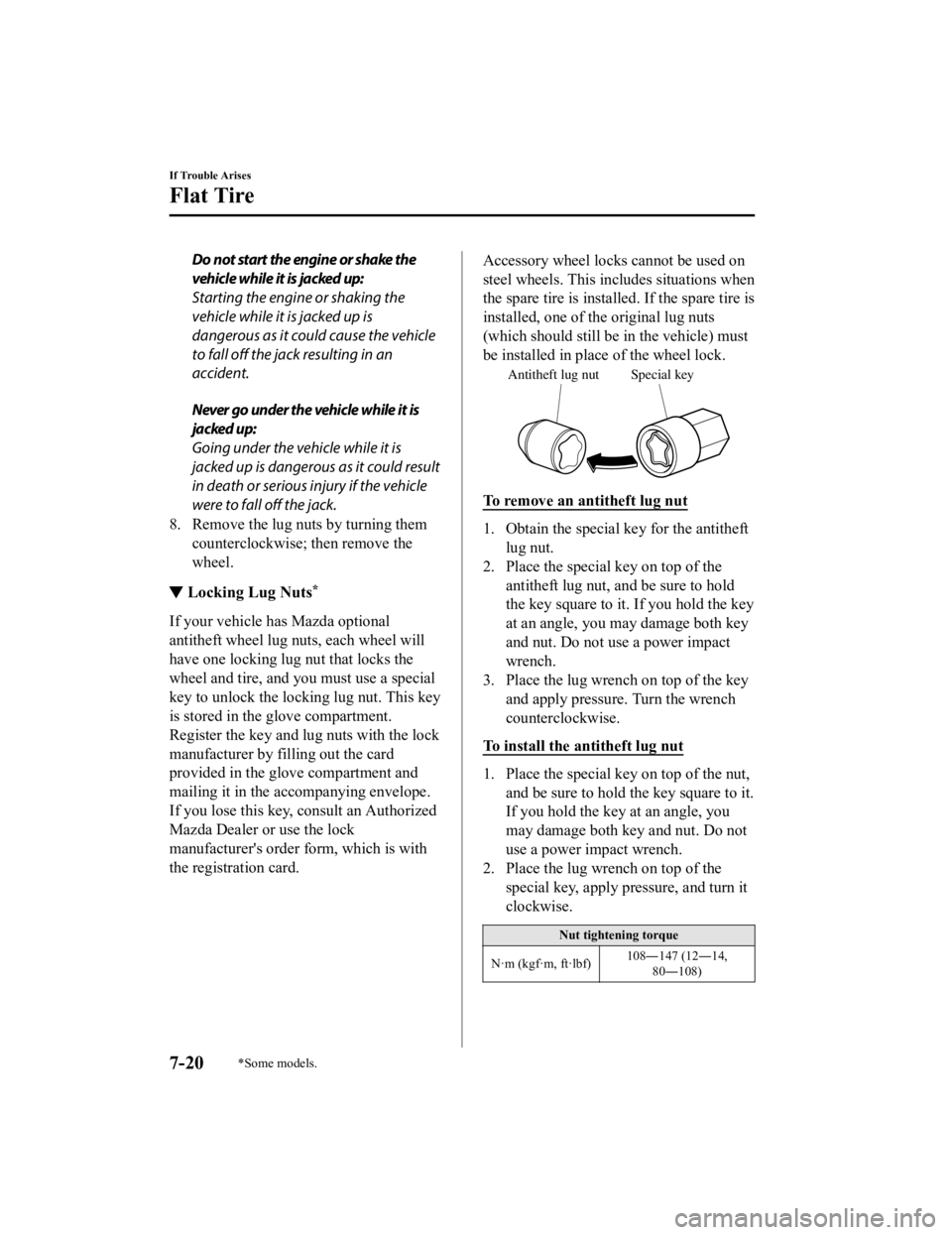
Accessory wheel locks cannot be used on
steel wheels. This includes situations when
the spare tire is installed. If the spare tire is
installed, one of th e original lug nuts
(which should still be in the vehicle) must
be installed in place of the wheel lock.
Special key
Antitheft lug nut
To remove an antitheft lug nut
1. Obtain the special key for the antitheft
lug nut.
2. Place the special key on top of the
antitheft lug nut, and be sure to hold
the key square to it. If you hold the key
at an angle, you may damage both key
and nut. Do not use a power impact
wrench.
3. Place the lug wrench on top of the key and apply pressure. Turn the wrench
counterclockwise.
To install the antitheft lug nut
1. Place the special key on top of the nut, and be sure to hold the key square to it.
If you hold the key at an angle, you
may damage both key and nut. Do not
use a power impact wrench.
2. Place the lug wrench on top of the
special key, apply pressure, and turn it
clockwise.
Nut tightening torque
N·m (kgf·m, ft·lbf) 108―147 (12―14,
80―108)
If Trouble Arises
Flat Tire
7-20*Some models.
MX-5_8GV5-EA-18E_Edition3 2018-7-17 15:48:16
Page 435 of 553
▼Mounting the Tire
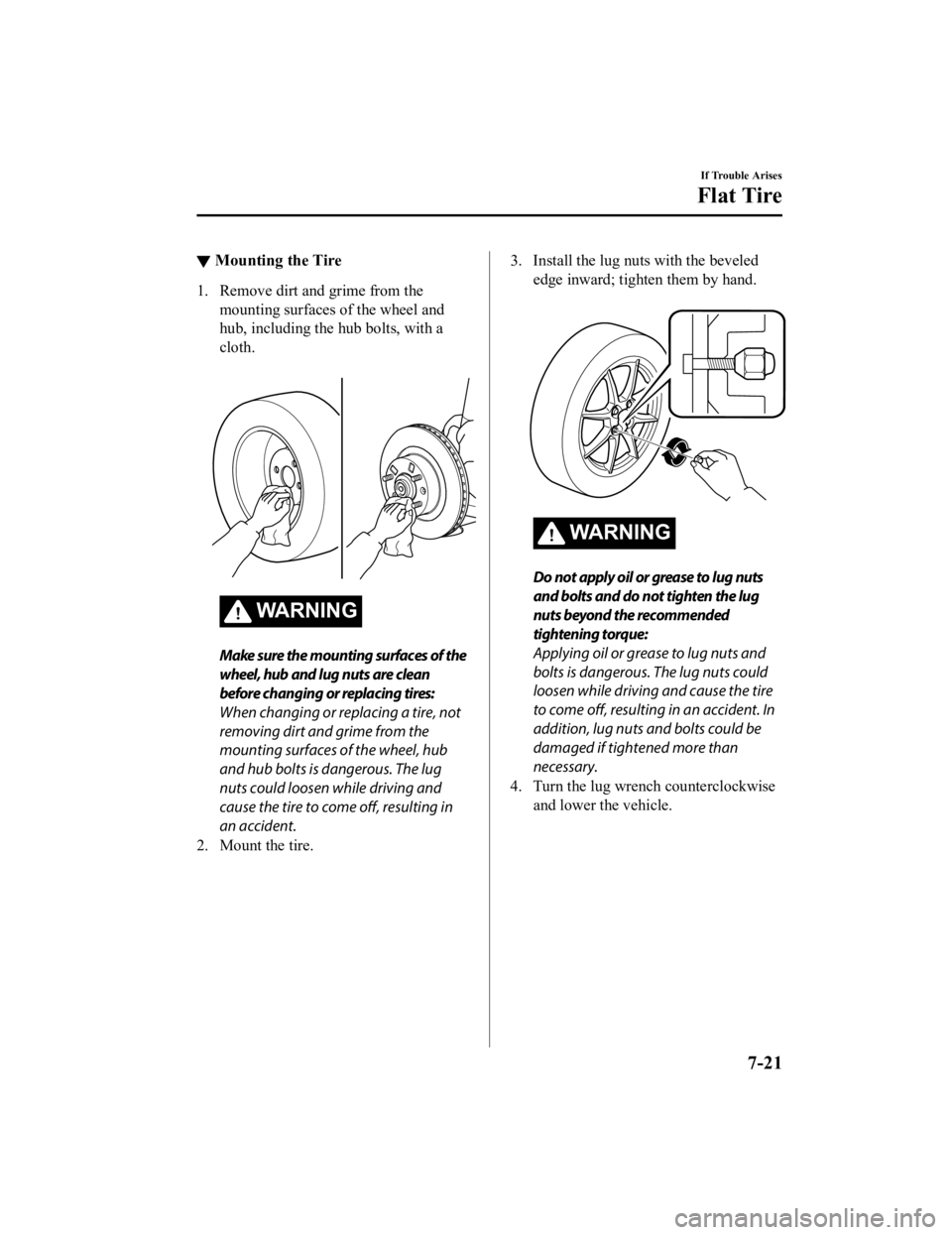
1. Remove dirt and grime from the
mounting surfaces of the wheel and
hub, including the hub bolts, with a
cloth.
WA R N I N G
Make sure the mounting surfaces of the
wheel, hub and lug nuts are clean
before changing or replacing tires:
When changing or replacing a tire, not
removing dirt and grime from the
mounting surfaces of the wheel, hub
and hub bolts is dangerous. The lug
nuts could loosen while driving and
cause the tire to come off, resulting in
an accident.
2. Mount the tire.
3. Install the lug nuts with the beveled edge inward; tighten them by hand.
WA R N I N G
Do not apply oil or grease to lug nuts
and bolts and do not tighten the lug
nuts beyond the recommended
tightening torque:
Applying oil or grease to lug nuts and
bolts is dangerous. The lug nuts could
loosen while driving and cause the tire
to come off, resulting in an accident. In
addition, lug nuts and bolts could be
damaged if tightened more than
necessary.
4. Turn the lug wrench counterclockwise and lower the vehicle.
If Trouble Arises
Flat Tire
7-21
MX-5_8GV5-EA-18E_Edition3 2018-7-17 15:48:16
Page 436 of 553
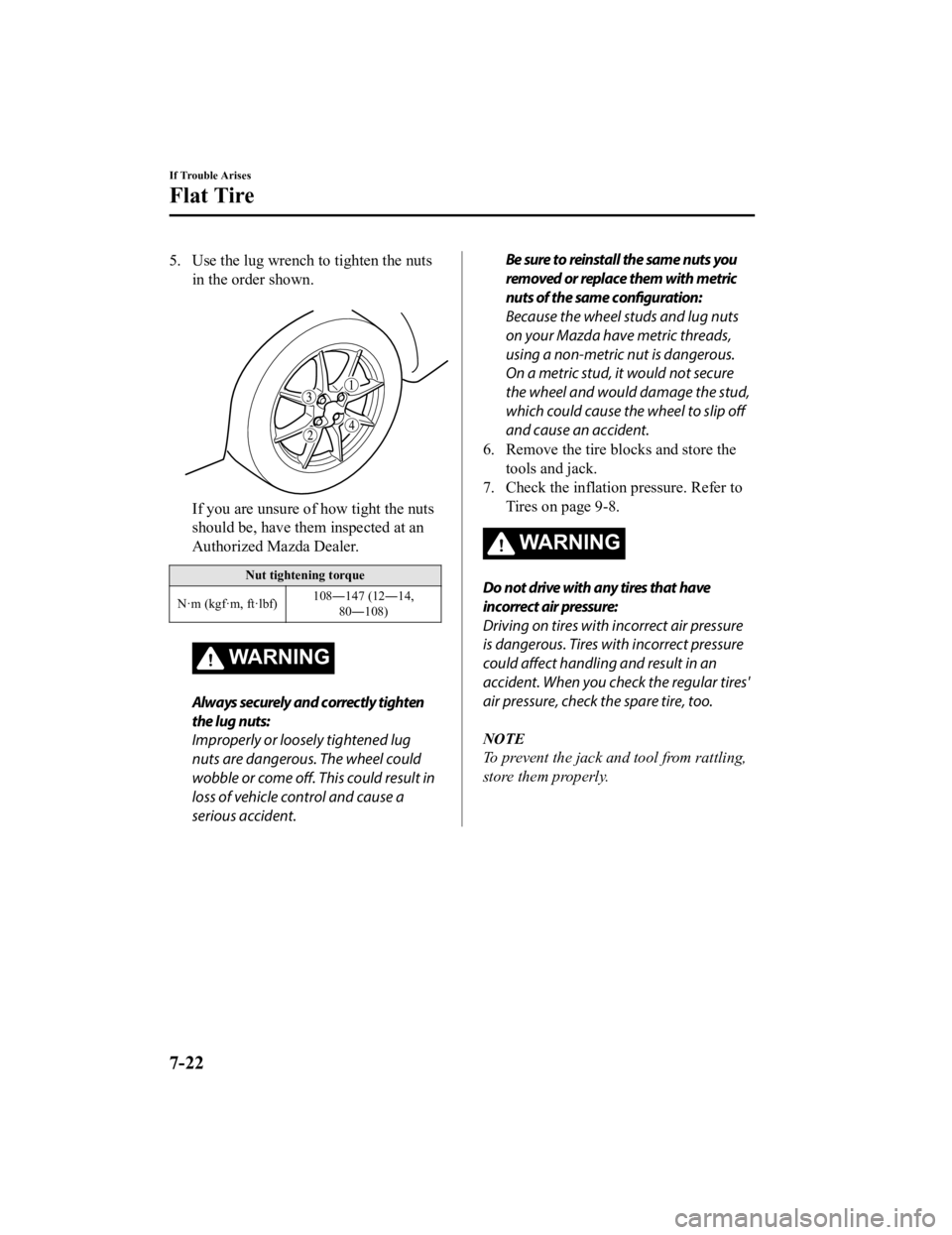
5. Use the lug wrench to tighten the nutsin the order shown.
If you are unsure of how tight the nuts
should be, have them inspected at an
Authorized Mazda Dealer.
Nut tightening torque
N·m (kgf·m, ft·lbf) 108―147 (12―14,
80―108)
WARNING
Always securely and correctly tighten
the lug nuts:
Improperly or loosely tightened lug
nuts are dangerous. The wheel could
wobble or come off. This could result in
loss of vehicle control and cause a
serious accident.
Be sure to reinstall the same nuts you
removed or replace them with metric
nuts of the same configuration:
Because the wheel studs and lug nuts
on your Mazda have metric threads,
using a non-metric nut is dangerous.
On a metric stud, it would not secure
the wheel and would damage the stud,
which could cause the wheel to slip off
and cause an accident.
6. Remove the tire blocks and store the tools and jack.
7. Check the inflation pressure. Refer to Tires on page 9-8.
WA R N I N G
Do not drive with any tires that have
incorrect air pressure:
Driving on tires with incorrect air pressure
is dangerous. Tires with incorrect pressure
could affect handling and result in an
accident. When you check the regular tires'
air pressure, check the spare tire, too.
NOTE
To prevent the jack and tool from rattling,
store them properly.
If Trouble Arises
Flat Tire
7-22
MX-5_8GV5-EA-18E_Edition3 2018-7-17 15:48:16
Page 439 of 553

1. Remove the battery cover.
2. Make sure the booster battery is 12 Vand that its negative terminal is
grounded.
3. If the booster battery is in another
vehicle, do not allow both vehicles to
touch. Turn off the engine of the
vehicle with the booster battery and all
unnecessary electrical loads in both
vehicles.
4. Connect the jumper cables in the exact sequence as in the illustration.
Connect one end of a cable to the
positive terminal o n the discharged
battery (1).
Attach the other end to the positive
terminal on the booster battery (2).
Connect one end of the other cable
to the negative terminal of the
booster battery (3).
Connect the other end to the ground
point indicated in the illustration
away from the discharged battery
(4).
5. Start the engine of the booster vehicle
and run it a few minutes. Then start the
engine of the other vehicle.
6. When finished, car efully disconnect
the cables in the reverse order
described in the illustration.
7. If the battery cover has been removed,
install it in the reverse order of
removal.
NOTE
Verify that the covers are securely
installed.
If Trouble Arises
Battery Runs Out
7-25
MX-5_8GV5-EA-18E_Edition3 2018-7-17 15:48:16
Page 441 of 553

Overheating
If the temperature gauge indicates
overheating or the high engine coolant
temperature warning light turns on, the
vehicle loses power, or you hear a loud
knocking or pinging noise, the engine is
probably too hot.
WA R N I N G
Pull over to a safe location, then switch
the ignition off and make sure the fan is
not running before attempting to work
near the cooling fan:
Working near the cooling fan when it is
running is dangerous. The fan could
continue running indefinitely even if the
engine has stopped and the engine
compartment temperature is high. You
could be hit by the fan and seriously
injured.
Do not remove either cooling
system cap when the engine and radiator
are hot:
When the engine and radiator are hot,
scalding coolant and steam may shoot out
under pressure and cause serious injury.
Open the hood ONLY after steam is no
longer escaping from the engine:
Steam from an overheated engine is
dangerous. The escaping steam could
seriously burn you.
If the temperature gauge indicates
overheating or the high engine coolant
temperature warning light turns on:
1. Drive safely to the side of the road and park off the right-of-way.
2. Put a vehicle with an automatic transmission in park (P), a manual
transmission in neutral.
3. Apply the parking brake.
4. Turn off the air conditioner.
5. Check whether coolant or steam is escaping from the engine
compartment.
If steam is coming from the engine
compartment:
Do not go near the front of the vehicle.
Stop the engine.
Wait until the steam dissipates, then
open the hood and start the engine.
If neither coolant nor steam is
escaping:
Open the hood and idle the engine
until it cools.
CAUTION
If the cooling fan does not operate
while the engine is running, the engine
temperature will increase. Stop the
engine and call an Authorized Mazda
Dealer.
6. Make sure the cooling fan is operating, then turn off the engine after the
temperature has decreased.
7. When cool, check the coolant level.
If Trouble Arises
Overheating
7-27
MX-5_8GV5-EA-18E_Edition3 2018-7-17 15:48:16
Page 444 of 553
Towing Description
We recommend that towing be done only
by an Authorized Mazda Dealer or a
commercial tow-truck service.
Proper lifting and towing are necessary to
prevent damage to the vehicle.
Government and local laws must be
followed.
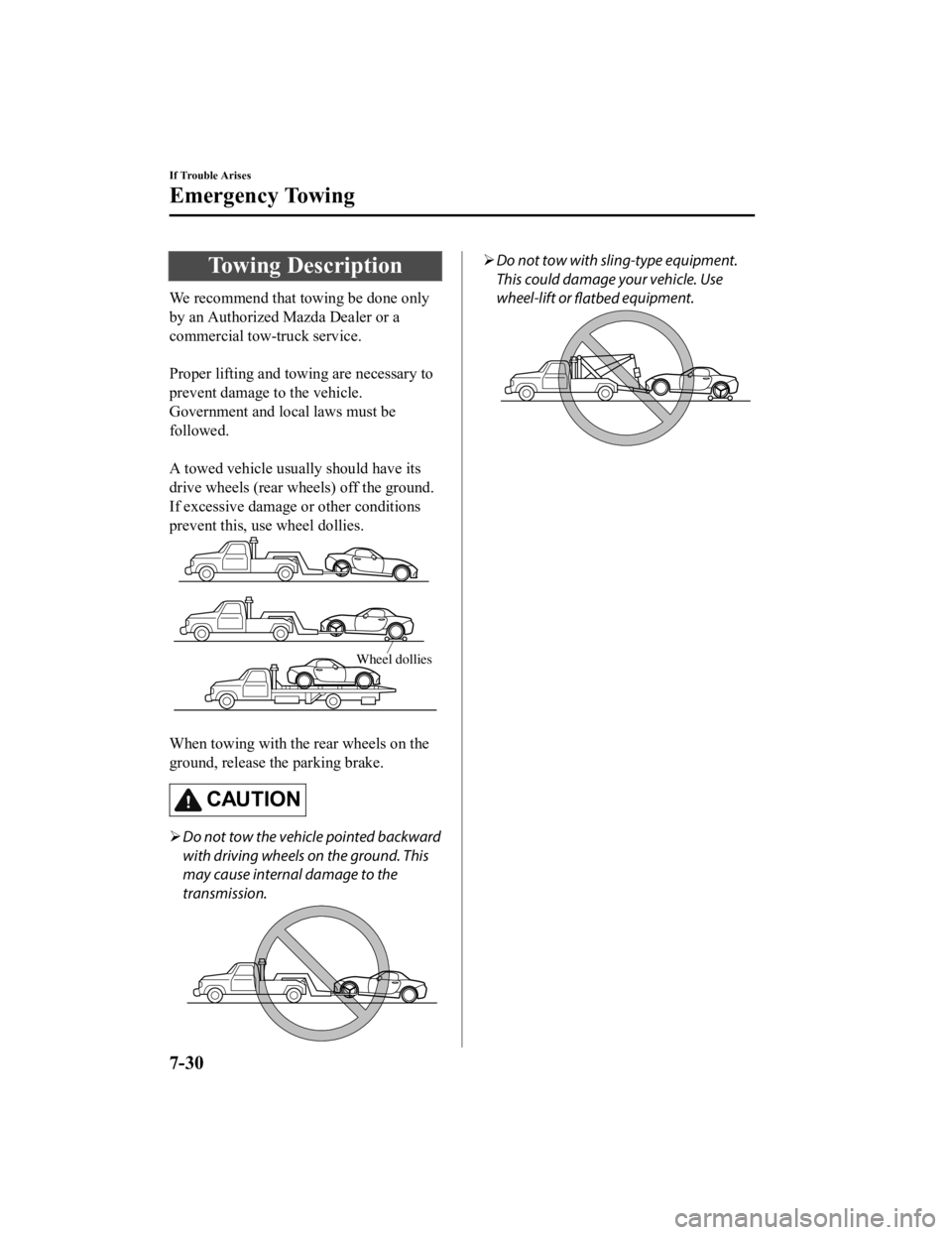
A towed vehicle usually should have its
drive wheels (rear wheels) off the ground.
If excessive damage or other conditions
prevent this, use wheel dollies.
Wheel dollies
When towing with the rear wheels on the
ground, release the parking brake.
CAUTION
Do not tow the vehicle pointed backward
with driving wheels on the ground. This
may cause internal damage to the
transmission.
Do not tow with sling-type equipment.
This could damage your vehicle. Use
wheel-lift or
flatbed equipment.
If Trouble Arises
Emergency Towing
7-30
MX-5_8GV5-EA-18E_Edition3
2018-7-17 15:48:16
Page 447 of 553

If a Warning Light Turns On or Flashes
If any warning light turns on/flashes, take appropriate action for each light. There is no
problem if the light turns off, h owever if the light does not turn off or turns on/flashes again,
consult an Authorized Mazda Dealer.
The details for some warnings can be viewed on the center display.
1. If the warning light is turned on, select
icon on the home screen to display the
application screen.
2. Select “Vehicle Status Monitor”.
3. Select “Warning Guidance” to display the current warnings.
4. Select the applicable warni ng to view the warning details.
▼Stop Vehicle in Safe Place Immediately
If any of the following warning
lights turns on, the system may have a malfunction. Stop the
vehicle in a safe place immediately and contact an Authorized M azda Dealer.
SignalWarning
Brake System Warning
Light This warning has the
following functions:
Parking brake warning/Warning light inspection
The light illuminates when the par king brake is applied with the ignition switched to
START or ON. It turns off when the parking brake is fully relea sed.
Low brake fluid level warning
If the brake warning light remains illuminated even though the parking brake is re‐
leased, the brake fluid may be l ow or there could be a problem with the brake system.
Park the vehicle in a safe place immediately and contact an Aut horized Mazda Dealer.
WA R N I N G
Do not drive with the brake system warning light illuminated. Contact an Authorized
Mazda Dealer to have the brakes inspected as soon as possible:
Driving with the brake system warning light illuminated is dangerous. It indicates that
your brakes may not work at all or that they could completely fail at any time. If this
light remains illuminated, after checking that the parking brake is fully released, have
the brakes inspected immediately.
CAUTION
In addition, the effectiveness of the braking may diminish so you may need to depress
the brake pedal more st rongly than normal to stop the vehicle.
If Trouble Arises
Warning/Indicator Lights and Warning Sounds
7-33
MX-5_8GV5-EA-18E_Edition3 2018-7-17 15:48:16
Page 448 of 553

SignalWarning
Electronic Brake Force
Distribution System Wa r n i n g If the electronic brake force di
stribution control unit determines that some compo‐
nents are operating incorrectly , the control unit may illuminate the brake system
warning light and the ABS warni ng light simultaneously. The problem is likely to be
the electronic brake force distribution system.
WARNING
Do not drive with both the ABS warning light and brake warning light illuminated.
Have the vehicle towed to an Authorized Mazda Dealer to have the brakes inspected as
soon as possible:
Driving when the brake system warning li ght and ABS warning light are illuminated
simultaneously is dangerous.
When both lights are illuminate d, the rear wheels could lock more quickly in an emer‐
gency stop than under normal circumstances.
Charging System Warn‐ ing Indication/Warning Light If the warning light illuminates while driving, it indicates a
malfunction of the alter‐
nator or of the charging system.
Drive to the side of the road and park off the right-of-way. Co nsult an Authorized
Mazda Dealer.
CAUTION
Do not continue driving when the charging system warning light is illuminated be‐
cause the engine could stop unexpectedly.
Engine Oil Warning Light This warning light indicates low engine oil pressure.
CAUTION
Do not run the engine if the oil pressure is
low. Otherwise, it could result in extensive
engine damage.
If the light illuminates or the w arning indication is displayed while driving:
1. Drive to the side of the road and park off the right-of-way o n level ground.
2. Turn off the engine and wait 5 minutes for the oil to drain b ack into the oil pan.
3. Inspect the engine oil level (p age 6-23). If it's low, add the appropriate amount of
engine oil while being careful not to overfill.
CAUTION
Do not run the engine if the oil level is low. Otherwise, it could result in extensive
engine damage.
4. Start the engine and check the warning light.
If the light remains illuminated even though the oil level is normal or after adding oil,
stop the engine immediately and have your vehicle towed to an Authorized Mazda
Dealer.
If Trouble Arises
Warning/Indicator Lights and Warning Sounds
7-34
MX-5_8GV5-EA-18E_Edition3 2018-7-17 15:48:16
Page 449 of 553

SignalWarning
(Red)
High Engine Coolant
Temperature Warning
Indication/Warning
Light The light flashes when the engine coolant temperature is extrem
ely high, and illumi‐
nates when the engine coolant temperature increases further.
Handling Procedure
Flashing light
Drive slowly to reduce engine l oad until you can find a safe place to stop the vehicle
and wait for the engine to cool down.
Illuminated light
This indicates the possibility of overheating. Park the vehicle in a safe place immedi‐
ately and stop the engine.
Refer to Overheating on page 7-27.
CAUTION
Do not drive the vehicle with the high engi ne coolant temperature warning light illumi‐
nated. Otherwise, it could resu lt in damage to the engine.
Power Steering Mal‐
function Indication*
The message is displayed if the electric power steering has a m alfunction.
If the message is displayed, stop the vehicle in a safe place a nd do not operate the
steering wheel. There is no probl em if the message in the display turns off after a
while. Contact an Authorized Mazda Dealer if the message is dis played continuously.
NOTE
If the message is displayed, the power steering will not operate normally. In this
case, the steering wheel can still be op erated, however, the operation may feel
heavy compared to normal, or the steer ing wheel could vibrate when turning.
Repeatedly jerking the steering wheel left and right while the vehicle is stopped or
moving extremely slowly will cause the power steering system to go into protective
mode which will make the steerin g feel heavy, but this does not indicate a problem.
If this occurs, park the vehicle safely and wait several minutes for the system to
return to normal.
Power Steering Mal‐ function Indicator
Light
*
The light illuminates/flashes if the electric power steering ha s a malfunction.
If the light illuminates/flashes, stop the vehicle in a safe pl ace and do not operate the
steering wheel. There is no problem if the light turns off afte r a while. Contact an Au‐
thorized Mazda Dealer if the lig ht illuminates/flashes continuously.
NOTE
If the indicator light illuminates/flashes, the power steering will not operate nor‐
mally. If this happens, the steering wheel can still be operated, however, the opera‐
tion may feel heavy compared to normal , or the steering wheel could vibrate when
turning.
Repeatedly jerking the steering wheel left and right while the vehicle is stopped or
moving extremely slowly will cause the power steering system to go into protective
mode which will make the steerin g feel heavy, but this does not indicate a problem.
If this occurs, park the vehicle safely and wait several minutes for the system to
return to normal.
If Trouble Arises
Warning/Indicator Lights and Warning Sounds
*Some models.7-35
MX-5_8GV5-EA-18E_Edition3 2018-7-17 15:48:16
Page 452 of 553

SignalWarning
(Flashing)
Tire Pressure Moni‐ toring System
Warning Light If the tire pressure monitoring s
ystem has a malfunction, the tire pressure warning light
flashes. Have your vehicle check ed by an Authorized Mazda Deale r as soon as possible.
WA R N I N G
If the tire pressure monitoring system warning light illuminates or flashes, or the tire pres‐
sure warning beep sound is heard, decrease vehicle speed immediately and avoid sudden
maneuvering and braking:
If the tire pressure monitoring system warnin g light illuminates or flashes, or the tire pres‐
sure warning beep sound is heard, it is dang erous to drive the vehicle at high speeds, or
perform sudden maneuver ing or braking. Vehicle drivabilit y could worsen and result in an
accident.
To determine if you have a slow leak or a flat, pull over to a safe position where you can
check the visual condition of the tire and determine if you have enough air to proceed to a
place where air may be added and the system monitored again by an Authorized Mazda
Dealer or a tire repair station.
Do not ignore the TPMS Warning Light:
Ignoring the TPMS warning light is dangerous, even if you know why it is illuminated. Have
the problem taken care of as soon as possible before it develops into a more serious situa‐
tion that could lead to tire failure and a dangerous accident.
(Red)
KEY Warning Indi‐
cation
*
“Keyless System malfunction” is displayed
This message is displayed if the advanced keyless entry & push button start system has a
problem.
Contact an Authorized Mazda Dealer.
CAUTION
If the message is indicated, or the push button start indicato r light (amber) flashes, the en‐
gine may not start. If the engine cannot be started, try starting it using the emergency oper‐
ation for starting the engine, and have the vehicle inspected at an Authorized Mazda Deal‐
er as soon as possible.
Refer to Emergency Operation for St arting the Engine on page 4-9.
(Amber)
KEY Warning Indi‐
cation
*
“Ignition is on” is displayed
This message is displayed when the driver's door is opened with out switching the ignition
off.
“Key not detected” is displayed
This message is displayed when any of the following operations is performed with the key
out of the operational range or placed in areas inside the cabi n where it is difficult for the
key to be detected.
The push button start is pressed with the ignition switched offThe ignition is switched onAll doors are closed without switching the ignition off
If Trouble Arises
Warning/Indicator Lights and Warning Sounds
7-38*Some models.
MX-5_8GV5-EA-18E_Edition3 2018-7-17 15:48:16