parking brake MAZDA MODEL MX-5 MIATA 2020 User Guide
[x] Cancel search | Manufacturer: MAZDA, Model Year: 2020, Model line: MODEL MX-5 MIATA, Model: MAZDA MODEL MX-5 MIATA 2020Pages: 566, PDF Size: 62.47 MB
Page 160 of 566

Manual Transmission ShiftPattern
Neutral position
The shift pattern of the transmission is
conventional, as shown.
Depress the clutch pedal all the way down
while shifting; then release it slowly.
Your vehicle is equipped with a device to
prevent shifting to R (reverse) by mistake.
Push the shift lever downward and shift to
R.
WA R N I N G
Do not use sudden engine braking on
slippery road surfaces or at high speeds:
Shifting down while driving on wet, snowy,
or frozen roads, or while driving at high
speeds causes sudden engine braking,
which is dangerous. The sudden change in
tire speed could cause the tires to skid. This
could lead to loss of vehicle control and an
accident.
Always leave the shift lever in 1 or R
position and set the parking brake when
leaving the vehicle unattended:
Otherwise the vehicle could move and
cause an accident.
CAUTION
Keep your foot off the clutch pedal except
when shifting gears. Also, do not use the
clutch to hold the vehicle on an upgrade.
Riding the clutch will cause needless
clutch wear and damage.
Do not apply any excessive lateral force
to the shift lever when changing from
5th to 4th gear. This could lead to the
accidental selection of 2nd gear, which
could result in damage to the
transmission.
Make sure the vehicle comes to a
complete stop before shifting to R.
Shifting to R while the vehicle is still
moving may damage the transmission.
When Driving
Manual Transmission Operation
4-32
MX-5_8JA4-EA-19K_Edition1_old 2019-8-29 16:18:06
Page 164 of 566

Shift-Lock System
The shift-lock system prevents shifting out
of P unless the brake pedal is depressed.
To shift from P:
1. Depress and hold the brake pedal.
2. Start the engine.
3. Press and hold the lock-release button.
4. Move the selector lever.
NOTE
When the ignition is switched to ACC or
the ignition is switched off, the selector
lever cannot be shifted from P position.
The ignition cannot be switched to OFF
if the selector lever is not in P position.
▼ Shift-Lock Override
If the selector lever will not move from P
using the proper shift procedure, continue
to hold down the brake pedal.
1. Remove the shift-lock override cover
using a cloth-wrapped flat head
screwdriver.
2. Insert a screwdriver and push it down.
Cover
3. Press and hold the lock-release button.
4. Move the selector lever.
Take the vehicle to an Authorized Mazda
Dealer to have the system checked.
Transmission Ranges
The shift position indication in the
instrument cluster illuminates.
Refer to Warning/Indicator Lights on
page 4-27.
The selector lever must be in P or N
position to operate the starter.
P (Park)
P locks the transmissi on and prevents the
rear wheels from rotating.
WA R N I N G
Always set the selector lever to P position
and set the parking brake:
Only setting the selector lever to the P
position without using the parking brake to
hold the vehicle is dangerous. If P fails to
hold, the vehicle could move and cause an
accident.
CAUTION
Shifting into P, N or R while the vehicle is
moving can damage your transmission.
Shifting into a driving gear or reverse
when the engine is running faster than
idle can damage the transmission.
R (Reverse)
In position R, the vehicle moves only
backward. You must be at a complete stop
before shifting to or from R, except under
rare circumstances as explained in
Rocking the Vehicle (page 3-53).
When Driving
Automatic Transmission
4-36
MX-5_8JA4-EA-19K_Edition1_old 2019-8-29 16:18:06
Page 165 of 566

N (Neutral)
In N, the wheels and transmission are not
locked. The vehicle will roll freely even
on the slightest incline unless the parking
brake or brakes are on.
WA R N I N G
If the engine is running faster than idle, do
not shift from N or P into a driving gear:
It's dangerous to shift from N or P into a
driving gear when the engine is running
faster than idle. If this is done, the vehicle
could move suddenly, causing an accident
or serious injury.
Do not shift into N when driving the
vehicle:
Shifting into N while driving is dangerous.
Engine braking cannot be applied when
decelerating which could lead to an
accident or serious injury.
CAUTION
Do not shift into N when driving the
vehicle. Doing so can cause transmission
damage.
NOTE
Apply the parking brake or depress the
brake pedal before moving the selector
lever from N position to prevent the
vehicle from moving unexpectedly.
D (Drive)
D is the normal driving position. From a
stop, the transmission will automatically
shift through a 6-gear sequence.
M (Manual)
M is the manual shift mode position.
Gears can be shifted up or down by
operating the selector lever. Refer to
Manual Shift Mode on page 4-38.
▼ Shift Position Indication
The selector position is indicated when the
ignition is switched ON.
Gear position indication
In manual shift mode, the “M” of the shift
position indication illuminates and the
numeral for the selected gear is displayed.
▼Active Adaptive Shift (AAS)
Active Adaptive Shift (AAS)
automatically controls the transmission
shift points to best suit the road conditions
and driver input. This improves driving
feel. The transmission may switch to AAS
mode when driving up and down slopes,
cornering, driving at high elevations, or
depressing the accelerator pedal quickly
while the selector lever is in the D
position. Depending on the road and
driving conditions/ve
hicle operations, gear
shifting could be delayed or not occur,
however, this does not indicate a problem
because the AAS mode will maintain the
optimum gear position.
When Driving
Automatic Transmission
4-37
MX-5_8JA4-EA-19K_Edition1_old 2019-8-29 16:18:06
Page 178 of 566

▼Headlight Leveling
The number of passengers and weight of
cargo in the luggage compartment change
the angle of the headlights.
The angle of the headlights will be
automatically adjusted when turning on
the headlights.
▼Daytime Running Lights
Some countries require moving vehicles to
have their lights o
n (daytime running
lights) during the daytime.
The daytime running lights turn on
automatically when the vehicle starts
moving.
They turn off when the parking brake is
operated or the shift lever is shifted to the
P position (automatic transmission
vehicle).
NOTE
(Except Canada)
The daytime running lights can be
deactivated.
Refer to Personalization Features on page
9-9.
Turn and Lane-Change Signals
The ignition must be switched ON to use
the turn and lane-change signals.
▼Tu r n S i g n a l s
Move the signal lever down (for a left
turn) or up (for a right turn) to the stop
position. The signal will self-cancel after
the turn is completed.
If the indicator light continues to flash
after a turn, ma
nually return th e lever to its
original position.
Right turn
Left turn
Right lane change
Left lane change OFF
The turn signal indicators in the
instrument cluster
flash according to the
operation of the turn signal lever to show
which signal is working.
When Driving
Switches and Controls
4-50
MX-5_8JA4-EA-19K_Edition1_old 2019-8-29 16:18:06
Page 190 of 566

Wear shoes appropriate for driving in
order to avoid your shoe contacting the
brake pedal when depressing the
accelerator pedal.
▼ Parking Brake
CAUTION
Driving with the parking brake on will
cause excessive wear of the brake parts.
NOTE
For parking in snow, refer to Winter
Driving (page 3-53) regarding parking
brake use.
Setting the parking brake
Depress the brake pedal and then firmly
pull the parking brake lever fully upwards
with sufficient force to hold the vehicle in
a stationary position.
Releasing the parking brake
Depress the brake pedal and pull the
parking brake lever upwards, then press
the release button. While holding the
button, lower the parking brake lever all
the way down to the
released position.
Button
▼Wa r n i n g L i g h t
The warning light turns on when the
system has a malfunction.
Refer to Contact Authorized Mazda
Dealer and Have Vehicle Inspected on
page 7-36.
When Driving
Brake
4-62
MX-5_8JA4-EA-19K_Edition1_old
2019-8-29 16:18:06
Page 192 of 566

Hill Launch Assist (HLA)*
HLA is a function which assists the driver
in accelerating from a stop while on a
slope. When the driver releases the brake
pedal and depresses the accelerator pedal
while on a slope, the function prevents the
vehicle from rolling. The braking force is
maintained automatically after the brake
pedal is released on a steep grade.
For vehicles with a manual transmission,
HLA operates on a downward slope when
the shift lever is in the reverse (R)
position, and on an upward slope when the
shift lever is in a position other than the
reverse (R) position.
For vehicles with an automatic
transmission, HLA operates on a
downward slope when the selector lever is
in the reverse (R) position, and on an
upward slope when the selector lever is in
a forward gear.
WA R N I N G
Do not rely completely on HLA:
HLA is an auxiliary device for accelerating
from a stop on a slope. The system only
operates for about 2 seconds and
therefore, relying only on the system, when
accelerating from a stop is dangerous
because the vehicle may move (roll)
unexpectedly and cause an accident.
The vehicle could roll depending on the
vehicle's load or if it is towing something. In
addition, for vehicles with a manual
transmission, the vehicle could still roll
depending on how the clutch pedal or the
accelerator pedal is operated.
Always confirm the safety around the
vehicle before starting to drive the vehicle.
NOTE
HLA does not operate on a gentle slope.
In addition, the gradient of the slope on
which the system will operate changes
depending on the vehicle's load.
HLA does not operate if the parking
brake is applied, the vehicle has not
stopped completely, or the clutch pedal
is released.
While HLA is operating, the brake pedal
may feel stiff and vibrate, however, this
does not indicate a malfunction.
HLA does not operate while the
TCS/DSC indicator light is illuminated.
Refer to Contact Authorized Mazda
Dealer and Have Vehicle Inspected on
page 7-36.
HLA does not turn off even if the DSC
OFF switch is pressed to turn off the
TCS/DSC.
When Driving
Brake
4-64*Some models.
MX-5_8JA4-EA-19K_Edition1_old 2019-8-29 16:18:06
Page 203 of 566
i-ACTIVSENSE*
i-ACTIVSENSE is a collective term covering a series of advanced safety and driver support
systems which make use of a Forward Sensing Camera (FSC) and radar sensors. These
systems consist of active safety and pre-crash safety systems.
These systems are designed to assist the driver in safer drivin g by reducing the load on the
driver and helping to avert collisions or reduce their severity . However, because each system
has its limitations, always drive carefully and do not rely sol ely on the systems.
▼Active Safety Technology
Active Safety Technology supports safer driving by helping the
driver to recognize potential
hazards and avert accidents.
Driver awareness support systems
Nighttime visibility
Adaptive Front Lighting System (AFS)..................................................................... page 4-77
High Beam Control System (HBC)............................................................................ page 4-78
Left/right side and rear side detection
Lane Departure War ning System (LDWS)........................... ......................................page 4-81
Blind Spot Monitoring (BSM).................................... ............................................... page 4-87
Road sign recognition
Traffic Sign Recognition System (TSR).......................... .......................................... page 4-92
Rear obstruction detection wh en leaving a parking space
Rear Cross Traffic Alert (RCTA)................................ ............................................... page 4-98
▼Pre-Crash Safety Technology
Pre-crash safety technology is de
signed to assist the driver in averting collisions or reduce
their severity in situations where they cannot be avoided.
Collision damage reduction in low vehicle speed range
Forward driving
Smart City Brake Support (SCBS)................................ .......................................... page 4-101
When Driving
i-ACTIVSENSE
*Some models.4-75
MX-5_8JA4-EA-19K_Edition1_old 2019-8-29 16:18:06
Page 240 of 566

(Cruise set indication (white)/indicator
light (green))
The cruise set indication (white) is
displayed in the instrument cluster and the
cruise set indicator light (green) turns on
when a cruising sp eed has been set.
▼Activation/Deactivation
To activate the system, press the ON
switch. The cruise main indication (white)
turns on.
To deactivate the system, press the OFF/
CANCEL switch.
The cruise main indi
cation (white) turns
off.
WA R N I N G
Always turn off the cruise control system
when it is not in use:
Leaving the cruise control system in an
activation-ready state while the cruise
control is not in use is dangerous as the
cruise control could unexpectedly activate
if the activation button is accidentally
pressed, and result in loss of vehicle control
and an accident.
NOTE
When the ignition is switched OFF, the
system status before it was turned off is
maintained. For exampl e, if the ignition is
switched OFF with the cruise control
system operable, the system will be
operable when the ignition is switched ON
the next time.
▼ To S e t S p e e d
1. Activate the cruise control system by
pressing the ON switch. The cruise
main indication (white) turns on.
2. Accelerate to the desired speed, which
must be more than 25 km/h (16 mph).
3. Type A instrument cluster
Set the cruise control by pressing the
SET/
switch at t he desired speed. The
cruise control is set at the moment the
SET/
switch is pressed. Release the
accelerator pedal simultaneously. The
cruise set indication (green) turns on.
Type B instrument cluster
Set the cruise control by pressing the
SET/
switch at t he desired speed. The
cruise control is set at the moment the
SET/
switch is pressed. Release the
accelerator pedal simultaneously. The
cruise set indication (white) is
displayed and the cr uise set indicator
light (green) turns on.
NOTE
The cruise control speed setting cannot
be performed under the following
conditions:
(Automatic transmission)
The selector lever is in the P or N
position.
(Manual transmission)
The shift lever is in the neutral
position.
The parking brake is applied.
When Driving
Cruise Control
4-112
MX-5_8JA4-EA-19K_Edition1_old 2019-8-29 16:18:06
Page 242 of 566

▼To Decrease Cruising Speed
Press the SET/ switch and hold it. The
vehicle will gradually slow.
Release the switch at the desired speed.
Press the SET/
switch and release it
immediately to adjust the preset speed.
Multiple operations will decrease the
preset speed according to the number of
times it is operated.
Decreasing speed with a single SET/
switch operation
Instrument cluster display for vehicle
speed indicated in km/h: 1 km/h (0.6 mph)
Instrument cluster display for vehicle
speed indicated in mph: 1 mph (1.6 km/h)
▼ To Resume Cruising Speed at More
Than 25 km/h (16 mph)
If the cruise contro
l system temporarily
canceled (such as by applying the brake
pedal) and the system is still activated, the
most recent set speed will automatically
resume when the RESUME/
switch is
pressed.
If vehicle speed is below 25 km/h (16
mph), increase the vehicle speed up to 25
km/h (16 mph) or more and press the
RESUME/
switch.
▼ To Temporarily Cancel
To temporarily cancel the system, use one
of these methods:
Slightly depress the brake pedal.
(Manual transmission)
Depress the clutch pedal.
Press the OFF/CANCEL switch.
If the RESUME/
switch is pressed when
the vehicle speed is 25 km/h (16 mph) or
higher, the system reverts to the previously
set speed.
NOTE
If any of the following conditions occur,
the cruise control system is temporarily
canceled.
The parking brake is applied.
(Automatic transmission)
The selector lever is in the P, N, or R
position.
(Manual transmission)
The shift lever is in the neutral
position.
When the cruise control system is
temporarily canceled by even one of the
applicable cancel conditions, the speed
cannot be re-set.
(Automatic transmission)
The cruise control cannot be cancelled
while driving in manual mode (selector
lever shifted from D to M position).
Therefore, engine braking will not be
applied even if the transmission is
shifted down to a lower gear. If
deceleration is required, lower the set
speed or depress the brake pedal.
When Driving
Cruise Control
4-114
MX-5_8JA4-EA-19K_Edition1_old 2019-8-29 16:18:06
Page 272 of 566
When connecting a device to the
auxiliary jack or USB port, noise may
occur depending on the connected
device. If the device is connected to the
vehicle's accessory socket, the noise can
be reduced by unplugging it from the
accessory socket.
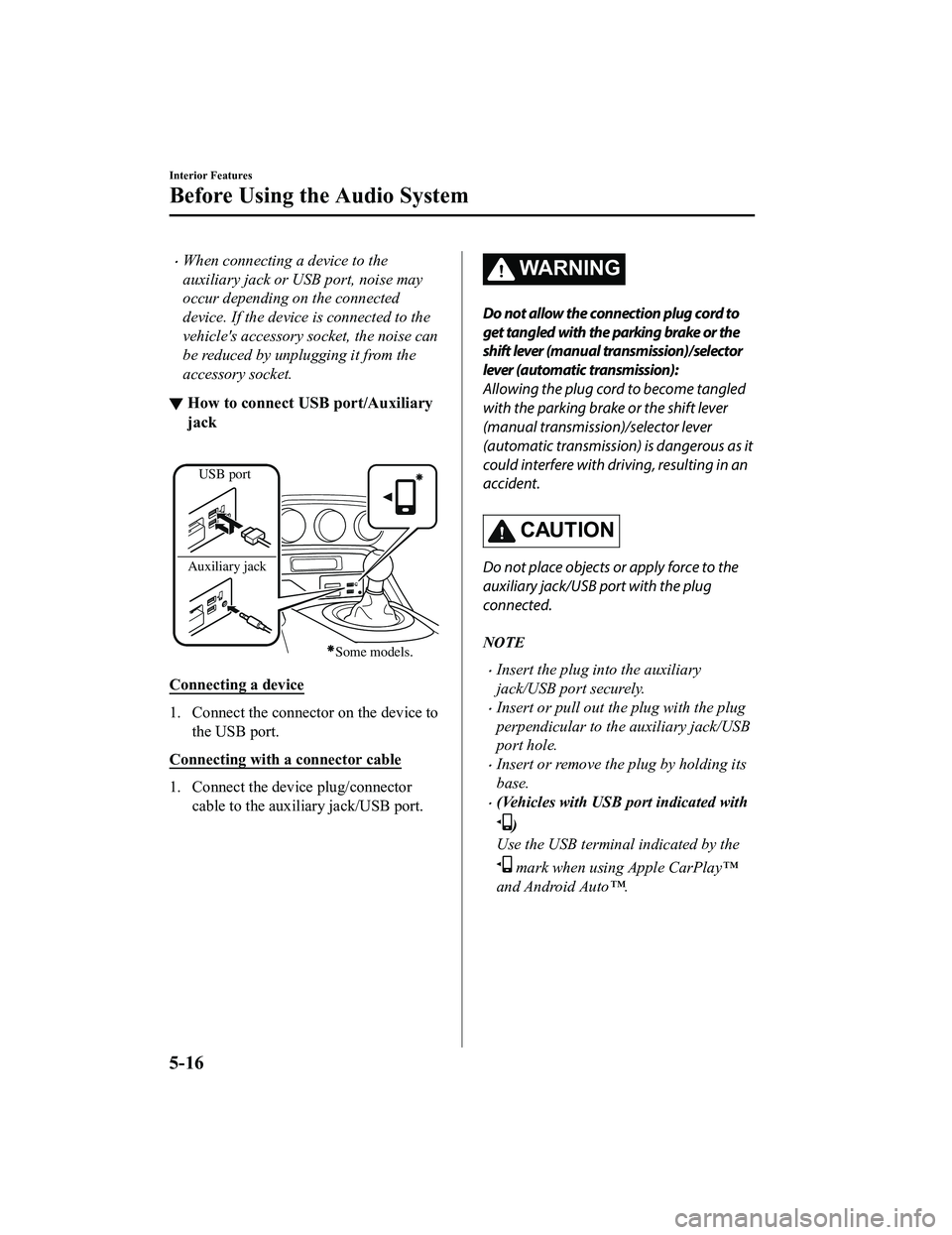
▼How to connect USB port/Auxiliary
jack
USB port
Auxiliary jack
Some models.
Connecting a device
1. Connect the connector on the device to the USB port.
Connecting with a connector cable
1. Connect the device plug/connector cable to the auxiliary jack/USB port.
WA R N I N G
Do not allow the connection plug cord to
get tangled with the parking brake or the
shift lever (manual transmission)/selector
lever (automatic transmission):
Allowing the plug cord to become tangled
with the parking brake or the shift lever
(manual transmission)/selector lever
(automatic transmission) is dangerous as it
could interfere with driving, resulting in an
accident.
CAUTION
Do not place objects or apply force to the
auxiliary jack/USB port with the plug
connected.
NOTE
Insert the plug into the auxiliary
jack/USB port securely.
Insert or pull out the plug with the plug
perpendicular to the auxiliary jack/USB
port hole.
Insert or remove the plug by holding its
base.
(Vehicles with USB port indicated with
)
Use the USB terminal indicated by the
mark when using Apple CarPlay™
and Android Auto™.
Interior Features
Before Using the Audio System
5-16
MX-5_8JA4-EA-19K_Edition1_old 2019-8-29 16:18:06