phone volume MAZDA MODEL MX-5 MIATA RF 2020 Owners Manual
[x] Cancel search | Manufacturer: MAZDA, Model Year: 2020, Model line: MODEL MX-5 MIATA RF, Model: MAZDA MODEL MX-5 MIATA RF 2020Pages: 566, PDF Size: 62.47 MB
Page 274 of 566
Basic Operation Method
NOTE
The explanation of functions described in this manual may differ from the actual
operation, and the shapes of screens and buttons and the letters and characters displayed
may also differ from the actual appearance.
Additionally, depending on future software updates, the content may successively change
without notice.
For additional information regarding Mazda Connect, please refer to the following
Website.
http://infotainment.mazdahandsfree.com/
Audio Set has 3 different human interfaces.
Commander switch
Touch panel
Voice recognition with steering switch and microphone
Refer to Voice Recognition on page 5-74.
▼ Commander switch operation
NOTE
For safety reasons, some operations are disabled while the vehicle is being driven.
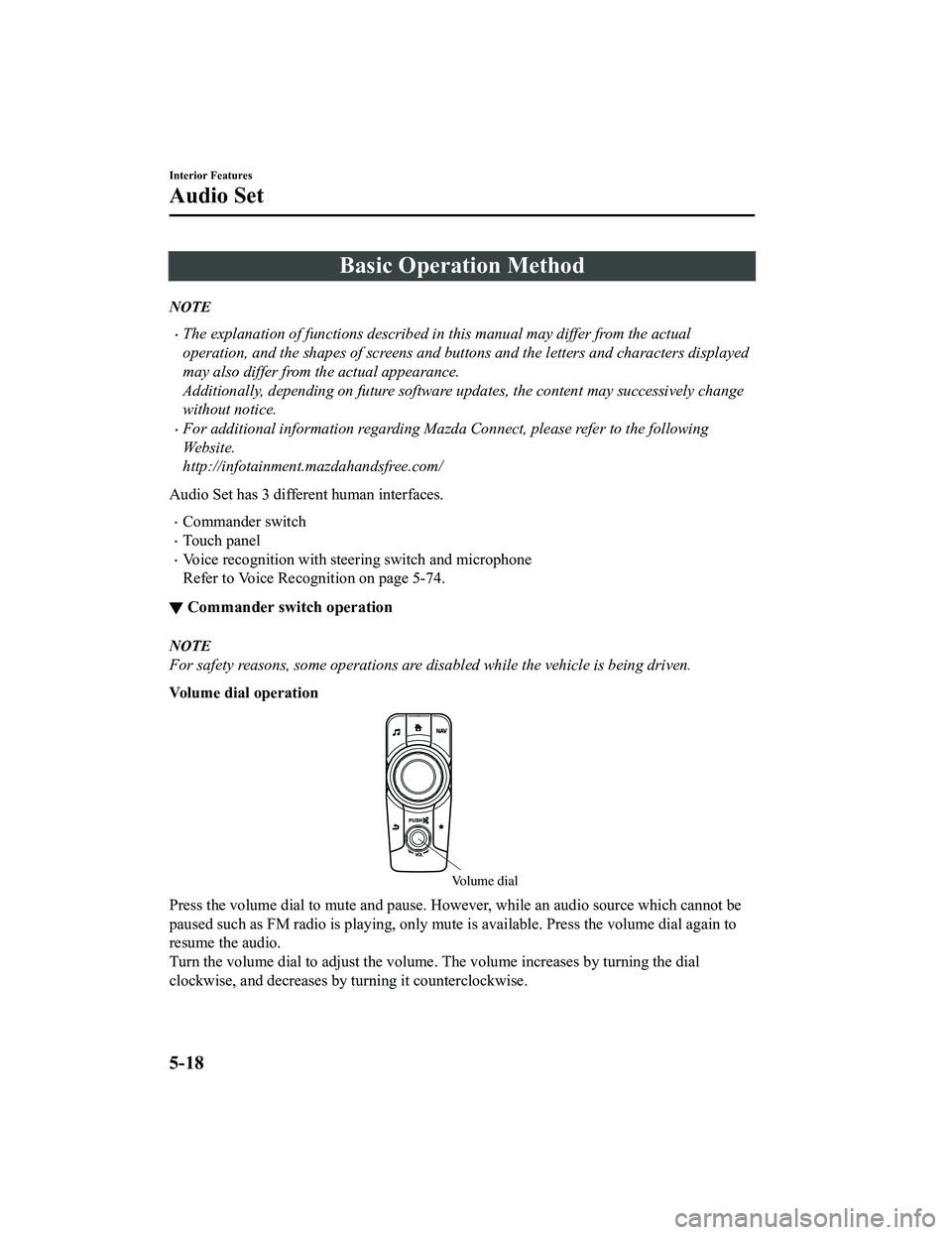
Volume dial operation
Volume dial
Press the volume dial
to mute and pause. However, while an audi o source which cannot be
paused such as FM radio is playing, only mute is available. Pre ss the volume dial again to
resume the audio.
Turn the volume dial to adjust the volume. The volume increases by turning the dial
clockwise, and decreases by turning it counterclockwise.
Interior Features
Audio Set
5-18
MX-5_8JA4-EA-19K_Edition1_old 2019-8-29 16:18:06
Page 305 of 566
Microphone (hands-free)
The microphone is used for speaking voice commands or when making a Hands-free call.
Talk button
Activates the voice recognition. In addition, it skips the voice guidance.
Pick-up button
Responds to incoming c alls. In addition, after selecting a cont act or dialing a number, it
places the call when the button is pressed.
Hang-up button
Ends the call or refuses an incoming call. In addition, it ends the voice recognition
operation.
Commander switch
The commander switch is used for volume adjustment and display operation. Tilt or turn the
commander knob to move the cursor. Press the commander knob to select the icon.
Volume adjustment
The volume dial of the commander switch is used to adjust the v olume. Turn the dial to the
right to increase volume, t o the left to decrease it.
The volume can also be adjusted using the volume button on the steering wheel.
NOTE
Press the volume dial to switch the audio MUTE on and off.
If the volume is lower compared to other audio modes, increase the volume from the
device side.
Conversation volume and the volume of the voice guidance and ringtone can each be set in
advance.
1. Select the
icon on the home screen to display the Communication screen.
2. Select
.
3. Adjust the
and the using the slider.
Interior Features
Audio Set
5-49
MX-5_8JA4-EA-19K_Edition1_old 2019-8-29 16:18:06
Page 329 of 566
▼Communication Settings
Select the icon on the home screen to display the Communication screen.
Select
to change the setting.
Item Setting Function
Bluetooth
®— Go to Bluetooth® setting menu.
Refer to Bluetooth® Preparation on page 5-50.
Incoming Call Notifi‐
cations On/Off Notifies when an in
coming call is received.
Auto Download Text
Message On/Off
Downloads SMS automatically when the Bluetooth
® unit is connected
to the device.
Text Notifications On/Off Notifies when a new SMS is received.
Auto Download
Email
*1On/Off Downloads E-mail automati
cally when the Bluetooth® unit is connect‐
ed to the device.
Email Notifications On/Off Notifies when a new Email is received.
Auto Download Call
History On/Off
Downloads Call History automatically when the Bluetooth
® unit is
connected to the device.
Auto Download Con‐
tacts
*1On/Off Downloads the phonebook auto
matically when the Bluetooth® unit is
connected to the device.
Ringtone Car/Phone/Off The type of ring tone can be chan
ged. Three selections are available
including the standard ring tone set on the vehicle, the ring t one regis‐
tered to your Bluetooth
® device, or no ring tone.
Phone Volume Adjusts using
the slider. Adjusts the conversation volume.
VR and Ringtone Adjusts using
the slider. Adjusts the voice guidan
ce and ringtone volume.
Contacts Display Or‐
der First Name, Last
Name Displays the contact information
in alphabetical order of the first
name.
Last Name, First Name Displays the contact information
in alphabetical order of the last
name.
Edit Preset Messages — Edits the preset message.
Refer to Receiving and Replying to Messages (available only wit
h
E-mail/SMS compatible phones) on page 5-69.
Emergency Assistance
Call On/Off Mobile Utilizes the Automatic 911 dialing function.
Restore Factory set‐
tings — Initializes all Communication Settings.
*1 Depending on the device, it may
be necessary to acquire download permission on the device side.
Interior Features
Audio Set
5-73
MX-5_8JA4-EA-19K_Edition1_old 2019-8-29 16:18:06
Page 335 of 566
Troubleshooting
SiriusXM® use-related issues
SymptomCauseSolution method
SiriusXM
® loads slowly. Since SiriusXM Travel Link
® re‐
ceives data from geo-synchronous
satellites and the data is transmitted
at preset intervals. When the system
is loading the SiriusXM
® data in the
background, There may be occa‐
sions when the SiriusXM
® function
is waiting on data before it can be
accessed. Allow time for SiriusXM Travel
Link
® to complete the loading of
the SiriusXM® data.
Apple CarPlay™ use-related issues
Symptom CauseSolution method
Apple CarPlay™ cannot launch
even though an Apple
®-genuine
connector cord is inserted into the
USB port and it is connected to my
iPhone
®. You used the wrong USB port.
Use the USB port displaying the
mark to start Apple CarPlay™.
The error message, “Mobile device
error” is displayed after connecting
my iPhone
® to the USB port. There is mis-communication be‐
tween the vehicle's audio system
and your iPhone®.
Disconnect the connector cord from
the USB port once and then recon‐
nect it.
The icon of the application I want to
use is not displayed on the home
screen of Apple CarPlay™. Only applications compatible with
Apple CarPlay™ are displayed on
the screen.
Contact the application's supplier.
Voice recognition using Siri
® is
poor or incorrect for commands or
contact names. There are many possible reasons for
this such as:
1. Poor network connectivity
2. Road noise/sound of air blow‐
ing from air conditioner
3. Incorrect iPhone
® language set‐
ting 1. Use the commander switch to
complete the task or wait until
there is sufficient network con‐
nectivity before using Siri
®
again.
2. For better voice recognition, speak loud and clear.
3. Make sure that the iPhone
® lan‐
guage is set correctly (Example:
US English vs UK English).
If you are still having difficulty us‐
ing Siri
®, visit the Apple® support
site or contact Apple®.
There is a difference in the audio
volume between Bluetooth
® audio
and Apple CarPlay™. ―Check the volume of the audio on
the device connected via Blue‐
tooth®. The volume on some devi‐
ces connected via Bluetooth® can be
adjusted.
Interior Features
Audio Set
5-79
MX-5_8JA4-EA-19K_Edition1_old 2019-8-29 16:18:06
Page 336 of 566
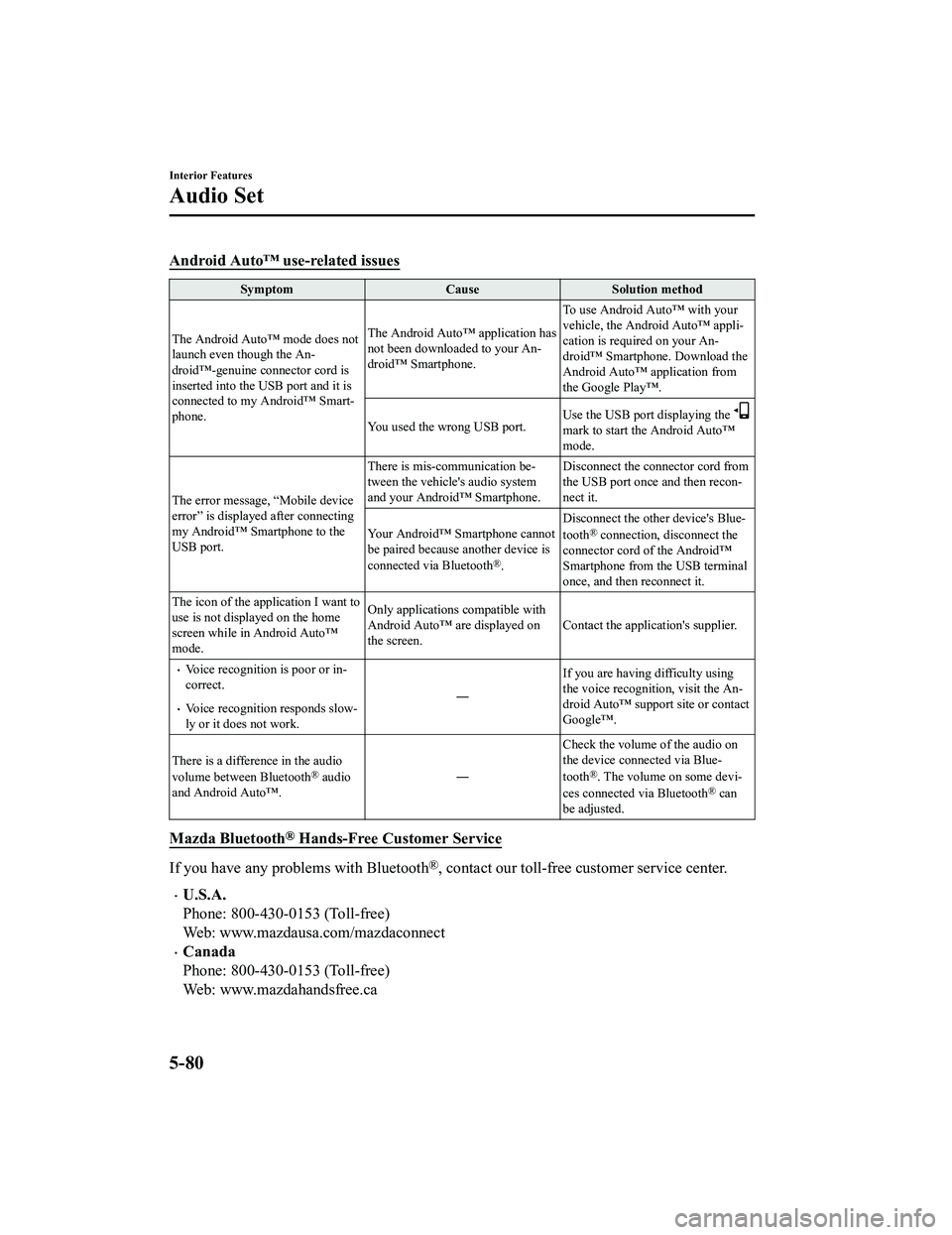
Android Auto™ use-related issues
SymptomCauseSolution method
The Android Auto™ mode does not
launch even though the An‐
droid™-genuine connector cord is
inserted into the USB port and it is
connected to my Android™ Smart‐
phone. The Android Auto™ application has
not been downloaded to your An‐
droid™ Smartphone.
To use Android Auto™ with your
vehicle, the Android Auto™ appli‐
cation is required on your An‐
droid™ Smartphone. Download the
Android Auto™ application from
the Google Play™.
You used the wrong USB port. Use the USB port displaying the
mark to start the Android Auto™
mode.
The error message, “Mobile device
error” is displayed after connecting
my Android™ Smartphone to the
USB port. There is mis-communication be‐
tween the vehicle's audio system
and your Android™ Smartphone.
Disconnect the connector cord from
the USB port once and then recon‐
nect it.
Your Android™ Smartphone cannot
be paired because another device is
connected via Bluetooth
®. Disconnect the other device's Blue‐
tooth
® connection, disconnect the
connector cord of the Android™
Smartphone from the USB terminal
once, and then reconnect it.
The icon of the application I want to
use is not displayed on the home
screen while in Android Auto™
mode. Only applications compatible with
Android Auto™ are displayed on
the screen.
Contact the application's supplier.
Voice recognition is poor or in‐
correct.
Voice recognition responds slow‐
ly or it does not work. ―
If you are having difficulty using
the voice recognitio
n, visit the An‐
droid Auto™ support site or contact
Google™.
There is a difference in the audio
volume between Bluetooth
® audio
and Android Auto™. ―Check the volume of the audio on
the device connected via Blue‐
tooth®. The volume on some devi‐
ces connected via Bluetooth® can
be adjusted.
Mazda Bluetooth® Hands-Free Customer Service
If you have any problems with Bluetooth®, contact our toll-free customer service center.
U.S.A.
Phone: 800-430-0153 (Toll-free)
Web: www.mazdausa.com/mazdaconnect
Canada
Phone: 800-430-0153 (Toll-free)
Web: www.mazdahandsfree.ca
Interior Features
Audio Set
5-80
MX-5_8JA4-EA-19K_Edition1_old 2019-8-29 16:18:06
Page 340 of 566
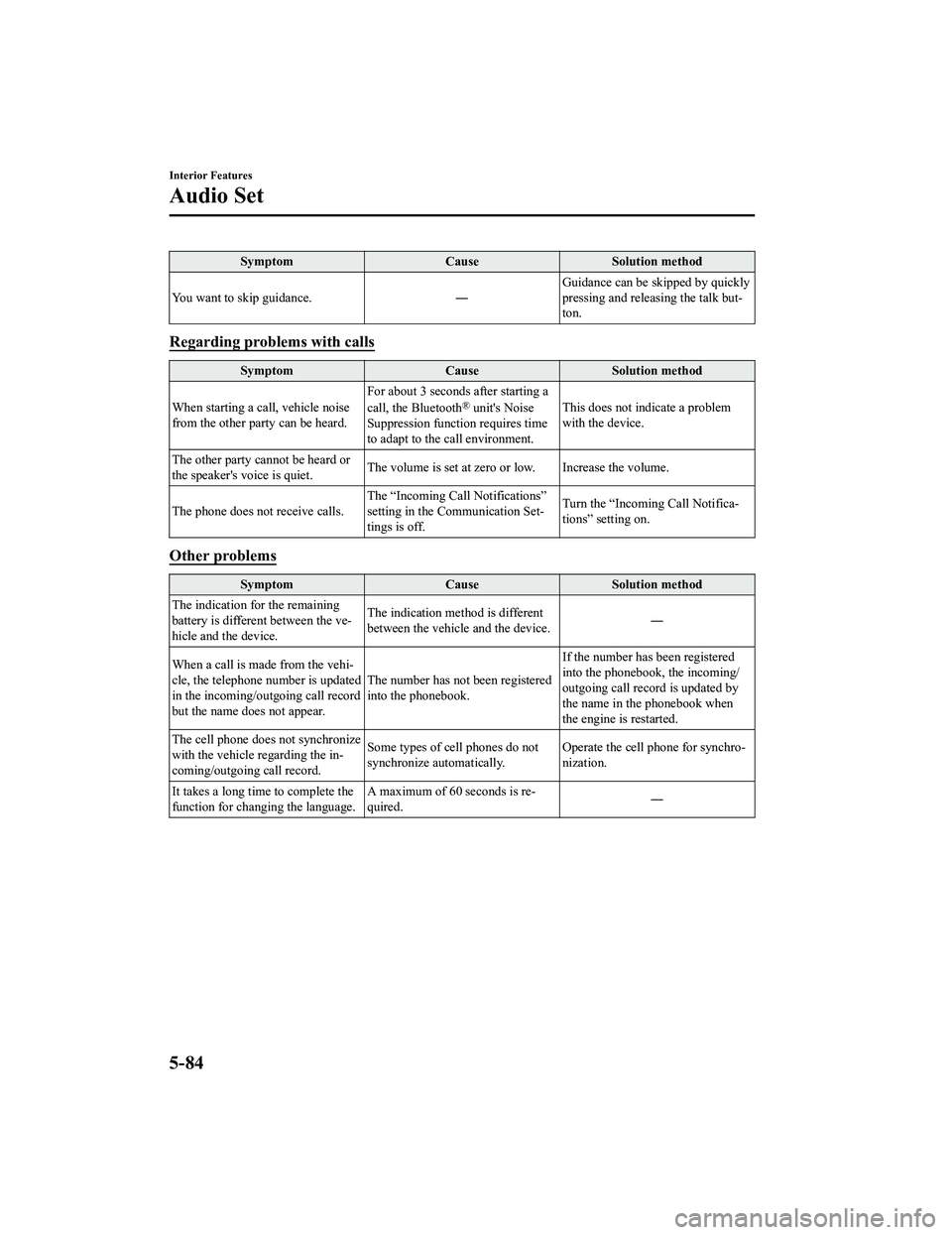
SymptomCauseSolution method
You want to skip guidance. ―Guidance can be skipped by quickly
pressing and releasing the talk but‐
ton.
Regarding problems with calls
Symptom
CauseSolution method
When starting a call, vehicle noise
from the other party can be heard. For about 3 seconds after starting a
call, the Bluetooth
® unit's Noise
Suppression function requires time
to adapt to the call environment. This does not indicate a problem
with the device.
The other party cannot be heard or
the speaker's voice is quiet. The volume is set at zero or low. Increase the volume.
The phone does not receive calls. The “Incoming Call
Notifications”
setting in the Communication Set‐
tings is off. Turn the “Incoming Call Notifica‐
tions” setting on.
Other problems
Symptom
CauseSolution method
The indication for the remaining
battery is different between the ve‐
hicle and the device. The indication method is different
between the vehicle and the device.
―
When a call is made from the vehi‐
cle, the telephone number is updated
in the incoming/outgoing call record
but the name does not appear. The number has not
been registered
into the phonebook. If the number has been registered
into the phonebook, the incoming/
outgoing call record is updated by
the name in the phonebook when
the engine is restarted.
The cell phone does not synchronize
with the vehicle regarding the in‐
coming/outgoing call record. Some types of cell phones do not
synchronize automatically.
Operate the cell p
hone for synchro‐
nization.
It takes a long time to complete the
function for changing the language. A maximum of 60 seconds is re‐
quired.
―
Interior Features
Audio Set
5-84
MX-5_8JA4-EA-19K_Edition1_old
2019-8-29 16:18:06
Page 341 of 566

Things You Need to Know
WA R N I N G
Always adjust the audio while the vehicle is
stopped:
Do not adjust the audio control switches
while driving the vehicle. Adjusting the
audio while driving the vehicle is
dangerous as it could distract your
attention from the vehicle operation which
could lead to a serious accident.
Even if the audio control switches are
equipped on the steering wheel, learn to
use the switches without looking down at
them so that you can keep your maximum
attention on the road while driving the
vehicle.
CAUTION
For the purposes of safe driving, adjust the
audio volume to a level that allows you to
hear sounds outside of the vehicle
including car horns and particularly
emergency vehicle sirens.
NOTE
To prevent the battery from being
discharged, do not leave the audio
system on for a long period of time when
the engine is not running.
If a cellular phone or CB radio is used
in or near the vehicle, it could cause
noise to occur from the audio system,
however, this does no t indicate that the
system has been damaged.
Do not spill any liquid on the audio
system.
▼ Radio Reception
AM characteristics
AM signals bend around such things as
buildings or mountains and bounce off the
ionosphere.
Therefore, they can reach longer distances
than FM signals.
Because of this, 2 stations may sometimes
be picked up on the same frequency at the
same time.
Station 2
Station 1 Ionosphere
Interior Features
Appendix
5-85
MX-5_8JA4-EA-19K_Edition1_old
2019-8-29 16:18:06
Page 558 of 566

Index
A
Accessory Socket.............................. 5-93
Adaptive Front Lighting System
(AFS)................................................. 4-77
Add-On Non-Genuine Parts and
Accessories........................................ 8-19
Advanced KeyAdvanced keyless entry system... 3-11
Operational range........................ 3-12
Air Bag Systems............................... 2-36
Air Bag/Seat Belt Pr etensioner System
Warning Beep.................................... 7-48
Ambient Temperature Display.......... 4-17
Antilock Brake System (ABS).......... 4-65
Audio Control Switch
Adjusting the Volume.................. 5-14
Seek Switch................................. 5-14
Audio Set Android Auto™........................... 5-43
Apple CarPlay™......................... 5-40
Applications................................. 5-78
AUX.............................................5-33
Bluetooth®.................................. 5-47
Radio............................................5-25
Satellite Radio........ ..................... 5-29
Settings........................................ 5-76
Troubleshooting.......... ................. 5-79
USB............................................. 5-34
Voice Recognition.... ................... 5-74
Volume/Display/Sound
Controls....................................... 5-23
Audio System
Antenna........................................5-17
Appendix..................................... 5-85
Audio Control Switch................. 5-14
Audio Set..................................... 5-18
AUX/USB mode..........................5-15
Before Using the Audio
System......................................... 5-14
Automatic Transmission
Active Adaptive Shift (AAS)...... 4-37
Automatic transmission
controls........................................ 4-35
Direct mode................................. 4-43
Driving tips..................................4-44
Manual shift mode.......................4-38
Shift-lock system......................... 4-36
Transmission ranges.................... 4-36
B
Back Trim Storage Box.................. 5-100
Battery............................................... 6-32 Maintenance.................................6-34
Replacement................................ 6-34
Specifications.................................9-4
Battery Runs Out.............................. 7-23 Jump-starting............................... 7-23
Blind Spot Monitoring (BSM).......... 4-87 Canceling operation of Blind Spot
Monitoring (BSM).......................4-91
Blind Spot Monitoring (BSM) System
Warning Beep.................................... 7-50
Bluetooth® Bluetooth® Audio....................... 5-53
Bluetooth® Hands-Free...............5-64
Bluetooth® Preparation............... 5-50
Body Lubrication.............................. 6-28
Brakes Brakes assist................................ 4-63
Foot brake....................................4-61
Pad wear indicator....................... 4-63
Parking brake...............................4-62
Warning light............................... 4-62
Break-In Period................................. 3-51
C
Capacities............................................ 9-5
Carbon Monoxide......... .................... 3-27
Cell Phones....................................... 8-20
Child Restraint
10-2
MX-5_8JA4-EA-19K_Edition1_old 2019-8-29 16:18:06