brake light MAZDA MODEL RX 8 2009 (in English) User Guide
[x] Cancel search | Manufacturer: MAZDA, Model Year: 2009, Model line: MODEL RX 8, Model: MAZDA MODEL RX 8 2009Pages: 430, PDF Size: 4.9 MB
Page 147 of 430

Black plate (147,1)
If the ABS warning light stays on while
you're driving, the ABS control unit has
detected a system malfunction. If this
occurs, your brakes will function normally
as if the vehicle had no ABS.
Should this happen, consult an Authorized
Mazda Dealer as soon as possible.
NOTE
When the engine is jump-started to charge the
battery, uneven rpm occurs and the ABS
warning light comes on. This is due to a weak
battery, not a malfunction.
Recharge the battery.
qElectronic Brake Force
Distribution System Warning
If the electronic brake force distribution
control unit determines that some
components are operating incorrectly, the
control unit may turn the brake system
warning light and the ABS warning light
on at the same time. The problem is likely
to be the electronic brake force
distribution system.
WARNING
Do not drive with both the ABS warning
light and brake warning light
illuminated. Have the vehicle towed to
an Authorized Mazda Dealer to have
the brakes inspected as soon as
possible:
Driving when the brake system
warning light and ABS warning light
are illuminated at the same time is
dangerous.
When both lights are illuminated, the
rear wheels could lock more quickly
in an emergency stop than under
normal circumstances.
qBrake Pad Wear Indicator
When the disc brake pads become worn,
the built-in wear indicators contact the
disc plates. This causes a screeching noise
to warn that the pads should be replaced.
When you hear this noise, consult an
Authorized Mazda Dealer as soon as
possible.
Driving Your Mazda
Starting and Driving
5-9
RX-8_8Z09-EA-08C_Edition3 Page147
Thursday, July 3 2008 2:23 PM
Form No.8Z09-EA-08C
Page 152 of 430

Black plate (152,1)
qTransmission Ranges
The shift lever must be in P or N to
operate the starter.
P (Park)
P locks the transmission and prevents the
rear wheels from rotating.
WARNING
Always set the shift lever to P and set
the parking brake:
Only setting the shift lever to the P
position without using the parking
brake to hold the vehicle is
dangerous. If P fails to hold, the
vehicle could move and cause an
accident.
CAUTION
ØShifting into P, N or R while the
vehicle is moving can damage
your transmission.
Ø Shifting into a driving gear or
reverse when the engine is running
faster than idle can damage the
transmission.
R (Reverse)
In position R, the vehicle moves only
backward. You must be at a complete stop
before shifting to or from R, except under
rare circumstances as explained in
Rocking the Vehicle (page 4-8).
N (Neutral)
In N, the wheels and transmission are not
locked. The vehicle will roll freely even
on the slightest incline unless the parking
brake or brakes are on.
WARNING
If the engine is running faster than idle,
do not shift from N or P into a driving
gear:
It's dangerous to shift from N or P
into a driving gear when the engine
is running faster than idle. If this is
done, the vehicle could move
suddenly, causing an accident or
serious injury.
Do not shift into N when driving the
vehicle: Shifting into N while driving is
dangerous. Engine braking cannot be
applied when decelerating which
could lead to an accident or serious
injury.
CAUTION
Do not shift into N when driving the
vehicle. Doing so can cause
transmission damage.
NOTE
Apply the parking brake or depress the brake
pedal before moving the shift lever from N to
prevent the vehicle from moving unexpectedly.
D (Drive)
D is the normal driving position. From a
stop, the transmission will automatically
shift through a 6-gear sequence.
Temporary use of the direct mode is
possible.
M (Manual)
M is the manual shift mode position.
Gears can be shifted up or down by
operating the shift lever or steering shift
switches.
Refer to Manual Shift Mode (page 5-15).
5-14
Driving Your Mazda
Starting and Driving
RX-8_8Z09-EA-08C_Edition3 Page152
Thursday, July 3 2008 2:23 PM
Form No.8Z09-EA-08C
Page 157 of 430
Black plate (157,1)
Recommendations for shifting
Upshifting
For normal acceleration, we recommend
these shift points.
GearVehicle speed
M1 to M2 19 km/h (12 mph)
M2 to M3 35 km/h (22 mph)
M3 to M4 47 km/h (29 mph)
M4 to M5 58 km/h (36 mph)
M5 to M6 78 km/h (49 mph)
For cruising Gear Vehicle speed
M1 to M2 5 km/h (3 mph)
M2 to M3 30 km/h (19 mph)
M3 to M4 40 km/h (25 mph)
M4 to M5 50 km/h (31 mph)
M5 to M6 67 km/h (42 mph)
Downshifting
When you must slow down in heavy
traffic or on a steep upgrade, downshift
before the engine starts to overwork. This
gives better acceleration when you need
more speed.
On a steep downgrade , downshifting
helps maintain safe speed and prolongs
brake life.
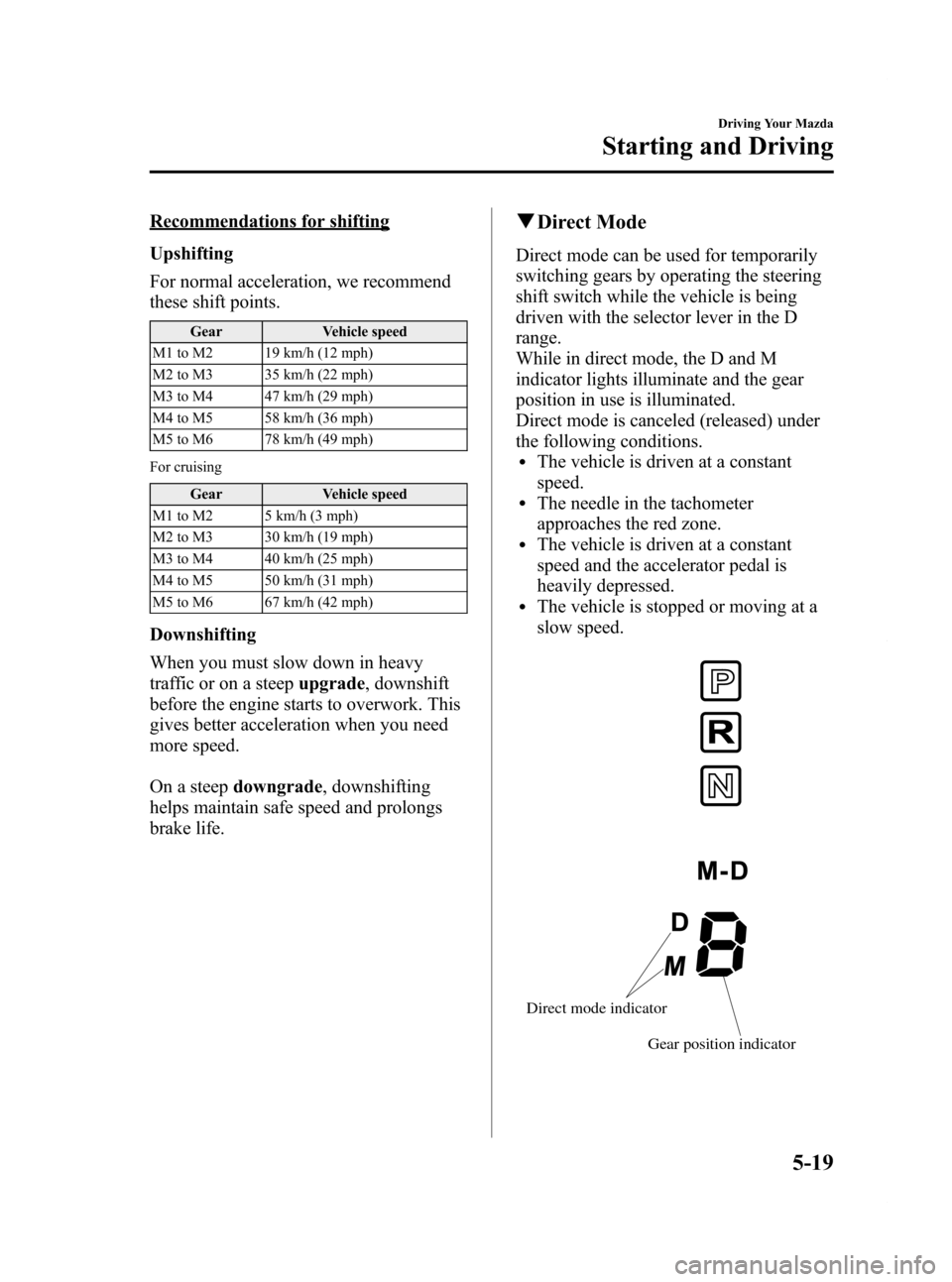
q Direct Mode
Direct mode can be used for temporarily
switching gears by operating the steering
shift switch while the vehicle is being
driven with the selector lever in the D
range.
While in direct mode, the D and M
indicator lights illuminate and the gear
position in use is illuminated.
Direct mode is canceled (released) under
the following conditions.
lThe vehicle is driven at a constant
speed.
lThe needle in the tachometer
approaches the red zone.
lThe vehicle is driven at a constant
speed and the accelerator pedal is
heavily depressed.
lThe vehicle is stopped or moving at a
slow speed.
Gear position indicator
Direct mode indicator
Driving Your Mazda
Starting and Driving
5-19
RX-8_8Z09-EA-08C_Edition3 Page157
Thursday, July 3 2008 2:23 PM
Form No.8Z09-EA-08C
Page 158 of 430
Black plate (158,1)
NOTE
Shifting up and down while in direct mode may
not be possible depending on the vehicle
speed. In addition, because direct mode is
canceled (released) depending on the rate of
acceleration or if the accelerator is fully
depressed, use of the manual shift mode is
recommended if you need to drive the vehicle
in a particular gear for long periods.
qDriving Tips
Passing
For extra power when passing another
vehicle or climbing steep grades, depress
the accelerator fully. The transmission will
shift to a lower gear, depending on vehicle
speed.
Climbing steep grades from a stop
To climb a steep grade from a stopped
position:
1. Depress the brake pedal.
2. Shift to D or M1, depending on the
load weight and grade steepness.
3. Release the brake pedal while gradually accelerating.
Descending steep grades
When descending a steep grade, shift to
lower gears, depending on load weight
and grade steepness. Descend slowly,
using the brakes only occasionally to
prevent them from overheating.
Power Steering
Power steering is only operable when the
engine is running. If the engine is off or if
the power steering system is inoperable,
you can still steer, but it requires more
physical effort.
If the steering feels stiffer than usual
during normal driving, consult an
Authorized Mazda Dealer.
NOTE
The steering may feel rigid if you continuously
attempt to steer when the vehicle is stopped or
moving extremely slowly. This has been
designed to protect the system and doesn't
indicate a malfunction. If you don't attempt to
steer for a minute, power steering will be
restored.
qPower Steering Malfunction
Indicator Light
This indicator light illuminates when the
ignition switch is turned to the ON
position and goes off when the engine is
started.
If this light illuminates while driving, it
indicates a malfunction of the power
steering system. Consult an Authorized
Mazda Dealer.
5-20
Driving Your Mazda
Starting and Driving
RX-8_8Z09-EA-08C_Edition3 Page158
Thursday, July 3 2008 2:23 PM
Form No.8Z09-EA-08C
Page 162 of 430
Black plate (162,1)
Your vehicle has a tap-down feature that
allows you to decrease your current speed
in decrements of 1.6 km/h (1 mph) by a
momentary tap of the cruise control SET/-
switch. Multiple taps will decrease your
vehicle speed 1.6 km/h (1 mph) for each
tap.
qTo Resume Cruising Speed at
More Than 30 km/h (19 mph)
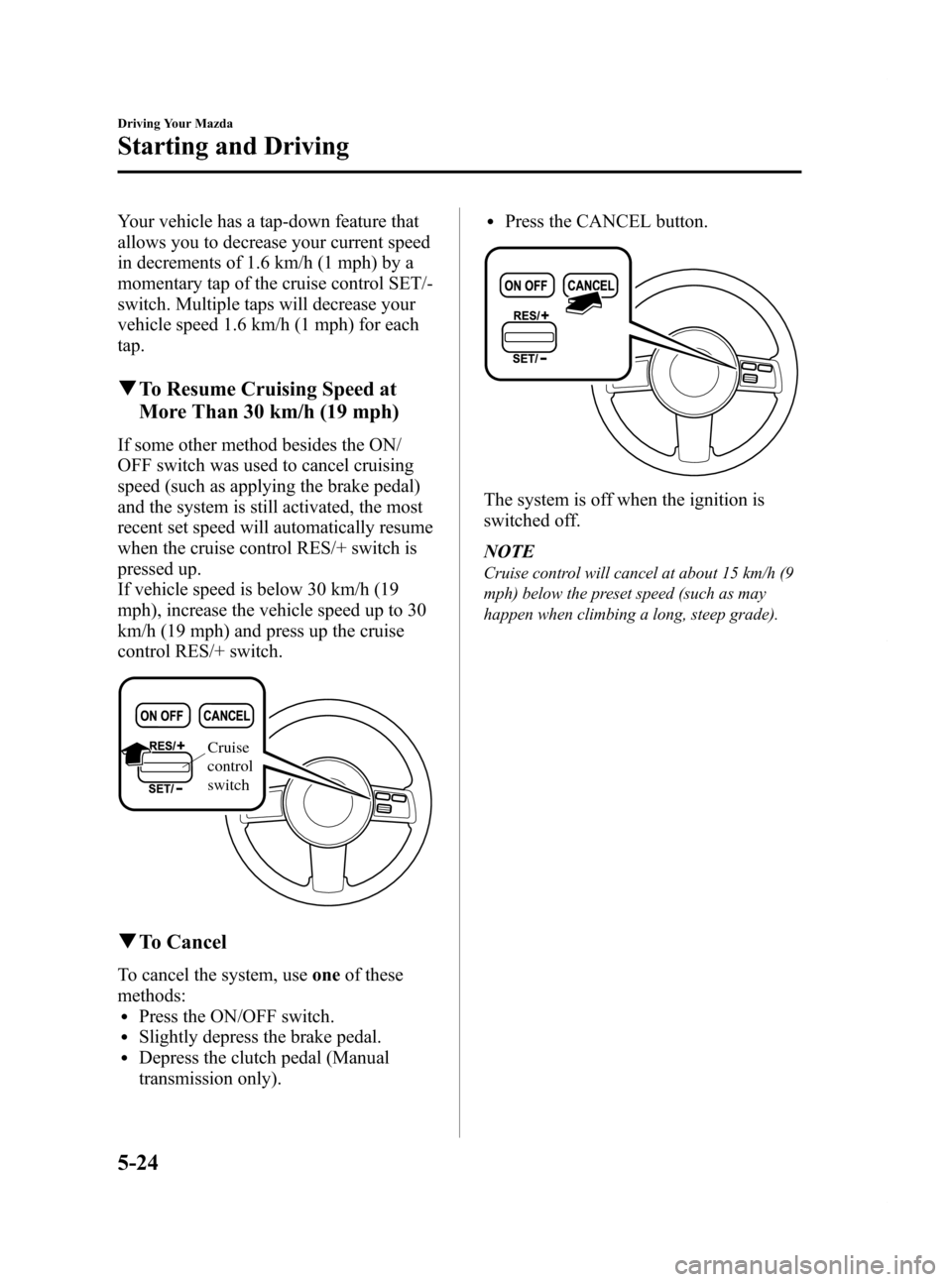
If some other method besides the ON/
OFF switch was used to cancel cruising
speed (such as applying the brake pedal)
and the system is still activated, the most
recent set speed will automatically resume
when the cruise control RES/+ switch is
pressed up.
If vehicle speed is below 30 km/h (19
mph), increase the vehicle speed up to 30
km/h (19 mph) and press up the cruise
control RES/+ switch.
Cruise
control
switch
qTo Cancel
To cancel the system, use oneof these
methods:
lPress the ON/OFF switch.lSlightly depress the brake pedal.lDepress the clutch pedal (Manual
transmission only).
lPress the CANCEL button.
The system is off when the ignition is
switched off.
NOTE
Cruise control will cancel at about 15 km/h (9
mph) below the preset speed (such as may
happen when climbing a long, steep grade).
5-24
Driving Your Mazda
Starting and Driving
RX-8_8Z09-EA-08C_Edition3 Page162
Thursday, July 3 2008 2:23 PM
Form No.8Z09-EA-08C
Page 163 of 430
Black plate (163,1)
Traction Control System
(TCS)
í
The Traction Control System (TCS)
enhances traction and safety by
controlling engine torque and braking.
When the TCS detects driving wheel
slippage, it lowers engine torque and
operates the brakes to prevent loss of
traction.
This means that on a slick surface, the
engine adjusts automatically to provide
optimum power to the drive wheels
without causing them to spin and lose
traction.
WARNING
Do not rely on the traction control
system as a substitute for safe driving:The traction control system (TCS)
cannot compensate for unsafe and
reckless driving, excessive speed,
tailgating (following another vehicle
too closely), and hydroplaning
(reduced tire friction and road
contact because of water on the road
surface). You can still have an
accident.
Use snow tires or tire chains and drive
at reduced speeds when roads are
covered with ice and/or snow: Driving without proper traction
devices on snow and/or ice-covered
roads is dangerous. The traction
control system (TCS) alone cannot
provide adequate traction and you
could still have an accident.
NOTE
To turn off the TCS, press the DSC OFF switch
(page 5-27).
q TCS/DSC Indicator Light
This indicator light stays on for a few
seconds when the ignition switch is turned
to the ON position. If the TCS or DSC is
operating, the indicator light flashes.
If the light stays on, the TCS or DSC may
have a malfunction and they may not
operate correctly. Take your vehicle to an
Authorized Mazda Dealer.
NOTE
lIn addition to the indicator light flashing, a
slight lugging sound will come from the
engine. This indicates that the TCS is
operating properly.
lOn slippery surfaces, such as fresh snow, it
will be impossible to achieve high rpm
when the TCS is on.
Driving Your Mazda
Starting and Driving
5-25íSome models.
RX-8_8Z09-EA-08C_Edition3 Page163
Thursday, July 3 2008 2:23 PM
Form No.8Z09-EA-08C
Page 166 of 430

Black plate (166,1)
NOTElWhen DSC is on and you attempt to free the
vehicle when it is stuck, or drive it out of
freshly fallen snow, the TCS (part of the
DSC system) will activate. Depressing the
accelerator will not increase engine power
and freeing the vehicle may be difficult.
When this happens, turn off the TCS/DSC.
lIf the TCS/DSC is off when the engine is
turned off, it automatically activates when
the ignition switch is turned on.
lLeaving the TCS/DSC on will provide the
best stability. When the TCS/DSC is off, the
TCS/DSC does not activate but the brake
LSD (Limited Slip Differentials) function
remains.
lIf the DSC OFF switch is pressed and held
for a second or more, the TCS/DSC system
may become inoperative due to the system
detecting switch trouble. If the TCS/DSC
system becomes inoperative, the TCS/DSC
and the DSC OFF indicator lights
illuminate simultaneously. In this case, turn
off the engine and restart it to restore the
TCS/DSC.
5-28
Driving Your Mazda
Starting and Driving
RX-8_8Z09-EA-08C_Edition3 Page166
Thursday, July 3 2008 2:23 PM
Form No.8Z09-EA-08C
Page 178 of 430
Black plate (178,1)
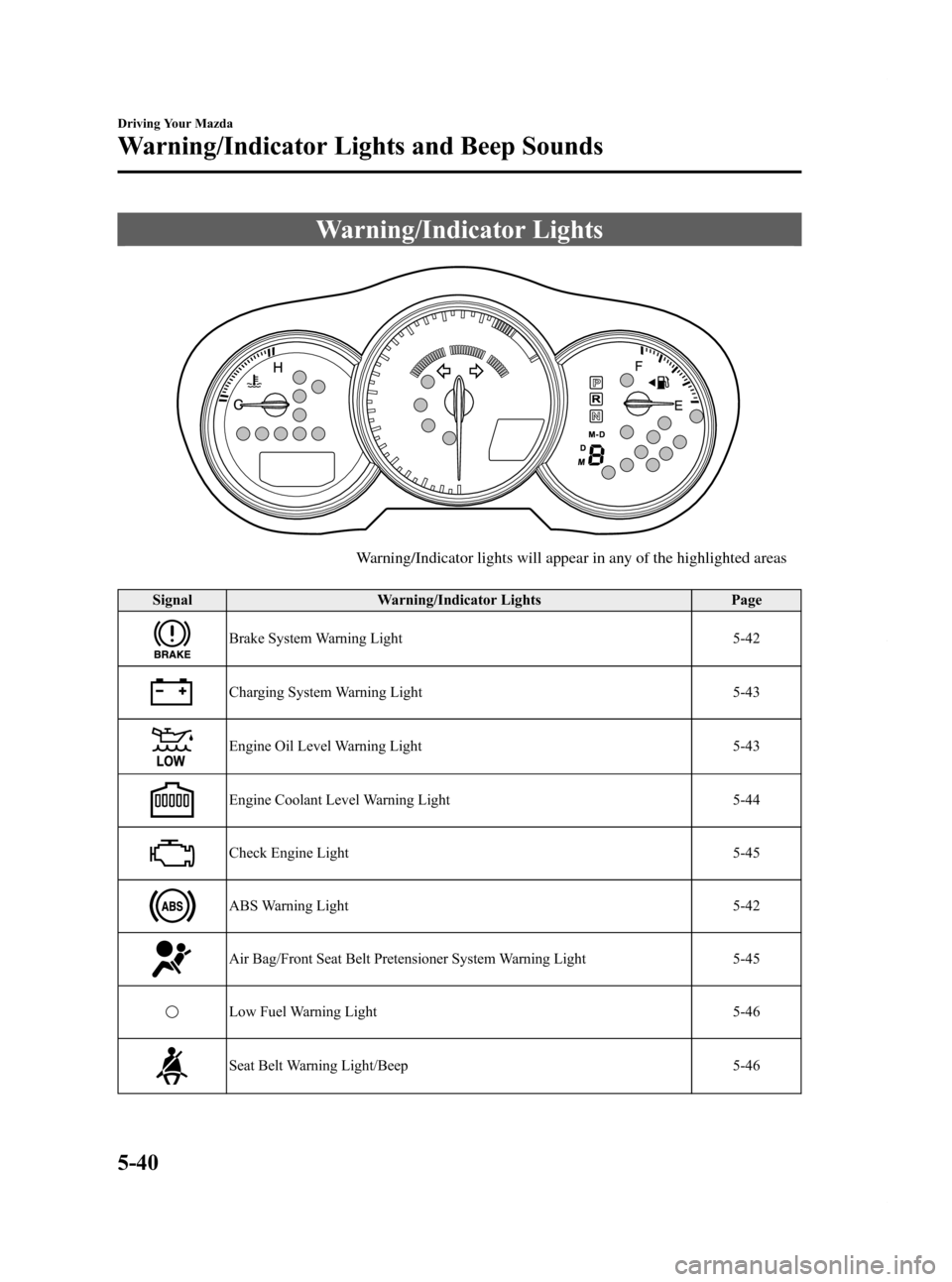
Warning/Indicator Lights
Warning/Indicator lights will appear in any of the highlighted areas
SignalWarning/Indicator Lights Page
Brake System Warning Light 5-42
Charging System Warning Light5-43
Engine Oil Level Warning Light5-43
Engine Coolant Level Warning Light5-44
Check Engine Light5-45
ABS Warning Light5-42
Air Bag/Front Seat Belt Pretensioner System Warning Light5-45
Low Fuel Warning Light5-46
Seat Belt Warning Light/Beep5-46
5-40
Driving Your Mazda
Warning/Indicator Lights and Beep Sounds
RX-8_8Z09-EA-08C_Edition3 Page178
Thursday, July 3 2008 2:23 PM
Form No.8Z09-EA-08C
Page 180 of 430

Black plate (180,1)
qBrake System Warning Light
This warning has the following functions:
Parking brake warning
The light comes on when the parking
brake is applied with the ignition switch
in the START or ON position. It turns off
when the parking brake is fully released.
Low brake fluid level warning
If the light stays on after the parking brake
is fully released, you may have a brake
problem.
Drive to the side of the road and park off
the right-of-way.
You may notice that the pedal is harder to
push or that it may go closer to the floor.
In either case, it will take longer to stop
the vehicle.
1. With the engine stopped, check the
brake fluid level immediately and add
fluid as required (page 8-16).
2. After adding fluid, check the light again.
If the warning light remains on, or if the
brakes do not operate properly, do not
drive the vehicle. Have it towed to an
Authorized Mazda Dealer.
Even if the light goes out have your brake
system inspected as soon as possible by
an Authorized Mazda Dealer. NOTE
Having to add brake fluid is sometimes an
indicator of leakage. Consult an Authorized
Mazda Dealer as soon as possible even if the
brake light is no longer illuminated.
WARNING
Do not drive with the brake system
warning light illuminated. Contact an
Authorized Mazda Dealer to have the
brakes inspected as soon as possible:
Driving with the brake system
warning light illuminated is
dangerous. It indicates that your
brakes may not work at all or that
they could completely fail at any
time. If this light remains
illuminated, after checking that the
parking brake is fully released, have
the brakes inspected immediately.
qABS Warning Light
The warning light stays on for a few
seconds when the ignition switch is turned
to the ON position.
If the ABS warning light stays on while
you're driving, the ABS control unit has
detected a system malfunction. If this
occurs, your brakes will function normally
as if the vehicle had no ABS.
Should this happen, consult an Authorized
Mazda Dealer as soon as possible.
5-42
Driving Your Mazda
Warning/Indicator Lights and Beep Sounds
RX-8_8Z09-EA-08C_Edition3 Page180
Thursday, July 3 2008 2:23 PM
Form No.8Z09-EA-08C
Page 181 of 430
Black plate (181,1)
NOTE
When the engine is jump-started to charge the
battery, uneven rpm occurs and the ABS
warning light comes on. This is due to a weak
battery, not a malfunction.
Recharge the battery.
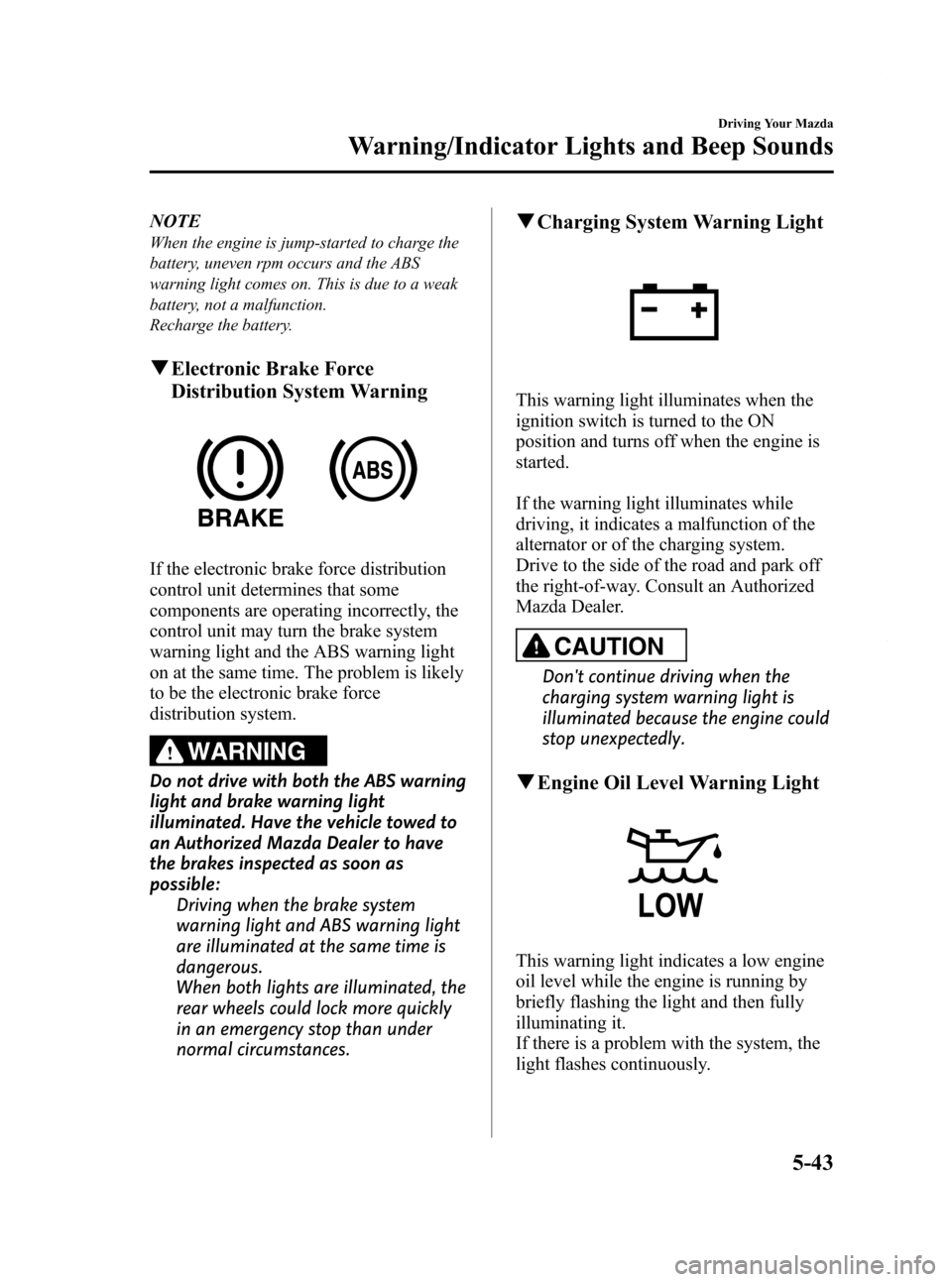
qElectronic Brake Force
Distribution System Warning
If the electronic brake force distribution
control unit determines that some
components are operating incorrectly, the
control unit may turn the brake system
warning light and the ABS warning light
on at the same time. The problem is likely
to be the electronic brake force
distribution system.
WARNING
Do not drive with both the ABS warning
light and brake warning light
illuminated. Have the vehicle towed to
an Authorized Mazda Dealer to have
the brakes inspected as soon as
possible:
Driving when the brake system
warning light and ABS warning light
are illuminated at the same time is
dangerous.
When both lights are illuminated, the
rear wheels could lock more quickly
in an emergency stop than under
normal circumstances.
qCharging System Warning Light
This warning light illuminates when the
ignition switch is turned to the ON
position and turns off when the engine is
started.
If the warning light illuminates while
driving, it indicates a malfunction of the
alternator or of the charging system.
Drive to the side of the road and park off
the right-of-way. Consult an Authorized
Mazda Dealer.
CAUTION
Don't continue driving when the
charging system warning light is
illuminated because the engine could
stop unexpectedly.
qEngine Oil Level Warning Light
This warning light indicates a low engine
oil level while the engine is running by
briefly flashing the light and then fully
illuminating it.
If there is a problem with the system, the
light flashes continuously.
Driving Your Mazda
Warning/Indicator Lights and Beep Sounds
5-43
RX-8_8Z09-EA-08C_Edition3 Page181
Thursday, July 3 2008 2:23 PM
Form No.8Z09-EA-08C