trunk MAZDA MODEL RX 8 2009 (in English) Owner's Manual
[x] Cancel search | Manufacturer: MAZDA, Model Year: 2009, Model line: MODEL RX 8, Model: MAZDA MODEL RX 8 2009Pages: 430, PDF Size: 4.9 MB
Page 105 of 430

Black plate (105,1)
WARNING
Make sure the opening is clear before
closing a window:Closing power windows are
dangerous. A person's hands, head,
or even neck could be caught by the
window and result in serious injury
or even death.
This warning applies especially to
children.
NOTE
lThe power windows cannot be opened or
closed from outside the vehicle under the
following condition:
lA door is opened.lThe key is inserted into the ignition
switch.
l(With advanced key)
The start knob is in any position except
LOCK.
lThe power windows may not close
completely. Make sure all the windows are
closed.
If the power windows cannot be closed
completely, operate each power window
switch from inside the vehicle. After closing
the windows from outside the vehicle, verify
that they are completely closed.
Opening
Because nobody likes getting into a very
hot car, Mazda has introduced a way to
open the both windows as you approach
the vehicle to get the air moving before
you get in.
WARNING
Use the auto-window function only
when you can see the vehicle and it is
in a secure area: Do not let children play with your
keys. If they open the window
without your knowing, the open
windows are an even bigger
invitation to a thief than leaving the
doors unlocked.
The windows can be opened for
ventilating the cabin before getting in the
vehicle.
With unlock button (Keyless entry
system)
Press the unlock button on the transmitter
once, then press again within 1.5 seconds
and hold.
After the doors are unlocked, both
windows open while the unlock button is
pressed.
To stop the windows while opening,
release the button.
If the operation is performed from the
beginning again, the windows open.
Advanced key
Panic button
Unlock button Lock button
Trunk button
Knowing Your Mazda
Doors and Locks
3-39
RX-8_8Z09-EA-08C_Edition3 Page105
Thursday, July 3 2008 2:23 PM
Form No.8Z09-EA-08C
Page 106 of 430

Black plate (106,1)
Retractable type key
Lock buttonUnlock button
Trunk button Panic button
Operation
indicator light
NOTElThe unlock button does not operate unless
it is pressed twice sequentially.
lThe lock button cannot be used to close the
power windows.
With key
1. Insert the key in the driver's door key
cylinder.
2. Turn the key toward the front and hold it. After the doors are unlocked, the
windows fully open automatically.
Open
To stop this operation, turn the key to the
center position, then turn it toward the
front again. NOTE
The window opening operation also can be
stopped by turning the key toward the back.
However, the doors will lock.
Closing
The windows can be closed in case they
are left open after getting out of the
vehicle.
NOTE
(With advanced key)
If the auto-lock function (page 3-8) has been
activated, the doors automatically lock as you
walk away from the vehicle, however, the
power windows cannot be closed. When
leaving the vehicle, close the windows using
the power window switch inside the vehicle,
the key, or a request switch.
With key
1. Insert the key in the driver's door key
cylinder.
2. Turn the key toward the back and hold it. After the doors are locked, the
windows close as long as the key is
turned.
Close
With request switch on the driver's
door (Advanced key)
1. If the doors are locked, unlock them.
3-40
Knowing Your Mazda
Doors and Locks
RX-8_8Z09-EA-08C_Edition3 Page106
Thursday, July 3 2008 2:23 PM
Form No.8Z09-EA-08C
Page 118 of 430
Black plate (118,1)
Theft-Deterrent Systemí
If the theft deterrent system detects an
inappropriate entry into the vehicle, which
could result in the vehicle or its contents
being stolen, the alarm alerts the
surrounding area of an abnormality by
sounding the horn and flashing the hazard
warning lights.
Refer to Operation on page 3-52.
NOTE
lThe theft-deterrent system operates with the
key or the keyless entry system transmitter.
l(With advanced key)
The theft-deterrent system can also be
operated using the advanced keyless
function.
The system operates only when the driver is
in the vehicle or within operational range
while the advanced key is being carried.
lThe system will not function unless it is
properly armed. To properly secure the
vehicle, always make sure all windows are
completely closed and all doors and the
trunk lid are locked before leaving the
vehicle. Remember to take your key and
transmitter.
qOperation
System triggering conditions
The horn sounds intermittently and the
hazard warning lights flash for about 3
minutes when the system is triggered by
any one of the following:
lForcing open a door, the hood or the
trunk lid.
lUnlocking a door with the inside door-
lock knob.
lUnlocking a door with the door lock
switch.
lOpening the hood by operating the
hood release handle.
lOpening the trunk lid by operating the
trunk lid release button.
If the system is triggered again, the lights
and horn will activate until a door is
unlocked or the trunk lid is opened with
the key or with the transmitter.
(With advanced key)
The lights and horn can also be
deactivated by pressing the request switch
on a door.
NOTE
If the battery goes dead while the theft-
deterrent system is armed, the horn will
activate and the hazard warning lights will
flash when the battery is charged or replaced.
q How to Arm the System
1. Remove the key from the ignition
switch.
(With advanced key)
Turn the start knob to the LOCK
position.
2. Make sure the hood and the trunk lid are closed. Close and lock all doors
from the outside using the key or press
the lock button on your keyless entry
system transmitter.
(With advanced key)
Press a request switch on the doors or
the lock button on the transmitter.
(Without advanced key)
The following method will also arm the
theft-deterrent system:
Close the hood and the trunk lid . Press
the area on the door-lock switch
marked “LOCK ”once. Close all doors.
The hazard warning lights will flash once.
NOTE
Locking the doors with the inside door-lock
knob will not arm the system.
3-52
Knowing Your Mazda
íSome models.
Security System
RX-8_8Z09-EA-08C_Edition3 Page118
Thursday, July 3 2008 2:23 PM
Form No.8Z09-EA-08C
Page 119 of 430

Black plate (119,1)
qTo Turn off an Armed System
An armed system can be turned off by any
one of the following methods:
lUnlock a door with the key.lPress the unlock button on the keyless
entry system transmitter.
lInsert the key into the ignition switch
and turn it to the ON position.
l(With advanced key)lPress a request switch on the doors
or the unlock button on the
transmitter.
lTurn the start knob to the ON
position.
The hazard warning lights will flash twice
to indicate that the system is turned off.
NOTE
The trunk lid can be opened with the key or the
transmitter even when the system is armed. The
alarm will not come on and the system will
remain armed.
q To Stop an Alarm
A triggered alarm can be turned off by
any one of the following methods:
lUnlock a door with the key.lOpen the trunk lid with the key.lPress the unlock button or press and
hold the trunk button on the keyless
entry system transmitter.
l(With advanced key)lPress a request switch on the doors.lPress the unlock button or press and
hold the trunk button on the
transmitter.
NOTE
If you have any problem with the theft-
deterrent system, consult an Authorized Mazda
Dealer.
q Theft-Deterrent Labels
A label indicating that your vehicle is
equipped with a Theft-Deterrent System is
in the glove box.
Mazda recommends that you affix it to the
lower rear corner of a front door window.
Knowing Your Mazda
Security System
3-53
RX-8_8Z09-EA-08C_Edition3 Page119
Thursday, July 3 2008 2:23 PM
Form No.8Z09-EA-08C
Page 185 of 430

Black plate (185,1)
Once the beep sound is heard, it continues
sounding even if the vehicle speed lowers
to 20 km/h (12 mph) or less until the
seatbelt is fastened or the beep sound
period has passed.
Driver seated/Front passenger seated
The seat belt warning function reminds
the front passenger to fasten the seat belt
according to the chart below.
ConditionVehicle speed
Between 0 ―20
km/h
(0 ― 12 mph) 20 km/h
(12 mph) or more
Seat belt
(Driver)
Seat belt
(Passenger)
Indicator
Beep
: Fastened: Unfastened: Illuminated: Flashing: Beep
Placing heavy items on the front
passenger seat may cause the front
passenger seat belt warning function to
operate depending on the weight of the
item.
Once the beep sound is heard, it continues
sounding even if the vehicle speed lowers
to 20 km/h (12 mph) or less until the
seatbelt is fastened or the beep sound
period has passed. NOTE
lTo allow the front passenger seat weight
sensor to function properly, do not place
and sit on an additional seat cushion on the
front passenger seat. The sensor may not
function properly because the additional
seat cushion could cause sensor
interference.
lWhen a small child sits on the front
passenger seat, it is possible that neither
the warning light nor the warning beep
operate.
q
Door-Ajar Warning Light
This warning light illuminates when any
door or the trunk is not securely closed.
Close the door or the trunk securely
before driving the vehicle.
qLow Washer Fluid Level
Warning Lightí
This warning light indicates that little
washer fluid remains. Add fluid (page
8-17).
Driving Your Mazda
Warning/Indicator Lights and Beep Sounds
5-47íSome models.
RX-8_8Z09-EA-08C_Edition3 Page185
Thursday, July 3 2008 2:23 PM
Form No.8Z09-EA-08C
Page 268 of 430
Black plate (268,1)
NOTElIf the ignition switch is turned off during a
hands-free call, the line is transferred to the
mobile telephone automatically.
lIf the mobile telephone is in a location
where radio reception is difficult such as a
metal container or in the trunk, the call may
not be connected using Bluetooth. If
communication is not possible, change the
location of the mobile telephone.
qComponent parts
Bluetooth Hands-Free consists of the
following items:
lVoice Recognition/Hands-Free switchlInformation displaylMicrophonelAudio unit/Navigation system
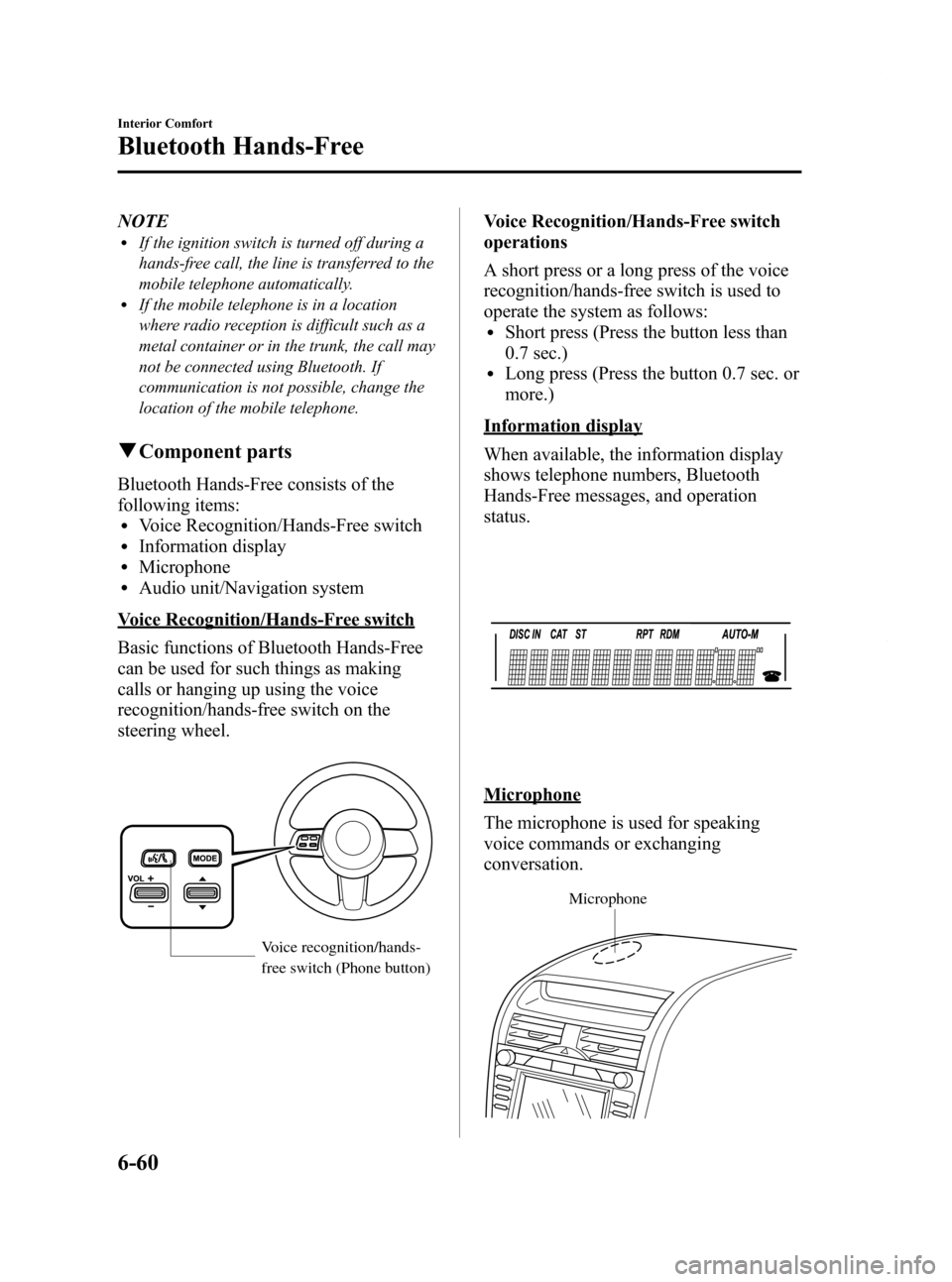
Voice Recognition/Hands-Free switch
Basic functions of Bluetooth Hands-Free
can be used for such things as making
calls or hanging up using the voice
recognition/hands-free switch on the
steering wheel.
Voice recognition/hands-
free switch (Phone button)
Voice Recognition/Hands-Free switch
operations
A short press or a long press of the voice
recognition/hands-free switch is used to
operate the system as follows:
lShort press (Press the button less than
0.7 sec.)
lLong press (Press the button 0.7 sec. or
more.)
Information display
When available, the information display
shows telephone numbers, Bluetooth
Hands-Free messages, and operation
status.
Microphone
The microphone is used for speaking
voice commands or exchanging
conversation.
Microphone
6-60
Interior Comfort
Bluetooth Hands-Free
RX-8_8Z09-EA-08C_Edition3 Page268
Thursday, July 3 2008 2:24 PM
Form No.8Z09-EA-08C
Page 294 of 430

Black plate (294,1)
To open, squeeze the latch and pull the lid
down.
When closing the storage box, put the
storage box back in its original position
until you hear a click sound.
NOTE
When using the storage box to store heavy
accessories, remove the storage box before
placing or removing the accessories.
Insert the key (auxiliary key*) and turn it
clockwise to lock, counterclockwise to
unlock.
* Advanced key equipped vehicle
Lock
Unlock
Loading long objects with storage box
removed
The storage box can be removed for
convenient loading of long objects such as
skis placed through the trunk.
WARNING
Secure long objects in the trunk so that
they cannot be thrown forward in the
cabin and avoid sudden breaking or
maneuvering:
Sudden braking or maneuvering
while long objects are loaded
through the removed storage box
area and into the trunk is dangerous.
Operation of the shift/selector lever
could be obstructed resulting in a
serious accident.
6-86
Interior Comfort
Interior Equipment
RX-8_8Z09-EA-08C_Edition3 Page294
Thursday, July 3 2008 2:24 PM
Form No.8Z09-EA-08C
Page 306 of 430

Black plate (306,1)
WARNING
Never operate the compressor above
300 kPa (3.1 kgf/cm2, 3 bar, 43.5 psi):
Operating the compressor above 300
kPa (3.1 kgf/cm
2, 3 bar, 43.5 psi) is
dangerous. When the inflation
pressure rises above 300 kPa (3.1
kgf/cm
2, 3 bar, 43.5 psi), heated air
will be exhausted from the back of
the compressor and you could be
burned.
CAUTION
If the compressor operates slowly or
becomes hot, it indicates
overheating. Turn the compressor off
immediately and leave it turned off
for 30 minutes or longer.
NOTE
lCheck the tire inflation pressure label (rear
door on the driver's side) for the correct tire
inflation pressure.
lDo not use the compressor for longer than
10 minutes because using the compressor
for long periods could damage it.
lIf the tire does not inflate, repair of the tire
may not be possible. If the tire does not
reach the correct inflation pressure within a
10-minute period, it probably has received
more extensive damage. When this happens,
the emergency flat tire repair kit cannot be
used to repair the tire. Contact an
Authorized Mazda Dealer.
lIf the tire has been over-inflated, loosen the
screw cap on the compressor and bleed
some of the air out.
17. When the tire has been inflated to the proper inflation pressure, turn the
compressor switch off and remove the
compressor hose from the tire valve. 18. Install the tire valve cap.
19. Put the emergency flat tire repair kit
in the trunk and continue driving.
CAUTION
ØDrive carefully to an Authorized
Mazda Dealer and keep the
vehicle speed below 80 km/h (50
mph).
Ø If the vehicle is driven 80 km/h (50
mph) or higher, the vehicle might
begin to vibrate.
NOTE
(With Tire Pressure Monitoring System)
If the tire is not properly inflated, the tire
pressure monitoring system warning light will
illuminate (page 5-31).
20. After driving the vehicle for 10 minutes or 5 km (3 miles), check the
tire pressure with the tire pressure
gauge equipped with the compressor.
If the tire pressure has fallen below
the correct tire pressure, inflate the
tire to the correct pressure again
following the steps from number 15.
CAUTION
ØIf the tire inflation pressure falls
below 130 kPa (1.3 kgf/cm2or bar,
18.9 psi), repair cannot be done
with the repair kit. Park the
vehicle on a level surface off the
right-of-way and contact an
Authorized Mazda Dealer.
Ø If the tire inflation pressure
continues to remain low after
repeating steps 14 to 21, park the
vehicle on a level surface off the
right-of-way and contact an
Authorized Mazda Dealer.
7-10
In Case of an Emergency
Flat Tire
RX-8_8Z09-EA-08C_Edition3 Page306
Thursday, July 3 2008 2:24 PM
Form No.8Z09-EA-08C
Page 320 of 430

Black plate (320,1)
Tiedown Hooks
CAUTION
Don't use the tiedown hooks under
the front and rear for towing.
They are designed ONLY for tying
down the vehicle when it's being
transported. Using them for towing
will damage the bumper.
qTiedown Hooks
1. Remove the tiedown eyelet and the lug
wrench from the trunk (page 7-3).
2. Wrap the lug wrench with a soft cloth to prevent damage to the bumper and
open the cap located on the front and
rear bumper.
Front
Rear
CAUTION
The cap cannot be completely
removed. Do not use excessive force
as it may damage the cap or scratch
the painted bumper surface.
3. Securely install the tiedown eyelet using the lug wrench.
Front
Rear
7-24
In Case of an Emergency
Emergency Towing
RX-8_8Z09-EA-08C_Edition3 Page320
Thursday, July 3 2008 2:24 PM
Form No.8Z09-EA-08C
Page 350 of 430
Black plate (350,1)
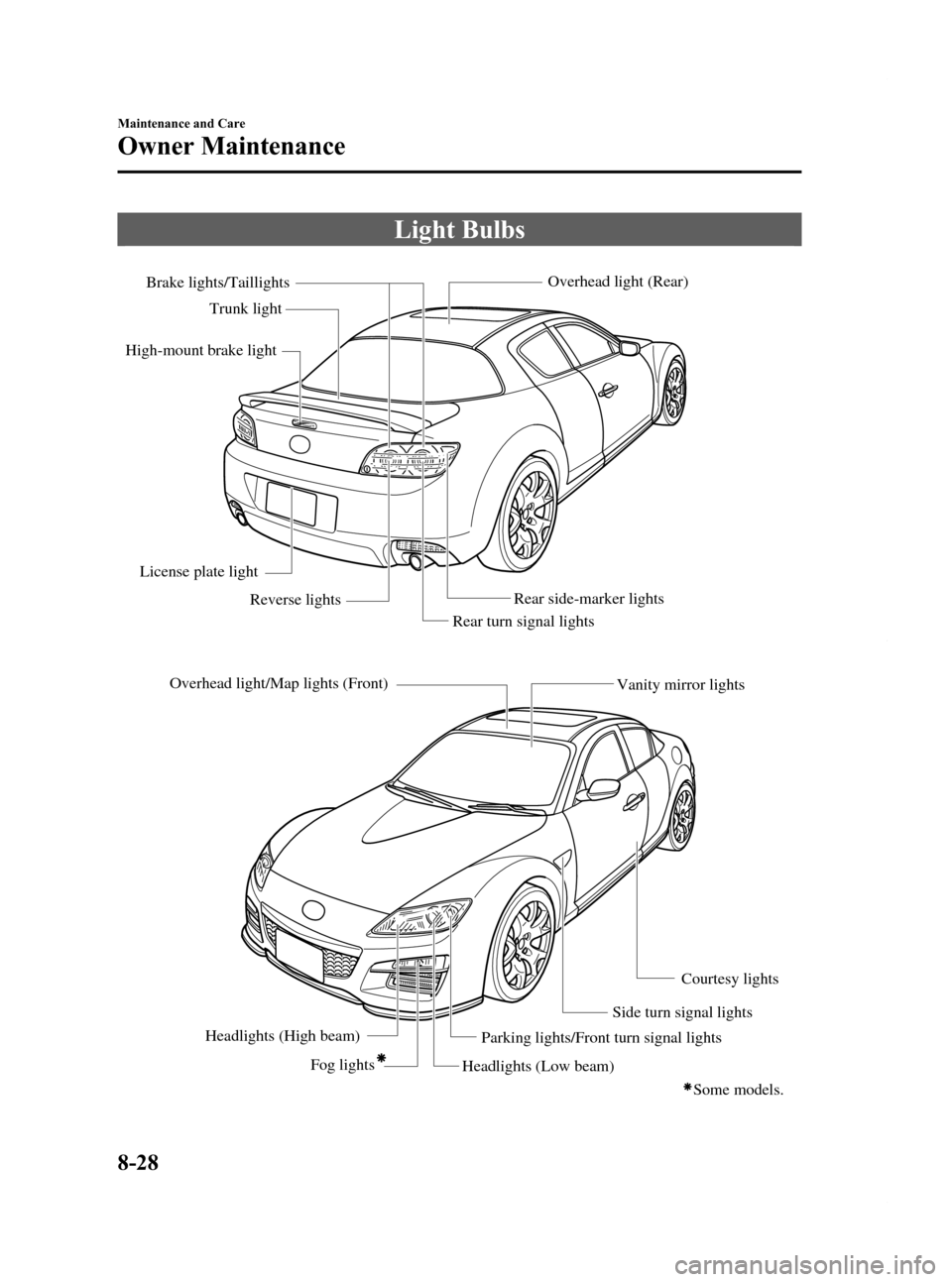
Light Bulbs
Overhead light/Map lights (Front)Headlights (High beam) Fog lights
Headlights (Low beam)Parking lights/Front turn signal lights
Side turn signal lightsCourtesy lights
Vanity mirror lights
Rear turn signal lights
Rear side-marker lightsOverhead light (Rear)
Brake lights/Taillights
Trunk light
High-mount brake light
License plate light Reverse lights
Some models.
8-28
Maintenance and Care
Owner Maintenance
RX-8_8Z09-EA-08C_Edition3 Page350
Thursday, July 3 2008 2:24 PM
Form No.8Z09-EA-08C