ignition MAZDA MODEL RX 8 2011 Owners Manual (in English)
[x] Cancel search | Manufacturer: MAZDA, Model Year: 2011, Model line: MODEL RX 8, Model: MAZDA MODEL RX 8 2011Pages: 442, PDF Size: 7.12 MB
Page 287 of 442

Black plate (287,1)
Hands-Free Telephone Setting
qMobile Phone
Mobile phone registration
For the registration of a Bluetooth
equipped mobile telephone to Bluetooth
Hands-Free, refer to“Bluetooth Hands-
Free preparation”(page 6-61).
Registered mobile phone read-out
Bluetooth Hands-Free can read-out the
mobile phones registered to its system.
NOTE
Do this function only when parked. It is too
distracting to attempt while driving and you
may make too many errors to be effective.
1. Press the voice recognition/hands-free
switch with a short press (without
navigation system) or a long press
(with navigation system).
NOTE
For vehicles with the navigation system, you
can also press the voice recognition/hands-free
switch with a short press and say: [Beep]
“Telephone”or“Phone”.
2.Say:[Beep]“Setup”
3.Prompt:“Select one of the following:
pairing options, confirmation prompts,
select phone, language, or passcode...,
or say“cancel”to return to main
menu.”
4.Say:[Beep]“Pairing options”
5.Prompt:“Do you want to pair a
phone, delete a phone, or list paired
phones?”
6.Say:[Beep]“List phones”7.Prompt:“XXXXX..., XXXXX...,
XXXXX... (Ex. Phone A, phone B,
phone C)”(The voice guidance reads
out the phone tags registered to the
hands-free system.)
Press the voice recognition/hands-free
switch during the read-out at the desired
phone, and then say one of the following
voice commands to execute it.
l“Select”: Programmed the mobile
phone when the voice recognition/
hands-free switch was pressed.
l“Continue”: Continues the voice
guidance.
l“Delete”: Deletes the registered mobile
phone.
l“Previous”: Returns to the previous
mobile phone.
8.Prompt:“End of list, would you like
to start from the beginning?”
9.Say:[Beep]“No”
10.Prompt:“Returning to main menu.”
Mobile phone selection
This function is for switching to a
different mobile phone which has been
registered beforehand. The selected
mobile phone will remain in effect until
the ignition is switched off.
1. Press the voice recognition/hands-free
switch with a short press (without
navigation system) or a long press
(with navigation system).
NOTE
For vehicles with the navigation system, you
can also press the voice recognition/hands-free
switch with a short press and say: [Beep]
“Telephone”or“Phone”.
2.Say:[Beep]“Setup”
Interior Comfort
Bluetooth Hands-Free
6-71
RX-8_8BQ7-EA-10H_Edition1 Page287
Wednesday, July 14 2010 11:51 AM
Form No.8BQ7-EA-10H
Page 294 of 442

Black plate (294,1)
Sunvisors
When you need a sunvisor, lower it for
use in front or swing it to the side.
Sunvisor
qVanity Mirrors
To use the vanity mirror, lower the
sunvisor.
The vanity mirror light will illuminate
when you open the cover.
Interior Lights
qIlluminated Entry System
When the illuminated entry system
operates, the overhead light (switch is in
the DOOR position)and the courtesy
lights turn on for:
lAbout 30 seconds after the driver's
door is unlocked and the ignition is
switched off (with the ignition key
removed).
lAbout 15 seconds after all doors are
closed.
(With Advanced key)
About 5 seconds after all doors are
closed when the advanced key is
outside of the vehicle.
lAbout 15 seconds after the ignition is
switched off (with the ignition key
removed) with all doors closed.
The light also turns off when:
lThe ignition is switched ON and all
doors are closed.
lThe driver's door is locked.
NOTE
Battery saver
If any door is left opened, the light turns off
after about 30 minutes to save the battery.
The light turns on again when the ignition is
switched ON, or when any door is opened after
all doors have been closed.
6-78
Interior Comfort
Interior Equipment
RX-8_8BQ7-EA-10H_Edition1 Page294
Wednesday, July 14 2010 11:52 AM
Form No.8BQ7-EA-10H
Page 297 of 442

Black plate (297,1)
qClock
When the ignition is switched to ACC or
ON, the time is displayed.
Without navigation system
Time setting
1. Switch the ignition to ACC or ON.
2. Adjust the time using the time setting
buttons (
,).
The hours advance while the time
setting button (
) is pressed.
The minutes advance while the time
setting button (
) is pressed.
Time resetting
1. Switch the ignition to ACC or ON.
2. Press and hold the :00 button for 1.5
seconds or more. The displayed time
flashes.
3. When the button is released, the time
will be reset as follows:
(Example)
12:01―12:29→12:00
12:30―12:59→1:00
NOTE
When the button is released, the seconds will
start at“00”.
With navigation system
Refer to the separate manual
“NAVIGATION SYSTEM”.
NOTE
Minutes and seconds are adjusted by the GPS,
however, it is necessary to adjust hours under
the following conditions:
lDriving across different time zoneslDaylight saving time start and end
qOutside Temperature Display
When the ignition is switched ON, press
the
switch to display the
ambient temperature.
Interior Comfort
Interior Equipment
6-81
RX-8_8BQ7-EA-10H_Edition1 Page297
Wednesday, July 14 2010 11:52 AM
Form No.8BQ7-EA-10H
Page 298 of 442

Black plate (298,1)
NOTElUnder the following conditions, the ambient
temperature display may differ from the
actual ambient temperature depending on
the surroundings and vehicle conditions:
lSignificantly cold or hot temperatures.lSudden changes in ambient temperature.lThe vehicle is parked.lThe vehicle is driven at low speeds.lPress theswitch for a few
seconds or more to switch the display from
Fahrenheit to Centigrade or vice versa.
l(With fully automatic climate control
system)
Press the
switch again to switch
the display from ambient temperature to the
temperature set for the air conditioner.
qClimate Control Display
The climate control system status is
displayed. To operate the climate control
system, refer to“Climate Control System”
(page 6-2).
qAudio Display
The audio system status is displayed. To
operate the audio system, refer to
“Audio System”(page 6-15).
Lighter
Switch the ignition to ACC or ON.
1. Open the cover.
2. Press the lighter in and release it. When
ready for use, it automatically pops out.
6-82
Interior Comfort
Interior Equipment
RX-8_8BQ7-EA-10H_Edition1 Page298
Wednesday, July 14 2010 11:52 AM
Form No.8BQ7-EA-10H
Page 304 of 442
Black plate (304,1)
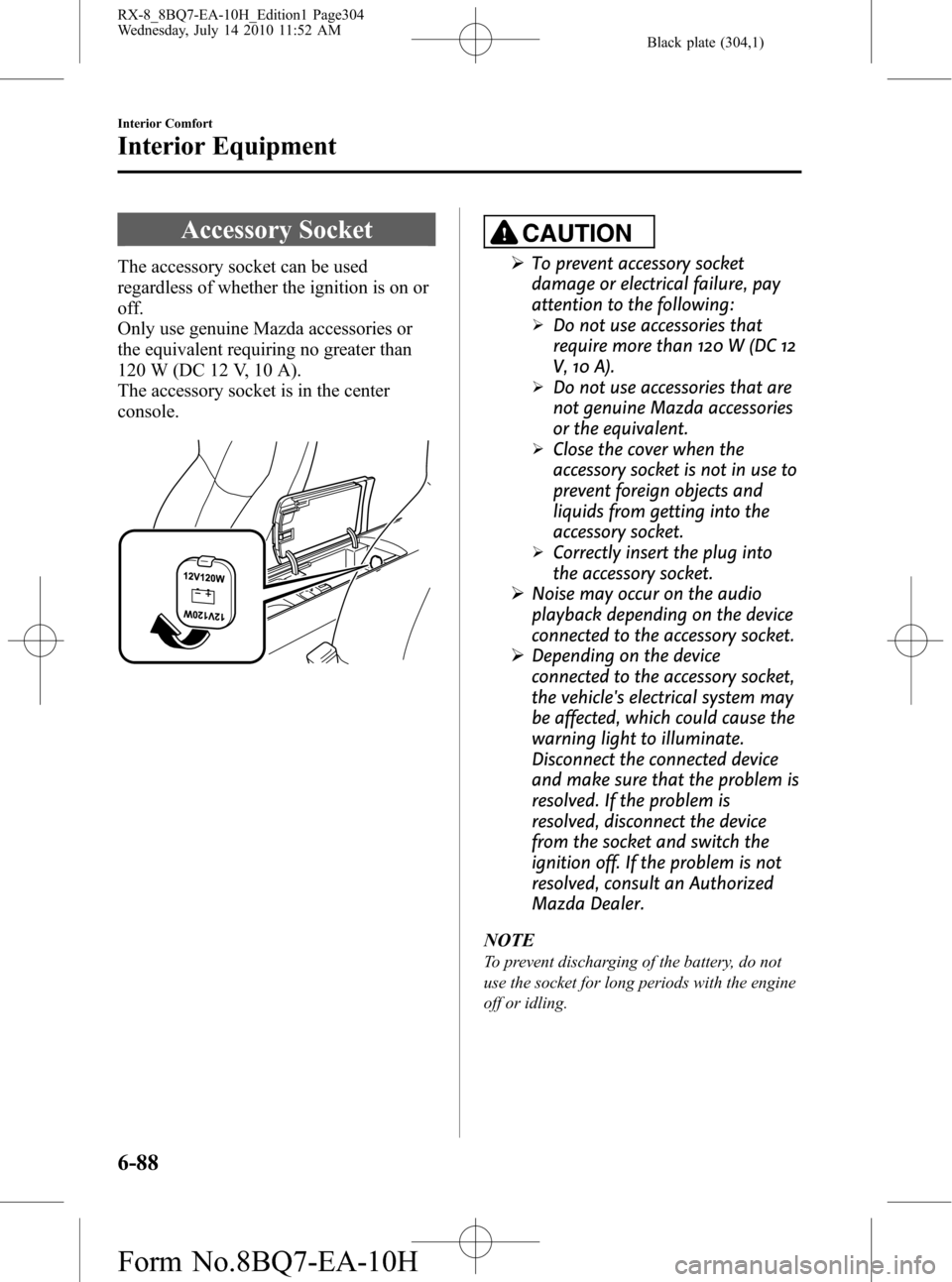
Accessory Socket
The accessory socket can be used
regardless of whether the ignition is on or
off.
Only use genuine Mazda accessories or
the equivalent requiring no greater than
120 W (DC 12 V, 10 A).
The accessory socket is in the center
console.
CAUTION
ØTo prevent accessory socket
damage or electrical failure, pay
attention to the following:
ØDo not use accessories that
require more than 120 W (DC 12
V, 10 A).
ØDo not use accessories that are
not genuine Mazda accessories
or the equivalent.
ØClose the cover when the
accessory socket is not in use to
prevent foreign objects and
liquids from getting into the
accessory socket.
ØCorrectly insert the plug into
the accessory socket.
ØNoise may occur on the audio
playback depending on the device
connected to the accessory socket.
ØDepending on the device
connected to the accessory socket,
the vehicle's electrical system may
be affected, which could cause the
warning light to illuminate.
Disconnect the connected device
and make sure that the problem is
resolved. If the problem is
resolved, disconnect the device
from the socket and switch the
ignition off. If the problem is not
resolved, consult an Authorized
Mazda Dealer.
NOTE
To prevent discharging of the battery, do not
use the socket for long periods with the engine
off or idling.
6-88
Interior Comfort
Interior Equipment
RX-8_8BQ7-EA-10H_Edition1 Page304
Wednesday, July 14 2010 11:52 AM
Form No.8BQ7-EA-10H
Page 313 of 442
Black plate (313,1)
NOTE
Do not throw away the empty tire sealant
bottle after use. Return the empty tire sealant
bottle to an Authorized Mazda Dealer when
replacing the tire. The empty tire sealant bottle
will need to be used to extract and dispose of
the used sealant from the tire.
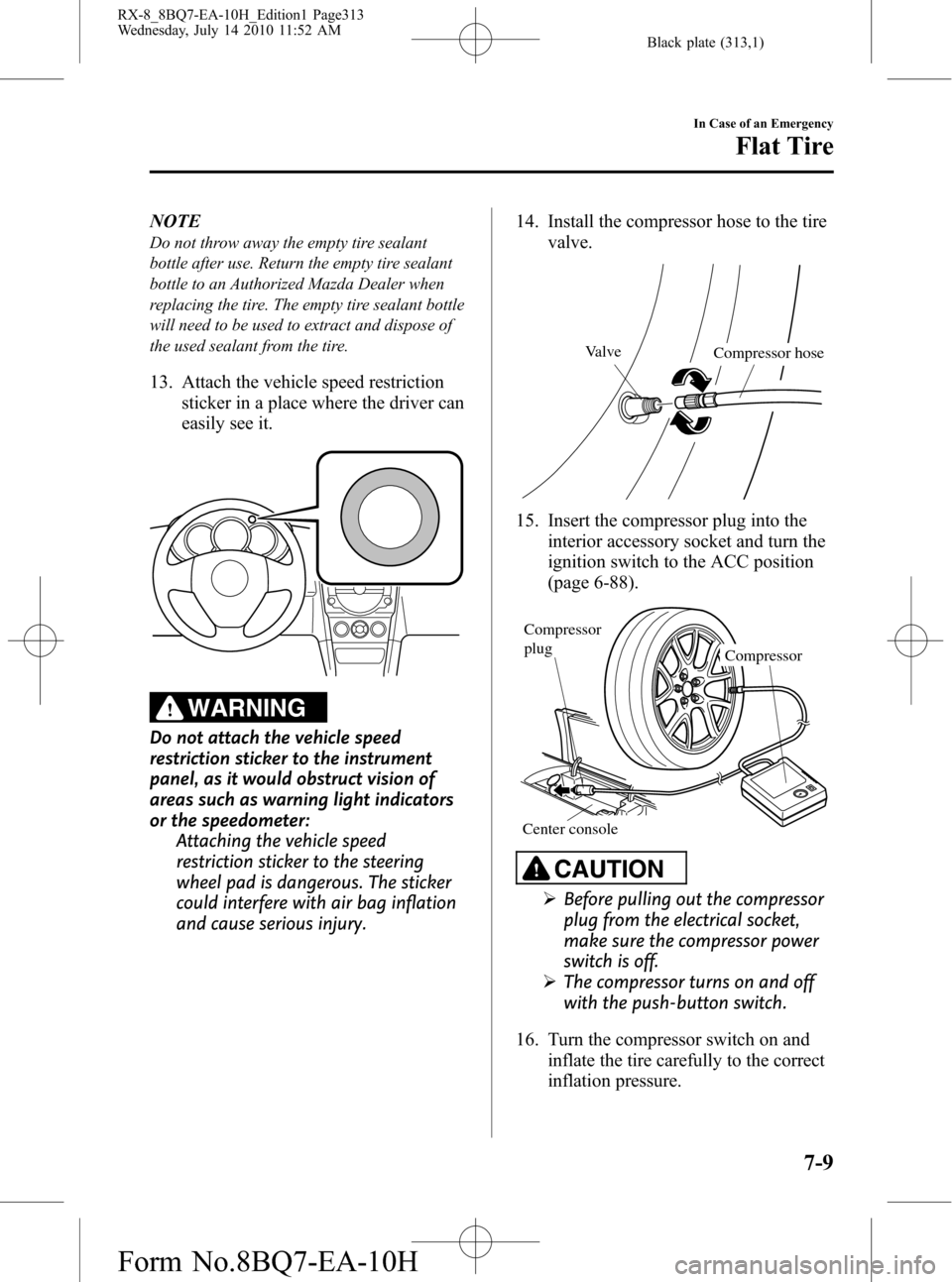
13. Attach the vehicle speed restriction
sticker in a place where the driver can
easily see it.
WARNING
Do not attach the vehicle speed
restriction sticker to the instrument
panel, as it would obstruct vision of
areas such as warning light indicators
or the speedometer:
Attaching the vehicle speed
restriction sticker to the steering
wheel pad is dangerous. The sticker
could interfere with air bag inflation
and cause serious injury.14. Install the compressor hose to the tire
valve.
Valve
Compressor hose
15. Insert the compressor plug into the
interior accessory socket and turn the
ignition switch to the ACC position
(page 6-88).
Compressor Compressor
plug
Center console
CAUTION
ØBefore pulling out the compressor
plug from the electrical socket,
make sure the compressor power
switch is off.
ØThe compressor turns on and off
with the push-button switch.
16. Turn the compressor switch on and
inflate the tire carefully to the correct
inflation pressure.
In Case of an Emergency
Flat Tire
7-9
RX-8_8BQ7-EA-10H_Edition1 Page313
Wednesday, July 14 2010 11:52 AM
Form No.8BQ7-EA-10H
Page 321 of 442

Black plate (321,1)
Overheating
If the temperature gauge indicates
overheating, the vehicle loses power, or
you hear a loud knocking or pinging
noise, the engine is probably too hot.
WARNING
Turn off the ignition switch and
make sure the fan is not running before
attempting to work near the cooling
fan:
Working near the cooling fan when it
is running is dangerous. The fan
could continue running indefinitely
even if the engine has stopped and
the engine compartment temperature
is high. You could be hit by the fan
and seriously injured.
Do not remove the cooling
system cap when the engine and
radiator are hot:
When the engine and radiator are
hot, scalding coolant and steam may
shoot out under pressure and cause
serious injury.
Open the hood ONLY after steam is no
longer escaping from the engine:
Steam from an overheated engine is
dangerous. The escaping steam could
seriously burn you.
NOTE
Once the engine coolant exceeds a preset
temperature, an electrical cooling fan turns
on. It will continue running for about 10
minutes after the ignition switch is turned to
off.
If the temperature gauge indicates
overheating:
1. Drive safely to the side of the road and
park off the right-of-way.
2. Put a vehicle with an automatic
transmission in park (P), a manual
transmission in neutral.
3. Apply the parking brake.
4. Turn off the air conditioner.
5. Check whether coolant or steam is
escaping from under the hood or from
the engine compartment.
If steam is coming from the engine
compartment:
Do not go near the front of the vehicle.
Stop the engine.
Wait until the steam dissipates, then
open the hood and start the engine.
If neither coolant nor steam is
escaping:
Open the hood and idle the engine until
it cools.
CAUTION
If the cooling fan does not operate
while the engine is running, the
engine temperature will increase.
Stop the engine and call an
Authorized Mazda Dealer.
6. Make sure the cooling fan is operating,
then turn off the engine after the
temperature has decreased.
7. When cool, check the coolant reservoir
level.
If it's low, look for coolant leaks from
the radiator and hoses.
In Case of an Emergency
Overheating
7-17
RX-8_8BQ7-EA-10H_Edition1 Page321
Wednesday, July 14 2010 11:52 AM
Form No.8BQ7-EA-10H
Page 323 of 442

Black plate (323,1)
Starting a Flooded Engine
If the engine does not start the first time,
perform the following procedure to start
the engine.
1. While the accelerator pedal is fully
depressed, switch the ignition to
START and crank the engine for about
7 to 8 seconds.
2. Release the ignition switch and
accelerator pedal.
3. Start the engine as normally without
depressing the accelerator.
lThe fuel injection is cut by fully
depressing the accelerator pedal.
lIf the engine starts during Step 1, the
engine will rev up. Release the ignition
switch and accelerator pedal
immediately.
lAvoid racing the engine or driving the
vehicle right after starting the engine.
lDo not hold the ignition switch in the
START position for over 10 seconds. It
may damage the starter and drain the
battery.
lIf the engine still does not start using
the above procedure, have your vehicle
inspected by an Authorized Mazda
Dealer.
In Case of an Emergency
Emergency Starting
7-19
RX-8_8BQ7-EA-10H_Edition1 Page323
Wednesday, July 14 2010 11:52 AM
Form No.8BQ7-EA-10H
Page 325 of 442

Black plate (325,1)
Keep all flames, including cigarettes, and sparks away from open battery cells:
Flames and sparks near open battery cells are dangerous. Hydrogen gas, produced
during normal battery operation, could ignite and cause the battery to explode. An
exploding battery can cause serious burns and injuries.
Do not jump-start a frozen battery or one with a low fluid level:
Jump-starting a frozen battery or one with a low fluid level is dangerous. It may
rupture or explode, causing serious injury.
Connect the negative cable to a good ground point away from the battery:
Connecting the end of the second jumper cable to the negative (
) terminal of the
discharged battery is dangerous.
A spark could cause the gas around the battery to explode and injure someone.
Route the jumper cables away from parts that will be moving:
Connecting a jumper cable near or to moving parts (cooling fans, belts) is dangerous.
The cable could get caught when the engine starts and cause serious injury.
CAUTION
Use only a 12 V booster system. You can damage a 12 V starter, ignition system, and
other electrical parts beyond repair with a 24 V power supply (two 12 V batteries in
series or a 24 V motor generator set).
1. Remove the engine cover.
2. Remove the rubber hose from the
battery cover.
In Case of an Emergency
Emergency Starting
7-21
RX-8_8BQ7-EA-10H_Edition1 Page325
Wednesday, July 14 2010 11:52 AM
Form No.8BQ7-EA-10H
Page 336 of 442
Black plate (336,1)
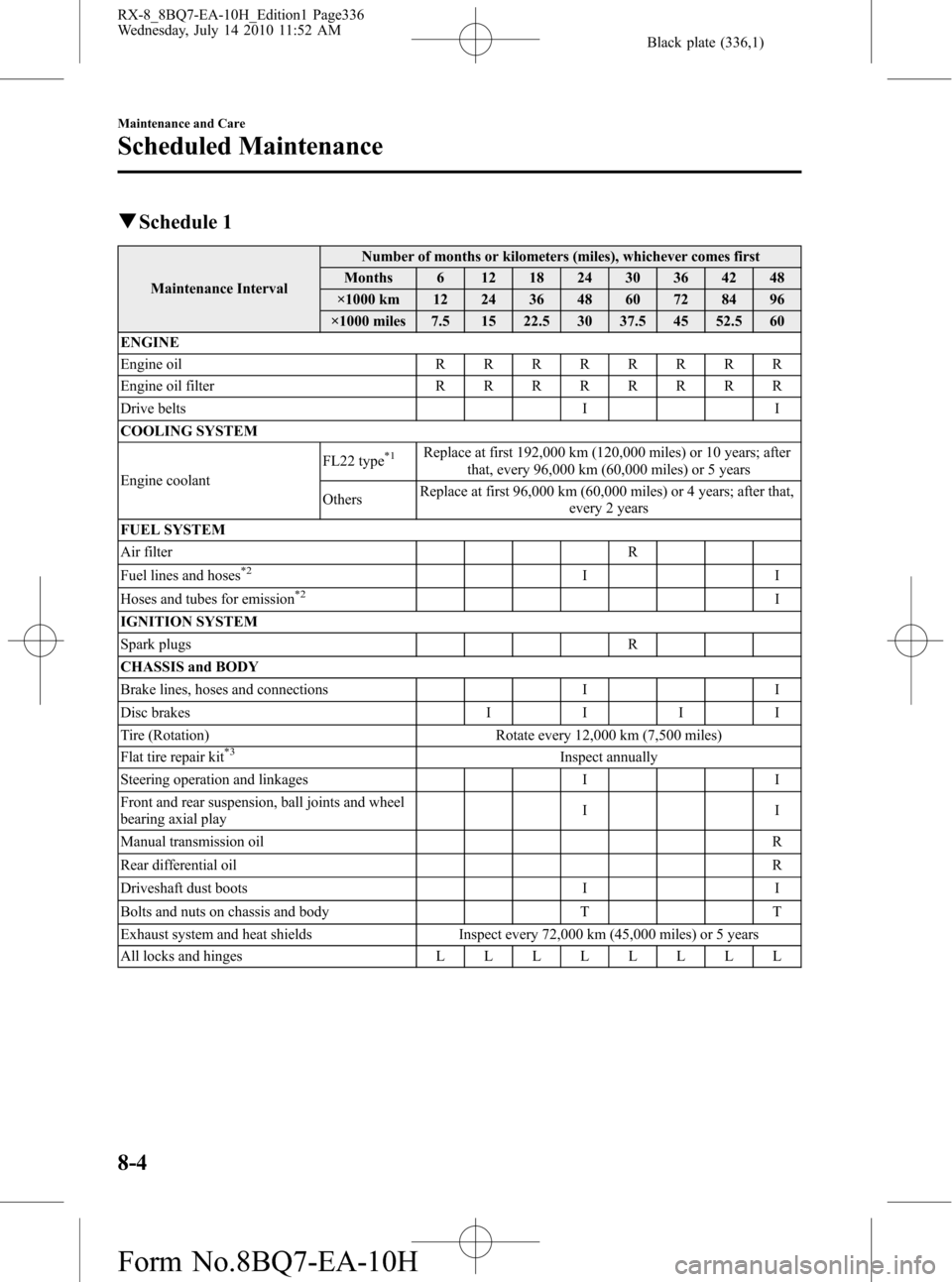
qSchedule 1
Maintenance IntervalNumber of months or kilometers (miles), whichever comes first
Months 6 12 18 24 30 36 42 48
×1000 km 12 24 36 48 60 72 84 96
×1000 miles 7.5 15 22.5 30 37.5 45 52.5 60
ENGINE
Engine oilRRRRRRRR
Engine oil filterRRRRRRRR
Drive belts I I
COOLING SYSTEM
Engine coolantFL22 type
*1Replace at first 192,000 km (120,000 miles) or 10 years; after
that, every 96,000 km (60,000 miles) or 5 years
OthersReplace at first 96,000 km (60,000 miles) or 4 years; after that,
every 2 years
FUEL SYSTEM
Air filter R
Fuel lines and hoses
*2II
Hoses and tubes for emission*2I
IGNITION SYSTEM
Spark plugs R
CHASSIS and BODY
Brake lines, hoses and connections I I
Disc brakesIIII
Tire (Rotation) Rotate every 12,000 km (7,500 miles)
Flat tire repair kit
*3Inspect annually
Steering operation and linkages I I
Front and rear suspension, ball joints and wheel
bearing axial playII
Manual transmission oilR
Rear differential oilR
Driveshaft dust boots I I
Bolts and nuts on chassis and body T T
Exhaust system and heat shields Inspect every 72,000 km (45,000 miles) or 5 years
All locks and hingesLLLLLLLL
8-4
Maintenance and Care
Scheduled Maintenance
RX-8_8BQ7-EA-10H_Edition1 Page336
Wednesday, July 14 2010 11:52 AM
Form No.8BQ7-EA-10H