steering wheel MAZDA MODEL RX 8 2011 (in English) Owner's Manual
[x] Cancel search | Manufacturer: MAZDA, Model Year: 2011, Model line: MODEL RX 8, Model: MAZDA MODEL RX 8 2011Pages: 442, PDF Size: 7.12 MB
Page 211 of 442
Black plate (211,1)
qMirror Defrosterí
To turn on the mirror defrosters, switch
the ignition ON and press the rear window
defroster switch (page 5-68).
Horn
To sound the horn, press themark on
the steering wheel.
Driving Your Mazda
Switches and Controls
5-69íSome models. RX-8_8BQ7-EA-10H_Edition1 Page211
Wednesday, July 14 2010 11:51 AM
Form No.8BQ7-EA-10H
Page 231 of 442

Black plate (231,1)
Antenna
qAM/FM Radio Antenna
The antenna is printed onto the window
glass.
CAUTION
When washing the inside of the
window which has an antenna, use a
soft cloth dampened in lukewarm
water, gently wiping the antenna
lines.
Use of glass cleaning products could
damage the antenna.
qSatellite Radio Antennaí
The satellite radio antenna receives
SIRIUS signals.
Satellite radio antenna
Operating Tips for Audio
System
WARNING
Do not adjust the audio control
switches while driving the vehicle:
Adjusting the audio while driving the
vehicle is dangerous as it could
distract your attention from the
vehicle operation which could lead to
a serious accident. Always adjust the
audio while the vehicle is stopped.
Even if the audio control switches are
equipped on the steering wheel, learn
to use the switches without looking
down at them so that you can keep
your maximum attention on the road
while driving the vehicle.
CAUTION
For the purposes of safe driving,
adjust the audio volume to a level
that allows you to hear sounds
outside of the vehicle including car
horns and particularly emergency
vehicle sirens.
NOTE
lTo prevent the battery from being
discharged, do not leave the audio system
on for a long period of time when the
engine is not running.
lIf a cellular phone or CB radio is used in
or near the vehicle, it could cause noise to
occur from the audio system, however, this
does not indicate that the system has been
damaged.
Interior Comfort
Audio System
6-15íSome models. RX-8_8BQ7-EA-10H_Edition1 Page231
Wednesday, July 14 2010 11:51 AM
Form No.8BQ7-EA-10H
Page 268 of 442
Black plate (268,1)
Audio Control Switch
Operation
When the audio unit is turned on,
operation of the audio unit from the
steering wheel is possible.
NOTE
Because the audio unit will be turned off under
the following conditions, the switches will be
inoperable.
lWhen the ignition is switched off.lWhen the power button on the audio unit is
pressed and the audio unit is turned off.
lWhen the CD being played is ejected and
the audio unit is turned off.
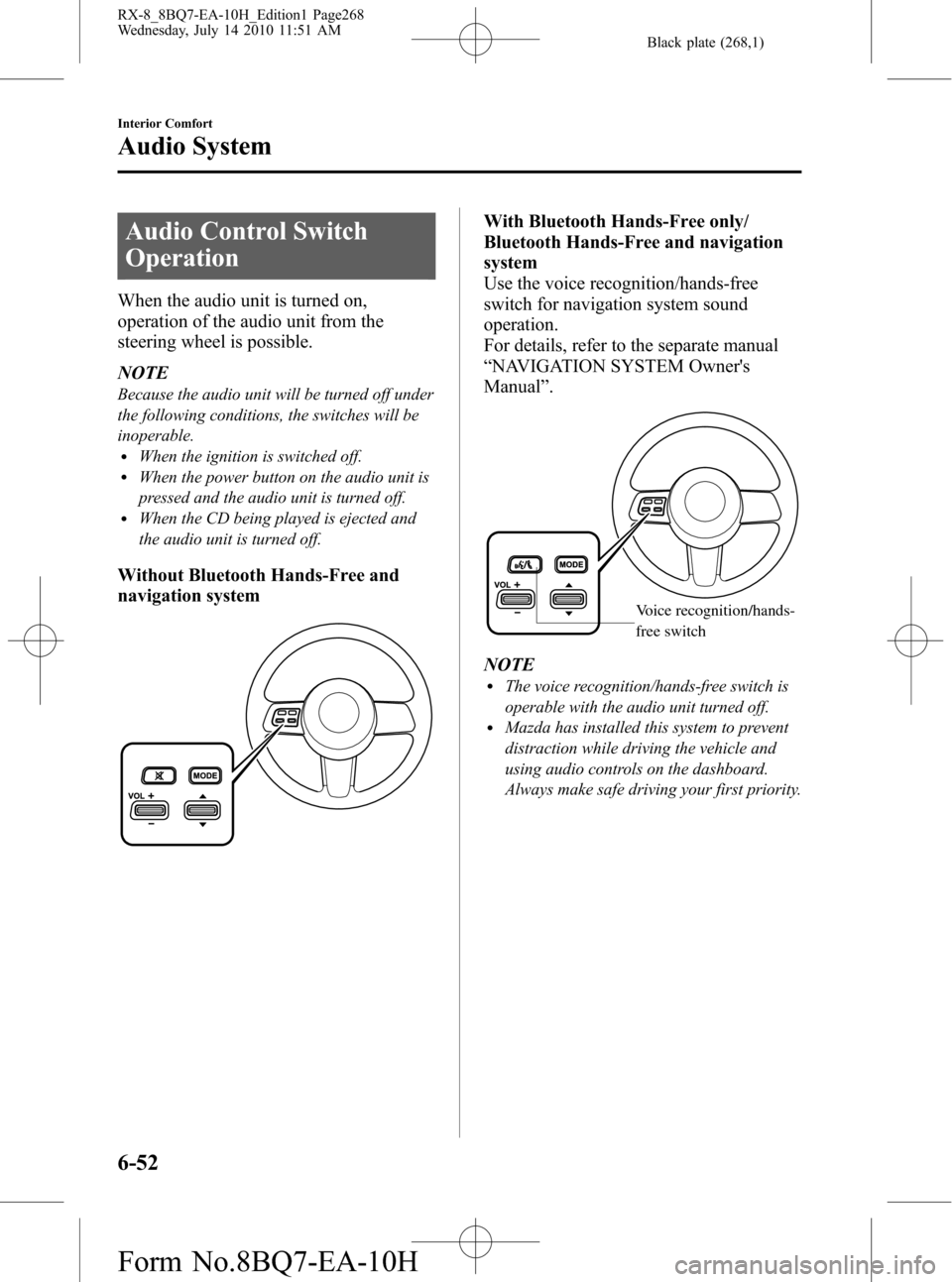
Without Bluetooth Hands-Free and
navigation system
With Bluetooth Hands-Free only/
Bluetooth Hands-Free and navigation
system
Use the voice recognition/hands-free
switch for navigation system sound
operation.
For details, refer to the separate manual
“NAVIGATION SYSTEM Owner's
Manual”.
Voice recognition/hands-
free switch
NOTElThe voice recognition/hands-free switch is
operable with the audio unit turned off.
lMazda has installed this system to prevent
distraction while driving the vehicle and
using audio controls on the dashboard.
Always make safe driving your first priority.
6-52
Interior Comfort
Audio System
RX-8_8BQ7-EA-10H_Edition1 Page268
Wednesday, July 14 2010 11:51 AM
Form No.8BQ7-EA-10H
Page 271 of 442

Black plate (271,1)
CAUTION
ØClose the cover when the auxiliary
jack is not in use to prevent
foreign objects and liquids from
penetrating the auxiliary jack.
ØDo not place objects or apply force
to the auxiliary jack with the plug
connected.
ØDepending on the portable audio
device, noise may occur when
using the device with it connected
to the accessory socket equipped
on the vehicle. (If noise occurs, do
not use the accessory socket.)
NOTE
lBefore using the auxiliary jack, read the
manufacturer's instructions for the product
being connected.
lUse a commercially-available, non-
impedance (3.5
) stereo mini plug for
connecting the portable audio unit to the
auxiliary jack. Before using the auxiliary
jack, read the manufacturer's instructions
for connecting a portable audio unit to the
auxiliary jack.
lTo prevent discharging of the battery, do
not use the auxiliary input for long periods
with the engine off or idling.
lNoise may occur depending on the product
connected to the auxiliary jack.
lWith regard to connecting a portable audio
or similar device to a power source, use the
battery for the device, not the accessory
socket.
lInsert the plug to the auxiliary jack
securely.
lInsert or remove the plug with the plug
perpendicular to the auxiliary jack hole.
lInsert or remove the plug by holding its
base.
To listen to a portable audio unit
1. Switch the ignition to ACC or ON.
2. Insert the connection plug into the
auxiliary jack.
3. Press the power/volume dial to turn the
audio system on.
4. Press the source change button
(
) of the audio unit or the mode
switch (
) of the audio control
switches on the steering wheel to
change to the AUX mode.
Audio Unit Audio Control
Switches
NOTElSet the volume of the portable audio unit to
the maximum within the range that the
sound does not become distorted, then
adjust the volume using the power/volume
dial of the audio unit or the volume switch
(
,) of the audio control switch.lAudio adjustments other than audio volume
can only be done using the portable audio
device.
lIf the connection plug is pulled out from the
auxiliary jack while in AUX mode, noise
may occur.
Interior Comfort
Audio System
6-55
RX-8_8BQ7-EA-10H_Edition1 Page271
Wednesday, July 14 2010 11:51 AM
Form No.8BQ7-EA-10H
Page 273 of 442

Black plate (273,1)
Bluetooth Hands-Freeí
qWhat is Bluetooth Hands-Free?
Bluetooth Hands-Free Outline
By connecting a Bluetooth equipped
mobile telephone to the hands-free unit
equipped on the vehicle, making and
receiving calls are possible using the
voice recognition/hands-free switch
located on the steering wheel, and saying
the voice commands.
WARNING
Perform phonebook registration related
operations while the vehicle is parked:
Performing phonebook registration
while driving the vehicle could be a
distraction to your driving and result
in an unexpected accident. In
addition, a mistake in performing the
phonebook operation could result in
the loss of important data.
Bluetooth equipped mobile telephone
A Bluetooth equipped mobile telephone
communicates with the hands-free unit
equipped on the vehicle using radio
transmission (Bluetooth).
For example, if the mobile telephone is
placed in a coat pocket, the phone calls
can be made through your mobile service
without taking out and handling the
mobile telephone.
CAUTION
The types of mobile phones which
can be connected to the hands-free
unit are limited. Therefore, before
purchasing or changing your mobile
phone model, consult Mazda
Bluetooth Hands-Free Customer
Service or visit www.MazdaUSA.com/
bluetooth for a complete list of
compatible phones.
Mobile phones which can be
connected to the hands-free system
need to be compliant with Bluetooth
specifications and the appropriate
profile. However, even among these
Bluetooth phones are some which
will not connect with your Mazda or
will have limited function. Therefore,
consult Mazda Bluetooth Hands-Free
Customer Service for information
regarding mobile phone
compatibility:
Phone: 800-430-0153
Web: www.MazdaUSA.com/
bluetooth
Applicable Bluetooth specification
Ver. 1.1 or higher
Response profile
lHFP (Hands Free Profile) Ver. 1.0lDUN (Dial-up Networking Profile)
Ver. 1.1
Bluetooth is the registered trademark of
Bluetooth SIG. Inc.
Interior Comfort
Bluetooth Hands-Free
6-57íSome models. RX-8_8BQ7-EA-10H_Edition1 Page273
Wednesday, July 14 2010 11:51 AM
Form No.8BQ7-EA-10H
Page 274 of 442
Black plate (274,1)
NOTElThe Bluetooth Hands-Free system is
operable several seconds after the ignition
is switched to ACC or ON (requires less
than 15 seconds).
lIf the ignition is switched off during a
hands-free call, the line is transferred to the
mobile telephone automatically.
lIf the mobile telephone is in a location
where radio reception is difficult such as a
metal container or in the trunk, the call may
not be connected using Bluetooth. If
communication is not possible, change the
location of the mobile telephone.
qComponent Parts
Bluetooth Hands-Free consists of the
following items:
lVoice Recognition/Hands-Free switchlInformation displaylMicrophonelAudio unit/Navigation system
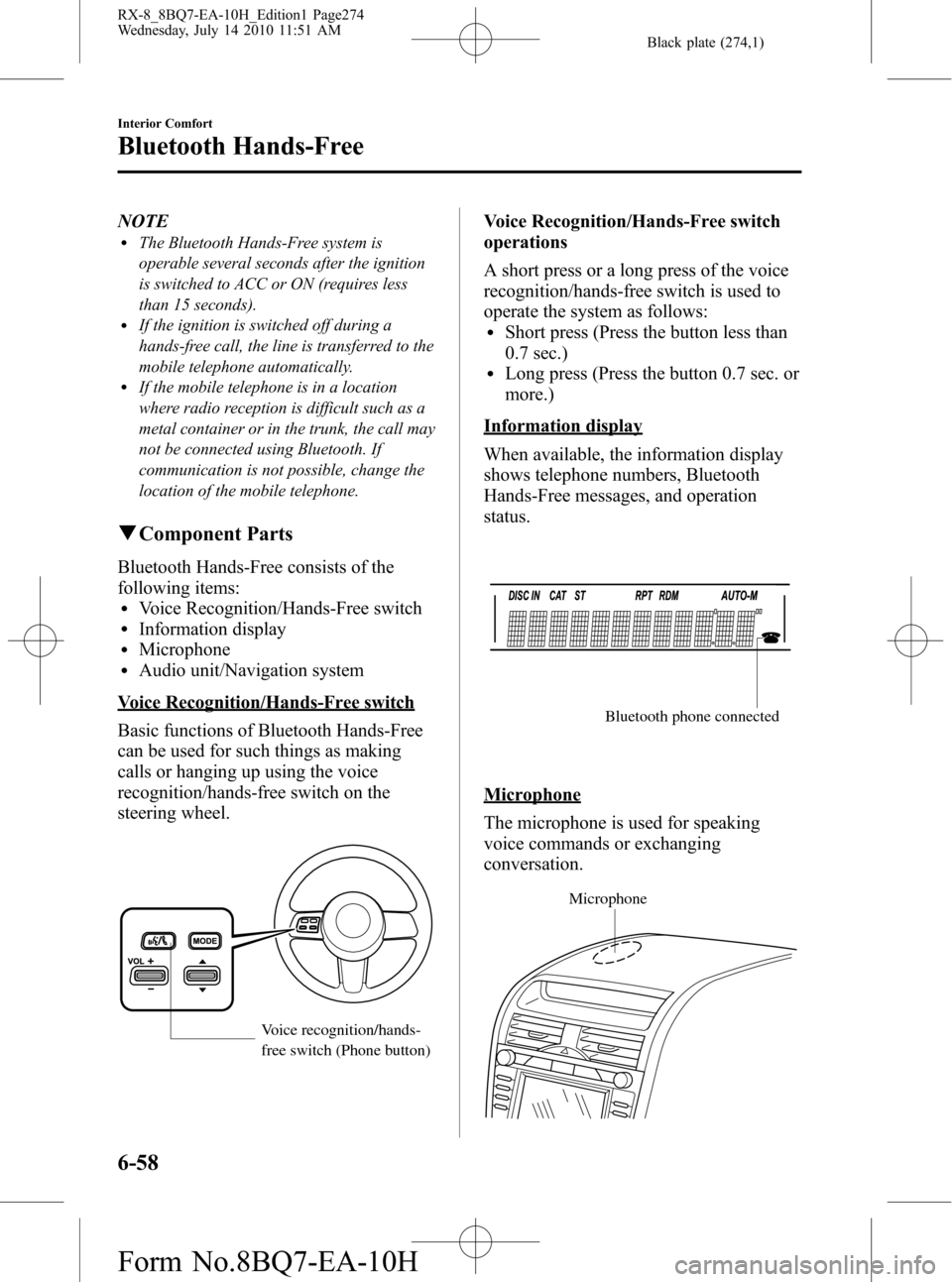
Voice Recognition/Hands-Free switch
Basic functions of Bluetooth Hands-Free
can be used for such things as making
calls or hanging up using the voice
recognition/hands-free switch on the
steering wheel.
Voice recognition/hands-
free switch (Phone button)
Voice Recognition/Hands-Free switch
operations
A short press or a long press of the voice
recognition/hands-free switch is used to
operate the system as follows:
lShort press (Press the button less than
0.7 sec.)
lLong press (Press the button 0.7 sec. or
more.)
Information display
When available, the information display
shows telephone numbers, Bluetooth
Hands-Free messages, and operation
status.
Bluetooth phone connected
Microphone
The microphone is used for speaking
voice commands or exchanging
conversation.
Microphone
6-58
Interior Comfort
Bluetooth Hands-Free
RX-8_8BQ7-EA-10H_Edition1 Page274
Wednesday, July 14 2010 11:51 AM
Form No.8BQ7-EA-10H
Page 281 of 442
Black plate (281,1)
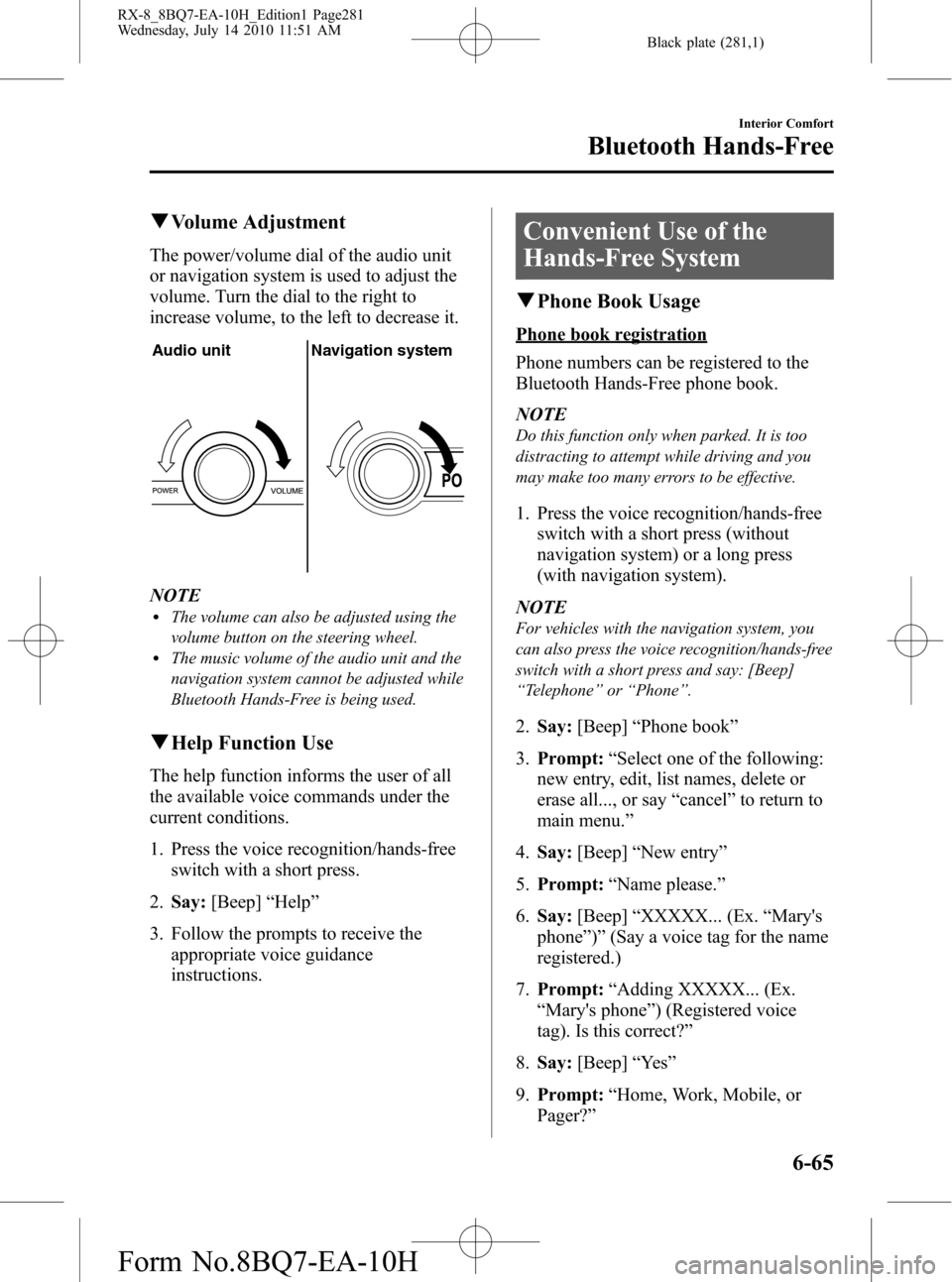
qVolume Adjustment
The power/volume dial of the audio unit
or navigation system is used to adjust the
volume. Turn the dial to the right to
increase volume, to the left to decrease it.
Audio unit Navigation system
NOTElThe volume can also be adjusted using the
volume button on the steering wheel.
lThe music volume of the audio unit and the
navigation system cannot be adjusted while
Bluetooth Hands-Free is being used.
qHelp Function Use
The help function informs the user of all
the available voice commands under the
current conditions.
1. Press the voice recognition/hands-free
switch with a short press.
2.Say:[Beep]“Help”
3. Follow the prompts to receive the
appropriate voice guidance
instructions.
Convenient Use of the
Hands-Free System
qPhone Book Usage
Phone book registration
Phone numbers can be registered to the
Bluetooth Hands-Free phone book.
NOTE
Do this function only when parked. It is too
distracting to attempt while driving and you
may make too many errors to be effective.
1. Press the voice recognition/hands-free
switch with a short press (without
navigation system) or a long press
(with navigation system).
NOTE
For vehicles with the navigation system, you
can also press the voice recognition/hands-free
switch with a short press and say: [Beep]
“Telephone”or“Phone”.
2.Say:[Beep]“Phone book”
3.Prompt:“Select one of the following:
new entry, edit, list names, delete or
erase all..., or say“cancel”to return to
main menu.”
4.Say:[Beep]“New entry”
5.Prompt:“Name please.”
6.Say:[Beep]“XXXXX... (Ex.“Mary's
phone”)”(Say a voice tag for the name
registered.)
7.Prompt:“Adding XXXXX... (Ex.
“Mary's phone”) (Registered voice
tag). Is this correct?”
8.Say:[Beep]“Ye s”
9.Prompt:“Home, Work, Mobile, or
Pager?”
Interior Comfort
Bluetooth Hands-Free
6-65
RX-8_8BQ7-EA-10H_Edition1 Page281
Wednesday, July 14 2010 11:51 AM
Form No.8BQ7-EA-10H
Page 313 of 442
Black plate (313,1)
NOTE
Do not throw away the empty tire sealant
bottle after use. Return the empty tire sealant
bottle to an Authorized Mazda Dealer when
replacing the tire. The empty tire sealant bottle
will need to be used to extract and dispose of
the used sealant from the tire.
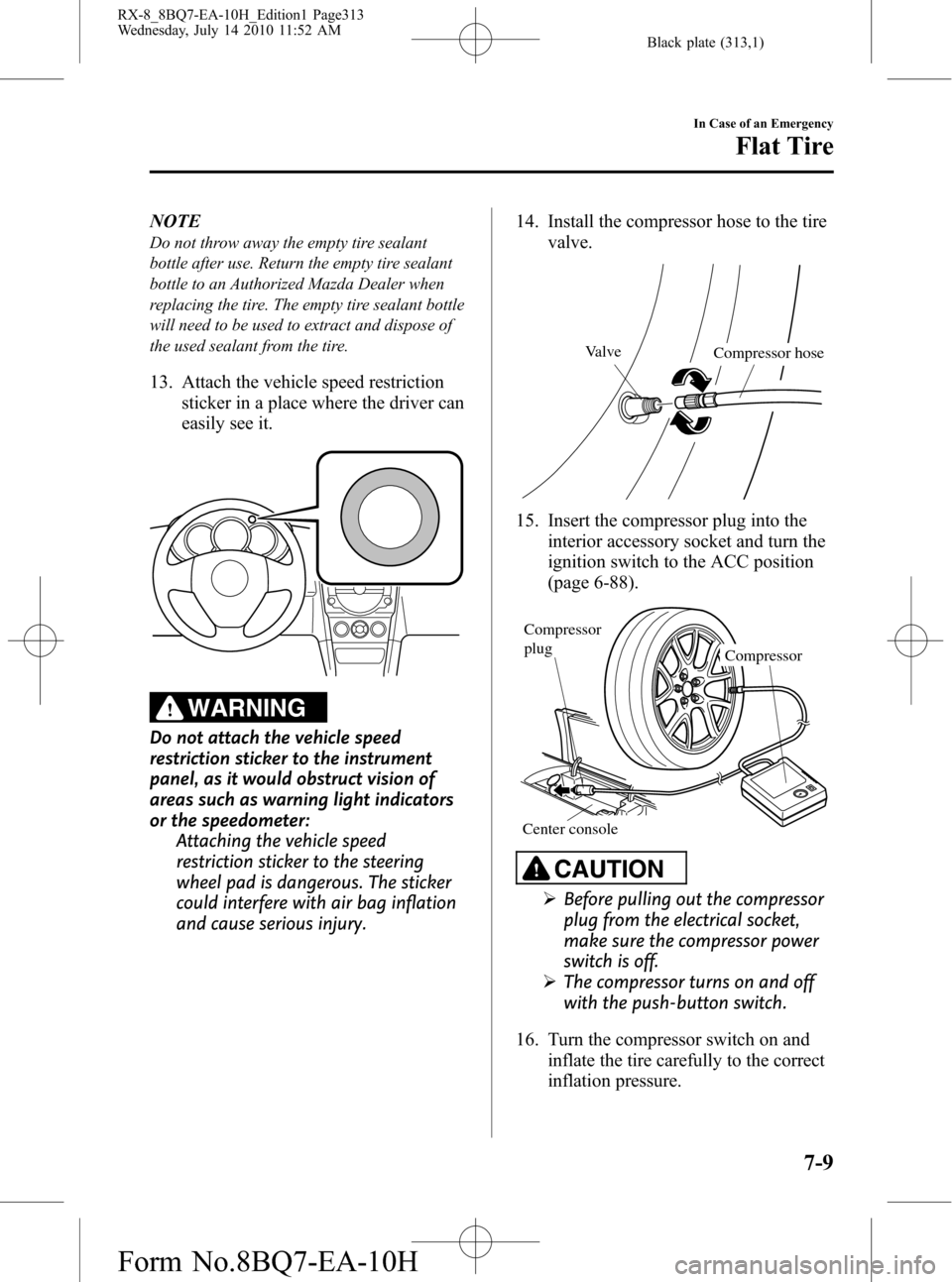
13. Attach the vehicle speed restriction
sticker in a place where the driver can
easily see it.
WARNING
Do not attach the vehicle speed
restriction sticker to the instrument
panel, as it would obstruct vision of
areas such as warning light indicators
or the speedometer:
Attaching the vehicle speed
restriction sticker to the steering
wheel pad is dangerous. The sticker
could interfere with air bag inflation
and cause serious injury.14. Install the compressor hose to the tire
valve.
Valve
Compressor hose
15. Insert the compressor plug into the
interior accessory socket and turn the
ignition switch to the ACC position
(page 6-88).
Compressor Compressor
plug
Center console
CAUTION
ØBefore pulling out the compressor
plug from the electrical socket,
make sure the compressor power
switch is off.
ØThe compressor turns on and off
with the push-button switch.
16. Turn the compressor switch on and
inflate the tire carefully to the correct
inflation pressure.
In Case of an Emergency
Flat Tire
7-9
RX-8_8BQ7-EA-10H_Edition1 Page313
Wednesday, July 14 2010 11:52 AM
Form No.8BQ7-EA-10H
Page 336 of 442
Black plate (336,1)
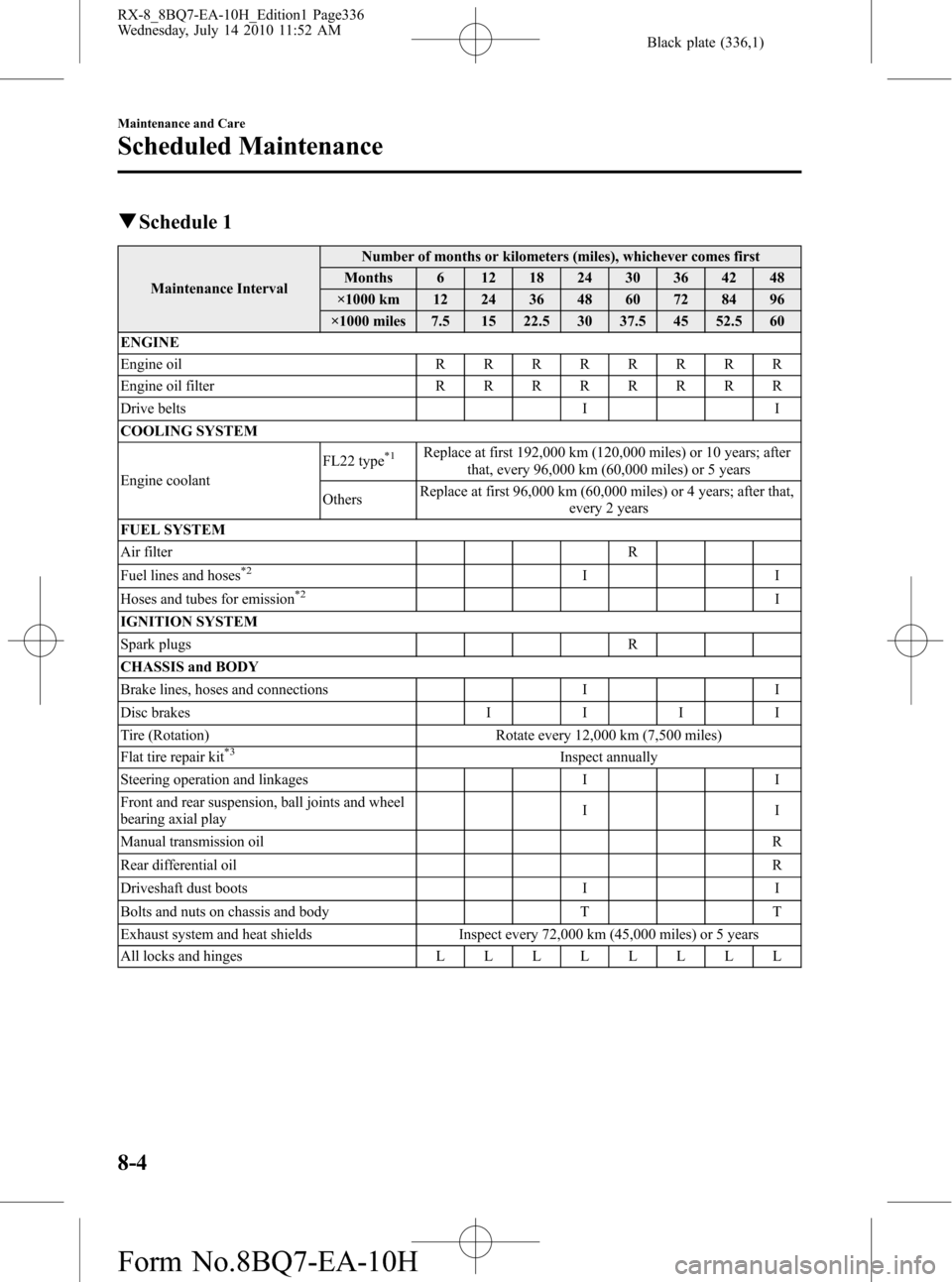
qSchedule 1
Maintenance IntervalNumber of months or kilometers (miles), whichever comes first
Months 6 12 18 24 30 36 42 48
×1000 km 12 24 36 48 60 72 84 96
×1000 miles 7.5 15 22.5 30 37.5 45 52.5 60
ENGINE
Engine oilRRRRRRRR
Engine oil filterRRRRRRRR
Drive belts I I
COOLING SYSTEM
Engine coolantFL22 type
*1Replace at first 192,000 km (120,000 miles) or 10 years; after
that, every 96,000 km (60,000 miles) or 5 years
OthersReplace at first 96,000 km (60,000 miles) or 4 years; after that,
every 2 years
FUEL SYSTEM
Air filter R
Fuel lines and hoses
*2II
Hoses and tubes for emission*2I
IGNITION SYSTEM
Spark plugs R
CHASSIS and BODY
Brake lines, hoses and connections I I
Disc brakesIIII
Tire (Rotation) Rotate every 12,000 km (7,500 miles)
Flat tire repair kit
*3Inspect annually
Steering operation and linkages I I
Front and rear suspension, ball joints and wheel
bearing axial playII
Manual transmission oilR
Rear differential oilR
Driveshaft dust boots I I
Bolts and nuts on chassis and body T T
Exhaust system and heat shields Inspect every 72,000 km (45,000 miles) or 5 years
All locks and hingesLLLLLLLL
8-4
Maintenance and Care
Scheduled Maintenance
RX-8_8BQ7-EA-10H_Edition1 Page336
Wednesday, July 14 2010 11:52 AM
Form No.8BQ7-EA-10H
Page 339 of 442
Black plate (339,1)
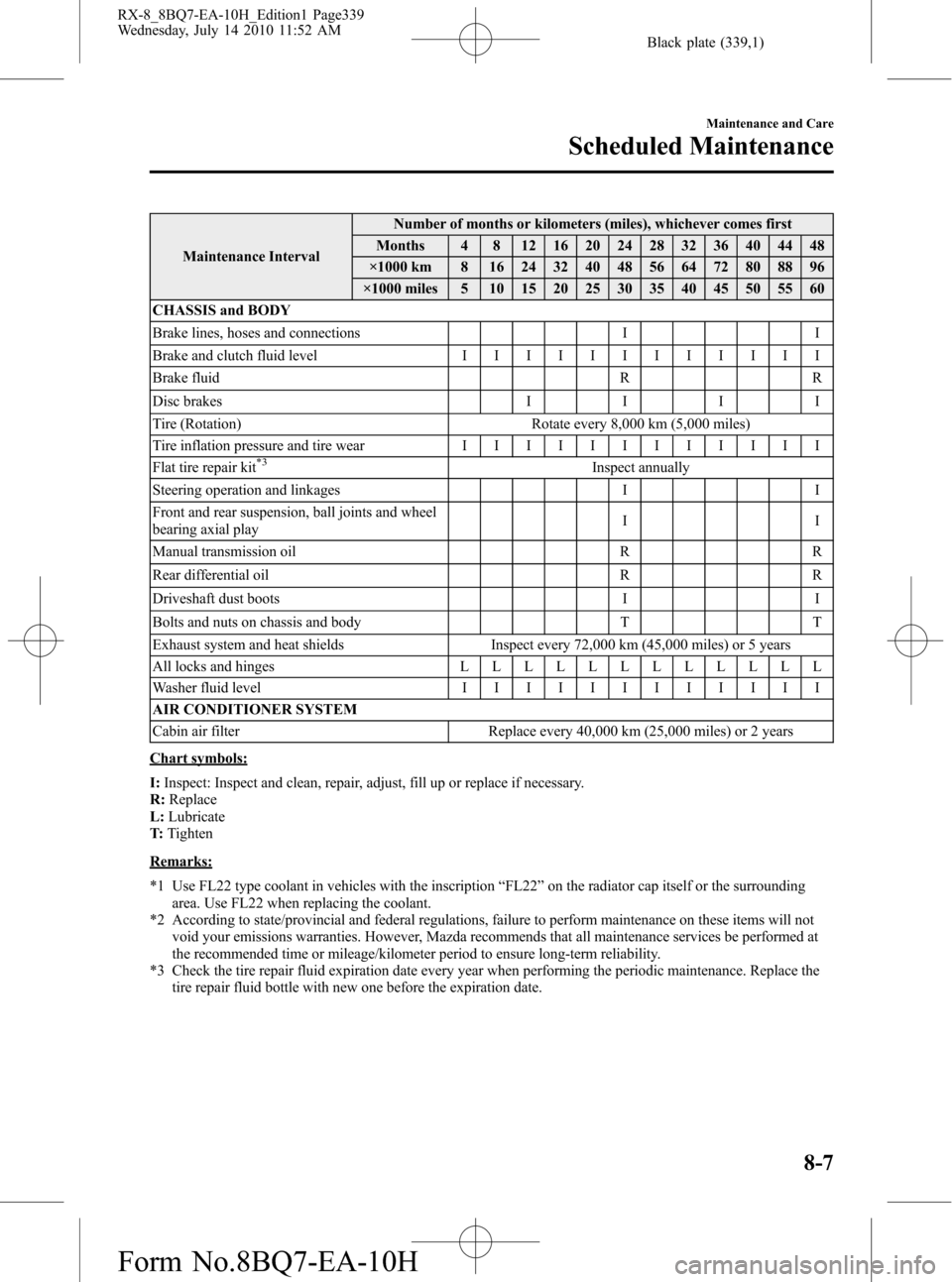
Maintenance IntervalNumber of months or kilometers (miles), whichever comes first
Months 4 8 12 16 20 24 28 32 36 40 44 48
×1000 km 8 16 24 32 40 48 56 64 72 80 88 96
×1000 miles 5 10 15 20 25 30 35 40 45 50 55 60
CHASSIS and BODY
Brake lines, hoses and connections I I
Brake and clutch fluid levelIIIIIIIIIIII
Brake fluid R R
Disc brakesIIII
Tire (Rotation) Rotate every 8,000 km (5,000 miles)
Tire inflation pressure and tire wearIIIIIIIIIIII
Flat tire repair kit
*3Inspect annually
Steering operation and linkages I I
Front and rear suspension, ball joints and wheel
bearing axial playII
Manual transmission oil R R
Rear differential oil R R
Driveshaft dust boots I I
Bolts and nuts on chassis and body T T
Exhaust system and heat shields Inspect every 72,000 km (45,000 miles) or 5 years
All locks and hingesLLLLLLLLLLLL
Washer fluid levelIIIIIIIIIIII
AIR CONDITIONER SYSTEM
Cabin air filter Replace every 40,000 km (25,000 miles) or 2 years
Chart symbols:
I:Inspect: Inspect and clean, repair, adjust, fill up or replace if necessary.
R:Replace
L:Lubricate
T:Tighten
Remarks:
*1 Use FL22 type coolant in vehicles with the inscription“FL22”on the radiator cap itself or the surrounding
area. Use FL22 when replacing the coolant.
*2 According to state/provincial and federal regulations, failure to perform maintenance on these items will not
void your emissions warranties. However, Mazda recommends that all maintenance services be performed at
the recommended time or mileage/kilometer period to ensure long-term reliability.
*3 Check the tire repair fluid expiration date every year when performing the periodic maintenance. Replace the
tire repair fluid bottle with new one before the expiration date.
Maintenance and Care
Scheduled Maintenance
8-7
RX-8_8BQ7-EA-10H_Edition1 Page339
Wednesday, July 14 2010 11:52 AM
Form No.8BQ7-EA-10H