automatic transmission MAZDA MX5 MIATA 2016 User Guide
[x] Cancel search | Manufacturer: MAZDA, Model Year: 2016, Model line: MX5 MIATA, Model: MAZDA MX5 MIATA 2016Pages: 526, PDF Size: 10.44 MB
Page 121 of 526

4–17
When Driving
Instrument Cluster and Display
*Some models.
SignalWarning Lights Page
Check Engine Light*17-33
(Red)High Engine Coolant Temperature Warning Light*17-33
*Automatic Transmission Warning Light*17-33
Power Steering Malfunction Indicator Light*17-33
Air Bag/Seat Belt Pretensioner System Warning Light*17-33
Low Fuel Warning Light7-33
Check Fuel Cap Warning Light*17-33
Seat Belt Warning Light7-33
Door-Ajar Warning Light7-33
*Low Washer Fluid Level Warning Light 7-33
*Tire Pressure Monitoring System Warning Light*17-33
(Red)
KEY Warning Light*17-33
*Lane Departure Warning System (LDWS) Warning Light*1Illuminated 7-33
Flashing 4-73
MX-5_8EU4-EA-15D_Edition3.indb 172015/10/21 16:53:00
Page 128 of 526

4–24
When Driving
Transmission
Automatic Transmission Controls
Lock-release button
Indicates the selector lever can be shifted freely into any position.Indicates that you must hold in the lock-release button to shift. Indicates that you must depress the brake pedal and hold in the lock-rel\
ease
button to shift (The ignition must be switched ON).
Various Lockouts:
NOTE
The Sport AT has an option that is not included in the traditional automatic transmi\
ssion
that gives the driver the option of selecting each gear instead of leavi\
ng it to the
transmission to shift gears. Even if you intend to use the automatic tra\
nsmission functions
as a traditional automatic, you should also be aware that you can inadvertently shift
into manual shift mode and an inappropriate gear may be retained as the vehicle speed
increases. If you notice the engine speed going higher or hear the engine racing, confirm
you have not accidentally slipped into manual shift mode (page 4-27).
MX-5_8EU4-EA-15D_Edition3.indb 242015/10/21 16:53:05
Page 130 of 526

4–26
When Driving
Transmission
CAUTION
Do not shift into N when driving the
vehicle. Doing so can cause transaxle
damage.
NOTE
Apply the parking brake or depress the
brake pedal before moving the selector
lever from N to prevent the vehicle from
moving unexpectedly.
D (Drive)
D is the normal driving position. From a
stop, the transmission will automatically
shift through a 6-gear sequence.
M (Manual)
M is the manual shift mode position. Gears
can be shifted up or down by operating the
selector lever. Refer to Manual Shift Mode
on page 4-27.
Active Adaptive Shift (AAS)
Active Adaptive Shift (AAS)
automatically controls the transmission
shift points to best suit the road conditions
and driver input. This improves driving
feel. The transmission may switch to AAS
mode when driving up and down slopes,
cornering, driving at high elevations,
or depressing the accelerator pedal
quickly while the selector lever is in the
D position. Depending on the road and
driving conditions/vehicle operations, gear
shifting could be delayed or not occur,
however, this does not indicate a problem
because the AAS mode will maintain the
optimum gear position.
Shift-Lock System
The shift-lock system prevents shifting out
of P unless the brake pedal is depressed.
To shift from P:
1. Depress and hold the brake pedal.
2. Start the engine.
3. Press and hold the lock-release button.
4. Move the selector lever.
NOTE
When the ignition is switched to ACC or
the ignition is switched off, the selector
lever cannot be shifted from P.
The ignition cannot be switched to OFF
if the selector lever is not in P.
Shift-Lock Override
If the selector lever will not move from P
using the proper shift procedure, continue
to hold down the brake pedal.
1. Remove the shift-lock override cover
using a cloth-wrapped flat head
screwdriver.
2. Insert a screwdriver and push it down.
Cover
3. Press and hold the lock-release button.
4. Move the selector lever.
MX-5_8EU4-EA-15D_Edition3.indb 262015/10/21 16:53:07
Page 131 of 526

4–27
When Driving
Transmission
Take the vehicle to an Authorized Mazda
Dealer to have the system checked.
Manual Shift Mode
The manual shift mode gives you the feel
of driving a manual transmission vehicle
by allowing you to operate the selector
lever manually. This allows you to control
engine rpm and torque to the drive wheels
much like a manual transmission when
more control is desired.
To change to manual shift mode, shift the
lever from D to M.
NOTE
Changing to manual shift mode while
driving will not damage the transmission.
To return to automatic shift mode, shift the
lever from M to D.
NOTE
If you change to manual shift mode
when the vehicle is stopped, the gear
will shift to M1.
If you change to manual shift mode
without depressing the accelerator
pedal when driving in D range, 5th
gear/6th gear, the gear will shift to M4/
M5.
Indicators
Manual shift mode indication
In manual shift mode, the “M” of the shift
position indication in the instrument panel
illuminates.
Gear position indication
The numeral for the selected gear
illuminates.
Manual shift mode indication
Gear position indication
NOTE
If the gears cannot be shifted down when
driving at higher speeds, the gear position
indication will flash twice to signal that
the gears cannot be shifted down (to
protect the transmission).
MX-5_8EU4-EA-15D_Edition3.indb 272015/10/21 16:53:07
Page 132 of 526
4–28
When Driving
Transmission
*Some models.
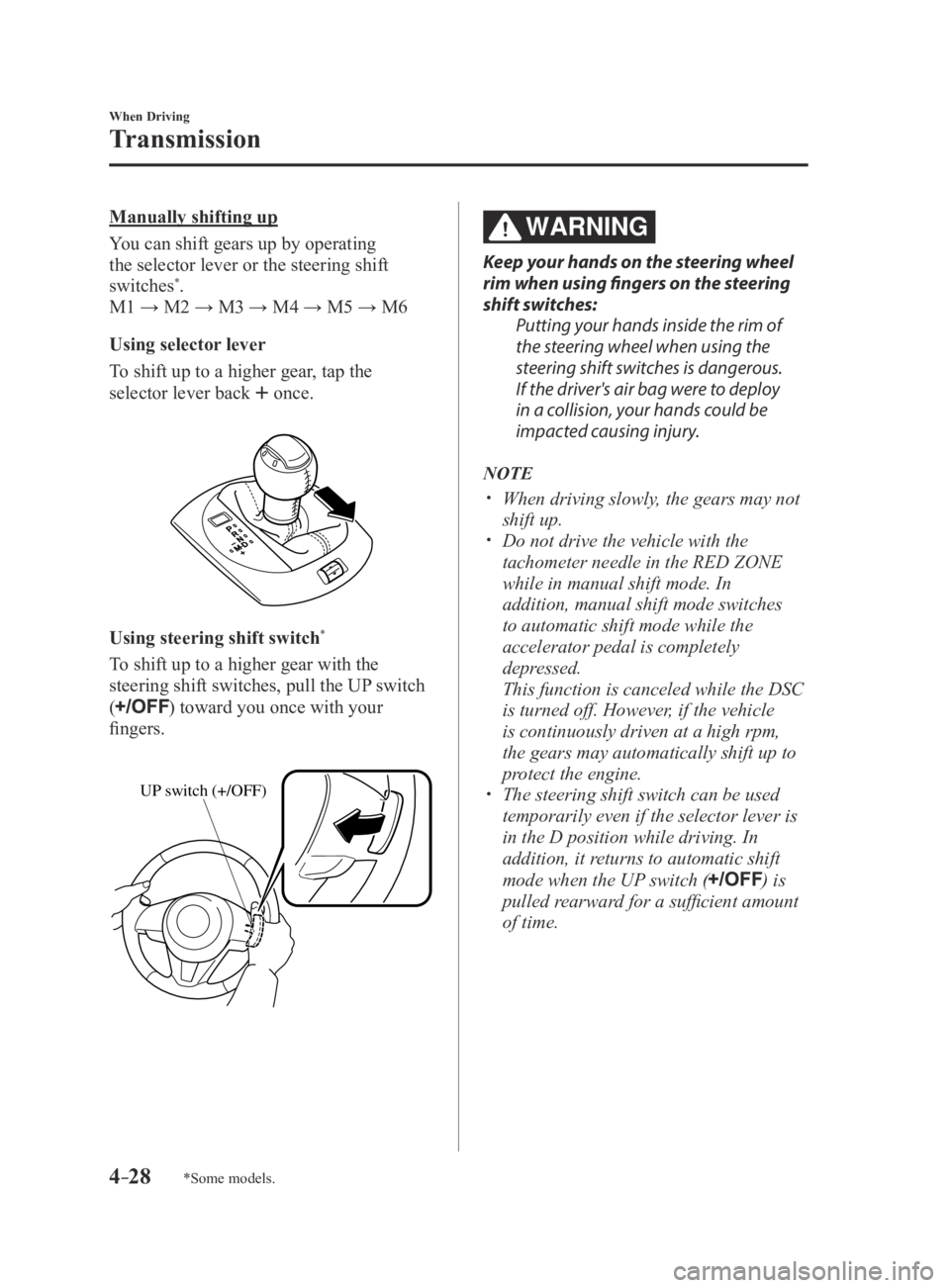
Manually shifting up
You can shift gears up by operating
the selector lever or the steering shift
switches
*.
M1 → M2 → M3 → M4 → M5 → M6
Using selector lever
To shift up to a higher gear, tap the
selector lever back
once.
Using steering shift switch*
To shift up to a higher gear with the
steering shift switches, pull the UP switch
(
) toward you once with your
fingers.
UP switch (+/OFF)
WARNING
Keep your hands on the steering wheel
rim when using fingers on the steering
shift switches:
Putting your hands inside the rim of
the steering wheel when using the
steering shift switches is dangerous.
If the driver's air bag were to deploy
in a collision, your hands could be
impacted causing injury.
NOTE
When driving slowly, the gears may not
shift up. Do not drive the vehicle with the
tachometer needle in the RED ZONE
while in manual shift mode. In
addition, manual shift mode switches
to automatic shift mode while the
accelerator pedal is completely
depressed.
This function is canceled while the DSC
is turned off. However, if the vehicle
is continuously driven at a high rpm,
the gears may automatically shift up to
protect the engine.
The steering shift switch can be used
temporarily even if the selector lever is
in the D position while driving. In
addition, it returns to automatic shift
mode when the UP switch (
) is
pulled rearward for a sufficient amount
of time.
MX-5_8EU4-EA-15D_Edition3.indb 282015/10/21 16:53:08
Page 133 of 526
4–29
When Driving
Transmission
*Some models.
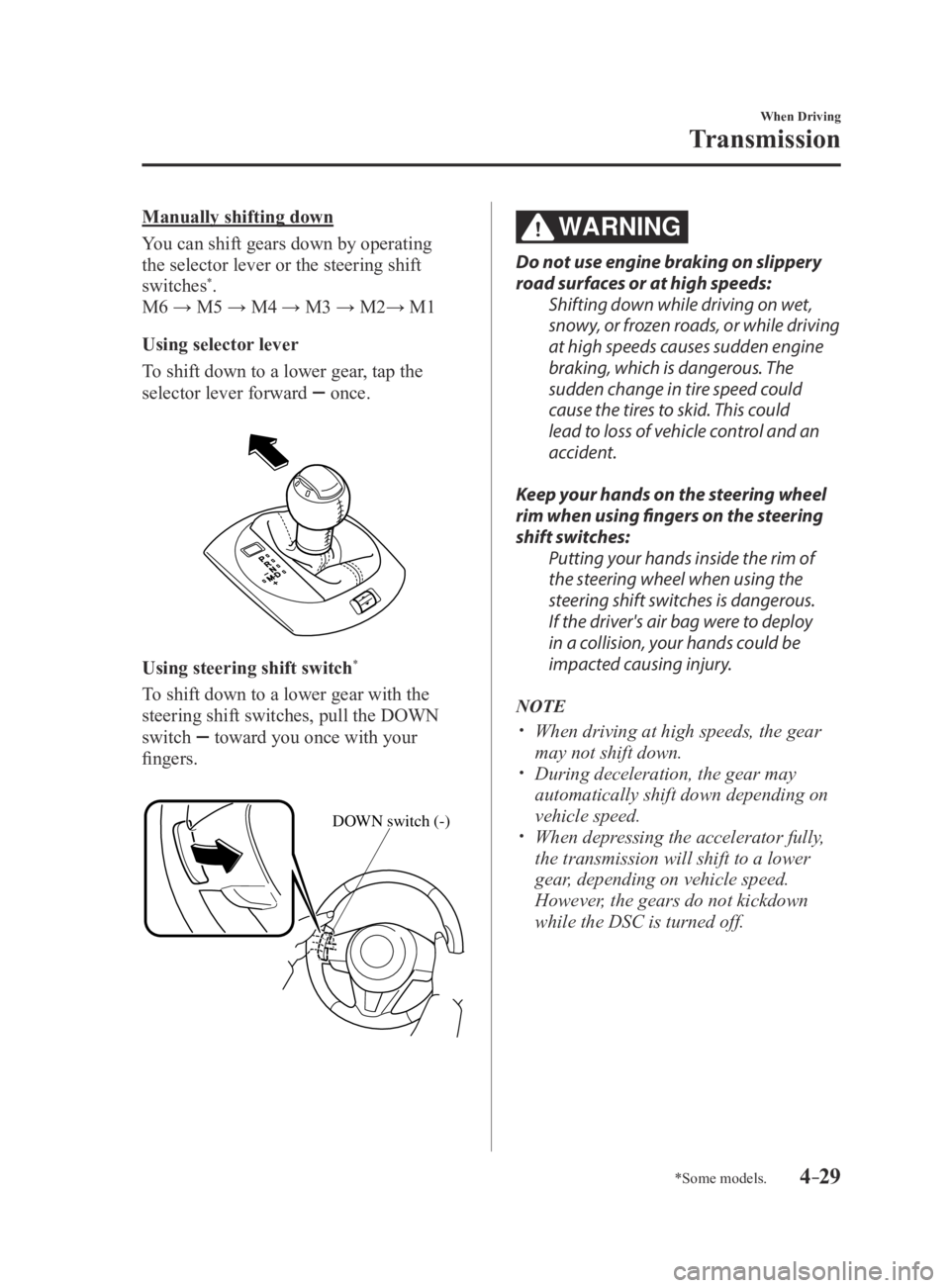
Manually shifting down
You can shift gears down by operating
the selector lever or the steering shift
switches
*.
M6 → M5 → M4 → M3 → M2→ M1
Using selector lever
To shift down to a lower gear, tap the
selector lever forward
once.
Using steering shift switch*
To shift down to a lower gear with the
steering shift switches, pull the DOWN
switch
toward you once with your
fingers.
DOWN switch (-)
WARNING
Do not use engine braking on slippery
road surfaces or at high speeds: Shifting down while driving on wet,
snowy, or frozen roads, or while driving
at high speeds causes sudden engine
braking, which is dangerous. The
sudden change in tire speed could
cause the tires to skid. This could
lead to loss of vehicle control and an
accident.
Keep your hands on the steering wheel
rim when using fingers on the steering
shift switches: Putting your hands inside the rim of
the steering wheel when using the
steering shift switches is dangerous.
If the driver's air bag were to deploy
in a collision, your hands could be
impacted causing injury.
NOTE
When driving at high speeds, the gear
may not shift down. During deceleration, the gear may
automatically shift down depending on
vehicle speed.
When depressing the accelerator fully,
the transmission will shift to a lower
gear, depending on vehicle speed.
However, the gears do not kickdown
while the DSC is turned off.
MX-5_8EU4-EA-15D_Edition3.indb 292015/10/21 16:53:09
Page 135 of 526
 speed limit
For each gear position while in the manual mode, the speed limit is set \
as follows: When the
selector lever is operated within the")
4–31
When Driving
Transmission
Shift gear (shifting) speed limit
For each gear position while in the manual mode, the speed limit is set \
as follows: When the
selector lever is operated within the range of the speed limit, the gear\
is shifted.
Shift up
The gear does not shift up while the vehicle speed is lower than the spe\
ed limit.
Shift down
The gear does not shift down while the vehicle speed exceeds the speed l\
imit.
If the vehicle speed exceeds the speed limit and the gear does not shift\
down, the gear
position indication flashes 2 times to notify the driver that the gear cannot be shifted.
Kickdown
When the accelerator pedal is depressed fully while driving, the gear sh\
ifts down.
However, the gears do not kickdown while the DSC is turned off.
NOTE
The gear also shifts down using kickdown while in the second gear fixed mode.
Auto-shift down
The gear shifts down automatically depending on the vehicle speed during\
deceleration.
NOTE
If the vehicle comes to a stop while in the second gear fixed mode, the gear remains in
second.
MX-5_8EU4-EA-15D_Edition3.indb 312015/10/21 16:53:10
Page 138 of 526
4–34
When Driving
Transmission
NOTE
The accelerator pedal may initially feel
heavy as it is being depressed, then feel
lighter as it is depressed further. This
change in pedal force aids the engine
control system in determining how
much the accelerator pedal has been
depressed for performing kickdown,
and functions to control whether or not
kickdown should be performed.
While the selector lever is in the M
position and the DSC is turned off,
manual shift mode does not switch
to automatic shift mode even if the
accelerator pedal is completely
depressed. Operate the selector lever.
Climbing steep grades from a stop
To climb a steep grade from a stopped
position:
1. Depress the brake pedal.
2. Shift to D or M1, depending on the
load weight and grade steepness.
3. Release the brake pedal while gradually
accelerating.
Descending steep grades
When descending a steep grade, shift to
lower gears, depending on load weight and
grade steepness. Descend slowly, using the
brakes only occasionally to prevent them
from overheating.
MX-5_8EU4-EA-15D_Edition3.indb 342015/10/21 16:53:10
Page 143 of 526
4–39
When Driving
Switches and Controls
Leaving Home Light
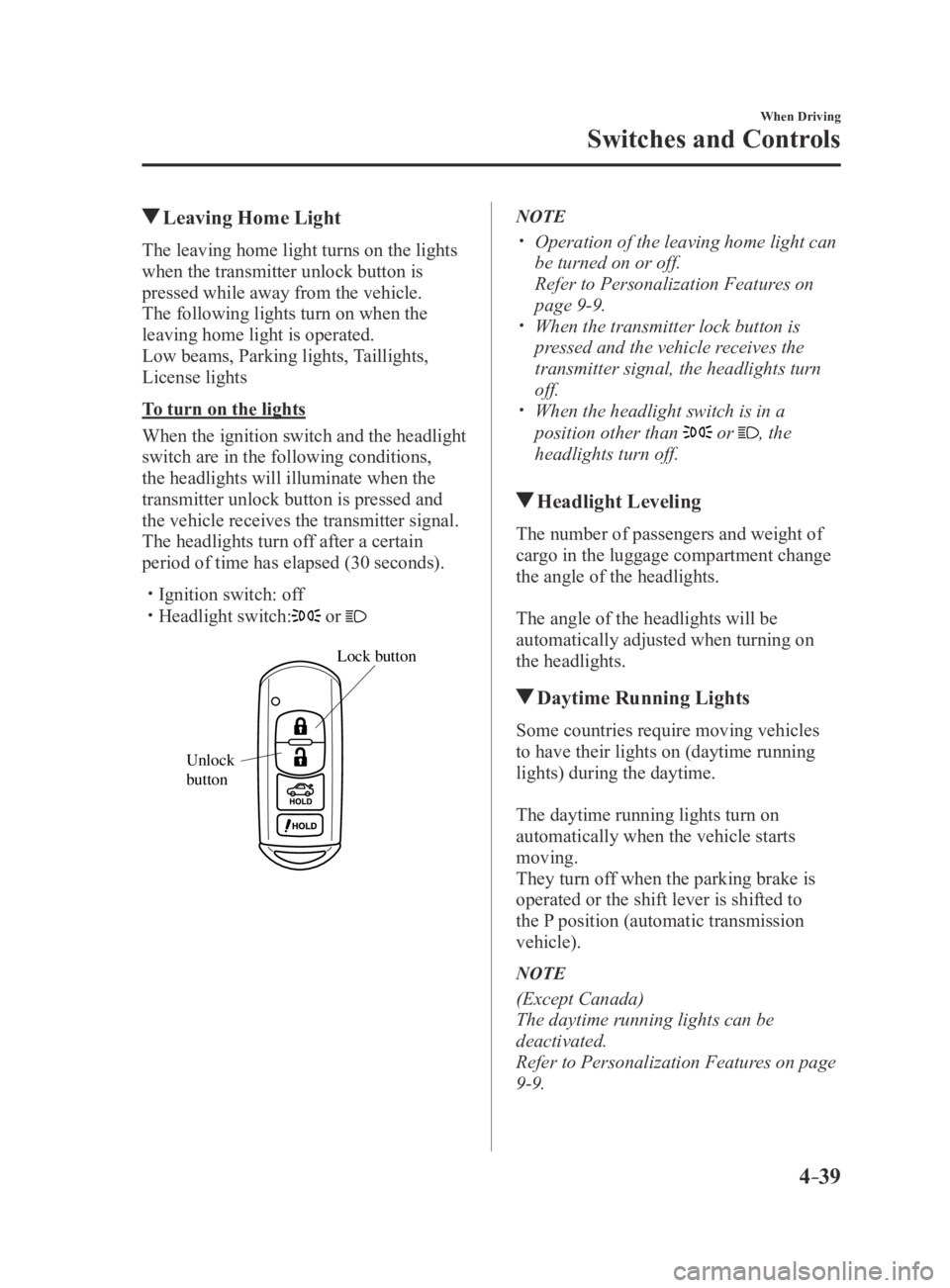
The leaving home light turns on the lights
when the transmitter unlock button is
pressed while away from the vehicle.
The following lights turn on when the
leaving home light is operated.
Low beams, Parking lights, Taillights,
License lights
To turn on the lights
When the ignition switch and the headlight
switch are in the following conditions,
the headlights will illuminate when the
transmitter unlock button is pressed and
the vehicle receives the transmitter signal.
The headlights turn off after a certain
period of time has elapsed (30 seconds).
Ignition switch: off Headlight switch: or
Lock button
Unlock
b
utton
NOTE
Operation of the leaving home light can
be turned on or off.
Refer to Personalization Featur es on
page 9-9. When the transmitter lock button is
pressed and the vehicle receives the
transmitter signal, the headlights turn
off.
When the headlight switch is in a
position other than or , the
headlights turn off.
Headlight Leveling
The number of passengers and weight of
cargo in the luggage compartment change
the angle of the headlights.
The angle of the headlights will be
automatically adjusted when turning on
the headlights.
Daytime Running Lights
Some countries require moving vehicles
to have their lights on (daytime running
lights) during the daytime.
The daytime running lights turn on
automatically when the vehicle starts
moving.
They turn off when the parking brake is
operated or the shift lever is shifted to
the P position (automatic transmission
vehicle).
NOTE
(Except Canada)
The daytime running lights can be
deactivated.
Refer to Personalization Features on page
9-9.
MX-5_8EU4-EA-15D_Edition4.indb 392016/01/20 11:05:11
Page 157 of 526
4–53
When Driving
Brake
*Some models.
WARNING
Do not drive with worn disc pads:
Driving with worn disc pads is
dangerous. The brakes could fail and
cause a serious accident. As soon as
you hear a screeching noise consult an
Authorized Mazda Dealer.
Brake Assist
During emergency braking situations
when it is necessary to depress the brake
pedal with greater force, the brake assist
system provides braking assistance, thus
enhancing braking performance.
When the brake pedal is depressed hard or
depressed more quickly, the brakes apply
more firmly.
NOTE
When the brake pedal is depressed hard
or depressed more quickly, the pedal
will feel softer but the brakes will apply
more firmly. This is a normal effect of
the brake assist operation and does not
indicate a malfunction.
When the brake pedal is depressed
hard or depressed more quickly, a
motor/pump operation noise may be
heard. This is a normal effect of the
brake assist and does not indicate a
malfunction.
The brake assist equipment does not
supersede the functionality of the
vehicle's main braking system.
Hill Launch Assist (HLA)*
Hill Launch Assist (HLA) is a function
which assists the driver in accelerating
from a stop while on a slope. When
the driver releases the brake pedal and
depresses the accelerator pedal while
on a slope, the function prevents the
vehicle from rolling. The braking force is
maintained automatically after the brake
pedal is released on a steep grade.
For vehicles with a manual transmission,
Hill Launch Assist (HLA) operates on a
downward slope when the shift lever is in
the reverse (R) position, and on an upward
slope when the shift lever is in a position
other than the reverse (R) position.
For vehicles with an automatic
transmission, Hill Launch Assist (HLA)
operates on a downward slope when the
selector lever is in the reverse (R) position,
and on an upward slope when the selector
lever is in a forward gear.
MX-5_8EU4-EA-15D_Edition3.indb 532015/10/21 16:53:22