language MAZDA MX5 MIATA 2016 User Guide
[x] Cancel search | Manufacturer: MAZDA, Model Year: 2016, Model line: MX5 MIATA, Model: MAZDA MX5 MIATA 2016Pages: 526, PDF Size: 10.44 MB
Page 310 of 526

5–110
Interior Features
Bluetooth®
Example of use (verify unread E-mail)
1. Select the icon on the home screen
to display the Communication screen.
2. Select to display the inbox.
3. Select the unread message displayed in
bold.
4. The details of the message are
displayed and replying to the message,
making a call, or playback can be
performed.
Changing account for displaying
(E-mail only)
1. Select .
2. Select the account which you would
like to display. Only the messages for
the selected account are displayed in
the inbox.
Editing preset messages
1. Select the icon on the home screen
to display the Communication screen.
2. Select .
3. Select .
4. Select the preset message which you
would like to edit. The keyboard screen
is displayed.
5. When the message is input and is
selected, the message is stored as a
preset message.
NOTE
Select the icon to change the
language.
Select the icon to switch between
capitalized and lower-case characters.
Select the icon to return to the
previous screen without storing the edit.
MX-5_8EU4-EA-15D_Edition4.indb 1102016/01/20 11:06:34
Page 330 of 526

5–130
Interior Features
Bluetooth®
Regarding problems with calls
SymptomCauseSolution method
When starting a call, vehicle noise
from the other party can be heard For about three seconds after
starting a call, the Bluetooth
®
unit's Noise Suppression function
requires time to adapt to the call
environment. This does not indicate a problem
with the device.
The other party cannot be heard or
the speaker's voice is quiet The volume is set at zero or low.
Increase the volume.
Other problems
Symptom CauseSolution method
The indication for the remaining
battery is different between the
vehicle and the device The indication method is different
between the vehicle and the device.
—
When a call is made from the
vehicle, the telephone number is
updated in the incoming/outgoing
call record but the name does not
appear The number has not been registered
into the phonebook.If the number has been registered
into the phonebook, the incoming/
outgoing call record is updated by
the name in the phonebook when the
engine is restarted.
The cell phone does not synchronize
with the vehicle regarding the
incoming/outgoing call record Some types of cell phones do not
synchronize automatically.
Operate the cell phone for
synchronization.
It takes a long time to complete the
function for changing the language A maximum of 60 seconds is
required.
—
MX-5_8EU4-EA-15D_Edition3.indb 1302015/10/21 16:54:57
Page 517 of 526
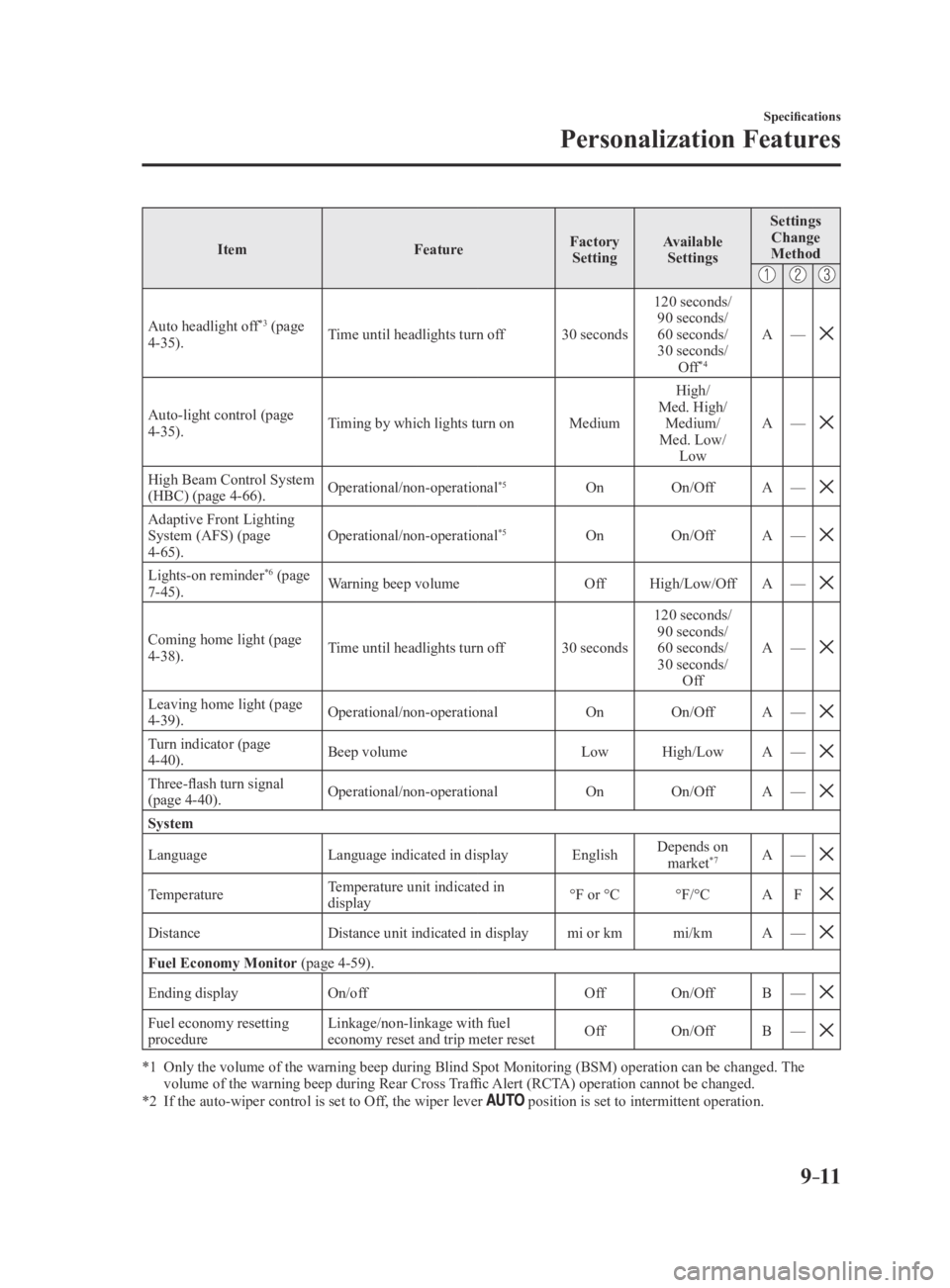
9–11
Specifications
Personalization Features
ItemFeatureFactory
Setting Available
Settings Settings
Change
Method
Auto headlight off*3 (page
4-35). Time until headlights turn off
30 seconds120 seconds/
90 seconds/
60 seconds/
30 seconds/ Off
*4
A —
Auto-light control (page 4-35). Timing by which lights turn on
MediumHigh/
Med. High/ Medium/
Med. Low/ Low A
—
High Beam Control System (HBC) (page 4-66). Operational/non-operational*5On
On/Off A—
Adaptive Front Lighting System (AFS) (page
4-65). Operational/non-operational*5On
On/Off A—
Lights-on reminder*6 (page
7-45). Warning beep volume
OffHigh/Low/Off A—
Coming home light (page 4-38). Time until headlights turn off
30 seconds120 seconds/
90 seconds/
60 seconds/
30 seconds/ Off A
—
Leaving home light (page 4-39). Operational/non-operational
OnOn/Off A—
Turn indicator (page
4-40). Beep volume
LowHigh/Low A—
Three-flash turn signal (page 4-40). Operational/non-operational
OnOn/Off A—
System
Language Language indicated in display EnglishDepends on
market*7A —
TemperatureTemperature unit indicated in
display °F or °C
°F/°CAF
DistanceDistance unit indicated in display mi or kmmi/kmA—
Fuel Economy Monitor (page 4-59).
Ending display On/off OffOn/Off B—
Fuel economy resetting procedure Linkage/non-linkage with fuel
economy reset and trip meter reset
Off
On/Off B—
*1 Only the volume of the warning beep during Blind Spot Monitorin g (BSM) operation can be changed. The volume of the warning beep during Rear Cross Traffic Alert (RCTA) operation cannot be changed.*2 If the auto-wiper control is set to Off, the wiper lever position is set to intermittent operation.
MX-5_8EU4-EA-15D_Edition4.indb 112016/01/20 11:08:29