battery MAZDA MX5 MIATA 2016 Owner's Manual
[x] Cancel search | Manufacturer: MAZDA, Model Year: 2016, Model line: MX5 MIATA, Model: MAZDA MX5 MIATA 2016Pages: 526, PDF Size: 10.44 MB
Page 139 of 526

4–35
When Driving
Switches and Controls
Lighting Control
Headlights
Turn the headlight switch to turn the headlights, other exterior lights a\
nd dashboard
illumination on or off.
When the lights are turned on, the lights-on indicator light in the inst\
rument cluster turns on.
NOTE
If the light switch is left on, the lights will automatically switch off\
approximately 30
seconds after switching the ignition off.
The time setting can be changed.
Refer to Personalization Features on page 9-9. To prevent discharging the battery, do not leave the lights on while the engine is off unless
safety requires them.
Without auto-light control
Switch Position
Ignition PositionON ACC or
OFF ONACC or
OFF ONACC or
OFF
Headlights OffOffOffOff OnOn
*2
Daytime running lights On*1OffOn*1Off OffOff
Taillights
Parking lights
License lights
Side-marker lights
Dashboard illumination Off
Off OnOn
*2OnOn*2
*1 The lights are turned on while the vehicle is driven.*2 The lights are turned on for the specified period by the auto he adlight off function.
MX-5_8EU4-EA-15D_Edition4.indb 352016/01/20 11:05:10
Page 151 of 526
4–47
When Driving
Switches and Controls
*Some models.
HomeLink Wireless
Control System
*
NOTE
HomeLink and HomeLink house icon
are registered trademarks of Gentex
Corporation.
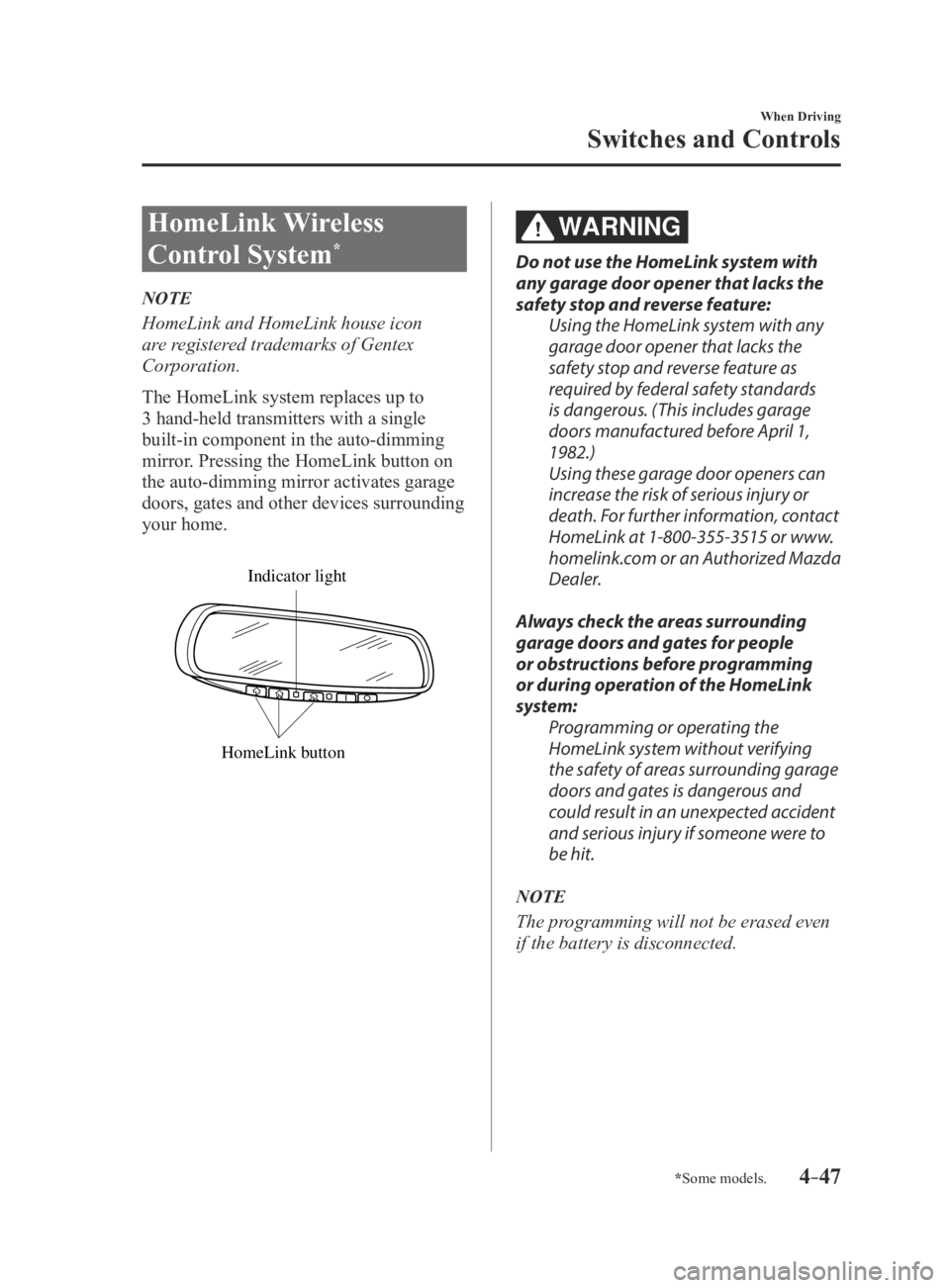
The HomeLink system replaces up to
3 hand-held transmitters with a single
built-in component in the auto-dimming
mirror. Pressing the HomeLink button on
the auto-dimming mirror activates garage
doors, gates and other devices surrounding
your home.
HomeLink button
Indicator light
WARNING
Do not use the HomeLink system with
any garage door opener that lacks the
safety stop and reverse feature:Using the HomeLink system with any
garage door opener that lacks the
safety stop and reverse feature as
required by federal safety standards
is dangerous. (This includes garage
doors manufactured before April 1,
1982.)
Using these garage door openers can
increase the risk of serious injury or
death. For further information, contact
HomeLink at 1-800-355-3515 or www.
homelink.com or an Authorized Mazda
Dealer.
Always check the areas surrounding
garage doors and gates for people
or obstructions before programming
or during operation of the HomeLink
system: Programming or operating the
HomeLink system without verifying
the safety of areas surrounding garage
doors and gates is dangerous and
could result in an unexpected accident
and serious injury if someone were to
be hit.
NOTE
The programming will not be erased even
if the battery is disconnected.
MX-5_8EU4-EA-15D_Edition3.indb 472015/10/21 16:53:19
Page 152 of 526
4–48
When Driving
Switches and Controls
Pre-programming the HomeLink
System
NOTE
It is recommended that a new battery be
placed in the hand-held transmitter of the
device being programmed to HomeLink
for quicker training and accurate
transmission of the radio-frequency signal.
Verify that there is a remote control
transmitter available for the device you
would like to program.
Disconnect the power to the device.
Programming the HomeLink
System
CAUTION
When programming a garage door
opener or a gate, disconnect the power
to these devices before performing
programming. Continuous operation
of the devices could damage the
motor.
The HomeLink system provides 3 buttons
which can be individually selected and
programmed using the transmitters for
current, on-market devices as follows:
1. Disconnect power to the device being
programmed.
2. Position the end of your hand-held
transmitter 2.5—7.5 cm (1—3 inches)
away from the HomeLink button you
wish to program while keeping the
indicator light in view.
3. Simultaneously press and hold both
the chosen HomeLink and hand-held
transmitter buttons. Do not release
the buttons until step 3 has been
completed.
NOTE
Some gate operators and garage door
openers may require you to replace this
Programming Step 2 with procedures
noted in the “Gate Operator/Canadian
Programming” section.
4. After the HomeLink indicator light
changes from a slow to a rapidly
blinking light, release both the
HomeLink and hand-held transmitter
buttons.
NOTE
If the HomeLink indicator light does not
change to a rapidly blinking light, contact
HomeLink at www.homelink.com or call
1-800-355-3515 for assistance.
5. Connect power to the device being
programmed.
MX-5_8EU4-EA-15D_Edition3.indb 482015/10/21 16:53:19
Page 179 of 526
 system will operate when all of the fo\
llowing
conditions are met:
The ignition is switched ON. The Blind Spot Monito")
4–75
When Driving
i-ACTIVSENSE
NOTE
The Blind Spot Monitoring (BSM) system will operate when all of the fo\
llowing
conditions are met:
The ignition is switched ON. The Blind Spot Monitoring (BSM) switch is pressed and the Blind Spot Monitoring
(BSM) OFF indicator light in the instrument cluster is turned off. The vehicle speed is about 10 km/h (6.3 mph) or faster.
The Blind Spot Monitoring (BSM) system will not operate under the foll\
owing
circumstances.
The vehicle speed falls below about 10 km/h (6.3 mph) even though the \
Blind Spot
Monitoring (BSM) OFF indicator light is turned off. The shift lever (manual transmission)/selector lever (automatic trans\
mission) is shifted
to reverse (R) and the vehicle is reversing.
In the following cases, the Blind Spot Monitoring (BSM) OFF indicator \
light turns on and
operation of the system is stopped. If the Blind Spot Monitoring (BSM)\
OFF indicator
light remains illuminated, have the vehicle inspected at an Authorized Mazda Dealer as
soon as possible.
Some problem with the system including the Blind Spot Monitoring (BSM) warnin\
g
lights is detected. A large deviation in the installation position of a radar sensor (rear) on the vehicle has
occurred. There is a large accumulation of snow or ice on the rear bumper near a radar sensor
(rear). Remove any snow, ice or mud on the rear bumper. Driving on snow-covered roads for long periods. The temperature near the radar sensors (rear) becomes extremely hot due to driving
for long periods on slopes during the summer. The battery voltage has decreased.
Under the following conditions, the radar sensors (rear) cannot detect target objects or it
may be difficult to detect them.
A vehicle is in the detection area at the rear in an adjacent driving lane but it does not
approach. The Blind Spot Monitoring (BSM) system determines the condition \
based on
radar detection data.
A vehicle is traveling alongside your vehicle at nearly the same speed fo\
r an extended
period of time. Vehicles approaching in the opposite direction. A vehicle in an adjacent driving lane is attempting to pass your vehicle.\
A vehicle is in an adjacent lane on a road with extremely wide driving lanes. The
detection area of the radar sensors (rear) is set at the road width of expressways.
MX-5_8EU4-EA-15D_Edition3.indb 752015/10/21 16:53:30
Page 184 of 526
4–80
When Driving
i-ACTIVSENSE
NOTE
When the ignition is switched off, the
condition before the system was turned
off is maintained. For example, if the
ignition is switched OFF while the
Blind Spot Monitoring (BSM) and Rear
Cross Traffic Alert (RCTA) systems are
operational, the Blind Spot Monitoring
(BSM) and Rear Cross Traffic Alert
(RCTA) systems remain operational the
next time the ignition is switched ON.
The Blind Spot Monitoring (BSM) and
Rear Cross Traffic Alert (RCTA) systems
are turned off when the battery is
disconnected such as when the battery
terminals or fuses have been removed
and re-installed. To turn the Blind Spot
Monitoring (BSM) and Rear Cross
Traffic Alert (RCTA) systems back on,
press the Blind Spot Monitoring (BSM)
switch.
MX-5_8EU4-EA-15D_Edition3.indb 802015/10/21 16:53:31
Page 186 of 526

4–82
When Driving
i-ACTIVSENSE
WARNING
Always check the surrounding area visually before actually putting the vehicle in
reverse:The system is only designed to assist you in checking for vehicles at the rear when putting
the vehicle in reverse. Due to certain limitations with the operation of this system, the
Blind Spot Monitoring (BSM) warning light may not flash or it might be delayed even
though a vehicle is behind your vehicle. Always make it your responsibility as a driver to
check the rear.
NOTE
In the following cases, the Blind Spot Monitoring (BSM) OFF indicator \
light turns on and
operation of the system is stopped. If the Blind Spot Monitoring (BSM)\
OFF indicator
light remains illuminated, have the vehicle inspected at an Authorized Mazda Dealer as
soon as possible.
Some problem with the system including the Blind Spot Monitoring (BSM) warnin\
g
lights has occurred. A large deviation in the installation position of a radar sensor (rear) on the vehicle has
occurred. There is a large accumulation of snow or ice on the rear bumper near a radar sensor
(rear). Driving on snow-covered roads for long periods. The temperature near the radar sensors becomes extremely hot due to driving for long
periods on slopes during the summer. The battery voltage has decreased.
MX-5_8EU4-EA-15D_Edition3.indb 822015/10/21 16:53:32
Page 200 of 526
4–96
When Driving
Tire Pressure Monitoring System
Tire Pressure Monitoring System
Initialization
In the following cases, system
initialization must be performed so that the
system operates normally.
A tire pressure is adjusted. Tire rotation is performed. A tire or wheel is replaced. The battery is replaced or completely
drained. The tire pressure monitoring system
warning light is illuminated.
Initialization method
1. Park the car in a safe place and firmly
apply the parking brake.
2. Let the tires cool, then adjust the tire
pressure of all four (4) tires to the
specified pressure indicated on the tire
pressure label located on the driver's
door frame (door open).
Refer to Tires on page 9-8.
3. Switch the ignition ON.
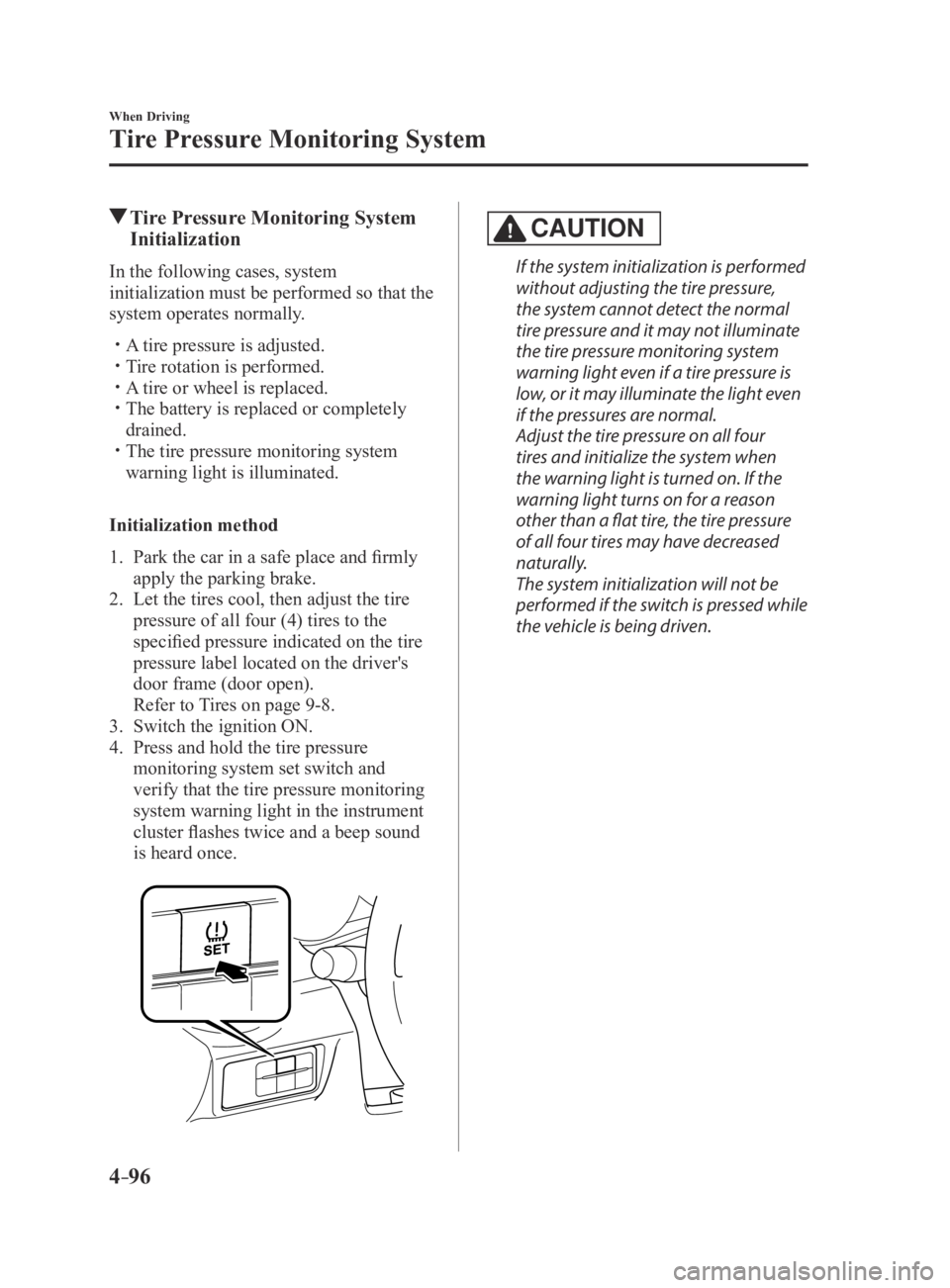
4. Press and hold the tire pressure
monitoring system set switch and
verify that the tire pressure monitoring
system warning light in the instrument
cluster flashes twice and a beep sound
is heard once.
CAUTION
If the system initialization is performed
without adjusting the tire pressure,
the system cannot detect the normal
tire pressure and it may not illuminate
the tire pressure monitoring system
warning light even if a tire pressure is
low, or it may illuminate the light even
if the pressures are normal.
Adjust the tire pressure on all four
tires and initialize the system when
the warning light is turned on. If the
warning light turns on for a reason
other than a flat tire, the tire pressure
of all four tires may have decreased
naturally.
The system initialization will not be
performed if the switch is pressed while
the vehicle is being driven.
MX-5_8EU4-EA-15D_Edition4.indb 962016/01/20 11:05:24
Page 202 of 526

5–2
Interior Features
Climate Control System
Operating Tips
Operate the climate control system with
the engine running. To prevent the battery from being
discharged, do not leave the fan control
dial on for a long period of time with the
ignition switched ON when the engine is
not running.
Clear all obstructions such as leaves,
snow and ice from the hood and the air
inlet in the cowl grille to improve the
system efficiency.
Use the climate control system to defog
the windows and dehumidify the air. The recirculate mode should be used
when driving through tunnels or while in
a traffic jam, or when you would like to
shut off outside air for quick cooling of
the interior.
Use the outside air position for
ventilation or windshield defrosting. If the vehicle has been parked in direct
sunlight during hot weather, open the
windows to let warm air escape, then
run the climate control system.
Run the air conditioner about 10 minutes
at least once a month to keep internal
parts lubricated.
Have the air conditioner checked before
the weather gets hot. Lack of refrigerant
may make the air conditioner less
efficient.
The refrigerant specifications are
indicated on a label attached to the
inside of the engine compartment. Check
the label before refilling the refrigerant.
If the wrong type of refrigerant is used,
it could result in a serious malfunction
of the air conditioner.
For details, consult an Authorized
Mazda Dealer.
Label
MX-5_8EU4-EA-15D_Edition3.indb 22015/10/21 16:53:41
Page 214 of 526

5–14
Interior Features
Audio System
Operating Tips for Audio
System
WARNING
Always adjust the audio while the
vehicle is stopped:Do not adjust the audio control
switches while driving the vehicle.
Adjusting the audio while driving
the vehicle is dangerous as it could
distract your attention from the vehicle
operation which could lead to a
serious accident.
Even if the audio control switches are
equipped on the steering wheel, learn
to use the switches without looking
down at them so that you can keep
your maximum attention on the road
while driving the vehicle.
CAUTION
For the purposes of safe driving,
adjust the audio volume to a level that
allows you to hear sounds outside of
the vehicle including car horns and
particularly emergency vehicle sirens.
NOTE
To prevent the battery from being
discharged, do not leave the audio
system on for a long period of time
when the engine is not running.
If a cellular phone or CB radio is used
in or near the vehicle, it could cause
noise to occur from the audio system,
however, this does not indicate that the
system has been damaged.
Do not spill any liquid on the audio
system.
Do not insert any objects, other than CDs,
into the slot.
Radio Reception
AM characteristics
AM signals bend around such things as
buildings or mountains and bounce off the
ionosphere.
Therefore, they can reach longer distances
than FM signals.
Because of this, two stations may
sometimes be picked up on the same
frequency at the same time.
Station 2
Station 1 Ionosphere
MX-5_8EU4-EA-15D_Edition3.indb 142015/10/21 16:53:49
Page 221 of 526
5–21
Interior Features
Audio System
Operating Tips for iPod
This unit supports playback of music files
recorded to an iPod.*
iPod is a trademark of Apple Inc.,
registered in the U.S. and other
countries.
The iPod may not be compatible
depending on the model or OS version. In
this case, an error message is displayed.
CAUTION
Remove the iPod when it is not in
use. Because the iPod is not designed
to withstand excessive changes in
temperature inside the cabin, it could be
damaged or the battery may deteriorate
due to the excessive temperature or
humidity inside the cabin if it is left in the
vehicle.
If data in the iPod is lost while it is
connected to the unit, Mazda cannot
guarantee recovery of any lost data.
If the iPod battery is deteriorated, the
iPod may not recharge and playback
may not be possible when it is connected
to the unit.
For details on using the iPod, refer to the
iPod instruction manual. When connecting the iPod to a USB port,
all commands are made from the audio
unit. iPod control is not possible.
NOTE
The audio unit cannot display images or
videos stored in an iPod.
MX-5_8EU4-EA-15D_Edition3.indb 212015/10/21 16:53:53