fuel MAZDA MX5 MIATA 2016 Owner's Manual
[x] Cancel search | Manufacturer: MAZDA, Model Year: 2016, Model line: MX5 MIATA, Model: MAZDA MX5 MIATA 2016Pages: 526, PDF Size: 10.44 MB
Page 113 of 526

4–9
When Driving
Instrument Cluster and Display
Meters and Gauges
Instrument Cluster
Steering Switc
h
Speedometer ........................................................................\
..................................page 4-10
Odometer, Trip Meter and Trip Meter Selector ....................................................page 4-10
Tachometer ........................................................................\
....................................page 4-11
Engine Coolant Temperature Gauge .....................................................................page 4-11
Fuel Gauge ........................................................................\
....................................page 4-12
Dashboard Illumination........................................................................\
.................page 4-13
Outside Temperature Display ........................................................................\
........page 4-13
Cruise Control Set Vehicle Speed Display ............................................................page 4-14
Trip Computer and INFO Switch ........................................................................\
..page 4-14
MX-5_8EU4-EA-15D_Edition3.indb 92015/10/21 16:52:52
Page 114 of 526

4–10
When Driving
Instrument Cluster and Display
Speedometer
The speedometer indicates the speed of the
vehicle.
Odometer, Trip Meter and Trip
Meter Selector
The display mode can be changed from
odometer to trip meter A to trip meter B
and then back to odometer by pressing the
selector while one of them is displayed.
The selected mode will be displayed.
Press the selector Press the selector
Press the selector
Odometer
Trip meter
A
Trip meter B
Selector
NOTE
When the ignition is switched to ACC or
off, the odometer or trip meters cannot be
displayed, however, pressing the selector
can inadvertently switch the trip meters or
reset them during an approximate ten-
minute period in the following cases:
After the ignition is switched to off from
ON. After the driver's door is opened.
Odometer
The odometer records the total distance
the vehicle has been driven.
Trip meter
The trip meter can record the total distance
of two trips. One is recorded in trip meter
A, and the other is recorded in trip meter
B.
For instance, trip meter A can record the
distance from the point of origin, and
trip meter B can record the distance from
where the fuel tank is filled.
When trip meter A is selected, pressing
the selector again within one second will
change to trip meter B mode.
When trip meter A is selected, TRIP A
will be displayed. When trip meter B is
selected, TRIP B will be displayed.
The trip meter records the total distance
the vehicle is driven until the meter
is again reset. Return it to “0.0” by
depressing and holding the selector for
one second or more. Use this meter to
measure trip distances and to compute fuel
consumption.
MX-5_8EU4-EA-15D_Edition3.indb 102015/10/21 16:52:53
Page 115 of 526
4–11
When Driving
Instrument Cluster and Display
NOTE
(Vehicles with type B audio)
If the fuel economy data is reset using
the fuel economy monitor, or trip A
is reset using the trip meter when the
function which synchronizes the fuel
economy monitor and the trip meter is
on, the fuel economy data and trip A are
reset simultaneously.
Refer to Fuel Economy Monitor on page
4-59. Only the trip meters record tenths of
kilometers (miles). The trip record will be erased when:
The power supply is interrupted
(blown fuse or the battery is
disconnected).
The vehicle is driven over 9999.9 km
(mile).
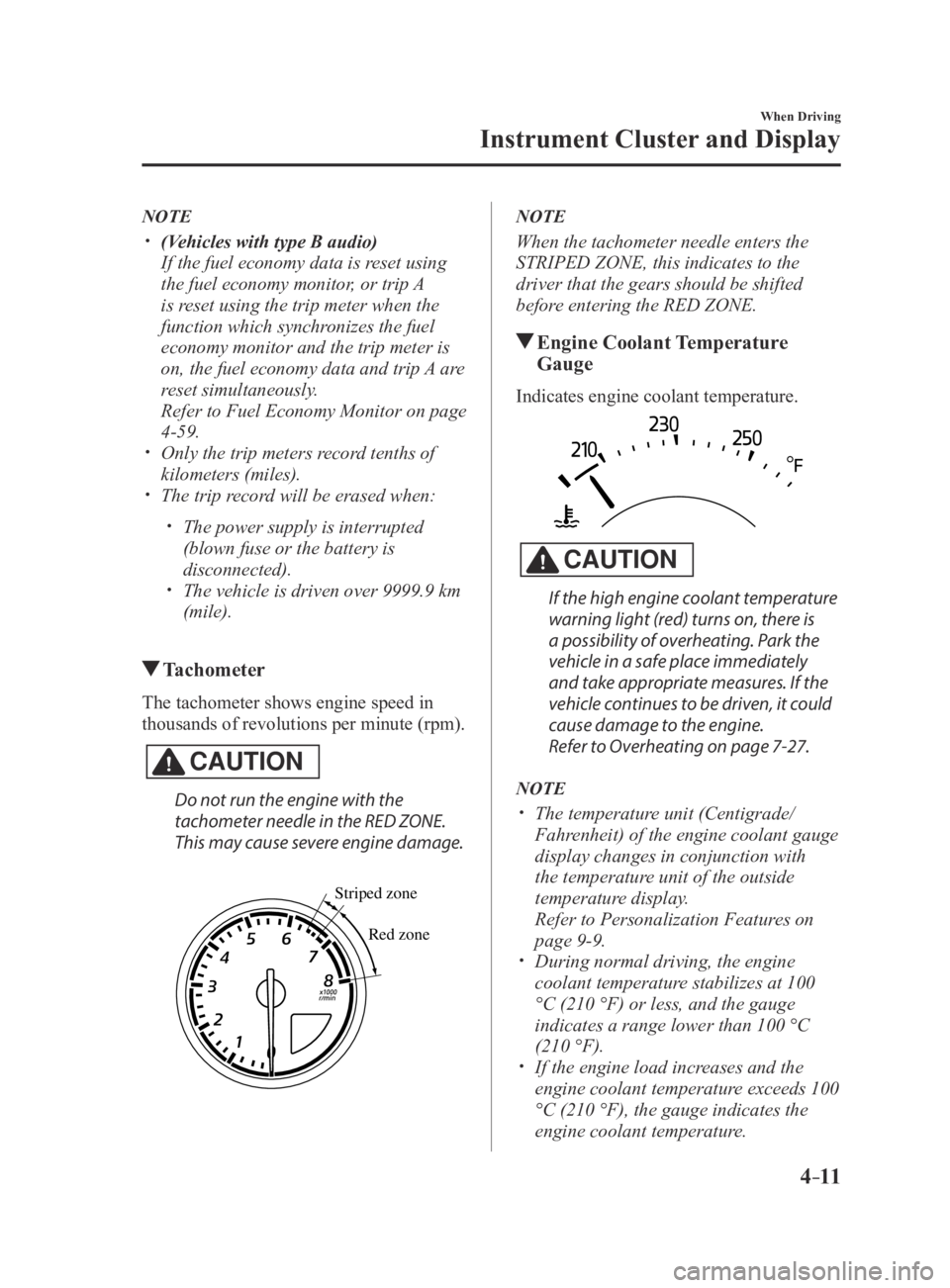
Tachometer
The tachometer shows engine speed in
thousands of revolutions per minute (rpm).
CAUTION
Do not run the engine with the
tachometer needle in the RED ZONE.
This may cause severe engine damage.
Striped zone
Red zone
NOTE
When the tachometer needle enters the
STRIPED ZONE, this indicates to the
driver that the gears should be shifted
before entering the RED ZONE.
Engine Coolant Temperature
Gauge
Indicates engine coolant temperature.
CAUTION
If the high engine coolant temperature
warning light (red) turns on, there is
a possibility of overheating. Park the
vehicle in a safe place immediately
and take appropriate measures. If the
vehicle continues to be driven, it could
cause damage to the engine.
Refer to Overheating on page 7-27.
NOTE
The temperature unit (Centigrade/
Fahrenheit) of the engine coolant gauge
display changes in conjunction with
the temperature unit of the outside
temperature display.
Refer to Personalization Featur es on
page 9-9. During normal driving, the engine
coolant temperature stabilizes at 100
°C (210 °F) or less, and the gauge
indicates a range lower than 100 °C
(210 °F).
If the engine load increases and the
engine coolant temperature exceeds 100
°C (210 °F), the gauge indicates the
engine coolant temperature.
MX-5_8EU4-EA-15D_Edition4.indb 112016/01/20 11:05:04
Page 116 of 526

4–12
When Driving
Instrument Cluster and Display
Fuel Gauge
The fuel gauge shows approximately
how much fuel is remaining in the tank
when the ignition is switched ON. We
recommend keeping the tank over 1/4 full.
Full
1/4 Full
Empty
If the low fuel warning light illuminates or
the fuel level is very low, refuel as soon as
possible.
Refer to Warning/Indicator Lights on page
4-16.
NOTE
After refueling, it may require some
time for the indicator to stabilize. In
addition, the indicator may deviate
while driving on a slope or curve since
the fuel moves in the tank.
The display indicating a quarter or less
remaining fuel has more segments to
show the remaining fuel level in greater
detail.
The direction of the arrow () indicates
that the fuel-filler lid is on the left side
of the vehicle.
MX-5_8EU4-EA-15D_Edition3.indb 122015/10/21 16:52:54
Page 118 of 526

4–14
When Driving
Instrument Cluster and Display
*Some models.
Changing the Temperature Unit of the
Outside Temperature Display
The outside temperature unit can be
switched between Celsius and Fahrenheit
using the following procedure.
(Vehicles with Type B Audio)
Settings can be changed by operating the
center display screen.
Refer to Personalization Features on page
9-9.
(Vehicles without Type B Audio)
1. Press the INFO switch with the ignition
switched off and continue pressing the
INFO switch for 5 seconds or longer
while switching the ignition ON. The
outside temperature display flashes.
2. Press the INFO switch to change the
outside temperature unit.
3. Press and hold the INFO switch for
3 seconds or longer while the outside
temperature display is flashing. The
outside temperature display illuminates.
NOTE
When the temperature unit indicated in the
outside temperature display is changed,
the temperature unit indicated in the
engine coolant gauge display changes in
conjunction with it.
Cruise Control Set Vehicle Speed
Display*
The vehicle speed preset using the cruise
control is displayed.
Trip Computer and INFO Switch
The following information can be selected
by pressing the INFO switch with the
ignition switched ON.
Approximate distance you can travel on
the available fuel Average fuel economy Current fuel economy Average vehicle speed
If you have any problems with your trip
computer, consult an Authorized Mazda
Dealer.
Distance-to-empty mode
This mode displays the approximate
distance you can travel on the remaining
fuel based on the fuel economy.
The distance-to-empty will be calculated
and displayed every second.
MX-5_8EU4-EA-15D_Edition3.indb 142015/10/21 16:52:55
Page 119 of 526

4–15
When Driving
Instrument Cluster and Display
NOTE
Even though the distance-to-empty
display may indicate a sufficient amount
of remaining driving distance before
refueling is required, refuel as soon as
possible if the fuel level is very low or
the low fuel warning light illuminates.
The display may not change unless you
add more than approximately 9 L (2.3
US gal, 1.9 Imp gal) of fuel.
The distance-to-empty is the
approximate remaining distance the
vehicle can be driven until all the
graduation marks in the fuel gauge
(indicating the remaining fuel supply)
disappear.
If there is no past fuel economy
information such as after first
purchasing your vehicle or the
information is deleted when the battery
cables are disconnected, the actual
distance-to empty/range may differ from
the amount indicated.
Average fuel economy mode
This mode displays the average fuel
economy by calculating the total fuel
consumption and the total traveled
distance since purchasing the vehicle, re-
connecting the battery after disconnection,
or resetting the data. The average fuel
economy is calculated and displayed every
minute.
To clear the data being displayed, press the
INFO switch for more than 1.5 seconds.
After pressing the INFO switch, - - - L/100
km (- - - mpg) will be displayed for about
1 minute before the fuel economy is
recalculated and displayed.
Current fuel economy mode
This mode displays the current fuel
economy by calculating the amount of fuel
consumption and the distance traveled.
Current fuel economy will be calculated
and displayed every 2 seconds.
When you've slowed to about 5 km/h (3
mph), - - - L/100 km (- - - mpg) will be
displayed.
Average vehicle speed mode
This mode displays the average vehicle
speed by calculating the distance and the
time traveled since connecting the battery
or resetting the data.
Average vehicle speed will be calculated
and displayed every 10 seconds.
To clear the data being displayed, press the
INFO switch for more than 1.5 seconds.
After pressing the INFO switch, - - - km/h
(- - - mph) will be displayed for about
1 minute before the vehicle speed is
recalculated and displayed.
MX-5_8EU4-EA-15D_Edition3.indb 152015/10/21 16:52:56
Page 121 of 526

4–17
When Driving
Instrument Cluster and Display
*Some models.
SignalWarning Lights Page
Check Engine Light*17-33
(Red)High Engine Coolant Temperature Warning Light*17-33
*Automatic Transmission Warning Light*17-33
Power Steering Malfunction Indicator Light*17-33
Air Bag/Seat Belt Pretensioner System Warning Light*17-33
Low Fuel Warning Light7-33
Check Fuel Cap Warning Light*17-33
Seat Belt Warning Light7-33
Door-Ajar Warning Light7-33
*Low Washer Fluid Level Warning Light 7-33
*Tire Pressure Monitoring System Warning Light*17-33
(Red)
KEY Warning Light*17-33
*Lane Departure Warning System (LDWS) Warning Light*1Illuminated 7-33
Flashing 4-73
MX-5_8EU4-EA-15D_Edition3.indb 172015/10/21 16:53:00
Page 126 of 526

4–22
When Driving
Transmission
NOTE
A natural driving posture can be
realized by lightly gripping the shift
lever from the side without having to
rest your elbow on the center console
box.
If shifting to R is difficult, shift back into
neutral, release the clutch pedal, and try
again.
Gear Shift Indicator
The gear shift indicator supports you to
obtain optimum fuel economy and smooth
driving. It displays the selected gear
position in the instrument cluster as well
as notifies the driver to change to the most
suitable gear position corresponding to the
actual driving condition.
Selected gear positionSuitable gear position
IndicationCondition
Numeral The selected gear position is
displayed.
and numeral
Shift up or down to the indicated
gear position is recommended.
CAUTION
Do not rely solely on the shift-up/
shift-down recommendations by
indications. The actual driving
situation might require shift operations
different from indication. To avoid the
risk of accidents, the road and traffic
conditions have to be judged correctly
by the driver before shifting.
MX-5_8EU4-EA-15D_Edition3.indb 222015/10/21 16:53:05
Page 163 of 526
4–59
When Driving
Fuel Economy Monitor
*Some models.
Fuel Economy Monitor*
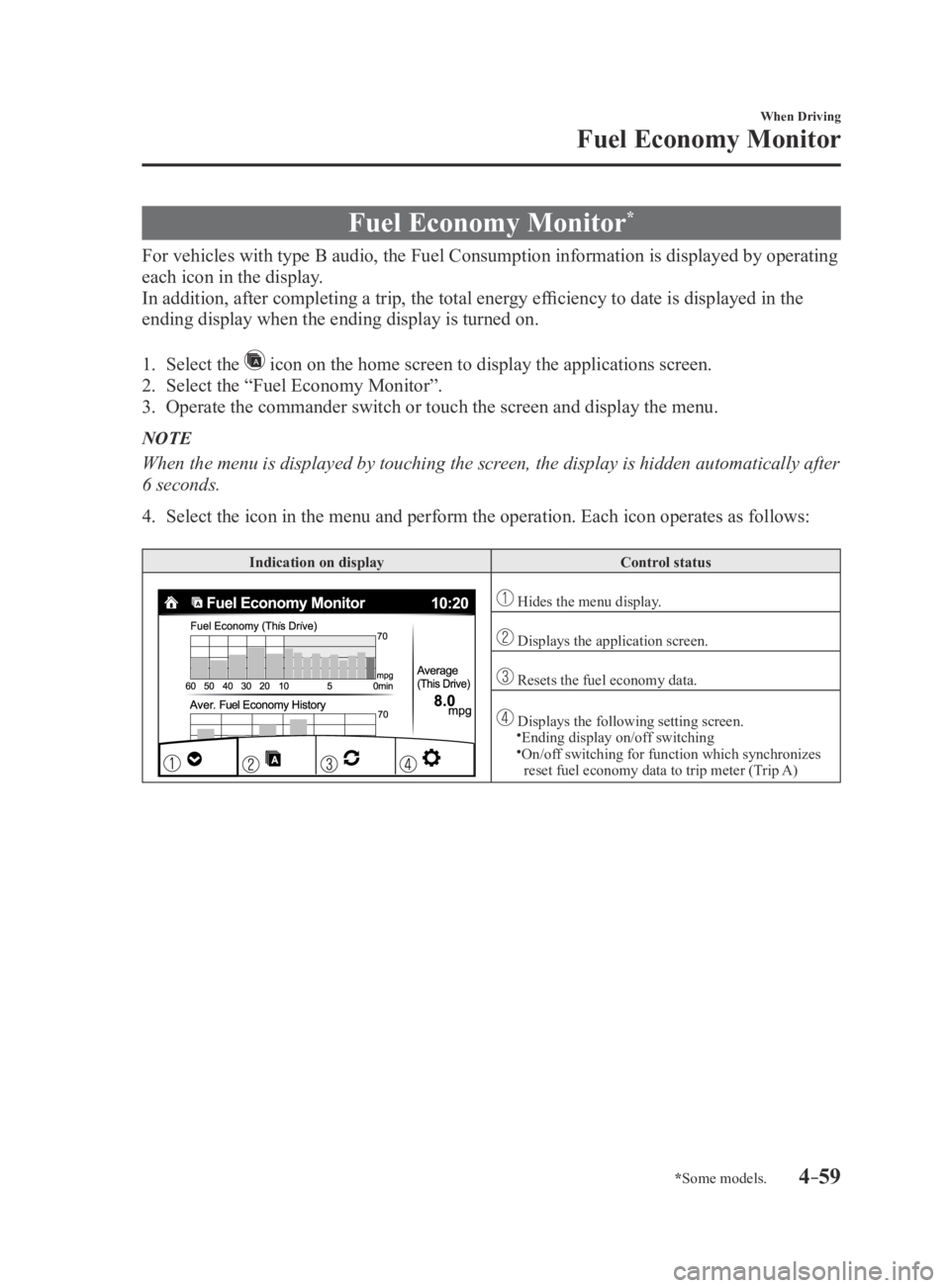
For vehicles with type B audio, the Fuel Consumption information is displayed by operating
each icon in the display.
In addition, after completing a trip, the total energy efficiency to date is displayed in the
ending display when the ending display is turned on.
1. Select the icon on the home screen to display the applications screen.
2. Select the “Fuel Economy Monitor”.
3. Operate the commander switch or touch the screen and display the menu.
NOTE
When the menu is displayed by touching the screen, the display is hidden automatically after
6 seconds.
4. Select the icon in the menu and perform the operation. Each icon operate\
s as follows:
Indication on displayControl status
Hides the menu display.
Displays the application screen.
Resets the fuel economy data.
Displays the following setting screen.Ending display on/off switching On/off switching for function which synchronizes
reset fuel economy data to trip meter (Trip A)
MX-5_8EU4-EA-15D_Edition3.indb 592015/10/21 16:53:24
Page 164 of 526
4–60
When Driving
Fuel Economy Monitor
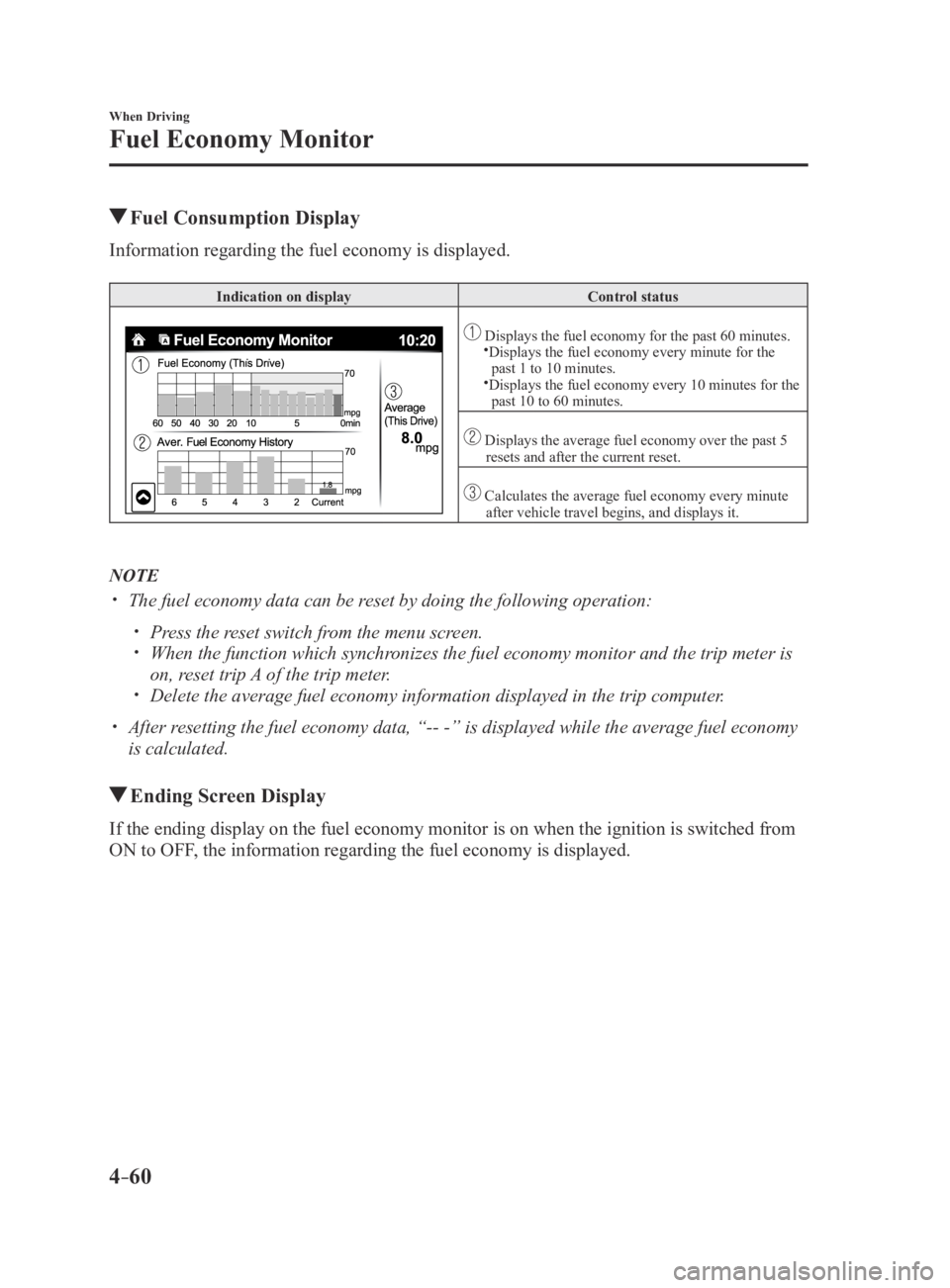
Fuel Consumption Display
Information regarding the fuel economy is displayed.
Indication on displayControl status
Displays the fuel economy for the past 60 minutes.Displays the fuel economy every minute for the
past 1 to 10 minutes.
Displays the fuel economy every 10 minutes for the past 10 to 60 minutes.
Displays the average fuel economy over the past 5 resets and after the current reset.
Calculates the average fuel economy every minute after vehicle travel begins, and displays it.
NOTE
The fuel economy data can be reset by doing the following operation:
Press the reset switch from the menu screen. When the function which synchronizes the fuel economy monitor and the trip meter is
on, reset trip A of the trip meter. Delete the average fuel economy information displayed in the trip comput\
er.
After resetting the fuel economy data, “-- -” is displayed while the aver\
age fuel economy
is calculated.
Ending Screen Display
If the ending display on the fuel economy monitor is on when the ignitio\
n is switched from
ON to OFF, the information regarding the fuel economy is displayed.
MX-5_8EU4-EA-15D_Edition3.indb 602015/10/21 16:53:25