turn signal MAZDA MX5 MIATA 2016 Owner's Manual
[x] Cancel search | Manufacturer: MAZDA, Model Year: 2016, Model line: MX5 MIATA, Model: MAZDA MX5 MIATA 2016Pages: 526, PDF Size: 10.44 MB
Page 245 of 526
5–45
Interior Features
Audio System
Multicast channel selection (FM)
If multi-cast channels are available for an
broadcast currently being
received, the multi-cast channel list is
displayed. Select the desired radio station.
NOTE
If an analog broadcast is received once
and is received while HD1 is
selected, the audio unit switches to the
station automatically.
When the icon is illuminated, there
could be a noticeable difference in
sound quality and volume when a
change from digital to analog signals
occurs. If the sound quality and volume
become noticeably diminished or cut
off, select the
icon to turn off
( icon is not illuminated). Once an analog broadcast is received
when HD1 is selected from the Favorite
channels, it is switched to
automatically. If the radio reception
conditions are poor, or HD is off,
switching to
broadcasts is
not possible. When an HD specialty channel (HD2 to
HD8) is selected from the Favorite
channels, “Signal Lost” is displayed
and no audio is output until
is received. If the radio reception
conditions are poor, “Signal Lost”
continues to be displayed.
If the icon is not illuminated,
information such as song titles of the
station are received,
however, the audio output is analog. iTunes Tagging (for Apple devices with
USB use only)
By tagging a song currently being aired,
the song can be easily purchased from the
iTunes Store. Up to 100 tags can be stored.
1. Select the icon. The tag is stored in
the audio unit.
2. Connect the device via USB. The
tag is sent to the connected device
automatically.
3. Synchronize the device with iTunes.
The tagged song can now be purchased
from the iTunes Store.
NOTE
Both AM and FM can be
used. Because iTunes Tagging only supports
purchasing from the iTunes Store, direct
downloading from the equipped vehicle
audio is not possible.
If the available memory for the
connected device is insufficient, the tag
is not sent.
If an error occurs while the tag is being
sent, reconnect the device.
MX-5_8EU4-EA-15D_Edition3.indb 452015/10/21 16:54:14
Page 383 of 526
6–45
Maintenance and Care
Owner Maintenance
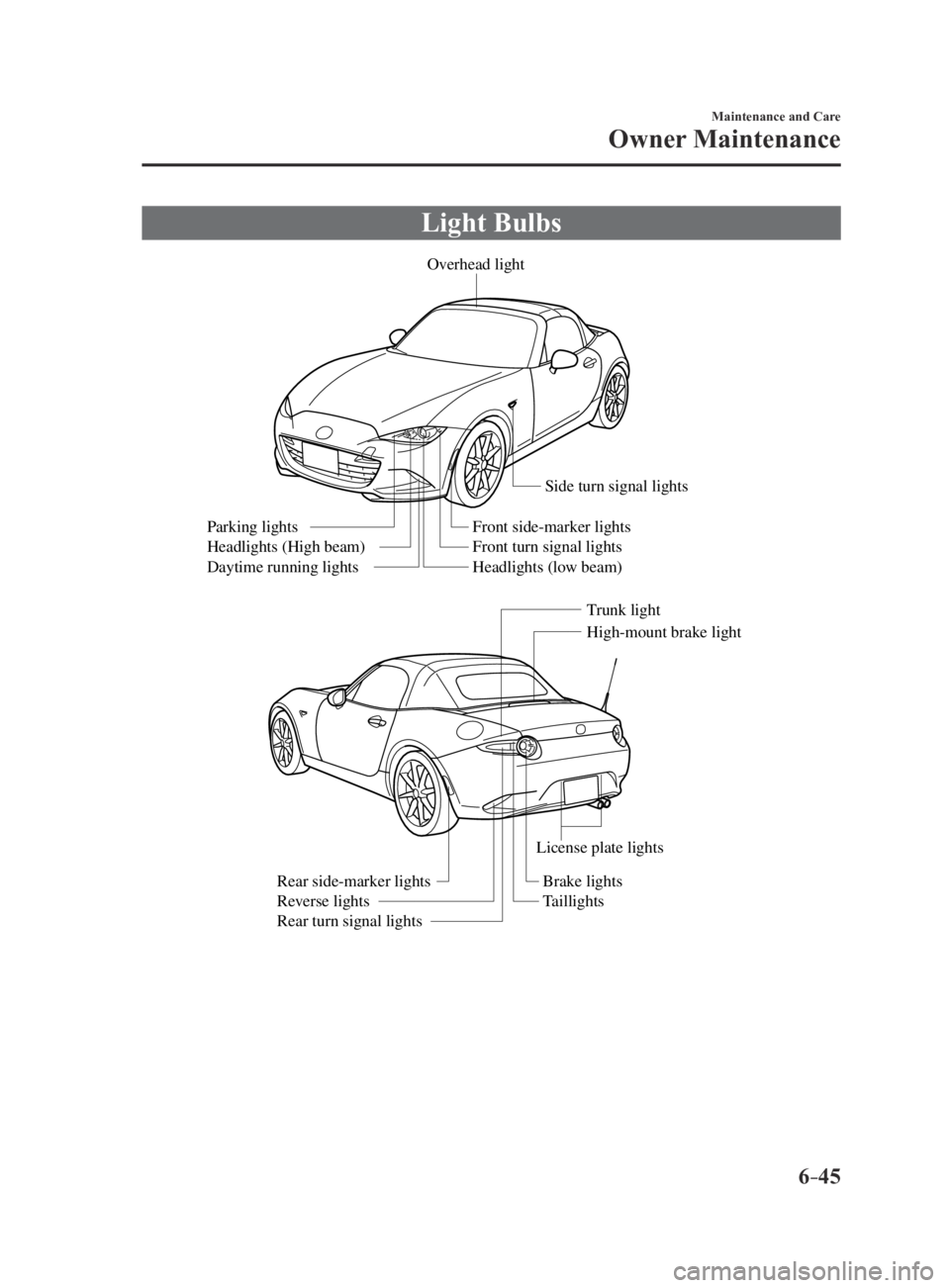
Light Bulbs
Overhead light
Side turn signal lights
High-mount brake light
Trunk light
Front side-marker lights
Front turn signal lights
Headlights (low beam)
Parking lights
Headlights (High beam)
Daytime running lights
License plate lights
Brake lights
Taillights
Rear side-marker lights
Reverse lights
Rear turn signal lights
MX-5_8EU4-EA-15D_Edition3.indb 452015/10/21 16:55:21
Page 385 of 526

6–47
Maintenance and Care
Owner Maintenance
5. Disconnect the bulb from the socket.
6. Install the new bulb in the reverse order
of the removal procedure.
Front side-marker lights
1. Make sure the ignition is switched off,
and the headlight switch is off.
2. If you are changing the right bulb, start
the engine, turn the steering wheel
all the way to the right, and turn off
engine. If you are changing the left
bulb, turn the steering wheel to the left.
3. Pull the center of each plastic retainer
and remove the retainers, and then
partially peel back the mudguard.
Remova l
Installation
4. Turn the socket and bulb assembly
counterclockwise and remove it.
5. Disconnect the bulb from the socket.
6. Install the new bulb in the reverse order
of the removal procedure.
Front turn signal lights
1. Make sure the ignition is switched off,
and the headlight switch is off.
2. If you are changing the right bulb, start
the engine, turn the steering wheel
all the way to the right, and turn off
engine. If you are changing the left
bulb, turn the steering wheel to the left.
3. Pull the center of each plastic retainer
and remove the retainers, and then
partially peel back the mudguard.
Remova l
Installation
MX-5_8EU4-EA-15D_Edition3.indb 472015/10/21 16:55:23
Page 386 of 526

6–48
Maintenance and Care
Owner Maintenance
4. Disconnect the connector from the unit
by pressing the tab on the connector
with your finger and pulling the
connector rearward.
5. Turn the socket and bulb assembly
counterclockwise and remove it.
6. Disconnect the bulb from the socket.
7. Install the new bulb in the reverse order
of the removal procedure.
Side turn signal lights
1. Make sure the ignition is switched off,
and the headlight switch is off.
2. If you are changing the right bulb, start
the engine, turn the steering wheel
all the way to the right, and turn off
engine. If you are changing the left
bulb, turn the steering wheel to the left.
3. Pull the center of each plastic retainer
and remove the retainers, and then
partially peel back the mudguard.
Remova l
Installation
4. Remove the unit by pressing the tab on
the unit with your finger and pulling the
unit forward.
5. Detach the electrical connector from
the unit by pulling it to the rear.
6. Install the new side turn signal unit
in the reverse order of the removal
procedure.
MX-5_8EU4-EA-15D_Edition3.indb 482015/10/21 16:55:24
Page 387 of 526
6–49
Maintenance and Care
Owner Maintenance
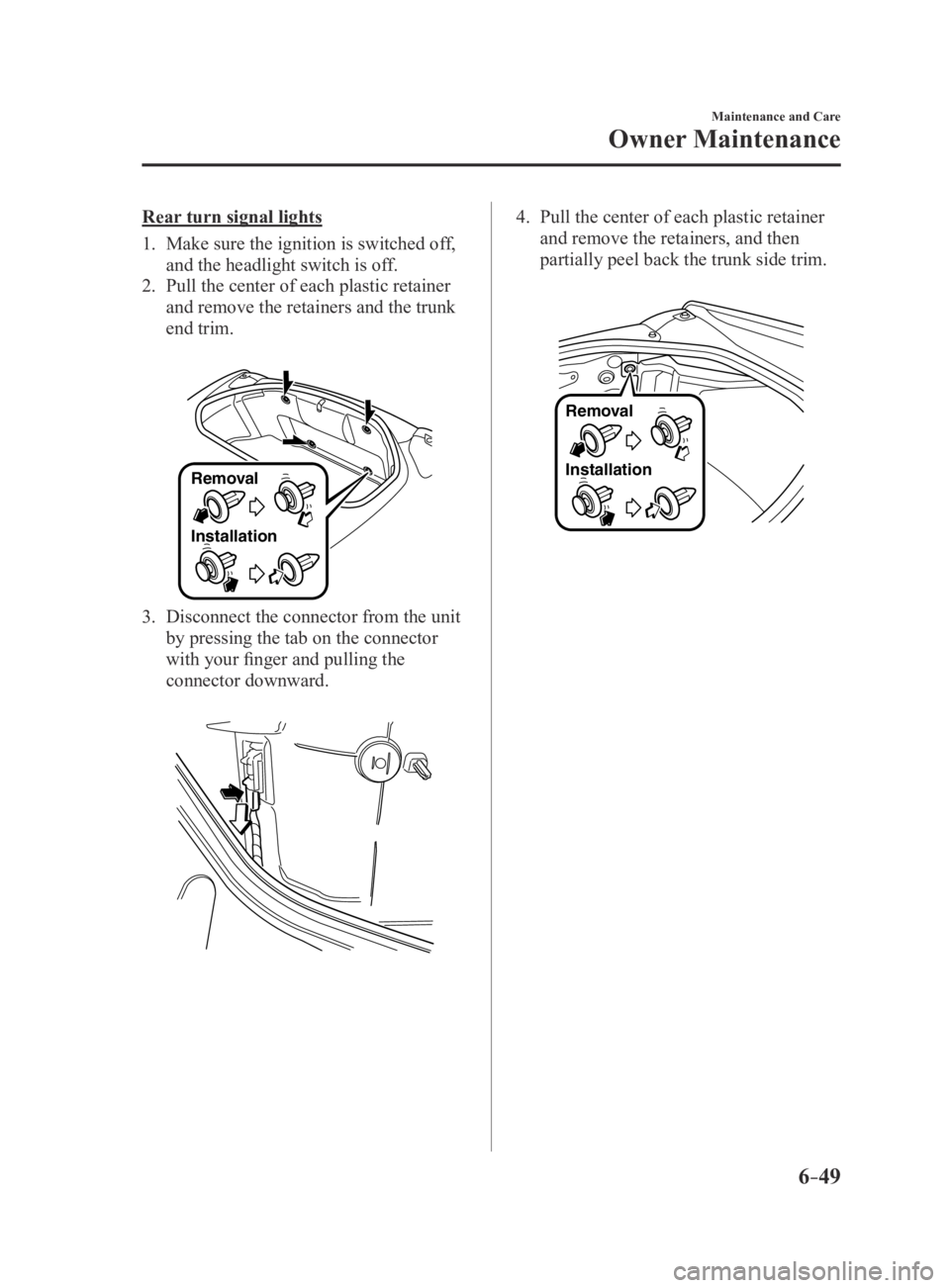
Rear turn signal lights
1. Make sure the ignition is switched off,
and the headlight switch is off.
2. Pull the center of each plastic retainer
and remove the retainers and the trunk
end trim.
Removal
Installation
3. Disconnect the connector from the unit
by pressing the tab on the connector
with your finger and pulling the
connector downward.
4. Pull the center of each plastic retainer
and remove the retainers, and then
partially peel back the trunk side trim.
Remova l
Installation
MX-5_8EU4-EA-15D_Edition3.indb 492015/10/21 16:55:24
Page 395 of 526

6–57
Maintenance and Care
Owner Maintenance
*Some models.
DESCRIPTIONFUSE
RATING PROTECTED COMPONENT
18 A/C MAG 7.5 AAir conditioner
19 AT PUMP 20 ATransmission control system
*
20 AT 15 ATransmission control system*
21 D LOCK 25 APower door locks
22 H/L RH 20 AHeadlight (RH)
23 ENG
B2 7.5 A
Engine control system
24 TAIL 20 ATaillights, License plate lights, Parking lights
25 DRL 15 A —
26 ROOM 25 AOverhead light
27 FOG 15 A —
28 H/CLEAN 20 A —
29 STOP 10 ABrake lights
30 HORN 15 AHorn
31 H/L LH 20 AHeadlight (LH)
32 ABS/DSC S 30 AABS, Dynamic stability control system
33 HAZARD 15 AHazard warning flashers, Turn signal lights
34 FUEL PUMP 15 AFuel system
35 ENG
B35 A —
36 WIPER 20 AWindshield wipers
37 CABIN
B50 AFor protection of various circuits
38 — — —
39 — — —
40 ABS/DSC M 50 AABS, Dynamic stability control system
41 EVVT
A/R PUMP 20 A
Engine control system
42 EVPS 30 ABrake control system
43 FAN1 30 ACooling fan
44 FAN2 40 A —
45 ENG.MAIN 40 AEngine control system
46 EPS 60 APower steering system
47 DEFOG 30 ARear window defogger
48 IG2 30 AFor protection of various circuits
49 INJECTOR 30 AEngine control system
50 HEATER 40 AAir conditioner
51 — — —
52 — — —
MX-5_8EU4-EA-15D_Edition3.indb 572015/10/21 16:55:30
Page 410 of 526
7–2
If Trouble Arises
Parking in an Emergency
Parking in an Emergency
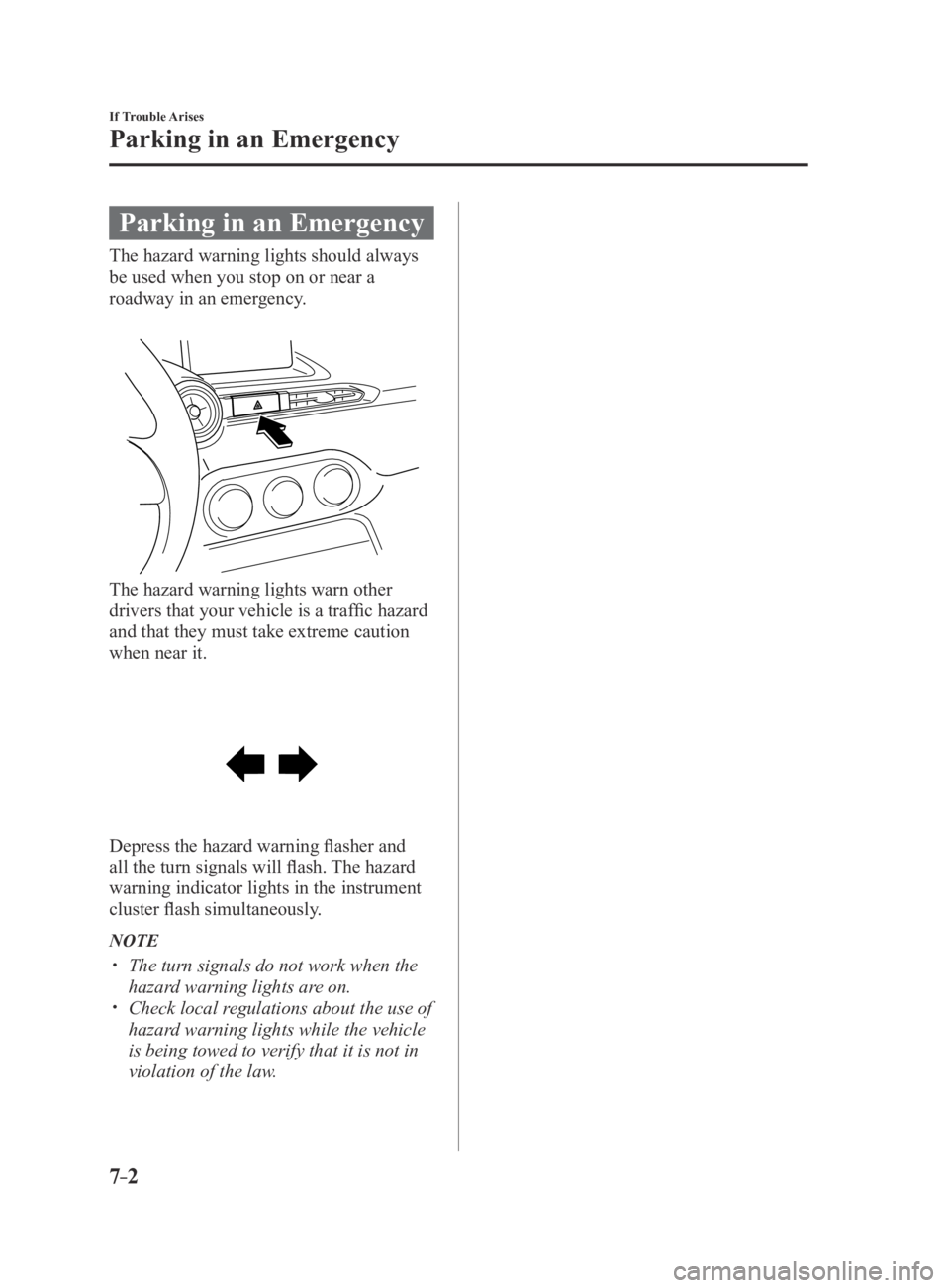
The hazard warning lights should always
be used when you stop on or near a
roadway in an emergency.
The hazard warning lights warn other
drivers that your vehicle is a traffic hazard
and that they must take extreme caution
when near it.
Depress the hazard warning flasher and
all the turn signals will flash. The hazard
warning indicator lights in the instrument
cluster flash simultaneously.
NOTE
The turn signals do not work when the
hazard warning lights are on. Check local regulations about the use of
hazard warning lights while the vehicle
is being towed to verify that it is not in
violation of the law.
MX-5_8EU4-EA-15D_Edition3.indb 22015/10/21 16:55:35
Page 441 of 526

7–33
If Trouble Arises
Warning/Indicator Lights and Warning Sounds
If a Warning Light Turns On or Flashes
If any warning light turns on/flashes, take appropriate action for each light. There is no
problem if the light turns off, however if the light does not turn off or turns on/flashes again,
consult an Authorized Mazda Dealer.
(Vehicles with type B audio)
The warning contents can be verified on the center display.
1. If the warning light is turned on, select icon on the home screen to display the
application screen.
2. Select “Warning Guidance” to display the current warnings.
3. Select the applicable warning to view the warning details.
Stop Vehicle in Safe Place Immediately
If any of the following warning lights turns on, the system may have a m\
alfunction. Stop the
vehicle in a safe place immediately and contact an Authorized Mazda Dealer.
Signal Warning
Brake System Warning Light
This warning has the following functions:
Parking brake warning/Warning light inspection
The light illuminates when the parking brake is applied with the ignitio\
n switched to
START or ON. It turns off when the parking brake is fully released.
Low brake fluid level warning
If the brake warning light remains illuminated even though the parking b\
rake is
released, the brake fluid may be low or there could be a problem with the brake system.
Park the vehicle in a safe place immediately and contact an Authorized Mazda Dealer.
WARNING
Do not drive with the brake system warning light illuminated. Contact an Authorized Mazda Dealer to have the brakes inspected as soon as possible:
Driving with the brake system warning light illuminated is dangerous. It indicates
that your brakes may not work at all or that they could completely fail at any
time. If this light remains illuminated, after checking that the parking brake is fully
released, have the brakes inspected immediately.
CAUTION
In addition, the effectiveness of the braking may diminish so you may need to depress the brake pedal more strongly than normal to stop the vehicle.
MX-5_8EU4-EA-15D_Edition4.indb 332016/01/20 11:07:52
Page 442 of 526
7–34
If Trouble Arises
Warning/Indicator Lights and Warning Sounds
SignalWarning
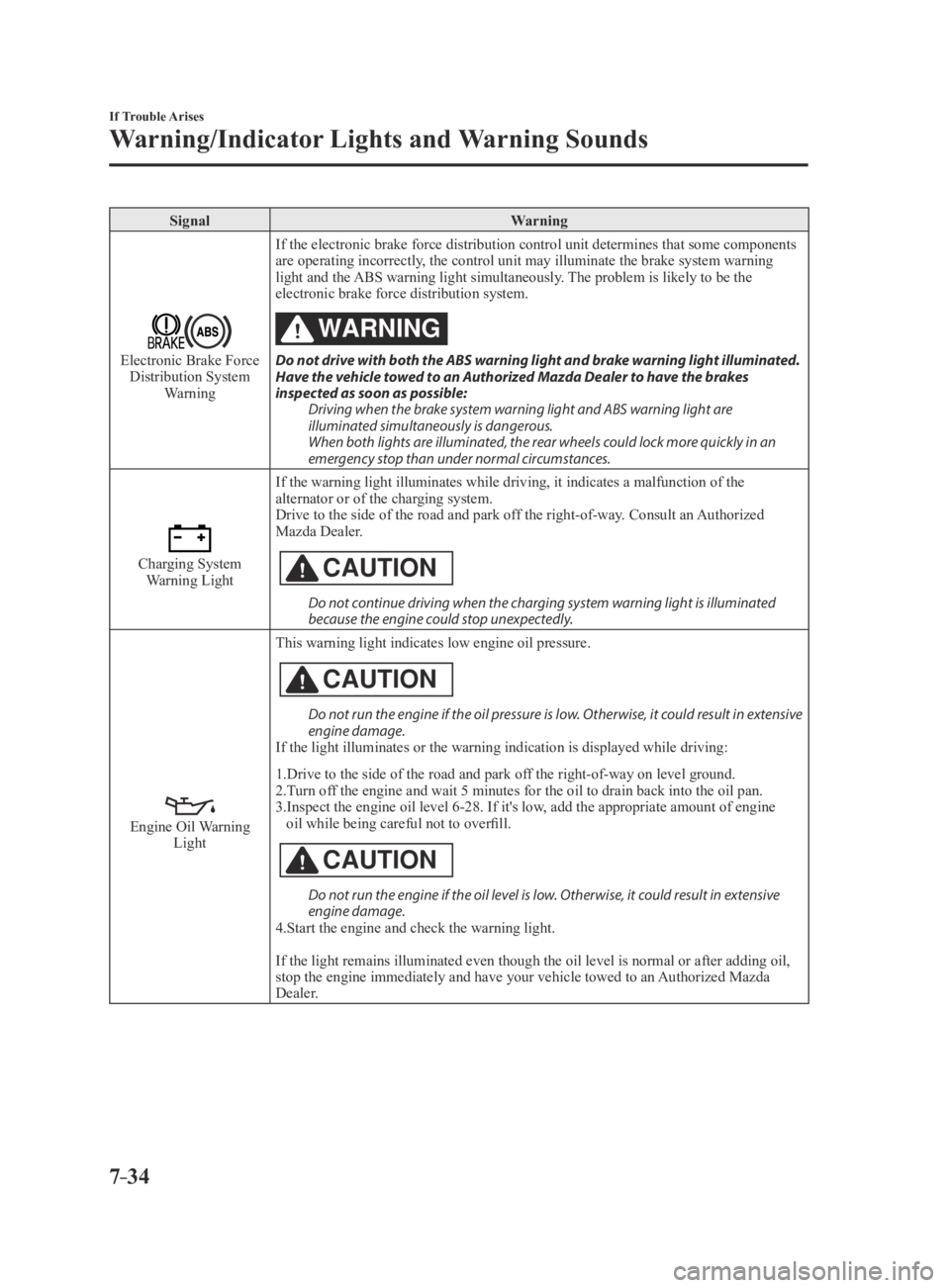
Electronic Brake Force Distribution System
Warning If the electronic brake force distribution control unit determines that \
some components
are operating incorrectly, the control unit may illuminate the brake system warning
light and the ABS warning light simultaneously. The problem is likely to be the
electronic brake force distribution system.
WARNING
Do not drive with both the ABS warning light and brake warning light illuminated. Have the vehicle towed to an Authorized Mazda Dealer to have the brakes
inspected as soon as possible:
Driving when the brake system warning light and ABS warning light are
illuminated simultaneously is dangerous.
When both lights are illuminated, the rear wheels could lock more quickly in an
emergency stop than under normal circumstances.
Charging System Warning Light If the warning light illuminates while driving, it indicates a malfuncti\
on of the
alternator or of the charging system.
Drive to the side of the road and park off the right-of-way. Consult an Authorized
Mazda Dealer.CAUTION
Do not continue driving when the charging system warning light is illuminated because the engine could stop unexpectedly.
Engine Oil Warning LightThis warning light indicates low engine oil pressure.
CAUTION
Do not run the engine if the oil pressure is low. Otherwise, it could result in extensive engine damage.
If the light illuminates or the warning indication is displayed while dr\
iving:
1.Drive to the side of the road and park off the right-of-way on level ground.
2.Turn off the engine and wait 5 minutes for the oil to drain back into the oil p\
an.
3.Inspect the engine oil level 6-28. If it's low, add the appropriate amount of engine
oil while being careful not to overfill.
CAUTION
Do not run the engine if the oil level is low. Otherwise, it could result in extensive engine damage.
4.Start the engine and check the warning light.
If the light remains illuminated even though the oil level is normal or \
after adding oil,
stop the engine immediately and have your vehicle towed to an Authorized Mazda
Dealer.
MX-5_8EU4-EA-15D_Edition3.indb 342015/10/21 16:55:57
Page 443 of 526
7–35
If Trouble Arises
Warning/Indicator Lights and Warning Sounds
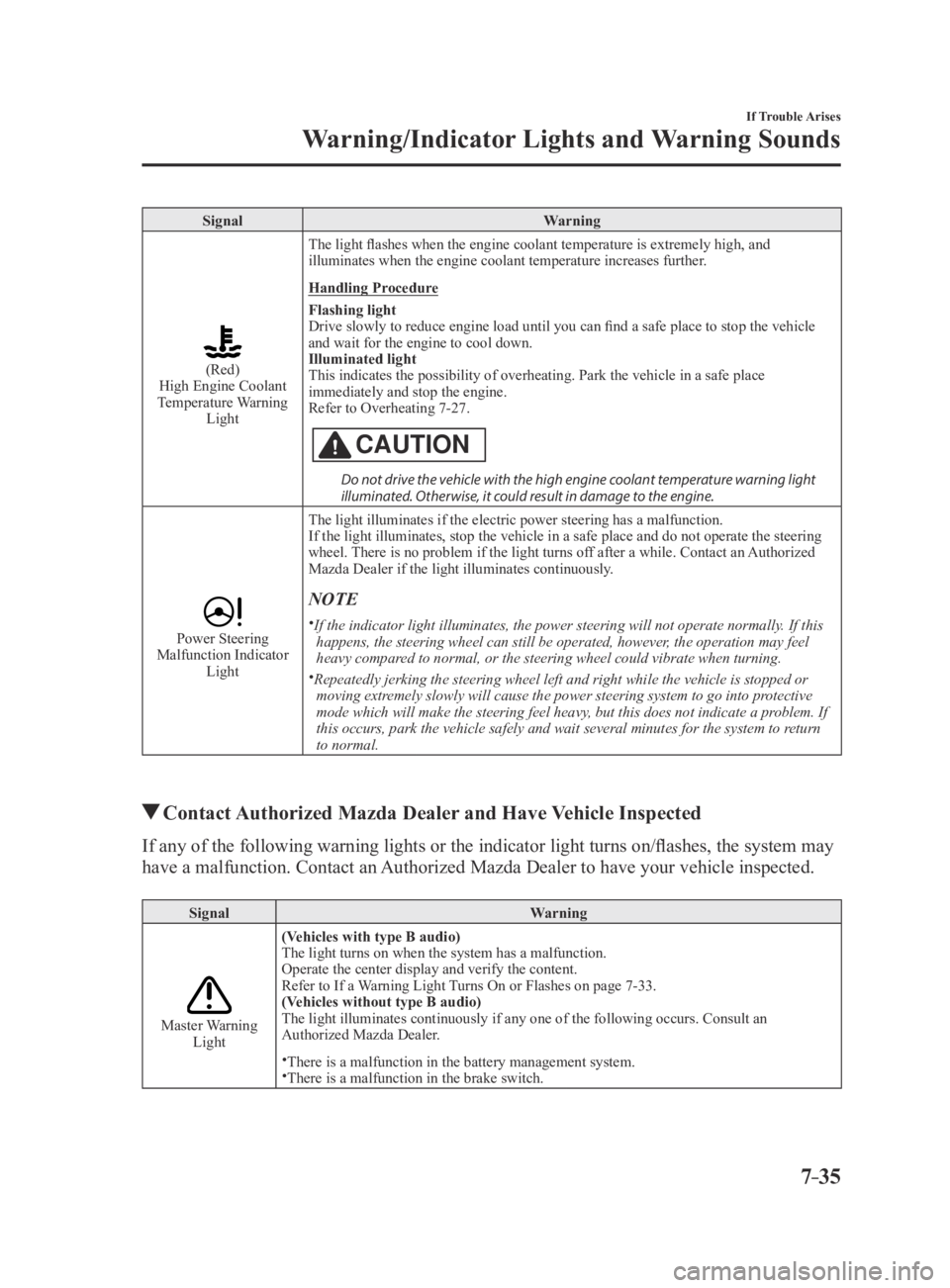
SignalWarning
(Red)High Engine Coolant
Temperature Warning Light
The light flashes when the engine coolant temperature is extremely high, and
illuminates when the engine coolant temperature increases further.
Handling Procedure
Flashing light
Drive slowly to reduce engine load until you can find a safe place to stop the vehicle
and wait for the engine to cool down.
Illuminated light
This indicates the possibility of overheating. Park the vehicle in a saf\
e place
immediately and stop the engine.
Refer to Overheating 7-27.
CAUTION
Do not drive the vehicle with the high engine coolant temperature warning light illuminated. Otherwise, it could result in damage to the engine.
Power Steering Malfunction Indicator
Light The light illuminates if the electric power steering has a malfunction.
If the light illuminates, stop the vehicle in a safe place and do not op\
erate the steering
wheel. There is no problem if the light turns off after a while. Contact an Authorized
Mazda Dealer if the light illuminates continuously.
NOTE
If the indicator light illuminates, the power steering will not operate \
normally. If this
happens, the steering wheel can still be operated, however, the operation may feel
heavy compared to normal, or the steering wheel could vibrate when turning.
Repeatedly jerking the steering wheel left and right while the vehicle i\
s stopped or moving extremely slowly will cause the power steering system to go into protective
mode which will make the steering feel heavy, but this does not indicate a problem. If
this occurs, park the vehicle safely and wait several minutes for the sy\
stem to return
to normal.
Contact Authorized Mazda Dealer and Have Vehicle Inspected
If any of the following warning lights or the indicator light turns on/flashes, the system may
have a malfunction. Contact an Authorized Mazda Dealer to have your vehicle inspected.
Signal Warning
Master Warning Light(Vehicles with type B audio)
The light turns on when the system has a malfunction.
Operate the center display and verify the content.
Refer to If a Warning Light Turns On or Flashes on page
7-33.
(Vehicles without type B audio)
The light illuminates continuously if any one of the following occurs. C\
onsult an
Authorized Mazda Dealer.There is a malfunction in the battery management system.There is a malfunction in the brake switch.
MX-5_8EU4-EA-15D_Edition3.indb 352015/10/21 16:55:58