display MAZDA MX5 MIATA 2016 Manual Online
[x] Cancel search | Manufacturer: MAZDA, Model Year: 2016, Model line: MX5 MIATA, Model: MAZDA MX5 MIATA 2016Pages: 526, PDF Size: 10.44 MB
Page 304 of 526
5–104
Interior Features
Bluetooth®
4. Select the phone number you would
like to call.
5. Select .
Deleting from your favorites
1. Select the icon on the home screen
to display the Communication screen.
2. Select to display the favorites
list.
3. Select .
4. Select .
5. Select the contact information which
you would like to delete.
6. Select .
Changing the display order of your
favorites list
1. Select the icon on the home screen
to display the Communication screen.
2. Select to display the favorites
list.
3. Select .
4. Select .
5. The contact can be moved after it is
selected.
6. Slide the contact or move it using the
commander switch, then select .
Changing contact name of your
favorites
1. Select the icon on the home screen
to display the Communication screen.
2. Select to display the favorites
list.
3. Select .
4. Select .
5. Select the contact to display the
keyboard screen.
6. If a new name is input and is
selected, the contact name is stored.
NOTE
If the contact is long-pressed when the
favorites list is displayed, the contact
information can be edited (deleted,
moved).
Telephone Number Input
NOTE
Practice this while parked until you are
confident you can do it while driving in a
non-taxing road situation. If you are not
completely comfortable, make all calls
from a safe parking position, and only
start driving when you can devote your full
attention to driving.
1. Select the icon on the home screen
to display the Communication screen.
2. When is pressed, the dial pad
is displayed.
3. Input the telephone number using the
dial pad.
4. Select to make the call.
Numeral or symbol entry
Use the dial pad.
Long-press the
to input +.
Select to delete the currently input
value.
Long-press
to delete all input values.
MX-5_8EU4-EA-15D_Edition3.indb 1042015/10/21 16:54:40
Page 305 of 526
5–105
Interior Features
Bluetooth®
Redial Function
Makes a call to the last person called
(latest person on outgoing call record)
from the mobile phone/vehicle.
1. Press the talk button.
2. Wait for the beep sound.
3. Say: “Redial”
Call back Function
Makes a call to the last person who called
your (latest person on incoming call
record) mobile phone/vehicle.
1. Press the talk button.
2. Wait for the beep sound.
3. Say: “Call back”
Mobile 911 (U.S.A./Canada only)
If the vehicle is involved in a moderate
to severe collision, a call is made
automatically to 911 from the connected
device. The “Emergency Assistance Call”
setting must be on.
Refer to Communication Settings on page
5-111 .
CAUTION
Though the system can be set to
not call 911, doing so will defeat
the purpose of the system. Mazda
recommends that the Mobile 911
system remain activated.
NOTE
Mobile 911 is a secondary function
of the audio entertainment system.
Therefore, the mobile 911 function
does not assure that the call is always
made to 911 after an accident occurs.
A Hands-free device must be paired and
connected. The 911 operator can verify
the vehicle's position information using
the Hands-free device GPS if equipped.
The 911 operator can verify the
vehicle’s position information.
1. If the vehicle is involved in a moderate
to severe collision, notification of the
call to 911 is made via audio and screen
display. To cancel the call, press
or hang-up
button within 10 seconds.
2. If or hang-
up button is not pressed within 10
seconds, the call is made to 911
automatically.
MX-5_8EU4-EA-15D_Edition3.indb 1052015/10/21 16:54:41
Page 306 of 526
5–106
Interior Features
Bluetooth®
Receiving an Incoming Call
When an incoming call is received, the incoming call notification screen is displayed. The
“Incoming Call Notifications” setting must be on.
Refer to Communication Settings on page 5-111.
To accept the call, press the pick-up button on the audio control switch \
or select
on
the screen.
To reject the call, press the hang-up button on the audio control switch \
or select
on the
screen.
The following icons are displayed on the screen during a call. Icons whi\
ch can be used differ
depending on use conditions.
Icon Function
Displays the Communication menu.
Ends the call.
Transferring a call from hands-free to a mobile phoneCommunication between the Bluetooth® unit and a device (mobile phone) is canceled, and
an incoming call will be received by the device (mobile phone) like a \
standard call.
Transferring a call from a device (mobile phone) to hands-freeCommunication between devices (mobile phone) can be switched to Bluetooth® Hands-
Free.
MuteThe microphone can be muted during a call.
When selected again, the mute is canceled.
A call is made to other person during a call and a 3-way call can be made\
. Select the contact from the following to make a call.
: Call History is displayed.
: The phonebook is displayed.
: The dial pad is displayed. Input the phone number.The device may be unusable depending on the contractual content.
The call on hold is made to make a 3-way call.The device may be unusable depending on the contractual content.
Switches the call on hold.
DTMF (Dual Tone Multi-Frequency Signal) TransmissionThis function is used when transmitting DTMF via the dial pad. The receiver of a DTMF
transmission is generally a home telephone answering machine or a compan\
y's automated
guidance call center.
Input the number using a dial pad.
MX-5_8EU4-EA-15D_Edition3.indb 1062015/10/21 16:54:43
Page 307 of 526

5–107
Interior Features
Bluetooth®
NOTE
If the ignition is switched off during a
hands-free call, the line is transferred
to the device (Mobile phone)
automatically.
If the DTMF code has two or more
digits or symbols, each one must be
transmitted individually.
Call Interrupt
A call can be interrupted to receive an
incoming call from a third party.
When
is selected or the pick-
up button on the steering wheel is pressed,
the current call is held and the system
switches to the new incoming call.
When
is selected, the current
call is ended and the system switches to
the new incoming call (GSM network
only).
When
is selected or the hang-up
button on the steering wheel is pressed, an
incoming call is refused.
NOTE
The function may not be available
depending on the contractual content of
the mobile device.
The function may not be operable
depending on the type of the telephone
network and the mobile device.
Receiving and Replying to
Messages (available only with
E-mail/SMS compatible phones)
SMS (Short Message Service) messages,
and E-mail received by connected devices
can be downloaded, displayed, and played
(read by the system).
Additionally, replies can also be made
to calls and messages in the received
messages.
Downloading messages
Up to 20 new messages can be
downloaded and displayed from a
connected device.
NOTE
For e-mail, 20 messages for each account
can be downloaded.
(Automatic downloading)
The “Auto Download Email” (E-mail)
or “Auto Download Text Message”
(SMS) setting must be on. A message
is downloaded automatically when the
Bluetooth
® unit is connected to the device.
Refer to Communication Settings on page
5-111 .
(Manually downloading)
When the “Auto Download Email”
(E-mail) or “Auto Download Text
Message” (SMS) setting is off, the
message is downloaded using the
following procedure.
1. Select the icon on the home screen
to display the Communication screen.
2. Select or to display
the Inbox.
3. Select .
4. Download will be started from the
mobile phone.
MX-5_8EU4-EA-15D_Edition3.indb 1072015/10/21 16:54:44
Page 308 of 526
5–10 8
Interior Features
Bluetooth®
NOTE
Attached data is not downloaded. Messages up to 1 kilobyte (e-mail)/140-
bytes (SMS) can be downloaded. A message list is created for each
device. If the connected device does not
correspond to MAP 1.0, the AT
command is used to download. The
downloaded message indicates that it is
already read.
Downloading using the AT command
may not function depending on the
connected device.
Receiving messages
(Method 1)
When a device receives a message, a
message received notification is displayed.
The “Email Notifications” (E-mail) or
“Text Notifications” (SMS) setting must
be on.
Refer to Communication Settings on page
5-111 .
Select
and display the message.
(Method 2)
1. Select the icon on the home screen
to display the Communication screen.
2. Select and display the new
message list for e-mail and SMS.
3. Select the message you would like to
display.
MX-5_8EU4-EA-15D_Edition3.indb 1082015/10/21 16:54:45
Page 309 of 526

5–109
Interior Features
Bluetooth®
The following icons are displayed in the lower part of the details on th\
e message. Icons
which can be used differ depending on use conditions.
IconFunction
Displays the Communication menu.
Displays the inbox.
Plays back a message.
When selected again, playback is temporarily stopped.
Displays the previous message.
Displays the next message.
Only replies to the sender of the currently displayed message.Select the sentence on the displayed reply screen and select the sentenc\
e for sending from
the preset message.
Select
.
(Only E-mail)Replies to all members including CC.
Select the sentence on the displayed reply screen and select the sentenc\
e for sending from
the preset message.
Select
.
Makes a call to a person who sent a message.For E-mail, this function may not work depending on the device.
Deletes a message.The messages stored in a device is also deleted.
NOTE
Up to three preset messages can be selected.
MX-5_8EU4-EA-15D_Edition3.indb 1092015/10/21 16:54:46
Page 310 of 526

5–110
Interior Features
Bluetooth®
Example of use (verify unread E-mail)
1. Select the icon on the home screen
to display the Communication screen.
2. Select to display the inbox.
3. Select the unread message displayed in
bold.
4. The details of the message are
displayed and replying to the message,
making a call, or playback can be
performed.
Changing account for displaying
(E-mail only)
1. Select .
2. Select the account which you would
like to display. Only the messages for
the selected account are displayed in
the inbox.
Editing preset messages
1. Select the icon on the home screen
to display the Communication screen.
2. Select .
3. Select .
4. Select the preset message which you
would like to edit. The keyboard screen
is displayed.
5. When the message is input and is
selected, the message is stored as a
preset message.
NOTE
Select the icon to change the
language.
Select the icon to switch between
capitalized and lower-case characters.
Select the icon to return to the
previous screen without storing the edit.
MX-5_8EU4-EA-15D_Edition4.indb 1102016/01/20 11:06:34
Page 311 of 526
5–111
Interior Features
Bluetooth®
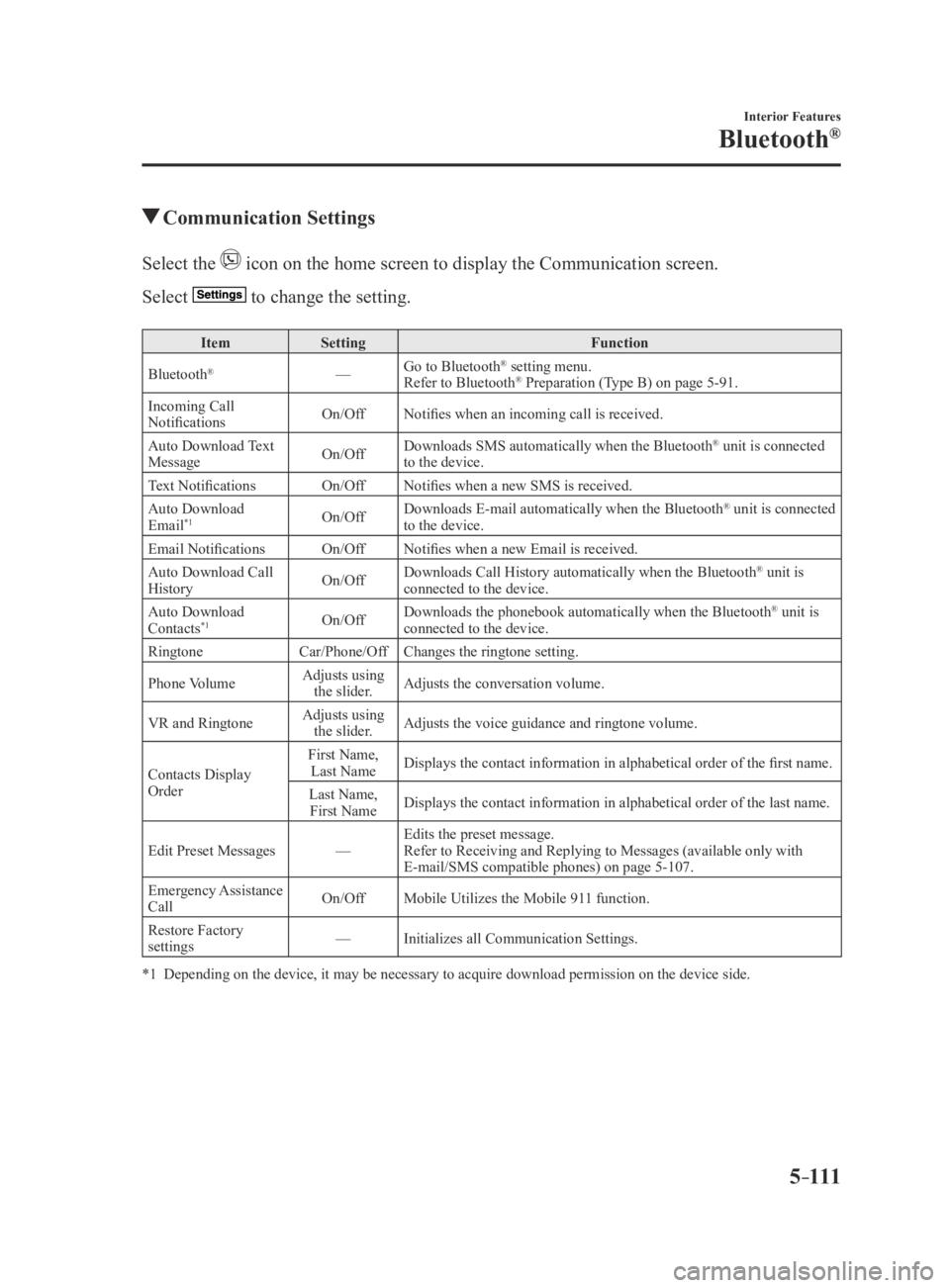
Communication Settings
Select the icon on the home screen to display the Communication screen.
Select to change the setting.
ItemSetting Function
Bluetooth
®— Go to Bluetooth® setting menu.
Refer to Bluetooth® Preparation (Type B) on page 5-91.
Incoming Call
Notifications On/Off
Notifies when an incoming call is received.
Auto Download Text
Message On/OffDownloads SMS automatically when the Bluetooth
® unit is connected
to the device.
Text Notifications On/OffNotifies when a new SMS is received.
Auto Download
Email
*1On/Off Downloads E-mail automatically when the Bluetooth® unit is connected
to the device.
Email Notifications On/OffNotifies when a new Email is received.
Auto Download Call
History On/OffDownloads Call History automatically when the Bluetooth
® unit is
connected to the device.
Auto Download
Contacts
*1On/Off Downloads the phonebook automatically when the Bluetooth® unit is
connected to the device.
Ringtone Car/Phone/OffChanges the ringtone setting.
Phone Volume Adjusts using
the slider. Adjusts the conversation volume.
VR and Ringtone Adjusts using
the slider. Adjusts the voice guidance and ringtone volume.
Contacts Display
Order First Name,
Last Name Displays the contact information in alphabetical order of the first name.
Last Name, First Name Displays the contact information in alphabetical order of the last name.\
Edit Preset Messages —Edits the preset message.
Refer to Receiving and Replying to Messages (available only with
E-mail/SMS compatible phones) on page
5-107.
Emergency Assistance
Call On/Off
Mobile Utilizes the Mobile 911 function.
Restore Factory
settings —
Initializes all Communication Settings.
*1 Depending on the device, it may be necessary to acquire download permiss\
ion on the device side.
MX-5_8EU4-EA-15D_Edition3.indb 1112015/10/21 16:54:48
Page 312 of 526

5–112
Interior Features
Bluetooth®
*Some models.
Bluetooth® Audio (Type A)*
Applicable Bluetooth® specification
(Recommended)
Ver. 2.0
Response profile
A2DP (Advanced Audio Distribution
Profile) Ver. 1.0/1.2 AVRCP (Audio/Video Remote Control
Profile) Ver. 1.0/1.3
A2DP is a profile which transmits only
audio to the Bluetooth
® unit. If your
Bluetooth® audio device corresponds
only to A2DP, but not AVRCP, you
cannot operate it using the control panel
of the vehicle's audio system. In this
case, only the operations on the mobile
device are available the same as when a
portable audio device for a non-compliant
Bluetooth
® device is connected to the
AUX terminal.
Function A2DPAVRCP
Ver. 1.0 Ver. 1.3
Playback —XX
Pause —XX
File (Track) up/down —XX
Reverse —— X
Fast-forward —— X
Text display —— X
X: Available
—: Not available
NOTE
The battery consumption of Bluetooth®
audio devices increases while
Bluetooth
® is connected. If a general mobile phone device is
USB connected during music playback
over the Bluetooth® connection, the
Bluetooth® connection is disconnected.
For this reason, you cannot have music
playback over a Bluetooth
® connection
and music playback using a USB
connection at the same time.
The system may not operate normally
depending on the Bluetooth® audio
device.
How to Use the Bluetooth® Audio
System
Switching to Bluetooth® audio mode
To listen to music or voice audio recorded
to a Bluetooth
® audio device, switch to
the Bluetooth® audio mode to operate
the audio device using the audio system
control panel. Any Bluetooth
® audio
device must be paired to the vehicle's
Bluetooth
® unit before it can be used.
Refer to Bluetooth® Preparation (Type A)
on page 5-77.
1. Turn on the Bluetooth® audio device's
power.
2. Switch the ignition to ACC or ON.
Make sure that the “ ” symbol is
displayed in the audio display. The
symbol is not displayed if an un-paired
Bluetooth
® audio device is being used
or the vehicle's Bluetooth® unit has a
malfunction.
NOTE
Some Bluetooth® audio devices need a
certain amount of time before the “
”
symbol is displayed.
MX-5_8EU4-EA-15D_Edition3.indb 1122015/10/21 16:54:48
Page 313 of 526

5–113
Interior Features
Bluetooth®
3. Press the media button () to
switch to the Bluetooth® audio mode
and start playback.
If the current device version is lower
than AVRCP Ver. 1.3: “BT Audio” is
displayed.
If the current device is AVRCP Ver. 1.3:
The playback time is displayed.
NOTE
If the Bluetooth® audio device does not
begin playback, press the Play/Pause
button (4).
If a call is r eceived on a hands-free
mobile phone during playback from the
Bluetooth® audio device, the playback is
stopped. Playback from the Bluetooth®
audio device resumes after the call
ends.
Playback
1. To listen to a Bluetooth® audio device
over the vehicle's speaker system,
switch the mode to Bluetooth
®
audio mode. (Refer to “Switching to
Bluetooth
® audio mode”)
2. To stop playback, press the Play/Pause
button (4).
3. Press the button again to resume
playback.
Selecting a file (track)
Selects the next file (track)
Short-press the track up button (
).
Selects the beginning of the current file
(track)
Short-press the track down button (
).
Fast-forward/Reverse (AVRCP Ver. 1.3)
Fast-forward
Press and hold the fast-forward button
(
).
Reverse
Press and hold the reverse down button
(
).
Switching the display (only AVRCP Ver.
1.3)
The information displayed on the audio
display changes as follows each time the
text button (3) is pressed during playback.
Button Information displayed
on audio display
Elapsed time
Album name
Song name
Artist name
NOTE
If title information is not available, “NO
TITLE” is displayed. This unit cannot display some
characters. Characters which cannot be
displayed are indicated by an asterisk
(
).
Display scroll
Only 13 characters can be displayed at one
time. To display the rest of the characters
of a long title, press and hold the text
button (3). The display scrolls the next 13
characters. Press and hold the text button
(3) again after the last 13 characters have
been displayed to return to the beginning
of the title.
MX-5_8EU4-EA-15D_Edition4.indb 1132016/01/20 11:06:35